目录
零基础 OpenGL (ES) 学习路线推荐 : OpenGL (ES) 学习目录 >> OpenGL ES 基础
零基础 OpenGL (ES) 学习路线推荐 : OpenGL (ES) 学习目录 >> OpenGL ES 转场
零基础 OpenGL (ES) 学习路线推荐 : OpenGL (ES) 学习目录 >> OpenGL ES 特效
零基础 OpenGL (ES) 学习路线推荐 : OpenGL (ES) 学习目录 >> OpenGL ES 函数
零基础 OpenGL (ES) 学习路线推荐 : OpenGL (ES) 学习目录 >> OpenGL ES GPUImage 使用
零基础 OpenGL (ES) 学习路线推荐 : OpenGL (ES) 学习目录 >> OpenGL ES GLSL 编程
GPUImage 共 125 个滤镜, 分为四类
1、Color adjustments : 31 filters , 颜色处理相关
2、Image processing : 40 filters , 图像处理相关.
3、Blending modes : 29 filters , 混合模式相关.
4、Visual effects : 25 filters , 视觉效果相关.
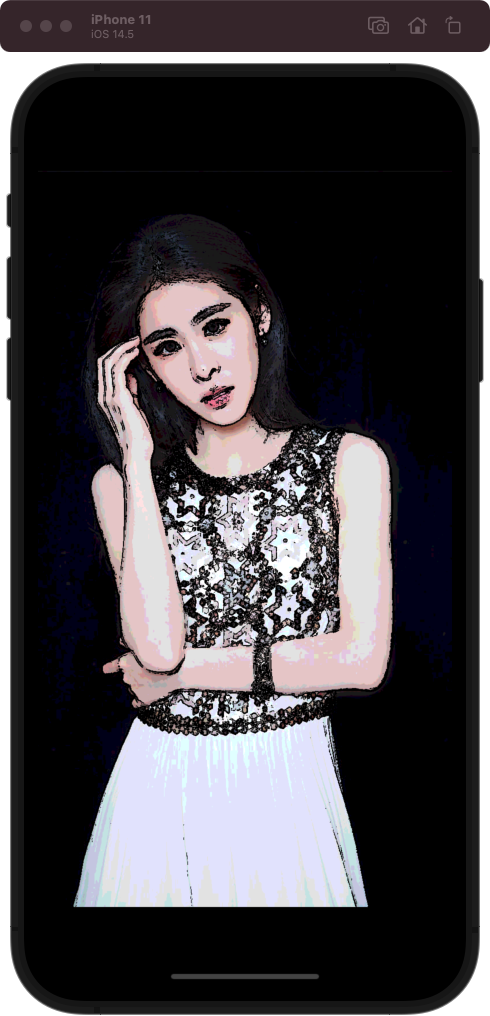
GPUImageToonFilter 属于 GPUImage 图像处理相关,用来图像卡通效果(黑色粗线描边),shader 源码如下:
******************************************************************************************/
//@Author:猿说编程
//@Blog(个人博客地址): www.codersrc.com
//@File:IOS – OpenGL ES 卡通效果(黑色粗线描边) GPUImageToonFilter
//@Time:2022/05/14 10:30
//@Motto:不积跬步无以至千里,不积小流无以成江海,程序人生的精彩需要坚持不懈地积累!
/******************************************************************************************/


#if TARGET_IPHONE_SIMULATOR || TARGET_OS_IPHONE
NSString *const kGPUImageToonFragmentShaderString = SHADER_STRING
(
 precision highp float;

 varying vec2 textureCoordinate;
 varying vec2 leftTextureCoordinate;
 varying vec2 rightTextureCoordinate;

 varying vec2 topTextureCoordinate;
 varying vec2 topLeftTextureCoordinate;
 varying vec2 topRightTextureCoordinate;

 varying vec2 bottomTextureCoordinate;
 varying vec2 bottomLeftTextureCoordinate;
 varying vec2 bottomRightTextureCoordinate;

 uniform sampler2D inputImageTexture;

 uniform highp float intensity;
 uniform highp float threshold;
 uniform highp float quantizationLevels;

 const highp vec3 W = vec3(0.2125, 0.7154, 0.0721);

 void main()
 {
     vec4 textureColor = texture2D(inputImageTexture, textureCoordinate);

     float bottomLeftIntensity = texture2D(inputImageTexture, bottomLeftTextureCoordinate).r;
     float topRightIntensity = texture2D(inputImageTexture, topRightTextureCoordinate).r;
     float topLeftIntensity = texture2D(inputImageTexture, topLeftTextureCoordinate).r;
     float bottomRightIntensity = texture2D(inputImageTexture, bottomRightTextureCoordinate).r;
     float leftIntensity = texture2D(inputImageTexture, leftTextureCoordinate).r;
     float rightIntensity = texture2D(inputImageTexture, rightTextureCoordinate).r;
     float bottomIntensity = texture2D(inputImageTexture, bottomTextureCoordinate).r;
     float topIntensity = texture2D(inputImageTexture, topTextureCoordinate).r;
     float h = -topLeftIntensity - 2.0 * topIntensity - topRightIntensity + bottomLeftIntensity + 2.0 * bottomIntensity + bottomRightIntensity;
     float v = -bottomLeftIntensity - 2.0 * leftIntensity - topLeftIntensity + bottomRightIntensity + 2.0 * rightIntensity + topRightIntensity;

     float mag = length(vec2(h, v));

     vec3 posterizedImageColor = floor((textureColor.rgb * quantizationLevels) + 0.5) / quantizationLevels;

     float thresholdTest = 1.0 - step(threshold, mag);

     gl_FragColor = vec4(posterizedImageColor * thresholdTest, textureColor.a);
 }
);
#else
NSString *const kGPUImageToonFragmentShaderString = SHADER_STRING
(
 varying vec2 textureCoordinate;
 varying vec2 leftTextureCoordinate;
 varying vec2 rightTextureCoordinate;

 varying vec2 topTextureCoordinate;
 varying vec2 topLeftTextureCoordinate;
 varying vec2 topRightTextureCoordinate;

 varying vec2 bottomTextureCoordinate;
 varying vec2 bottomLeftTextureCoordinate;
 varying vec2 bottomRightTextureCoordinate;

 uniform sampler2D inputImageTexture;

 uniform float intensity;
 uniform float threshold;
 uniform float quantizationLevels;

 const vec3 W = vec3(0.2125, 0.7154, 0.0721);

 void main()
 {
     vec4 textureColor = texture2D(inputImageTexture, textureCoordinate);

     float bottomLeftIntensity = texture2D(inputImageTexture, bottomLeftTextureCoordinate).r;
     float topRightIntensity = texture2D(inputImageTexture, topRightTextureCoordinate).r;
     float topLeftIntensity = texture2D(inputImageTexture, topLeftTextureCoordinate).r;
     float bottomRightIntensity = texture2D(inputImageTexture, bottomRightTextureCoordinate).r;
     float leftIntensity = texture2D(inputImageTexture, leftTextureCoordinate).r;
     float rightIntensity = texture2D(inputImageTexture, rightTextureCoordinate).r;
     float bottomIntensity = texture2D(inputImageTexture, bottomTextureCoordinate).r;
     float topIntensity = texture2D(inputImageTexture, topTextureCoordinate).r;
     float h = -topLeftIntensity - 2.0 * topIntensity - topRightIntensity + bottomLeftIntensity + 2.0 * bottomIntensity + bottomRightIntensity;
     float v = -bottomLeftIntensity - 2.0 * leftIntensity - topLeftIntensity + bottomRightIntensity + 2.0 * rightIntensity + topRightIntensity;

     float mag = length(vec2(h, v));

     vec3 posterizedImageColor = floor((textureColor.rgb * quantizationLevels) + 0.5) / quantizationLevels;

     float thresholdTest = 1.0 - step(threshold, mag);

     gl_FragColor = vec4(posterizedImageColor * thresholdTest, textureColor.a);
 }
);
#endif
使用 GPUImageToonFilter 用来图像卡通效果(黑色粗线描边)****,原图:

**GPUImageToonFilter** 用来图像卡通效果(黑色粗线描边)**,效果图:**
OpenGL ES Demo 下载地址 : IOS – OpenGL ES 设置图像卡通效果(黑色粗线描边) GPUImageToonFilter
本文由博客 - 猿说编程 猿说编程 发布!
ruby调试器不会在我在与执行开始时不同的文件中设置的断点处停止。例如,考虑这两个文件,foo.rb:#foo.rbclassFoodefbarputs"baz"endend和main.rb:#main.rbrequire'./foo'Foo.new.bar我使用ruby-rdebug.\main.rb开始调试。现在,当我尝试使用b./foo.rb:4在另一个文件的特定行上设置断点时,我收到消息Setbreakpoint1atfoo.rb:4,但是当我cont时,程序执行到最后,调试器永远不会停止。但是,如果我在main.rb中的一行上打断,例如b./main.rb:3,或者一个方法,
今天我在我的Rails控制台中尝试了一些东西,这发生了,2.0.0p247:009>Date.today-29.days=>Fri,07Feb20142.0.0p247:010>Date.today-29.days=>Thu,09Jan2014我很困惑。我可以看到我缺少一些基本的东西。但这让我印象深刻!谁能解释为什么会这样? 最佳答案 实际发生的是这样的:Date.today(-29.days)#=>Fri,07Feb2014today有一个名为start的可选参数,默认为Date::ITALY。Anoptionalargument
视频教程:https://www.bilibili.com/video/BV1WJ411778C/?spm_id_from=333.999.0.0&vd_source=4a4c35da6aef7094d5990c213c39aa09使用素材(推荐使用GitZipforgithub下载):https://github.com/zheyuanzhou/Youtube-Unity-Tutorial/tree/master/EP45_Health%20Bar/Sprites效果如下图所示:首先在场景中创建一个新的Canvas,并命名为HeathBar,并创建三个Image作为前者的子物体,分别命名为
文章目录前言核心逻辑配置iSH安装Python创建Python脚本配置启动文件测试效果快捷指令前言iOS快捷指令所能做的操作极为有限。假如快捷指令能运行Python程序,那么可操作空间就瞬间变大了。iSH是一款免费的iOS软件,它模拟了一个类似Linux的命令行解释器。我们将在iSH中运行Python程序,然后在快捷指令中获取Python程序的输出。核心逻辑我们用一个“获取当前日期”的Python程序作为演示(其实快捷指令中本身存在“获取当前日期”的操作,因而此需求可以不用Python,这里仅仅为了演示方便),核心代码如下。>>>importtime>>>time.strftime('%Y-%
iOS适配Unity-2019背景由于2019起,Unity的Xcode工程,更改了项目结构。Unity2018的结构:可以看Targets只有一个Unity-iPhone,Unity-iPhone直接依赖管理三方库。Unity2019以后:Targets多了一个UnityFramework,UnityFramework管理三方库,Unity-iPhone依赖于UnityFramwork。所以升级后,会有若干的问题,以下是对问题的解决方式。问题一错误描述error:exportArchive:Missingsigningidentifierat"/var/folders/fr//T/Xcode
Note:thisquestioncouldlookoddonsystemsnotsupportingtheincludedemoji.这是HowdoIremoveemojifromstring的后续问题.我想构建一个正则表达式来匹配所有可以在MacOSX/iOS中输入的表情符号。明显的Unicodeblock涵盖了大部分,但不是所有这些表情符号:U+1F300..U+1F5FFMiscellaneousSymbolsAndPictographsU+1F600..U+1F64FEmoticonsU+1F650..U+1F67FOrnamentalDingbatsU+1F680..U+1
一、如何实现透明效果在Unity中实现透明效果的方式有两种,其一是透明度测试,其二是透明度混合。透明度测试:这种方式不需要关闭深度写入,且实现机制非常简单粗暴。只要一个片元的透明度不满足条件(比如小于某个值),则该片元会被直接舍弃,否则就按照不透明物体的处理方式来处理。它产生的效果要么是完全不透明,要么是完全透明,并不是真正的半透明效果。透明度混合:这种方式会使用当前片元的透明度作为混合因子,与颜色缓冲中的颜色进行混合。这就需要关闭深度写入。而关闭深度写入意味着我们需要非常小心物体的渲染顺序,否则可能出现渲染问题。为什么要关注渲染顺序在之前的Shader中我们并没有关心过物体渲染顺序的问题。这
在Ruby1.9中你可以有Fixnum,Float,和Symbol未卡住或卡住的值:irb(main):001:0>a=[17,42.0,:foo];a.map(&:frozen?)=>[false,false,false]irb(main):002:0>a.each(&:freeze);a.map(&:frozen?)=>[true,true,true]我了解卡住字符串、数组或其他可变数据类型的实用性。然而,据我所知,Fixnum,Symbol,和Float实例从一开始就是不可变的。是否有任何理由卡住它们(或者Ruby不会报告它们的任何原因frozen?请注意,在Ruby2.0中Fi
当我的应用启动时,情节板启动屏幕显示我的图像如预期的,但部分被灰色盒子覆盖。有人可以让我知道图像框的来源吗?启动屏幕上唯一的东西是页面上的图像。这是屏幕截图:看答案您是否检查了启动图像是否损坏了?
往期周报汇总地址:嵌入式周报-uCOS&uCGUI&emWin&embOS&TouchGFX&ThreadX-硬汉嵌入式论坛-PoweredbyDiscuz! 祝大家开工大吉视频版:https://www.bilibili.com/video/BV1GT411o7zr1、ThreadX老大离开微软,开发的第5代RTOS系统PX5RTOS正式上线最早是看到IAR的一条消息,全面支持PX5RTOS,然后就进一步上他们的官方下载白皮书了解相关消息当看到这两个名字时,很熟悉,这不就是ThreadX的老大BillLamie。 经过信息检索,应该是实锤了,领英上已经更新了他的工作经历: 然后再结合Azur
