学习 Python 之 Pygame 开发魂斗罗(四)
在上次的博客学习 Python 之 Pygame 开发魂斗罗(三)中,我们完成了角色的移动和跳跃,下面我们来继续写魂斗罗。
下面是图片的素材
链接:https://pan.baidu.com/s/1X7tESkes_O6nbPxfpHD6hQ?pwd=hdly
提取码:hdly
发射子弹首先要有子弹类
我们来创建一下
import pygame
from Constants import *

class Bullet(pygame.sprite.Sprite):

    def __init__(self, person):
        pygame.sprite.Sprite.__init__(self)
        self.images = [
            loadImage('../Image/Bullet/bullet1.png')
        ]
        self.index = 0
        self.image = self.images[self.index]
        # 速度
        self.xSpeed = 1
        self.ySpeed = 1
        self.rect = pygame.Rect(person.rect)

        # 销毁开关
        self.isDestroy = False

    def move(self):
        self.rect.x += self.xSpeed
        self.rect.y += self.ySpeed
        self.checkBullet()

    def draw(self, window):
        window.blit(self.image, self.rect)

    def checkBullet(self):
        toDestroy = False
        if self.rect.top < 0 or self.rect.top > 600:
            toDestroy = True
        if self.rect.left < 0 or self.rect.right > 900:
            toDestroy = True
        if toDestroy:
            self.isDestroy = True
由于玩家的方向和状态不一样,所以玩家开火后,子弹发射的位置也不一样
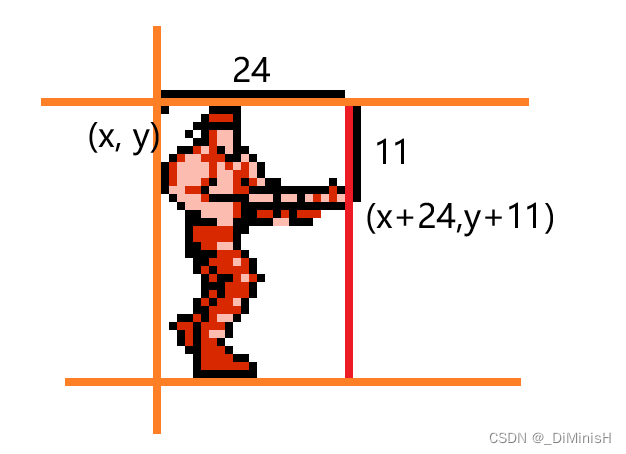
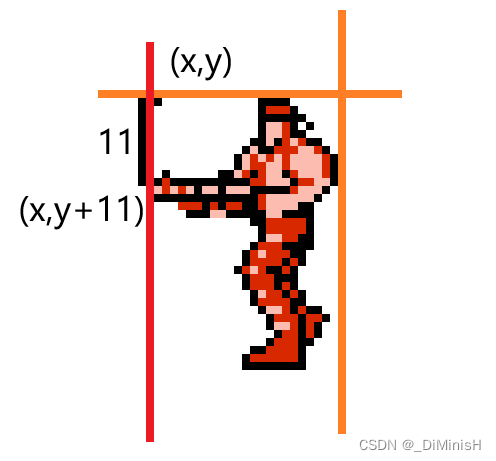
下面我们来看看角色状态和发射子弹的位置
(x,y) 是图片的位置,我们计算出,此状态下,子弹发射的位置是 (x+24,y+11)
下面我们来设置一下
self.rect.x += 24 * 2.5
self.rect.y += 11 * 2.5
self.ySpeed = 0
self.xSpeed = 7
2.5是人物放大的倍数,加载图像的时候把图像放大了2.5倍,所以设置子弹发射位置的时候,同样要乘以2.5
if person.isStanding:
	# 判断方向
	# 方向向右
    if person.direction == Direction.RIGHT:
    	# 向上
        if person.isUp:
            pass
        # 向右
        else:
            self.rect.x += 24 * 2.5
            self.rect.y += 11 * 2.5
            self.ySpeed = 0
            self.xSpeed = 7
    # 方向向左
    else:
        if person.isUp:
            pass
        else:
            pass

elif person.isSquating and not person.isWalking:
    if person.direction == Direction.RIGHT:
        pass
    else:
        pass

elif person.isWalking:
    if person.direction == Direction.RIGHT:
        if person.isUp:
            pass
        elif person.isDown:
            pass
        else:
            pass
    else:
        if person.isUp:
            pass
        elif person.isDown:
            pass
        else:
            pass

elif person.isJumping or person.state == State.FALL:
    if person.direction == Direction.RIGHT:
        pass
    else:
        pass
self.rect.y += 11 * 2.5
self.ySpeed = 0
self.xSpeed = -7
# 根据角色的方向和状态设置子弹发射的位置
# 角色站着
if person.isStanding:
	# 判断方向
    if person.direction == Direction.RIGHT:
    	# 向上
        if person.isUp:
            pass
        else:
            self.rect.x += 24 * 2.5
            self.rect.y += 11 * 2.5
            self.ySpeed = 0
            self.xSpeed = 7
    else:
        if person.isUp:
            pass
        else:
            self.rect.y += 11 * 2.5
            self.ySpeed = 0
            self.xSpeed = -7

elif person.isSquating and not person.isWalking:
    if person.direction == Direction.RIGHT:
        pass
    else:
        pass

elif person.isWalking:
    if person.direction == Direction.RIGHT:
        if person.isUp:
            pass
        elif person.isDown:
            pass
        else:
            pass
    else:
        if person.isUp:
            pass
        elif person.isDown:
            pass
        else:
            pass

elif person.isJumping or person.state == State.FALL:
    if person.direction == Direction.RIGHT:
        pass
    else:
        pass
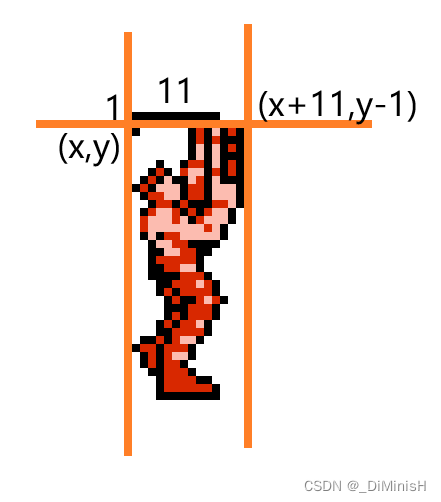
站立向右朝上发射子弹
self.rect.x += 10 * 2.5
self.rect.y += -1 * 2.5
self.ySpeed = -7
self.xSpeed = 0
这里我微微调整了一下y的值,方向向上,所以子弹的y是逐渐减小的,所以y速度是负数
# 根据角色的方向和状态设置子弹发射的位置
# 角色站着
if person.isStanding:
	# 判断方向
    if person.direction == Direction.RIGHT:
    	# 向上
        if person.isUp:
            self.rect.x += 10 * 2.5
			self.rect.y += -1 * 2.5
			self.ySpeed = -7
			self.xSpeed = 0
        else:
            self.rect.x += 24 * 2.5
            self.rect.y += 11 * 2.5
            self.ySpeed = 0
            self.xSpeed = 7
    else:
        if person.isUp:
            pass
        else:
            self.rect.y += 11 * 2.5
            self.ySpeed = 0
            self.xSpeed = -7

elif person.isSquating and not person.isWalking:
    if person.direction == Direction.RIGHT:
        pass
    else:
        pass

elif person.isWalking:
    if person.direction == Direction.RIGHT:
        if person.isUp:
            pass
        elif person.isDown:
            pass
        else:
            pass
    else:
        if person.isUp:
            pass
        elif person.isDown:
            pass
        else:
            pass

elif person.isJumping or person.state == State.FALL:
    if person.direction == Direction.RIGHT:
        pass
    else:
        pass
站立向左朝上发射子弹也是同样的计算方式
self.rect.x += 10 * 2.5
self.rect.y += -1 * 2.5
self.ySpeed = -7
self.xSpeed = 0
# 根据角色的方向和状态设置子弹发射的位置
# 角色站着
if person.isStanding:
	# 判断方向
    if person.direction == Direction.RIGHT:
    	# 向上
        if person.isUp:
            self.rect.x += 10 * 2.5
			self.rect.y += -1 * 2.5
			self.ySpeed = -7
			self.xSpeed = 0
        else:
            self.rect.x += 24 * 2.5
            self.rect.y += 11 * 2.5
            self.ySpeed = 0
            self.xSpeed = 7
    else:
        if person.isUp:
            self.rect.x += 10 * 2.5
            self.rect.y += -1 * 2.5
            self.ySpeed = -7
            self.xSpeed = 0
        else:
            self.rect.y += 11 * 2.5
            self.ySpeed = 0
            self.xSpeed = -7

elif person.isSquating and not person.isWalking:
    if person.direction == Direction.RIGHT:
        pass
    else:
        pass

elif person.isWalking:
    if person.direction == Direction.RIGHT:
        if person.isUp:
            pass
        elif person.isDown:
            pass
        else:
            pass
    else:
        if person.isUp:
            pass
        elif person.isDown:
            pass
        else:
            pass

elif person.isJumping or person.state == State.FALL:
    if person.direction == Direction.RIGHT:
        pass
    else:
        pass
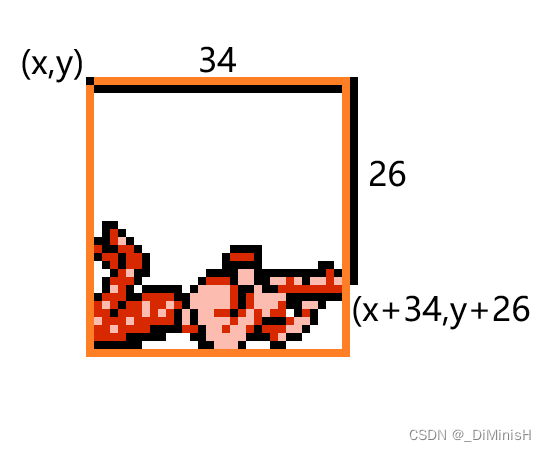
向右示意图
self.rect.x += 34 * 2.5
self.rect.y += 25 * 2.5
self.ySpeed = 0
self.xSpeed = 7
# 根据角色的方向和状态设置子弹发射的位置
# 角色站着
if person.isStanding:
	# 判断方向
    if person.direction == Direction.RIGHT:
    	# 向上
        if person.isUp:
            self.rect.x += 10 * 2.5
			self.rect.y += -1 * 2.5
			self.ySpeed = -7
			self.xSpeed = 0
        else:
            self.rect.x += 24 * 2.5
            self.rect.y += 11 * 2.5
            self.ySpeed = 0
            self.xSpeed = 7
    else:
        if person.isUp:
            self.rect.x += 10 * 2.5
            self.rect.y += -1 * 2.5
            self.ySpeed = -7
            self.xSpeed = 0
        else:
            self.rect.y += 11 * 2.5
            self.ySpeed = 0
            self.xSpeed = -7

elif person.isSquating and not person.isWalking:
    if person.direction == Direction.RIGHT:
        self.rect.x += 34 * 2.5
		self.rect.y += 25 * 2.5
		self.ySpeed = 0
		self.xSpeed = 7
    else:
        pass

elif person.isWalking:
    if person.direction == Direction.RIGHT:
        if person.isUp:
            pass
        elif person.isDown:
            pass
        else:
            pass
    else:
        if person.isUp:
            pass
        elif person.isDown:
            pass
        else:
            pass

elif person.isJumping or person.state == State.FALL:
    if person.direction == Direction.RIGHT:
        pass
    else:
        pass
同样的,设置向左的发射位置
self.rect.y += 25 * 2.5
self.ySpeed = 0
self.xSpeed = -7
# 根据角色的方向和状态设置子弹发射的位置
# 角色站着
if person.isStanding:
	# 判断方向
    if person.direction == Direction.RIGHT:
    	# 向上
        if person.isUp:
            self.rect.x += 10 * 2.5
			self.rect.y += -1 * 2.5
			self.ySpeed = -7
			self.xSpeed = 0
        else:
            self.rect.x += 24 * 2.5
            self.rect.y += 11 * 2.5
            self.ySpeed = 0
            self.xSpeed = 7
    else:
        if person.isUp:
            self.rect.x += 10 * 2.5
            self.rect.y += -1 * 2.5
            self.ySpeed = -7
            self.xSpeed = 0
        else:
            self.rect.y += 11 * 2.5
            self.ySpeed = 0
            self.xSpeed = -7

elif person.isSquating and not person.isWalking:
    if person.direction == Direction.RIGHT:
        self.rect.x += 34 * 2.5
		self.rect.y += 25 * 2.5
		self.ySpeed = 0
		self.xSpeed = 7
    else:
        self.rect.y += 25 * 2.5
		self.ySpeed = 0
		self.xSpeed = -7

elif person.isWalking:
    if person.direction == Direction.RIGHT:
        if person.isUp:
            pass
        elif person.isDown:
            pass
        else:
            pass
    else:
        if person.isUp:
            pass
        elif person.isDown:
            pass
        else:
            pass

elif person.isJumping or person.state == State.FALL:
    if person.direction == Direction.RIGHT:
        pass
    else:
        pass
向斜右上方发射子弹示意图
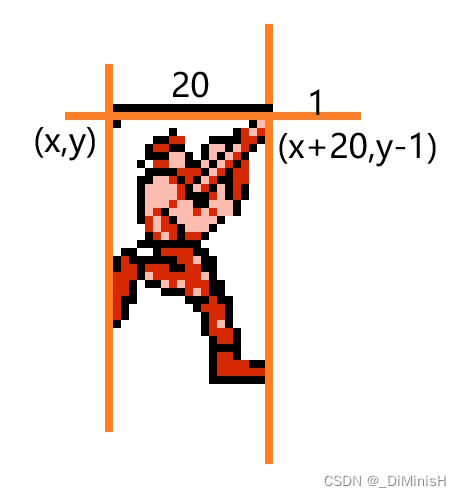
self.rect.x += 20 * 2.5
self.rect.y += -1 * 2.5
self.ySpeed = -7
self.xSpeed = 7
向斜左上方发射子弹时的子弹位置
self.rect.x += -3 * 2.5
self.rect.y += -1 * 2.5
self.ySpeed = -7
self.xSpeed = -7
向斜右下方发射子弹示意图
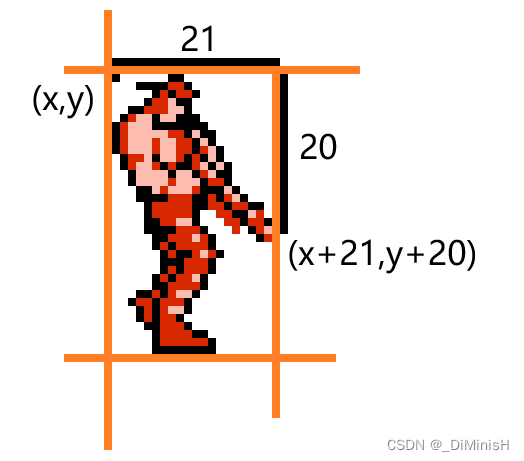
self.rect.x += 21 * 2.5
self.rect.y += 20 * 2.5
self.ySpeed = 7
self.xSpeed = 7
向斜左下方发射子弹时的子弹位置
self.rect.x += -3 * 2.5
self.rect.y += 20 * 2.5
self.ySpeed = 7
self.xSpeed = -7
奔跑时发射子弹和站立发射子弹是一样的
向右
self.rect.x += 24 * 2.5
self.rect.y += 11 * 2.5
self.ySpeed = 0
self.xSpeed = 7
向左
self.rect.y += 11 * 2.5
self.ySpeed = 0
self.xSpeed = -7
完整的代码
if person.isStanding:
    if person.direction == Direction.RIGHT:
        if person.isUp:
            self.rect.x += 10 * 2.5
            self.rect.y += -1 * 2.5
            self.ySpeed = -7
            self.xSpeed = 0
        else:
            self.rect.x += 24 * 2.5
            self.rect.y += 11 * 2.5
            self.ySpeed = 0
            self.xSpeed = 7
    else:
        if person.isUp:
            self.rect.x += 10 * 2.5
            self.rect.y += -1 * 2.5
            self.ySpeed = -7
            self.xSpeed = 0
        else:
            self.rect.y += 11 * 2.5
            self.ySpeed = 0
            self.xSpeed = -7

elif person.isSquating and not person.isWalking:
    if person.direction == Direction.RIGHT:
        self.rect.x += 34 * 2.5
        self.rect.y += 25 * 2.5
        self.ySpeed = 0
        self.xSpeed = 7
    else:
        self.rect.y += 25 * 2.5
        self.ySpeed = 0
        self.xSpeed = -7

elif person.isWalking:
    if person.direction == Direction.RIGHT:
        if person.isUp:
            self.rect.x += 20 * 2.5
            self.rect.y += -1 * 2.5
            self.ySpeed = -7
            self.xSpeed = 7
        elif person.isDown:
            self.rect.x += 21 * 2.5
            self.rect.y += 20 * 2.5
            self.ySpeed = 7
            self.xSpeed = 7
        else:
            self.rect.x += 24 * 2.5
            self.rect.y += 11 * 2.5
            self.ySpeed = 0
            self.xSpeed = 7
    else:
        if person.isUp:
            self.rect.x += -3 * 2.5
            self.rect.y += -1 * 2.5
            self.ySpeed = -7
            self.xSpeed = -7
        elif person.isDown:
            self.rect.x += -3 * 2.5
            self.rect.y += 20 * 2.5
            self.ySpeed = 7
            self.xSpeed = -7
        else:
            self.rect.y += 11 * 2.5
            self.ySpeed = 0
            self.xSpeed = -7

elif person.isJumping or person.state == State.FALL:
    if person.direction == Direction.RIGHT:
        pass
    else:
        pass
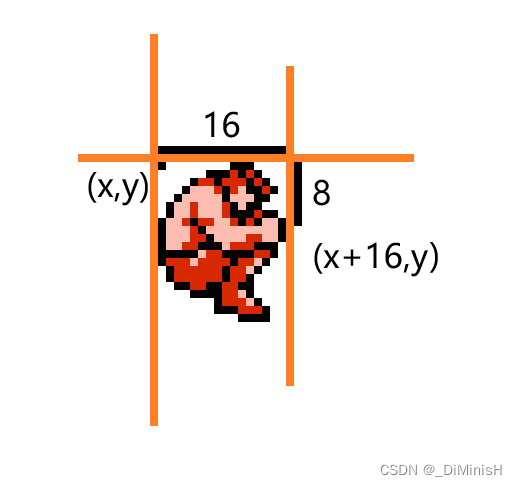
elif person.isJumping or person.state == State.FALL:
    if person.direction == Direction.RIGHT:
        self.rect.x += 16 * 2.5
        self.rect.y += 8 * 2.5
        self.ySpeed = 0
        self.xSpeed = 7
    else:
        self.rect.x += -2 * 2.5
        self.rect.y += 8 * 2.5
        self.ySpeed = 0
        self.xSpeed = -7
完整子弹类代码
import pygame
from Constants import *

class Bullet(pygame.sprite.Sprite):

    def __init__(self, person):
        pygame.sprite.Sprite.__init__(self)
        self.images = [
            loadImage('../Image/Bullet/bullet1.png')
        ]
        self.index = 0
        self.image = self.images[self.index]
        # 速度
        self.xSpeed = 1
        self.ySpeed = 1
        self.rect = pygame.Rect(person.rect)

        if person.isStanding:
            if person.direction == Direction.RIGHT:
                if person.isUp:
                    self.rect.x += 10 * 2.5
                    self.rect.y += -1 * 2.5
                    self.ySpeed = -7
                    self.xSpeed = 0
                else:
                    self.rect.x += 24 * 2.5
                    self.rect.y += 11 * 2.5
                    self.ySpeed = 0
                    self.xSpeed = 7
            else:
                if person.isUp:
                    self.rect.x += 10 * 2.5
                    self.rect.y += -1 * 2.5
                    self.ySpeed = -7
                    self.xSpeed = 0
                else:
                    self.rect.y += 11 * 2.5
                    self.ySpeed = 0
                    self.xSpeed = -7

        elif person.isSquating and not person.isWalking:
            if person.direction == Direction.RIGHT:
                self.rect.x += 34 * 2.5
                self.rect.y += 25 * 2.5
                self.ySpeed = 0
                self.xSpeed = 7
            else:
                self.rect.y += 25 * 2.5
                self.ySpeed = 0
                self.xSpeed = -7

        elif person.isWalking:
            if person.direction == Direction.RIGHT:
                if person.isUp:
                    self.rect.x += 20 * 2.5
                    self.rect.y += -1 * 2.5
                    self.ySpeed = -7
                    self.xSpeed = 7
                elif person.isDown:
                    self.rect.x += 21 * 2.5
                    self.rect.y += 20 * 2.5
                    self.ySpeed = 7
                    self.xSpeed = 7
                else:
                    self.rect.x += 24 * 2.5
                    self.rect.y += 11 * 2.5
                    self.ySpeed = 0
                    self.xSpeed = 7
            else:
                if person.isUp:
                    self.rect.x += -3 * 2.5
                    self.rect.y += -1 * 2.5
                    self.ySpeed = -7
                    self.xSpeed = -7
                elif person.isDown:
                    self.rect.x += -3 * 2.5
                    self.rect.y += 20 * 2.5
                    self.ySpeed = 7
                    self.xSpeed = -7
                else:
                    self.rect.y += 11 * 2.5
                    self.ySpeed = 0
                    self.xSpeed = -7

        elif person.isJumping or person.state == State.FALL:
            if person.direction == Direction.RIGHT:
                self.rect.x += 16 * 2.5
                self.rect.y += 8 * 2.5
                self.ySpeed = 0
                self.xSpeed = 7
            else:
                self.rect.x += -2 * 2.5
                self.rect.y += 8 * 2.5
                self.ySpeed = 0
                self.xSpeed = -7

        # 销毁开关
        self.isDestroy = False

    def move(self):
        self.rect.x += self.xSpeed
        self.rect.y += self.ySpeed
        self.checkBullet()

    def draw(self, window):
        window.blit(self.image, self.rect)

    def checkBullet(self):
        toDestroy = False
        if self.rect.top < 0 or self.rect.top > 600:
            toDestroy = True
        if self.rect.left < 0 or self.rect.right > 900:
            toDestroy = True
        if toDestroy:
            self.isDestroy = True
在常量文件中设置子弹上限
# 设置玩家子弹上限
PLAYER_BULLET_NUMBER = 15
在玩家类的四个状态函数中加入发射的代码
if keys[pygame.K_j]:
    self.isFiring = True
    if len(playerBulletList) < PLAYER_BULLET_NUMBER:
    	# 设置子弹发射的间隔为150
        if currentTime - self.fireLastTimer  > 150:
            playerBulletList.append(Bullet(self))
            self.fireLastTimer = currentTime
完整的玩家类
import pygame
from Constants import *
from Bullet import Bullet
class PlayerOne(pygame.sprite.Sprite):
def __init__(self, currentTime):
pygame.sprite.Sprite.__init__(self)
# 加载角色图片
self.standRightImage = loadImage('../Image/Player/Player1/Right/stand.png')
self.standLeftImage = loadImage('../Image/Player/Player1/Left/stand.png')
self.upRightImage = loadImage('../Image/Player/Player1/Up/upRight(small).png')
self.upLeftImage = loadImage('../Image/Player/Player1/Up/upLeft(small).png')
self.downRightImage = loadImage('../Image/Player/Player1/Down/down.png')
self.downLeftImage = loadImage('../Image/Player/Player1/Down/down.png', True)
self.obliqueUpRightImages = [
loadImage('../Image/Player/Player1/Up/rightUp1.png'),
loadImage('../Image/Player/Player1/Up/rightUp2.png'),
loadImage('../Image/Player/Player1/Up/rightUp3.png'),
]
self.obliqueUpLeftImages = [
loadImage('../Image/Player/Player1/Up/rightUp1.png', True),
loadImage('../Image/Player/Player1/Up/rightUp2.png', True),
loadImage('../Image/Player/Player1/Up/rightUp3.png', True),
]
self.obliqueDownRightImages = [
loadImage('../Image/Player/Player1/ObliqueDown/1.png'),
loadImage('../Image/Player/Player1/ObliqueDown/2.png'),
loadImage('../Image/Player/Player1/ObliqueDown/3.png'),
]
self.obliqueDownLeftImages = [
loadImage('../Image/Player/Player1/ObliqueDown/1.png', True),
loadImage('../Image/Player/Player1/ObliqueDown/2.png', True),
loadImage('../Image/Player/Player1/ObliqueDown/3.png', True),
]
# 角色向右的全部图片
self.rightImages = [
loadImage('../Image/Player/Player1/Right/run1.png'),
loadImage('../Image/Player/Player1/Right/run2.png'),
loadImage('../Image/Player/Player1/Right/run3.png')
]
# 角色向左的全部图片
self.leftImages = [
loadImage('../Image/Player/Player1/Left/run1.png'),
loadImage('../Image/Player/Player1/Left/run2.png'),
loadImage('../Image/Player/Player1/Left/run3.png')
]
# 角色跳跃的全部图片
self.upRightImages = [
loadImage('../Image/Player/Player1/Jump/jump1.png'),
loadImage('../Image/Player/Player1/Jump/jump2.png'),
loadImage('../Image/Player/Player1/Jump/jump3.png'),
loadImage('../Image/Player/Player1/Jump/jump4.png'),
]
self.upLeftImages = [
loadImage('../Image/Player/Player1/Jump/jump1.png', True),
loadImage('../Image/Player/Player1/Jump/jump2.png', True),
loadImage('../Image/Player/Player1/Jump/jump3.png', True),
loadImage('../Image/Player/Player1/Jump/jump4.png', True),
]
self.rightFireImages = [
loadImage('../Image/Player/Player1/Right/fire1.png'),
loadImage('../Image/Player/Player1/Right/fire2.png'),
loadImage('../Image/Player/Player1/Right/fire3.png'),
]
self.leftFireImages = [
loadImage('../Image/Player/Player1/Right/fire1.png', True),
loadImage('../Image/Player/Player1/Right/fire2.png', True),
loadImage('../Image/Player/Player1/Right/fire3.png', True),
]
# 角色左右移动下标
self.imageIndex = 0
# 角色跳跃下标
self.upImageIndex = 0
# 角色斜射下标
self.obliqueImageIndex = 0
# 上一次显示图片的时间
self.runLastTimer = currentTime
self.fireLastTimer = currentTime
# 选择当前要显示的图片
self.image = self.standRightImage
# 获取图片的rect
self.rect = self.image.get_rect()
# 设置角色的状态
self.state = State.STAND
# 角色的方向
self.direction = Direction.RIGHT
# 速度
self.xSpeed = PLAYER_X_SPEED
self.ySpeed = 0
self.jumpSpeed = -11
# 人物当前的状态标志
self.isStanding = False
self.isWalking = False
self.isJumping = True
self.isSquating = False
self.isFiring = False
# 重力加速度
self.gravity = 0.7
self.isUp = False
self.isDown = False
def update(self, keys, currentTime, playerBulletList):
# 更新站或者走的状态
# 根据状态响应按键
if self.state == State.STAND:
self.standing(keys, currentTime, playerBulletList)
elif self.state == State.WALK:
self.walking(keys, currentTime, playerBulletList)
elif self.state == State.JUMP:
self.jumping(keys, currentTime, playerBulletList)
elif self.state == State.FALL:
self.falling(keys, currentTime, playerBulletList)
# 更新位置
# 记录前一次的位置坐标
pre = self.rect.x
self.rect.x += self.xSpeed
self.rect.y += self.ySpeed
# 如果x位置小于0了,就不能移动,防止人物跑到屏幕左边
if self.rect.x <= 0:
self.rect.x = pre
# 更新动画
# 跳跃状态
if self.isJumping:
# 根据方向
if self.direction == Direction.RIGHT:
# 方向向右,角色加载向右跳起的图片
self.image = self.upRightImages[self.upImageIndex]
else:
# 否则,方向向左,角色加载向左跳起的图片
self.image = self.upLeftImages[self.upImageIndex]
# 角色蹲下
if self.isSquating:
if self.direction == Direction.RIGHT:
# 加载向右蹲下的图片
self.image = self.downRightImage
else:
# 加载向左蹲下的图片
self.image = self.downLeftImage
# 角色站着
if self.isStanding:
if self.direction == Direction.RIGHT:
if self.isUp:
# 加载向右朝上的图片
self.image = self.upRightImage
elif self.isDown:
# 加载向右蹲下的图片
self.image = self.downRightImage
else:
# 加载向右站着的图片
self.image = self.standRightImage
else:
# 向左也是同样的效果
if self.isUp:
self.image = self.upLeftImage
elif self.isDown:
self.image = self.downLeftImage
else:
self.image = self.standLeftImage
# 角色移动
if self.isWalking:
if self.direction == Direction.RIGHT:
if self.isUp:
# 加载斜右上的图片
self.image = self.obliqueUpRightImages[self.obliqueImageIndex]
elif self.isDown:
# 加载斜右下的图片
self.image = self.obliqueDownRightImages[self.obliqueImageIndex]
else:
# 加载向右移动的图片,根据开火状态是否加载向右开火移动的图片
if self.isFiring:
self.image = self.rightFireImages[self.imageIndex]
else:
self.image = self.rightImages[self.imageIndex]
else:
if self.isUp:
self.image = self.obliqueUpLeftImages[self.obliqueImageIndex]
elif self.isDown:
self.image = self.obliqueDownLeftImages[self.obliqueImageIndex]
else:
if self.isFiring:
self.image = self.leftFireImages[self.imageIndex]
else:
self.image = self.leftImages[self.imageIndex]
def standing(self, keys, currentTime, playerBulletList):
"""角色站立"""
# 设置角色状态
self.isStanding = True
self.isWalking = False
self.isJumping = False
self.isSquating = False
self.isUp = False
self.isDown = False
self.isFiring = False
# 设置速度
self.ySpeed = 0
self.xSpeed = 0
# 按下A键
if keys[pygame.K_a]:
# A按下,角色方向向左
self.direction = Direction.LEFT
# 改变角色的状态,角色进入移动状态
self.state = State.WALK
# 设置站立状态为False,移动状态为True
self.isStanding = False
self.isWalking = True
# 向左移动,速度为负数,这样玩家的x坐标是减小的
self.xSpeed = -PLAYER_X_SPEED
# 按下D键
elif keys[pygame.K_d]:
# D按下,角色方向向右
self.direction = Direction.RIGHT
# 改变角色的状态,角色进入移动状态
self.state = State.WALK
# 设置站立状态为False,移动状态为True
self.isStanding = False
self.isWalking = True
# 向右移动,速度为正数
self.xSpeed = PLAYER_X_SPEED
# 按下k键
elif keys[pygame.K_k]:
# K按下,角色进入跳跃状态,但是不会改变方向
self.state = State.JUMP
# 设置站立状态为False,跳跃状态为True
# 不改变移动状态,因为移动的时候也可以跳跃
self.isStanding = False
self.isJumping = True
# 设置速度,速度为负数,因为角色跳起后,要下落
self.ySpeed = self.jumpSpeed
# 没有按下按键
else:
# 没有按下按键,角色依然是站立状态
self.state = State.STAND
self.isStanding = True
# 按下w键
if keys[pygame.K_w]:
# W按下,角色向上,改变方向状态
self.isUp = True
self.isStanding = True
self.isDown = False
self.isSquating = False
# 按下s键
elif keys[pygame.K_s]:
# S按下,角色蹲下,改变方向状态,并且蹲下状态设置为True
self.isUp = False
self.isStanding = False
self.isDown = True
self.isSquating = True
if keys[pygame.K_j]:
self.isFiring = True
if len(playerBulletList) < PLAYER_BULLET_NUMBER:
if currentTime - self.fireLastTimer > 150:
playerBulletList.append(Bullet(self))
self.fireLastTimer = currentTime
def walking(self, keys, currentTime, playerBulletList):
"""角色行走,每10帧变换一次图片"""
self.isStanding = False
self.isWalking = True
self.isJumping = False
self.isSquating = False
self.isFiring = False
self.ySpeed = 0
self.xSpeed = PLAYER_X_SPEED
# 如果当前是站立的图片
if self.isStanding:
# 方向向右,方向向上
if self.direction == Direction.RIGHT and self.isUp:
# 设置为向右朝上的图片
self.image = self.upRightImage
# 方向向右
elif self.direction == Direction.RIGHT and not self.isUp:
# 设置为向右站立的图片
self.image = self.standRightImage
elif self.direction == Direction.LEFT and self.isUp:
self.image = self.upLeftImage
elif self.direction == Direction.LEFT and not self.isUp:
self.image = self.standLeftImage
# 记下当前时间
self.runLastTimer = currentTime
else:
# 如果是走动的图片,先判断方向
if self.direction == Direction.RIGHT:
# 设置速度
self.xSpeed = PLAYER_X_SPEED
# 根据上下方向觉得是否角色要加载斜射的图片
if self.isUp or self.isDown:
# isUp == True表示向上斜射
# isDown == True表示向下斜射
# 计算上一次加载图片到这次的时间,如果大于115,即11.5帧,即上次加载图片到这次加载图片之间,已经加载了11张图片
if currentTime - self.runLastTimer > 115:
# 那么就可以加载斜着奔跑的图片
# 如果角色加载的图片不是第三张,则加载下一张就行
if self.obliqueImageIndex < 2:
self.obliqueImageIndex += 1
# 否则就加载第一张图片
else:
self.obliqueImageIndex = 0
# 记录变换图片的时间,为下次变换图片做准备
self.runLastTimer = currentTime
# 不是斜射
else:
# 加载正常向右奔跑的图片
if currentTime - self.runLastTimer > 115:
if self.imageIndex < 2:
self.imageIndex += 1
else:
self.imageIndex = 0
self.runLastTimer = currentTime
else:
self.xSpeed = -PLAYER_X_SPEED
if self.isUp or self.isDown:
if currentTime - self.runLastTimer > 115:
if self.obliqueImageIndex < 2:
self.obliqueImageIndex += 1
else:
self.obliqueImageIndex = 0
self.runLastTimer = currentTime
else:
if currentTime - self.runLastTimer > 115:
if self.imageIndex < 2:
self.imageIndex += 1
else:
self.imageIndex = 0
self.runLastTimer = currentTime
# 按下D键
if keys[pygame.K_d]:
self.direction = Direction.RIGHT
self.xSpeed = PLAYER_X_SPEED
# 按下A键
elif keys[pygame.K_a]:
self.direction = Direction.LEFT
self.xSpeed = -PLAYER_X_SPEED
# 按下S键
elif keys[pygame.K_s]:
self.isStanding = False
self.isDown = True
# 按下W键
if keys[pygame.K_w]:
self.isUp = True
self.isDown = False
# 没有按键按下
else:
self.state = State.STAND
# 移动时按下K键
if keys[pygame.K_k]:
# 角色状态变为跳跃
self.state = State.JUMP
self.ySpeed = self.jumpSpeed
self.isJumping = True
self.isStanding = False
if keys[pygame.K_j]:
self.isFiring = True
if len(playerBulletList) < PLAYER_BULLET_NUMBER:
if currentTime - self.fireLastTimer > 150:
playerBulletList.append(Bullet(self))
self.fireLastTimer = currentTime
def jumping(self, keys, currentTime, playerBulletList):
"""跳跃"""
# 设置标志
self.isJumping = True
self.isStanding = False
self.isDown = False
self.isSquating = False
self.isFiring = False
# 更新速度
self.ySpeed += self.gravity
if currentTime - self.runLastTimer > 115:
if self.upImageIndex < 3:
self.upImageIndex += 1
else:
self.upImageIndex = 0
# 记录变换图片的时间,为下次变换图片做准备
self.runLastTimer = currentTime
if keys[pygame.K_d]:
self.direction = Direction.RIGHT
elif keys[pygame.K_a]:
self.direction = Direction.LEFT
# 按下W键
if keys[pygame.K_w]:
self.isUp = True
self.isDown = False
elif keys[pygame.K_s]:
self.isUp = False
self.isDown = True
if self.ySpeed >= 0:
self.state = State.FALL
if not keys[pygame.K_k]:
self.state = State.FALL
if keys[pygame.K_j]:
self.isFiring = True
if len(playerBulletList) < PLAYER_BULLET_NUMBER:
if currentTime - self.fireLastTimer > 150:
playerBulletList.append(Bullet(self))
self.fireLastTimer = currentTime
def falling(self, keys, currentTime, playerBulletList):
# 下落时速度越来越快,所以速度需要一直增加
self.ySpeed += self.gravity
if currentTime - self.runLastTimer > 115:
if self.upImageIndex < 3:
self.upImageIndex += 1
else:
self.upImageIndex = 0
self.runLastTimer = currentTime
# 防止落到窗口外面,当落到一定高度时,就不会再掉落了
if self.rect.bottom > SCREEN_HEIGHT - GROUND_HEIGHT:
self.state = State.WALK
self.ySpeed = 0
self.rect.bottom = SCREEN_HEIGHT - GROUND_HEIGHT
self.isJumping = False
if keys[pygame.K_d]:
self.direction = Direction.RIGHT
self.isWalking = False
elif keys[pygame.K_a]:
self.direction = Direction.LEFT
self.isWalking = False
if keys[pygame.K_j]:
self.isFiring = True
if len(playerBulletList) < PLAYER_BULLET_NUMBER:
if currentTime - self.fireLastTimer > 150:
playerBulletList.append(Bullet(self))
self.fireLastTimer = currentTime
由于玩家类中的update()方法多了一个子弹列表的参数,现在要修改主类
在主类中加入子弹列表
# 子弹
player1BulletList = []
修改run()函数,把子弹列表传入update()函数
def run(self):

    while not self.isEnd:

        # 获取窗口中的事件
        self.getPlayingModeEvent()

        # 游戏场景和景物更新函数
        self.update(MainGame.window, MainGame.player1BulletList)

        # 更新窗口
        pygame.display.update()

        # 设置帧率
        self.clock.tick(self.fps)
        fps = self.clock.get_fps()
        caption = '魂斗罗 - {:.2f}'.format(fps)
        pygame.display.set_caption(caption)
    else:
        sys.exit()
修改update()函数
def update(self, window, player1BulletList):
    # 更新物体
    currentTime = pygame.time.get_ticks()
    MainGame.allSprites.update(self.keys, currentTime, player1BulletList)
    drawPlayerOneBullet(player1BulletList)
    # 显示物体
    MainGame.allSprites.draw(window)
创建显示子弹函数,在类外创建
def drawPlayerOneBullet(player1BulletList):
    for bullet in player1BulletList:
        if bullet.isDestroy:
            player1BulletList.remove(bullet)
        else:
            bullet.draw(MainGame.window)
            bullet.move()
完整的主类代码
import sys
import pygame
from Constants import *
from PlayerOne import PlayerOne


def drawPlayerOneBullet(player1BulletList):
    for bullet in player1BulletList:
        if bullet.isDestroy:
            player1BulletList.remove(bullet)
        else:
            bullet.draw(MainGame.window)
            bullet.move()

class MainGame:

    player1 = None
    allSprites = None

    window = None

    # 子弹
    player1BulletList = []

    def __init__(self):
        # 初始化展示模块
        pygame.display.init()

        SCREEN_SIZE = (SCREEN_WIDTH, SCREEN_HEIGHT)
        # 初始化窗口
        MainGame.window = pygame.display.set_mode(SCREEN_SIZE)
        # 设置窗口标题
        pygame.display.set_caption('魂斗罗角色')
        # 是否结束游戏
        self.isEnd = False
        # 获取按键
        self.keys = pygame.key.get_pressed()
        # 帧率
        self.fps = 60
        self.clock = pygame.time.Clock()

        # 初始化角色
        MainGame.player1 = PlayerOne(pygame.time.get_ticks())
        # 设置角色的初始位置
        # 这里设置为(0,80),可以实现一开始玩家掉下来的动画
        MainGame.player1.rect.x = 80
        MainGame.player1.rect.bottom = 300

        # 把角色放入组中,方便统一管理
        MainGame.allSprites = pygame.sprite.Group(MainGame.player1)

    def run(self):
        while not self.isEnd:

            # 设置背景颜色
            pygame.display.get_surface().fill((0, 0, 0))

            # 游戏场景和景物更新函数
            self.update(MainGame.window, MainGame.player1BulletList)

            # 获取窗口中的事件
            self.getPlayingModeEvent()

            # 更新窗口
            pygame.display.update()

            # 设置帧率
            self.clock.tick(self.fps)
            fps = self.clock.get_fps()
            caption = '魂斗罗 - {:.2f}'.format(fps)
            pygame.display.set_caption(caption)
        else:
            sys.exit()

    def getPlayingModeEvent(self):
        # 获取事件列表
        for event in pygame.event.get():
            # 点击窗口关闭按钮
            if event.type == pygame.QUIT:
                self.isEnd = True
            # 键盘按键按下
            elif event.type == pygame.KEYDOWN:
                self.keys = pygame.key.get_pressed()
            # 键盘按键抬起
            elif event.type == pygame.KEYUP:
                self.keys = pygame.key.get_pressed()

    def update(self, window, player1BulletList):
        # 更新物体
        currentTime = pygame.time.get_ticks()
        MainGame.allSprites.update(self.keys, currentTime, player1BulletList)
        drawPlayerOneBullet(player1BulletList)
        # 显示物体
        MainGame.allSprites.draw(window)


if __name__ == '__main__':
    MainGame().run()
运行一下,看看效果
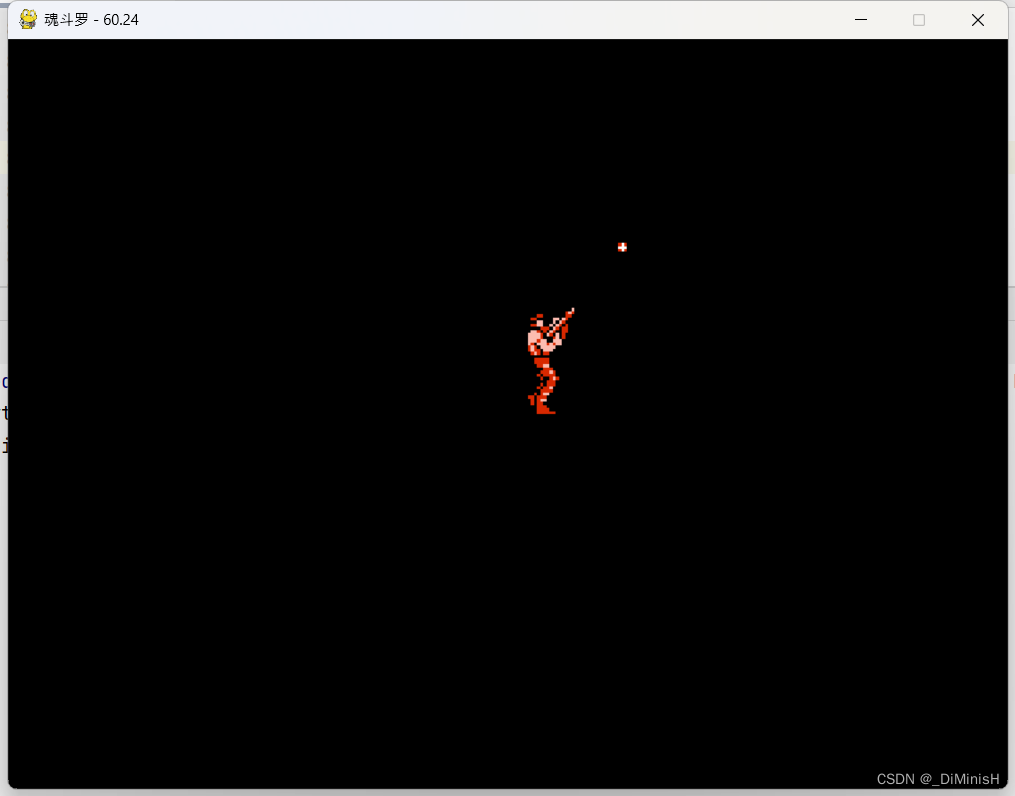
哈哈,完成了
关闭。这个问题是opinion-based.它目前不接受答案。想要改进这个问题?更新问题,以便editingthispost可以用事实和引用来回答它.关闭4年前。Improvethisquestion我想在固定时间创建一系列低音和高音调的哔哔声。例如:在150毫秒时发出高音调的蜂鸣声在151毫秒时发出低音调的蜂鸣声200毫秒时发出低音调的蜂鸣声250毫秒的高音调蜂鸣声有没有办法在Ruby或Python中做到这一点?我真的不在乎输出编码是什么(.wav、.mp3、.ogg等等),但我确实想创建一个输出文件。
我正在编写一个包含C扩展的gem。通常当我写一个gem时,我会遵循TDD的过程,我会写一个失败的规范,然后处理代码直到它通过,等等......在“ext/mygem/mygem.c”中我的C扩展和在gemspec的“扩展”中配置的有效extconf.rb,如何运行我的规范并仍然加载我的C扩展?当我更改C代码时,我需要采取哪些步骤来重新编译代码?这可能是个愚蠢的问题,但是从我的gem的开发源代码树中输入“bundleinstall”不会构建任何native扩展。当我手动运行rubyext/mygem/extconf.rb时,我确实得到了一个Makefile(在整个项目的根目录中),然后当
我已经在Sinatra上创建了应用程序,它代表了一个简单的API。我想在生产和开发上进行部署。我想在部署时选择,是开发还是生产,一些方法的逻辑应该改变,这取决于部署类型。是否有任何想法,如何完成以及解决此问题的一些示例。例子:我有代码get'/api/test'doreturn"Itisdev"end但是在部署到生产环境之后我想在运行/api/test之后看到ItisPROD如何实现? 最佳答案 根据SinatraDocumentation:EnvironmentscanbesetthroughtheRACK_ENVenvironm
我们的git存储库中目前有一个Gemfile。但是,有一个gem我只在我的环境中本地使用(我的团队不使用它)。为了使用它,我必须将它添加到我们的Gemfile中,但每次我checkout到我们的master/dev主分支时,由于与跟踪的gemfile冲突,我必须删除它。我想要的是类似Gemfile.local的东西,它将继承从Gemfile导入的gems,但也允许在那里导入新的gems以供使用只有我的机器。此文件将在.gitignore中被忽略。这可能吗? 最佳答案 设置BUNDLE_GEMFILE环境变量:BUNDLE_GEMFI
这似乎非常适得其反,因为太多的gem会在window上破裂。我一直在处理很多mysql和ruby-mysqlgem问题(gem本身发生段错误,一个名为UnixSocket的类显然在Windows机器上不能正常工作,等等)。我只是在浪费时间吗?我应该转向不同的脚本语言吗? 最佳答案 我在Windows上使用Ruby的经验很少,但是当我开始使用Ruby时,我是在Windows上,我的总体印象是它不是Windows原生系统。因此,在主要使用Windows多年之后,开始使用Ruby促使我切换回原来的系统Unix,这次是Linux。Rub
我正在玩HTML5视频并且在ERB中有以下片段:mp4视频从在我的开发环境中运行的服务器很好地流式传输到chrome。然而firefox显示带有海报图像的视频播放器,但带有一个大X。问题似乎是mongrel不确定ogv扩展的mime类型,并且只返回text/plain,如curl所示:$curl-Ihttp://0.0.0.0:3000/pr6.ogvHTTP/1.1200OKConnection:closeDate:Mon,19Apr201012:33:50GMTLast-Modified:Sun,18Apr201012:46:07GMTContent-Type:text/plain
这个问题在这里已经有了答案:关闭10年前。PossibleDuplicate:Pythonconditionalassignmentoperator对于这样一个简单的问题表示歉意,但是谷歌搜索||=并不是很有帮助;)Python中是否有与Ruby和Perl中的||=语句等效的语句?例如:foo="hey"foo||="what"#assignfooifit'sundefined#fooisstill"hey"bar||="yeah"#baris"yeah"另外,类似这样的东西的通用术语是什么?条件分配是我的第一个猜测,但Wikipediapage跟我想的不太一样。
什么是ruby的rack或python的Java的wsgi?还有一个路由库。 最佳答案 来自Python标准PEP333:Bycontrast,althoughJavahasjustasmanywebapplicationframeworksavailable,Java's"servlet"APImakesitpossibleforapplicationswrittenwithanyJavawebapplicationframeworktoruninanywebserverthatsupportstheservletAPI.ht
无论您是想搭建桌面端、WEB端或者移动端APP应用,HOOPSPlatform组件都可以为您提供弹性的3D集成架构,同时,由工业领域3D技术专家组成的HOOPS技术团队也能为您提供技术支持服务。如果您的客户期望有一种在多个平台(桌面/WEB/APP,而且某些客户端是“瘦”客户端)快速、方便地将数据接入到3D应用系统的解决方案,并且当访问数据时,在各个平台上的性能和用户体验保持一致,HOOPSPlatform将帮助您完成。利用HOOPSPlatform,您可以开发在任何环境下的3D基础应用架构。HOOPSPlatform可以帮您打造3D创新型产品,HOOPSSDK包含的技术有:快速且准确的CAD
华为OD机试题本篇题目:明明的随机数题目输入描述输出描述:示例1输入输出说明代码编写思路最近更新的博客华为od2023|什么是华为od,od薪资待遇,od机试题清单华为OD机试真题大全,用Python解华为机试题|机试宝典【华为OD机试】全流程解析+经验分享,题型分享,防作弊指南华为o
