需要源码请点赞关注收藏后评论区留言私信~~~
Android提供了蓝牙模块的管理工具,名叫BluetoothAdapter。下面是BluetoothAdapter类常用的方法说明:
getDefaultAdapter:获取默认的蓝牙适配器。
getState:获取蓝牙的开关状态。
enable:启用蓝牙功能。
disable:禁用蓝牙功能。
getBondedDevices:获取已配对的设备集合。
getRemoteDevice:根据设备地址获取远程的设备对象。
startDiscovery:开始搜索周围的蓝牙设备。
cancelDiscovery:取消搜索周围的蓝牙设备。
蓝牙配对实现步骤如下
(1)初始化蓝牙适配器
(2)启用蓝牙功能
(3)搜索周围的蓝牙设备
(4)与指定的蓝牙设备配对
首先会搜索附近的蓝牙并显示他们的相关信息
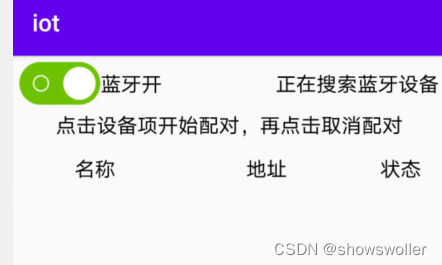
配对完成后各自手机上申请如下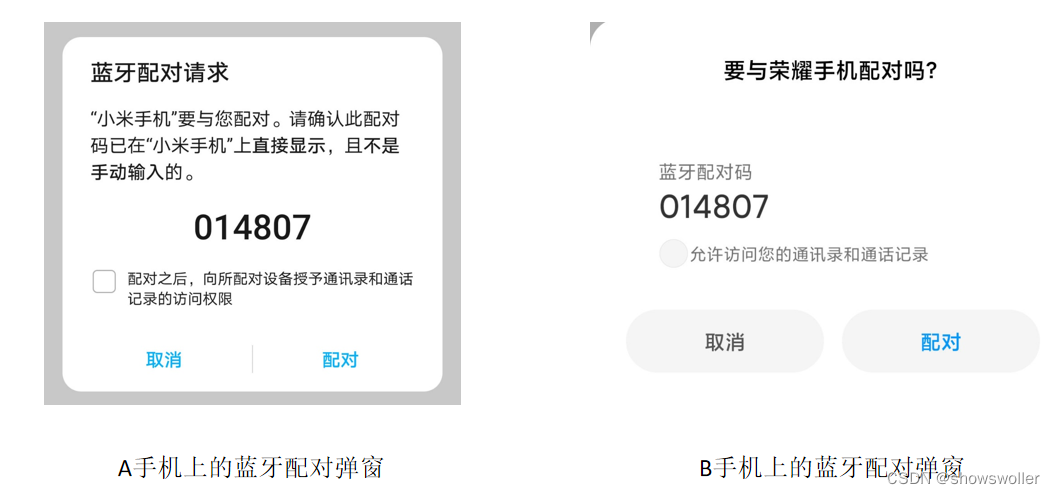
代码如下
package com.example.iot;

import android.annotation.SuppressLint;
import android.bluetooth.BluetoothAdapter;
import android.bluetooth.BluetoothDevice;
import android.content.BroadcastReceiver;
import android.content.Context;
import android.content.Intent;
import android.content.IntentFilter;
import android.os.Bundle;
import android.os.Handler;
import android.os.Looper;
import android.util.Log;
import android.view.View;
import android.widget.AdapterView;
import android.widget.AdapterView.OnItemClickListener;
import android.widget.CheckBox;
import android.widget.CompoundButton;
import android.widget.CompoundButton.OnCheckedChangeListener;
import android.widget.ListView;
import android.widget.TextView;
import android.widget.Toast;

import androidx.appcompat.app.AppCompatActivity;

import com.example.iot.adapter.BlueListAdapter;
import com.example.iot.bean.BlueDevice;
import com.example.iot.util.BluetoothUtil;

import java.util.ArrayList;
import java.util.List;
import java.util.Set;

@SuppressLint("SetTextI18n")
public class BluetoothPairActivity extends AppCompatActivity implements
        OnCheckedChangeListener, OnItemClickListener {
    private static final String TAG = "BluetoothPairActivity";
    private CheckBox ck_bluetooth; // 声明一个复选框对象
    private TextView tv_discovery; // 声明一个文本视图对象
    private ListView lv_bluetooth; // 声明一个用于展示蓝牙设备的列表视图对象
    private BluetoothAdapter mBluetooth; // 声明一个蓝牙适配器对象
    private BlueListAdapter mListAdapter; // 声明一个蓝牙设备的列表适配器对象
    private List<BlueDevice> mDeviceList = new ArrayList<>(); // 蓝牙设备列表
    private Handler mHandler = new Handler(Looper.myLooper()); // 声明一个处理器对象
    private int mOpenCode = 1; // 是否允许扫描蓝牙设备的选择对话框返回结果代码

    @Override
    protected void onCreate(Bundle savedInstanceState) {
        super.onCreate(savedInstanceState);
        setContentView(R.layout.activity_bluetooth_pair);
        initBluetooth(); // 初始化蓝牙适配器
        ck_bluetooth = findViewById(R.id.ck_bluetooth);
        tv_discovery = findViewById(R.id.tv_discovery);
        lv_bluetooth = findViewById(R.id.lv_bluetooth);
        ck_bluetooth.setOnCheckedChangeListener(this);
        if (BluetoothUtil.getBlueToothStatus()) { // 已经打开蓝牙
            ck_bluetooth.setChecked(true);
        }
        initBlueDevice(); // 初始化蓝牙设备列表
    }

    // 初始化蓝牙适配器
    private void initBluetooth() {
        // 获取系统默认的蓝牙适配器
        mBluetooth = BluetoothAdapter.getDefaultAdapter();
        if (mBluetooth == null) {
            Toast.makeText(this, "当前设备未找到蓝牙功能", Toast.LENGTH_SHORT).show();
            finish(); // 关闭当前页面
        }
    }

    // 初始化蓝牙设备列表
    private void initBlueDevice() {
        mDeviceList.clear();
        // 获取已经配对的蓝牙设备集合
        Set<BluetoothDevice> bondedDevices = mBluetooth.getBondedDevices();
        for (BluetoothDevice device : bondedDevices) {
            mDeviceList.add(new BlueDevice(device.getName(), device.getAddress(), device.getBondState()));
        }
        if (mListAdapter == null) { // 首次打开页面,则创建一个新的蓝牙设备列表
            mListAdapter = new BlueListAdapter(this, mDeviceList);
            lv_bluetooth.setAdapter(mListAdapter);
            lv_bluetooth.setOnItemClickListener(this);
        } else { // 不是首次打开页面,则刷新蓝牙设备列表
            mListAdapter.notifyDataSetChanged();
        }
    }

    private Runnable mDiscoverable = new Runnable() {
        public void run() {
            // Android8.0要在已打开蓝牙功能时才会弹出下面的选择窗
            if (BluetoothUtil.getBlueToothStatus()) { // 已经打开蓝牙
                // 弹出是否允许扫描蓝牙设备的选择对话框
                Intent intent = new Intent(BluetoothAdapter.ACTION_REQUEST_DISCOVERABLE);
                startActivityForResult(intent, mOpenCode);
            } else {
                mHandler.postDelayed(this, 1000);
            }
        }
    };

    @Override
    public void onCheckedChanged(CompoundButton buttonView, boolean isChecked) {
        if (buttonView.getId() == R.id.ck_bluetooth) {
            if (isChecked) { // 开启蓝牙功能
                ck_bluetooth.setText("蓝牙开");
                if (!BluetoothUtil.getBlueToothStatus()) { // 还未打开蓝牙
                    BluetoothUtil.setBlueToothStatus(true); // 开启蓝牙功能
                }
                mHandler.post(mDiscoverable);
            } else { // 关闭蓝牙功能
                ck_bluetooth.setText("蓝牙关");
                cancelDiscovery(); // 取消蓝牙设备的搜索
                BluetoothUtil.setBlueToothStatus(false); // 关闭蓝牙功能
                initBlueDevice(); // 初始化蓝牙设备列表
            }
        }
    }

    @Override
    protected void onActivityResult(int requestCode, int resultCode, Intent intent) {
        super.onActivityResult(requestCode, resultCode, intent);
        if (requestCode == mOpenCode) { // 来自允许蓝牙扫描的对话框
            // 延迟50毫秒后启动蓝牙设备的刷新任务
            mHandler.postDelayed(mRefresh, 50);
            if (resultCode == RESULT_OK) {
                Toast.makeText(this, "允许本地蓝牙被附近的其他蓝牙设备发现",
                        Toast.LENGTH_SHORT).show();
            } else if (resultCode == RESULT_CANCELED) {
                Toast.makeText(this, "不允许蓝牙被附近的其他蓝牙设备发现",
                        Toast.LENGTH_SHORT).show();
            }
        }
    }

    // 定义一个刷新任务,每隔两秒刷新扫描到的蓝牙设备
    private Runnable mRefresh = new Runnable() {
        @Override
        public void run() {
            beginDiscovery(); // 开始扫描周围的蓝牙设备
            // 延迟30秒后再次启动蓝牙设备的刷新任务
            mHandler.postDelayed(this, 30*1000);
        }
    };

    // 开始扫描周围的蓝牙设备
    private void beginDiscovery() {
        // 如果当前不是正在搜索,则开始新的搜索任务
        if (!mBluetooth.isDiscovering()) {
            initBlueDevice(); // 初始化蓝牙设备列表
            tv_discovery.setText("正在搜索蓝牙设备");
            mBluetooth.startDiscovery(); // 开始扫描周围的蓝牙设备
        }
    }

    // 取消蓝牙设备的搜索
    private void cancelDiscovery() {
        mHandler.removeCallbacks(mRefresh);
        tv_discovery.setText("取消搜索蓝牙设备");
        // 当前正在搜索,则取消搜索任务
        if (mBluetooth.isDiscovering()) {
            mBluetooth.cancelDiscovery(); // 取消扫描周围的蓝牙设备
        }
    }

    @Override
    protected void onStart() {
        super.onStart();
        mHandler.postDelayed(mRefresh, 50);
        // 需要过滤多个动作,则调用IntentFilter对象的addAction添加新动作
        IntentFilter discoveryFilter = new IntentFilter();
        discoveryFilter.addAction(BluetoothDevice.ACTION_FOUND);
        discoveryFilter.addAction(BluetoothAdapter.ACTION_DISCOVERY_FINISHED);
        discoveryFilter.addAction(BluetoothDevice.ACTION_BOND_STATE_CHANGED);
        // 注册蓝牙设备搜索的广播接收器
        registerReceiver(discoveryReceiver, discoveryFilter);
    }

    @Override
    protected void onStop() {
        super.onStop();
        cancelDiscovery(); // 取消蓝牙设备的搜索
        unregisterReceiver(discoveryReceiver); // 注销蓝牙设备搜索的广播接收器
    }

    // 蓝牙设备的搜索结果通过广播返回
    private BroadcastReceiver discoveryReceiver = new BroadcastReceiver() {
        @Override
        public void onReceive(Context context, Intent intent) {
            String action = intent.getAction();
            Log.d(TAG, "onReceive action=" + action);
            // 获得已经搜索到的蓝牙设备
            if (action.equals(BluetoothDevice.ACTION_FOUND)) { // 发现新的蓝牙设备
                BluetoothDevice device = intent.getParcelableExtra(BluetoothDevice.EXTRA_DEVICE);
                Log.d(TAG, "name=" + device.getName() + ", state=" + device.getBondState());
                refreshDevice(device, device.getBondState()); // 将发现的蓝牙设备加入到设备列表
            } else if (action.equals(BluetoothAdapter.ACTION_DISCOVERY_FINISHED)) { // 搜索完毕
                //mHandler.removeCallbacks(mRefresh); // 需要持续搜索就要注释这行
                tv_discovery.setText("蓝牙设备搜索完成");
            } else if (action.equals(BluetoothDevice.ACTION_BOND_STATE_CHANGED)) { // 配对状态变更
                BluetoothDevice device = intent.getParcelableExtra(BluetoothDevice.EXTRA_DEVICE);
                if (device.getBondState() == BluetoothDevice.BOND_BONDING) {
                    tv_discovery.setText("正在配对" + device.getName());
                } else if (device.getBondState() == BluetoothDevice.BOND_BONDED) {
                    tv_discovery.setText("完成配对" + device.getName());
                    mHandler.postDelayed(mRefresh, 50);
                } else if (device.getBondState() == BluetoothDevice.BOND_NONE) {
                    tv_discovery.setText("取消配对" + device.getName());
                    refreshDevice(device, device.getBondState()); // 刷新蓝牙设备列表
                }
            }
        }
    };

    // 刷新蓝牙设备列表
    private void refreshDevice(BluetoothDevice device, int state) {
        int i;
        for (i = 0; i < mDeviceList.size(); i++) {
            BlueDevice item = mDeviceList.get(i);
            if (item.address.equals(device.getAddress())) {
                item.state = state;
                mDeviceList.set(i, item);
                break;
            }
        }
        if (i >= mDeviceList.size()) {
            mDeviceList.add(new BlueDevice(device.getName(), device.getAddress(), device.getBondState()));
        }
        mListAdapter.notifyDataSetChanged();
    }

    @Override
    public void onItemClick(AdapterView<?> parent, View view, int position, long id) {
        //cancelDiscovery();
        BlueDevice item = mDeviceList.get(position);
        // 根据设备地址获得远端的蓝牙设备对象
        BluetoothDevice device = mBluetooth.getRemoteDevice(item.address);
        Log.d(TAG, "getBondState="+device.getBondState()+", item.state="+item.state);
        if (device.getBondState() == BluetoothDevice.BOND_NONE) { // 尚未配对
            BluetoothUtil.createBond(device); // 创建配对信息
        } else if (device.getBondState() == BluetoothDevice.BOND_BONDED) { // 已经配对
            boolean isSucc = BluetoothUtil.removeBond(device); // 移除配对信息
            if (!isSucc) {
                refreshDevice(device, BluetoothDevice.BOND_NONE); // 刷新蓝牙设备列表
            }
        }
    }

}
通过蓝牙连接音箱,进而把手机上的音乐同步到音箱上播放,具体的编码过程主要有以下三个步骤:
(1)定义并设置A2DP的蓝牙代理(A2DP全称是蓝牙音频传输模型协定)
(2)发现蓝牙音箱,并进行配对和连接
(3)定义A2DP的广播接收器,并注册相关广播事件 蓝牙音箱连接成功,接下来播放手机音乐,就会由蓝牙音箱发出声音。
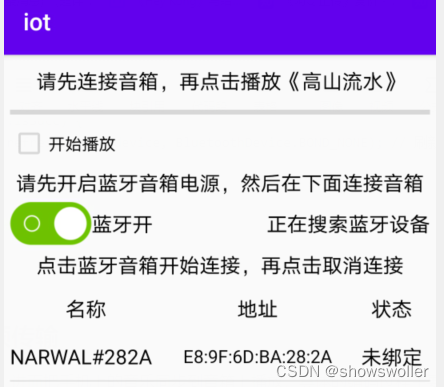
手机上开始播放放可以在音箱中听到音乐
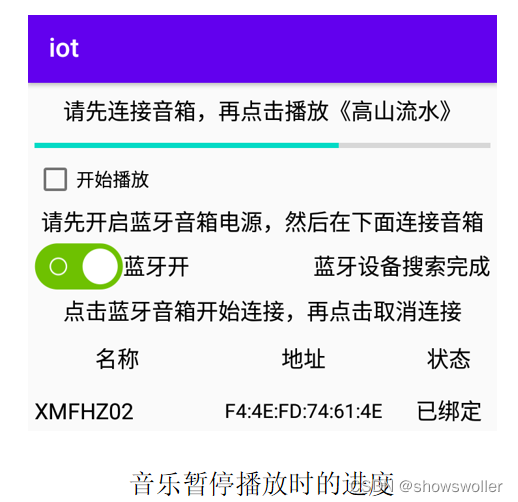
代码如下
package com.example.iot;

import android.annotation.SuppressLint;
import android.bluetooth.BluetoothA2dp;
import android.bluetooth.BluetoothAdapter;
import android.bluetooth.BluetoothDevice;
import android.bluetooth.BluetoothProfile;
import android.content.BroadcastReceiver;
import android.content.Context;
import android.content.Intent;
import android.content.IntentFilter;
import android.os.Build;
import android.os.Bundle;
import android.os.Handler;
import android.os.Looper;
import android.util.Log;
import android.view.View;
import android.widget.AdapterView;
import android.widget.AdapterView.OnItemClickListener;
import android.widget.CheckBox;
import android.widget.CompoundButton;
import android.widget.CompoundButton.OnCheckedChangeListener;
import android.widget.ListView;
import android.widget.TextView;
import android.widget.Toast;

import androidx.appcompat.app.AppCompatActivity;

import com.example.iot.adapter.BlueListAdapter;
import com.example.iot.bean.BlueDevice;
import com.example.iot.util.BluetoothUtil;
import com.example.iot.widget.AudioPlayer;

import java.util.ArrayList;
import java.util.List;
import java.util.Set;

@SuppressLint("SetTextI18n")
public class BluetoothA2dpActivity extends AppCompatActivity implements
        OnCheckedChangeListener, OnItemClickListener {
    private static final String TAG = "BluetoothA2dpActivity";
    private Context mContext; // 声明一个上下文对象
    private CheckBox ck_bluetooth; // 声明一个复选框对象
    private TextView tv_discovery; // 声明一个文本视图对象
    private ListView lv_bluetooth; // 声明一个用于展示蓝牙设备的列表视图对象
    private AudioPlayer ap_music; // 声明一个音频播放器对象
    private BluetoothAdapter mBluetooth; // 声明一个蓝牙适配器对象
    private BlueListAdapter mListAdapter; // 声明一个蓝牙设备的列表适配器对象
    private List<BlueDevice> mDeviceList = new ArrayList<>(); // 蓝牙设备列表
    private Handler mHandler = new Handler(Looper.myLooper()); // 声明一个处理器对象
    private int mOpenCode = 1; // 是否允许扫描蓝牙设备的选择对话框返回结果代码

    @Override
    protected void onCreate(Bundle savedInstanceState) {
        super.onCreate(savedInstanceState);
        setContentView(R.layout.activity_bluetooth_a2dp);
        mContext = this;
        initBluetooth(); // 初始化蓝牙适配器
        ck_bluetooth = findViewById(R.id.ck_bluetooth);
        tv_discovery = findViewById(R.id.tv_discovery);
        lv_bluetooth = findViewById(R.id.lv_bluetooth);
        ap_music = findViewById(R.id.ap_music);
        ck_bluetooth.setOnCheckedChangeListener(this);
        if (BluetoothUtil.getBlueToothStatus()) { // 已经打开蓝牙
            ck_bluetooth.setChecked(true);
        }
        initBlueDevice(); // 初始化蓝牙设备列表
        if (Build.VERSION.SDK_INT >= Build.VERSION_CODES.Q) {
            Toast.makeText(this, "Android10开始无法调用A2DP的隐藏方法", Toast.LENGTH_SHORT).show();
        }
    }

    // 初始化蓝牙适配器
    private void initBluetooth() {
        // 获取系统默认的蓝牙适配器
        mBluetooth = BluetoothAdapter.getDefaultAdapter();
        if (mBluetooth == null) {
            Toast.makeText(this, "当前设备未找到蓝牙功能", Toast.LENGTH_SHORT).show();
            finish(); // 关闭当前页面
        }
    }

    // 初始化蓝牙设备列表
    private void initBlueDevice() {
        mDeviceList.clear();
        // 获取已经配对的蓝牙设备集合
        Set<BluetoothDevice> bondedDevices = mBluetooth.getBondedDevices();
        for (BluetoothDevice device : bondedDevices) {
            mDeviceList.add(new BlueDevice(device.getName(), device.getAddress(), device.getBondState()));
        }
        if (mListAdapter == null) { // 首次打开页面,则创建一个新的蓝牙设备列表
            mListAdapter = new BlueListAdapter(this, mDeviceList);
            lv_bluetooth.setAdapter(mListAdapter);
            lv_bluetooth.setOnItemClickListener(this);
        } else { // 不是首次打开页面,则刷新蓝牙设备列表
            mListAdapter.notifyDataSetChanged();
        }
    }

    private Runnable mDiscoverable = new Runnable() {
        public void run() {
            // Android8.0要在已打开蓝牙功能时才会弹出下面的选择窗
            if (BluetoothUtil.getBlueToothStatus()) { // 已经打开蓝牙
                // 弹出是否允许扫描蓝牙设备的选择对话框
                Intent intent = new Intent(BluetoothAdapter.ACTION_REQUEST_DISCOVERABLE);
                startActivityForResult(intent, mOpenCode);
            } else {
                mHandler.postDelayed(this, 1000);
            }
        }
    };

    @Override
    public void onCheckedChanged(CompoundButton buttonView, boolean isChecked) {
        if (buttonView.getId() == R.id.ck_bluetooth) {
            if (isChecked) { // 开启蓝牙功能
                ck_bluetooth.setText("蓝牙开");
                if (!BluetoothUtil.getBlueToothStatus()) { // 还未打开蓝牙
                    BluetoothUtil.setBlueToothStatus(true); // 开启蓝牙功能
                }
                mHandler.post(mDiscoverable);
            } else { // 关闭蓝牙功能
                ck_bluetooth.setText("蓝牙关");
                cancelDiscovery(); // 取消蓝牙设备的搜索
                BluetoothUtil.setBlueToothStatus(false); // 关闭蓝牙功能
                initBlueDevice(); // 初始化蓝牙设备列表
            }
        }
    }

    @Override
    protected void onActivityResult(int requestCode, int resultCode, Intent intent) {
        super.onActivityResult(requestCode, resultCode, intent);
        if (requestCode == mOpenCode) { // 来自允许蓝牙扫描的对话框
            // 延迟50毫秒后启动蓝牙设备的刷新任务
            mHandler.postDelayed(mRefresh, 50);
            if (resultCode == RESULT_OK) {
                Toast.makeText(this, "允许本地蓝牙被附近的其他蓝牙设备发现",
                        Toast.LENGTH_SHORT).show();
            } else if (resultCode == RESULT_CANCELED) {
                Toast.makeText(this, "不允许蓝牙被附近的其他蓝牙设备发现",
                        Toast.LENGTH_SHORT).show();
            }
        }
    }

    // 定义一个刷新任务,每隔两秒刷新扫描到的蓝牙设备
    private Runnable mRefresh = new Runnable() {
        @Override
        public void run() {
            beginDiscovery(); // 开始扫描周围的蓝牙设备
            // 延迟2秒后再次启动蓝牙设备的刷新任务
            mHandler.postDelayed(this, 2000);
        }
    };

    // 开始扫描周围的蓝牙设备
    private void beginDiscovery() {
        // 如果当前不是正在搜索,则开始新的搜索任务
        if (!mBluetooth.isDiscovering()) {
            initBlueDevice(); // 初始化蓝牙设备列表
            tv_discovery.setText("正在搜索蓝牙设备");
            mBluetooth.startDiscovery(); // 开始扫描周围的蓝牙设备
        }
    }

    // 取消蓝牙设备的搜索
    private void cancelDiscovery() {
        mHandler.removeCallbacks(mRefresh);
        tv_discovery.setText("取消搜索蓝牙设备");
        // 当前正在搜索,则取消搜索任务
        if (mBluetooth.isDiscovering()) {
            mBluetooth.cancelDiscovery(); // 取消扫描周围的蓝牙设备
        }
    }

    @Override
    protected void onStart() {
        super.onStart();
        mHandler.postDelayed(mRefresh, 50);
        // 注册蓝牙设备搜索的广播接收器
        IntentFilter discoveryFilter = new IntentFilter();
        discoveryFilter.addAction(BluetoothDevice.ACTION_FOUND);
        discoveryFilter.addAction(BluetoothAdapter.ACTION_DISCOVERY_FINISHED);
        discoveryFilter.addAction(BluetoothDevice.ACTION_BOND_STATE_CHANGED);
        registerReceiver(discoveryReceiver, discoveryFilter);
        // 获取A2DP的蓝牙代理
        mBluetooth.getProfileProxy(this, serviceListener, BluetoothProfile.A2DP);
        IntentFilter a2dpFilter = new IntentFilter(); // 创建一个意图过滤器
        // 指定A2DP的连接状态变更广播
        a2dpFilter.addAction(BluetoothA2dp.ACTION_CONNECTION_STATE_CHANGED);
        // 指定A2DP的播放状态变更广播
        a2dpFilter.addAction(BluetoothA2dp.ACTION_PLAYING_STATE_CHANGED);
        registerReceiver(a2dpReceiver, a2dpFilter); // 注册A2DP连接管理的广播接收器
    }

    @Override
    protected void onStop() {
        super.onStop();
        cancelDiscovery(); // 取消蓝牙设备的搜索
        unregisterReceiver(discoveryReceiver); // 注销蓝牙设备搜索的广播接收器
        unregisterReceiver(a2dpReceiver); // 注销A2DP连接管理的广播接收器
    }

    // 蓝牙设备的搜索结果通过广播返回
    private BroadcastReceiver discoveryReceiver = new BroadcastReceiver() {
        @Override
        public void onReceive(Context context, Intent intent) {
            String action = intent.getAction();
            Log.d(TAG, "onReceive action=" + action);
            // 获得已经搜索到的蓝牙设备
            if (action.equals(BluetoothDevice.ACTION_FOUND)) { // 发现新的蓝牙设备
                BluetoothDevice device = intent.getParcelableExtra(BluetoothDevice.EXTRA_DEVICE);
                Log.d(TAG, "name=" + device.getName() + ", state=" + device.getBondState());
                refreshDevice(device, device.getBondState()); // 将发现的蓝牙设备加入到设备列表
            } else if (action.equals(BluetoothAdapter.ACTION_DISCOVERY_FINISHED)) { // 搜索完毕
                //mHandler.removeCallbacks(mRefresh); // 需要持续搜索就要注释这行
                tv_discovery.setText("蓝牙设备搜索完成");
            } else if (action.equals(BluetoothDevice.ACTION_BOND_STATE_CHANGED)) { // 配对状态变更
                BluetoothDevice device = intent.getParcelableExtra(BluetoothDevice.EXTRA_DEVICE);
                if (device.getBondState() == BluetoothDevice.BOND_BONDING) {
                    tv_discovery.setText("正在配对" + device.getName());
                } else if (device.getBondState() == BluetoothDevice.BOND_BONDED) {
                    tv_discovery.setText("完成配对" + device.getName());
                    mHandler.postDelayed(mRefresh, 50);
                } else if (device.getBondState() == BluetoothDevice.BOND_NONE) {
                    tv_discovery.setText("取消配对" + device.getName());
                    refreshDevice(device, device.getBondState()); // 刷新蓝牙设备列表
                }
            }
        }
    };

    // 刷新蓝牙设备列表
    private void refreshDevice(BluetoothDevice device, int state) {
        int i;
        for (i = 0; i < mDeviceList.size(); i++) {
            BlueDevice item = mDeviceList.get(i);
            if (item.address.equals(device.getAddress())) {
                item.state = state;
                mDeviceList.set(i, item);
                break;
            }
        }
        if (i >= mDeviceList.size()) {
            mDeviceList.add(new BlueDevice(device.getName(), device.getAddress(), device.getBondState()));
        }
        mListAdapter.notifyDataSetChanged();
    }

    private String mAddress;
    @Override
    public void onItemClick(AdapterView<?> parent, View view, int position, long id) {
        mAddress = mDeviceList.get(position).address;
        // 根据设备地址获得远端的蓝牙设备对象
        BluetoothDevice device = mBluetooth.getRemoteDevice(mAddress);
        if (device.getBondState() == BluetoothDevice.BOND_NONE) { // 尚未配对
            BluetoothUtil.connectA2dp(bluetoothA2dp, device); // 创建配对信息
        } else if (device.getBondState() == BluetoothDevice.BOND_BONDED) { // 已经配对
            BluetoothUtil.removeBond(device); // 移除配对信息
        } else if (device.getBondState() == BlueListAdapter.CONNECTED) { // 已经建立A2DP连接
            BluetoothUtil.disconnectA2dp(bluetoothA2dp, device); // 断开A2DP连接
        }
    }

    private BluetoothA2dp bluetoothA2dp; // 声明一个蓝牙音频传输对象
    // 定义一个A2DP的服务监听器,类似于Service的绑定方式启停,
    // 也有onServiceConnected和onServiceDisconnected两个接口方法
    private BluetoothProfile.ServiceListener serviceListener = new BluetoothProfile.ServiceListener() {

        // 在服务断开连接时触发
        @Override
        public void onServiceDisconnected(int profile) {
            if (profile == BluetoothProfile.A2DP) {
                Toast.makeText(mContext, "onServiceDisconnected", Toast.LENGTH_SHORT).show();
                bluetoothA2dp = null; // A2DP已连接,则释放A2DP的蓝牙代理
            }
        }

        // 在服务建立连接时触发
        @Override
        public void onServiceConnected(int profile, final BluetoothProfile proxy) {
            if (profile == BluetoothProfile.A2DP) {
                Toast.makeText(mContext, "onServiceConnected", Toast.LENGTH_SHORT).show();
                bluetoothA2dp = (BluetoothA2dp) proxy; // A2DP已连接,则设置A2DP的蓝牙代理
            }
        }
    };

    // 定义一个A2DP连接的广播接收器
    private BroadcastReceiver a2dpReceiver = new BroadcastReceiver() {
        @Override
        public void onReceive(Context context, Intent intent) {
            switch (intent.getAction()) {
                // 侦听到A2DP的连接状态变更广播
                case BluetoothA2dp.ACTION_CONNECTION_STATE_CHANGED:
                    BluetoothDevice device = mBluetooth.getRemoteDevice(mAddress);
                    int connectState = intent.getIntExtra(BluetoothA2dp.EXTRA_STATE,
                            BluetoothA2dp.STATE_DISCONNECTED);
                    if (connectState == BluetoothA2dp.STATE_CONNECTED) {
                        // 收到连接上的广播,则更新设备状态为已连接
                        refreshDevice(device, BlueListAdapter.CONNECTED); // 刷新蓝牙设备列表
                        ap_music.initFromRaw(mContext, R.raw.mountain_and_water);
                        Toast.makeText(mContext, "已连上蓝牙音箱。快来播放音乐试试",
                                Toast.LENGTH_SHORT).show();
                    } else if (connectState == BluetoothA2dp.STATE_DISCONNECTED) {
                        // 收到断开连接的广播,则更新设备状态为已断开
                        refreshDevice(device, BluetoothDevice.BOND_NONE); // 刷新蓝牙设备列表
                        Toast.makeText(mContext, "已断开蓝牙音箱",
                                Toast.LENGTH_SHORT).show();
                    }
                    break;
                // 侦听到A2DP的播放状态变更广播
                case BluetoothA2dp.ACTION_PLAYING_STATE_CHANGED:
                    int playState = intent.getIntExtra(BluetoothA2dp.EXTRA_STATE,
                            BluetoothA2dp.STATE_NOT_PLAYING);
                    if (playState == BluetoothA2dp.STATE_PLAYING) {
                        Toast.makeText(mContext, "蓝牙音箱正在播放",
                                Toast.LENGTH_SHORT).show();
                    } else if (playState == BluetoothA2dp.STATE_NOT_PLAYING) {
                        Toast.makeText(mContext, "蓝牙音箱停止播放",
                                Toast.LENGTH_SHORT).show();
                    }
                    break;
            }
        }
    };

}
要想不通过网络服务器中转,直接把数据从A手机传给B手机,就要借助于蓝牙技术。 Android为蓝牙技术提供了4个工具类:
(1)蓝牙适配器BuletoothAdapter
(2)蓝牙设备BluetoothDevice
(3)蓝牙服务端套接字BluetoothServerSocket
(4)蓝牙客户端套接字BluetoothSocket
使用蓝牙传输数据的完整步骤
(1)开启蓝牙功能
(2)确认配对并完成绑定
(3)建立蓝牙连接
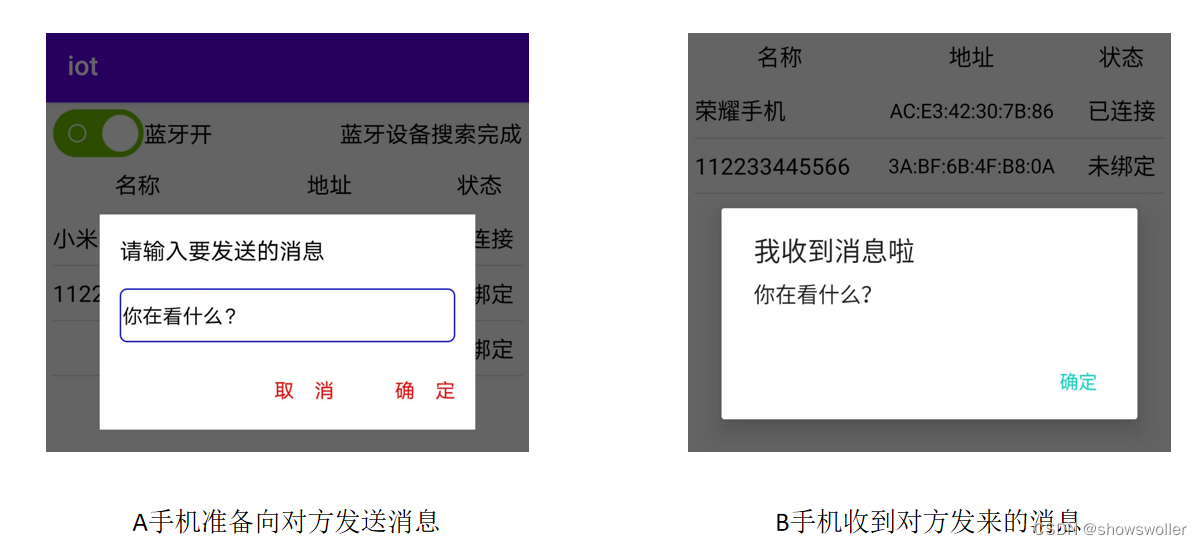
(4)通过蓝牙发送消息
运行测试效果如下
代码如下
package com.example.iot;

import androidx.appcompat.app.AppCompatActivity;

import android.bluetooth.BluetoothAdapter;
import android.bluetooth.BluetoothDevice;
import android.bluetooth.BluetoothGatt;
import android.bluetooth.BluetoothGattCharacteristic;
import android.bluetooth.BluetoothGattServer;
import android.bluetooth.BluetoothGattServerCallback;
import android.bluetooth.BluetoothGattService;
import android.bluetooth.BluetoothManager;
import android.bluetooth.BluetoothProfile;
import android.bluetooth.le.AdvertiseCallback;
import android.bluetooth.le.AdvertiseData;
import android.bluetooth.le.AdvertiseSettings;
import android.bluetooth.le.BluetoothLeAdvertiser;
import android.content.Context;
import android.content.pm.PackageManager;
import android.os.Bundle;
import android.os.Handler;
import android.os.Looper;
import android.text.TextUtils;
import android.util.Log;
import android.view.View;
import android.view.WindowManager;
import android.widget.EditText;
import android.widget.LinearLayout;
import android.widget.ScrollView;
import android.widget.TextView;
import android.widget.Toast;

import com.example.iot.constant.BleConstant;
import com.example.iot.util.BluetoothUtil;
import com.example.iot.util.ChatUtil;
import com.example.iot.util.DateUtil;
import com.example.iot.util.Utils;
import com.example.iot.util.ViewUtil;

import java.util.List;

public class BleServerActivity extends AppCompatActivity {
    private static final String TAG = "BleServerActivity";
    private TextView tv_hint; // 声明一个文本视图对象
    private ScrollView sv_chat; // 声明一个滚动视图对象
    private LinearLayout ll_show; // 声明一个线性视图对象
    private LinearLayout ll_input; // 声明一个线性视图对象
    private EditText et_input; // 声明一个编辑框对象
    private Handler mHandler = new Handler(Looper.myLooper()); // 声明一个处理器对象
    private int dip_margin; // 每条聊天记录的四周空白距离
    private String mMinute = "00:00";

    private BluetoothManager mBluetoothManager; // 声明一个蓝牙管理器对象
    private BluetoothAdapter mBluetoothAdapter; // 声明一个蓝牙适配器对象
    private BluetoothDevice mRemoteDevice; // 声明一个蓝牙设备对象
    private BluetoothGattServer mGattServer; // 声明一个蓝牙GATT服务器对象
    private BluetoothGattCharacteristic mReadChara; // 客户端读取数据的特征值

    @Override
    protected void onCreate(Bundle savedInstanceState) {
        super.onCreate(savedInstanceState);
        setContentView(R.layout.activity_ble_server);
        getWindow().addFlags(WindowManager.LayoutParams.FLAG_KEEP_SCREEN_ON); // 保持屏幕常亮
        initView(); // 初始化视图
        initBluetooth(); // 初始化蓝牙适配器
        mHandler.postDelayed(mAdvertise, 200); // 延迟200毫秒开启低功耗蓝牙广播任务
    }

    // 初始化视图
    private void initView() {
        dip_margin = Utils.dip2px(this, 5);
        tv_hint = findViewById(R.id.tv_hint);
        sv_chat = findViewById(R.id.sv_chat);
        ll_show = findViewById(R.id.ll_show);
        ll_input = findViewById(R.id.ll_input);
        et_input = findViewById(R.id.et_input);
        findViewById(R.id.btn_send).setOnClickListener(v -> sendMesssage());
    }

    // 初始化蓝牙适配器
    private void initBluetooth() {
        if (!getPackageManager().hasSystemFeature(PackageManager.FEATURE_BLUETOOTH_LE)) {
            Toast.makeText(this, "当前设备不支持低功耗蓝牙", Toast.LENGTH_SHORT).show();
            finish(); // 关闭当前页面
        }
        // 获取蓝牙管理器,并从中得到蓝牙适配器
        mBluetoothManager =(BluetoothManager) getSystemService(Context.BLUETOOTH_SERVICE);
        mBluetoothAdapter = mBluetoothManager.getAdapter(); // 获取蓝牙适配器
        if (!BluetoothUtil.getBlueToothStatus()) { // 还未打开蓝牙
            BluetoothUtil.setBlueToothStatus(true); // 开启蓝牙功能
        }
    }

    // 创建一个低功耗蓝牙广播任务
    private Runnable mAdvertise = new Runnable() {
        @Override
        public void run() {
            if (BluetoothUtil.getBlueToothStatus()) { // 已经打开蓝牙
                stopAdvertise(); // 停止低功耗蓝牙广播
                String server_name = getIntent().getStringExtra("server_name");
                startAdvertise(server_name); // 开始低功耗蓝牙广播
                tv_hint.setText("“"+server_name+"”服务端正在广播,请等候客户端连接");
            } else {
                mHandler.postDelayed(this, 2000);
            }
        }
    };

    // 开始低功耗蓝牙广播
    private void startAdvertise(String ble_name) {
        // 设置广播参数
        AdvertiseSettings settings = new AdvertiseSettings.Builder()
                .setConnectable(true) // 是否允许连接
                .setTimeout(0) // 设置超时时间
                .setTxPowerLevel(AdvertiseSettings.ADVERTISE_TX_POWER_HIGH)
                .setAdvertiseMode(AdvertiseSettings.ADVERTISE_MODE_LOW_LATENCY)
                .build();
        // 设置广播内容
        AdvertiseData advertiseData = new AdvertiseData.Builder()
                .setIncludeDeviceName(true) // 是否把设备名称也广播出去
                .setIncludeTxPowerLevel(true) // 是否把功率电平也广播出去
                .build();
        mBluetoothAdapter.setName(ble_name); // 设置BLE服务端的名称
        // 获取BLE广播器
        BluetoothLeAdvertiser advertiser = mBluetoothAdapter.getBluetoothLeAdvertiser();
        // BLE服务端开始广播,好让别人发现自己
        advertiser.startAdvertising(settings, advertiseData, mAdvertiseCallback);
    }

    // 停止低功耗蓝牙广播
    private void stopAdvertise() {
        if (mBluetoothAdapter != null) {
            // 获取BLE广播器
            BluetoothLeAdvertiser advertiser = mBluetoothAdapter.getBluetoothLeAdvertiser();
            if (advertiser != null) {
                advertiser.stopAdvertising(mAdvertiseCallback); // 停止低功耗蓝牙广播
            }
        }
    }

    // 创建一个低功耗蓝牙广播回调对象
    private AdvertiseCallback mAdvertiseCallback = new AdvertiseCallback() {
        @Override
        public void onStartSuccess(AdvertiseSettings settings) {
            Log.d(TAG, "低功耗蓝牙广播成功:"+settings.toString());
            addService(); // 添加读写服务UUID,特征值等
        }

        @Override
        public void onStartFailure(int errorCode) {
            Log.d(TAG, "低功耗蓝牙广播失败,错误代码为"+errorCode);
        }
    };

    // 添加读写服务UUID,特征值等
    private void addService() {
        BluetoothGattService gattService = new BluetoothGattService(
                BleConstant.UUID_SERVER, BluetoothGattService.SERVICE_TYPE_PRIMARY);
        // 只读的特征值
        mReadChara = new BluetoothGattCharacteristic(BleConstant.UUID_CHAR_READ,
                BluetoothGattCharacteristic.PROPERTY_READ | BluetoothGattCharacteristic.PROPERTY_NOTIFY,
                BluetoothGattCharacteristic.PERMISSION_READ);
        // 只写的特征值
        BluetoothGattCharacteristic charaWrite = new BluetoothGattCharacteristic(BleConstant.UUID_CHAR_WRITE,
                BluetoothGattCharacteristic.PROPERTY_WRITE | BluetoothGattCharacteristic.PROPERTY_NOTIFY,
                BluetoothGattCharacteristic.PERMISSION_WRITE);
        gattService.addCharacteristic(mReadChara); // 将特征值添加到服务里面
        gattService.addCharacteristic(charaWrite); // 将特征值添加到服务里面
        // 开启GATT服务器等待客户端连接
        mGattServer = mBluetoothManager.openGattServer(this, mGattCallback);
        mGattServer.addService(gattService); // 向GATT服务器添加指定服务
    }

    private BluetoothGattServerCallback mGattCallback = new BluetoothGattServerCallback() {
        // BLE连接的状态发生变化时回调
        @Override
        public void onConnectionStateChange(BluetoothDevice device, int status, int newState) {
            super.onConnectionStateChange(device, status, newState);
            Log.d(TAG, "onConnectionStateChange device=" + device.toString() + " status=" + status + " newState=" + newState);
            if (newState == BluetoothProfile.STATE_CONNECTED) {
                mRemoteDevice = device;
                runOnUiThread(() -> {
                    String desc = String.format("已连接BLE客户端,对方名称为“%s”,MAC地址为%s",
                            device.getName(), device.getAddress());
                    tv_hint.setText(desc);
                    ll_input.setVisibility(View.VISIBLE);
                });
            }
        }

        // 收到BLE客户端写入请求时回调
        @Override
        public void onCharacteristicWriteRequest(BluetoothDevice device, int requestId, BluetoothGattCharacteristic chara, boolean preparedWrite, boolean responseNeeded, int offset, byte[] value) {
            super.onCharacteristicWriteRequest(device, requestId, chara, preparedWrite, responseNeeded, offset, value);
            String message = new String(value); // 把客户端发来的数据转成字符串
            Log.d(TAG, "收到了客户端发过来的数据 " + message);
            // 向GATT客户端发送应答,告诉它成功收到了要写入的数据
            mGattServer.sendResponse(device, requestId, BluetoothGatt.GATT_SUCCESS, offset, chara.getValue());
            runOnUiThread(() -> appendChatMsg(message, false)); // 往聊天窗口添加聊天消息
        }
    };

    @Override
    protected void onDestroy() {
        super.onDestroy();
        stopAdvertise(); // 停止低功耗蓝牙广播
        if (mGattServer != null) {
            mGattServer.close(); // 关闭GATT服务器
        }
    }

    // 发送聊天消息
    private void sendMesssage() {
        String message = et_input.getText().toString();
        if (TextUtils.isEmpty(message)) {
            Toast.makeText(this, "请先输入聊天消息", Toast.LENGTH_SHORT).show();
            return;
        }
        et_input.setText("");
        ViewUtil.hideOneInputMethod(this, et_input); // 隐藏软键盘
        List<String> msgList = ChatUtil.splitString(message, 20); // 按照20字节切片
        for (String msg : msgList) {
            mReadChara.setValue(msg); // 设置读特征值
            // 发送本地特征值已更新的通知
            mGattServer.notifyCharacteristicChanged(mRemoteDevice, mReadChara, false);
        }
        appendChatMsg(message, true); // 往聊天窗口添加聊天消息
    }

    // 往聊天窗口添加聊天消息
    private void appendChatMsg(String content, boolean isSelf) {
        appendNowMinute(); // 往聊天窗口添加当前时间
        // 把单条消息的线性布局添加到聊天窗口上
        ll_show.addView(ChatUtil.getChatView(this, content, isSelf));
        // 延迟100毫秒后启动聊天窗口的滚动任务
        new Handler(Looper.myLooper()).postDelayed(() -> {
            sv_chat.fullScroll(ScrollView.FOCUS_DOWN); // 滚动到底部
        }, 100);
    }

    // 往聊天窗口添加当前时间
    private void appendNowMinute() {
        String nowMinute = DateUtil.getNowMinute();
        if (!mMinute.substring(0, 4).equals(nowMinute.substring(0, 4))) {
            mMinute = nowMinute;
            ll_show.addView(ChatUtil.getHintView(this, nowMinute, dip_margin));
        }
    }

}
创作不易 觉得有帮助请点赞关注收藏~~~
一、引擎主循环UE版本:4.27一、引擎主循环的位置:Launch.cpp:GuardedMain函数二、、GuardedMain函数执行逻辑:1、EnginePreInit:加载大多数模块int32ErrorLevel=EnginePreInit(CmdLine);PreInit模块加载顺序:模块加载过程:(1)注册模块中定义的UObject,同时为每个类构造一个类默认对象(CDO,记录类的默认状态,作为模板用于子类实例创建)(2)调用模块的StartUpModule方法2、FEngineLoop::Init()1、检查Engine的配置文件找出使用了哪一个GameEngine类(UGame
@作者:SYFStrive @博客首页:HomePage📜:微信小程序📌:个人社区(欢迎大佬们加入)👉:社区链接🔗📌:觉得文章不错可以点点关注👉:专栏连接🔗💃:感谢支持,学累了可以先看小段由小胖给大家带来的街舞👉微信小程序(🔥)目录自定义组件-behaviors 1、什么是behaviors 2、behaviors的工作方式 3、创建behavior 4、导入并使用behavior 5、behavior中所有可用的节点 6、同名字段的覆盖和组合规则总结最后自定义组件-behaviors 1、什么是behaviorsbehaviors是小程序中,用于实现
1.回顾.TransportServicepublicclassTransportServiceextendsAbstractLifecycleComponentTransportService:方法:1publicfinalTextendsTransportResponse>voidsendRequest(finalTransport.Connectionconnection,finalStringaction,finalTransportRequestrequest,finalTransportRequestOptionsoptions,TransportResponseHandlerT>
参考文章搭建文章gitte源码在线体验可以注册两个号来测试演示图:一.整体介绍 介绍SignalR一种通讯模型Hub(中心模型,或者叫集线器模型),调用这个模型写好的方法,去发送消息。 内容有: ①:Hub模型的方法介绍 ②:服务器端代码介绍 ③:前端vue3安装并调用后端方法 ④:聊天室样例整体流程:1、进入网站->调用连接SignalR的方法2、与好友发送消息->调用SignalR的自定义方法 前端通过,signalR内置方法.invoke() 去请求接口3、监听接受方法(渲染消息)通过new signalR.HubConnectionBuilder().on
我正在尝试下载一个大文件,然后使用Ruby将该文件发布到REST端点。该文件可能非常大,即超过可以存储在内存中甚至磁盘上的临时文件中的容量。我一直在用Net::HTTP尝试这个,但我愿意接受任何其他库(rest-client等)的解决方案,只要他们做我想做的事情。这是我尝试过的:require'net/http'source_uri=URI("https://example.org/very_large_file")source_request=Net::HTTP::Get.new(source_uri)source_http=Net::HTTP.start(source_uri.ho
我在Heroku上构建了一个必须在Docker容器内运行的RoR应用程序。为此,我使用officialDockerfile.因为它在Heroku中很常见,所以我需要一些附加组件才能使这个应用程序完全运行。在生产中,变量DATABASE_URL在我的应用程序中可用。但是,如果我尝试其他一些使用环境变量(在我的例子中是Mailtrap)的加载项,变量不会在运行时复制到实例中。所以我的问题很简单:如何让docker实例在Heroku上执行时知道环境变量?您可能会问,我已经知道我们可以在docker-compose.yml中指定一个environment指令。我想避免这种情况,以便能够通过项目
快速导航(持续更新中…)Cesium源码解析一(terrain文件的加载、解析与渲染全过程梳理)Cesium源码解析二(metadataAvailability的含义)Cesium源码解析三(metadata元数据拓展中行列号的分块规则解析)Cesium源码解析四(Quantized-Mesh(.terrain)格式文件在CesiumJS和UE中加载情况的对比)目录1.前言2.本篇的由来3.terrain文件的加载3.1更新环境3.2更新和执行渲染命令3.3数据优化3.4结束当前帧4.总结1.前言 目前市场上三维比较火的实现方案主要有两种,b/s的方案主要是Cesium,c/s的方案主要是u
最近在工作中,看到一些新手测试同学,对接口测试存在很多疑问,甚至包括一些从事软件测试3,5年的同学,在聊到接口时,也是一知半解;今天借着这个机会,对接口测试做个实战教学,顺便总结一下经验,分享给大家。计划拆分成4个模块跟大家做一个分享,(接口测试、接口基础知识、接口自动化、接口进阶)感兴趣的小伙伴记得关注,希望对你的日常工作和求职面试,带来一些帮助。注:文章较长有5000多字,希望小伙伴们认真看完,当然有些内容对小白同学不是太友好,如果你需要详细了解其中的一些概念或者名词,请在文章之后留言,后续我将针对大家的疑问,整理输出一些大家感兴趣的文章。随着开发模式的迭代更新,前后端分离已不是新的概念,
似乎Capistrano曾经有anextensivefiletransferpackage.但是在3.0版本重写后好像没有了。知道是否还有其他方法可以将文件传输到服务器/从服务器传输文件吗? 最佳答案 下载:desc"downloadfoobar.txtintolocal_dir/"task:foobardodownload!"some_remote_path/foobar.txt","local_dir/"end我知道这从Cap3.2.1开始有效,因为我现在正在使用它。 关于ruby-
我正在尝试将数据从我的生产数据库传输到我的登台数据库,但没有成功。我正在关注heroku的相关文档:http://devcenter.heroku.com/articles/pgbackups#transfers这些是我运行的命令...$herokuaddons:addpgbackups--remotestaging$herokuaddons:addpgbackups--remoteproduction$herokupgbackups:capture--remoteproduction$herokupgbackups:restoreDATABASE`herokupgbackups:ur
