elasticsearch我已经装了ik,中文分词器。已经使用容器搭建了集群。之前在我的博客-elasticsearch入门中,已经介绍了http请求操纵es的基本功能,java API功能和他一样,只是从http请求换成了javaApi操作。当然你还是想写http操作也没有问题的,看我的目录跳转到万金油。
springBoot里继承了elasticsearch,他是spring-data的一个子模块,里面的主要核心就是ElasticsearchRepository。只要你写一个interface继承他,就可以用基本的CRUD操作es。
如果你想要http那样灵活的操作es,他提供了elasticsearchRestTemplate,你可以把他看成一个小型的http,你要通过代码的形式将http中的内容表示出来,在通过这个template发送。
<dependencies>
<dependency>
<groupId>org.springframework.boot</groupId>
<artifactId>spring-boot-starter-web</artifactId>
</dependency>
<dependency>
<groupId>org.springframework.boot</groupId>
<artifactId>spring-boot-starter-test</artifactId>
<scope>test</scope>
</dependency>
<dependency>
<groupId>org.springframework.boot</groupId>
<artifactId>spring-boot-starter-data-elasticsearch</artifactId>
</dependency>
<dependency>
<groupId>org.springframework.data</groupId>
<artifactId>spring-data-elasticsearch</artifactId>
</dependency>
<dependency>
<groupId>org.projectlombok</groupId>
<artifactId>lombok</artifactId>
<version>1.18.12</version>
</dependency>
</dependencies>
在你的springBoot项目里,我的是application.properties,加一个自己的地址,这样启动springBoot的时候就会自动识别了。
spring.elasticsearch.uris=http://192.168.9.102:9200

最好创建一个与es数据相对应的实体类
我的es:

我的实体类:
package com.example.elaticsearchtest2.entity;


import lombok.Data;
import org.springframework.data.annotation.Id;
import org.springframework.data.elasticsearch.annotations.DateFormat;
import org.springframework.data.elasticsearch.annotations.Document;
import org.springframework.data.elasticsearch.annotations.Field;
import org.springframework.data.elasticsearch.annotations.FieldType;
//lombok自动加get,set以及构造
@Data
//指定索引
@Document(indexName = "game")
public class GameEntity  {
@Id
    private String id;

    /**
     * 游戏名
     */
    @Field(type = FieldType.Text, analyzer = "ik_max_word")
private String name;

    /**
     * 创建日期
     */
    @Field(type = FieldType.Date, format = DateFormat.date, pattern = "yyyy-MM-dd HH:mm:ss")
private String date;


    /**
     * 游戏介绍
     */
    @Field(type = FieldType.Text, analyzer = "ik_max_word", searchAnalyzer = "ik_smart")
private String introduction;


    /**
     * 主页面地址
     */
    @Field(type = FieldType.Text)
private String url;
}
其中analyzer代表的是分词方式,ik_max_word是ik中文分词器的细粒度模式,关于ik具体请看我的博客 elatiscsearch入门教程中有写到
他的标准用法是用【数据实体类的interface-repository】去继承它
首先写一个,关于game索引的数据实体类的interface
package com.example.elaticsearchtest2.controller;

import com.example.elaticsearchtest2.entity.GameEntity;
import org.springframework.data.elasticsearch.repository.ElasticsearchRepository;
import org.springframework.stereotype.Repository;


@Repository
public interface GameRepository extends ElasticsearchRepository<GameEntity,Long> {


}
其中,继承参数的那里GameEntity就是我之前写的数据实体,Long代表的是行数类型
一定要加一个repository注解,这样才能被springBoot识别
测试类,一定要用@SpringBootTest注解,这样才能模拟springBoot的运行
然后,自动注入刚刚的接口gameRepository,然后在写一个test方法,调用查询做测试
package com.example.elaticsearchtest2;

import com.example.elaticsearchtest2.controller.GameRepository;

import com.example.elaticsearchtest2.entity.GameEntity;

import org.junit.jupiter.api.Test;
import org.springframework.beans.factory.annotation.Autowired;
import org.springframework.boot.test.context.SpringBootTest;

@SpringBootTest
public class ConnectTest {
@Autowired
    GameRepository gameRepository ;
    @Test
    public void test1(){
        Iterable<GameEntity> all = gameRepository.findAll();
        for(GameEntity one:all){
            System.out.println(one);
        }
    }
}
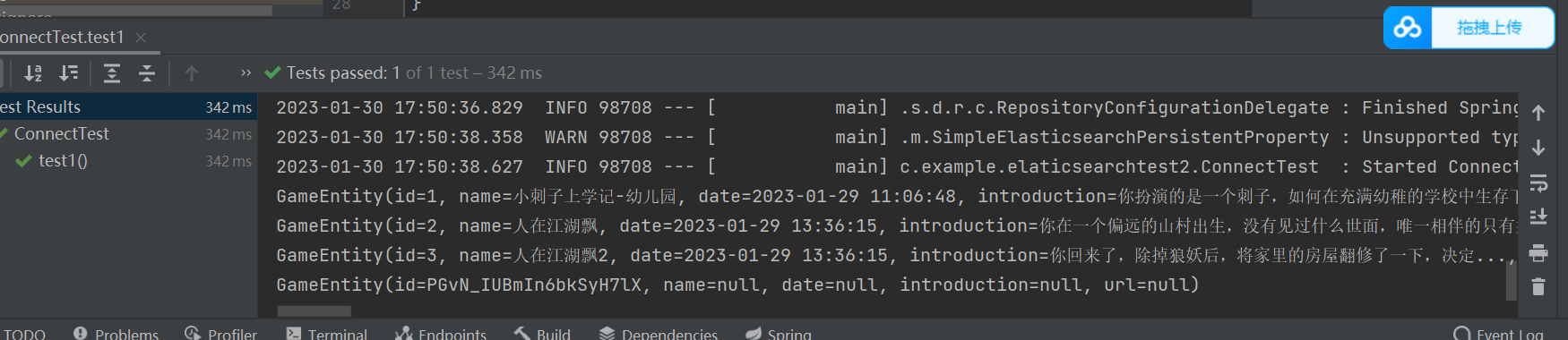
右键运行,成功显示出es的数据
这种方法最好用,而且他还支持自定义方法,比下面的那个好用多了。
这个写起来很复杂,但是笔记灵活,可以说和http一样,什么功能都有。
有了这个东西就很灵活了,能通过它做各种查询,但是这个东西怎么构建?
他是基于RestHighLevelClient的,也就是说你要先构建这个client,而springBoot-data已经能自动识别这个了,所以你只用在springBoot工程下的任何一个地方,创建一个es的配置类,他就能识别了。
es配置类(用于生成RestHighLevelClient)
package com.example.elaticsearchtest2.tools;
import lombok.Data;
import org.apache.http.HttpHost;
import org.elasticsearch.client.RestClient;
import org.elasticsearch.client.RestClientBuilder;
import org.elasticsearch.client.RestHighLevelClient;
import org.springframework.context.annotation.Configuration;
import org.springframework.data.elasticsearch.config.AbstractElasticsearchConfiguration;


@Configuration
@Data
public class ElasticsearchConfig extends AbstractElasticsearchConfiguration {
    private String host="192.168.9.102";
    private Integer port=9200;
    @Override
    public RestHighLevelClient elasticsearchClient() {
        RestClientBuilder builder = RestClient.builder(new HttpHost(host,port));
        RestHighLevelClient restHighLevelClient = new RestHighLevelClient(builder);
        return restHighLevelClient;
    }
}
回到代码测试类
编写matchTest方法做temp的测试
package com.example.elaticsearchtest2;
import com.example.elaticsearchtest2.controller.GameRepository;
import com.example.elaticsearchtest2.tools.ElasticsearchConfig;
import org.elasticsearch.index.query.MatchQueryBuilder;
import org.elasticsearch.index.query.QueryBuilders;
import com.example.elaticsearchtest2.entity.GameEntity;
import org.junit.jupiter.api.Test;
import org.springframework.beans.factory.annotation.Autowired;
import org.springframework.boot.test.context.SpringBootTest;
import org.springframework.data.elasticsearch.core.ElasticsearchRestTemplate;
import org.springframework.data.elasticsearch.core.SearchHit;
import org.springframework.data.elasticsearch.core.SearchHits;
import org.springframework.data.elasticsearch.core.query.*;
@SpringBootTest
public class ConnectTest {
@Autowired
GameRepository gameRepository ;
@Test
public void test1(){
Iterable<GameEntity> all = gameRepository.findAll();
for(GameEntity one:all){
System.out.println(one);
}
}
@Test
public void test2(){
ElasticsearchRestTemplate elasticsearchRestTemplate
=new ElasticsearchRestTemplate(new ElasticsearchConfig().elasticsearchClient());
//构建查询条件
MatchQueryBuilder matchQueryBuilder =
QueryBuilders.matchQuery("_all", "小刺字")
.analyzer("ik_max_word");
}
@Test
void matchTest() {
ElasticsearchRestTemplate elasticsearchRestTemplate
=new ElasticsearchRestTemplate(new ElasticsearchConfig().elasticsearchClient());
MatchQueryBuilder matchQueryBuilder =
new MatchQueryBuilder("name", "小池子")
.analyzer("ik_smart");
NativeSearchQuery nativeSearchQuery = new NativeSearchQuery(matchQueryBuilder);
SearchHits<GameEntity> searchHits = elasticsearchRestTemplate.search(nativeSearchQuery, GameEntity.class);
for (SearchHit<GameEntity> searchHit : searchHits) {
GameEntity game = searchHit.getContent();
System.out.println(game);
}
}
}
结果

虽然我们用的是过时版本的,但是刚好能满足客户版本的需求,我们用的版本是7.9.3,但是es官方8.1已经不用resthighlevelclient了,而是用elasticsearch-java。
这里通过java查询就和你用dsl查询一摸一样。方便的要死!

主要用到的是es自带的
QueryBuilders.wrapperQuery(dsl); /**wrapperQuery这个是包装器的意思,会自动给你包装个query**/
好处是你不用写query,坏处是不能自定义,如果涉及高亮和size限制就没办法。
只能单独在后面,通过其他方法添加。这也是java中es的不足之处,所以大家能不用java还是别用,这个语言,没什么好处,处理速度没c快,写的速度没有python便捷,只是因为国内都用java。
用到的包是

<dependency>
    <groupId>org.springframework.boot</groupId>
    <artifactId>spring-boot-starter-data-elasticsearch</artifactId>
</dependency>
<dependency>
    <groupId>org.springframework.data</groupId>
    <artifactId>spring-data-elasticsearch</artifactId>
</dependency>
比如我的dsl写的是
dsl=
{ "multi_match" : {
"query" : "中国平安",
"fields" : ["title","summary"]
}
}
他会自动帮我构建加一个query
{
"query":
dsl的内容
}
调用下面的方法生成query
WrapperQueryBuilder wrapperQueryBuilder = QueryBuilders.wrapperQuery(dsl);
generateQuery(wrapperQueryBuilder,PageRequest.of(0,30),includeFields);
public static Query generateQuery(QueryBuilder qb, PageRequest pageRequest, String[] includeFields) {
NativeSearchQuery searchQuery = new NativeSearchQueryBuilder()
.withQuery(qb)
.withSearchType(SearchType.DEFAULT)
.withSourceFilter(new FetchSourceFilter(includeFields, null))
.withPageable(pageRequest)
// .withPreference(ES_PREFERENCE)
.build();
log.info("ES dsl语句:"+searchQuery.getQuery().toString());
return searchQuery;
}
然后搜索就行
SearchHits<NewsIndex> newsResult = elasticsearchRestTemplate.search(newsQuery, NewsIndex.class);
参考文章:
下面这个地址对javaApi操作es(含分页,等其他功能的介绍非常详细)
https://www.cnblogs.com/tanghaorong/p/16365684.html#_label0
我真的很习惯使用Ruby编写以下代码:my_hash={}my_hash['test']=1Java中对应的数据结构是什么? 最佳答案 HashMapmap=newHashMap();map.put("test",1);我假设? 关于java-等价于Java中的RubyHash,我们在StackOverflow上找到一个类似的问题: https://stackoverflow.com/questions/22737685/
我正在尝试使用boilerpipe来自JRuby。我看过guide从JRuby调用Java,并成功地将它与另一个Java包一起使用,但无法弄清楚为什么同样的东西不能用于boilerpipe。我正在尝试基本上从JRuby中执行与此Java等效的操作:URLurl=newURL("http://www.example.com/some-location/index.html");Stringtext=ArticleExtractor.INSTANCE.getText(url);在JRuby中试过这个:require'java'url=java.net.URL.new("http://www
我只想对我一直在思考的这个问题有其他意见,例如我有classuser_controller和classuserclassUserattr_accessor:name,:usernameendclassUserController//dosomethingaboutanythingaboutusersend问题是我的User类中是否应该有逻辑user=User.newuser.do_something(user1)oritshouldbeuser_controller=UserController.newuser_controller.do_something(user1,user2)我
什么是ruby的rack或python的Java的wsgi?还有一个路由库。 最佳答案 来自Python标准PEP333:Bycontrast,althoughJavahasjustasmanywebapplicationframeworksavailable,Java's"servlet"APImakesitpossibleforapplicationswrittenwithanyJavawebapplicationframeworktoruninanywebserverthatsupportstheservletAPI.ht
这篇文章是继上一篇文章“Observability:从零开始创建Java微服务并监控它(一)”的续篇。在上一篇文章中,我们讲述了如何创建一个Javaweb应用,并使用Filebeat来收集应用所生成的日志。在今天的文章中,我来详述如何收集应用的指标,使用APM来监控应用并监督web服务的在线情况。源码可以在地址 https://github.com/liu-xiao-guo/java_observability 进行下载。摄入指标指标被视为可以随时更改的时间点值。当前请求的数量可以改变任何毫秒。你可能有1000个请求的峰值,然后一切都回到一个请求。这也意味着这些指标可能不准确,你还想提取最小/
HashMap中为什么引入红黑树,而不是AVL树呢1.概述开始学习这个知识点之前我们需要知道,在JDK1.8以及之前,针对HashMap有什么不同。JDK1.7的时候,HashMap的底层实现是数组+链表JDK1.8的时候,HashMap的底层实现是数组+链表+红黑树我们要思考一个问题,为什么要从链表转为红黑树呢。首先先让我们了解下链表有什么不好???2.链表上述的截图其实就是链表的结构,我们来看下链表的增删改查的时间复杂度增:因为链表不是线性结构,所以每次添加的时候,只需要移动一个节点,所以可以理解为复杂度是N(1)删:算法时间复杂度跟增保持一致查:既然是非线性结构,所以查询某一个节点的时候
遍历文件夹我们通常是使用递归进行操作,这种方式比较简单,也比较容易理解。本文为大家介绍另一种不使用递归的方式,由于没有使用递归,只用到了循环和集合,所以效率更高一些!一、使用递归遍历文件夹整体思路1、使用File封装初始目录,2、打印这个目录3、获取这个目录下所有的子文件和子目录的数组。4、遍历这个数组,取出每个File对象4-1、如果File是否是一个文件,打印4-2、否则就是一个目录,递归调用代码实现publicclassSearchFile{publicstaticvoidmain(String[]args){//初始目录Filedir=newFile("d:/Dev");Datebeg
我基本上来自Java背景并且努力理解Ruby中的模运算。(5%3)(-5%3)(5%-3)(-5%-3)Java中的上述操作产生,2个-22个-2但在Ruby中,相同的表达式会产生21个-1-2.Ruby在逻辑上有多擅长这个?模块操作在Ruby中是如何实现的?如果将同一个操作定义为一个web服务,两个服务如何匹配逻辑。 最佳答案 在Java中,模运算的结果与被除数的符号相同。在Ruby中,它与除数的符号相同。remainder()在Ruby中与被除数的符号相同。您可能还想引用modulooperation.
Java的Collections.unmodifiableList和Collections.unmodifiableMap在Ruby标准API中是否有等价物? 最佳答案 使用freeze应用程序接口(interface):Preventsfurthermodificationstoobj.ARuntimeErrorwillberaisedifmodificationisattempted.Thereisnowaytounfreezeafrozenobject.SeealsoObject#frozen?.Thismethodretur
我有一个使用SeleniumWebdriver和Nokogiri的Ruby应用程序。我想选择一个类,然后对于那个类对应的每个div,我想根据div的内容执行一个Action。例如,我正在解析以下页面:https://www.google.com/webhp?sourceid=chrome-instant&ion=1&espv=2&ie=UTF-8#q=puppies这是一个搜索结果页面,我正在寻找描述中包含“Adoption”一词的第一个结果。因此机器人应该寻找带有className:"result"的div,对于每个检查它的.descriptiondiv是否包含单词“adoption
