目录
学习安卓开发时做的一个小demo,知识点包括:intent、UI、界面切换、API调用、播放器调用、内部存储、list控件等。
具体可看视频:
简单的安卓网络音乐视频播放器app
截图:
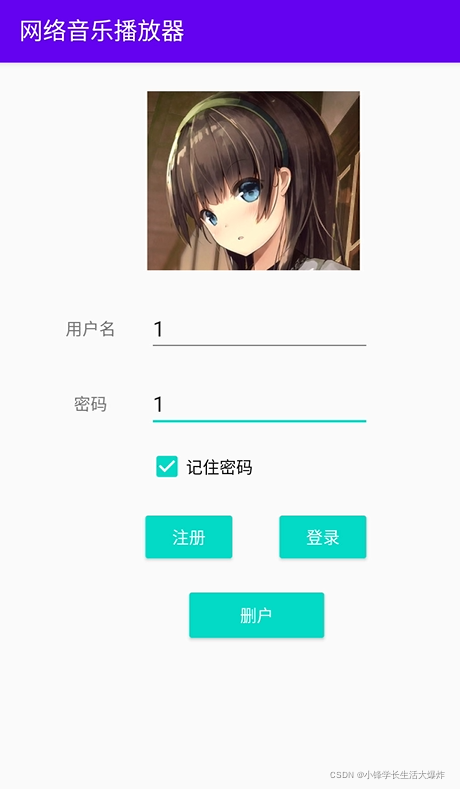
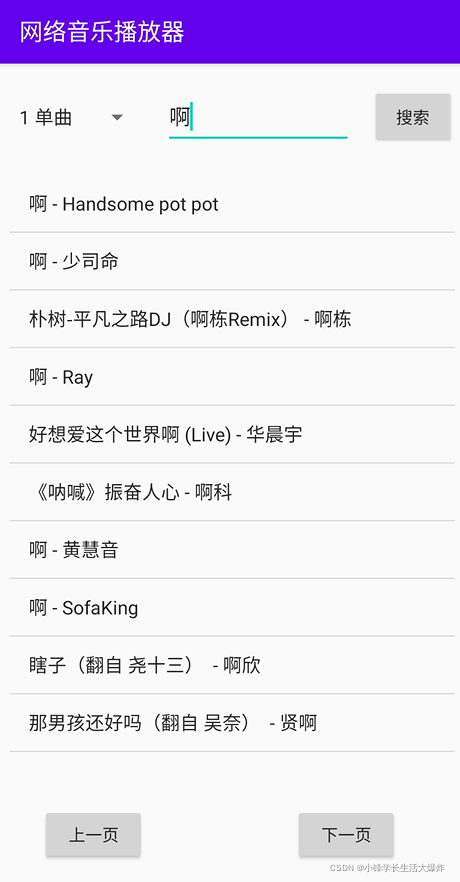

开发工具:Android Studio
音视频接口:网易云API,项目地址:网易云音乐 API service
账号:注册、登录、删除、记住密码
音视频:搜索、播放/暂停音乐、播放/暂停视频、上一曲/下一曲
当时初学,写的比较粗糙,仅供参考
package com.sxf.myapp;

import androidx.appcompat.app.AppCompatActivity;

import android.content.Intent;
import android.content.SharedPreferences;
import android.database.Cursor;
import android.database.sqlite.SQLiteCursor;
import android.database.sqlite.SQLiteDatabase;
import android.database.sqlite.SQLiteOpenHelper;
import android.os.Bundle;
import android.text.TextUtils;
import android.util.Log;
import android.view.View;
import android.widget.Button;
import android.widget.CheckBox;
import android.widget.EditText;
import android.widget.Toast;

public class login extends AppCompatActivity implements View.OnClickListener {
    private static final String TAG = "LOGIN";
    private Button button_signin;
    private Button button_signup;
    private Button button_delete;
    private EditText editText_pwd;
    private EditText editText_usr;
    private CheckBox checkBox_rmpwd;
    private SQLiteDatabase db;
    private Cursor cursor;
    @Override
    protected void onCreate(Bundle savedInstanceState) {
        super.onCreate(savedInstanceState);
        setContentView(R.layout.activity_login);
        button_signin = findViewById(R.id.button_signin);
        button_signup = findViewById(R.id.button_signup);
        button_delete = findViewById(R.id.button_delete);
        editText_pwd = findViewById(R.id.editText_pwd);
        editText_usr = findViewById(R.id.editText_usr);
        checkBox_rmpwd = findViewById(R.id.checkBox_rmpwd);
        button_signin.setOnClickListener(this);
        button_signup.setOnClickListener(this);
        button_delete.setOnClickListener(this);

        SharedPreferences sharedPreferences = getSharedPreferences("loginFile", MODE_PRIVATE);

        Boolean rm = sharedPreferences.getBoolean("rm", false);
        if (rm){
            checkBox_rmpwd.setChecked(true);
            String temp = "";
            temp = sharedPreferences.getString("usr", "");
            editText_usr.setText(temp);
            temp = sharedPreferences.getString("pwd", "");
            editText_pwd.setText(temp);
        }
        Toast.makeText(this,"读取记录完成", Toast.LENGTH_SHORT).show();
        db = SQLiteDatabase.openOrCreateDatabase(this.getFilesDir().toString()+"login.db", null);
        try {
            db.rawQuery("select * from users;", null);
        }catch (Exception e){
            e.printStackTrace();
            db.execSQL("create table users(id INTEGER PRIMARY KEY AUTOINCREMENT,usr VARCHAR(20) DEFAULT NULL,pwd VARCHAR(20) DEFAULT NULL);");
        }
    }

    @Override
    protected void onDestroy() {
        super.onDestroy();
        if (!checkBox_rmpwd.isSelected()){
            SharedPreferences sharedPreferences = getSharedPreferences("loginFile", MODE_PRIVATE);
            SharedPreferences.Editor editor = sharedPreferences.edit();
//            editor.putString("usr","");
//            editor.putString("pwd","");
            editor.putBoolean("rm",checkBox_rmpwd.isChecked());
            editor.apply();
        }
        Toast.makeText(this,"欢迎下次光临", Toast.LENGTH_SHORT).show();
    }

    @Override
    public void onClick(View v) {
        String usr = editText_usr.getText().toString();
        String pwd = editText_pwd.getText().toString();
        if (TextUtils.isEmpty(usr) || TextUtils.isEmpty(pwd)){
            Toast.makeText(this,"请先输入用户名和密码", Toast.LENGTH_SHORT).show();
            return;
        }
        switch (v.getId()){
            case R.id.button_signin:  //登录
                try {
                    if (!db.isOpen()){
                        db = SQLiteDatabase.openOrCreateDatabase(this.getFilesDir().toString()+"login.db", null);
                    }
                    cursor = db.rawQuery("select * from users where usr=(?) AND pwd=(?)", new String[]{usr, pwd},null);
                    Log.i(TAG, "登录: "+cursor.getCount());
                    if (cursor.getCount()==0){
                        Toast.makeText(this,"用户名或密码错误", Toast.LENGTH_SHORT).show();
                    }else {
                        cursor.moveToFirst();
                        String res = cursor.getString(1);
                        Toast.makeText(this,"欢迎你,"+res, Toast.LENGTH_SHORT).show();
                        db.close();

                        SharedPreferences sharedPreferences = getSharedPreferences("loginFile", MODE_PRIVATE);
                        SharedPreferences.Editor editor = sharedPreferences.edit();
                        if (checkBox_rmpwd.isChecked()){
                            editor.putString("usr",usr);
                            editor.putString("pwd",pwd);
                        }else {
                            editor.putString("usr","");
                            editor.putString("pwd","");
                        }
                        editor.putBoolean("rm",checkBox_rmpwd.isChecked());
                        editor.apply();

                        Intent intent = new Intent(login.this, MainActivity.class);
                        startActivity(intent);
                    }
                }catch (Exception e){
                    e.printStackTrace();
                }
            break;
            case R.id.button_signup:  // 注册
                try {
                    cursor = db.rawQuery("select * from users where usr=(?)", new String[]{usr},null);
                    Log.i(TAG, "注册: "+cursor.getCount());
                    if (cursor.getCount()==0){
                        db.execSQL("INSERT INTO users VALUES(null, ?,?)", new String[]{usr,pwd});
                        cursor = db.rawQuery("select * from users where usr=(?)", new String[]{usr},null);
                        if (cursor.getCount()==0){
                            Toast.makeText(this,"注册失败", Toast.LENGTH_SHORT).show();
                        }else {
                            Toast.makeText(this,"注册成功", Toast.LENGTH_SHORT).show();
                        }
                    }else {
                        Toast.makeText(this,"该用户已存在", Toast.LENGTH_SHORT).show();
                    }
                }catch (Exception e){
                    e.printStackTrace();
                }
                break;

            case R.id.button_delete:
                try {
                    cursor = db.rawQuery("select * from users where usr=(?)", new String[]{usr},null);
                    Log.i(TAG, "删户: "+cursor.getCount());
                    if (cursor.getCount()>0){
                        db.execSQL("DELETE FROM users WHERE usr=(?)", new String[]{usr});
                        cursor = db.rawQuery("select * from users where usr=(?)", new String[]{usr},null);
                        if (cursor.getCount()==0){
                            Toast.makeText(this,"删除成功", Toast.LENGTH_SHORT).show();
                        }else {
                            Toast.makeText(this,"删除失败", Toast.LENGTH_SHORT).show();
                        }
                    }else {
                        Toast.makeText(this,"该用户不存在", Toast.LENGTH_SHORT).show();
                    }
                }catch (Exception e){
                    e.printStackTrace();
                }
                break;
            default:break;
        }
    }
}
package com.sxf.myapp;
import androidx.annotation.NonNull;
import androidx.appcompat.app.AppCompatActivity;
import android.annotation.SuppressLint;
import android.content.Intent;
import android.media.MediaPlayer;
import android.net.Uri;
import android.os.Bundle;
import android.os.Handler;
import android.os.Message;
import android.text.TextUtils;
import android.util.Log;
import android.view.SurfaceHolder;
import android.view.SurfaceView;
import android.view.View;
import android.widget.AdapterView;
import android.widget.ArrayAdapter;
import android.widget.Button;
import android.widget.EditText;
import android.widget.ListView;
import android.widget.Spinner;
import android.widget.TextView;
import com.alibaba.fastjson.JSON;
import com.alibaba.fastjson.JSONArray;
import com.alibaba.fastjson.JSONObject;
import java.io.BufferedReader;
import java.io.InputStream;
import java.io.InputStreamReader;
import java.net.HttpURLConnection;
import java.net.URL;
import java.net.URLEncoder;
public class MainActivity extends AppCompatActivity implements View.OnClickListener {
private static final String TAG = "DEBUG";
private Button button_search;
private Button button_musicplay;
private Button button_musicpause;
private Button button_lastPage;
private Button button_nextPage;
private EditText editText_search;
private TextView textView_searchResult;
private Spinner spinner;
private ListView listView_resultShow;
private ArrayAdapter<String> adapterListView;
private String rootURL = "http://121.36.68.53:3000/";
private int offset = 0;
private String[] idArrays;
private int idArraysIndex = 0;
private int checkMusicFlag = 0;
private String selectedMusicUrl = null;
private String selectedItem = null;
private MediaPlayer mediaPlayer;
private TextView textView_lrc;
@Override
protected void onCreate(Bundle savedInstanceState) {
super.onCreate(savedInstanceState);
setContentView(R.layout.activity_main);
button_search = findViewById(R.id.button_search);
editText_search = findViewById(R.id.editText_search);
textView_searchResult = findViewById(R.id.textView_searchResult);
spinner = findViewById(R.id.spinner_class);
listView_resultShow = findViewById(R.id.listview_resultshow);
button_search.setOnClickListener(this);
idArrays = new String[10];
mediaPlayer = new MediaPlayer();
textView_lrc = findViewById(R.id.textView_lrc);
button_musicplay = findViewById(R.id.button_musicplay);
button_musicpause = findViewById(R.id.button_musicpause);
button_musicplay.setOnClickListener(this);
button_musicpause.setOnClickListener(this);
button_lastPage = findViewById(R.id.button_lastPage);
button_nextPage = findViewById(R.id.button_nextPage);
button_lastPage.setOnClickListener(this);
button_nextPage.setOnClickListener(this);
adapterListView = new ArrayAdapter<String>(MainActivity.this, android.R.layout.simple_list_item_1);
listView_resultShow.setAdapter(adapterListView);
listView_resultShow.setOnItemClickListener(new AdapterView.OnItemClickListener() {
@Override
public void onItemClick(AdapterView<?> parent, View view, int position, long id) {
button_nextPage.setVisibility(View.GONE);
button_lastPage.setVisibility(View.GONE);
String code = idArrays[position].split(",")[0];
String vid = idArrays[position].split(",")[1];
String name = idArrays[position].split(",")[2];
Log.i(TAG, "onItemClick "+vid);
getMusicUrl(vid, code);
selectedItem = name;
Log.i(TAG, "selectedItem: "+selectedItem);
}
});
}
@SuppressLint("HandlerLeak")
Handler handler = new Handler(){
@Override
public void handleMessage(@NonNull Message msg) {
if (msg.what>0){
String res = (String) msg.obj;
if (msg.what==200){
Log.i(TAG, "checkMusic: "+res);
JSONObject obj = JSONObject.parseObject(res);
if (obj!=null){
if(obj.getBooleanValue("success")){
checkMusicFlag = 1;
}else {
checkMusicFlag = -1;
}
}
return;
}
if (msg.what==201){ // get music url
if (res!=null){
System.out.println(res);
JSONObject obj = JSONObject.parseObject(res);
JSONArray data = obj.getJSONArray("data");
if (data!=null){
selectedMusicUrl = data.getJSONObject(0).getString("url");
Log.i(TAG, "handleMessage201: "+selectedMusicUrl);
findViewById(R.id.include_textview).setVisibility(View.VISIBLE);
listView_resultShow.setVisibility(View.GONE);
textView_searchResult.setVisibility(View.GONE);
if (selectedMusicUrl!=null){
textView_lrc.setText("");
textView_lrc.append(selectedItem);
textView_lrc.append("\n\n");
textView_lrc.append(selectedMusicUrl);
// playMusic(selectedMusicUrl);
}else {
textView_lrc.setText("没找到你要的东西");
}
}
return;
}
}else if (msg.what==202){ // get mv url
if (res!=null){
System.out.println(res);
JSONObject obj = JSONObject.parseObject(res);
JSONObject data = obj.getJSONObject("data");
if (data!=null){
selectedMusicUrl = data.getString("url");
Log.i(TAG, "handleMessage202: "+selectedMusicUrl);
findViewById(R.id.include_textview).setVisibility(View.VISIBLE);
listView_resultShow.setVisibility(View.GONE);
textView_searchResult.setVisibility(View.GONE);
if (selectedMusicUrl!=null){
textView_lrc.setText("");
textView_lrc.append(selectedItem);
textView_lrc.append("\n\n");
textView_lrc.append(selectedMusicUrl);
}else {
textView_lrc.setText("没找到你要的东西");
}
}
return;
}
}
JSONObject json = JSON.parseObject(res);
JSONObject result = json.getJSONObject("result");
Integer count = 0;
JSONArray songs = null;
switch (msg.what){
case 1:
count = result.getInteger("songCount");
if (count>0){
songs = result.getJSONArray("songs");
for (Object o :songs) {
JSONObject item = (JSONObject) o;
Integer id = item.getInteger("id");
String name = item.getString("name");
JSONObject artists = item.getJSONArray("artists").getJSONObject(0);
String artistName = artists.getString("name");
idArrays[idArraysIndex++] = 1+","+id+","+name;
Log.i(TAG, id+" - "+name+" - "+artistName);
findViewById(R.id.include_textview).setVisibility(View.GONE);
textView_searchResult.setVisibility(View.GONE);
listView_resultShow.setVisibility(View.VISIBLE);
adapterListView.add(name+" - "+artistName);
}
}
break;
case 10:
count = result.getInteger("albumCount");
if (count>0){
songs = result.getJSONArray("albums");
for (Object o :songs) {
JSONObject item = (JSONObject) o;
Integer id = item.getInteger("id");
String name = item.getString("name");
JSONObject artists = item.getJSONArray("artists").getJSONObject(0);
String artistName = artists.getString("name");
idArrays[idArraysIndex++] = 10+","+id+","+name;
Log.i(TAG, id+" - "+name+" - "+artistName);
findViewById(R.id.include_textview).setVisibility(View.GONE);
textView_searchResult.setVisibility(View.GONE);
listView_resultShow.setVisibility(View.VISIBLE);
adapterListView.add(name+" - "+artistName);
}
}
break;
case 100:
count = result.getInteger("artistCount");
if (count>0){
songs = result.getJSONArray("artists");
for (Object o :songs) {
JSONObject item = (JSONObject) o;
Integer id = item.getInteger("id");
String name = item.getString("name");
Log.i(TAG, id+" - "+name+" - "+name);
idArrays[idArraysIndex++] = 100+","+id+","+name;
findViewById(R.id.include_textview).setVisibility(View.GONE);
textView_searchResult.setVisibility(View.GONE);
listView_resultShow.setVisibility(View.VISIBLE);
adapterListView.add(name);
}
}
break;
case 1000:
count = result.getInteger("playlistCount");
if (count>0){
songs = result.getJSONArray("playlists");
for (Object o :songs) {
JSONObject item = (JSONObject) o;
Integer id = item.getInteger("id");
String name = item.getString("name");
idArrays[idArraysIndex++] = 1000+","+id+","+name;
Log.i(TAG, id+" - "+name);
findViewById(R.id.include_textview).setVisibility(View.GONE);
textView_searchResult.setVisibility(View.GONE);
listView_resultShow.setVisibility(View.VISIBLE);
adapterListView.add(name);
}
}
break;
case 1002:
count = result.getInteger("userprofileCount");
if (count>0){
songs = result.getJSONArray("userprofiles");
for (Object o :songs) {
JSONObject item = (JSONObject) o;
Integer id = item.getInteger("userId");
String name = item.getString("nickname");
idArrays[idArraysIndex++] = 1002+","+id+","+name;
Log.i(TAG, id+" - "+name);
findViewById(R.id.include_textview).setVisibility(View.GONE);
textView_searchResult.setVisibility(View.GONE);
listView_resultShow.setVisibility(View.VISIBLE);
adapterListView.add(name);
}
}
break;
case 1004:
count = result.getInteger("mvCount");
if (count>0){
songs = result.getJSONArray("mvs");
for (Object o :songs) {
JSONObject item = (JSONObject) o;
Integer id = item.getInteger("id");
String name = item.getString("name");
JSONObject artists = item.getJSONArray("artists").getJSONObject(0);
String artistName = artists.getString("name");
idArrays[idArraysIndex++] = 1004+","+id+","+name;
Log.i(TAG, id+" - "+name+" - "+artistName);
findViewById(R.id.include_textview).setVisibility(View.GONE);
textView_searchResult.setVisibility(View.GONE);
listView_resultShow.setVisibility(View.VISIBLE);
adapterListView.add(name+" - "+artistName);
}
}
break;
case 1006:
count = result.getInteger("songCount");
if (count>0){
songs = result.getJSONArray("songs");
for (Object o :songs) {
JSONObject item = (JSONObject) o;
Integer id = item.getInteger("id");
String name = item.getString("name");
JSONObject artists = item.getJSONArray("artists").getJSONObject(0);
String artistName = artists.getString("name")+","+name;
idArrays[idArraysIndex++] = 1006+","+id;
Log.i(TAG, id+" - "+name+" - "+artistName);
findViewById(R.id.include_textview).setVisibility(View.GONE);
textView_searchResult.setVisibility(View.GONE);
listView_resultShow.setVisibility(View.VISIBLE);
adapterListView.add(name+" - "+artistName);
}
}
break;
case 1009:
count = result.getInteger("djRadiosCount");
if (count>0){
songs = result.getJSONArray("djRadios");
for (Object o :songs) {
JSONObject item = (JSONObject) o;
Integer id = item.getInteger("id");
String name = item.getString("name");
idArrays[idArraysIndex++] = 1009+","+id+","+name;
Log.i(TAG, id+" - "+name);
findViewById(R.id.include_textview).setVisibility(View.GONE);
textView_searchResult.setVisibility(View.GONE);
listView_resultShow.setVisibility(View.VISIBLE);
adapterListView.add(name);
}
}
break;
case 1014:
count = result.getInteger("videoCount");
if (count>0){
songs = result.getJSONArray("videos");
for (Object o :songs) {
JSONObject item = (JSONObject) o;
String id = item.getString("vid");
String name = item.getString("title");
idArrays[idArraysIndex++] = 1014+","+id+","+name;
Log.i(TAG, id+" - "+name);
findViewById(R.id.include_textview).setVisibility(View.GONE);
textView_searchResult.setVisibility(View.GONE);
listView_resultShow.setVisibility(View.VISIBLE);
adapterListView.add(name);
}
}
break;
default:break;
}
if (count==0){
findViewById(R.id.include_textview).setVisibility(View.GONE);
listView_resultShow.setVisibility(View.GONE);
textView_searchResult.setText("没找到你要的东西");
textView_searchResult.setVisibility(View.VISIBLE);
return;
}
}
}
};
public void playMusic(String url){
if (url != null){
try {
mediaPlayer.setDataSource(url);
mediaPlayer.prepare();
} catch (Exception e) {
e.printStackTrace();
}
}
if (!mediaPlayer.isPlaying()){
mediaPlayer.start();
}
}
public void stopMusic(){
if (mediaPlayer.isPlaying()) {
mediaPlayer.stop();
}
mediaPlayer.reset();
}
public void pauseMusic(){
if (mediaPlayer.isPlaying()) {
mediaPlayer.pause();
}
}
public void destroyMusic(){
if (mediaPlayer != null) {
if (mediaPlayer.isPlaying()) {
mediaPlayer.stop();
}
mediaPlayer.release();
}
}
public Boolean isPlayMusic(){
return mediaPlayer.isPlaying();
}
static void getWebInfoThread(final URL url, final Handler handler, final Integer what){
new Thread(new Runnable() {
@Override
public void run() {
try {
HttpURLConnection httpURLConnection = (HttpURLConnection)url.openConnection();
InputStream inputStream = httpURLConnection.getInputStream();
InputStreamReader reader = new InputStreamReader(inputStream, "UTF-8");
BufferedReader bufferedReader = new BufferedReader(reader);
StringBuilder buffer = new StringBuilder();
String temp = null;
while ((temp = bufferedReader.readLine())!=null){
buffer.append(temp);
}
bufferedReader.close();
reader.close();
inputStream.close();
handler.sendMessage(handler.obtainMessage(what, buffer.toString()));
}catch (Exception e){
e.printStackTrace();
}
}
}).start();
}
public Boolean checkMusic(String id){
try {
URL url = new URL(rootURL+"check/music?id="+id);
getWebInfoThread(url, handler, 200);
while (checkMusicFlag==0){Thread.sleep(1000);};
if (checkMusicFlag==1) return true;
if (checkMusicFlag==-1) return false;
}catch (Exception e){
e.printStackTrace();
}
return false;
}
public void getMusicUrl(String id, String code){
try {
if (code.equals("1004")){
URL url = new URL(rootURL+"mv/url?id="+id);
getWebInfoThread(url, handler, 202);
}else {
URL url = new URL(rootURL+"song/url?id="+id);
getWebInfoThread(url, handler, 201);
}
}catch (Exception e){
e.printStackTrace();
}
}
public void doSearch(int off){
if (!TextUtils.isEmpty(editText_search.getText())){
adapterListView.clear();
stopMusic();
idArraysIndex = 0;
URL url = null;
try {
String msg = editText_search.getText().toString();
String spinnerItem = spinner.getSelectedItem().toString().split(" ")[0];
url = new URL(rootURL+"search?keywords="+URLEncoder.encode(msg,"utf-8")+"&limit=10&type="+spinnerItem+"&offset="+off);
final URL finalUrl = url;
Log.i(TAG, "URL: "+finalUrl);
getWebInfoThread(finalUrl, handler, Integer.parseInt(spinnerItem));
} catch (Exception e) {
e.printStackTrace();
}
}
}
@Override
public void onClick(View v) {
switch (v.getId()){
case R.id.button_search:
offset = 0;
button_nextPage.setVisibility(View.VISIBLE);
button_lastPage.setVisibility(View.VISIBLE);
adapterListView.clear();
doSearch(0);
break;
case R.id.button_musicplay:
if(!isPlayMusic()) {
if (selectedMusicUrl.contains(".mp4")){
Intent intent = new Intent(Intent.ACTION_VIEW);
Uri uri = Uri.parse(selectedMusicUrl);
intent.setDataAndType(uri, "video/3gp");
startActivity(intent);
}else {
playMusic(selectedMusicUrl);
}
}
break;
case R.id.button_musicpause:
if(isPlayMusic()){
pauseMusic();
}
break;
case R.id.button_lastPage:
if (offset<10) offset=10;
offset -= 10;
doSearch(offset);
break;
case R.id.button_nextPage:
offset += 10;
doSearch(offset);
break;
default:break;
}
}
}
package com.sxf.myapp;

import android.content.Context;
import android.database.sqlite.SQLiteDatabase;
import android.database.sqlite.SQLiteOpenHelper;

import androidx.annotation.Nullable;

public class MyDatabase extends SQLiteOpenHelper {
    public MyDatabase(@Nullable Context context, @Nullable String name, @Nullable SQLiteDatabase.CursorFactory factory, int version) {
        super(context, name, factory, version);
    }

    @Override
    public void onCreate(SQLiteDatabase db) {

    }

    @Override
    public void onUpgrade(SQLiteDatabase db, int oldVersion, int newVersion) {

    }
}
apply plugin: 'com.android.application'

android {
    compileSdkVersion 29
    buildToolsVersion "29.0.3"

    defaultConfig {
        applicationId "com.sxf.myapp"
        minSdkVersion 21
        targetSdkVersion 29
        versionCode 1
        versionName "1.0"

        testInstrumentationRunner "androidx.test.runner.AndroidJUnitRunner"
    }

    buildTypes {
        release {
            minifyEnabled false
            proguardFiles getDefaultProguardFile('proguard-android-optimize.txt'), 'proguard-rules.pro'
        }
    }

}

dependencies {
    implementation fileTree(dir: 'libs', include: ['*.jar'])

    implementation 'androidx.appcompat:appcompat:1.1.0'
    implementation 'androidx.constraintlayout:constraintlayout:1.1.3'
    implementation 'com.google.android.material:material:1.0.0'
    implementation 'androidx.annotation:annotation:1.1.0'
    implementation 'androidx.lifecycle:lifecycle-extensions:2.0.0'
    testImplementation 'junit:junit:4.12'
    androidTestImplementation 'androidx.test.ext:junit:1.1.1'
    androidTestImplementation 'androidx.test.espresso:espresso-core:3.2.0'

    implementation 'com.android.support:localbroadcastmanager:29.0.0'
    implementation files('libs/fastjson-1.2.66.jar')
}
我收到这个错误:RuntimeError(自动加载常量Apps时检测到循环依赖当我使用多线程时。下面是我的代码。为什么会这样?我尝试多线程的原因是因为我正在编写一个HTML抓取应用程序。对Nokogiri::HTML(open())的调用是一个同步阻塞调用,需要1秒才能返回,我有100,000多个页面要访问,所以我试图运行多个线程来解决这个问题。有更好的方法吗?classToolsController0)app.website=array.join(',')putsapp.websiteelseapp.website="NONE"endapp.saveapps=Apps.order("
有没有办法在这个简单的get方法中添加超时选项?我正在使用法拉第3.3。Faraday.get(url)四处寻找,我只能先发起连接后应用超时选项,然后应用超时选项。或者有什么简单的方法?这就是我现在正在做的:conn=Faraday.newresponse=conn.getdo|req|req.urlurlreq.options.timeout=2#2secondsend 最佳答案 试试这个:conn=Faraday.newdo|conn|conn.options.timeout=20endresponse=conn.get(url
我是Google云的新手,我正在尝试对其进行首次部署。我的第一个部署是RubyonRails项目。我基本上是在关注thisguideinthegoogleclouddocumentation.唯一的区别是我使用的是我自己的项目,而不是他们提供的“helloworld”项目。这是我的app.yaml文件runtime:customvm:trueentrypoint:bundleexecrackup-p8080-Eproductionconfig.ruresources:cpu:0.5memory_gb:1.3disk_size_gb:10当我转到我的项目目录并运行gcloudprevie
当我在我的Rails应用程序根目录中运行rakedoc:app时,API文档是使用/doc/README_FOR_APP作为主页生成的。我想向该文件添加.rdoc扩展名,以便它在GitHub上正确呈现。更好的是,我想将它移动到应用程序根目录(/README.rdoc)。有没有办法通过修改包含的rake/rdoctask任务在我的Rakefile中执行此操作?是否有某个地方可以查找可以修改的主页文件的名称?还是我必须编写一个新的Rake任务?额外的问题:Rails应用程序的两个单独文件/README和/doc/README_FOR_APP背后的逻辑是什么?为什么不只有一个?
我想在Ruby中创建一个用于开发目的的极其简单的Web服务器(不,不想使用现成的解决方案)。代码如下:#!/usr/bin/rubyrequire'socket'server=TCPServer.new('127.0.0.1',8080)whileconnection=server.acceptheaders=[]length=0whileline=connection.getsheaders想法是从命令行运行这个脚本,提供另一个脚本,它将在其标准输入上获取请求,并在其标准输出上返回完整的响应。到目前为止一切顺利,但事实证明这真的很脆弱,因为它在第二个请求上中断并出现错误:/usr/b
我意识到这可能是一个非常基本的问题,但我现在已经花了几天时间回过头来解决这个问题,但出于某种原因,Google就是没有帮助我。(我认为部分问题在于我是一个初学者,我不知道该问什么......)我也看过O'Reilly的RubyCookbook和RailsAPI,但我仍然停留在这个问题上.我找到了一些关于多态关系的信息,但它似乎不是我需要的(尽管如果我错了请告诉我)。我正在尝试调整MichaelHartl'stutorial创建一个包含用户、文章和评论的博客应用程序(不使用脚手架)。我希望评论既属于用户又属于文章。我的主要问题是:我不知道如何将当前文章的ID放入评论Controller。
我的工作要求我为某些测试自动生成电子邮件。我一直在四处寻找,但未能找到可以快速实现的合理解决方案。它需要在outlook而不是其他邮件服务器中,因为我们有一些奇怪的身份验证规则,我们需要保存草稿而不是仅仅发送邮件的选项。显然win32ole可以做到这一点,但我找不到任何相当简单的例子。 最佳答案 假设存储了Outlook凭据并且您设置为自动登录到Outlook,WIN32OLE可以很好地完成此操作:require'win32ole'outlook=WIN32OLE.new('Outlook.Application')message=
网络编程套接字网络编程基础知识理解源`IP`地址和目的`IP`地址理解源MAC地址和目的MAC地址认识端口号理解端口号和进程ID理解源端口号和目的端口号认识`TCP`协议认识`UDP`协议网络字节序socket编程接口`sockaddr``UDP`网络程序服务器端代码逻辑:需要用到的接口服务器端代码`udp`客户端代码逻辑`udp`客户端代码`TCP`网络程序服务器代码逻辑多个版本服务器单进程版本多进程版本多线程版本线程池版本服务器端代码客户端代码逻辑客户端代码TCP协议通讯流程TCP协议的客户端/服务器程序流程三次握手(建立连接)数据传输四次挥手(断开连接)TCP和UDP对比网络编程基础知识
//1.验证返回状态码是否是200pm.test("Statuscodeis200",function(){pm.response.to.have.status(200);});//2.验证返回body内是否含有某个值pm.test("Bodymatchesstring",function(){pm.expect(pm.response.text()).to.include("string_you_want_to_search");});//3.验证某个返回值是否是100pm.test("Yourtestname",function(){varjsonData=pm.response.json
在前面两节的例子中,主界面窗口的尺寸和标签控件显示的矩形区域等,都是用C++代码编写的。窗口和控件的尺寸都是预估的,控件如果多起来,那就不好估计每个控件合适的位置和大小了。用C++代码编写图形界面的问题就是不直观,因此Qt项目开发了专门的可视化图形界面编辑器——QtDesigner(Qt设计师)。通过QtDesigner就可以很方便地创建图形界面文件*.ui,然后将ui文件应用到源代码里面,做到“所见即所得”,大大方便了图形界面的设计。本节就演示一下QtDesigner的简单使用,学习拖拽控件和设置控件属性,并将ui文件应用到Qt程序代码里。使用QtDesigner设计界面在开始菜单中找到「Q
