
欠第八章,有机会补(doge)
mysql> show databases;
+--------------------+
| Database           |
+--------------------+
| information_schema |
| mysql              |
| performance_schema |
| sys                |
+--------------------+
mysql [options] [database]

选项:
    -u, --user=name #指定用户名
    -p, --password[=name] #指定密码
    -h, --host=name #指定服务器IP或域名
    -P, --port=port #指定连接端口    大写
    -e, --execute=name #执行SQL语句并退出
-e用于脚本文件中
用于脚本文件: mysql -uroot –pxxxxxx db01 -e "select * from stu";
[root@hadoop ~]#  mysql -h192.168.60.102 -P3306 -uroot -pxxxxxxxx itcast -e"select * from course";
mysql: [Warning] Using a password on the command line interface can be insecure.
+----+-------------+
| id | name        |
+----+-------------+
|  6 | Hive        |
|  1 | javaEE      |
|  3 | MySQL       |
|  8 | RabbitMQ    |
|  9 | Spark       |
|  2 | SpringBoot  |
|  4 | SpringCloud |
+----+-------------+
[root@hadoop ~]# mysqladmin [OPTIONS] command command....

通过帮助文档查看 [OPTIONS] command :
[root@hadoop ~]# mysqladmin --help
commad就是很多关于服务器的操作了
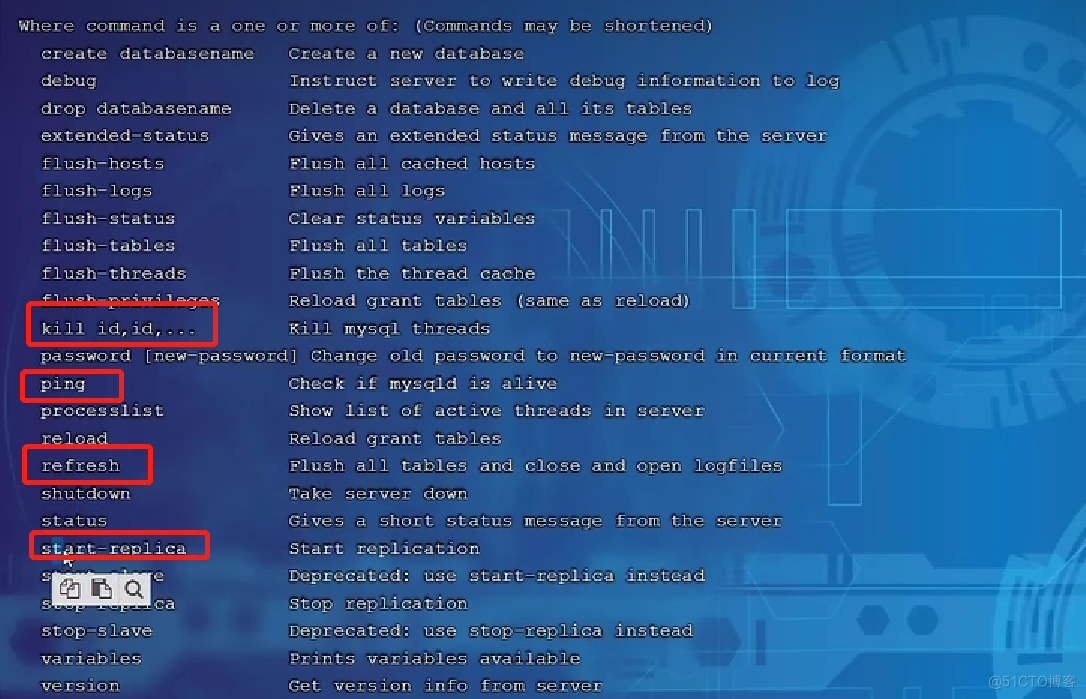
-- 看下版本
[root@hadoop ~]# mysqladmin -uroot -pxxxxxxxx version

mysqladmin: [Warning] Using a password on the command line interface can be insecure.
mysqladmin  Ver 8.0.26 for Linux on x86_64 (MySQL Community Server - GPL)
Copyright (c) 2000, 2021, Oracle and/or its affiliates.

Oracle is a registered trademark of Oracle Corporation and/or its
affiliates. Other names may be trademarks of their respective
owners.

Server version		8.0.26
Protocol version	10
Connection		Localhost via UNIX socket
UNIX socket		/var/lib/mysql/mysql.sock
Uptime:			4 hours 37 min 28 sec

Threads: 5  Questions: 132  Slow queries: 0  Opens: 197  Flush tables: 3  Open tables: 116  Queries per second avg: 0.007
-- 查看系统变量
[root@hadoop ~]# mysqladmin -uroot -pxxxxxxxx variables
-- 创建一个数据库
[root@hadoop ~]# mysqladmin -uroot -pxxxxxxx create db02
mysqladmin: [Warning] Using a password on the command line interface can be insecure.
语法 :
mysqlbinlog [options] log-files1 log-files2 ...
选项 :
-d, --database=name 指定数据库名称,只列出指定的数据库相关操作。
-o, --offset=# 忽略掉日志中的前n行命令。
-r,--result-file=name 将输出的文本格式日志输出到指定文件。
-s, --short-form 显示简单格式, 省略掉一些信息。
--start-datatime=date1 --stop-datetime=date2 指定日期间隔内的所有日志。
--start-position=pos1 --stop-position=pos2 指定位置间隔内的所有日志。
-- 查看二进制文件
[root@hadoop ~]# cd /var/lib/mysql
[root@hadoop mysql]# ll
total 322952
-rw-r----- 1 mysql mysql 56 Dec 25 2021 auto.cnf
-rw-r----- 1 mysql mysql 179 Aug 15 04:43 binlog.000001
-rw-r----- 1 mysql mysql 179 Aug 15 05:55 binlog.000002
-rw-r----- 1 mysql mysql 179 Aug 15 06:01 binlog.000003
-rw-r----- 1 mysql mysql 179 Aug 15 06:14 binlog.000004
-rw-r----- 1 mysql mysql 179 Aug 15 06:24 binlog.000005
-- 乱码来着的
[root@hadoop mysql]# cat binlog.000001 aþbinjR8.0.26jR
**4
(9^*R?Т^࿗³q[root@hadoop mysql]#
-- 用binlog查看,这样看就不会乱码
[root@hadoop mysql]# mysqlbinlog -s binlog.000001
# The proper term is pseudo_replica_mode, but we use this compatibility alias
# to make the statement usable on server versions 8.0.24 and older.
/*!50530 SET @@SESSION.PSEUDO_SLAVE_MODE=1*/;
/*!50003 SET @OLD_COMPLETION_TYPE=@@COMPLETION_TYPE,COMPLETION_TYPE=0*/;
语法 :
mysqlshow [options] [db_name [table_name [col_name]]]
选项 :
--count 显示数据库及表的统计信息(数据库,表均可以不指定)
-i 显示指定数据库或者指定表的状态信息
[root@hadoop mysql]# mysqlshow -uroot -pxxxxxxxx itcast --count
mysqlshow: [Warning] Using a password on the command line interface can be insecure.
Database: itcast
+----------------+----------+------------+
|     Tables     | Columns  | Total Rows |
+----------------+----------+------------+
| course         |        2 |          7 |
| course_v_1     |        2 |          7 |
| course_v_2     |        2 |          0 |
| course_v_3     |        2 |          0 |
| course_v_4     |        2 |          7 |
| course_v_5     |        2 |          0 |
| course_v_6     |        2 |          0 |
| course_v_count |        1 |          1 |
| tb_user        |        9 |         25 |
| tb_user_pro    |        3 |         18 |
| tb_user_view   |        7 |         25 |
| user_logs      |        5 |         10 |
+----------------+----------+------------+
语法 :
mysqldump [options] db_name [tables]
mysqldump [options] --database/-B db1 [db2 db3...]
mysqldump [options] --all-databases/-A
连接选项 :
-u, --user=name 指定用户名
-p, --password[=name] 指定密码
-h, --host=name 指定服务器ip或域名
-P, --port=# 指定连接端口
输出选项:
--add-drop-database 在每个数据库创建语句前加上 drop database 语句
--add-drop-table 在每个表创建语句前加上 drop table 语句 , 默认开启 ; 不
开启 (--skip-add-drop-table)
-n, --no-create-db 不包含数据库的创建语句
-t, --no-create-info 不包含数据表的创建语句
-d --no-data 不包含数据
-T, --tab=name 自动生成两个文件:一个.sql文件,创建表结构的语句;一
个.txt文件,数据文件
[root@hadoop ~]# mysqldump -uroot -pxxxxxxxx itcast > itcast.sql
mysqldump: [Warning] Using a password on the command line interface can be insecure.
[root@hadoop ~]# ll
total 56328
-rw-------. 1 root   root      1259 Aug 21  2021 anaconda-ks.cfg
drwxr-xr-x  3 root   root        35 Dec 26  2021 app
-rw-r--r--  1 hadoop root         0 Jul 25 04:06 apple.txt
-rw-r--r--  1 root   root     24260 Aug 30 02:43 itcast.sql


-- -t 不包含建表语句
[root@hadoop ~]# mysqldump -uroot -pxxxxxxxx -t itcast > itcast.sql
mysqldump: [Warning] Using a password on the command line interface can be insecure.
[root@hadoop ~]# ll
total 56316
-rw-------. 1 root   root      1259 Aug 21  2021 anaconda-ks.cfg
drwxr-xr-x  3 root   root        35 Dec 26  2021 app
-rw-r--r--  1 hadoop root         0 Jul 25 04:06 apple.txt
-rw-r--r--  1 root   root     11378 Aug 30 02:43 itcast.sql
-- mysql信任的存放目录在这个目录中
mysql> show variables like '%secure_file_priv%';
+------------------+-----------------------+
| Variable_name    | Value                 |
+------------------+-----------------------+
| secure_file_priv | /var/lib/mysql-files/ |
+------------------+-----------------------+
1 row in set (0.00 sec)

-- -T会形成两个文件,一个表结构语句,一个数据语句
[root@hadoop ~]# mysqldump -uroot -pxxxxxxxx -T /var/lib/mysql-files/ itcast course
mysqldump: [Warning] Using a password on the command line interface can be insecure.
[root@hadoop ~]# cd /var/lib/mysql-files/
[root@hadoop mysql-files]# ll
total 8
-rw-r--r-- 1 root  root  1435 Aug 30 02:43 course.sql
-rw-r----- 1 mysql mysql   70 Aug 30 02:43 course.txt
语法 :
mysqlimport [options] db_name textfile1 [textfile2...]
示例 :
mysqlimport -uroot -p2143 test /tmp/city.txt
先删掉表中数据

[root@hadoop mysql-files]# mysqlimport -uroot -pxxxxxxxx itcast /var/lib/mysql-files/course.txt
mysqlimport: [Warning] Using a password on the command line interface can be insecure.
itcast.course: Records: 7  Deleted: 0  Skipped: 0  Warnings: 0

完成之后数据又显示了
source /root/xxxx/sql
mysql> use itcast;
mysql> source /root/itcast.sql

Query OK, 6 rows affected (0.00 sec)

Query OK, 30 rows affected (0.00 sec)

Query OK, 20 rows affected (0.00 sec)

Query OK, 9 rows affected (0.00 sec)
我正在使用i18n从头开始构建一个多语言网络应用程序,虽然我自己可以处理一大堆yml文件,但我说的语言(非常)有限,最终我想寻求外部帮助帮助。我想知道这里是否有人在使用UI插件/gem(与django上的django-rosetta不同)来处理多个翻译器,其中一些翻译器不愿意或无法处理存储库中的100多个文件,处理语言数据。谢谢&问候,安德拉斯(如果您已经在rubyonrails-talk上遇到了这个问题,我们深表歉意) 最佳答案 有一个rails3branchofthetolkgem在github上。您可以通过在Gemfi
我安装了ruby版本管理器,并将RVM安装的ruby实现设置为默认值,这样'哪个ruby'显示'~/.rvm/ruby-1.8.6-p383/bin/ruby'但是当我在emacs中打开inf-ruby缓冲区时,它使用安装在/usr/bin中的ruby。有没有办法让emacs像shell一样尊重ruby的路径?谢谢! 最佳答案 我创建了一个emacs扩展来将rvm集成到emacs中。如果您有兴趣,可以在这里获取:http://github.com/senny/rvm.el
是否有简单的方法来更改默认ISO格式(yyyy-mm-dd)的ActiveAdmin日期过滤器显示格式? 最佳答案 您可以像这样为日期选择器提供额外的选项,而不是覆盖js:=f.input:my_date,as::datepicker,datepicker_options:{dateFormat:"mm/dd/yy"} 关于ruby-on-rails-事件管理员日期过滤器日期格式自定义,我们在StackOverflow上找到一个类似的问题: https://s
文章目录一、概述简介原理模块二、配置Mysql使用版本环境要求1.操作系统2.mysql要求三、配置canal-server离线下载在线下载上传解压修改配置单机配置集群配置分库分表配置1.修改全局配置2.实例配置垂直分库水平分库3.修改group-instance.xml4.启动监听四、配置canal-adapter1修改启动配置2配置映射文件3启动ES数据同步查询所有订阅同步数据同步开关启动4.验证五、配置canal-admin一、概述简介canal是Alibaba旗下的一款开源项目,Java开发。基于数据库增量日志解析,提供增量数据订阅&消费。Git地址:https://github.co
我想用这两种语言中的任何一种(最好是ruby)制作一个窗口管理器。老实说,除了我需要加载某种X模块外,我不知道从哪里开始。因此,如果有人有线索,如果您能指出正确的方向,那就太好了。谢谢 最佳答案 XCB,X的下一代API使用XML格式定义X协议(protocol),并使用脚本生成特定语言绑定(bind)。它在概念上与SWIG类似,只是它描述的不是CAPI,而是X协议(protocol)。目前,C和Python存在绑定(bind)。理论上,Ruby端口只是编写一个从XML协议(protocol)定义语言到Ruby的翻译器的问题。生
这是我在ActiveAdmin中的自定义页面ActiveAdmin.register_page"Settings"doaction_itemdolink_to('Importprojects','settings/importprojects')endcontentdopara"Text"endcontrollerdodefimportprojectssystem"rakedataspider:import_projects_ninja"para"OK"endendend我想做的是,当我单击“导入项目”按钮时,我想在Controller中执行rake任务。但是我无法访问该方法。可能是什
我看到其他人也遇到过类似的问题,但没有一个解决方案对我有用。0.3.14gem与其他gem文件一起存在。我已经完全按照此处指示完成了所有操作:https://github.com/brianmario/mysql2.我仍然得到以下信息。我不知道为什么安装程序指示它找不到include目录,因为我已经检查过它存在。thread.h文件存在,但不在ruby目录中。相反,它在这里:C:\RailsInstaller\DevKit\lib\perl5\5.8\msys\CORE\我正在运行Windows7并尝试在Aptana3中构建我的Rails项目。我的Ruby是1.9.3。$gemin
我已经开始使用mysql2gem。我试图弄清楚一些基本的事情——其中之一是如何明确地执行事务(对于批处理操作,比如多个INSERT/UPDATE查询)。在旧的ruby-mysql中,这是我的方法:client=Mysql.real_connect(...)inserts=["INSERTINTO...","UPDATE..WHEREid=..",#etc]client.autocommit(false)inserts.eachdo|ins|beginclient.query(ins)rescue#handleerrorsorabortentirelyendendclient.commi
我正在寻找用于Rails的优质管理插件。似乎大多数现有的插件/gem(例如“restful_authentication”、“acts_as_authenticated”)都围绕着self注册等展开。但是,我正在寻找一种功能齐全的基于管理/管理角色的解决方案——但不是简单地附加到另一个非基于角色的解决方案。如果我找不到,我想我会自己动手......只是不想重新发明轮子。 最佳答案 RyanBates最近做了两个关于授权的railscast(注意身份验证和授权之间的区别;身份验证检查用户是否如她所说的那样,授权检查用户是否有权访问资源
文章目录一基础定义二创建逻辑卷2-1准备物理设备2-2创建物理卷2-3创建卷组2-4创建逻辑卷2-5创建文件系统并挂载文件三扩展卷组和缩减卷组3-1准备物理设备3-2创建物理卷3-3扩展卷组3-4查看卷组的详细信息以验证3-5缩减卷组四扩展逻辑卷4-1检查卷组是否有可用的空间4-2扩展逻辑卷4-3扩展文件系统五删除逻辑卷5-1备份数据5-2卸载文件系统5-3删除逻辑卷5-4删除卷组5-5删除物理卷六LVM逻辑卷缩容6-1缩容注意事项6-2标准缩容步骤一基础定义LVM,LogicalVolumeManger,逻辑卷管理,Linux磁盘分区管理的一种机制,建立在硬盘和分区上的一个逻辑层,提高磁盘分
