每日一句:人间总有一两,填我十万八千梦
目录
被触发物体(挂载脚本)下UI,先不激活
public class TalkButton : MonoBehaviour
{
public GameObject tipshow;//提示UI
public GameObject talkUI;//对话UI
private void OnTriggerEnter(Collider other)
{
Debug.Log("aaa");
tipshow.SetActive(true);
}
private void OnTriggerExit(Collider other)
{
tipshow.SetActive(false);
}
private void Update()
{
if(tipshow.activeSelf&&Input.GetKeyDown(KeyCode.R))
{
talkUI.SetActive(true);
}
}
}
TextAsset文档文件

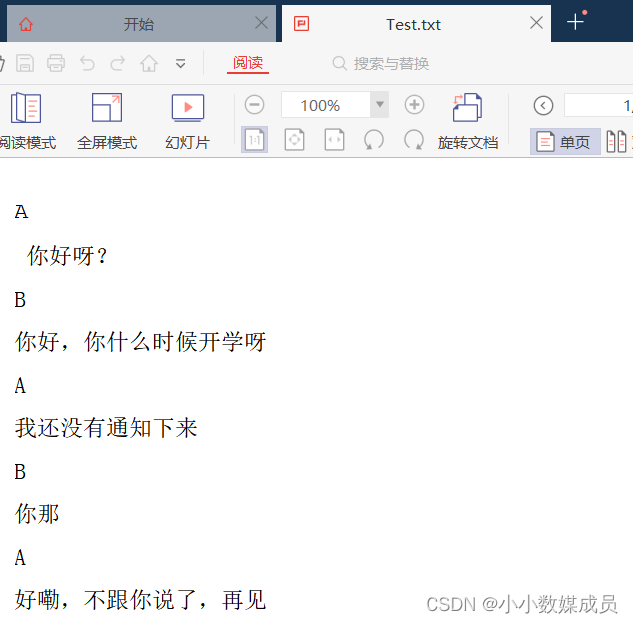
(用记事本另存为txt文本文件,导入Unity中)
DialogSystem类
public class DialogSystem : MonoBehaviour
{
public Text textLabel;//文字组件
public Image faceImage;//头像图片
public TextAsset textFile;
public int index;//文本内容索引+
public Sprite face01, face02;
public float textSpeed;
bool textFinished;//判断是否输出完了当前行的内容
List<string> textList = new List<string>();
bool cancelTyping;//取消逐字打印
private void Awake()
{
GetTextFormFile(textFile);//从文本文件中得到文本内容
}
private void OnEnable()
{
textFinished = true;//当前文本没有输出完
StartCoroutine(SetTextUI());//获得这一行长度的每一个文字,累加输出
}
private void Update()
{
if(Input.GetKeyDown(KeyCode.R)&&index==textList.Count)//如果按下R键,并且当前文本索引等于文本总长度
{
gameObject.SetActive(false);//销毁当前对话框
index = 0;//索引归零
return;
}
if (Input.GetKeyDown(KeyCode.R))//按下R键
{
if (textFinished && !cancelTyping)//如果上一行文本输入完,并没有取消逐字打印
{
StartCoroutine(SetTextUI());//开启逐字打印
}
else if (!textFinished && !cancelTyping)//如果上一行文本没有输入完,并没有取消逐字打印
{
cancelTyping = true;//取消逐字打印
}
}
}
/// <summary>
/// 把整片文件分成每一行,输出到一个列表中,再转换成文本
/// </summary>
/// <param name="file"></param>
void GetTextFormFile(TextAsset file)
{
textList.Clear();
index = 0;
var lineData = file.text.Split("\n");
foreach(var line in lineData)
{
textList.Add(line);
}
}
/// <summary>
/// 获得这一行长度的每一个文字,累加输出
/// </summary>
/// <returns></returns>
IEnumerator SetTextUI()
{
textLabel.text = "";
textFinished = false;//文本内容正在输出
switch (textList[index].Trim().ToString())
{
case "A":
faceImage.sprite = face01;
Debug.Log("aaa");
index++;
break;
case "B":
faceImage.sprite = face02;
index++;
Debug.Log("bbb");
break;
}
int letter = 0;
while(!cancelTyping&&letter<textList[index].Length-1)
{
Debug.Log("逐字打印");
textLabel.text += textList[index][letter];
letter++;
yield return new WaitForSeconds(textSpeed);
}
cancelTyping = false;
textFinished = true;
index++;
}
}
public class TypewriterEffect : MonoBehaviour
{
public float charsPerSecond = 0.2f;//打字时间间隔
private string words;//保存需要显示的文字
private bool isActive = false;
private float timer;//计时器
private Text myText;
private int currentPos = 0;//当前打字位置
// Use this for initialization
void Start()
{
timer = 0;
isActive = true;
charsPerSecond = Mathf.Max(0.2f, charsPerSecond);
myText = GetComponent<Text>();
words = myText.text;
myText.text = "";//获取Text的文本信息,保存到words中,然后动态更新文本显示内容,实现打字机的效果
}
// Update is called once per frame
void Update()
{
OnStartWriter();
}
/// <summary>
/// 执行打字任务
/// </summary>
void OnStartWriter()
{
if (isActive)
{
timer += Time.deltaTime;
if (timer >= charsPerSecond)
{//判断计时器时间是否到达
timer = 0;
currentPos++;
myText.text = words.Substring(0, currentPos);//刷新文本显示内容
if (currentPos >= words.Length)
{
OnFinish();
}
}
}
}
/// <summary>
/// 结束打字,初始化数据
/// </summary>
void OnFinish()
{
isActive = false;
timer = 0;
currentPos = 0;
myText.text = words;
}
}
substring()的作用就是截取父字符串的某一部分
public String substring(int beginIndex, int endIndex)
第一个参数int为开始的索引,对应String数字中的开始位置,
第二个参数是截止的索引位置,对应String中的结束位置
Galgame游戏
剧本数据类
public class GameManager_BE : MonoBehaviour
{
public static GameManager_BE Instance { get; private set; }//单例模式
private List<ScriptData_BE> scriptDatas_BE;
private int scriptIndex;
private void Awake()
{
Instance = this;
scriptDatas_BE = new List<ScriptData_BE>()
{ //编写剧本对话
new ScriptData_BE()
{
loadType=1,BGspriteName="bg1"//背景图片名字路径
},
new ScriptData_BE()
{
loadType=2,dialogueContent="上古时期,魔神出世,颠覆六界,屠戮生灵"
},
new ScriptData_BE()
{
loadType=2,dialogueContent="诸天神尊牺牲毕生修为,献祭无上神器,才得以斩杀魔神。"
},
new ScriptData_BE()
{
loadType=2,dialogueContent="那一战,众神陨落,神器破碎,换来了,世间万年安宁。"
},
new ScriptData_BE()
{
loadType=1,BGspriteName="bg2"//背景图片名字路径
},
new ScriptData_BE()
{
loadType=2,dialogueContent="然而万年后,第二位魔神横空出世,"
},
new ScriptData_BE()
{
loadType=2,dialogueContent="他残忍嗜血,暴虐无道,比上古魔神更甚。"
},
new ScriptData_BE()
{
loadType=2,dialogueContent="各仙门拼死抵抗,修道者前赴后继。"
},
new ScriptData_BE()
{
loadType=2,dialogueContent="但,尘世已无神。"
},
new ScriptData_BE()
{
loadType=1,BGspriteName="bg4"//背景图片名字路径
},
new ScriptData_BE()
{
loadType=3,name="衡阳宗宗主",dialogueContent="自古魔王能号令天下魔物,因其天生邪骨,超脱六界。"
},
new ScriptData_BE()
{
loadType=3,name="衡阳宗宗主",dialogueContent="过去镜指出,五百年前的魔王,原身是个凡人,叫澹台烬。"
},
new ScriptData_BE()
{
loadType=3,name="衡阳宗宗主",dialogueContent="苏苏,今日子时是最佳时辰"
},
new ScriptData_BE()
{
loadType=3,name="衡阳宗宗主",dialogueContent="众位长老会用毕生修为,送你回到五百年前。"
},
new ScriptData_BE()
{
loadType=3,name="衡阳宗宗主",dialogueContent="那时的魔王还是凡人,你要抽出他邪骨,阻止他觉醒。"
},
new ScriptData_BE()
{
loadType=3,name="衡阳宗宗主",dialogueContent="想要拯救苍生,只有这个办法"
},
new ScriptData_BE()
{
loadType=3,name="黎苏苏",dialogueContent="爹爹放心,苏苏一定全力以赴"
},
new ScriptData_BE()
{
loadType=3,name="公治寂无",dialogueContent="师父,师妹年纪还小,让我代她吧"
},
};
scriptIndex = 0;
HandleData();
}
/// <summary>
/// 处理每一条剧情数据
/// </summary>
private void HandleData()
{
if (scriptIndex >= scriptDatas_BE.Count)
{
Debug.Log("游戏结束");
return;
}
if (scriptDatas_BE[scriptIndex].loadType == 1)
{
//设置一下背景图片
SetBGImageSprite(scriptDatas_BE[scriptIndex].BGspriteName);
//加载下一条剧情数据
LoadNextScript();
}
if (scriptDatas_BE[scriptIndex].loadType == 2)//旁白对话
{
//更新对话框文本
UpdateTalkLineText(scriptDatas_BE[scriptIndex].dialogueContent);
}
if (scriptDatas_BE[scriptIndex].loadType == 3)//人物对话
{
//显示人物
ShowCharacter(scriptDatas_BE[scriptIndex].name);
//更新对话框文本
UpdateTalkLineText(scriptDatas_BE[scriptIndex].dialogueContent);
}
}
//设置一下背景图片
private void SetBGImageSprite(string spriteName)
{
UIManager_BE.Instance.SetBGImageSprite(spriteName);
}
//加载下一条剧情数据
public void LoadNextScript()
{
Debug.Log("加载下一条剧情");
scriptIndex++;
HandleData();
}
//显示人物
private void ShowCharacter(string name)
{
UIManager_BE.Instance.ShowCharacter(name);
}
//更新对话框文本
private void UpdateTalkLineText(string dialogueContent)
{
UIManager_BE.Instance.UpdateTalkLineText(dialogueContent);
}
}
/// <summary>
/// 剧本数据
/// </summary>
public class ScriptData_BE
{
public int loadType;//载入资源类型 1.更换背景 2.旁白对话
public string name;//角色名称
public string BGspriteName;//图片资源路径
public string dialogueContent;//对话内容
}
UIManager_BE类
public class UIManager_BE : MonoBehaviour
{
public static UIManager_BE Instance { get; private set; }
public Image imgBG;//背景图片组件
public Image imgCharacter;//人物图片组件
public Text textName;//人物名称文字组件
public Text textTalkLine;//人物对话文字组件
public GameObject talkLineGo;//对话框父对象游戏物体
private void Awake()
{
Instance = this;
}
/// <summary>
/// 设置背景图片
/// </summary>
/// <param name="spriteName"></param>
public void SetBGImageSprite(string spriteName)
{
imgBG.sprite = Resources.Load<Sprite>("Sprite_BE/" + spriteName);
}
/// <summary>
/// 显示人物
/// </summary>
/// <param name="name"></param>
public void ShowCharacter(string name)
{
talkLineGo.SetActive(true);
imgCharacter.sprite = Resources.Load<Sprite>("Sprite_BE/" + name);
imgCharacter.gameObject.SetActive(true);
textName.text = name;
}
/// <summary>
/// 更新对话内容
/// </summary>
/// <param name="dialogueContent"></param>
public void UpdateTalkLineText(string dialogueContent)
{
textTalkLine.text = dialogueContent;
}
}
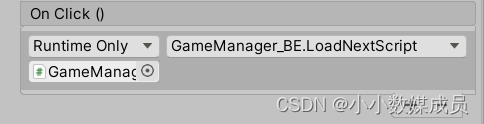
通过按钮点击对话框,推动人物进行
【仅当学习笔记,特别感谢:M_Studio 我是Trigger呀 UP主,】
我正在尝试测试是否存在表单。我是Rails新手。我的new.html.erb_spec.rb文件的内容是:require'spec_helper'describe"messages/new.html.erb"doit"shouldrendertheform"dorender'/messages/new.html.erb'reponse.shouldhave_form_putting_to(@message)with_submit_buttonendendView本身,new.html.erb,有代码:当我运行rspec时,它失败了:1)messages/new.html.erbshou
我在从html页面生成PDF时遇到问题。我正在使用PDFkit。在安装它的过程中,我注意到我需要wkhtmltopdf。所以我也安装了它。我做了PDFkit的文档所说的一切......现在我在尝试加载PDF时遇到了这个错误。这里是错误:commandfailed:"/usr/local/bin/wkhtmltopdf""--margin-right""0.75in""--page-size""Letter""--margin-top""0.75in""--margin-bottom""0.75in""--encoding""UTF-8""--margin-left""0.75in""-
我在我的项目目录中完成了compasscreate.和compassinitrails。几个问题:我已将我的.sass文件放在public/stylesheets中。这是放置它们的正确位置吗?当我运行compasswatch时,它不会自动编译这些.sass文件。我必须手动指定文件:compasswatchpublic/stylesheets/myfile.sass等。如何让它自动运行?文件ie.css、print.css和screen.css已放在stylesheets/compiled。如何在编译后不让它们重新出现的情况下删除它们?我自己编译的.sass文件编译成compiled/t
我有一个对象has_many应呈现为xml的子对象。这不是问题。我的问题是我创建了一个Hash包含此数据,就像解析器需要它一样。但是rails自动将整个文件包含在.........我需要摆脱type="array"和我该如何处理?我没有在文档中找到任何内容。 最佳答案 我遇到了同样的问题;这是我的XML:我在用这个:entries.to_xml将散列数据转换为XML,但这会将条目的数据包装到中所以我修改了:entries.to_xml(root:"Contacts")但这仍然将转换后的XML包装在“联系人”中,将我的XML代码修改为
为了将Cucumber用于命令行脚本,我按照提供的说明安装了arubagem。它在我的Gemfile中,我可以验证是否安装了正确的版本并且我已经包含了require'aruba/cucumber'在'features/env.rb'中为了确保它能正常工作,我写了以下场景:@announceScenario:Testingcucumber/arubaGivenablankslateThentheoutputfrom"ls-la"shouldcontain"drw"假设事情应该失败。它确实失败了,但失败的原因是错误的:@announceScenario:Testingcucumber/ar
我有一大串格式化数据(例如JSON),我想使用Psychinruby同时保留格式转储到YAML。基本上,我希望JSON使用literalstyle出现在YAML中:---json:|{"page":1,"results":["item","another"],"total_pages":0}但是,当我使用YAML.dump时,它不使用文字样式。我得到这样的东西:---json:!"{\n\"page\":1,\n\"results\":[\n\"item\",\"another\"\n],\n\"total_pages\":0\n}\n"我如何告诉Psych以想要的样式转储标量?解
我在我的项目中添加了一个系统来重置用户密码并通过电子邮件将密码发送给他,以防他忘记密码。昨天它运行良好(当我实现它时)。当我今天尝试启动服务器时,出现以下错误。=>BootingWEBrick=>Rails3.2.1applicationstartingindevelopmentonhttp://0.0.0.0:3000=>Callwith-dtodetach=>Ctrl-CtoshutdownserverExiting/Users/vinayshenoy/.rvm/gems/ruby-1.9.3-p0/gems/actionmailer-3.2.1/lib/action_mailer
我的瘦服务器配置了nginx,我的ROR应用程序正在它们上运行。在我发布代码更新时运行thinrestart会给我的应用程序带来一些停机时间。我试图弄清楚如何优雅地重启正在运行的Thin实例,但找不到好的解决方案。有没有人能做到这一点? 最佳答案 #Restartjustthethinserverdescribedbythatconfigsudothin-C/etc/thin/mysite.ymlrestartNginx将继续运行并代理请求。如果您将Nginx设置为使用多个上游服务器,例如server{listen80;server
在MRIRuby中我可以这样做:deftransferinternal_server=self.init_serverpid=forkdointernal_server.runend#Maketheserverprocessrunindependently.Process.detach(pid)internal_client=self.init_client#Dootherstuffwithconnectingtointernal_server...internal_client.post('somedata')ensure#KillserverProcess.kill('KILL',
我已经从我的命令行中获得了一切,所以我可以运行rubymyfile并且它可以正常工作。但是当我尝试从sublime中运行它时,我得到了undefinedmethod`require_relative'formain:Object有人知道我的sublime设置中缺少什么吗?我正在使用OSX并安装了rvm。 最佳答案 或者,您可以只使用“require”,它应该可以正常工作。我认为“require_relative”仅适用于ruby1.9+ 关于ruby-主要:Objectwhenrun
