登录与注册
1、创建登录界面,点击注册按钮,弹出注册窗口。
2、创建注册窗口,输入用户名和密码,在SQLite中存储用户名和密码。
3、注册成功,跳转到登录界面,进行登录。
4、注册成功,把用户名和密码保存到SharedPreferences中,登录时自动填充用户名和密码。
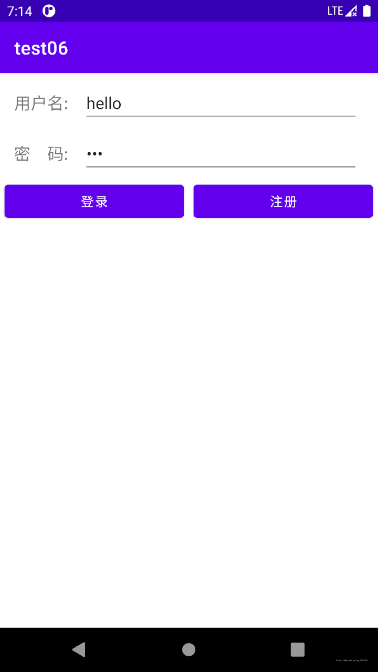
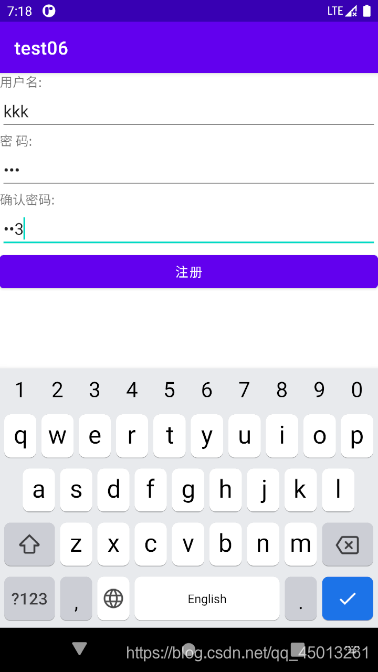
登录页面具有两个输入框和两个按键,输入框分别用于获取用户名和密码,按键分为登录按键和注册按键,分别跳往不同的页面。登陆成功后,进入到欢迎界面。注册跳转到注册页面,注册成功后,将数据存储到SharedPreferences和数据中,返回登录页面将SharedPreferences中的数据填充到输入框中。
1登录页面:
这是我之前注册过后的账户,所以点击进去就自动填充好了信息。
2.注册页面:
注册页面写的非常简略,如果想实现更多的效果可以网上查查,也可以参照下我上一篇文章中的注册页面。
编写一个简单的andriod注册页面,并跳转后显示注册信息
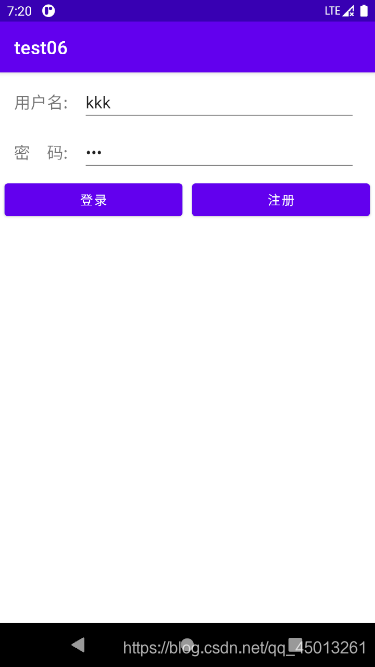
3.注册成功后:
注册成功后会自动跳转到登录页面,并且填充信息。
4.登录成功后:
登陆成功后会将用户名取出来,并显示欢迎。
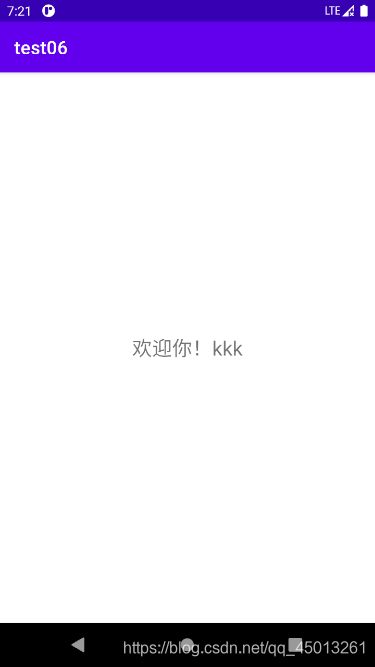
这里登录比对数据的时候,我采用的方法是从数据库中查询与输入的用户名、密码相同的记录,若记录存在则登陆成功。不存在则提示用户用户名或密码输入错误。
package com.example.test06;

import androidx.appcompat.app.AppCompatActivity;

import android.content.Intent;
import android.content.SharedPreferences;
import android.database.Cursor;
import android.database.sqlite.SQLiteDatabase;
import android.os.Bundle;
import android.view.View;
import android.widget.Button;
import android.widget.EditText;
import android.widget.Toast;

public class MainActivity extends AppCompatActivity {
    EditText name,pwd;
    Button btnlogin,btnreg;
    Mysql mysql;
    SQLiteDatabase db;
    SharedPreferences sp1,sp2;
    @Override
    protected void onCreate(Bundle savedInstanceState) {
        super.onCreate(savedInstanceState);
        setContentView(R.layout.activity_main);
        name = this.findViewById(R.id.name);            //用户名输入框
        pwd = this.findViewById(R.id.pwd);              //密码输入框
        btnlogin = this.findViewById(R.id.login);         //登录按钮
        btnreg = this.findViewById(R.id.reg);               //注册按钮
        sp1 =  this.getSharedPreferences("useinfo",this.MODE_PRIVATE);
        sp2 = this.getSharedPreferences("username",this.MODE_PRIVATE);

        name.setText(sp1.getString("usname",null));
        pwd.setText(sp1.getString("uspwd",null));
        mysql = new Mysql(this,"Userinfo",null,1);      //建数据库或者取数据库
        db = mysql.getReadableDatabase();
        btnlogin.setOnClickListener(new View.OnClickListener() {                //登录事件
            @Override
            public void onClick(View v) {
                String username = name.getText().toString();
                String password = pwd.getText().toString();                 //获取用户输入的用户名和密码
                //查询用户名和密码相同的数据
                Cursor cursor = db.query("logins",new String[]{"usname","uspwd"}," usname=? and uspwd=?",new String[]{username,password},null,null,null);

                int flag = cursor.getCount();                            //查询出来的记录项的条数,若没有该用户则为0条
                if(flag!=0){                                            //若查询出的记录不为0,则进行跳转操作
                    Intent intent = new Intent();
                    intent.setClass(MainActivity.this,Welcome.class);            //设置页面跳转
                    SharedPreferences.Editor editor = sp2.edit();
                    cursor.moveToFirst();                                   //将光标移动到position为0的位置,默认位置为-1
                    String loginname = cursor.getString(0);
                    editor.putString("Loginname",loginname);
                    editor.commit();                                        //将用户名存到SharedPreferences中
                    startActivity(intent);
                }
                else{
                    Toast.makeText(MainActivity.this,"用户名或密码错误!",Toast.LENGTH_LONG).show();             //提示用户信息错误或没有账号
                }

            }
        });

        btnreg.setOnClickListener(new View.OnClickListener() {                  //注册事件
            @Override
            public void onClick(View v) {

                Intent intent = new Intent();
                intent.setClass(MainActivity.this,Register.class);          //跳转到注册页面
                startActivity(intent);
                Toast.makeText(MainActivity.this,"前往注册!",Toast.LENGTH_SHORT).show();
            }
        });
    }
}
这是对应的布局文件activity_main.xml
<?xml version="1.0" encoding="utf-8"?>
<androidx.constraintlayout.widget.ConstraintLayout xmlns:android="http://schemas.android.com/apk/res/android"
    xmlns:app="http://schemas.android.com/apk/res-auto"
    xmlns:tools="http://schemas.android.com/tools"
    android:layout_width="match_parent"
    android:layout_height="match_parent"
    tools:context=".MainActivity">

    <LinearLayout
        android:layout_width="match_parent"
        android:layout_height="match_parent"
        android:orientation="vertical">
        <LinearLayout
            android:layout_width="match_parent"
            android:layout_height="wrap_content"
            android:layout_marginTop="10dp"
            android:orientation="horizontal">
            <TextView
                android:layout_width="0dp"
                android:layout_height="wrap_content"
                android:layout_weight="0.3"
                android:gravity="center"
                android:textSize="18dp"
                android:text="用户名:"/>
            <EditText
                android:id="@+id/name"
                android:layout_width="0dp"
                android:layout_height="wrap_content"
                android:layout_weight="1"
                android:layout_marginRight="20dp"/>
        </LinearLayout>

        <LinearLayout
            android:layout_width="match_parent"
            android:layout_height="wrap_content"
            android:layout_marginTop="10dp"
            android:orientation="horizontal">
            <TextView
                android:layout_width="0dp"
                android:layout_height="wrap_content"
                android:gravity="center"
                android:textSize="18dp"
                android:layout_weight="0.3"
                android:text="密    码:"/>
            <EditText
                android:id="@+id/pwd"
                android:layout_width="0dp"
                android:layout_height="wrap_content"
                android:inputType="textPassword"
                android:layout_weight="1"
                android:layout_marginRight="20dp"
                />
        </LinearLayout>
        <LinearLayout
            android:layout_width="match_parent"
            android:layout_height="wrap_content"
            android:orientation="horizontal">
            <Button
                android:id="@+id/login"
                android:layout_width="wrap_content"
                android:layout_height="wrap_content"
                android:layout_weight="1"
                android:layout_margin="5dp"
                android:text="登录"
                />
            <Button
                android:id="@+id/reg"
                android:layout_width="wrap_content"
                android:layout_height="wrap_content"
                android:layout_weight="1"
                android:layout_margin="5dp"
                android:text="注册"
                />
        </LinearLayout>
    </LinearLayout>


</androidx.constraintlayout.widget.ConstraintLayout>
注册时,会先对用户名进行比对,若用户名存在则提醒用户名已存在。设置密码会比对两次输入的密码是否相同,不相同则发出提醒。
package com.example.test06;

import androidx.appcompat.app.AppCompatActivity;

import android.content.ContentValues;
import android.content.Intent;
import android.content.SharedPreferences;
import android.database.Cursor;
import android.database.sqlite.SQLiteDatabase;
import android.os.Bundle;
import android.view.View;
import android.widget.Button;
import android.widget.EditText;
import android.widget.Toast;

public class Register extends AppCompatActivity {
    EditText usename,usepwd,usepwd2;
    Button submit;
    Mysql mysql;
    SQLiteDatabase db;
    SharedPreferences sp;
    @Override
    protected void onCreate(Bundle savedInstanceState) {
        super.onCreate(savedInstanceState);
        setContentView(R.layout.activity_register);
        usename = this.findViewById(R.id.usename);			    //用户名编辑框
        usepwd =  this.findViewById(R.id.usepwd);				//设置初始密码编辑框
        usepwd2 = this.findViewById(R.id.usepwd2);			    //二次输入密码编辑框
        submit =   this.findViewById(R.id.submit);				//注册按钮
        mysql = new Mysql(this,"Userinfo",null,1);      //建数据库
        db = mysql.getReadableDatabase();
        sp = this.getSharedPreferences("useinfo",this.MODE_PRIVATE);


        submit.setOnClickListener(new View.OnClickListener() {
            boolean flag = true;            //判断用户是否已存在的标志位
            @Override
            public void onClick(View v) {
                String name = usename.getText().toString();				//用户名
                String pwd01 = usepwd.getText().toString();				//密码
                String pwd02 = usepwd2.getText().toString();			//二次输入的密码
                String sex = "";										//性别
                if(name.equals("")||pwd01 .equals("")||pwd02.equals("")){
                    Toast.makeText(Register.this, "用户名或密码不能为空!!", Toast.LENGTH_LONG).show();
                }
                else{
                    Cursor cursor = db.query("logins",new String[]{"usname"},null,null,null,null,null);

                    while (cursor.moveToNext()){
                        if(cursor.getString(0).equals(name)){
                            flag = false;
                            break;
                        }
                    }
                    if(flag==true){                                             //判断用户是否已存在
                        if (pwd01.equals(pwd02)) {								//判断两次输入的密码是否一致,若一致则继续,不一致则提醒密码不一致
                            ContentValues cv = new ContentValues();
                            cv.put("usname",name);
                            cv.put("uspwd",pwd01);
                            db.insert("logins",null,cv);
                            SharedPreferences.Editor editor = sp.edit();
                            editor.putString("usname",name);
                            editor.putString("uspwd",pwd01);
                            editor.commit();
                            Intent intent = new Intent();
                            intent.setClass(Register.this,MainActivity.class);      //跳转到登录页面
                            startActivity(intent);
                            Toast.makeText(Register.this, "注册成功!", Toast.LENGTH_LONG).show();
                        }
                        else {
                            Toast.makeText(Register.this, "密码不一致!", Toast.LENGTH_LONG).show();			//提示密码不一致
                        }
                    }
                    else{
                        Toast.makeText(Register.this, "用户已存在!", Toast.LENGTH_LONG).show();			//提示密码不一致
                    }

                }
            }


        });
    }
}
这是对应的布局文件activity_register.xml
<?xml version="1.0" encoding="utf-8"?>
<androidx.constraintlayout.widget.ConstraintLayout xmlns:android="http://schemas.android.com/apk/res/android"
    xmlns:app="http://schemas.android.com/apk/res-auto"
    xmlns:tools="http://schemas.android.com/tools"
    android:layout_width="match_parent"
    android:layout_height="match_parent"
    tools:context=".Register">
    <LinearLayout
        android:layout_width="match_parent"
        android:layout_height="match_parent"
        android:orientation="vertical">
    <!-- 用户名部分 -->
    <TextView
        android:layout_width="fill_parent"
        android:layout_height="wrap_content"
        android:text="用户名:" />

    <EditText
        android:id="@+id/usename"
        android:layout_width="fill_parent"
        android:layout_height="wrap_content"
        android:text=""
        />
    <!-- 密码部分 -->
    <TextView
        android:layout_width="fill_parent"
        android:layout_height="wrap_content"
        android:text="密 码:"
        />

    <EditText
        android:id="@+id/usepwd"
        android:layout_width="fill_parent"
        android:layout_height="wrap_content"
        android:inputType="textPassword"

        />
    <!-- 确认密码部分 -->
    <TextView
        android:layout_width="fill_parent"
        android:layout_height="wrap_content"
        android:text="确认密码:"
        />

    <EditText
        android:id="@+id/usepwd2"
        android:layout_width="fill_parent"
        android:layout_height="wrap_content"
        android:inputType="textPassword"
        />
        <Button
            android:id="@+id/submit"
            android:layout_width="fill_parent"
            android:layout_height="wrap_content"
            android:text="注册" />
    </LinearLayout>
</androidx.constraintlayout.widget.ConstraintLayout>
package com.example.test06;

import androidx.appcompat.app.AppCompatActivity;

import android.content.SharedPreferences;
import android.os.Bundle;
import android.widget.TextView;

public class Welcome extends AppCompatActivity {
    SharedPreferences sp;
    TextView showhello;
    @Override
    protected void onCreate(Bundle savedInstanceState) {
        super.onCreate(savedInstanceState);
        setContentView(R.layout.activity_welcome);
        sp = this.getSharedPreferences("username", this.MODE_PRIVATE);  //获取sharepreferences
        showhello = this.findViewById(R.id.mainword);           //显示欢迎

        showhello.setText("欢迎你!"+sp.getString("Loginname",""));     //获取用户名
    }
}
这是对应的布局文件activity_welcome.xml
<?xml version="1.0" encoding="utf-8"?>
<androidx.constraintlayout.widget.ConstraintLayout xmlns:android="http://schemas.android.com/apk/res/android"
    xmlns:app="http://schemas.android.com/apk/res-auto"
    xmlns:tools="http://schemas.android.com/tools"
    android:layout_width="match_parent"
    android:layout_height="match_parent"
    tools:context=".Welcome">
    <TextView
        android:id="@+id/mainword"
        android:layout_width="fill_parent"
        android:layout_height="fill_parent"
        android:gravity="center"
        android:textSize="22dp"
        tools:ignore="MissingConstraints" />
</androidx.constraintlayout.widget.ConstraintLayout>
package com.example.test06;

import android.content.Context;
import android.database.sqlite.SQLiteDatabase;
import android.database.sqlite.SQLiteOpenHelper;

import androidx.annotation.Nullable;

public class Mysql extends SQLiteOpenHelper {
    public Mysql(@Nullable Context context, @Nullable String name, @Nullable SQLiteDatabase.CursorFactory factory, int version) {
        super(context, name, factory, version);
    }

    @Override
    public void onCreate(SQLiteDatabase db) {
        String sql = "create table logins(id integer primary key autoincrement,usname text,uspwd text)";
        db.execSQL(sql);
    }

    @Override
    public void onUpgrade(SQLiteDatabase db, int oldVersion, int newVersion) {

    }
}
代码可能有些简陋,考虑也可能没那么全面,但基本的功能还是可以的。暂时没发现什么大的问题。
我想安装一个带有一些身份验证的私有(private)Rubygem服务器。我希望能够使用公共(public)Ubuntu服务器托管内部gem。我读到了http://docs.rubygems.org/read/chapter/18.但是那个没有身份验证-如我所见。然后我读到了https://github.com/cwninja/geminabox.但是当我使用基本身份验证(他们在他们的Wiki中有)时,它会提示从我的服务器获取源。所以。如何制作带有身份验证的私有(private)Rubygem服务器?这是不可能的吗?谢谢。编辑:Geminabox问题。我尝试“捆绑”以安装新的gem..
使用带有Rails插件的vim,您可以创建一个迁移文件,然后一次性打开该文件吗?textmate也可以这样吗? 最佳答案 你可以使用rails.vim然后做类似的事情::Rgeneratemigratonadd_foo_to_bar插件将打开迁移生成的文件,这正是您想要的。我不能代表textmate。 关于ruby-使用VimRails,您可以创建一个新的迁移文件并一次性打开它吗?,我们在StackOverflow上找到一个类似的问题: https://sta
我需要从一个View访问多个模型。以前,我的links_controller仅用于提供以不同方式排序的链接资源。现在我想包括一个部分(我假设)显示按分数排序的顶级用户(@users=User.all.sort_by(&:score))我知道我可以将此代码插入每个链接操作并从View访问它,但这似乎不是“ruby方式”,我将需要在不久的将来访问更多模型。这可能会变得很脏,是否有针对这种情况的任何技术?注意事项:我认为我的应用程序正朝着单一格式和动态页面内容的方向发展,本质上是一个典型的网络应用程序。我知道before_filter但考虑到我希望应用程序进入的方向,这似乎很麻烦。最终从任何
我想要做的是有2个不同的Controller,client和test_client。客户端Controller已经构建,我想创建一个test_clientController,我可以使用它来玩弄客户端的UI并根据需要进行调整。我主要是想绕过我在客户端中内置的验证及其对加载数据的管理Controller的依赖。所以我希望test_clientController加载示例数据集,然后呈现客户端Controller的索引View,以便我可以调整客户端UI。就是这样。我在test_clients索引方法中试过这个:classTestClientdefindexrender:template=>
我想用ruby编写一个小的命令行实用程序并将其作为gem分发。我知道安装后,Guard、Sass和Thor等某些gem可以从命令行自行运行。为了让gem像二进制文件一样可用,我需要在我的gemspec中指定什么。 最佳答案 Gem::Specification.newdo|s|...s.executable='name_of_executable'...endhttp://docs.rubygems.org/read/chapter/20 关于ruby-在Ruby中编写命令行实用程序
如果您尝试在Ruby中的nil对象上调用方法,则会出现NoMethodError异常并显示消息:"undefinedmethod‘...’fornil:NilClass"然而,有一个tryRails中的方法,如果它被发送到一个nil对象,它只返回nil:require'rubygems'require'active_support/all'nil.try(:nonexisting_method)#noNoMethodErrorexceptionanymore那么try如何在内部工作以防止该异常? 最佳答案 像Ruby中的所有其他对象
关闭。这个问题需要detailsorclarity.它目前不接受答案。想改进这个问题吗?通过editingthispost添加细节并澄清问题.关闭8年前。Improvethisquestion为什么SecureRandom.uuid创建一个唯一的字符串?SecureRandom.uuid#=>"35cb4e30-54e1-49f9-b5ce-4134799eb2c0"SecureRandom.uuid方法创建的字符串从不重复?
我有一个正在构建的应用程序,我需要一个模型来创建另一个模型的实例。我希望每辆车都有4个轮胎。汽车模型classCar轮胎模型classTire但是,在make_tires内部有一个错误,如果我为Tire尝试它,则没有用于创建或新建的activerecord方法。当我检查轮胎时,它没有这些方法。我该如何补救?错误是这样的:未定义的方法'create'forActiveRecord::AttributeMethods::Serialization::Tire::Module我测试了两个环境:测试和开发,它们都因相同的错误而失败。 最佳答案
我想在Ruby中创建一个用于开发目的的极其简单的Web服务器(不,不想使用现成的解决方案)。代码如下:#!/usr/bin/rubyrequire'socket'server=TCPServer.new('127.0.0.1',8080)whileconnection=server.acceptheaders=[]length=0whileline=connection.getsheaders想法是从命令行运行这个脚本,提供另一个脚本,它将在其标准输入上获取请求,并在其标准输出上返回完整的响应。到目前为止一切顺利,但事实证明这真的很脆弱,因为它在第二个请求上中断并出现错误:/usr/b
我想让一个yaml对象引用另一个,如下所示:intro:"Hello,dearuser."registration:$introThanksforregistering!new_message:$introYouhaveanewmessage!上面的语法只是它如何工作的一个例子(这也是它在thiscpanmodule中的工作方式。)我正在使用标准的rubyyaml解析器。这可能吗? 最佳答案 一些yaml对象确实引用了其他对象:irb>require'yaml'#=>trueirb>str="hello"#=>"hello"ir
