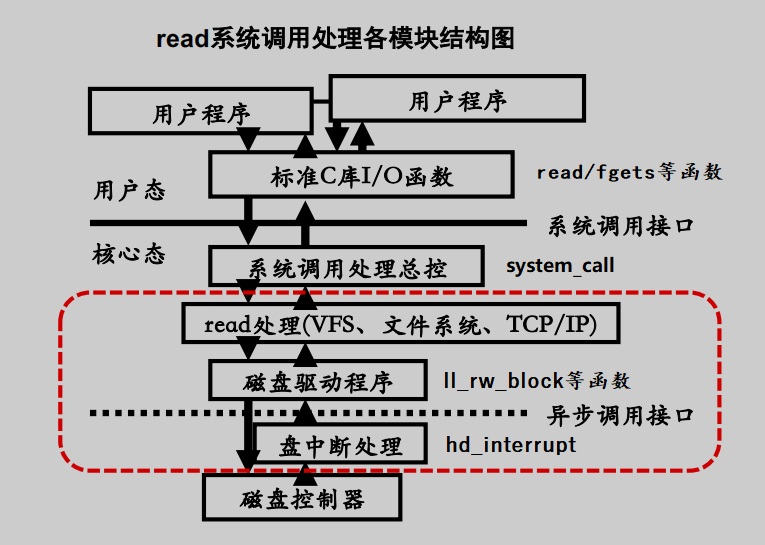
用户进程read、write在高速缓冲块上读写数据,高速缓冲块和块设备交换数据。
代码文件:linux-0.11/fs/read_write.c
系统调用sys_read与sys_write是内核提供给用户程序调用的IO接口。若IO设备是块设备,底层分别调用block_read与block_write进行块设备的读写。
int sys_read(unsigned int fd,char * buf,int count)
{
	struct file * file;
	struct m_inode * inode;

    // 通过文件描述符,在file表中找到file结构地址
	if (fd>=NR_OPEN || count<0 || !(file=current->filp[fd]))
		return -EINVAL;
	if (!count)
		return 0;

	verify_area(buf,count);
	inode = file->f_inode;	// 通过file的f_inode访问inode节点

    //判断是什么设备:管道、字符设备、块设备
    //如果是块设备,调用block_read读块设备
	if (inode->i_pipe)
		return (file->f_mode&1)?read_pipe(inode,buf,count):-EIO;
	if (S_ISCHR(inode->i_mode))
		return rw_char(READ,inode->i_zone[0],buf,count,&file->f_pos);
	if (S_ISBLK(inode->i_mode))
		return block_read(inode->i_zone[0],&file->f_pos,buf,count);

	if (S_ISDIR(inode->i_mode) || S_ISREG(inode->i_mode)) {
		if (count+file->f_pos > inode->i_size)
			count = inode->i_size - file->f_pos;
		if (count<=0)
			return 0;
		return file_read(inode,file,buf,count);
	}

	printk("(Read)inode->i_mode=%06o\n\r",inode->i_mode);
	return -EINVAL;
}
int sys_write(unsigned int fd,char * buf,int count)
{
	struct file * file;
	struct m_inode * inode;

	if (fd>=NR_OPEN || count <0 || !(file=current->filp[fd]))
		return -EINVAL;
	if (!count)
		return 0;

    //判断是什么设备:管道、字符设备、块设备
    //如果是块设备,调用block_write读块设备
	inode=file->f_inode;
	if (inode->i_pipe)
		return (file->f_mode&2)?write_pipe(inode,buf,count):-EIO;
	if (S_ISCHR(inode->i_mode))
		return rw_char(WRITE,inode->i_zone[0],buf,count,&file->f_pos);
	if (S_ISBLK(inode->i_mode))
		return block_write(inode->i_zone[0],&file->f_pos,buf,count);
	if (S_ISREG(inode->i_mode))
		return file_write(inode,file,buf,count);

	printk("(Write)inode->i_mode=%06o\n\r",inode->i_mode);
	return -EINVAL;
}
block_read与block_write负责块设备的读写。他们底层调用breada函数获取缓冲块,然后在缓冲块上读写数据。
代码文件:linux-0.11/fs/block_dev.c
int block_write(int dev, long * pos, char * buf, int count)
{
	int block = *pos >> BLOCK_SIZE_BITS;// pos所在文件数据块号
	int offset = *pos & (BLOCK_SIZE-1); // pos在数据块中偏移值
	int chars;
	int written = 0;
	struct buffer_head * bh;			//指向当前写缓冲块
	register char * p;

    // 向缓冲块中写数据,通过getblk获取缓冲块,获取缓冲块的同时会读取磁盘块数据到缓冲块
    // 数据量较多时,通过bread一次性缓存3个磁盘块数据到缓冲块,减小磁盘IO次数
	while (count>0) {
		chars = BLOCK_SIZE - offset;
		if (chars > count)
			chars=count;
		if (chars == BLOCK_SIZE)
            //获取高速缓冲块,并建立其与磁盘块的映射关系
			bh = getblk(dev,block);
		else
            // 读取的数据超过一个磁盘块,调用breada读多个块
            // breada底层调用getblk缓存3个连续磁盘块的数据
			bh = breada(dev,block,block+1,block+2,-1);
		block++;
		if (!bh)
			return written?written:-EIO;

		p = offset + bh->b_data;
		offset = 0;
		*pos += chars;
		written += chars;
		count -= chars;
		while (chars-->0)
			*(p++) = get_fs_byte(buf++);

        //完成对缓冲块的数据写入后,设置缓冲块的修改位dirt,然后释放缓冲块(引用计数减一)
		bh->b_dirt = 1;
		brelse(bh);
	}
	return written;
}
代码文件:linux-0.11/fs/block_dev.c
int block_read(int dev, unsigned long * pos, char * buf, int count)
{
	int block = *pos >> BLOCK_SIZE_BITS;
	int offset = *pos & (BLOCK_SIZE-1);
	int chars;
	int read = 0;
	struct buffer_head * bh;
	register char * p;

	while (count>0) {
		chars = BLOCK_SIZE-offset;
		if (chars > count)
			chars = count;
		if (!(bh = breada(dev,block,block+1,block+2,-1)))
			return read?read:-EIO;
		block++;

		p = offset + bh->b_data;
		offset = 0;
		*pos += chars;
		read += chars;
		count -= chars;
		while (chars-->0)
			put_fs_byte(*(p++),buf++);

		//完成对缓冲块的数据读取之后,释放缓冲块(引用计数减一)
        brelse(bh);
	}
	return read;
}
代码文件:linux-0.11/fs/buffer.c
bread、breada、bread_page三者功能相似,用法不同。三者均会调用getblk获取缓冲块,并调用ll_rw_block读数据到缓冲块。
struct buffer_head * bread(int dev,int block)
{
	struct buffer_head * bh;

	if (!(bh=getblk(dev,block)))
		panic("bread: getblk returned NULL\n");
	if (bh->b_uptodate)
		return bh;

    // 调用ll_rw_block读磁盘块数据到缓冲区
	ll_rw_block(READ,bh);
	wait_on_buffer(bh);
	if (bh->b_uptodate)
		return bh;
	brelse(bh);
	return NULL;
}
代码文件:linux-0.11/fs/buffer.c
bread系列函数通过getblk获取缓冲块,在必要的时候,会调用sync_dev函数将脏缓冲块数据写入磁盘。
getblk代码逻辑复杂,需要对资源可用性进行复杂的检查。资源不可用时,需要睡眠,被唤醒之后又要进行一些检查判断资源是否可用。复杂逻辑可以暂时不考虑,避免陷入代码细节。
仅考虑getblk获取空闲块之后的代码逻辑。getblk获取可用缓冲块后,若缓冲块dirt位为1,表示缓冲块有数据未同步到磁盘,getblk将调用sync_dev将数据同步到磁盘,然后占用该缓冲块。
struct buffer_head * getblk(int dev,int block)
{
	struct buffer_head * tmp, * bh;

repeat:
    // 搜索hash表,如果指定块已经在高速缓冲中,则返回对应缓冲区头指针,退出。
	if ((bh = get_hash_table(dev,block)))
		return bh;
    // 扫描空闲数据块链表,寻找空闲缓冲区。
	tmp = free_list;
	do {
        // 如果该缓冲区正被使用(引用计数不等于0)
		if (tmp->b_count)
			continue;

        // 找到可用缓冲块,且满足一些条件
		if (!bh || BADNESS(tmp)<BADNESS(bh)) {
			bh = tmp;
			if (!BADNESS(tmp))
				break;
		}
/* and repeat until we find something good */
	} while ((tmp = tmp->b_next_free) != free_list);

    // 没有可用缓冲块,则睡眠等待有空闲缓冲块可用。
    // 当有空闲缓冲块可用时本进程会被的唤醒。
	if (!bh) {
		sleep_on(&buffer_wait); //睡眠在缓冲区上
		goto repeat;
	}

    //等待缓冲区解锁?
	wait_on_buffer(bh);
	if (bh->b_count)
		goto repeat;

    // 分配到的缓冲块dirt位为1(表示有数据未同步到磁盘)
    // 调用sync_dev将数据同步到磁盘,并睡眠在该缓冲块上
	while (bh->b_dirt) {
		sync_dev(bh->b_dev);
		wait_on_buffer(bh);
		if (bh->b_count)
			goto repeat;
	}
/* NOTE!! While we slept waiting for this block, somebody else might */
/* already have added "this" block to the cache. check it */
	if (find_buffer(dev,block))
		goto repeat;
/* OK, FINALLY we know that this buffer is the only one of it's kind, */
/* and that it's unused (b_count=0), unlocked (b_lock=0), and clean */

    // 对空闲缓冲块的处理
    // 占用空闲缓冲块。置引用计数为1,复位修改标志和有效(更新)标志。
	bh->b_count=1;
	bh->b_dirt=0;
	bh->b_uptodate=0;
    // 从原hash队列和空闲队列块链表中移出该缓冲区头。根据此新的设备号和块号重新插入空闲链表和hash队列
    // 让该缓冲区用于指定设备和其上的指定块。
    // 根据此新的设备号和块号重新哈希,并插入响应的hash队列
	remove_from_queues(bh);
	bh->b_dev=dev;
	bh->b_blocknr=block; //加锁
	insert_into_queues(bh);
	return bh;
}
代码文件:linux-0.11/fs/buffer.c
调用ll_rw_block将缓冲块内数据写入磁盘。getblk管理缓冲块时,若其它进程需要某缓冲块,且缓冲块具有脏(dirt位为1)数据,调用sync_dev将数据写入磁盘。
int sync_dev(int dev)
{
	int i;
	struct buffer_head * bh;

	bh = start_buffer;
	for (i=0 ; i<NR_BUFFERS ; i++,bh++) {
		if (bh->b_dev != dev)
			continue;
		wait_on_buffer(bh);
		if (bh->b_dev == dev && bh->b_dirt)
            // 调用ll_rw_block写缓冲区数据到磁盘块
			ll_rw_block(WRITE,bh);
	}

	bh = start_buffer;
	for (i=0 ; i<NR_BUFFERS ; i++,bh++) {
		if (bh->b_dev != dev)
			continue;
		wait_on_buffer(bh);
		if (bh->b_dev == dev && bh->b_dirt)
			ll_rw_block(WRITE,bh);
	}
	return 0;
}
代码文件:linux-0.11/kernel/blk_drv/ll_rw_blk.c
将缓冲块的数据写入磁盘块,获将磁盘块数据读入缓冲块,底层通过设备请求队列完成读写。
void ll_rw_block(int rw, struct buffer_head * bh)
{
	unsigned int major;

	if ((major=MAJOR(bh->b_dev)) >= NR_BLK_DEV ||
	!(blk_dev[major].request_fn)) {
		printk("Trying to read nonexistent block-device\n\r");
		return;
	}

    // 将读写请求加入设备请求队列
	make_request(major,rw,bh);
}
代码文件:linux-0.11/kernel/blk_drv/hd.c
设备完成读扇区数据后,发出读中断,读中断处理程序read_intr执行。若当前读请求还有数据要读,则继续完成当前请求的数据读。因为,一次读请求可能读若干连续扇区数据,磁盘每次只能写读一个扇区数据。完成一次读请求的所有数据读之后,将调用do_hd_request处理下一个写请求。
static void read_intr(void)
{
	if (win_result()) {
		bad_rw_intr();
		do_hd_request();
		return;
	}
	port_read(HD_DATA,CURRENT->buffer,256);
	CURRENT->errors = 0;
	CURRENT->buffer += 512;
	CURRENT->sector++;
	if (--CURRENT->nr_sectors) {
		do_hd = &read_intr;
		return;
	}
	end_request(1);
	do_hd_request();
}
与写完成中断处理程序过程类似。
static void write_intr(void)
{
	if (win_result()) {
		bad_rw_intr();
		do_hd_request(); //处理下一个请求
		return;
	}
	if (--CURRENT->nr_sectors) {
		CURRENT->sector++;
		CURRENT->buffer += 512;
		do_hd = &write_intr;
		port_write(HD_DATA,CURRENT->buffer,256);
		return;
	}
	end_request(1);
	do_hd_request();
}
处理设备请求队列的读写请求。设备中断处理程序不断调用do_hd_request处理请求队列,直到请求队列为空。
void do_hd_request(void)
{
	int i,r = 0;
	unsigned int block,dev;
	unsigned int sec,head,cyl;
	unsigned int nsect;

	INIT_REQUEST;
	dev = MINOR(CURRENT->dev);
	block = CURRENT->sector;
	if (dev >= 5*NR_HD || block+2 > hd[dev].nr_sects) {
		end_request(0);
		goto repeat;
	}
	block += hd[dev].start_sect;
	dev /= 5;
	__asm__("divl %4":"=a" (block),"=d" (sec):"0" (block),"1" (0),
		"r" (hd_info[dev].sect));
	__asm__("divl %4":"=a" (cyl),"=d" (head):"0" (block),"1" (0),
		"r" (hd_info[dev].head));
	sec++;
	nsect = CURRENT->nr_sectors;
	if (reset) {
		reset = 0;
		recalibrate = 1;
		reset_hd(CURRENT_DEV);
		return;
	}
	if (recalibrate) {
		recalibrate = 0;
		hd_out(dev,hd_info[CURRENT_DEV].sect,0,0,0,
			WIN_RESTORE,&recal_intr);
		return;
	}
	if (CURRENT->cmd == WRITE) {
		hd_out(dev,nsect,sec,head,cyl,WIN_WRITE,&write_intr);
		for(i=0 ; i<3000 && !(r=inb_p(HD_STATUS)&DRQ_STAT) ; i++)
			/* nothing */ ;
		if (!r) {
			bad_rw_intr();
			goto repeat;
		}
		port_write(HD_DATA,CURRENT->buffer,256);
	} else if (CURRENT->cmd == READ) {
		hd_out(dev,nsect,sec,head,cyl,WIN_READ,&read_intr);
	} else
		panic("unknown hd-command");
}
我有一个Ruby程序,它使用rubyzip压缩XML文件的目录树。gem。我的问题是文件开始变得很重,我想提高压缩级别,因为压缩时间不是问题。我在rubyzipdocumentation中找不到一种为创建的ZIP文件指定压缩级别的方法。有人知道如何更改此设置吗?是否有另一个允许指定压缩级别的Ruby库? 最佳答案 这是我通过查看rubyzip内部创建的代码。level=Zlib::BEST_COMPRESSIONZip::ZipOutputStream.open(zip_file)do|zip|Dir.glob("**/*")d
我试图在一个项目中使用rake,如果我把所有东西都放到Rakefile中,它会很大并且很难读取/找到东西,所以我试着将每个命名空间放在lib/rake中它自己的文件中,我添加了这个到我的rake文件的顶部:Dir['#{File.dirname(__FILE__)}/lib/rake/*.rake'].map{|f|requiref}它加载文件没问题,但没有任务。我现在只有一个.rake文件作为测试,名为“servers.rake”,它看起来像这样:namespace:serverdotask:testdoputs"test"endend所以当我运行rakeserver:testid时
我的目标是转换表单输入,例如“100兆字节”或“1GB”,并将其转换为我可以存储在数据库中的文件大小(以千字节为单位)。目前,我有这个:defquota_convert@regex=/([0-9]+)(.*)s/@sizes=%w{kilobytemegabytegigabyte}m=self.quota.match(@regex)if@sizes.include?m[2]eval("self.quota=#{m[1]}.#{m[2]}")endend这有效,但前提是输入是倍数(“gigabytes”,而不是“gigabyte”)并且由于使用了eval看起来疯狂不安全。所以,功能正常,
Rails2.3可以选择随时使用RouteSet#add_configuration_file添加更多路由。是否可以在Rails3项目中做同样的事情? 最佳答案 在config/application.rb中:config.paths.config.routes在Rails3.2(也可能是Rails3.1)中,使用:config.paths["config/routes"] 关于ruby-on-rails-Rails3中的多个路由文件,我们在StackOverflow上找到一个类似的问题
对于具有离线功能的智能手机应用程序,我正在为Xml文件创建单向文本同步。我希望我的服务器将增量/差异(例如GNU差异补丁)发送到目标设备。这是计划:Time=0Server:hasversion_1ofXmlfile(~800kiB)Client:hasversion_1ofXmlfile(~800kiB)Time=1Server:hasversion_1andversion_2ofXmlfile(each~800kiB)computesdeltaoftheseversions(=patch)(~10kiB)sendspatchtoClient(~10kiBtransferred)Cl
我正在寻找执行以下操作的正确语法(在Perl、Shell或Ruby中):#variabletoaccessthedatalinesappendedasafileEND_OF_SCRIPT_MARKERrawdatastartshereanditcontinues. 最佳答案 Perl用__DATA__做这个:#!/usr/bin/perlusestrict;usewarnings;while(){print;}__DATA__Texttoprintgoeshere 关于ruby-如何将脚
使用带有Rails插件的vim,您可以创建一个迁移文件,然后一次性打开该文件吗?textmate也可以这样吗? 最佳答案 你可以使用rails.vim然后做类似的事情::Rgeneratemigratonadd_foo_to_bar插件将打开迁移生成的文件,这正是您想要的。我不能代表textmate。 关于ruby-使用VimRails,您可以创建一个新的迁移文件并一次性打开它吗?,我们在StackOverflow上找到一个类似的问题: https://sta
好的,所以我的目标是轻松地将一些数据保存到磁盘以备后用。您如何简单地写入然后读取一个对象?所以如果我有一个简单的类classCattr_accessor:a,:bdefinitialize(a,b)@a,@b=a,bendend所以如果我从中非常快地制作一个objobj=C.new("foo","bar")#justgaveitsomerandomvalues然后我可以把它变成一个kindaidstring=obj.to_s#whichreturns""我终于可以将此字符串打印到文件或其他内容中。我的问题是,我该如何再次将这个id变回一个对象?我知道我可以自己挑选信息并制作一个接受该信
我正在编写一个小脚本来定位aws存储桶中的特定文件,并创建一个临时验证的url以发送给同事。(理想情况下,这将创建类似于在控制台上右键单击存储桶中的文件并复制链接地址的结果)。我研究过回形针,它似乎不符合这个标准,但我可能只是不知道它的全部功能。我尝试了以下方法:defauthenticated_url(file_name,bucket)AWS::S3::S3Object.url_for(file_name,bucket,:secure=>true,:expires=>20*60)end产生这种类型的结果:...-1.amazonaws.com/file_path/file.zip.A
我注意到像bundler这样的项目在每个specfile中执行requirespec_helper我还注意到rspec使用选项--require,它允许您在引导rspec时要求一个文件。您还可以将其添加到.rspec文件中,因此只要您运行不带参数的rspec就会添加它。使用上述方法有什么缺点可以解释为什么像bundler这样的项目选择在每个规范文件中都需要spec_helper吗? 最佳答案 我不在Bundler上工作,所以我不能直接谈论他们的做法。并非所有项目都checkin.rspec文件。原因是这个文件,通常按照当前的惯例,只
