手机部署和推理参考:
https://developer.qualcomm.com/sites/default/files/docs/snpe/tutorial_inceptionv3.html
运行命令snpe-net-run的说明参考:
https://developer.qualcomm.com/sites/default/files/docs/snpe/tools.html
DSP环境配置:
https://developer.qualcomm.com/sites/default/files/docs/snpe/dsp_runtime.html
手机是需要root的
大坑提示:
骁龙855需要用的snpe的版本不能太高,我最后用的1.40成功了,1.66检测不到gpu和dsp;
设置DSP的环境变量ADSP_LIBRARY_PATH的时候和设置LD_LIBRARY_PATH不一样。官网写到:路径之间的间隔不用冒号,而是用分号;路径必须在引号中;三个路径必须包含。但是我用的手机没有/dsp这个路径,我没设,也成功了。
Key points to note when setting the ADSP_LIBRARY_PATH:

Unlike LD_LIBRARY_PATH the path must be contained within quotations.
Additionally unlike LD_LIBRARY_PATH, the directory separator is a semi-colon, not a colon.

For Android and most embeded linux systems, the 3 paths below MUST be part of ADSP_LIBRARY_PATH. If any of these are missing the DSP runtime may fail.
/system/lib/rfsa/adsp
/system/vendor/lib/rfsa/adsp
/dsp
For embeded linux automotive system, the following DSP paths are required.
/usr/lib/rfsa/adsp
/dsp
The SNPE SDK provides Linux and Android binaries of snpe-net-run under
,
$SNPE_ROOT/bin/x86_64-linux-clang
$SNPE_ROOT/bin/arm-android-clang6.0
$SNPE_ROOT/bin/aarch64-android-clang6.0
$SNPE_ROOT/bin/aarch64-oe-linux-gcc6.4
$SNPE_ROOT/bin/arm-oe-linux-gcc6.4hf
我们在安卓手机上运行,如果是architecture: armeabi-v7a选择arm-android-clang6.0 ;如果是arm64-v8a,选择aarch64-android-clang6.0
在host的命令行中输入,将必要的lib和bin的内容推到安卓机上。
export SNPE_TARGET_ARCH=arm-android-clang6.0
export SNPE_TARGET_STL=libc++_shared.so

adb shell "mkdir -p /data/local/tmp/snpeexample/$SNPE_TARGET_ARCH/bin"
adb shell "mkdir -p /data/local/tmp/snpeexample/$SNPE_TARGET_ARCH/lib"
adb shell "mkdir -p /data/local/tmp/snpeexample/dsp/lib"

adb push $SNPE_ROOT/lib/$SNPE_TARGET_ARCH/$SNPE_TARGET_STL \
      /data/local/tmp/snpeexample/$SNPE_TARGET_ARCH/lib
adb push $SNPE_ROOT/lib/$SNPE_TARGET_ARCH/*.so \
      /data/local/tmp/snpeexample/$SNPE_TARGET_ARCH/lib
adb push $SNPE_ROOT/lib/dsp/*.so \
      /data/local/tmp/snpeexample/dsp/lib
adb push $SNPE_ROOT/bin/$SNPE_TARGET_ARCH/snpe-net-run \
      /data/local/tmp/snpeexample/$SNPE_TARGET_ARCH/bin
cd $SNPE_ROOT/models/inception_v3
mkdir data/rawfiles && cp data/cropped/*.raw data/rawfiles/
adb shell "mkdir -p /data/local/tmp/inception_v3"
adb push data/rawfiles /data/local/tmp/inception_v3/cropped
adb push data/target_raw_list.txt /data/local/tmp/inception_v3
adb push dlc/inception_v3_quantized.dlc /data/local/tmp/inception_v3
rm -rf data/rawfiles
好像每次进入一个adb shell都要重设一遍,永久设置的方案我还没试
adb shell
export SNPE_TARGET_ARCH=arm-android-clang6.0
export LD_LIBRARY_PATH=$LD_LIBRARY_PATH:/data/local/tmp/snpeexample/$SNPE_TARGET_ARCH/lib
export PATH=$PATH:/data/local/tmp/snpeexample/$SNPE_TARGET_ARCH/bin
snpe-net-run -h
输入推理命令,注意对应的文件路径:
cd /data/local/tmp/inception_v3
snpe-net-run --container inception_v3.dlc --input_list target_raw_list.txt
推理的结果默认保存在output下,运行时,使用--output_dir参数,后面加上自己的输出路径
输入推理命令,注意对应的文件路径:snpe-net-run --container inception_v3.dlc --input_list data/cropped/raw_list.txt --output_dir output_gpu --use_gpu
详见“写在前面”的第3条的网页,注意设置环境变量详见“写在前面”的最后一条
# config dsp env
export ADSP_LIBRARY_PATH="/data/local/tmp/incpv3_40/dsp/lib;/system/vendor/lib/rfsa/adsp;/system/system_ext/lib/rfsa/adsp"
输入推理命令
snpe-net-run --container inception_v3_quanti.dlc --input_list data/cropped/raw_list.txt --output_dir output_dsp --use_dsp
结果:
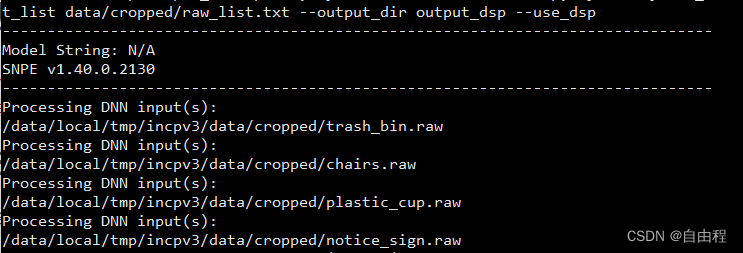
将运行结果从安卓机pull到host上
(root) root@node2-virtual-machine:/home/node2/snpe/snpe-1.40.0.2130/bin/x86_64-linux-clang# ./snpe-diagview --input_log /home/node2/snpe/inception_demo/output_cpu/SNPEDiag_0.log
Interpreting file serialized with Protobuf
Log File Created: Wed Oct  5 14:07:27 2022
Time Scale: 1e-06
Epoch Timestamp: 1664950047462994 Steady Clock Timestamp: 616682741723
Software library version: 1.40.0.2130

Dnn Runtime Load/Deserialize/Create/De-Init Statistics:
--------------------------------------------------
Load: 124 us
Deserialize: 303082 us
Create: 275542 us

Init: 579341 us
De-Init: 44160 us

Create Network(s): 187526 us
RPC Init Time: 0 us
Snpe Accelerator Init Time: 0 us
Accelerator Init Time: 0 us

Average SNPE Statistics:
------------------------------
Total Inference Time: 283228 us
Forward Propagate Time: 283205 us
RPC Execute Time: 0 us
Snpe Accelerator Time: 0 us
Accelerator Time: 0 us
Misc Accelerator Time: 0 us

Layer Times:
---------------
0: 10 us : CPU
1: 7026 us : CPU
2: 2484 us : CPU
3: 19498 us : CPU
(root) root@node2-virtual-machine:/home/node2/snpe/snpe-1.40.0.2130/bin/x86_64-linux-clang# ./snpe-diagview --input_log /home/node2/snpe/inception_demo/output_gpu/SNPEDiag_0.log
Interpreting file serialized with Protobuf
Log File Created: Thu Sep 29 19:55:52 2022
Time Scale: 1e-06
Epoch Timestamp: 1664452552705708 Steady Clock Timestamp: 367353572182
Software library version: 1.40.0.2130

Dnn Runtime Load/Deserialize/Create/De-Init Statistics:
--------------------------------------------------
Load: 148 us
Deserialize: 87545 us
Create: 1481574 us

Init: 1582893 us
De-Init: 66284 us

Create Network(s): 279867 us
RPC Init Time: 0 us
Snpe Accelerator Init Time: 0 us
Accelerator Init Time: 0 us

Average SNPE Statistics:
------------------------------
Total Inference Time: 74891 us
Forward Propagate Time: 74350 us
RPC Execute Time: 0 us
Snpe Accelerator Time: 0 us
Accelerator Time: 0 us
Misc Accelerator Time: 0 us

Layer Times:
---------------
0: 76 us : GPU
1: 258 us : GPU
2: 104 us : GPU
(root) root@node2-virtual-machine:/home/node2/snpe/snpe-1.40.0.2130/bin/x86_64-linux-clang# ./snpe-diagview --input_log /home/node2/snpe/inception_demo/output_dsp/SNPEDiag_0.log
Interpreting file serialized with Protobuf
Log File Created: Thu Sep 29 20:24:07 2022
Time Scale: 1e-06
Epoch Timestamp: 1664454247241986 Steady Clock Timestamp: 369048108460
Software library version: 1.40.0.2130

Dnn Runtime Load/Deserialize/Create/De-Init Statistics:
--------------------------------------------------
Load: 139 us
Deserialize: 84410 us
Create: 1255474 us

Init: 1342995 us
De-Init: 53234 us

Create Network(s): 838072 us
RPC Init Time: 318394 us
Snpe Accelerator Init Time: 316750 us
Accelerator Init Time: 309395 us

Average SNPE Statistics:
------------------------------
Total Inference Time: 21012 us
Forward Propagate Time: 20957 us
RPC Execute Time: 19846 us
Snpe Accelerator Time: 18466 us
Accelerator Time: 16913 us
Misc Accelerator Time: 13 us

Layer Times:
---------------
0: 157 us : DSP
1: 0 us : DSP
2: 291 us : DSP
3: 0 us : DSP
(root) root@node2-virtual-machine:/home/node2/snpe/snpe-1.40.0.2130/bin/x86_64-linux-clang# ./snpe-diagview --input_log /home/node2/snpe/inception_demo/output_aip/SNPEDiag_0.log
Interpreting file serialized with Protobuf
Log File Created: Tue Oct  4 20:11:14 2022
Time Scale: 1e-06
Epoch Timestamp: 1664885474100794 Steady Clock Timestamp: 558001916484
Software library version: 1.40.0.2130

Dnn Runtime Load/Deserialize/Create/De-Init Statistics:
--------------------------------------------------
Load: 148 us
Deserialize: 25203 us
Create: 393726 us

Init: 420999 us
De-Init: 55800 us

Create Network(s): 17399 us
RPC Init Time: 327292 us
Snpe Accelerator Init Time: 325744 us
Accelerator Init Time: 319019 us

Average SNPE Statistics:
------------------------------
Total Inference Time: 15338 us
Forward Propagate Time: 15280 us
RPC Execute Time: 14311 us
Snpe Accelerator Time: 13306 us
Accelerator Time: 11786 us
Misc Accelerator Time: 25 us

Layer Times:
---------------
0: 150 us : DSP
1: 0 us : DSP
2: 238 us : DSP
3: 0 us : DSP
4: 247 us : DSP
这是一个测试设备处理器兼容性的命令。
详见“写在前面”的第2条的网页,注意如果是前面cpu推理是用的arm-android-clang6.0里的,还是aarch64-android-clang6.0 里的内容,这里保持一致。
使用gpu进行推理报错
error_code=1006; error_message=Invalid constraint. error_code=1006; error_message=Invalid constraint.
No GPU device available for target UNKNOWN_SDM;
error_component=Model Validation; line_no=77; thread_id=535068429568; error_component=Model Validation; line_no=342; thread_id=547735115000
输入命令:snpe-platform-validator --runtime all
返回:
SNPE is not supported on this SoC.
最后的解决方案是把snpe1.66换成了1.40,成功解决。还有一点点小差异是1.66里面用的是aarch64-android-clang8.0,后来换成了arm-android-clang6.0,应该和这里没关系吧。
遇到这种报错其实有点,无从下手,我的思路是广泛查找,csdn,论坛,google,Stack Overflow都看一下,然后列了一下解决思路,然后根据经验一条条试试

https://developer.qualcomm.com/forum/qdn-forums/software/qualcomm-neural-processing-sdk/59207
https://developer.qualcomm.com/forum/qdn-forums/software/snapdragon-neural-processing-engine-sdk/35112
GPU不报错了,DSP推理有报错
The selected runtime is not available on this platform. Continue anyway to observe the failure at network creation time.
error_code=500; error_message=Target runtime is not available. error_code=500; error_message=Target runtime is not available. No viable runtimes available.; error_component=Host Runtime; line_no=328; thread_id=-404725280; error_component=Host Runtime; line_no=271; thread_id=-352988048
仔细看了一下官方文档,应该是环境变量设的有问题。详见文章开头“写在前面”最后一条
可能和前文有点出入,但也给大家列出来参考一下
# config snpe-net-run env
export LD_LIBRARY_PATH=$LD_LIBRARY_PATH:/data/local/tmp/incpv3_40/arm-android-clang6.0/lib
export PATH=$PATH:/data/local/tmp/incpv3_40/arm-android-clang6.0/bin

# config snpe-platform-validator
export PATH=$PATH:/data/local/tmp/platformValidator/bin

# config dsp env
export ADSP_LIBRARY_PATH="/data/local/tmp/incpv3_40/dsp/lib;/system/vendor/lib/rfsa/adsp;/system/system_ext/lib/rfsa/adsp"
找dsp相关的环境变量时用到了,mark一下。
find 命令是完全匹配的,必须和搜索关键字一模一样才会列出。
Linux 中的文件名是区分大小写的,也就是说,搜索小写文件,是找不到大写文件的。如果想要大小通吃,就要使用 -iname 来搜索文件。2>/dev/null是不显示无权限的目录。
find / -name libOpenCL.so 2>/dev/null
总的来说,我对ruby还比较陌生,我正在为我正在创建的对象编写一些rspec测试用例。许多测试用例都非常基础,我只是想确保正确填充和返回值。我想知道是否有办法使用循环结构来执行此操作。不必为我要测试的每个方法都设置一个assertEquals。例如:describeitem,"TestingtheItem"doit"willhaveanullvaluetostart"doitem=Item.new#HereIcoulddotheitem.name.shouldbe_nil#thenIcoulddoitem.category.shouldbe_nilendend但我想要一些方法来使用
在选择我想要运行操作的频率时,唯一的选项是“每天”、“每小时”和“每10分钟”。谢谢!我想为我的Rails3.1应用程序运行调度程序。 最佳答案 这不是一个优雅的解决方案,但您可以安排它每天运行,并在实际开始工作之前检查日期是否为当月的第一天。 关于ruby-如何每月在Heroku运行一次Scheduler插件?,我们在StackOverflow上找到一个类似的问题: https://stackoverflow.com/questions/8692687/
exe应该在我打开页面时运行。异步进程需要运行。有什么方法可以在ruby中使用两个参数异步运行exe吗?我已经尝试过ruby命令-system()、exec()但它正在等待过程完成。我需要用参数启动exe,无需等待进程完成是否有任何rubygems会支持我的问题? 最佳答案 您可以使用Process.spawn和Process.wait2:pid=Process.spawn'your.exe','--option'#Later...pid,status=Process.wait2pid您的程序将作为解释器的子进程执行。除
我尝试运行2.x应用程序。我使用rvm并为此应用程序设置其他版本的ruby:$rvmuseree-1.8.7-head我尝试运行服务器,然后出现很多错误:$script/serverNOTE:Gem.source_indexisdeprecated,useSpecification.Itwillberemovedonorafter2011-11-01.Gem.source_indexcalledfrom/Users/serg/rails_projects_terminal/work_proj/spohelp/config/../vendor/rails/railties/lib/r
Sinatra新手;我正在运行一些rspec测试,但在日志中收到了一堆不需要的噪音。如何消除日志中过多的噪音?我仔细检查了环境是否设置为:test,这意味着记录器级别应设置为WARN而不是DEBUG。spec_helper:require"./app"require"sinatra"require"rspec"require"rack/test"require"database_cleaner"require"factory_girl"set:environment,:testFactoryGirl.definition_file_paths=%w{./factories./test/
我是Google云的新手,我正在尝试对其进行首次部署。我的第一个部署是RubyonRails项目。我基本上是在关注thisguideinthegoogleclouddocumentation.唯一的区别是我使用的是我自己的项目,而不是他们提供的“helloworld”项目。这是我的app.yaml文件runtime:customvm:trueentrypoint:bundleexecrackup-p8080-Eproductionconfig.ruresources:cpu:0.5memory_gb:1.3disk_size_gb:10当我转到我的项目目录并运行gcloudprevie
GivenIamadumbprogrammerandIamusingrspecandIamusingsporkandIwanttodebug...mmm...let'ssaaay,aspecforPhone.那么,我应该把“require'ruby-debug'”行放在哪里,以便在phone_spec.rb的特定点停止处理?(我所要求的只是一个大而粗的箭头,即使是一个有挑战性的程序员也能看到:-3)我已经尝试了很多位置,除非我没有正确测试它们,否则会发生一些奇怪的事情:在spec_helper.rb中的以下位置:require'rubygems'require'spork'
是否有可能:before_filter:authenticate_user!||:authenticate_admin! 最佳答案 before_filter:do_authenticationdefdo_authenticationauthenticate_user!||authenticate_admin!end 关于ruby-on-rails-before_filter运行多个方法,我们在StackOverflow上找到一个类似的问题: https://
我可以在Azure网站上部署RubyonRails吗? 最佳答案 还没有。目前仅支持.NET和PHP。 关于ruby-on-rails-RubyonRails可以部署在Azure网站上吗?,我们在StackOverflow上找到一个类似的问题: https://stackoverflow.com/questions/12964010/
之前在培训新生的时候,windows环境下配置opencv环境一直教的都是网上主流的vsstudio配置属性表,但是这个似乎对新生来说难度略高(虽然个人觉得完全是他们自己的问题),加之暑假之后对cmake实在是爱不释手,且这样配置确实十分简单(其实都不需要配置),故斗胆妄言vscode下配置CV之法。其实极为简单,图比较多所以很长。如果你看此文还配不好,你应该思考一下是不是自己的问题。闲话少说,直接开始。0.CMkae简介有的人到大二了都不知道cmake是什么,我不说是谁。CMake是一个开源免费并且跨平台的构建工具,可以用简单的语句来描述所有平台的编译过程。它能够根据当前所在平台输出对应的m
