前言
pytest测试框架也是主流的一个测试框架,推荐使用该框架,对比unnitest框架来说,其效率更高。前面的文章讲解了,如何使用pytest,这篇文章一起来看下如何针对pytest的测试用例进行控制。
本篇文章是《Selenium3自动化测试【38】单元测试Pytest》的后续,建议连续阅读,效果更佳。
Pytest执行用例的方式,不单单是Pytest这一种方式,Pytest提供了3种运行方式执行测试用例。
在pytestDemo目录下,新创建一个Demo_test.py文件,代码如下:
# 乘法,返回a*b的值
def multi(a,b):
    return a*b

# 除法,返回a/b的值
def divide(a,b):
    return a/b

class TestClass:
    def test_multi(self):
        assert multi(3, 3) == 6

    def test_divide(self):
        assert divide(3, 2) == 4
格式为:【pytest 文件名/】或进入pytestDemo目录下,运行pytest,执行某个目录下所有的用例,结果如下,可观察到Demo_test.py与test_demo.py两个测试文件均被运行。
E:\pytestDemo>pytest
=================== test session starts =================================
platform win32 -- Python 3.7.5, pytest-5.4.1, py-1.8.1, pluggy-0.13.1
rootdir: E:\pytestDemo
collected 4 items

Demo_test.py FF                                                                                                  [ 50%]
test_demo.py ..                                                                                                  [100%]

======================= FAILURES ================================
_______________________ TestClass.test_multi _________________________

self = <pytestDemo.Demo_test.TestClass object at 0x00000190540EAA48>

    def test_multi(self):
>       assert multi(3, 3) == 6
E       assert 9 == 6
E        +  where 9 = multi(3, 3)

Demo_test.py:25: AssertionError
_________________ TestClass.test_divide _________________________

self = <pytestDemo.Demo_test.TestClass object at 0x00000190540DF208>

    def test_divide(self):
>       assert divide(3, 2) == 4
E       assert 1.5 == 4
E        +  where 1.5 = divide(3, 2)

Demo_test.py:28: AssertionError
==================== short test summary info ==========================
FAILED Demo_test.py::TestClass::test_multi - assert 9 == 6
FAILED Demo_test.py::TestClass::test_divide - assert 1.5 == 4
=================== 2 failed, 2 passed in 0.07s =======================
执行某一个py文件下用例【pytest 脚本名称.py】,操作步骤及运行结果如下,可观察到仅仅运行了Demo_test.py文件,而test_demo.py并未被运行。
E:\pytestDemo>pytest Demo_test.py
========= test session starts ==================================
platform win32 -- Python 3.7.5, pytest-5.4.1, py-1.8.1, pluggy-0.13.1
rootdir: E:\pytestDemo
collected 2 items
Demo_test.py FF                                                                                                  [100%]

========================= FAILURES ================================
_____ TestClass.test_multi _________________________
self = <pytestDemo.Demo_test.TestClass object at 0x000001B64767ED48>
    def test_multi(self):
>       assert multi(3, 3) == 6
E       assert 9 == 6
E        +  where 9 = multi(3, 3)

Demo_test.py:25: AssertionError
________________________TestClass.test_divide ____________________________
self = <pytestDemo.Demo_test.TestClass object at 0x000001B64767EF48>
    def test_divide(self):
>       assert divide(3, 2) == 4
E       assert 1.5 == 4
E        +  where 1.5 = divide(3, 2)

Demo_test.py:28: AssertionError
===================== short test summary info =========================
FAILED Demo_test.py::TestClass::test_multi - assert 9 == 6
FAILED Demo_test.py::TestClass::test_divide - assert 1.5 == 4
================ 2 failed in 0.10s ===================
通过python -m pytest运行当前目录下的所有测试用例文件。
E:\pytestDemo>python -m pytest
================test session starts ====================================
platform win32 -- Python 3.7.5, pytest-5.4.1, py-1.8.1, pluggy-0.13.1
rootdir: E:\pytestDemo
collected 4 items
Demo_test.py FF                                                                                                  [ 50%]
test_demo.py ..                                                                                                  [100%]
=====================FAILURES ==========================
__________ TestClass.test_multi ____________________________________
self = <pytestDemo.Demo_test.TestClass object at 0x0000019554B8AE48>
    def test_multi(self):
>       assert multi(3, 3) == 6
E       assert 9 == 6
E        +  where 9 = multi(3, 3)

Demo_test.py:25: AssertionError
__________________TestClass.test_divide ____________________

self = <pytestDemo.Demo_test.TestClass object at 0x0000019554B4A708>
    def test_divide(self):
>       assert divide(3, 2) == 4
E       assert 1.5 == 4
E        +  where 1.5 = divide(3, 2)
Demo_test.py:28: AssertionError
===================== short test summary info ====================
FAILED Demo_test.py::TestClass::test_multi - assert 9 == 6
FAILED Demo_test.py::TestClass::test_divide - assert 1.5 == 4
=================== 2 failed, 2 passed in 0.14s ====================
通过节点运行方式可运行某个.py文件(模块)里的某个函数或某个方法,如仅仅运行Demo_test.py文件中的test_multi方法,而Demo_test.py中的test_divide不要运行。
通过“pytest Demo_test.py::TestClass::test_multi”运行后,在结果中可观察到仅仅运行了test_multi方法。
E:\pytestDemo>pytest Demo_test.py::TestClass::test_multi
=================== test session starts ===================
platform win32 -- Python 3.7.5, pytest-5.4.1, py-1.8.1, pluggy-0.13.1
rootdir: E:\pytestDemo
collected 1 item

Demo_test.py F                                                                                                   [100%]

======================== FAILURES ======================
_____________________TestClass.test_multi _________________________
self = <pytestDemo.Demo_test.TestClass object at 0x0000015DDF3E64C8>
    def test_multi(self):
>       assert multi(3, 3) == 6
E       assert 9 == 6
E        +  where 9 = multi(3, 3)

Demo_test.py:25: AssertionError
=================== short test summary info =============================
FAILED Demo_test.py::TestClass::test_multi - assert 9 == 6
==================== 1 failed in 0.05s ===================
Demo_test.py文件中的test_multi与 test_divide两个方法运行断言,均会执行失败。通过pytest -x Demo_test.py执行过程中,当遇到第一个方法或函数执行无法通过,则将停止运行,后面的方法或函数将不被执行,如下所示:
E:\pytestDemo>pytest -x Demo_test.py
====================== test session starts ====================
platform win32 -- Python 3.7.5, pytest-5.4.1, py-1.8.1, pluggy-0.13.1
rootdir: E:\pytestDemo
collected 2 items
Demo_test.py F
=================================== FAILURES =====================
_______________ TestClass.test_multi _____________________________
self = <pytestDemo.Demo_test.TestClass object at 0x00000208030AFD48>
    def test_multi(self):
>       assert multi(3, 3) == 6
E       assert 9 == 6
E        +  where 9 = multi(3, 3)

Demo_test.py:25: AssertionError
============================== short test summary info ==============
FAILED Demo_test.py::TestClass::test_multi - assert 9 == 6
!!!!!!!!!!!!!!!!!!!!!!!!!!!!!!!!!!!!!!!!!!!!!!!!!!!!!!!!! stopping after 1 failures !!!!!!!!!!!!!!!!!!!!!!!!!!!!!!!!!!!!!!!!!!!!!!!!!!!!!!!!!!
============================= 1 failed in 0.06s =========================
pytest测试用例编写非常简单,pytest可以在不同的函数、包中发现用例,但pytest有如下约束。
Python默认自带的单元测试框架是unittest,因此在PyCharm编译器中默认的单元测试框架一般是unittest。如果想修改当前工程的单元测试框架,可通过修改PyCharm默认的【test runner】来指定为单元测试框架pytest。
修改路径file->Setting->Tools->python Integrated Tools>Default test runner-> pytest,如图所示。
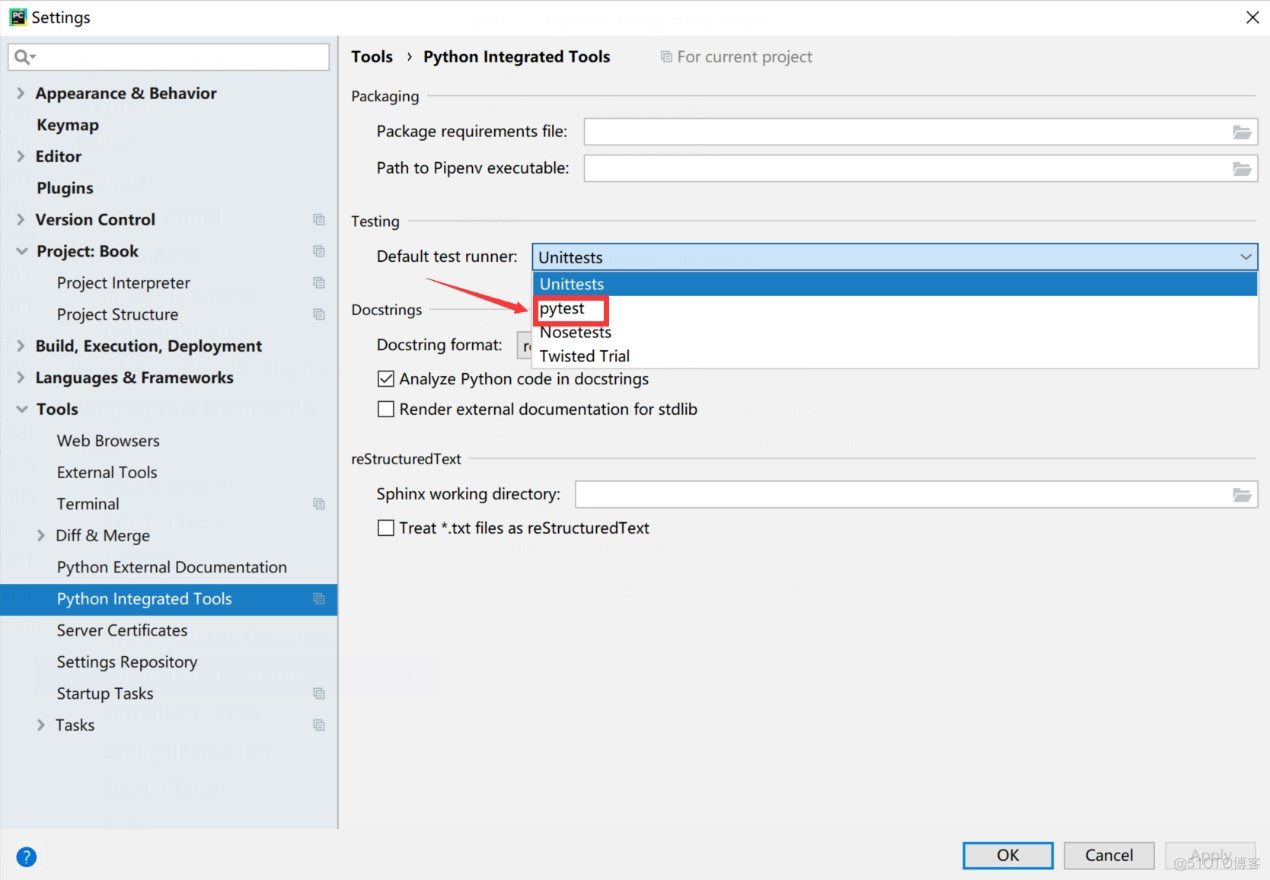
图 PyTest的设定



图书京东、当当有售
京东:https://item.jd.com/12784287.html
当当:http://product.dangdang.com/29177828.html)!
很好奇,就使用rubyonrails自动化单元测试而言,你们正在做什么?您是否创建了一个脚本来在cron中运行rake作业并将结果邮寄给您?git中的预提交Hook?只是手动调用?我完全理解测试,但想知道在错误发生之前捕获错误的最佳实践是什么。让我们理所当然地认为测试本身是完美无缺的,并且可以正常工作。下一步是什么以确保他们在正确的时间将可能有害的结果传达给您? 最佳答案 不确定您到底想听什么,但是有几个级别的自动代码库控制:在处理某项功能时,您可以使用类似autotest的内容获得关于哪些有效,哪些无效的即时反馈。要确保您的提
我正在尝试测试是否存在表单。我是Rails新手。我的new.html.erb_spec.rb文件的内容是:require'spec_helper'describe"messages/new.html.erb"doit"shouldrendertheform"dorender'/messages/new.html.erb'reponse.shouldhave_form_putting_to(@message)with_submit_buttonendendView本身,new.html.erb,有代码:当我运行rspec时,它失败了:1)messages/new.html.erbshou
我在我的项目目录中完成了compasscreate.和compassinitrails。几个问题:我已将我的.sass文件放在public/stylesheets中。这是放置它们的正确位置吗?当我运行compasswatch时,它不会自动编译这些.sass文件。我必须手动指定文件:compasswatchpublic/stylesheets/myfile.sass等。如何让它自动运行?文件ie.css、print.css和screen.css已放在stylesheets/compiled。如何在编译后不让它们重新出现的情况下删除它们?我自己编译的.sass文件编译成compiled/t
我在我的项目中添加了一个系统来重置用户密码并通过电子邮件将密码发送给他,以防他忘记密码。昨天它运行良好(当我实现它时)。当我今天尝试启动服务器时,出现以下错误。=>BootingWEBrick=>Rails3.2.1applicationstartingindevelopmentonhttp://0.0.0.0:3000=>Callwith-dtodetach=>Ctrl-CtoshutdownserverExiting/Users/vinayshenoy/.rvm/gems/ruby-1.9.3-p0/gems/actionmailer-3.2.1/lib/action_mailer
我正在编写一个包含C扩展的gem。通常当我写一个gem时,我会遵循TDD的过程,我会写一个失败的规范,然后处理代码直到它通过,等等......在“ext/mygem/mygem.c”中我的C扩展和在gemspec的“扩展”中配置的有效extconf.rb,如何运行我的规范并仍然加载我的C扩展?当我更改C代码时,我需要采取哪些步骤来重新编译代码?这可能是个愚蠢的问题,但是从我的gem的开发源代码树中输入“bundleinstall”不会构建任何native扩展。当我手动运行rubyext/mygem/extconf.rb时,我确实得到了一个Makefile(在整个项目的根目录中),然后当
我有一个围绕一些对象的包装类,我想将这些对象用作散列中的键。包装对象和解包装对象应映射到相同的键。一个简单的例子是这样的:classAattr_reader:xdefinitialize(inner)@inner=innerenddefx;@inner.x;enddef==(other)@inner.x==other.xendenda=A.new(o)#oisjustanyobjectthatallowso.xb=A.new(o)h={a=>5}ph[a]#5ph[b]#nil,shouldbe5ph[o]#nil,shouldbe5我试过==、===、eq?并散列所有无济于事。
在MRIRuby中我可以这样做:deftransferinternal_server=self.init_serverpid=forkdointernal_server.runend#Maketheserverprocessrunindependently.Process.detach(pid)internal_client=self.init_client#Dootherstuffwithconnectingtointernal_server...internal_client.post('somedata')ensure#KillserverProcess.kill('KILL',
我有一些Ruby代码,如下所示:Something.createdo|x|x.foo=barend我想编写一个测试,它使用double代替block参数x,这样我就可以调用:x_double.should_receive(:foo).with("whatever").这可能吗? 最佳答案 specify'something'dox=doublex.should_receive(:foo=).with("whatever")Something.should_receive(:create).and_yield(x)#callthere
我已经从我的命令行中获得了一切,所以我可以运行rubymyfile并且它可以正常工作。但是当我尝试从sublime中运行它时,我得到了undefinedmethod`require_relative'formain:Object有人知道我的sublime设置中缺少什么吗?我正在使用OSX并安装了rvm。 最佳答案 或者,您可以只使用“require”,它应该可以正常工作。我认为“require_relative”仅适用于ruby1.9+ 关于ruby-主要:Objectwhenrun
我花了三天的时间用头撞墙,试图弄清楚为什么简单的“rake”不能通过我的规范文件。如果您遇到这种情况:任何文件夹路径中都不要有空格!。严重地。事实上,从现在开始,您命名的任何内容都没有空格。这是我的控制台输出:(在/Users/*****/Desktop/LearningRuby/learn_ruby)$rake/Users/*******/Desktop/LearningRuby/learn_ruby/00_hello/hello_spec.rb:116:in`require':cannotloadsuchfile--hello(LoadError) 最佳
