Helm 是一个 Kubernetes 的包管理工具, 就像 Linux 下的包管理器, 如 yum/apt 等, 可以很方便的将之前打包好的 yaml 文件部署到 kubernetes 上。
Helm 有 3 个重要概念:
在部署微服务项目时,可能有几十个服务,每个服务都有一套 yaml 文件,需要维护大量 yaml 文件,版本管理特别不方便
使用 helm 可以解决下列问题:
helm 2019年 V3版本,变化项
https://helm.sh/
https://helm.sh/zh/docs/intro/install/
下载 helm 安装压缩包,上传到 linux
解压 helm,把目录复制到 usr/bin 目录中
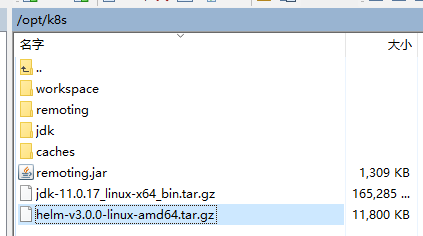
[root@k8smaster ~]# cd /opt/k8s/
[root@k8smaster k8s]# tar zxfv helm-v3.0.0-linux-amd64.tar.gz
linux-amd64/
linux-amd64/helm
linux-amd64/README.md
linux-amd64/LICENSE
[root@k8smaster k8s]# mv ./linux-amd64/helm /usr/bin/
# 显示版本,安装完成
[root@k8smaster k8s]# helm version
version.BuildInfo{Version:"v3.0.0", GitCommit:"e29ce2a54e96cd02ccfce88bee4f58bb6e2a28b6", GitTreeState:"clean", GoVersion:"go1.13.4"}
[root@k8smaster k8s]#
添加仓库
# 添加 仓库
[root@k8smaster ~]# helm repo add stable http://mirror.azure.cn/kubernetes/charts
"stable" has been added to your repositories
# 添加 阿里云仓库
[root@k8smaster ~]# helm repo add aliyun https://kubernetes.oss-cn-hangzhou.aliyuncs.com/charts
"aliyun" has been added to your repositories
# 查看
[root@k8smaster ~]# helm repo list
NAME    URL
stable  http://mirror.azure.cn/kubernetes/charts
aliyun  https://kubernetes.oss-cn-hangzhou.aliyuncs.com/charts
# 更新
[root@k8smaster ~]# helm repo update
Hang tight while we grab the latest from your chart repositories...
...Successfully got an update from the "aliyun" chart repository
...Successfully got an update from the "stable" chart repository
Update Complete. ⎈ Happy Helming!⎈
# 删除阿里云
[root@k8smaster ~]# helm repo remove aliyun
"aliyun" has been removed from your repositories
[root@k8smaster ~]# helm repo list
NAME    URL
stable  http://mirror.azure.cn/kubernetes/charts
[root@k8smaster ~]#
# 查找 chart
[root@k8smaster ~]# helm search repo weave
NAME                    CHART VERSION   APP VERSION     DESCRIPTION
stable/weave-cloud      0.3.9           1.4.0           DEPRECATED - Weave Cloud is a add-on to Kuberne...
stable/weave-scope      1.1.12          1.12.0          DEPRECATED - A Helm chart for the Weave Scope c...
# 查看 chrt 信息
[root@k8smaster ~]# helm show chart stable/weave-scope
apiVersion: v1
appVersion: 1.12.0
deprecated: true
description: DEPRECATED - A Helm chart for the Weave Scope cluster visualizer.
home: https://www.weave.works/oss/scope/
icon: https://avatars1.githubusercontent.com/u/9976052?s=64
keywords:
- containers
- dashboard
- monitoring
name: weave-scope
sources:
- https://github.com/weaveworks/scope
version: 1.1.12
# 安装,名字叫 ui
[root@k8smaster ~]# helm install ui stable/weave-scope
NAME: ui
LAST DEPLOYED: Mon Nov 28 13:15:05 2022
NAMESPACE: default
STATUS: deployed
REVISION: 1
NOTES:
You should now be able to access the Scope frontend in your web browser, by
using kubectl port-forward:

kubectl -n default port-forward $(kubectl -n default get endpoints \
ui-weave-scope -o jsonpath='{.subsets[0].addresses[0].targetRef.name}') 8080:4040

then browsing to http://localhost:8080/.
For more details on using Weave Scope, see the Weave Scope documentation:

https://www.weave.works/docs/scope/latest/introducing/
# 查看列表
[root@k8smaster ~]# helm list
NAME    NAMESPACE       REVISION        UPDATED                                 STATUS          CHART                   APP VERSION
ui      default         1               2022-11-28 13:15:05.404335352 +0800 CST deployed        weave-scope-1.1.12      1.12.0 # 查看发布状态
[root@k8smaster ~]# helm status ui
NAME: ui
LAST DEPLOYED: Mon Nov 28 13:15:05 2022
NAMESPACE: default
STATUS: deployed
REVISION: 1
NOTES:
You should now be able to access the Scope frontend in your web browser, by
using kubectl port-forward:

kubectl -n default port-forward $(kubectl -n default get endpoints \
ui-weave-scope -o jsonpath='{.subsets[0].addresses[0].targetRef.name}') 8080:4040

then browsing to http://localhost:8080/.
For more details on using Weave Scope, see the Weave Scope documentation:

https://www.weave.works/docs/scope/latest/introducing/
# 查看服务 当前是不暴露端口的
[root@k8smaster ~]# kubectl get svc
NAME             TYPE        CLUSTER-IP     EXTERNAL-IP   PORT(S)          AGE
javademo1        NodePort    10.106.43.46   <none>        8111:31452/TCP   40d
kubernetes       ClusterIP   10.96.0.1      <none>        443/TCP          45d
nginx            NodePort    10.103.87.81   <none>        80:30339/TCP     45d
nginx-nfs        NodePort    10.99.84.9     <none>        80:30205/TCP     19d
ui-weave-scope   ClusterIP   10.101.4.212   <none>        80/TCP           3m19s
# 修改 ui-weave-scpoe 暴露端口
[root@k8smaster ~]# kubectl edit svc ui-weave-scope
#  type: ClusterIP =>  改成 type: NodePort
service/ui-weave-scope edited
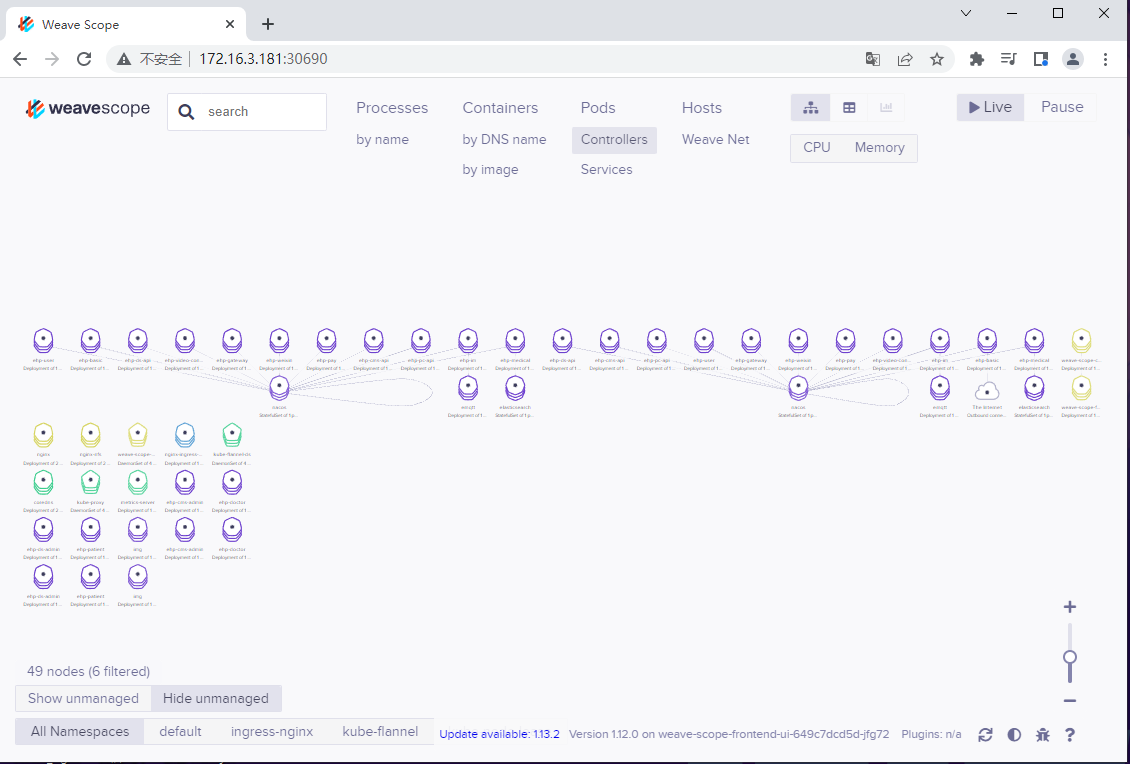
# 再次查看,暴露了 30690 端口
[root@k8smaster ~]# kubectl get svc
NAME             TYPE        CLUSTER-IP     EXTERNAL-IP   PORT(S)          AGE
javademo1        NodePort    10.106.43.46   <none>        8111:31452/TCP   40d
kubernetes       ClusterIP   10.96.0.1      <none>        443/TCP          45d
nginx            NodePort    10.103.87.81   <none>        80:30339/TCP     45d
nginx-nfs        NodePort    10.99.84.9     <none>        80:30205/TCP     19d
ui-weave-scope   NodePort    10.101.4.212   <none>        80:30690/TCP     5m26s
# 删除 ui-weave-scope
[root@k8smaster ~]# kubectl delete deployment ui-weave-scope
[root@k8smaster ~]# kubectl delete svc ui-weave-scope
测试
我想为Heroku构建一个Rails3应用程序。他们使用Postgres作为他们的数据库,所以我通过MacPorts安装了postgres9.0。现在我需要一个postgresgem并且共识是出于性能原因你想要pggem。但是我对我得到的错误感到非常困惑当我尝试在rvm下通过geminstall安装pg时。我已经非常明确地指定了所有postgres目录的位置可以找到但仍然无法完成安装:$envARCHFLAGS='-archx86_64'geminstallpg--\--with-pg-config=/opt/local/var/db/postgresql90/defaultdb/po
我打算为ruby脚本创建一个安装程序,但我希望能够确保机器安装了RVM。有没有一种方法可以完全离线安装RVM并且不引人注目(通过不引人注目,就像创建一个可以做所有事情的脚本而不是要求用户向他们的bash_profile或bashrc添加一些东西)我不是要脚本本身,只是一个关于如何走这条路的快速指针(如果可能的话)。我们还研究了这个很有帮助的问题:RVM-isthereawayforsimpleofflineinstall?但有点误导,因为答案只向我们展示了如何离线在RVM中安装ruby。我们需要能够离线安装RVM本身,并查看脚本https://raw.github.com/wayn
我有一个奇怪的问题:我在rvm上安装了rubyonrails。一切正常,我可以创建项目。但是在我输入“railsnew”时重新启动后,我有“程序'rails'当前未安装。”。SystemUbuntu12.04ruby-v"1.9.3p194"gemlistactionmailer(3.2.5)actionpack(3.2.5)activemodel(3.2.5)activerecord(3.2.5)activeresource(3.2.5)activesupport(3.2.5)arel(3.0.2)builder(3.0.0)bundler(1.1.4)coffee-rails(
我刚刚为fedora安装了emacs。我想用emacs编写ruby。为ruby提供代码提示、代码完成类型功能所需的工具、扩展是什么? 最佳答案 ruby-mode已经包含在Emacs23之后的版本中。不过,它也可以通过ELPA获得。您可能感兴趣的其他一些事情是集成RVM、feature-mode(Cucumber)、rspec-mode、ruby-electric、inf-ruby、rinari(用于Rails)等。这是我当前用于Ruby开发的Emacs配置:https://github.com/citizen428/emacs
我正在尝试在我的centos服务器上安装therubyracer,但遇到了麻烦。$geminstalltherubyracerBuildingnativeextensions.Thiscouldtakeawhile...ERROR:Errorinstallingtherubyracer:ERROR:Failedtobuildgemnativeextension./usr/local/rvm/rubies/ruby-1.9.3-p125/bin/rubyextconf.rbcheckingformain()in-lpthread...yescheckingforv8.h...no***e
我的最终目标是安装当前版本的RubyonRails。我在OSXMountainLion上运行。到目前为止,这是我的过程:已安装的RVM$\curl-Lhttps://get.rvm.io|bash-sstable检查已知(我假设已批准)安装$rvmlistknown我看到当前的稳定版本可用[ruby-]2.0.0[-p247]输入命令安装$rvminstall2.0.0-p247注意:我也试过这些安装命令$rvminstallruby-2.0.0-p247$rvminstallruby=2.0.0-p247我很快就无处可去了。结果:$rvminstall2.0.0-p247Search
我实际上是在尝试使用RVM在我的OSX10.7.5上更新ruby,并在输入以下命令后:rvminstallruby我得到了以下回复:Searchingforbinaryrubies,thismighttakesometime.Checkingrequirementsforosx.Installingrequirementsforosx.Updatingsystem.......Errorrunning'requirements_osx_brew_update_systemruby-2.0.0-p247',pleaseread/Users/username/.rvm/log/138121
由于fast-stemmer的问题,我很难安装我想要的任何rubygem。我把我得到的错误放在下面。Buildingnativeextensions.Thiscouldtakeawhile...ERROR:Errorinstallingfast-stemmer:ERROR:Failedtobuildgemnativeextension./System/Library/Frameworks/Ruby.framework/Versions/2.0/usr/bin/rubyextconf.rbcreatingMakefilemake"DESTDIR="cleanmake"DESTDIR=
当我尝试安装Ruby时遇到此错误。我试过查看this和this但无济于事➜~brewinstallrubyWarning:YouareusingOSX10.12.Wedonotprovidesupportforthispre-releaseversion.Youmayencounterbuildfailuresorotherbreakages.Pleasecreatepull-requestsinsteadoffilingissues.==>Installingdependenciesforruby:readline,libyaml,makedepend==>Installingrub
当我执行>rvminstall1.9.2时一切顺利。然后我做>rvmuse1.9.2也很顺利。但是当涉及到ruby-v时..sam@sjones:~$rvminstall1.9.2/home/sam/.rvm/rubies/ruby-1.9.2-p136,thismaytakeawhiledependingonyourcpu(s)...ruby-1.9.2-p136-#fetchingruby-1.9.2-p136-#downloadingruby-1.9.2-p136,thismaytakeawhiledependingonyourconnection...%Total%Rece
