新公司做的是桌面应用程序, 与之前一直在做的web页面 ,相差甚大 。
这篇文章是写于2022年10月底,这时在新公司已经入职了快三月。写作目的是:国内对于eclipse插件开发相关的文档是少之又少,这三个月我们小组翻遍了国外文档,勉强将软件拼凑出并release出测试版本,为了方便同行以及自我学习,所以想把这几个月学到的eclipse rcp插件相关知识写下来。
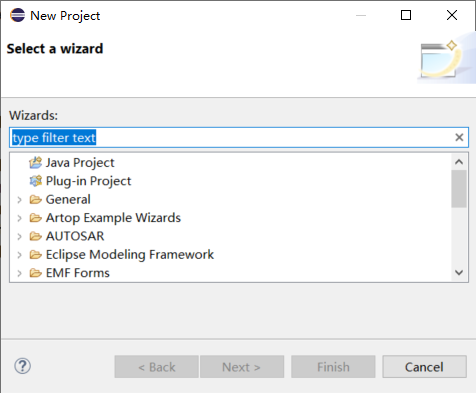
Wizard 一般用于向导式对话框 ,eclipse的新建项目就是一个典型的wizard 。wizard一般由几个wizard page 组成 ,通过按钮控制 上一页下一页完成取消 。
package de.vogella.rcp.intro.wizards.wizard;

import org.eclipse.jface.wizard.WizardPage;
import org.eclipse.swt.SWT;
import org.eclipse.swt.events.KeyEvent;
import org.eclipse.swt.events.KeyListener;
import org.eclipse.swt.layout.GridData;
import org.eclipse.swt.layout.GridLayout;
import org.eclipse.swt.widgets.Composite;
import org.eclipse.swt.widgets.Label;
import org.eclipse.swt.widgets.Text;

public class MyPageOne extends WizardPage {
    private Text text1;
    private Composite container;

    public MyPageOne() {
        super("First Page");
        setTitle("First Page");
        setDescription("Fake Wizard: First page");
    }

    @Override
    public void createControl(Composite parent) {
        container = new Composite(parent, SWT.NONE);
        GridLayout layout = new GridLayout();
        container.setLayout(layout);
        layout.numColumns = 2;
        Label label1 = new Label(container, SWT.NONE);
        label1.setText("Put a value here.");

        text1 = new Text(container, SWT.BORDER | SWT.SINGLE);
        text1.setText("");
        text1.addKeyListener(new KeyListener() {

            @Override
            public void keyPressed(KeyEvent e) {
            }

            @Override
            public void keyReleased(KeyEvent e) {
                if (!text1.getText().isEmpty()) {
                    setPageComplete(true);

                }
            }

        });
        GridData gd = new GridData(GridData.FILL_HORIZONTAL);
        text1.setLayoutData(gd);
        // required to avoid an error in the system
        setControl(container);
        setPageComplete(false);

    }

    public String getText1() {
        return text1.getText();
    }
}
package de.vogella.rcp.intro.wizards.wizard;

import org.eclipse.jface.wizard.WizardPage;
import org.eclipse.swt.SWT;
import org.eclipse.swt.events.KeyEvent;
import org.eclipse.swt.events.KeyListener;
import org.eclipse.swt.layout.GridData;
import org.eclipse.swt.layout.GridLayout;
import org.eclipse.swt.widgets.Button;
import org.eclipse.swt.widgets.Composite;
import org.eclipse.swt.widgets.Label;
import org.eclipse.swt.widgets.Text;

public class MyPageTwo extends WizardPage {
    private Text text1;
    private Composite container;

    public MyPageTwo() {
        super("Second Page");
        setTitle("Second Page");
        setDescription("Now this is the second page");
        setControl(text1);
    }

    @Override
    public void createControl(Composite parent) {
        container = new Composite(parent, SWT.NONE);
        GridLayout layout = new GridLayout();
        container.setLayout(layout);
        layout.numColumns = 2;
        Label label1 = new Label(container, SWT.NONE);
        label1.setText("Say hello to Fred");

        text1 = new Text(container, SWT.BORDER | SWT.SINGLE);
        text1.setText("");
        text1.addKeyListener(new KeyListener() {

            @Override
            public void keyPressed(KeyEvent e) {
                // TODO Auto-generated method stub
            }

            @Override
            public void keyReleased(KeyEvent e) {
                if (!text1.getText().isEmpty()) {
                    setPageComplete(true);
                }
            }

        });
        GridData gd = new GridData(GridData.FILL_HORIZONTAL);
        text1.setLayoutData(gd);
        Label labelCheck = new Label(container, SWT.NONE);
        labelCheck.setText("This is a check");
        Button check = new Button(container, SWT.CHECK);
        check.setSelection(true);
        // required to avoid an error in the system
        setControl(container);
        setPageComplete(false);
    }

    public String getText1() {
        return text1.getText();
    }
}
①自定义wizardpage主要是继承JFACE 的 WizardPage ,并重写 createControl方法。 在createControl方法中,可以对你的向导页面组件进行布局、添加监听等动作。
②对于当前页面的标题、描述等信息,可以在构造函数中通过setTitle 和 setDescription方法来设置
wizardpage添加好后,需要新建一个wizard类来管理它们 。
package de.vogella.rcp.intro.wizards.wizard;

import org.eclipse.jface.wizard.Wizard;


public class MyWizard extends Wizard {

    protected MyPageOne one;
    protected MyPageTwo two;

    public MyWizard() {
        super();
        setNeedsProgressMonitor(true);
    }

    @Override
    public String getWindowTitle() {
        return "Export My Data";
    }

    @Override
    public void addPages() {
        one = new MyPageOne();
        two = new MyPageTwo();
        addPage(one);
        addPage(two);
    }

    @Override
    public boolean performFinish() {
        // Print the result to the console
        System.out.println(one.getText1());
        System.out.println(two.getText1());

        return true;
    }
}
① 自定义wizard继承 JFACE的 Wizard类 。
重写addPage()方法,为向导添加向导页。
重写performFinish()方法,指定点击finish按钮后完成的动作.
重写canFinish()方法,FINISH按钮是否可以点击,
@Override
	public boolean canFinish() {
		if (this.getContainer().getCurrentPage() instanceof FilePreprocessingWizardPage) // FilePreprocessingWizardPage为最后一个页面
			return true;
		else
			return false;
	}
重写getNextPage()方法, 下一页
wizardDialog 一般用于管理向导页的按钮,如果你想将原有的next/finish/cancel等按钮重写,就需要新建这个类。
下面是我项目中遇到的代码,需求是:最后一个页不再显示next按钮,而是改为start,并执行相关功能。
第一页finish不可点 (这个由wizard类的canfinish方法控制):

第二页finish可以点、next 变为start

import org.eclipse.jface.dialogs.IDialogConstants;
import org.eclipse.jface.wizard.IWizard;
import org.eclipse.jface.wizard.IWizardPage;
import org.eclipse.jface.wizard.WizardDialog;
import org.eclipse.swt.widgets.Shell;
import org.eclipse.swt.widgets.Button;

public class InputFileWizardDialog extends WizardDialog {
	private Button startBtn;
	private Button nextButton;

	public InputFileWizardDialog(Shell parentShell, IWizard newWizard) {
		super(parentShell, newWizard);
	}

	@Override
	protected void buttonPressed(int buttonId) {
		switch (buttonId) {
		case IDialogConstants.HELP_ID: {
			helpPressed();
			break;
		}
		case IDialogConstants.BACK_ID: {
			backPressed();
			break;
		}
		case IDialogConstants.NEXT_ID: {
			nextPressed();
			break;
		}
		case IDialogConstants.FINISH_ID: {
			finishPressed();
			break;
		}
		}
	}

	@Override
	protected void nextPressed() {
		IWizardPage currentPage = getCurrentPage();
		IWizardPage nextPage = currentPage.getNextPage();
		if (currentPage instanceof FilePreprocessingWizardPage) {
			((FilePreprocessingWizardPage) currentPage).startButtonClick();
		}
		if (nextPage instanceof FilePreprocessingWizardPage) { // last page
			if (nextPage.getControl() != null)
				nextPage.dispose();
			showPage(nextPage);
			startBtn = this.getButton(IDialogConstants.NEXT_ID);
			startBtn.setText("Start");
			startBtn.setEnabled(true);
		}
	}

	/**
	 * The Back button has been pressed.
	 */
	@Override
	protected void backPressed() {
		IWizardPage page = getCurrentPage().getPreviousPage();
		super.backPressed();
		if (!(page instanceof FilePreprocessingWizardPage)) { // last page
			nextButton = this.getButton(IDialogConstants.NEXT_ID);
			nextButton.setText(IDialogConstants.NEXT_LABEL);
		}
	}
}
①buttonPressed()方法监听按钮被点击后执行的方法
②nextPressed()方法,下一页 。 这里判断当前页面的下一页是否为最后一页,如果是则通过setTest方法将按钮改为start按钮,并将其设为可用状态 。 如果当前页面已经是最后一页,则执行在最后一页中定义的startbuttonclick方法 。
③ backPressed()方法,点上一页时,将上个方法中被改变的next按钮复原
一般写在一个按钮监听中 , 或者菜单功能里 。
Button button = new Button(parent, SWT.PUSH);
button.setText("Open Wizard");
button.addSelectionListener(new SelectionAdapter() {
    @Override
    public void widgetSelected(SelectionEvent e) {
        WizardDialog wizardDialog = new WizardDialog(parent.getShell(),
            new MyWizard());
        if (wizardDialog.open() == Window.OK) {
            System.out.println("Ok pressed");
        } else {
            System.out.println("Cancel pressed");
        }
    }
});
import org.eclipse.e4.core.di.annotations.Execute;
import org.eclipse.ui.IWorkbench;
import org.eclipse.jface.window.Window;
import org.eclipse.jface.wizard.WizardDialog;
import org.eclipse.swt.widgets.Shell;

public class InputFilesAssistantHandle {
	@Execute
	public void execute(IWorkbench iWorkbench, Shell shell) {
		WizardDialog wizardDialog = new WizardDialog(shell, new MyWizard());
		WizardDialog.setDefaultImage(ApplicationContext.getImage(Constant.PLUGIN_ID, "icons/module/cn_icon.png"));
		if (wizardDialog.open() == Window.OK) {
		} else {
		}
	}
}
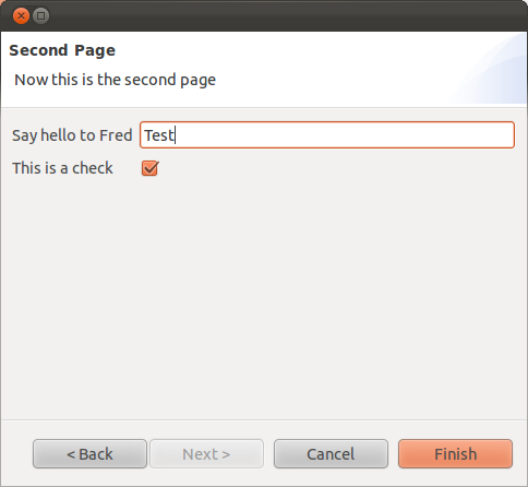
①可以通过setDefaultImage来设置向导的图标
效果:
你的wizardpages 初始化是在wizard打开的时候, 而不是点next或back时再初始化 。 所以,如果你想将两个wizardpage进行联动,通过上面的代码难以实现 。
阅读源码会发现,
    private void updateForPage(IWizardPage page) {
     // ensure this page belongs to the current wizard
     if (wizard != page.getWizard()) {
       setWizard(page.getWizard());
      }
     // ensure that page control has been created
     // (this allows lazy page control creation)
     if (page.getControl() == null) {
         page.createControl(pageContainer);
         // the page is responsible for ensuring the created control is accessable
         // via getControl.
         Assert.isNotNull(page.getControl());
         // ensure the dialog is large enough for this page
         updateSize(page);
     }
     // make the new page visible
     IWizardPage oldPage = currentPage;
     currentPage = page;
     currentPage.setVisible(true);
     if (oldPage != null) {
       oldPage.setVisible(false);
      }
     // update the dialog controls
     update();
    }
点next或back按钮后,页面之所以不会再初始化,是因为他会有个判断page.getControl() == null,因此我们只要将想办法在调转到某个WizardPage的时候,将其control设置为null就可以了.
所以,在点next 或 back 按钮时 ,可以加如下代码:
// 对参数页必须重绘
IWizardPage page = getNextPage();
if (page.getControl() != null)
page.dispose();
并在你想要刷新的页面中重写dispose方法:
public void dispose() {
super.dispose();
setControl(null);
}
二、eclipse插件开发中 IFile 与 File 互转
(1) File转IFile
第一种方法:
IFile[] ifile = ResourcesPlugin.getWorkspace().getRoot().findFilesForLocationURI(file.toURI());
第二种方法:
String filepath =file.getPath();
IProject proj =ResourcesPlugin.getWorkspace().getRoot().getProject(projName);
String path =filepath.substring(proj.getLocation().toString().length() + 1);
IFile file =proj.getFile(path);
(2) IFile转File
File file = ifile.getLocation().toFile;
或者
File = newFile(ifile.getLocation().toOSString);
对于具有离线功能的智能手机应用程序,我正在为Xml文件创建单向文本同步。我希望我的服务器将增量/差异(例如GNU差异补丁)发送到目标设备。这是计划:Time=0Server:hasversion_1ofXmlfile(~800kiB)Client:hasversion_1ofXmlfile(~800kiB)Time=1Server:hasversion_1andversion_2ofXmlfile(each~800kiB)computesdeltaoftheseversions(=patch)(~10kiB)sendspatchtoClient(~10kiBtransferred)Cl
在选择我想要运行操作的频率时,唯一的选项是“每天”、“每小时”和“每10分钟”。谢谢!我想为我的Rails3.1应用程序运行调度程序。 最佳答案 这不是一个优雅的解决方案,但您可以安排它每天运行,并在实际开始工作之前检查日期是否为当月的第一天。 关于ruby-如何每月在Heroku运行一次Scheduler插件?,我们在StackOverflow上找到一个类似的问题: https://stackoverflow.com/questions/8692687/
我对最新版本的Rails有疑问。我创建了一个新应用程序(railsnewMyProject),但我没有脚本/生成,只有脚本/rails,当我输入ruby./script/railsgeneratepluginmy_plugin"Couldnotfindgeneratorplugin.".你知道如何生成插件模板吗?没有这个命令可以创建插件吗?PS:我正在使用Rails3.2.1和ruby1.8.7[universal-darwin11.0] 最佳答案 随着Rails3.2.0的发布,插件生成器已经被移除。查看变更日志here.现在
我正在编写一个包含C扩展的gem。通常当我写一个gem时,我会遵循TDD的过程,我会写一个失败的规范,然后处理代码直到它通过,等等......在“ext/mygem/mygem.c”中我的C扩展和在gemspec的“扩展”中配置的有效extconf.rb,如何运行我的规范并仍然加载我的C扩展?当我更改C代码时,我需要采取哪些步骤来重新编译代码?这可能是个愚蠢的问题,但是从我的gem的开发源代码树中输入“bundleinstall”不会构建任何native扩展。当我手动运行rubyext/mygem/extconf.rb时,我确实得到了一个Makefile(在整个项目的根目录中),然后当
我构建了两个需要相互通信和发送文件的Rails应用程序。例如,一个Rails应用程序会发送请求以查看其他应用程序数据库中的表。然后另一个应用程序将呈现该表的json并将其发回。我还希望一个应用程序将存储在其公共(public)目录中的文本文件发送到另一个应用程序的公共(public)目录。我从来没有做过这样的事情,所以我什至不知道从哪里开始。任何帮助,将不胜感激。谢谢! 最佳答案 无论Rails是什么,几乎所有Web应用程序都有您的要求,大多数现代Web应用程序都需要相互通信。但是有一个小小的理解需要你坚持下去,网站不应直接访问彼此
我尝试运行2.x应用程序。我使用rvm并为此应用程序设置其他版本的ruby:$rvmuseree-1.8.7-head我尝试运行服务器,然后出现很多错误:$script/serverNOTE:Gem.source_indexisdeprecated,useSpecification.Itwillberemovedonorafter2011-11-01.Gem.source_indexcalledfrom/Users/serg/rails_projects_terminal/work_proj/spohelp/config/../vendor/rails/railties/lib/r
刚入门rails,开始慢慢理解。有人可以解释或给我一些关于在application_controller中编码的好处或时间和原因的想法吗?有哪些用例。您如何为Rails应用程序使用应用程序Controller?我不想在那里放太多代码,因为据我了解,每个请求都会调用此Controller。这是真的? 最佳答案 ApplicationController实际上是您应用程序中的每个其他Controller都将从中继承的类(尽管这不是强制性的)。我同意不要用太多代码弄乱它并保持干净整洁的态度,尽管在某些情况下ApplicationContr
我是一个Rails初学者,但我想从我的RailsView(html.haml文件)中查看Ruby变量的内容。我试图在ruby中打印出变量(认为它会在终端中出现),但没有得到任何结果。有什么建议吗?我知道Rails调试器,但更喜欢使用inspect来打印我的变量。 最佳答案 您可以在View中使用puts方法将信息输出到服务器控制台。您应该能够在View中的任何位置使用Haml执行以下操作:-puts@my_variable.inspect 关于ruby-on-rails-如何在我的R
我已经在Sinatra上创建了应用程序,它代表了一个简单的API。我想在生产和开发上进行部署。我想在部署时选择,是开发还是生产,一些方法的逻辑应该改变,这取决于部署类型。是否有任何想法,如何完成以及解决此问题的一些示例。例子:我有代码get'/api/test'doreturn"Itisdev"end但是在部署到生产环境之后我想在运行/api/test之后看到ItisPROD如何实现? 最佳答案 根据SinatraDocumentation:EnvironmentscanbesetthroughtheRACK_ENVenvironm
我们的git存储库中目前有一个Gemfile。但是,有一个gem我只在我的环境中本地使用(我的团队不使用它)。为了使用它,我必须将它添加到我们的Gemfile中,但每次我checkout到我们的master/dev主分支时,由于与跟踪的gemfile冲突,我必须删除它。我想要的是类似Gemfile.local的东西,它将继承从Gemfile导入的gems,但也允许在那里导入新的gems以供使用只有我的机器。此文件将在.gitignore中被忽略。这可能吗? 最佳答案 设置BUNDLE_GEMFILE环境变量:BUNDLE_GEMFI
