去年写了一篇博客:【SlowFast复现】SlowFast Networks for Video Recognition复现代码 使用自己的视频进行demo检测
facebookresearch SlowFast :https://github.com/facebookresearch/SlowFast
但是没有整理出快速安装的流程,这次就是把所有的安装指令整理处理,实现快速安装 facebookresearch SlowFast,如果不受国内网速限制,1分钟左右就可以安装好。
我采用的AI平台:https://cloud.videojj.com/auth/register?inviter=18452&activityChannel=student_invite
AI平台镜像选择:pytorch 1.8.0,python 3.8,CUDA:11.1.1

为了能够每次都能快速安装 facebookresearch SlowFast,需要提前下好两个权重,一个是slowfast的权重,一个是faster rcnn的权重。
需要先将这两个权重下载到AI平台的:/user-data/slowfastFile
model_final_280758.pkl:https://dl.fbaipublicfiles.com/detectron2/COCO-Detection/faster_rcnn_R_50_FPN_3x/137849458/model_final_280758.pkl
SLOWFAST_32x2_R101_50_50.pkl:https://dl.fbaipublicfiles.com/pyslowfast/model_zoo/ava/SLOWFAST_32x2_R101_50_50.pkl
mkdir -p /user-data/slowfastFile
cd /user-data/slowfastFile
wget https://dl.fbaipublicfiles.com/pyslowfast/model_zoo/ava/SLOWFAST_32x2_R101_50_50.pkl
wget https://dl.fbaipublicfiles.com/detectron2/COCO-Detection/faster_rcnn_R_50_FPN_3x/137849458/model_final_280758.pkl
pip install 'git+https://gitee.com/YFwinston/fvcore'
pip install simplejson
conda install av -c conda-forge -y
conda install x264 ffmpeg -c conda-forge -y
pip install -U iopath or conda install -c iopath iopath
pip install psutil

pip install tensorboard
pip install moviepy
pip install pytorchvideo
pip install 'git+https://gitee.com/YFwinston/fairscale'
cd /home
pip install cython; pip install git+https://github.com/cocodataset/cocoapi.git#subdirectory=PythonAPI
git clone https://gitee.com/YFwinston/detectron2  detectron2_repo
cd  detectron2_repo
python setup.py build develop
cd ..
pip install -e detectron2_repo

apt update
apt install libgl1-mesa-glx
cd /home
git clone https://gitee.com/YFwinston/slowfast.git
export PYTHONPATH=/home/slowfast:$PYTHONPATH
cd slowfast
python setup.py build develop
cd /home/slowfast/demo/AVA
touch ava.json
touch SLOWFAST_32x2_R101_50_50s.yaml

cp /user-data/slowfastFile/SLOWFAST_32x2_R101_50_50.pkl /home/slowfast/configs/AVA/c2/
cp /user-data/slowfastFile/model_final_280758.pkl /home/slowfast/configs/AVA/c2/
然后在/home/slowfast/demo/AVA下面的ava.json写入:
{"bend/bow (at the waist)": 0, "crawl": 1, "crouch/kneel": 2, "dance": 3, "fall down": 4, "get up": 5, "jump/leap": 6, "lie/sleep": 7, "martial art": 8, "run/jog": 9, "sit": 10, "stand": 11, "swim": 12, "walk": 13, "answer phone": 14, "brush teeth": 15, "carry/hold (an object)": 16, "catch (an object)": 17, "chop": 18, "climb (e.g., a mountain)": 19, "clink glass": 20, "close (e.g., a door, a box)": 21, "cook": 22, "cut": 23, "dig": 24, "dress/put on clothing": 25, "drink": 26, "drive (e.g., a car, a truck)": 27, "eat": 28, "enter": 29, "exit": 30, "extract": 31, "fishing": 32, "hit (an object)": 33, "kick (an object)": 34, "lift/pick up": 35, "listen (e.g., to music)": 36, "open (e.g., a window, a car door)": 37, "paint": 38, "play board game": 39, "play musical instrument": 40, "play with pets": 41, "point to (an object)": 42, "press": 43, "pull (an object)": 44, "push (an object)": 45, "put down": 46, "read": 47, "ride (e.g., a bike, a car, a horse)": 48, "row boat": 49, "sail boat": 50, "shoot": 51, "shovel": 52, "smoke": 53, "stir": 54, "take a photo": 55, "text on/look at a cellphone": 56, "throw": 57, "touch (an object)": 58, "turn (e.g., a screwdriver)": 59, "watch (e.g., TV)": 60, "work on a computer": 61, "write": 62, "fight/hit (a person)": 63, "give/serve (an object) to (a person)": 64, "grab (a person)": 65, "hand clap": 66, "hand shake": 67, "hand wave": 68, "hug (a person)": 69, "kick (a person)": 70, "kiss (a person)": 71, "lift (a person)": 72, "listen to (a person)": 73, "play with kids": 74, "push (another person)": 75, "sing to (e.g., self, a person, a group)": 76, "take (an object) from (a person)": 77, "talk to (e.g., self, a person, a group)": 78, "watch (a person)": 79}
然后在/home/slowfast/demo/AVA下面的SLOWFAST_32x2_R101_50_50s.yaml 写入:
TRAIN:
  ENABLE: False
  DATASET: ava
  BATCH_SIZE: 16
  EVAL_PERIOD: 1
  CHECKPOINT_PERIOD: 1
  AUTO_RESUME: True
  CHECKPOINT_FILE_PATH: '/home/slowfast/configs/AVA/c2/SLOWFAST_32x2_R101_50_50.pkl'  #path to pretrain model
  CHECKPOINT_TYPE: pytorch
DATA:
  NUM_FRAMES: 32
  SAMPLING_RATE: 2
  TRAIN_JITTER_SCALES: [256, 320]
  TRAIN_CROP_SIZE: 224
  TEST_CROP_SIZE: 256
  INPUT_CHANNEL_NUM: [3, 3]
DETECTION:
  ENABLE: True
  ALIGNED: False
AVA:
  BGR: False
  DETECTION_SCORE_THRESH: 0.8
  TEST_PREDICT_BOX_LISTS: ["person_box_67091280_iou90/ava_detection_val_boxes_and_labels.csv"]
SLOWFAST:
  ALPHA: 4
  BETA_INV: 8
  FUSION_CONV_CHANNEL_RATIO: 2
  FUSION_KERNEL_SZ: 5
RESNET:
  ZERO_INIT_FINAL_BN: True
  WIDTH_PER_GROUP: 64
  NUM_GROUPS: 1
  DEPTH: 101
  TRANS_FUNC: bottleneck_transform
  STRIDE_1X1: False
  NUM_BLOCK_TEMP_KERNEL: [[3, 3], [4, 4], [6, 6], [3, 3]]
  SPATIAL_DILATIONS: [[1, 1], [1, 1], [1, 1], [2, 2]]
  SPATIAL_STRIDES: [[1, 1], [2, 2], [2, 2], [1, 1]]
NONLOCAL:
  LOCATION: [[[], []], [[], []], [[6, 13, 20], []], [[], []]]
  GROUP: [[1, 1], [1, 1], [1, 1], [1, 1]]
  INSTANTIATION: dot_product
  POOL: [[[2, 2, 2], [2, 2, 2]], [[2, 2, 2], [2, 2, 2]], [[2, 2, 2], [2, 2, 2]], [[2, 2, 2], [2, 2, 2]]]
BN:
  USE_PRECISE_STATS: False
  NUM_BATCHES_PRECISE: 200
SOLVER:
  MOMENTUM: 0.9
  WEIGHT_DECAY: 1e-7
  OPTIMIZING_METHOD: sgd
MODEL:
  NUM_CLASSES: 80
  ARCH: slowfast
  MODEL_NAME: SlowFast
  LOSS_FUNC: bce
  DROPOUT_RATE: 0.5
  HEAD_ACT: sigmoid
TEST:
  ENABLE: False
  DATASET: ava
  BATCH_SIZE: 8
DATA_LOADER:
  NUM_WORKERS: 2
  PIN_MEMORY: True

NUM_GPUS: 1
NUM_SHARDS: 1
RNG_SEED: 0
OUTPUT_DIR: .
#TENSORBOARD:
#  MODEL_VIS:
#    TOPK: 2
DEMO:
  ENABLE: True
  LABEL_FILE_PATH: "/home/slowfast/demo/AVA/ava.json"
  INPUT_VIDEO: "/home/slowfast/demo/1.mp4"
  OUTPUT_FILE: "/home/slowfast/demo/out.mp4"

  DETECTRON2_CFG: "COCO-Detection/faster_rcnn_R_50_FPN_3x.yaml"
  DETECTRON2_WEIGHTS: "/home/slowfast/configs/AVA/c2/model_final_280758.pkl"
在/home/slowfast/demo/中传入一个视频:1.mp4
执行:
cd /home/slowfast/
python tools/run_net.py --cfg demo/AVA/SLOWFAST_32x2_R101_50_50s.yaml
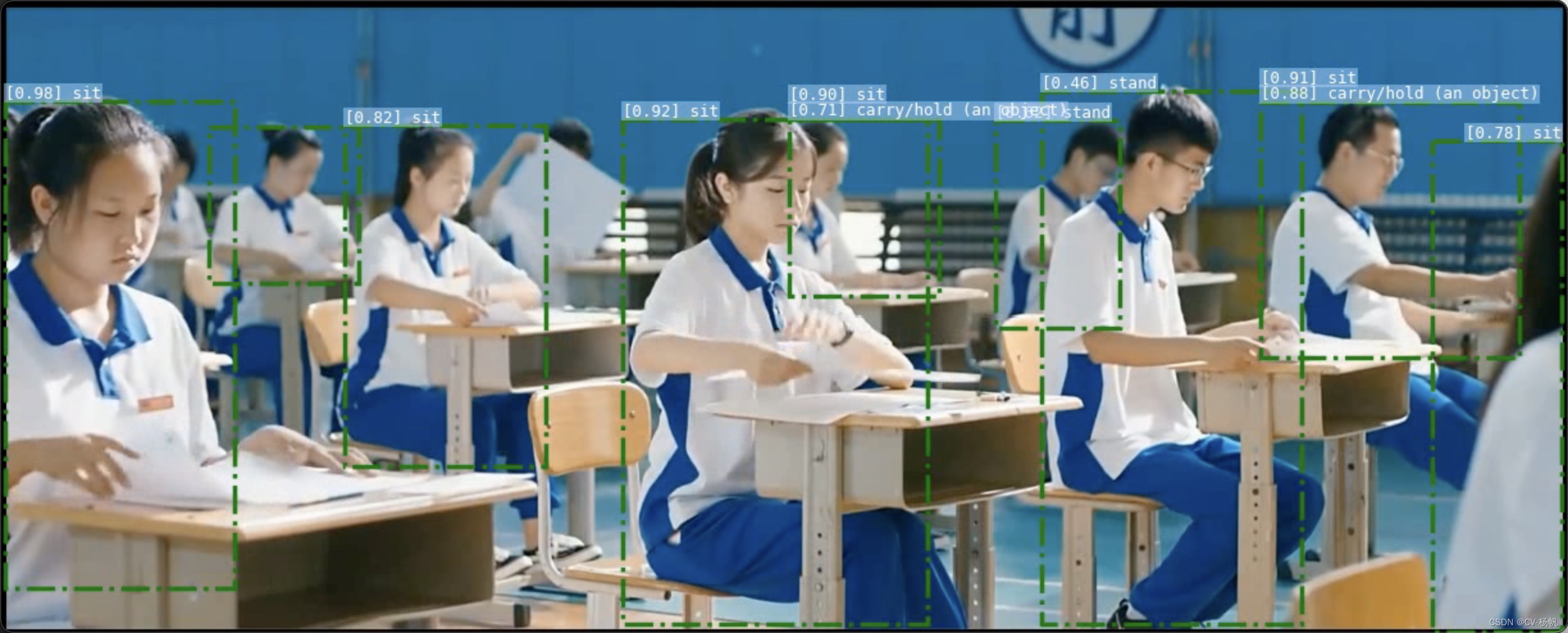
最后结果:
我想为Heroku构建一个Rails3应用程序。他们使用Postgres作为他们的数据库,所以我通过MacPorts安装了postgres9.0。现在我需要一个postgresgem并且共识是出于性能原因你想要pggem。但是我对我得到的错误感到非常困惑当我尝试在rvm下通过geminstall安装pg时。我已经非常明确地指定了所有postgres目录的位置可以找到但仍然无法完成安装:$envARCHFLAGS='-archx86_64'geminstallpg--\--with-pg-config=/opt/local/var/db/postgresql90/defaultdb/po
我打算为ruby脚本创建一个安装程序,但我希望能够确保机器安装了RVM。有没有一种方法可以完全离线安装RVM并且不引人注目(通过不引人注目,就像创建一个可以做所有事情的脚本而不是要求用户向他们的bash_profile或bashrc添加一些东西)我不是要脚本本身,只是一个关于如何走这条路的快速指针(如果可能的话)。我们还研究了这个很有帮助的问题:RVM-isthereawayforsimpleofflineinstall?但有点误导,因为答案只向我们展示了如何离线在RVM中安装ruby。我们需要能够离线安装RVM本身,并查看脚本https://raw.github.com/wayn
我有一个奇怪的问题:我在rvm上安装了rubyonrails。一切正常,我可以创建项目。但是在我输入“railsnew”时重新启动后,我有“程序'rails'当前未安装。”。SystemUbuntu12.04ruby-v"1.9.3p194"gemlistactionmailer(3.2.5)actionpack(3.2.5)activemodel(3.2.5)activerecord(3.2.5)activeresource(3.2.5)activesupport(3.2.5)arel(3.0.2)builder(3.0.0)bundler(1.1.4)coffee-rails(
我刚刚为fedora安装了emacs。我想用emacs编写ruby。为ruby提供代码提示、代码完成类型功能所需的工具、扩展是什么? 最佳答案 ruby-mode已经包含在Emacs23之后的版本中。不过,它也可以通过ELPA获得。您可能感兴趣的其他一些事情是集成RVM、feature-mode(Cucumber)、rspec-mode、ruby-electric、inf-ruby、rinari(用于Rails)等。这是我当前用于Ruby开发的Emacs配置:https://github.com/citizen428/emacs
我正在尝试在我的centos服务器上安装therubyracer,但遇到了麻烦。$geminstalltherubyracerBuildingnativeextensions.Thiscouldtakeawhile...ERROR:Errorinstallingtherubyracer:ERROR:Failedtobuildgemnativeextension./usr/local/rvm/rubies/ruby-1.9.3-p125/bin/rubyextconf.rbcheckingformain()in-lpthread...yescheckingforv8.h...no***e
我的最终目标是安装当前版本的RubyonRails。我在OSXMountainLion上运行。到目前为止,这是我的过程:已安装的RVM$\curl-Lhttps://get.rvm.io|bash-sstable检查已知(我假设已批准)安装$rvmlistknown我看到当前的稳定版本可用[ruby-]2.0.0[-p247]输入命令安装$rvminstall2.0.0-p247注意:我也试过这些安装命令$rvminstallruby-2.0.0-p247$rvminstallruby=2.0.0-p247我很快就无处可去了。结果:$rvminstall2.0.0-p247Search
我实际上是在尝试使用RVM在我的OSX10.7.5上更新ruby,并在输入以下命令后:rvminstallruby我得到了以下回复:Searchingforbinaryrubies,thismighttakesometime.Checkingrequirementsforosx.Installingrequirementsforosx.Updatingsystem.......Errorrunning'requirements_osx_brew_update_systemruby-2.0.0-p247',pleaseread/Users/username/.rvm/log/138121
由于fast-stemmer的问题,我很难安装我想要的任何rubygem。我把我得到的错误放在下面。Buildingnativeextensions.Thiscouldtakeawhile...ERROR:Errorinstallingfast-stemmer:ERROR:Failedtobuildgemnativeextension./System/Library/Frameworks/Ruby.framework/Versions/2.0/usr/bin/rubyextconf.rbcreatingMakefilemake"DESTDIR="cleanmake"DESTDIR=
当我尝试安装Ruby时遇到此错误。我试过查看this和this但无济于事➜~brewinstallrubyWarning:YouareusingOSX10.12.Wedonotprovidesupportforthispre-releaseversion.Youmayencounterbuildfailuresorotherbreakages.Pleasecreatepull-requestsinsteadoffilingissues.==>Installingdependenciesforruby:readline,libyaml,makedepend==>Installingrub
当我执行>rvminstall1.9.2时一切顺利。然后我做>rvmuse1.9.2也很顺利。但是当涉及到ruby-v时..sam@sjones:~$rvminstall1.9.2/home/sam/.rvm/rubies/ruby-1.9.2-p136,thismaytakeawhiledependingonyourcpu(s)...ruby-1.9.2-p136-#fetchingruby-1.9.2-p136-#downloadingruby-1.9.2-p136,thismaytakeawhiledependingonyourconnection...%Total%Rece
