本文讲解了编译源码过程中的常见问题,以及如何升级make和gcc版本。
点击上方“后端开发技术”,选择“设为星标” ,优质资源及时送达
今天讲一个 CentOS 中编译时的常见问题:在编译源码过程中 make 或者 gcc 版本过低导致的异常 configure: error。
具体报错如下:
configure: error:
*** These critical programs are missing or too old: compiler
*** Check the INSTALL file for required versions.
或者
*** These critical programs are missing or too old: make compiler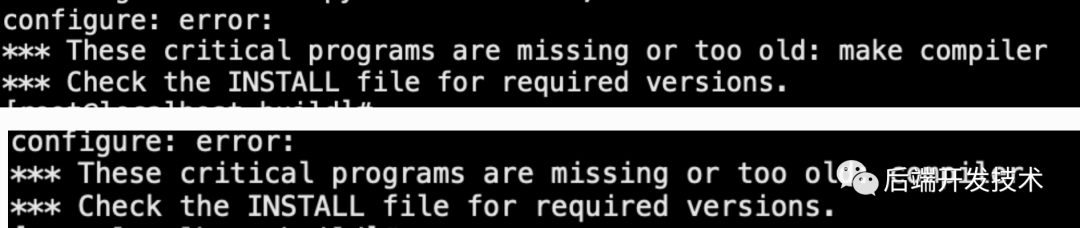
此问题尤其容易出现在刚刚搭建的CentOS环境中,或者使用的安装包较新,应对方法就是把 make 或者 gcc 的版本进行升级。
目标是将 make升级到到较新的 4.3 版本,我的操作系统版本是CentOS 7,具体操作如下:
1.下载make安装包
wget http://ftp.gnu.org/pub/gnu/make/make-4.3.tar.gz如需最新安装包可以去这里自行寻找:https://ftp.gnu.org/pub/gnu/make/
2.解压安装包
tar -zxvf make-4.3.tar.gz3.编译并且安装make
cd make-4.3
./configure --prefix=/usr
type make
make check
make install
4.验证是否安装成功
make -v
[root@localhost build]# make -v
GNU Make 4.3
Built for aarch64-unknown-linux-gnu
Copyright (C) 1988-2020 Free Software Foundation, Inc.
License GPLv3+: GNU GPL version 3 or later <http://gnu.org/licenses/gpl.html>
This is free software: you are free to change and redistribute it.
There is NO WARRANTY, to the extent permitted by law.可见make的版本已经成功更新为4.3。
目标是将 make升级到到较新的 11.2.0 版本,具体操作如下:
1.下载make安装包
wget http://ftp.gnu.org/gnu/gcc/gcc-11.2.0/gcc-11.2.0.tar.gz如需最新版本安装包请自行查找:http://ftp.gnu.org/gnu/gcc/
2.解压缩安装包
tar -zxvf gcc-11.2.0.tar.gz3.安装依赖
yum -y install bzip2
cd gcc-11.2.0
./contrib/download_prerequisites
4.configuration 配置
mkdir build
cd build/
../configure -enable-checking=release -enable-languages=c,c++ -disable-multilib

#–enable-languages表示你要让你的gcc支持那些语言,
#–disable-multilib不生成编译为其他平台可执行代码的交叉编译器。
#–disable-checking生成的编译器在编译过程中不做额外检查,
#也可以使用*–enable-checking=xxx*来增加一些检查
5.编译源码
make这一步需要时间非常久,真的是非常非常久,因为我用的手机编译,大约用了2个小时…… 可以使用make -j4 让make最多运行四个编译命令同时运行,加快编译速度(建议不要超过CPU核心数量的2倍)。
6.安装 gcc
make install7.验证gcc是否更新成功
gcc -v

Using built-in specs.
COLLECT_GCC=/usr/local/bin/gcc
COLLECT_LTO_WRAPPER=/usr/local/libexec/gcc/x86_64-pc-linux-gnu/11.2.0/lto-wrapper
Target: x86_64-pc-linux-gnu
Configured with: ../configure -enable-checking=release -enable-languages=c,c++ -disable-multilib
Thread model: posix
Supported LTO compression algorithms: zlib
gcc version 11.2.0 (GCC)验如果显示的gcc版本仍是以前的版本,就需要重启系统。或者可以查看gcc的安装位置:which gcc,然后在查看版本/usr/local/bin/gcc -v,确定以及配置成功后可以将原先的版本删除
8.删除旧版本gcc
yum -y remove gcc g++9.配置软链接,使新版本gcc全局可用
ln -s /usr/local/bin/gcc /usr/bin/gcc10.更新动态库
#查看当前的动态库
strings /usr/lib64/libstdc++.so.6 | grep CXXABI
rm -f /usr/lib64/libstdc++.so.6
ln -s /usr/local/lib64/libstdc++.so.6.0.29 /usr/lib64/libstdc++.so.6
#查看更新后的动态库
strings /usr/lib64/libstdc++.so.6 | grep CXXABI
# 安装后的动态库会位于/usr/local/lib64目录下,
#其他版本在该目录下寻找对应的动态库libstdc++.so.6.X.XX如果觉得对你有帮助,欢迎点赞、标🌟或分享!
快来下载,免费!替代Navicat的开源数据库神器|强烈推荐


我想为Heroku构建一个Rails3应用程序。他们使用Postgres作为他们的数据库,所以我通过MacPorts安装了postgres9.0。现在我需要一个postgresgem并且共识是出于性能原因你想要pggem。但是我对我得到的错误感到非常困惑当我尝试在rvm下通过geminstall安装pg时。我已经非常明确地指定了所有postgres目录的位置可以找到但仍然无法完成安装:$envARCHFLAGS='-archx86_64'geminstallpg--\--with-pg-config=/opt/local/var/db/postgresql90/defaultdb/po
尝试通过RVM将RubyGems升级到版本1.8.10并出现此错误:$rvmrubygemslatestRemovingoldRubygemsfiles...Installingrubygems-1.8.10forruby-1.9.2-p180...ERROR:Errorrunning'GEM_PATH="/Users/foo/.rvm/gems/ruby-1.9.2-p180:/Users/foo/.rvm/gems/ruby-1.9.2-p180@global:/Users/foo/.rvm/gems/ruby-1.9.2-p180:/Users/foo/.rvm/gems/rub
我正在尝试在我的centos服务器上安装therubyracer,但遇到了麻烦。$geminstalltherubyracerBuildingnativeextensions.Thiscouldtakeawhile...ERROR:Errorinstallingtherubyracer:ERROR:Failedtobuildgemnativeextension./usr/local/rvm/rubies/ruby-1.9.3-p125/bin/rubyextconf.rbcheckingformain()in-lpthread...yescheckingforv8.h...no***e
我知道您通常应该在Rails中使用新建/创建和编辑/更新之间的链接,但我有一个情况需要其他东西。无论如何我可以实现同样的连接吗?我有一个模型表单,我希望它发布数据(类似于新View如何发布到创建操作)。这是我的表格prohibitedthisjobfrombeingsaved: 最佳答案 使用:url选项。=form_for@job,:url=>company_path,:html=>{:method=>:post/:put} 关于ruby-on-rails-rails:Howtomak
我的最终目标是安装当前版本的RubyonRails。我在OSXMountainLion上运行。到目前为止,这是我的过程:已安装的RVM$\curl-Lhttps://get.rvm.io|bash-sstable检查已知(我假设已批准)安装$rvmlistknown我看到当前的稳定版本可用[ruby-]2.0.0[-p247]输入命令安装$rvminstall2.0.0-p247注意:我也试过这些安装命令$rvminstallruby-2.0.0-p247$rvminstallruby=2.0.0-p247我很快就无处可去了。结果:$rvminstall2.0.0-p247Search
我在我的Rails项目中使用Pow和powifygem。现在我尝试升级我的ruby版本(从1.9.3到2.0.0,我使用RVM)当我切换ruby版本、安装所有gem依赖项时,我通过运行railss并访问localhost:3000确保该应用程序正常运行以前,我通过使用pow访问http://my_app.dev来浏览我的应用程序。升级后,由于错误Bundler::RubyVersionMismatch:YourRubyversionis1.9.3,butyourGemfilespecified2.0.0,此url不起作用我尝试过的:重新创建pow应用程序重启pow服务器更新战俘
我实际上是在尝试使用RVM在我的OSX10.7.5上更新ruby,并在输入以下命令后:rvminstallruby我得到了以下回复:Searchingforbinaryrubies,thismighttakesometime.Checkingrequirementsforosx.Installingrequirementsforosx.Updatingsystem.......Errorrunning'requirements_osx_brew_update_systemruby-2.0.0-p247',pleaseread/Users/username/.rvm/log/138121
由于fast-stemmer的问题,我很难安装我想要的任何rubygem。我把我得到的错误放在下面。Buildingnativeextensions.Thiscouldtakeawhile...ERROR:Errorinstallingfast-stemmer:ERROR:Failedtobuildgemnativeextension./System/Library/Frameworks/Ruby.framework/Versions/2.0/usr/bin/rubyextconf.rbcreatingMakefilemake"DESTDIR="cleanmake"DESTDIR=
我正在尝试修改当前依赖于定义为activeresource的gem:s.add_dependency"activeresource","~>3.0"为了让gem与Rails4一起工作,我需要扩展依赖关系以与activeresource的版本3或4一起工作。我不想简单地添加以下内容,因为它可能会在以后引起问题:s.add_dependency"activeresource",">=3.0"有没有办法指定可接受版本的列表?~>3.0还是~>4.0? 最佳答案 根据thedocumentation,如果你想要3到4之间的所有版本,你可以这
当我尝试安装Ruby时遇到此错误。我试过查看this和this但无济于事➜~brewinstallrubyWarning:YouareusingOSX10.12.Wedonotprovidesupportforthispre-releaseversion.Youmayencounterbuildfailuresorotherbreakages.Pleasecreatepull-requestsinsteadoffilingissues.==>Installingdependenciesforruby:readline,libyaml,makedepend==>Installingrub
