Performance analysis tools for Linux.
Performance counters for Linux are a new kernel-based subsystem that provide a framework for all things performance analysis. It covers hardware level (CPU/PMU, Performance Monitoring Unit) features and software features (software counters, tracepoints) as well.
perf是内置于Linux内核源码树中的系统性能剖析(profiling)工具,原理是在CPU的PMU register中Get/Set performance counters来获得诸如instructions executed,cache-missed suffered,branches mispredicted等信息。
perf基于事件采样原理,以性能事件为基础,支持针对处理器相关性能指标与操作系统相关性能指标的性能剖析。常用于性能瓶颈的查找与热点代码的定位。
通过它,应用程序可以利用 PMU,tracepoint 和内核中的特殊计数器来进行性能统计。它不但可以分析指定应用程序的性能问题,也可以用来分析内核的性能问题,当然也可以同时分析应用代码和内核,从而全面理解应用程序中的性能瓶颈。
最初的时候,它叫做 Performance counter,在 2.6.31 中第一次亮相。此后他成为内核开发最为活跃的一个领域。在 2.6.32 中它正式改名为 Performance Event,因为 perf 已不再仅仅作为 PMU 的抽象,而是能够处理所有的性能相关的事件。
perf分析程序运行期间发生的硬件事件,比如 instructions retired ,processor clock cycles 等;也可以分析软件事件,比如 Page Fault 和进程切换等。
perf 也拥有了众多的性能分析能力,举例来说,它可以计算每个时钟周期内的指令数,称为 IPC,IPC 偏低表明代码没有很好地利用 CPU;还可以对程序进行函数级别的采样,从而了解程序的性能瓶颈究竟在哪里等。
perf还可以替代 strace,可以添加动态内核 probe 点,还可以做 benchmark 衡量调度器的好坏等。
很多人称它为进行性能分析的“瑞士军刀”
Perf是一个包含22种子工具的工具集,以下介绍最常用的5种:
perf list
perf stat
perf top
perf record
perf report
注意:性能事件的采集和分析请在物理机上进行,虚拟机很多性能事件屏蔽掉了。
#cat /proc/cpuinfo | grep name | cut -f2 -d: | uniq -c
     24  Intel(R) Xeon(R) CPU E5-2620 v3 @ 2.40GHz
#free -h
total   used    free      shared  buff/cache   available
Mem:    62G     20G     24G         27M         17G         41G
Swap:   6.0G    0B      6.0G
#uname -r
3.10.0-229.el7.x86_64+
注意:环境不同,下面例子中命令执行的结果会不一样。
perf --help之后可以看到perf的二级命令。
perf --help

 usage: perf [--version] [--help] COMMAND [ARGS]

 The most commonly used perf commands are:
   annotate        Read perf.data (created by perf record) and display annotated code
   archive         Create archive with object files with build-ids found in perf.data file
   bench           General framework for benchmark suites
   buildid-cache   Manage build-id cache.
   buildid-list    List the buildids in a perf.data file
   diff            Read perf.data files and display the differential profile
   evlist          List the event names in a perf.data file
   inject          Filter to augment the events stream with additional information
   kmem            Tool to trace/measure kernel memory(slab) properties
   kvm             Tool to trace/measure kvm guest os
   list            List all symbolic event types
   lock            Analyze lock events
   mem             Profile memory accesses
   record          Run a command and record its profile into perf.data
   report          Read perf.data (created by perf record) and display the profile
   sched           Tool to trace/measure scheduler properties (latencies)
   script          Read perf.data (created by perf record) and display trace output
   stat            Run a command and gather performance counter statistics
   test            Runs sanity tests.
   timechart       Tool to visualize total system behavior during a workload
   top             System profiling tool.
   trace           strace inspired tool
   probe           Define new dynamic tracepoints

 See 'perf help COMMAND' for more information on a specific command.
| 序号 | 命令 | 作用 |
|---|---|---|
| 1 | annotate | 解析perf record生成的perf.data文件,显示被注释的代码。 |
| 2 | archive | 根据数据文件记录的build-id,将所有被采样到的elf文件打包。利用此压缩包,可以再任何机器上分析数据文件中记录的采样数据。 |
| 3 | bench | perf中内置的benchmark,目前包括两套针对调度器和内存管理子系统的benchmark。 |
| 4 | buildid-cache | 管理perf的buildid缓存,每个elf文件都有一个独一无二的buildid。buildid被perf用来关联性能数据与elf文件。 |
| 5 | buildid-list | 列出数据文件中记录的所有buildid。 |
| 6 | diff | 对比两个数据文件的差异。能够给出每个符号(函数)在热点分析上的具体差异。 |
| 7 | evlist | 列出数据文件perf.data中所有性能事件。 |
| 8 | inject | 该工具读取perf record工具记录的事件流,并将其定向到标准输出。在被分析代码中的任何一点,都可以向事件流中注入其它事件。 |
| 9 | kmem | 针对内核内存(slab)子系统进行追踪测量的工具 |
| 10 | kvm | 用来追踪测试运行在KVM虚拟机上的Guest OS。 |
| 11 | list | 列出当前系统支持的所有性能事件。包括硬件性能事件、软件性能事件以及检查点。 |
| 12 | lock | 分析内核中的锁信息,包括锁的争用情况,等待延迟等。 |
| 13 | mem | 内存存取情况 |
| 14 | record | 收集采样信息,并将其记录在数据文件中。随后可通过其它工具对数据文件进行分析。 |
| 15 | report | 读取perf record创建的数据文件,并给出热点分析结果。 |
| 16 | sched | 针对调度器子系统的分析工具。 |
| 17 | script | 执行perl或python写的功能扩展脚本、生成脚本框架、读取数据文件中的数据信息等。 |
| 18 | stat | 执行某个命令,收集特定进程的性能概况,包括CPI、Cache丢失率等。 |
| 19 | test | perf对当前软硬件平台进行健全性测试,可用此工具测试当前的软硬件平台是否能支持perf的所有功能。 |
| 20 | timechart | 针对测试期间系统行为进行可视化的工具 |
| 21 | top | 类似于linux的top命令,对系统性能进行实时分析。 |
| 22 | trace | 关于syscall的工具。 |
| 23 | probe | 用于定义动态检查点。 |
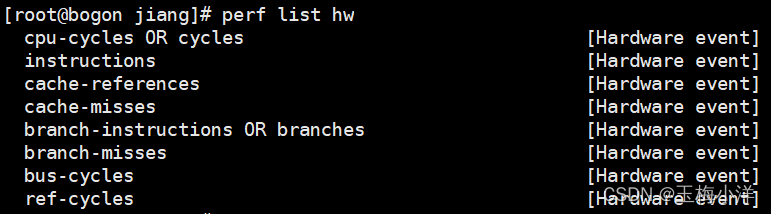
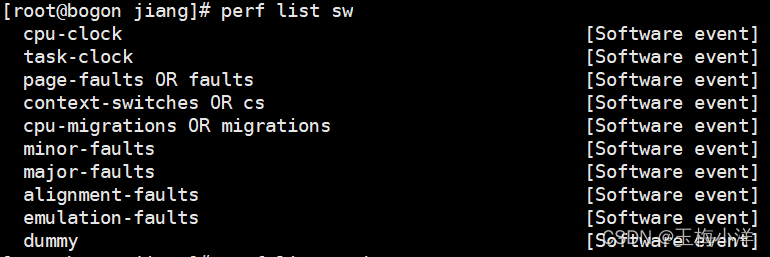
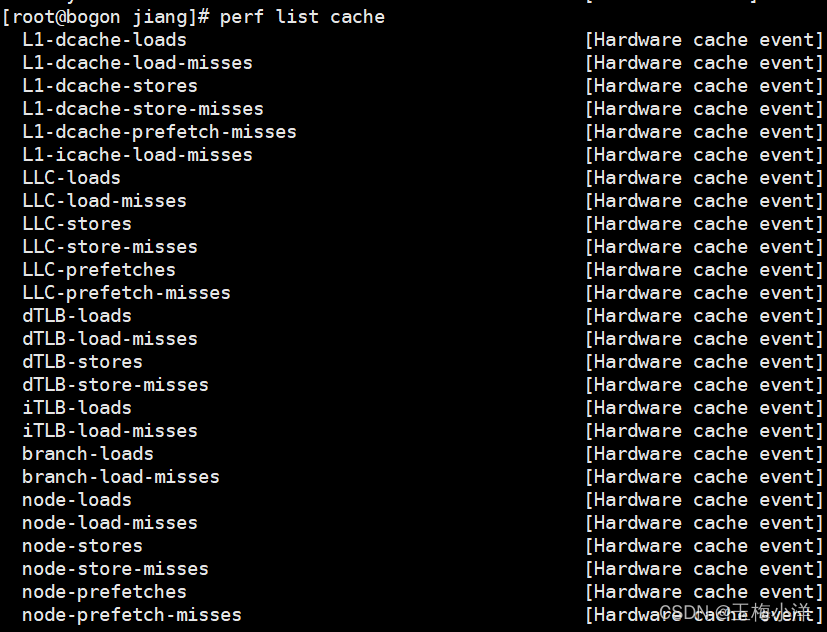
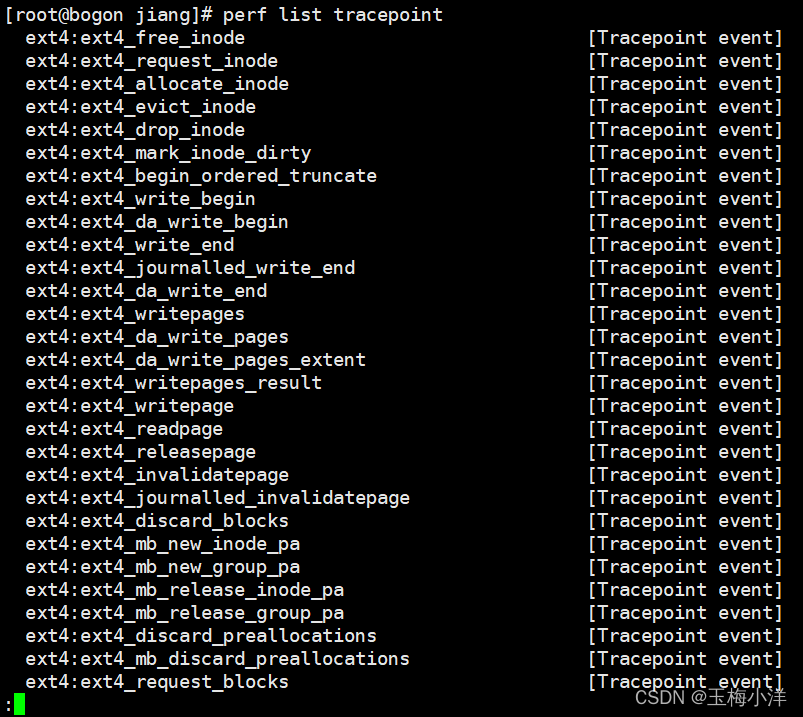
perf list用来查看perf所支持的性能事件,有软件的也有硬件的。
环境不同列出的信息可能不同,可以根据需求对指定事件进行采样。
perf list -h
 usage: perf list [hw|sw|cache|tracepoint|pmu|event_glob]
perf list hw
perf list sw
perf list cache
perf list tracepoint
perf list pmu
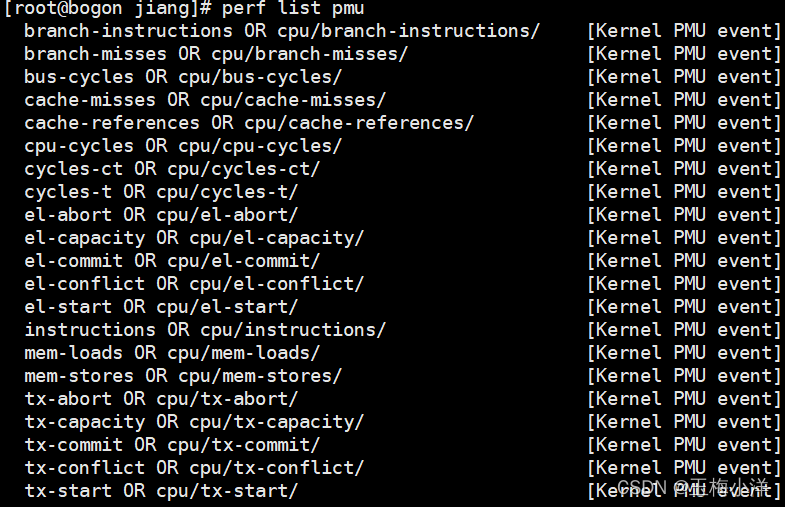
总体分为三类hardware(硬件产生)、software(内核软件产生)、tracepoint(内核中静态tracepoint触发事件)。
hw(Hardware event)和cache(Hardware cache event) 是由 PMU 硬件产生的事件,比如 cache 命中,当您需要了解程序对硬件特性的使用情况时,便需要对这些事件进行采样。
sw(Software event) 是内核软件产生的事件,比如进程切换,tick 数等。
tracepoint(Tracepoint event) 是内核中的静态 tracepoint 所触发的事件,这些 tracepoint 用来判断程序运行期间内核的行为细节,比如 slab 分配器的分配次数等。
上述每一个事件都可以用于采样,并生成一项统计数据。
面对一个问题程序,最好采用自顶向下的策略。先整体看看该程序运行时各种统计事件的大概,再针对某些方向深入细节,而不是一下子扎进琐碎细节,否则会一叶障目的。
有些程序慢是因为计算量太大,其多数时间都应该在使用CPU进行计算,这叫做CPU bound(CPU密集)型;有些程序慢是因为过多的IO,这种时候其CPU利用率应该不高,这叫做IO bound(IO密集)型;对于CPU bound程序的调优和IO bound的调优是不同的。
perf stat 就是一个很好的工具,它通过概括精简的方式提供被调试程序运行的整体情况和汇总数据。
perf stat -h
 usage: perf stat [<options>] [<command>]
-e, --event <event>   event selector. use 'perf list' to list available events
-p, --pid <pid>       stat events on existing process id
-t, --tid <tid>       stat events on existing thread id
-a, --all-cpus        system-wide collection from all CPUs
-r, --repeat <n>      repeat command and print average + stddev (max: 100, forever: 0)
-C, --cpu <cpu>       list of cpus to monitor in system-wide
-d, --detailed        detailed run - start a lot of events

-e,指定性能事件
-p,指定分析进程的PID
-t,指定待分析线程的TID
-r N,连续分析N次
-d,全面性能分析,采用更多的性能事件

#指定事件
-e <event>:u // userspace
-e <event>:k // kernel
-e <event>:h // hypervisor
-e <event>:G // guest counting (in KVM guests)
-e <event>:H // host counting (not in KVM guests)
例如查看ls的cpu周期数,分别为总周期数,用户态周期数,内核态周期数。
[root@bogon test]# perf stat -e cycles ls

 Performance counter stats for 'ls':

         1,701,168      cycles

       0.001918895 seconds time elapsed

[root@bogon test]# perf stat -e cycles:u ls

 Performance counter stats for 'ls':

           670,422      cycles:u

       0.001387917 seconds time elapsed

[root@bogon test]# perf stat -e cycles:k ls

 Performance counter stats for 'ls':

         1,036,760      cycles:k

       0.001821355 seconds time elapsed
可以发现,总周期数≈用户态周期数+内核态周期数。
用-e指定相应事件,举例如下:
[root@bogon test]# perf stat -e cycles,instructions,cache-references,cache-misses,L1-dcache-loads,L1-dcache-load-misses,LLC-loads,LLC-load-misses,dTLB-loads,dTLB-load-misses -p 2347 sleep 10

[root@bogon test]# perf stat -d ls
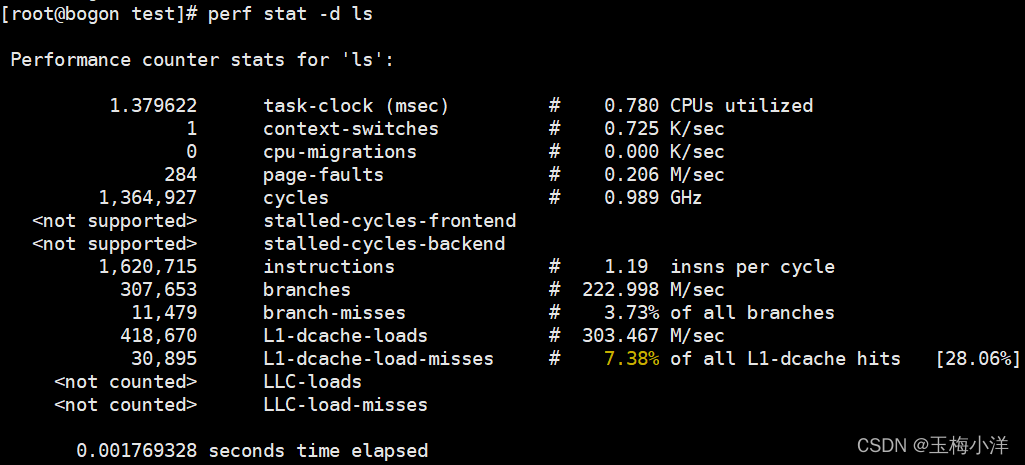
下面这个是网上找的事件比较全的例子。

其他一些事件
14. **cache-references:**cache的命中次数。
15. **cache-misses:**cache失效的次数。
16. **dTLB-loads:**数据读取TLB的次数。
17. **dTLB-load-misses:**数据读取TLB失败的次数。
18. iTLB-loads: 指令读取TLB的次数。
19. **iTLB-load-misses:**指令读取TLB失败的次数。
这里应该注意到misses的值越小越好。
perf top -h
 usage: perf top [<options>]
-e, --event <event>   event selector. use 'perf list' to list available events
-p, --pid <pid>       profile events on existing process id
-t, --tid <tid>       profile events on existing thread id
-a, --all-cpus        system-wide collection from all CPUs
-C, --cpu <cpu>       list of cpus to monitor
-k, --vmlinux <file>  vmlinux pathname
-K, --hide_kernel_symbols
                          hide kernel symbols
-U, --hide_user_symbols
                          hide user symbols
-g                        enables call-graph recording

-e <event>:指明要分析的性能事件。
-p <pid>:Profile events on existing Process ID (comma sperated list). 仅分析目标进程及其创建的线程。
-k <path>:Path to vmlinux. Required for annotation functionality. 带符号表的内核映像所在的路径。
-K:不显示属于内核或模块的符号。
-U:不显示属于用户态程序的符号。
-d <n>:界面的刷新周期,默认为2s,因为perf top默认每2s从mmap的内存区域读取一次性能数据。
-g:得到函数的调用关系图。
perf top –K
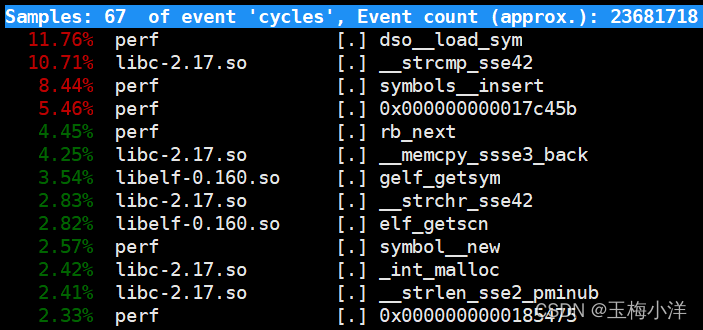
perf top –U
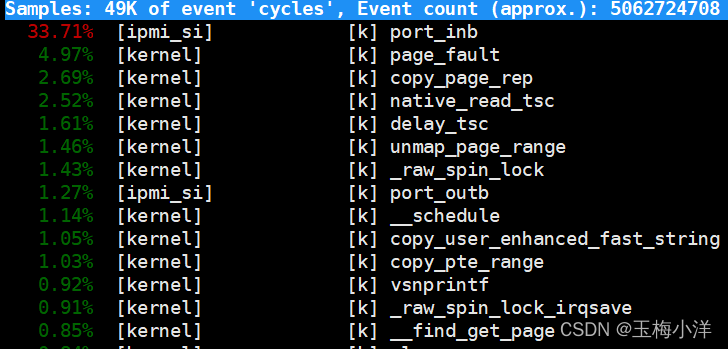
perf top –g
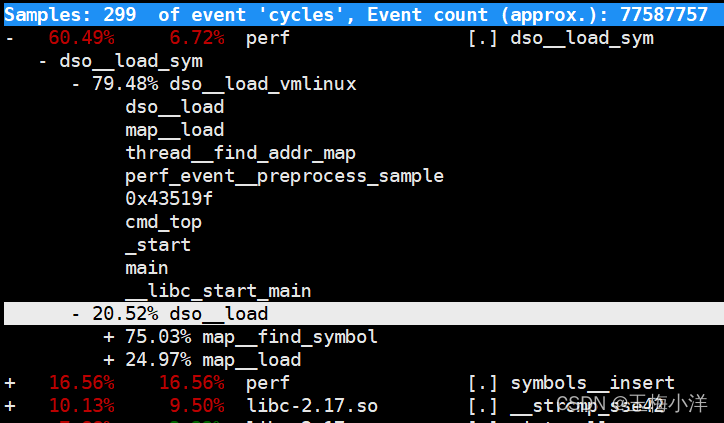
输入perf top就能进入交互模式
h:显示帮助

UP/DOWN/PGUP/PGDN/SPACE:上下和翻页。
a:annotate current symbol,注解当前符号。能够给出汇编语言的注解,给出各条指令的采样率。
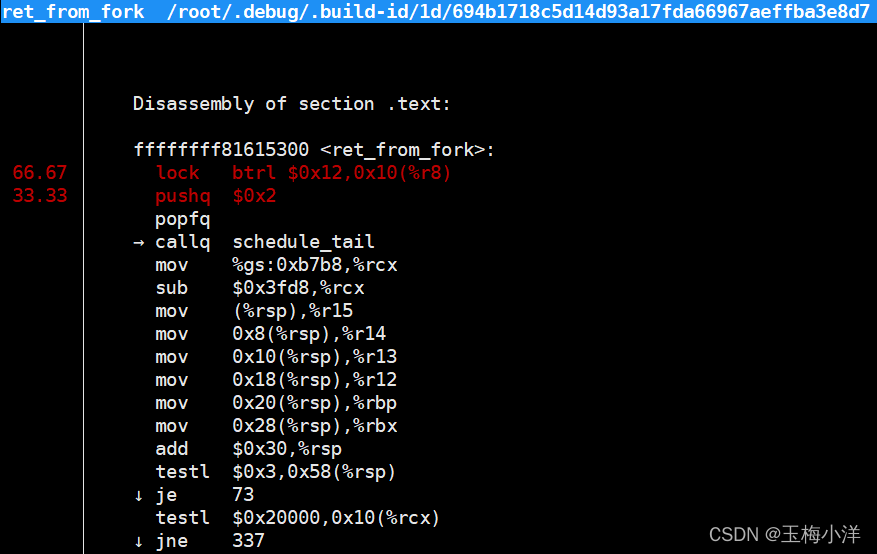
d:过滤掉所有不属于此DSO的符号。非常方便查看同一类别的符号。

P:将当前信息保存到perf.hist.N中,存在当前路径。
[root@bogon test]# ls
perf.hist.0
perf top
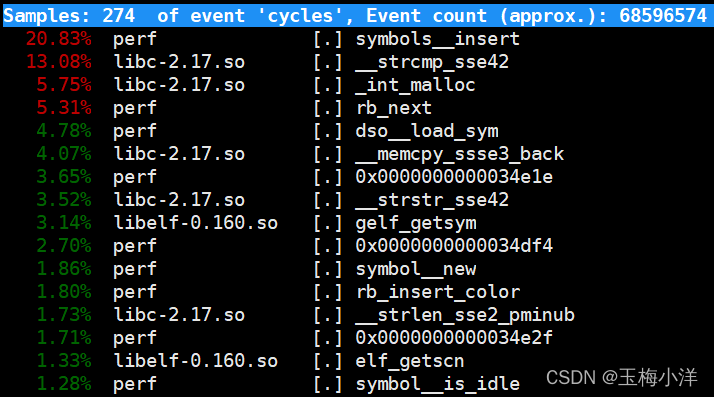
第一列:符号引发的性能事件的比例,默认指占用的cpu周期比例。
第二列:符号所在的DSO(Dynamic Shared Object),可以是应用程序、内核、动态链接库、模块。
第三列:DSO的类型。[.]表示此符号属于用户态的ELF文件,包括可执行文件与动态链接库)。[k]表述此符号属于内核或模块。
第四列:符号名。有些符号不能解析为函数名,只能用地址表示。
Run a command and record its profile into perf.data. This command runs a command and gathers a performance counter profile from it, into perf.data, without displaying anything. This file can then be inspected later on, using perf report.
收集采样信息,并将其记录在数据文件中(如果没有通过-o指定文件,则在当前目录生成perf.data文件),随后可以通过其它工具(perf report)对数据文件进行分析,结果类似于perf top的。
perf record 可以记录单个函数级别的统计信息,并使用 perf report 来显示统计结果。调优应该将注意力集中到百分比高的热点代码片段上,假如一段代码只占用整个程序运行时间的 0.1%,即使您将其优化到仅剩一条机器指令,恐怕也只能将整体的程序性能提高 0.1%。俗话说,好钢要用在刀刃上。
perf record -h
 usage: perf record [<options>] [<command>]
-e, --event <event>   event selector. use 'perf list' to list available events
        --filter <filter>
                          event filter
-p, --pid <pid>       record events on existing process id
-t, --tid <tid>       record events on existing thread id
-a, --all-cpus        system-wide collection from all CPUs
-C, --cpu <cpu>       list of cpus to monitor
-o, --output <file>   output file name
-g                    enables call-graph recording

-e record指定PMU事件
   --filter event事件过滤器
-a  录取所有CPU的事件
-p  录取指定pid进程的事件
-o  指定录取保存数据的文件名
-g  使能函数调用图功能
-C  录取指定CPU的事件
1.收集某个命令的事件信息
[root@bogon test]# perf record -g ls
perf.data
[ perf record: Woken up 1 times to write data ]
[ perf record: Captured and wrote 0.016 MB perf.data (~704 samples) ]
[root@bogon test]# ls
perf.data
[root@bogon test]# perf report -i perf.data
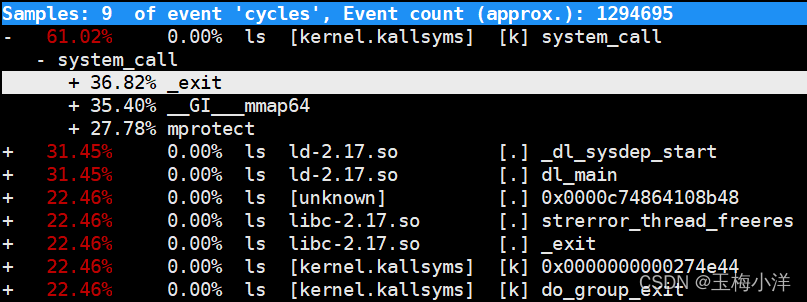
2.收集某个进程的事件信息 sleep 10 表示收集10秒中。
[root@bogon test]# perf record -g -p 2347 -o 2347.data sleep 10
[ perf record: Woken up 1 times to write data ]
[ perf record: Captured and wrote 0.669 MB 2347.data (~29242 samples) ]
[root@bogon test]# ls
2347.data  perf.data
[root@bogon test]# perf report -i 2347.data

解析perf record产生的数据,并给出分析结果。
perf report -h
 usage: perf report [<options>]
-i  导入的数据文件名称,如果没有则默认为perf.data
-g  生成函数调用关系图
我正在学习如何使用Nokogiri,根据这段代码我遇到了一些问题:require'rubygems'require'mechanize'post_agent=WWW::Mechanize.newpost_page=post_agent.get('http://www.vbulletin.org/forum/showthread.php?t=230708')puts"\nabsolutepathwithtbodygivesnil"putspost_page.parser.xpath('/html/body/div/div/div/div/div/table/tbody/tr/td/div
我有一个Ruby程序,它使用rubyzip压缩XML文件的目录树。gem。我的问题是文件开始变得很重,我想提高压缩级别,因为压缩时间不是问题。我在rubyzipdocumentation中找不到一种为创建的ZIP文件指定压缩级别的方法。有人知道如何更改此设置吗?是否有另一个允许指定压缩级别的Ruby库? 最佳答案 这是我通过查看rubyzip内部创建的代码。level=Zlib::BEST_COMPRESSIONZip::ZipOutputStream.open(zip_file)do|zip|Dir.glob("**/*")d
类classAprivatedeffooputs:fooendpublicdefbarputs:barendprivatedefzimputs:zimendprotecteddefdibputs:dibendendA的实例a=A.new测试a.foorescueputs:faila.barrescueputs:faila.zimrescueputs:faila.dibrescueputs:faila.gazrescueputs:fail测试输出failbarfailfailfail.发送测试[:foo,:bar,:zim,:dib,:gaz].each{|m|a.send(m)resc
很好奇,就使用rubyonrails自动化单元测试而言,你们正在做什么?您是否创建了一个脚本来在cron中运行rake作业并将结果邮寄给您?git中的预提交Hook?只是手动调用?我完全理解测试,但想知道在错误发生之前捕获错误的最佳实践是什么。让我们理所当然地认为测试本身是完美无缺的,并且可以正常工作。下一步是什么以确保他们在正确的时间将可能有害的结果传达给您? 最佳答案 不确定您到底想听什么,但是有几个级别的自动代码库控制:在处理某项功能时,您可以使用类似autotest的内容获得关于哪些有效,哪些无效的即时反馈。要确保您的提
假设我做了一个模块如下:m=Module.newdoclassCendend三个问题:除了对m的引用之外,还有什么方法可以访问C和m中的其他内容?我可以在创建匿名模块后为其命名吗(就像我输入“module...”一样)?如何在使用完匿名模块后将其删除,使其定义的常量不再存在? 最佳答案 三个答案:是的,使用ObjectSpace.此代码使c引用你的类(class)C不引用m:c=nilObjectSpace.each_object{|obj|c=objif(Class===objandobj.name=~/::C$/)}当然这取决于
我正在尝试使用ruby和Savon来使用网络服务。测试服务为http://www.webservicex.net/WS/WSDetails.aspx?WSID=9&CATID=2require'rubygems'require'savon'client=Savon::Client.new"http://www.webservicex.net/stockquote.asmx?WSDL"client.get_quotedo|soap|soap.body={:symbol=>"AAPL"}end返回SOAP异常。检查soap信封,在我看来soap请求没有正确的命名空间。任何人都可以建议我
关闭。这个问题是opinion-based.它目前不接受答案。想要改进这个问题?更新问题,以便editingthispost可以用事实和引用来回答它.关闭4年前。Improvethisquestion我想在固定时间创建一系列低音和高音调的哔哔声。例如:在150毫秒时发出高音调的蜂鸣声在151毫秒时发出低音调的蜂鸣声200毫秒时发出低音调的蜂鸣声250毫秒的高音调蜂鸣声有没有办法在Ruby或Python中做到这一点?我真的不在乎输出编码是什么(.wav、.mp3、.ogg等等),但我确实想创建一个输出文件。
我在我的项目目录中完成了compasscreate.和compassinitrails。几个问题:我已将我的.sass文件放在public/stylesheets中。这是放置它们的正确位置吗?当我运行compasswatch时,它不会自动编译这些.sass文件。我必须手动指定文件:compasswatchpublic/stylesheets/myfile.sass等。如何让它自动运行?文件ie.css、print.css和screen.css已放在stylesheets/compiled。如何在编译后不让它们重新出现的情况下删除它们?我自己编译的.sass文件编译成compiled/t
我想将html转换为纯文本。不过,我不想只删除标签,我想智能地保留尽可能多的格式。为插入换行符标签,检测段落并格式化它们等。输入非常简单,通常是格式良好的html(不是整个文档,只是一堆内容,通常没有anchor或图像)。我可以将几个正则表达式放在一起,让我达到80%,但我认为可能有一些现有的解决方案更智能。 最佳答案 首先,不要尝试为此使用正则表达式。很有可能你会想出一个脆弱/脆弱的解决方案,它会随着HTML的变化而崩溃,或者很难管理和维护。您可以使用Nokogiri快速解析HTML并提取文本:require'nokogiri'h
我想为Heroku构建一个Rails3应用程序。他们使用Postgres作为他们的数据库,所以我通过MacPorts安装了postgres9.0。现在我需要一个postgresgem并且共识是出于性能原因你想要pggem。但是我对我得到的错误感到非常困惑当我尝试在rvm下通过geminstall安装pg时。我已经非常明确地指定了所有postgres目录的位置可以找到但仍然无法完成安装:$envARCHFLAGS='-archx86_64'geminstallpg--\--with-pg-config=/opt/local/var/db/postgresql90/defaultdb/po
