为什么会写这样一篇呢,应该早晚会用到paddlelite,所以paddle还是要学的,与其在飞桨平台上跑,不如在自己电脑上跑。我以为安装paddle只需要三行代码:
# 打开Anaconda Prompt
conda create -n paddle python=3.9
conda activate paddle
python -m pip install paddlepaddle-gpu==2.4.0.post116 -f https://www.paddlepaddle.org.cn/whl/windows/mkl/avx/stable.html
然后就可以快乐地荡起飞桨……
前两步不变,python版本看你安装的版本。
# 打开Anaconda Prompt
conda create -n paddle python=3.9
conda activate paddle
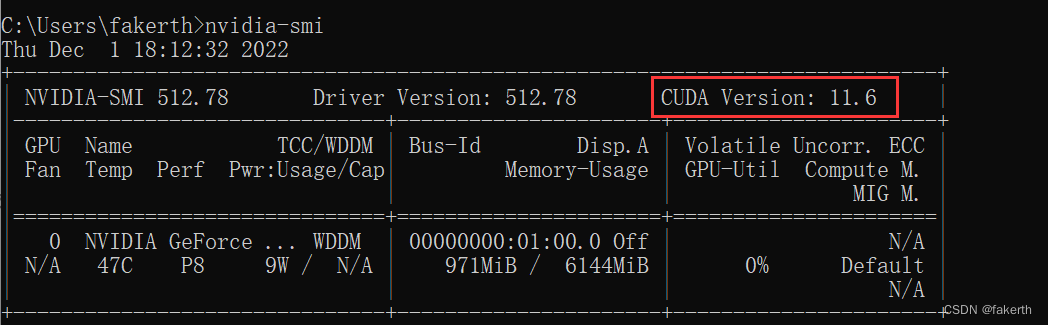
关于如何选择适合自己版本的paddle,打开cmd命令窗口,输入nvidia-smi,红框中表示你可以适配的最高版本,可以选择11.2,但我个人喜欢最新的,有问题也用最高版本的。
然后进入飞桨官网选择合适版本复制命令安装。
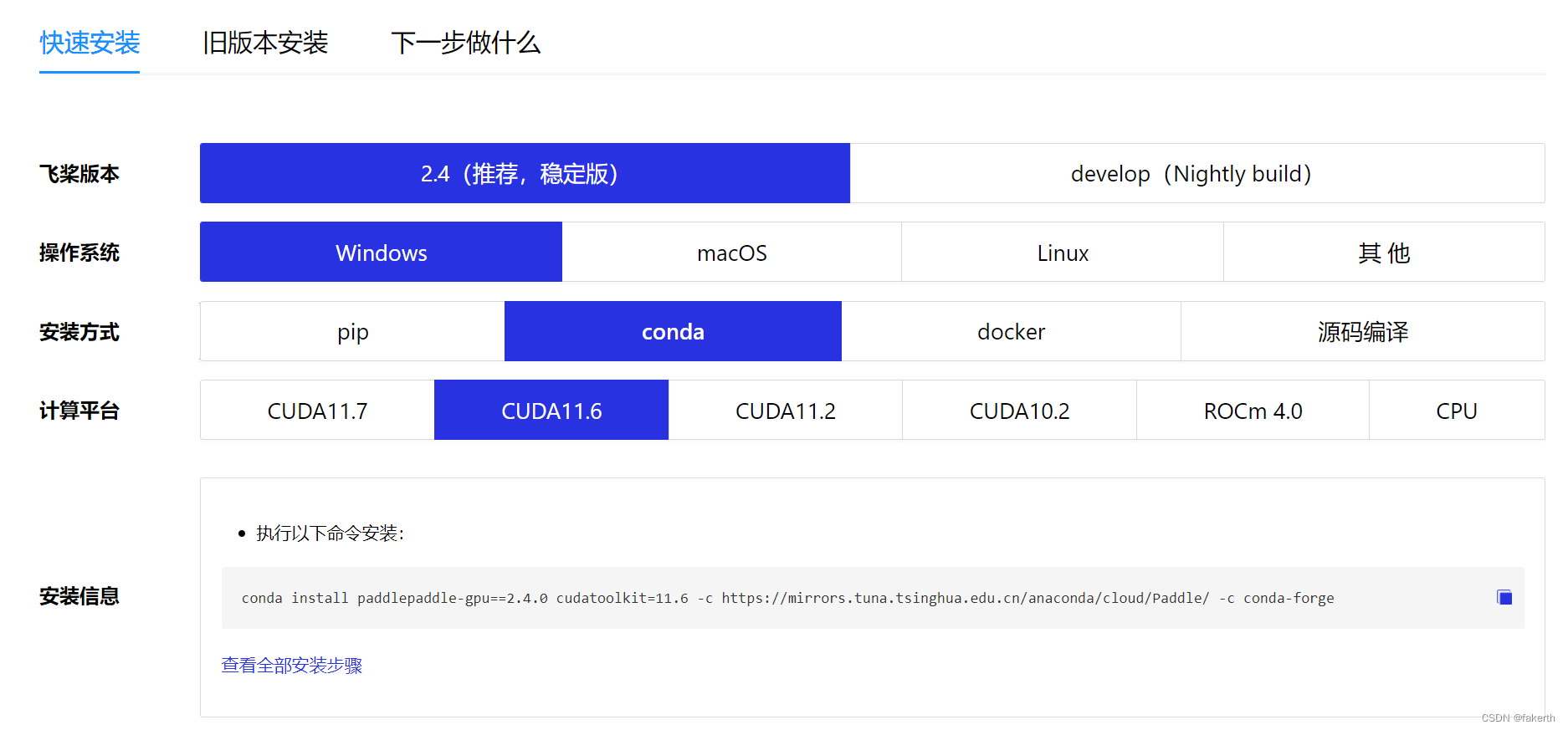
然后执行以下命令,验证是否安装成功:
python
import paddle
paddle.utils.run_check()
如果你安装了CUDA,CUDNN,到这里一般就结束了。我是没安装的那种,但我并不认为我没有安装,因为之前安装过pytorch时,我记得安装了CUDA,跑了深度学习也没问题,所以我就没往这方面想,也不认为是版本的问题,报错如下:
Running verify PaddlePaddle program ...
W1201 16:34:44.189872 20796 gpu_resources.cc:61] Please NOTE: device: 0, GPU Compute Capability: 8.6, Driver API Version: 11.6, Runtime API Version: 11.6
W1201 16:34:44.190871 20796 dynamic_loader.cc:278] Note: [Recommend] copy cudnn into CUDA installation directory.
 For instance, download cudnn-10.0-windows10-x64-v7.6.5.32.zip from NVIDIA's official website,
then, unzip it and copy it into C:\Program Files\NVIDIA GPU Computing Toolkit\CUDA\v10.0
You should do this according to your CUDA installation directory and CUDNN version.
…………
PreconditionNotMetError: The third-party dynamic library (cudnn64_8.dll) that Paddle depends on is not configured correctly. (error code is 126)
     Suggestions:
     1. Check if the third-party dynamic library (e.g. CUDA, CUDNN) is installed correctly and its version is matched with paddlepaddle you installed.
     2. Configure third-party dynamic library environment variables as follows:
     - Linux: set LD_LIBRARY_PATH by `export LD_LIBRARY_PATH=...`
     - Windows: set PATH by `set PATH=XXX; (at ..\paddle\phi\backends\dynload\dynamic_loader.cc:305)
     [operator < fill_constant > error]
翻译过来:
正在运行验证飞桨程序。。。

W1201 16:34:44.189872 20796 gpu资源。cc:61]请注意:设备:0,GPU计算能力:8.6,驱动程序API版本:11.6,运行时API版本:11.6

W1201 16:34:44.190771 20796动态加载器。cc:278]注意:[建议]将cunn复制到CUDA安装目录中。

例如,从NVIDIA官网下载cunn-10.0-windows10-x64-v7.6.5.32.zip,

然后,将其解压缩并复制到C:\Program Files\NVIDIA GPU Computing Toolkit\CUDA\v10.0中

您应该根据CUDA安装目录和CUDNN版本执行此操作。


PreconditionNotMetError:Paddle依赖的第三方动态库(cudnn64_8.dll)未正确配置。(错误代码为126)

建议:

1.检查第三方动态库(如CUDA、CUDNN)是否安装正确,其版本是否与您安装的飞桨相匹配。

2.配置第三方动态库环境变量如下:

-Linux:通过`export LD_LIBRARY_PATH=`

-Windows:通过`set PATH=XXX;(位于..\plade\phi\backends\dynload\dynamic_loader.cc:305)

[运算符<fill_constant>错误]
接下来就是在信息的海洋里遨游的时刻,直到看到这段话,这是我的灯塔:


进入官网选择合适版本下载:
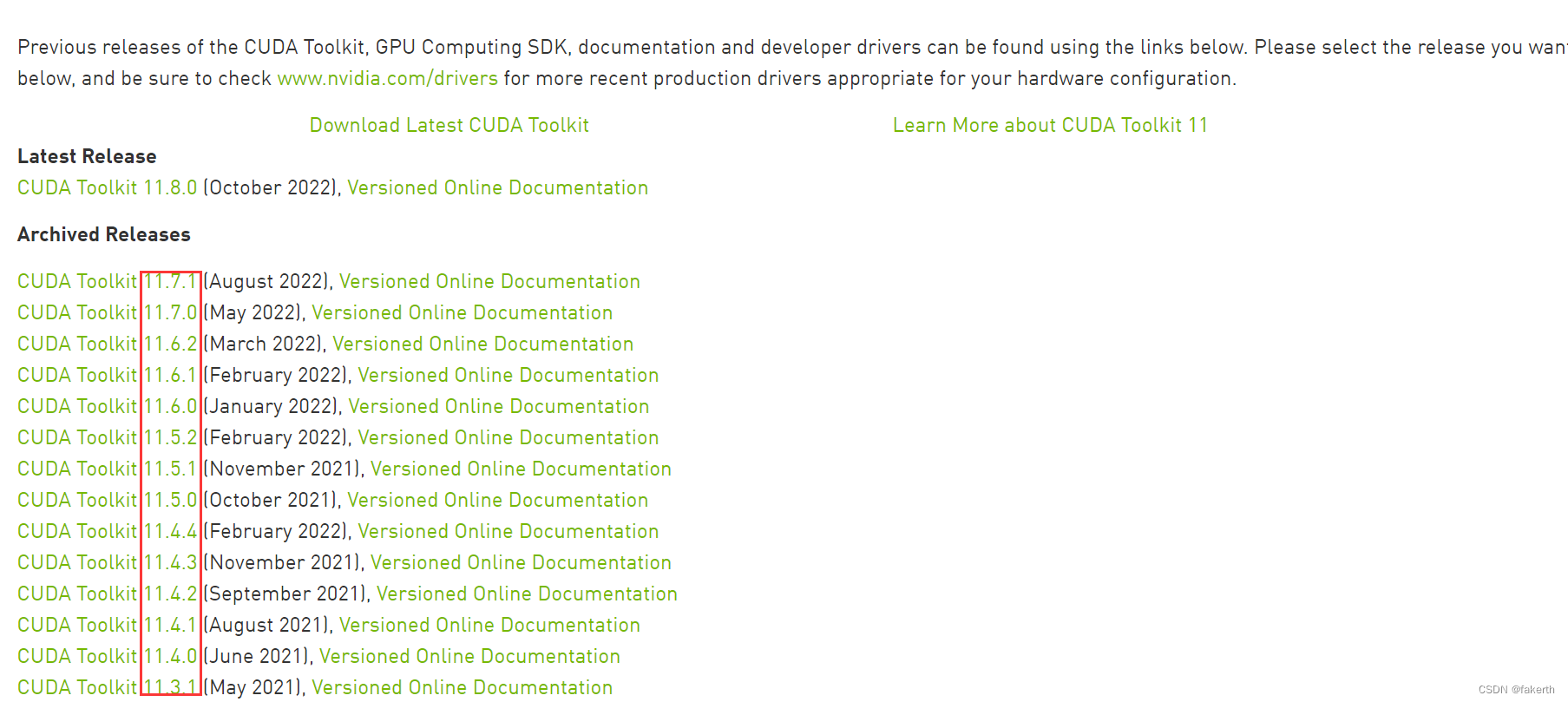
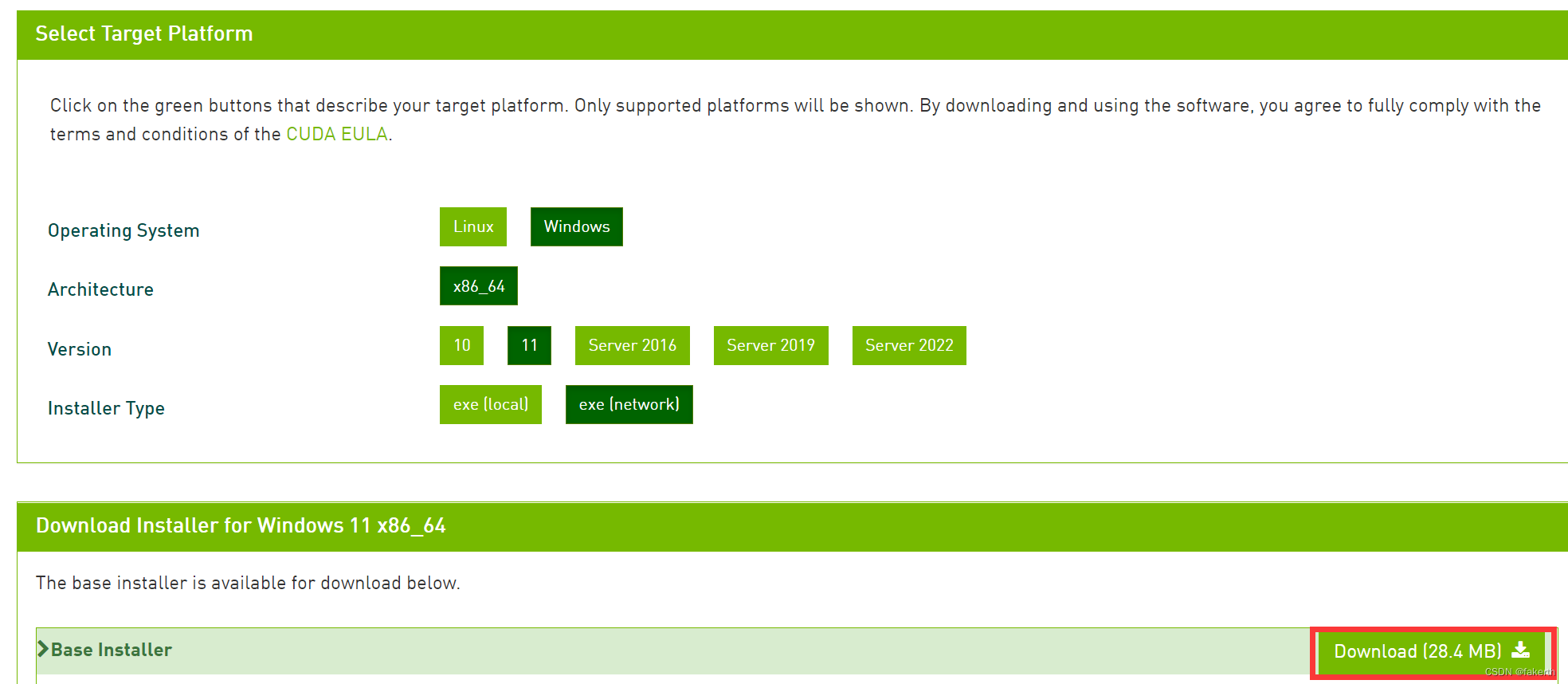
选择自定义全部安装:
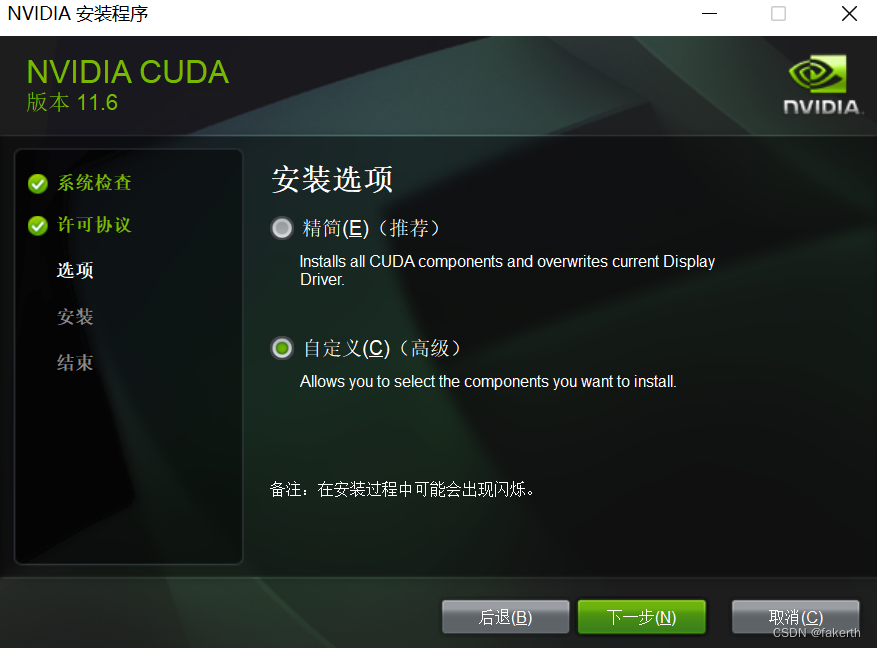
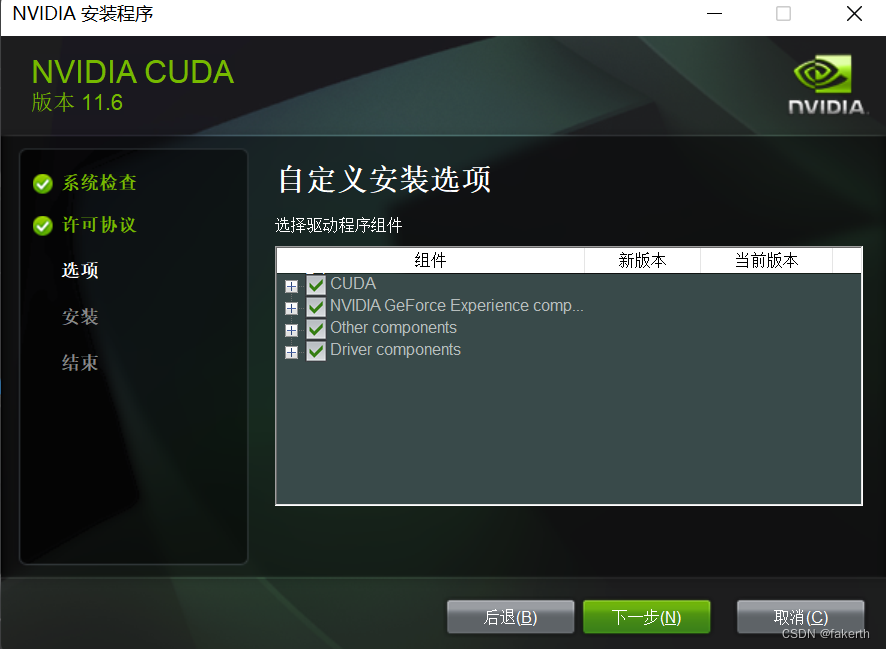
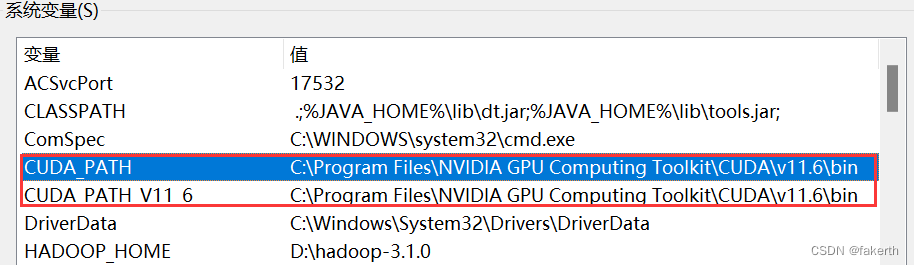
配置变量:
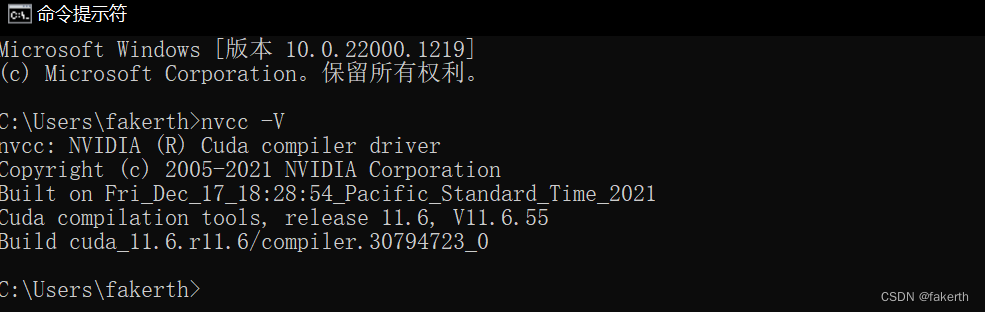
安装完成后进行验证,打开cmd命令窗口,输入nvcc -V:
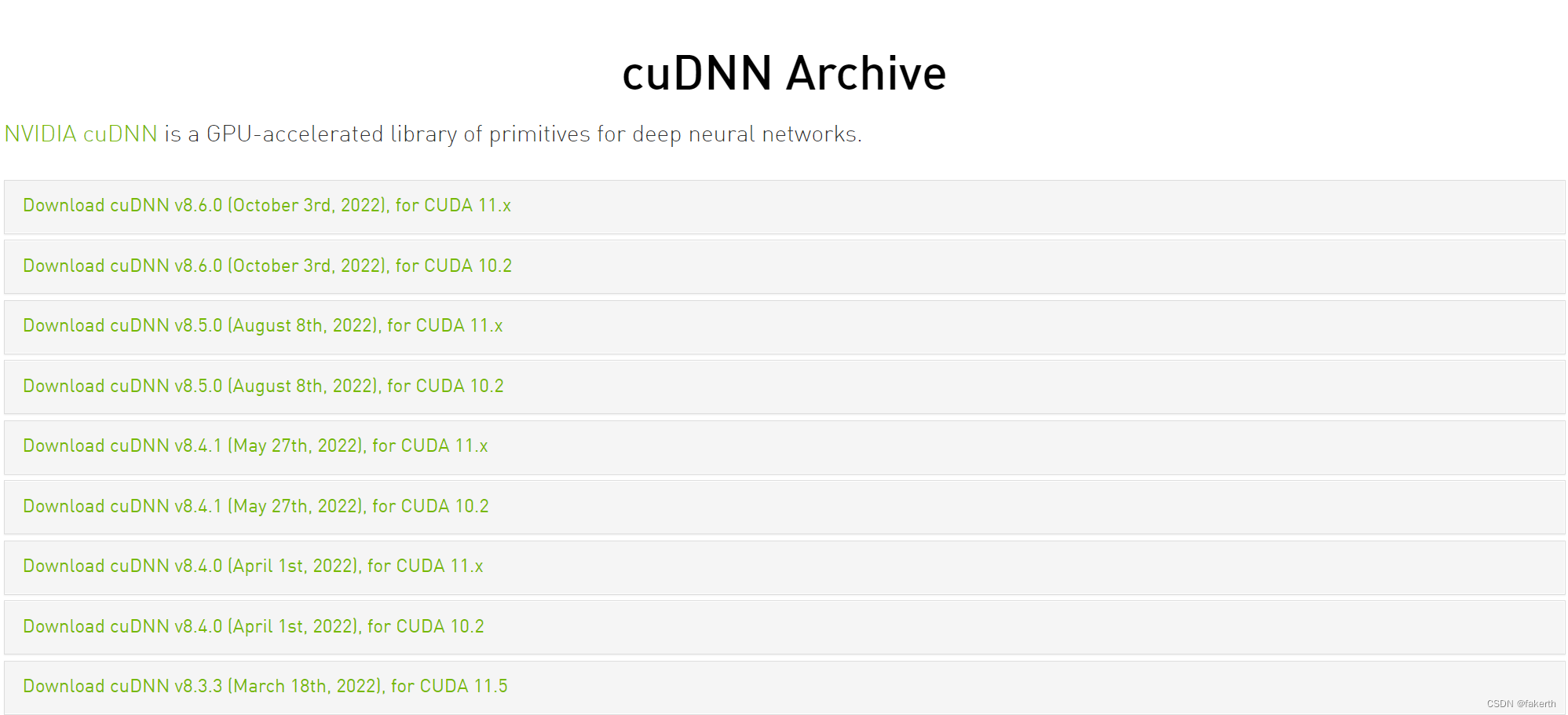
进入官网,这个需要注册登录,选择合适版本下载,下载的是一个压缩包。
意外之喜:

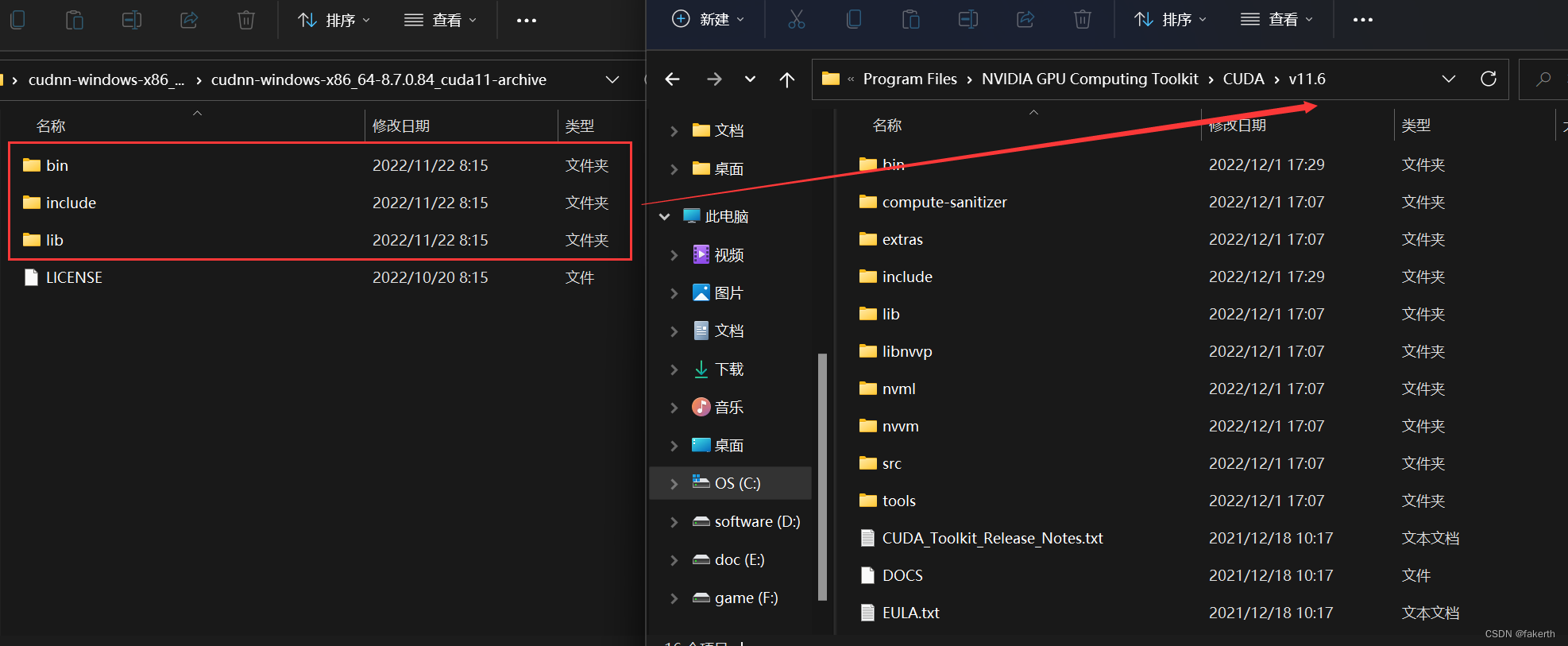
然后解压该文件,将其复制到CUDA的v11.6文件下,有重复的直接替换。
执行以下命令,验证是否可以用paddle:
python
import paddle
paddle.utils.run_check()
报错如下,这个应该就是CUDA和CUDNN某些地方不匹配吧,稳定的话还是选择低版本好。
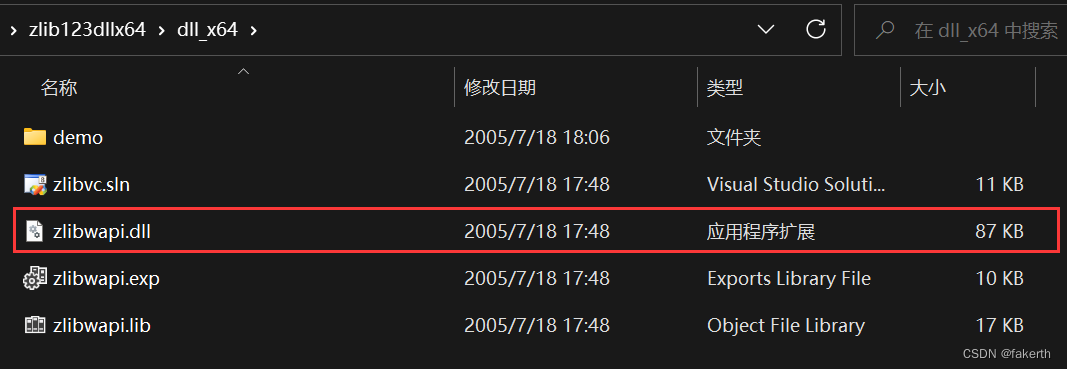
Could not locate cudnn_ops_infer64_8.dll. Please make sure it is in your lib
解决方法:前往官网如下图所示位置下载一个zlib包,解压缩后找到zlibwapi.dll文件,剪切到C:\Windows\System32


学习照亮我的灯塔也翻译一下:
Running verify PaddlePaddle program ...
W1201 18:57:31.685199  5020 gpu_resources.cc:61] Please NOTE: device: 0, GPU Compute Capability: 8.6, Driver API Version: 11.6, Runtime API Version: 11.6
W1201 18:57:31.688201  5020 gpu_resources.cc:91] device: 0, cuDNN Version: 8.7.
PaddlePaddle works well on 1 GPU.
PaddlePaddle works well on 1 GPUs.
PaddlePaddle is installed successfully! Let's start deep learning with PaddlePaddle now.

正在运行验证飞桨程序。。。

警告...] 请注意:设备:0,GPU计算能力:8.6,驱动程序API版本:11.6,运行时API版本:11.6

警告...] 设备:0,cuDNN版本:8.7。

飞桨在1个GPU上运行良好。

飞桨在1个GPU上运行良好。

飞桨安装成功!现在,让我们开始深入学习飞桨。
我想为Heroku构建一个Rails3应用程序。他们使用Postgres作为他们的数据库,所以我通过MacPorts安装了postgres9.0。现在我需要一个postgresgem并且共识是出于性能原因你想要pggem。但是我对我得到的错误感到非常困惑当我尝试在rvm下通过geminstall安装pg时。我已经非常明确地指定了所有postgres目录的位置可以找到但仍然无法完成安装:$envARCHFLAGS='-archx86_64'geminstallpg--\--with-pg-config=/opt/local/var/db/postgresql90/defaultdb/po
我打算为ruby脚本创建一个安装程序,但我希望能够确保机器安装了RVM。有没有一种方法可以完全离线安装RVM并且不引人注目(通过不引人注目,就像创建一个可以做所有事情的脚本而不是要求用户向他们的bash_profile或bashrc添加一些东西)我不是要脚本本身,只是一个关于如何走这条路的快速指针(如果可能的话)。我们还研究了这个很有帮助的问题:RVM-isthereawayforsimpleofflineinstall?但有点误导,因为答案只向我们展示了如何离线在RVM中安装ruby。我们需要能够离线安装RVM本身,并查看脚本https://raw.github.com/wayn
我有一个奇怪的问题:我在rvm上安装了rubyonrails。一切正常,我可以创建项目。但是在我输入“railsnew”时重新启动后,我有“程序'rails'当前未安装。”。SystemUbuntu12.04ruby-v"1.9.3p194"gemlistactionmailer(3.2.5)actionpack(3.2.5)activemodel(3.2.5)activerecord(3.2.5)activeresource(3.2.5)activesupport(3.2.5)arel(3.0.2)builder(3.0.0)bundler(1.1.4)coffee-rails(
我刚刚为fedora安装了emacs。我想用emacs编写ruby。为ruby提供代码提示、代码完成类型功能所需的工具、扩展是什么? 最佳答案 ruby-mode已经包含在Emacs23之后的版本中。不过,它也可以通过ELPA获得。您可能感兴趣的其他一些事情是集成RVM、feature-mode(Cucumber)、rspec-mode、ruby-electric、inf-ruby、rinari(用于Rails)等。这是我当前用于Ruby开发的Emacs配置:https://github.com/citizen428/emacs
我正在尝试在我的centos服务器上安装therubyracer,但遇到了麻烦。$geminstalltherubyracerBuildingnativeextensions.Thiscouldtakeawhile...ERROR:Errorinstallingtherubyracer:ERROR:Failedtobuildgemnativeextension./usr/local/rvm/rubies/ruby-1.9.3-p125/bin/rubyextconf.rbcheckingformain()in-lpthread...yescheckingforv8.h...no***e
我的最终目标是安装当前版本的RubyonRails。我在OSXMountainLion上运行。到目前为止,这是我的过程:已安装的RVM$\curl-Lhttps://get.rvm.io|bash-sstable检查已知(我假设已批准)安装$rvmlistknown我看到当前的稳定版本可用[ruby-]2.0.0[-p247]输入命令安装$rvminstall2.0.0-p247注意:我也试过这些安装命令$rvminstallruby-2.0.0-p247$rvminstallruby=2.0.0-p247我很快就无处可去了。结果:$rvminstall2.0.0-p247Search
我实际上是在尝试使用RVM在我的OSX10.7.5上更新ruby,并在输入以下命令后:rvminstallruby我得到了以下回复:Searchingforbinaryrubies,thismighttakesometime.Checkingrequirementsforosx.Installingrequirementsforosx.Updatingsystem.......Errorrunning'requirements_osx_brew_update_systemruby-2.0.0-p247',pleaseread/Users/username/.rvm/log/138121
由于fast-stemmer的问题,我很难安装我想要的任何rubygem。我把我得到的错误放在下面。Buildingnativeextensions.Thiscouldtakeawhile...ERROR:Errorinstallingfast-stemmer:ERROR:Failedtobuildgemnativeextension./System/Library/Frameworks/Ruby.framework/Versions/2.0/usr/bin/rubyextconf.rbcreatingMakefilemake"DESTDIR="cleanmake"DESTDIR=
当我尝试安装Ruby时遇到此错误。我试过查看this和this但无济于事➜~brewinstallrubyWarning:YouareusingOSX10.12.Wedonotprovidesupportforthispre-releaseversion.Youmayencounterbuildfailuresorotherbreakages.Pleasecreatepull-requestsinsteadoffilingissues.==>Installingdependenciesforruby:readline,libyaml,makedepend==>Installingrub
当我执行>rvminstall1.9.2时一切顺利。然后我做>rvmuse1.9.2也很顺利。但是当涉及到ruby-v时..sam@sjones:~$rvminstall1.9.2/home/sam/.rvm/rubies/ruby-1.9.2-p136,thismaytakeawhiledependingonyourcpu(s)...ruby-1.9.2-p136-#fetchingruby-1.9.2-p136-#downloadingruby-1.9.2-p136,thismaytakeawhiledependingonyourconnection...%Total%Rece
