BestYOLO:https://github.com/WangRongsheng/BestYOLO
BestYOLO是一个以科研和竞赛为导向的最好的YOLO实践框架!
目前BestYOLO是一个完全基于YOLOv5 v7.0 进行改进的开源库,该库将始终秉持以落地应用为导向,以轻便化使用为宗旨,简化各种模块的改进。目前已经集成了基于torchvision.models 模型为Backbone的YOLOv5目标检测算法,同时也将逐渐开源更多YOLOv5应用程序。
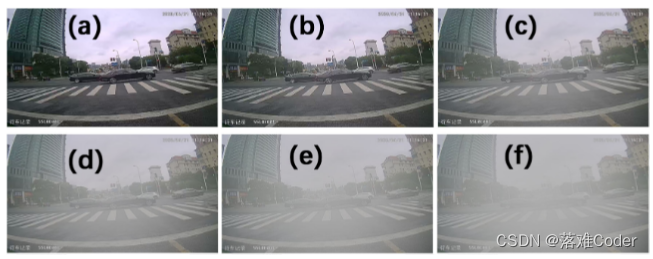
合成雾数据增强算法是一种基于图像处理技术的算法,用于增加由雾霾天气产生的雾气效果,从而提高图像的质量和可用性。该算法通过模拟雾气的形成原理,对图像进行处理和合成,使其看起来更加真实和自然。
合成雾数据增强算法的具体实现步骤如下:
提取图像的深度信息和细节信息,包括场景的几何结构、纹理和颜色等。
通过计算雾气的传播模型,确定雾气的密度和浓度,从而模拟出雾气效果。
根据模拟的雾气效果,对图像进行混合处理,包括颜色平衡、对比度调整以及明暗度等参数的调整。
针对特定场景的需求,可以对雾气的效果进行调整和优化,比如增强景深、调整雾气的颜色和透明度等。
通过合成雾数据增强算法,可实现对图像的自然场景雾化处理,从而提高图像的可视化效果和实用性。该算法在计算机视觉、图像处理、人工智能等领域都有着广泛的应用和研究价值。
synthetic_fog.py
"""
直接运行程序可以测试合成雾气效果
Produced by: zhangzhengde@sjtu.edu.cn
"""
import os
import math
import cv2
import time
from pathlib import Path
import numpy as np
import matplotlib.pyplot as plt
from tqdm import tqdm
import shutil


class SyntheticFog(object):
    def __init__(self):
        pass

    def __call__(self, show=False):
        img_path = '../example/fog_image/raw.jpg'
        # img_path = '../sources/IMG_6685.JPG'
        assert os.path.exists(img_path), f'error: img does not exists, {img_path}'
        img = cv2.imread(img_path)
        print(img.shape)
        img = img/255.0
        print(f'fogging...')
        t0 = time.time()
        br = 0.7
        th = 0.05
        fogged_img = self.fogging_img(
            img, brightness=br, thickness=th,
            high_efficiency=True)
        print(f'fogging time: {(time.time()-t0)*1000:.4f}ms')
        rf = 1  # resize factor
        img = cv2.resize(img, (int(img.shape[1]*rf), int(img.shape[0]*rf)))
        fogged_img = cv2.resize(fogged_img, ((int(fogged_img.shape[1]*rf)), (int(fogged_img.shape[0]*rf))))
        fogged_img = np.array(fogged_img*255, dtype=np.uint8)
        if show:
            cv2.imshow('src', img)
            cv2.imshow('fogged', fogged_img)
            cv2.waitKey(0)
        cv2.imwrite(f'../example/fog_image/fogged_br{br}_th{th}.jpg', fogged_img)

    def fogging_dir(self, sp, tp=None, random_params=True, brightness=None, thickness=None, save_src_img=False):
        """
        fogging images in a directory
        :param sp: str, source dir path
        :param tp: str, target dir path, tp is fogged_{sp} by default
        :param random_params: bool, use random brightness and fog thickness params if True
        :param brightness: float, 0.1 to 0.9, gray of synthetic fog, pure white fog if 1, dark fog if 0.
        :param thickness: float, 0.01 to 0.09, thickness of synthetic fog, the larger the value, the thicker the fog.
        :param save_src_img: save source image at the same time i.e. copy source imgs to tp
        :return: None, all fogged images will be saved to target dir path.
        """
        tp = tp if tp is not None else f'{Path(sp).parent}/fogged_{Path(sp).name}'
        if os.path.exists(tp):
            ipt = input(f'Target dir: {tp} exists, do you want to remove it and continue. [Yes]/No: ')
            if ipt in ['', 'Yes', 'Y', 'yes']:
                shutil.rmtree(tp)
            else:
                print('do nothing')
                exit()
        os.makedirs(f'{tp}')

        imgs = [x for x in os.listdir(sp) if str(Path(x).suffix).lower() in ['.jpg', '.bmp']]
        print(f'Fogging {len(imgs)} images in dir {sp}, \nfogged images will be save to {tp}.')
        bar = tqdm(imgs)
        for i, img_name in enumerate(bar):
            img_path = f'{sp}/{img_name}'
            # stem = Path(img_path).stem
            # suffix = Path(img_path).suffix

            if save_src_img:  # save source img
                shutil.copy(f'{sp}/{img_name}', f'{tp}/{img_name}')

            img = cv2.imread(img_path)
            h, w, c = img.shape
            normed_img = img.copy()/255.0

            if random_params:
                br = np.clip(0.2 * np.random.randn() + 0.5, 0.1, 0.9)  # 0.1~0.9
                th = np.clip(0.01 * np.random.randn() + 0.05, 0.01, 0.09)
            else:
                br = brightness
                th = thickness
                assert br is not None
                assert th is not None
            fogged_img = self.fogging_img(normed_img, br, th, high_efficiency=True)
            fogged_img = np.array(fogged_img * 255, dtype=np.uint8)
            cv2.imwrite(f'{tp}/fogged_{img_name}', fogged_img)

            bar.set_description(f'Fogged image saved, fogged_{img_name}')

    def fogging_img(self, img, brightness=0.7, thickness=0.05, high_efficiency=True):
        """
        fogging single image
        :param img: src img
        :param brightness: brightness
        :param thickness: fog thickness, without fog when 0, max 0.1,
        :param high_efficiency: use matrix to improve fogging speed when high_efficiency is True, else use loops
                low efficiency: about 4000ms, high efficiency: about 80ms, tested in (864, 1152, 3) img
        :return: fogged image
        """
        assert 0 <= brightness <= 1
        assert 0 <= thickness <= 0.1
        fogged_img = img.copy()
        h, w, c = fogged_img.shape
        if not high_efficiency:  # use default loop to fogging, low efficiency
            size = np.sqrt(np.max(fogged_img.shape[:2]))  # 雾化尺寸
            center = (h // 2, w // 2)  # 雾化中心
            # print(f'shape: {img.shape} center: {center} size: {size}')  # 33
            # d_list = []
            for j in range(h):
                for l in range(w):
                    d = -0.04 * math.sqrt((j - center[0]) ** 2 + (l - center[1]) ** 2) + size
                    # print(f'd {d}')
                    td = math.exp(-thickness * d)
                    # d_list.append(td)
                    fogged_img[j][l][:] = fogged_img[j][l][:] * td + brightness * (1 - td)
                # x = np.arange(len(d_list))
                # plt.plot(x, d_list, 'o')
                # if j == 5:
                #     break
        else:  # use matrix  # TODO: 直接使用像素坐标,距离参数不适用于大分辨率图像,会变成鱼眼镜头的样子. done.
            use_pixel = True
            size = np.sqrt(np.max(fogged_img.shape[:2])) if use_pixel else 1  # 雾化尺寸
            h, w, c = fogged_img.shape
            hc, wc = h // 2, w // 2
            mask = self.get_mask(h=h, w=w, hc=hc, wc=wc, pixel=use_pixel)  # (h, w, 2)
            d = -0.04 * np.linalg.norm(mask, axis=2) + size

            td = np.exp(-thickness * d)

            for cc in range(c):
                fogged_img[..., cc] = fogged_img[..., cc] * td + brightness*(1-td)

            # a = np.linalg.norm(mask, axis=2)
            # print(f'size: {fogged_img.shape} a: {a} max: {np.max(fogged_img)} {np.min(fogged_img)}')

            fogged_img = np.clip(fogged_img, 0, 1)  # 解决黑白噪点的问题
            # print(f'mask: {mask[:, :, 1]} {mask.shape}')
            # print(f'd: {d} {d.shape}')

        return fogged_img

    def get_mask(self, h, w, hc, wc, pixel=True):
        mask = np.zeros((h, w, 2), dtype=np.float32)
        if pixel:
            mask[:, :, 0] = np.repeat(np.arange(h).reshape((h, 1)), w, axis=1) - hc
            mask[:, :, 1] = np.repeat(np.arange(w).reshape((1, w)), h, axis=0) - wc
        else:
            mask[:, :, 0] = np.repeat(np.linspace(0, 1, h).reshape(h, 1), w, axis=1) - 0.5
            mask[:, :, 1] = np.repeat(np.linspace(0, 1, w).reshape((1, w)), h, axis=0) - 0.5
        return mask


if __name__ == '__main__':
    synf = SyntheticFog()
    synf(show=True)
fog_augment.py
"""
fogging train and test datasets using synthetic fog algorithm
"""

import os, sys
import shutil
from pathlib import Path
import numpy as np
from tqdm import tqdm
import cv2
import random
from copy import deepcopy

from synthetic_fog import SyntheticFog


class AugmentCrosswalkDataset(object):
    def __init__(self, source_path):
        self.sp = source_path  # source path
        p = Path(self.sp)
        self.tp = f'{p.parent}/fogged_{p.stem}'  # target path

        self.sf = SyntheticFog()  # synthetic fog object

    def augment(self, show=False):
        """augment train and test set in YOLOv5 format"""
        # 逐张进行增强
        sp = self.sp
        tp = self.tp
        print(f'fogged data will be saved to: {tp}')
        if os.path.exists(self.tp):

            shutil.rmtree(self.tp)
        os.makedirs(f'{self.tp}/train/images')
        os.makedirs(f'{self.tp}/test/images')
        os.makedirs(f'{self.tp}/train/labels')
        os.makedirs(f'{self.tp}/test/labels')

        for trte in ['train', 'test']:
            pi = f'{sp}/{trte}/images'  # path of images
            pl = f'{sp}/{trte}/labels'
            ti = f'{tp}/{trte}/images'
            tl = f'{tp}/{trte}/labels'

            imgs = [f'{x}' for x in os.listdir(pi) if x.endswith('.jpg')]
            #print(f'transform {trte} images, total: {len(imgs)}, transformed total: {2*len(img)}.')
            bar = tqdm(imgs)
            for i, img_name in enumerate(bar):
                img_path = f'{pi}/{img_name}'
                stem = Path(img_path).stem
                assert os.path.exists(img_path), f'img does not exists {img_path}'

                # 先拷贝原始图像和标注
                shutil.copy(img_path, f'{ti}/{img_name}')
                shutil.copy(f'{pl}/{stem}.txt', f'{tl}/{stem}.txt')

                # fogging
                img = cv2.imread(img_path)
                h, w, c = img.shape
                # random brightness and thickness
                br = np.clip(0.2 * np.random.randn() + 0.5, 0.1, 0.9)  # 0.1~0.9
                th = np.clip(0.01 * np.random.randn() + 0.05, 0.01, 0.09)
                normed_img = img.copy()/255.0
                fogged_img = self.sf.fogging_img(
                    normed_img, brightness=br, thickness=th, high_efficiency=True)
                fogged_img = np.array(fogged_img*255, dtype=np.uint8)

                # save fogged images and labels
                cv2.imwrite(f'{ti}/fogged_{img_name}', fogged_img)
                shutil.copy(f'{pl}/{stem}.txt', f'{tl}/fogged_{stem}.txt')

                if show:
                    print(f'img_name: {Path(img_path).name} img: {img.shape} br: {br} th: {th} max: {np.max(fogged_img)}')
                    self.show(img, name='src_img', wait=False)
                    self.show(fogged_img, name='fogged_img', wait=False)
                    if cv2.waitKey(0) == ord('q'):
                        break

                bar.set_description(f'Img and fogged img saved, {stem}.')

    def show(self, img, name='xx', wait=True):
        h, w, c = img.shape
        scale = 0.5
        show_img = cv2.resize(img, (int(w*scale), int(h*scale)))
        cv2.imshow(name, show_img)
        if wait:
            cv2.waitKey(0)

    def augment_testset(self, dir):
        """augment only test set"""
        self.sf.fogging_dir(sp=dir, tp=None, random_params=True, save_src_img=True)


if __name__ == '__main__':
    source_path = './data'
    acd = AugmentCrosswalkDataset(source_path)
    acd.augment(show=False)
    # test_imgs_path = '/home/zzd/datasets/crosswalk/testsets_1770/Images'
    # acd.augment_testset(test_imgs_path)
所有离线增强的数据都可以用于YOLOv5或者YOLOv8模型的训练,可以有效提升YOLO算法的模型泛化性能。
我试图获取一个长度在1到10之间的字符串,并输出将字符串分解为大小为1、2或3的连续子字符串的所有可能方式。例如:输入:123456将整数分割成单个字符,然后继续查找组合。该代码将返回以下所有数组。[1,2,3,4,5,6][12,3,4,5,6][1,23,4,5,6][1,2,34,5,6][1,2,3,45,6][1,2,3,4,56][12,34,5,6][12,3,45,6][12,3,4,56][1,23,45,6][1,2,34,56][1,23,4,56][12,34,56][123,4,5,6][1,234,5,6][1,2,345,6][1,2,3,456][123
我主要使用Ruby来执行此操作,但到目前为止我的攻击计划如下:使用gemsrdf、rdf-rdfa和rdf-microdata或mida来解析给定任何URI的数据。我认为最好映射到像schema.org这样的统一模式,例如使用这个yaml文件,它试图描述数据词汇表和opengraph到schema.org之间的转换:#SchemaXtoschema.orgconversion#data-vocabularyDV:name:namestreet-address:streetAddressregion:addressRegionlocality:addressLocalityphoto:i
有时我需要处理键/值数据。我不喜欢使用数组,因为它们在大小上没有限制(很容易不小心添加超过2个项目,而且您最终需要稍后验证大小)。此外,0和1的索引变成了魔数(MagicNumber),并且在传达含义方面做得很差(“当我说0时,我的意思是head...”)。散列也不合适,因为可能会不小心添加额外的条目。我写了下面的类来解决这个问题:classPairattr_accessor:head,:taildefinitialize(h,t)@head,@tail=h,tendend它工作得很好并且解决了问题,但我很想知道:Ruby标准库是否已经带有这样一个类? 最佳
question的一些答案关于redirect_to让我想到了其他一些问题。基本上,我正在使用Rails2.1编写博客应用程序。我一直在尝试自己完成大部分工作(因为我对Rails有所了解),但在需要时会引用Internet上的教程和引用资料。我设法让一个简单的博客正常运行,然后我尝试添加评论。靠我自己,我设法让它进入了可以从script/console添加评论的阶段,但我无法让表单正常工作。我遵循的其中一个教程建议在帖子Controller中创建一个“评论”操作,以添加评论。我的问题是:这是“标准”方式吗?我的另一个问题的答案之一似乎暗示应该有一个CommentsController参
我正在尝试使用Curbgem执行以下POST以解析云curl-XPOST\-H"X-Parse-Application-Id:PARSE_APP_ID"\-H"X-Parse-REST-API-Key:PARSE_API_KEY"\-H"Content-Type:image/jpeg"\--data-binary'@myPicture.jpg'\https://api.parse.com/1/files/pic.jpg用这个:curl=Curl::Easy.new("https://api.parse.com/1/files/lion.jpg")curl.multipart_form_
无论您是想搭建桌面端、WEB端或者移动端APP应用,HOOPSPlatform组件都可以为您提供弹性的3D集成架构,同时,由工业领域3D技术专家组成的HOOPS技术团队也能为您提供技术支持服务。如果您的客户期望有一种在多个平台(桌面/WEB/APP,而且某些客户端是“瘦”客户端)快速、方便地将数据接入到3D应用系统的解决方案,并且当访问数据时,在各个平台上的性能和用户体验保持一致,HOOPSPlatform将帮助您完成。利用HOOPSPlatform,您可以开发在任何环境下的3D基础应用架构。HOOPSPlatform可以帮您打造3D创新型产品,HOOPSSDK包含的技术有:快速且准确的CAD
在应用开发中,有时候我们需要获取系统的设备信息,用于数据上报和行为分析。那在鸿蒙系统中,我们应该怎么去获取设备的系统信息呢,比如说获取手机的系统版本号、手机的制造商、手机型号等数据。1、获取方式这里分为两种情况,一种是设备信息的获取,一种是系统信息的获取。1.1、获取设备信息获取设备信息,鸿蒙的SDK包为我们提供了DeviceInfo类,通过该类的一些静态方法,可以获取设备信息,DeviceInfo类的包路径为:ohos.system.DeviceInfo.具体的方法如下:ModifierandTypeMethodDescriptionstatic StringgetAbiList()Obt
本教程将在Unity3D中混合Optitrack与数据手套的数据流,在人体运动的基础上,添加双手手指部分的运动。双手手背的角度仍由Optitrack提供,数据手套提供双手手指的角度。 01 客户端软件分别安装MotiveBody与MotionVenus并校准人体与数据手套。MotiveBodyMotionVenus数据手套使用、校准流程参照:https://gitee.com/foheart_1/foheart-h1-data-summary.git02 数据转发打开MotiveBody软件的Streaming,开始向Unity3D广播数据;MotionVenus中设置->选项选择Unit
文章目录一、概述简介原理模块二、配置Mysql使用版本环境要求1.操作系统2.mysql要求三、配置canal-server离线下载在线下载上传解压修改配置单机配置集群配置分库分表配置1.修改全局配置2.实例配置垂直分库水平分库3.修改group-instance.xml4.启动监听四、配置canal-adapter1修改启动配置2配置映射文件3启动ES数据同步查询所有订阅同步数据同步开关启动4.验证五、配置canal-admin一、概述简介canal是Alibaba旗下的一款开源项目,Java开发。基于数据库增量日志解析,提供增量数据订阅&消费。Git地址:https://github.co
我正在尝试在Rails上安装ruby,到目前为止一切都已安装,但是当我尝试使用rakedb:create创建数据库时,我收到一个奇怪的错误:dyld:lazysymbolbindingfailed:Symbolnotfound:_mysql_get_client_infoReferencedfrom:/Library/Ruby/Gems/1.8/gems/mysql2-0.3.11/lib/mysql2/mysql2.bundleExpectedin:flatnamespacedyld:Symbolnotfound:_mysql_get_client_infoReferencedf
