目录
1)查看mapping信息:GET 索引名/_mapping
映射(Mapping)相当于数据表的表结构。ElasticSearch中的映射(Mapping)用来定义一个文档,可以定义所包含的字段以及字段的类型、分词器及属性等等
映射可以分为动态映射和静态映射:
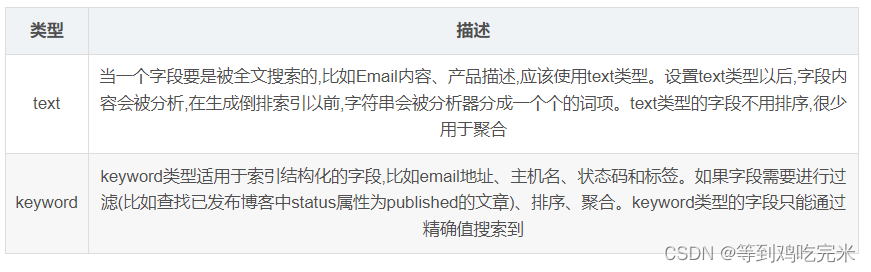
1)字符串(text、keyword)
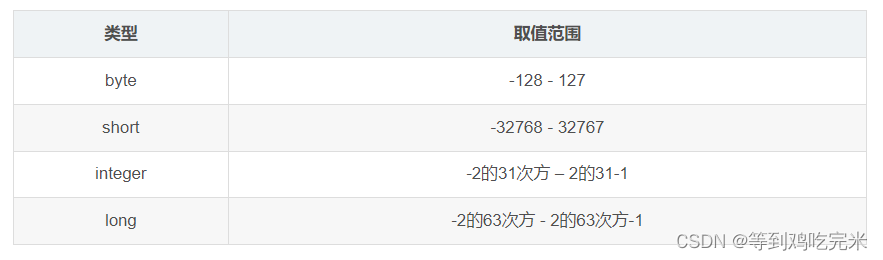
2)整数
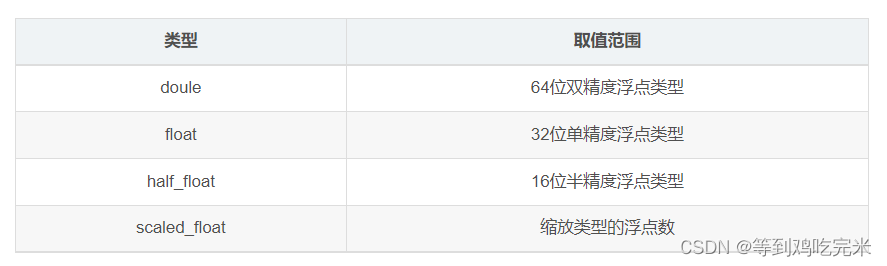
3)浮点类型
4)date类型
5) boolean类型
逻辑类型(布尔类型)可以接受true/false
6) binary类型
二进制字段是指base64来表示索引中储存的二进制数据,可用来储存二进制形式的数据,例如图像。默认情况下,该类型的字段只储存不索引。二进制只支持index_name属性
7)array类型
8)object类型
JSON天生具有层级关系,文档会包含嵌套的对象
假如我们有如下索引tax,保存了一些公司的纳税或资产信息,单位为"万元"。当前这个例子里。索引达的含义并不重要,关键点在于字段的内容格式。我们看到date字段其中包含了多种日期的格式:“yyyy-MM-dd”,"yyyy-MM-dd"还有时间戳。
如果按照dynamic mapping,采取自动映射器来映射索引,我们自然而然的都会感觉字段应该是一个date类型;我们把数据存入索引然后查看tax索引的mapping;
POST tax/_bulk
{"index":{}}
{"date": "2021-01-27 10:01:54","company": "腾讯","ratal": 6500}
{"index":{}}
{"date": "2021-01-28 10:01:32","company": "蚂蚁金服","ratal": 5000}
{"index":{}}
{"date": "2021-01-29 10:01:21","company": "字节跳动","ratal": 10000}
{"index":{}}
{"date": "2021-01-30 10:02:07","company": "中国石油","ratal": 18302097}
{"index":{}}
{"date": "1648100904","company": "中国石化","ratal": 32654722}
{"index":{}}
{"date": "2021-11-1 12:20:00","company": "国家电网","ratal": 82950000}
查看tax索引的mapping:
"properties" : {
  "date" : {
    "type" : "text","fields" : {
      "keyword" : {
        "type" : "keyword","ignore_above" : 256
      }
    }
  }
}
我们可以看到date居然是一个text类型。这是为什么呢,原因就在于对时间类型的格式的要求是绝对严格的。要求必须是一个标准的UTC时间类型。上述字段的数据格式如果想要使用,就必须使用yyyy-MM-ddTHH:mm:ssZ格式(其中T个间隔符,Z代表 0 时区);
错误的时间格式均无法被自动映射器识别为日期时间类型,例如:
PUT tax
{
 "mappings": {
   "properties": {
     "date": {
       "type": "date"
     }
   }
 }
}
POST tax/_bulk
{"index":{}}
{"date": "2021-01-30 10:02:07","ratal": 32654722}
{"index":{}}
{"date": "2021-11-1T12:20:00Z","ratal": 82950000}
{"index":{}}
{"date": "2021-01-30T10:02:07Z","ratal": 18302097}
{"index":{}}
{"date": "2021-01-25","ratal": 5700000}
第一个(写入失败):2021-01-30 10:02:07
第二个(写入成功):1648100904
第三个(写入失败):2021-11-1T12:20:00Z
第四个(写入成功):2021-01-30T10:02:07Z
第五个(写入成功):2021-01-25
总结:
1.对于yyyy-MM-dd HH:mm:ss或2021-11-1T12:20:00Z,ES 的自动映射器完全无法识别,即便是事先声明日期类型,数据强行写入也会失败
2.对于时间戳和yyyy-MM-dd这样的时间格式,ES 自动映射器无法识别,但是如果事先说明了日期类型是可以正常写入的
3.对于标准的日期时间类型是可以正常自动识别为日期类型,并且也可以通过手工映射来实现声明字段类型
实际开发中的解决方法:
//只需要在字段属性中添加一个参数:
“format”: “yyyy-MM-dd HH:mm:ss||yyyy-MM-dd||epoch_millis”,这样就可以避免因为数据格式不统一而导致数据无法写入的窘境
PUT test_index
{
 "mappings": {
   "properties": {
     "time": {
       "type": "date","format": "yyyy-MM-dd HH:mm:ss||yyyy-MM-dd||epoch_millis"
     }
   }
 }
}
在es的5.x版本,keyword类型字段可以设置ignore_above,表示最大的字段值长度,超出这个长度的字段将不会被索引,但是会存储;举个例子:设置message 的长度最长为20,超过20的不被索引,这里的不被索引是这个字段不被索引,但是其他字段有的话仍然被索引到;
PUT my_index
{
  "mappings": {
    "my_type": {
      "properties": {
        "message": {
          "type": "keyword",
          "ignore_above": 20
        }
      }
    }
  }
}
# 下面造点数据
PUT my_index/my_type/3
{
  "message": "123456789"
}

PUT my_index/my_type/5
{
  "message": "123456789012345678901"
}
全部查询:
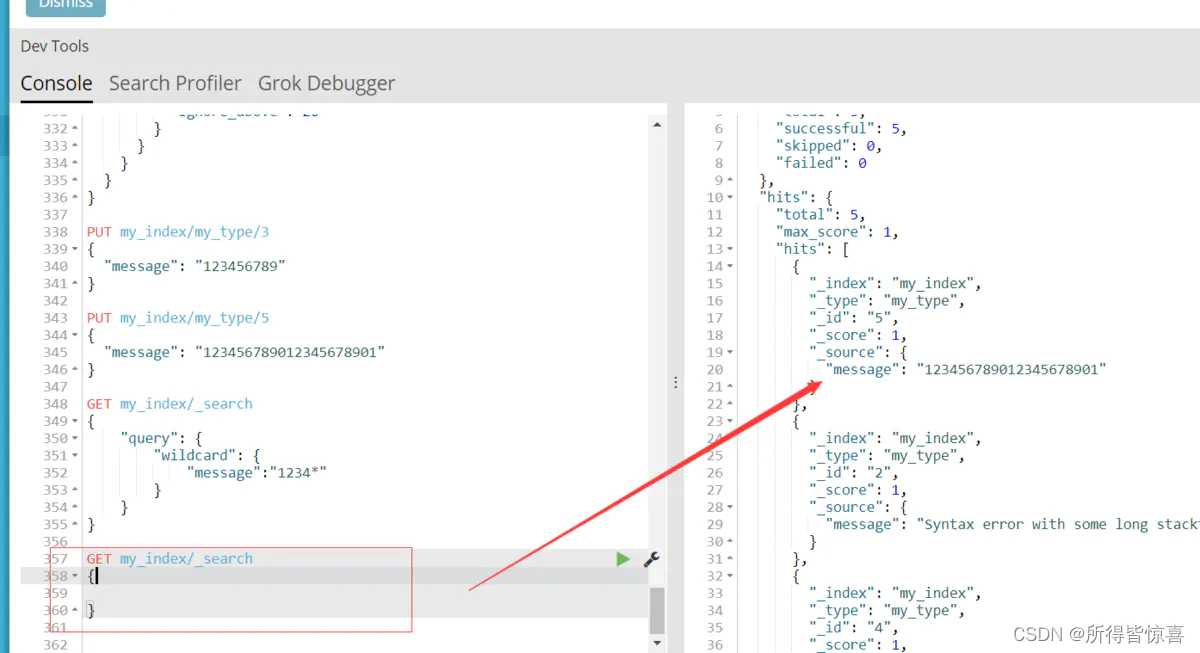
模糊匹配:
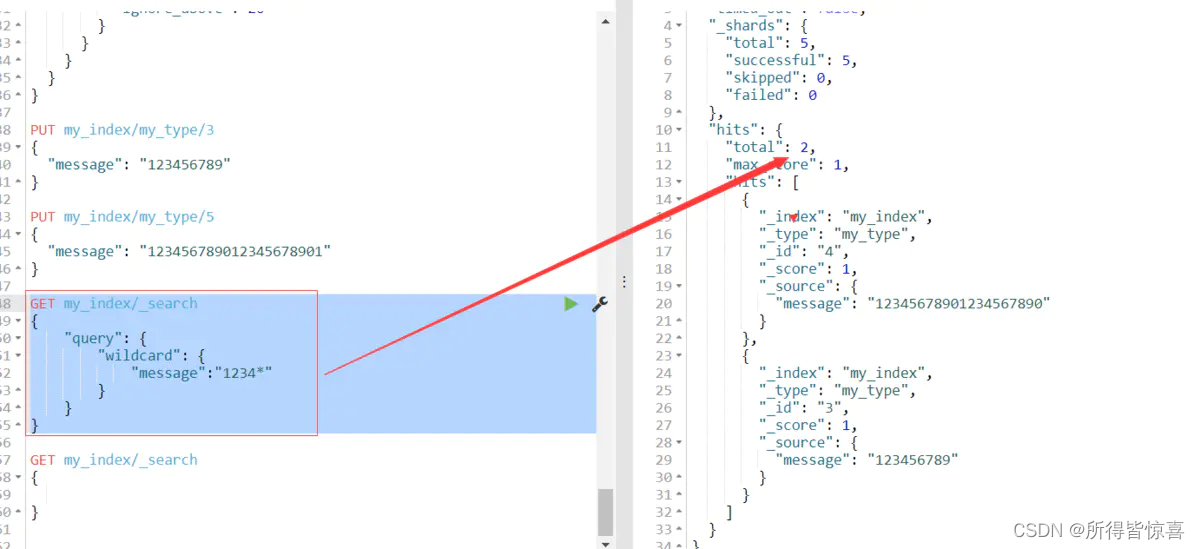
我们可以发现你用模糊匹配是搜索不到的(注意上面的数据最后带个1是21位下图是20位的),同样 用精确匹配前面20个仍然搜索不到;
 {
    "bank" : {
      "mappings" : {
        "properties" : {
          "account_number" : {
            "type" : "long" # long类型
          },
          "address" : {
            "type" : "text", # 文本类型,会进行全文检索,进行分词
            "fields" : {
              "keyword" : { # addrss.keyword
                "type" : "keyword",  # 该字段必须全部匹配到
                "ignore_above" : 256
              }
            }
          },
          "age" : {
            "type" : "long"
          },
          "balance" : {
            "type" : "long"
          },
          "city" : {
            "type" : "text",
            "fields" : {
              "keyword" : {
                "type" : "keyword",
                "ignore_above" : 256
              }
            }
          },
          "email" : {
            "type" : "text",
            "fields" : {
              "keyword" : {
                "type" : "keyword",
                "ignore_above" : 256
              }
            }
          },
          "employer" : {
            "type" : "text",
            "fields" : {
              "keyword" : {
                "type" : "keyword",
                "ignore_above" : 256
              }
            }
          },
          "firstname" : {
            "type" : "text",
            "fields" : {
              "keyword" : {
                "type" : "keyword",
                "ignore_above" : 256
              }
            }
          },
          "gender" : {
            "type" : "text",
            "fields" : {
              "keyword" : {
                "type" : "keyword",
                "ignore_above" : 256
              }
            }
          },
          "lastname" : {
            "type" : "text",
            "fields" : {
              "keyword" : {
                "type" : "keyword",
                "ignore_above" : 256
              }
            }
          },
          "state" : {
            "type" : "text",
            "fields" : {
              "keyword" : {
                "type" : "keyword",
                "ignore_above" : 256
              }
            }
          }
        }
      }
    }
  }
ElasticSearch7-去掉type概念:
1、关系型数据库中两个数据表示是独立的,即使他们里面有相同名称的列也不影响使用,但ES中不是这样的。elasticsearch是基于Lucene开发的搜索引擎,而ES中不同type下名称相同的filed最终在Lucene中的处理方式是一样的
2、Elasticsearch 7.x URL中的type参数为可选。比如,索引一个文档不再要求提供文档类型
3、Elasticsearch 8.x 不再支持URL中的type参数
解决:将索引从多类型迁移到单类型,每种类型文档一个独立索引;将已存在的索引下的类型数据,全部迁移到指定位置即可;
创建Mapping映射语法:
PUT /索引库名/_mapping
{
  "properties": {
    "字段名": {
      "type": "类型",  # type:类型,可以是text、long、short、date、integer、object等
      "index": true,  # index:是否索引,默认为true
      "store": false, # store:是否存储,默认为false
      "analyzer": "分词器" # analyzer:指定分词器
    }
  }
}
PUT /company-index/_mapping
{
  "properties": {
    "name": {
      "type": "text",
      "index": true,
      "analyzer": "ik_max_word"
    },
    "job": {
      "type": "text",
      "analyzer": "ik_max_word"
    },
    "logo": {
      "type": "keyword",
      "index": false
    },
    "payment": {
      "type": "float"
    }
  }
}
1、index影响字段的索引情况:
index的默认值就是true,也就是说你不进行任何配置,所有字段都会被索引。但是有些字段是我们不希望被索引的,比如企业的logo图片地址,就需要手动设置index为false;
2、store:是否将数据进行独立存储:
原始的文本会存储在_source里面,默认情况下其他提取出来的字段都不是独立存储的,是从_source里面提取出来的。当然你也可以独立的存储某个字段,只要设置store:true即可,获取独立存储的字段要比从_source中解析快得多,但是也会占用更多的空间,所以要根据实际业务需求来设置,默认为false;
3、analyzer:指定分词器:
一般我们处理中文会选择ik分词器 ik_max_word、ik_smart
PUT /my_index
{
  "mappings": {
    "properties": {
      "age": {
        "type": "integer"
      },
      "email": {
        "type": "keyword" # 指定为keyword
      },
      "name": {
        "type": "text" # 全文检索。保存时候分词,检索时候进行分词匹配
      }
    }
  }
}
输出:
{
  "acknowledged" : true,
  "shards_acknowledged" : true,
  "index" : "my_index"
}
查看映射GET /my_index
输出结果:
{
  "my_index" : {
    "aliases" : { },
    "mappings" : {
      "properties" : {
        "age" : {
          "type" : "integer"
        },
        "email" : {
          "type" : "keyword"
        },
        "employee-id" : {
          "type" : "keyword",
          "index" : false
        },
        "name" : {
          "type" : "text"
        }
      }
    },
    "settings" : {
      "index" : {
        "creation_date" : "1588410780774",
        "number_of_shards" : "1",
        "number_of_replicas" : "1",
        "uuid" : "ua0lXhtkQCOmn7Kh3iUu0w",
        "version" : {
          "created" : "7060299"
        },
        "provided_name" : "my_index"
      }
    }
  }
}
# 添加新的字段映射PUT /my_index/_mapping
PUT /my_index/_mapping
{
  "properties": {
    "employee-id": {
      "type": "keyword",
      "index": false # 字段不能被检索。检索
    }
  }
}
这里的 "index": false,表明新增的字段不能被检索,只是一个冗余字段。
注意:不能更新映射:对于已经存在的字段映射,我们不能更新。更新必须创建新的索引,进行数据迁移
PUT /索引库名/_mapping
{
  "properties": {
    "字段名": {
      "type": "类型",
      "index": true,
      "store": true,
      "analyzer": "分词器"
    }
  }
}
注意:这里修改映射是增加字段,做其它更改只能删除索引重新建立映射
put /索引库名称
{
  "settings": {
    "索引库属性名": "索引库属性值"
  },
  "mappings": {
    "properties": {
      "字段名": {
        "映射属性名": "映射属性值"
      }
    }
  }
}
先创建new_twitter的正确映射,然后使用如下方式进行数据迁移
6.0以后写法
POST reindex
{
  "source":{
      "index":"twitter"
   },
  "dest":{
      "index":"new_twitters"
   }
}


老版本写法
POST reindex
{
  "source":{
      "index":"twitter",
      "type":"twitter"
   },
  "dest":{
      "index":"new_twitters"
   }
}
案例:原来类型为account,新版本没有类型了,所以我们把他去掉;想要将年龄修改为integer,先创建新的索引;
1.原索引:
GET /bank/_search
{
  "took" : 0,
  "timed_out" : false,
  "_shards" : {
    "total" : 1,
    "successful" : 1,
    "skipped" : 0,
    "failed" : 0
  },
  "hits" : {
    "total" : {
      "value" : 1000,
      "relation" : "eq"
    },
    "max_score" : 1.0,
    "hits" : [
      {
        "_index" : "bank",
        "_type" : "account",//原来类型为account,新版本没有类型了,所以我们把他去掉
        "_id" : "1",
        "_score" : 1.0,
        "_source" : {
          "account_number" : 1,
          "balance" : 39225,
          "firstname" : "Amber",
          "lastname" : "Duke",
          "age" : 32,
          "gender" : "M",
          "address" : "880 Holmes Lane",
          "employer" : "Pyrami",
          "email" : "amberduke@pyrami.com",
          "city" : "Brogan",
          "state" : "IL"
        }
      },
      ...
GET /bank/_search
查出
"age":{"type":"long"}
2.创建新的索引:
PUT /newbank
{
  "mappings": {
    "properties": {
      "account_number": {
        "type": "long"
      },
      "address": {
        "type": "text"
      },
      "age": {
        "type": "integer"
      },
      "balance": {
        "type": "long"
      },
      "city": {
        "type": "keyword"
      },
      "email": {
        "type": "keyword"
      },
      "employer": {
        "type": "keyword"
      },
      "firstname": {
        "type": "text"
      },
      "gender": {
        "type": "keyword"
      },
      "lastname": {
        "type": "text",
        "fields": {
          "keyword": {
            "type": "keyword",
            "ignore_above": 256
          }
        }
      },
      "state": {
        "type": "keyword"
      }
    }
  }
}
查看"newbank"的映射:
GET /newbank/_mapping
能够看到age的映射类型被修改为了integer.
"age":{"type":"integer"}
3.将bank中的数据迁移到newbank中:
POST _reindex
{
  "source": {
    "index": "bank",
    "type": "account"
  },
  "dest": {
    "index": "newbank"
  }
}
运行输出:
#! Deprecation: [types removal] Specifying types in reindex requests is deprecated.
{
  "took" : 768,
  "timed_out" : false,
  "total" : 1000,
  "updated" : 0,
  "created" : 1000,
  "deleted" : 0,
  "batches" : 1,
  "version_conflicts" : 0,
  "noops" : 0,
  "retries" : {
    "bulk" : 0,
    "search" : 0
  },
  "throttled_millis" : 0,
  "requests_per_second" : -1.0,
  "throttled_until_millis" : 0,
  "failures" : [ ]
}
4.查看newbank中的数据:
GET /newbank/_search

输出
  "hits" : {
    "total" : {
      "value" : 1000,
      "relation" : "eq"
    },
    "max_score" : 1.0,
    "hits" : [
      {
        "_index" : "newbank",
        "_type" : "_doc", # 没有了类型
一个tokenizer(分词器)接收一个字符流,将之分割为独立的tokens(词元,通常是独立的单词),然后输出tokens流;例如:whitespace tokenizer遇到空白字符时分割文本。它会将文本"Quick brown fox!"分割为(Quick,brown,fox!);
该tokenizer(分词器)还负责记录各个terms(词条)的顺序或position位置(用于phrase短语和word proximity词近邻查询),以及term(词条)所代表的原始word(单词)的start(起始)和end(结束)的character offsets(字符串偏移量)(用于高亮显示搜索的内容)。elasticsearch提供了很多内置的分词器(标准分词器),可以用来构建custom analyzers(自定义分词器)。
分词器的安装:根据当前es的版本,去找到对应版本的分词器,下载.zip文件,然后解压到elasticsearch/plugins文件夹下即可,注意需要将权限进行修改chmod -R 777 plugins/ik;安装完毕后,需要重启elasticsearch容器。
POST _analyze
{
  "analyzer": "standard",
  "text": "The 2 Brown-Foxes bone."
}
执行结果:
{
  "tokens" : [
    {
      "token" : "the",
      "start_offset" : 0,
      "end_offset" : 3,
      "type" : "<ALPHANUM>",
      "position" : 0
    },
    {
      "token" : "2",
      "start_offset" : 4,
      "end_offset" : 5,
      "type" : "<NUM>",
      "position" : 1
    },
    {
      "token" : "brown",
      "start_offset" : 6,
      "end_offset" : 11,
      "type" : "<ALPHANUM>",
      "position" : 2
    },
    {
      "token" : "foxes",
      "start_offset" : 12,
      "end_offset" : 17,
      "type" : "<ALPHANUM>",
      "position" : 3
    },
    {
      "token" : "bone",
      "start_offset" : 18,
      "end_offset" : 22,
      "type" : "<ALPHANUM>",
      "position" : 4
    }
  ]
}
ik_max_word:会将文本做最细粒度的拆分,比如会将"湖南省岳阳县"拆分为"湖南省、湖南、省、 岳阳县、岳阳、县等词语(索引的时候用ik_max_word):
GET _analyze
{
   "analyzer": "ik_max_word",
   "text":"湖南省岳阳县"
}
{
  "tokens" : [
    {
      "token" : "湖南省",
      "start_offset" : 0,
      "end_offset" : 3,
      "type" : "CN_WORD",
      "position" : 0
    },
    {
      "token" : "湖南",
      "start_offset" : 0,
      "end_offset" : 2,
      "type" : "CN_WORD",
      "position" : 1
    },
    {
      "token" : "省",
      "start_offset" : 2,
      "end_offset" : 3,
      "type" : "CN_CHAR",
      "position" : 2
    },
    {
      "token" : "岳阳县",
      "start_offset" : 3,
      "end_offset" : 6,
      "type" : "CN_WORD",
      "position" : 3
    },
    {
      "token" : "岳阳",
      "start_offset" : 3,
      "end_offset" : 5,
      "type" : "CN_WORD",
      "position" : 4
    },
    {
      "token" : "县",
      "start_offset" : 5,
      "end_offset" : 6,
      "type" : "CN_CHAR",
      "position" : 5
    }
  ]
}
ik_smart:会做最粗粒度的拆分,比如会将"湖南省岳阳县"拆分为湖南省、岳阳县(前台搜索的时候用 ik_smart):
GET _analyze
{
   "analyzer": "ik_smart",
   "text":"湖南省岳阳县"
}
 {
 "tokens" : [
   {
     "token" : "湖南省",
     "start_offset" : 0,
     "end_offset" : 3,
     "type" : "CN_WORD",
     "position" : 0
   },
   {
     "token" : "岳阳县",
     "start_offset" : 3,
     "end_offset" : 6,
     "type" : "CN_WORD",
     "position" : 1
   }
 ]
}
用户还可以通过修改elasticsearch/plugins/ik/config中的IKAnalyzer.cfg.xml文件自定义分词器;
参考原文地址:http://t.csdn.cn/WK4mn
出于纯粹的兴趣,我很好奇如何按顺序创建PI,而不是在过程结果之后生成数字,而是让数字在过程本身生成时显示。如果是这种情况,那么数字可以自行产生,我可以对以前看到的数字实现垃圾收集,从而创建一个无限系列。结果只是在Pi系列之后每秒生成一个数字。这是我通过互联网筛选的结果:这是流行的计算机友好算法,类机器算法:defarccot(x,unity)xpow=unity/xn=1sign=1sum=0loopdoterm=xpow/nbreakifterm==0sum+=sign*(xpow/n)xpow/=x*xn+=2sign=-signendsumenddefcalc_pi(digits
关闭。这个问题是opinion-based.它目前不接受答案。想要改进这个问题?更新问题,以便editingthispost可以用事实和引用来回答它.关闭4年前。Improvethisquestion我想在固定时间创建一系列低音和高音调的哔哔声。例如:在150毫秒时发出高音调的蜂鸣声在151毫秒时发出低音调的蜂鸣声200毫秒时发出低音调的蜂鸣声250毫秒的高音调蜂鸣声有没有办法在Ruby或Python中做到这一点?我真的不在乎输出编码是什么(.wav、.mp3、.ogg等等),但我确实想创建一个输出文件。
使用带有Rails插件的vim,您可以创建一个迁移文件,然后一次性打开该文件吗?textmate也可以这样吗? 最佳答案 你可以使用rails.vim然后做类似的事情::Rgeneratemigratonadd_foo_to_bar插件将打开迁移生成的文件,这正是您想要的。我不能代表textmate。 关于ruby-使用VimRails,您可以创建一个新的迁移文件并一次性打开它吗?,我们在StackOverflow上找到一个类似的问题: https://sta
我对最新版本的Rails有疑问。我创建了一个新应用程序(railsnewMyProject),但我没有脚本/生成,只有脚本/rails,当我输入ruby./script/railsgeneratepluginmy_plugin"Couldnotfindgeneratorplugin.".你知道如何生成插件模板吗?没有这个命令可以创建插件吗?PS:我正在使用Rails3.2.1和ruby1.8.7[universal-darwin11.0] 最佳答案 随着Rails3.2.0的发布,插件生成器已经被移除。查看变更日志here.现在
我有一个表单,其中有很多字段取自数组(而不是模型或对象)。我如何验证这些字段的存在?solve_problem_pathdo|f|%>... 最佳答案 创建一个简单的类来包装请求参数并使用ActiveModel::Validations。#definedsomewhere,atthesimplest:require'ostruct'classSolvetrue#youcouldevencheckthesolutionwithavalidatorvalidatedoerrors.add(:base,"WRONG!!!")unlesss
我想向我的Controller传递一个参数,它是一个简单的复选框,但我不知道如何在模型的form_for中引入它,这是我的观点:{:id=>'go_finance'}do|f|%>Transferirde:para:Entrada:"input",:placeholder=>"Quantofoiganho?"%>Saída:"output",:placeholder=>"Quantofoigasto?"%>Nota:我想做一个额外的复选框,但我该怎么做,模型中没有一个对象,而是一个要检查的对象,以便在Controller中创建一个ifelse,如果没有检查,请帮助我,非常感谢,谢谢
如何使用RSpec::Core::RakeTask初始化RSpecRake任务?require'rspec/core/rake_task'RSpec::Core::RakeTask.newdo|t|#whatdoIputinhere?endInitialize函数记录在http://rubydoc.info/github/rspec/rspec-core/RSpec/Core/RakeTask#initialize-instance_method没有很好的记录;它只是说:-(RakeTask)initialize(*args,&task_block)AnewinstanceofRake
关闭。这个问题需要detailsorclarity.它目前不接受答案。想改进这个问题吗?通过editingthispost添加细节并澄清问题.关闭8年前。Improvethisquestion为什么SecureRandom.uuid创建一个唯一的字符串?SecureRandom.uuid#=>"35cb4e30-54e1-49f9-b5ce-4134799eb2c0"SecureRandom.uuid方法创建的字符串从不重复?
我知道我可以指定某些字段来使用pluck查询数据库。ids=Item.where('due_at但是我想知道,是否有一种方法可以指定我想避免从数据库查询的某些字段。某种反拔?posts=Post.where(published:true).do_not_lookup(:enormous_field) 最佳答案 Model#attribute_names应该返回列/属性数组。您可以排除其中一些并传递给pluck或select方法。像这样:posts=Post.where(published:true).select(Post.attr
我正在阅读SandiMetz的POODR,并且遇到了一个我不太了解的编码原则。这是代码:classBicycleattr_reader:size,:chain,:tire_sizedefinitialize(args={})@size=args[:size]||1@chain=args[:chain]||2@tire_size=args[:tire_size]||3post_initialize(args)endendclassMountainBike此代码将为其各自的属性输出1,2,3,4,5。我不明白的是查找方法。当一辆山地自行车被实例化时,因为它没有自己的initialize方法
