项目源码及数据库:
链接:https://pan.baidu.com/s/1ktUyxbOI9lljWr-HRTRIiQ?pwd=1024
提取码:1024
目录
⑨点击学号,修改学生信息界面(StudentInfo.jsp)
本系统主要实现对基于Javaweb学生信息管理系统所需的各项基本功能,能够对学生信息进行增删改查等功能,并可以实现用户注册、用户登陆等功能。
数据库:Mysql
开发工具:Eclipse
开发环境:JDK+Tomcat
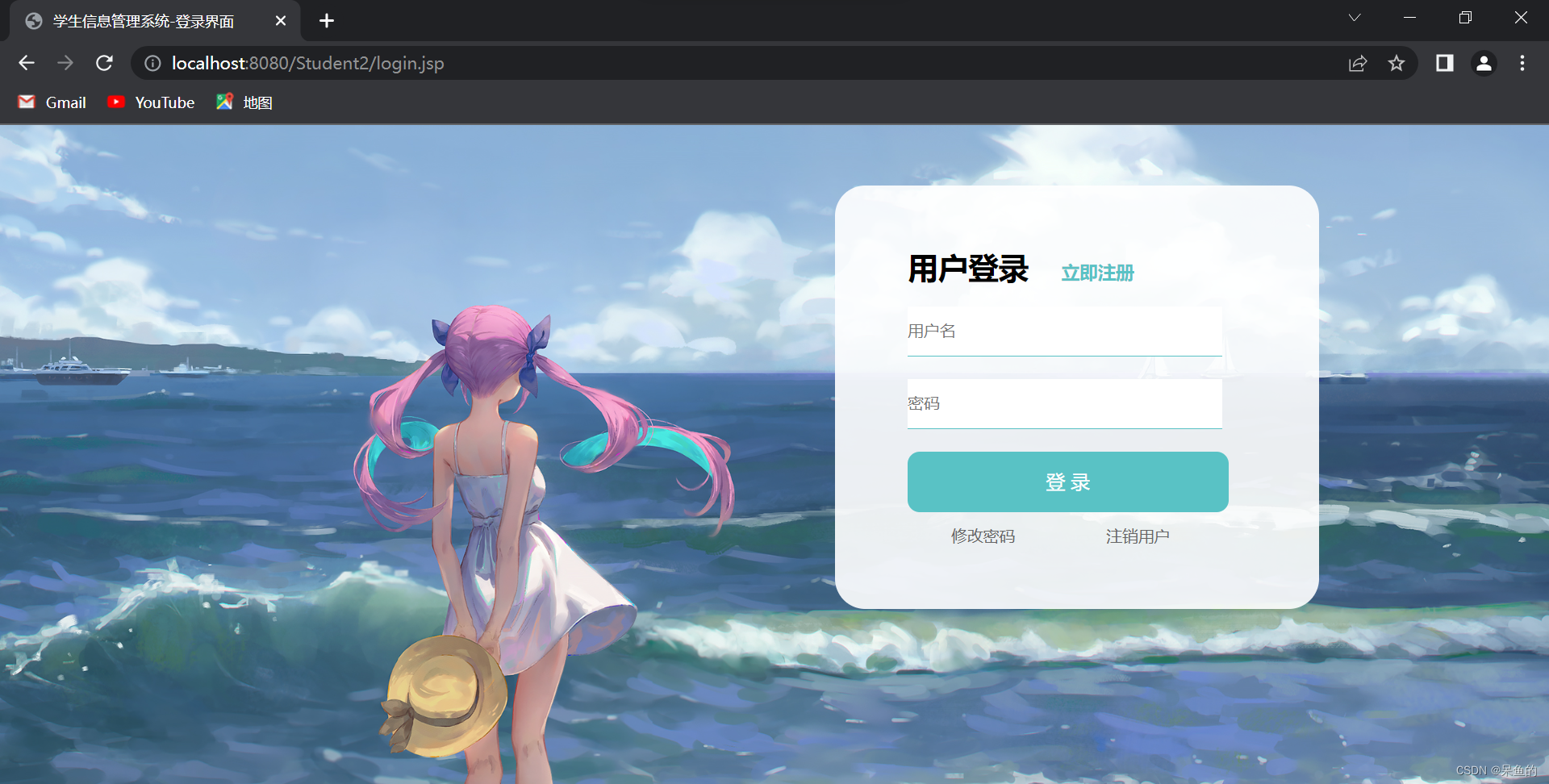
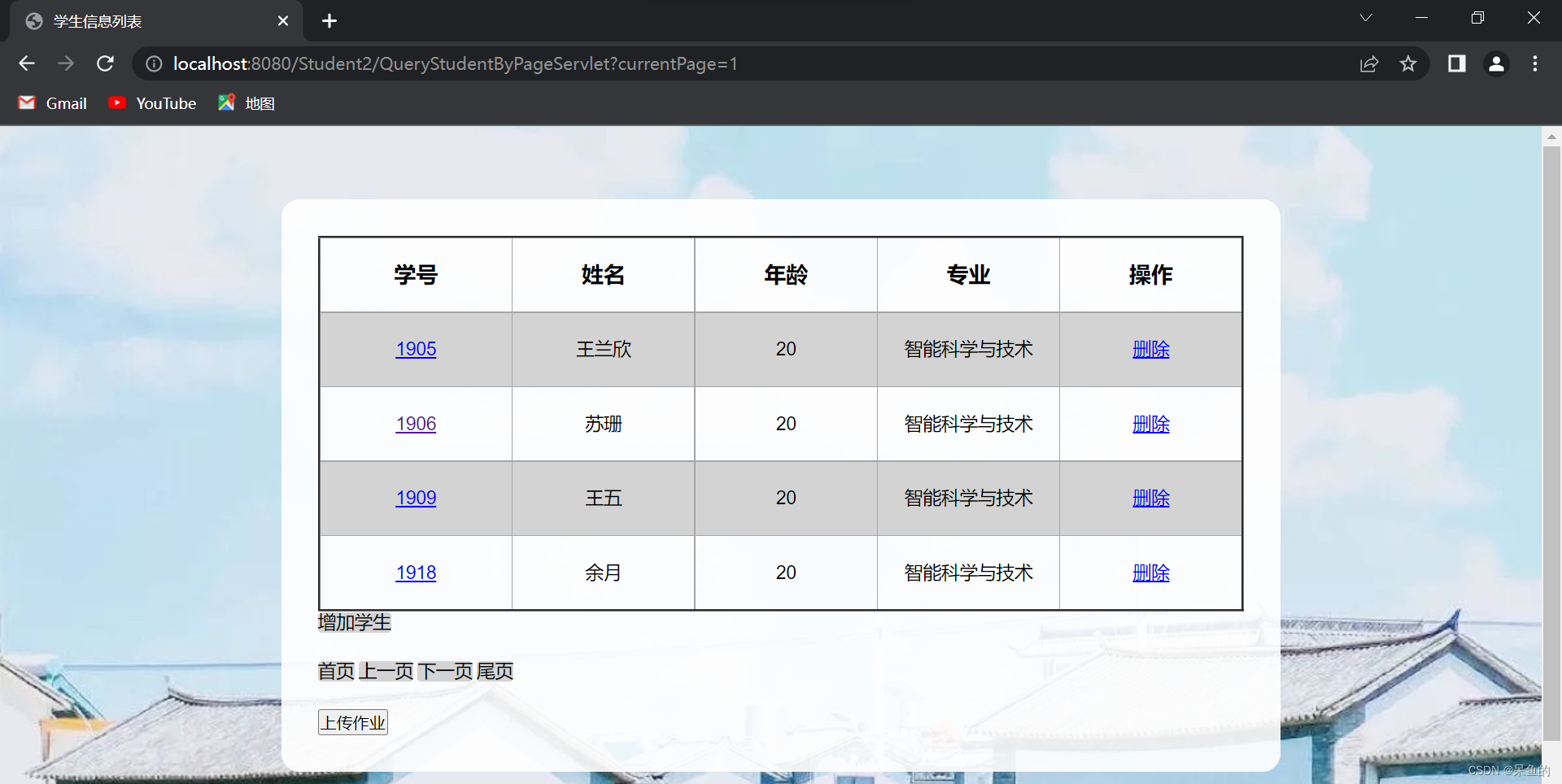
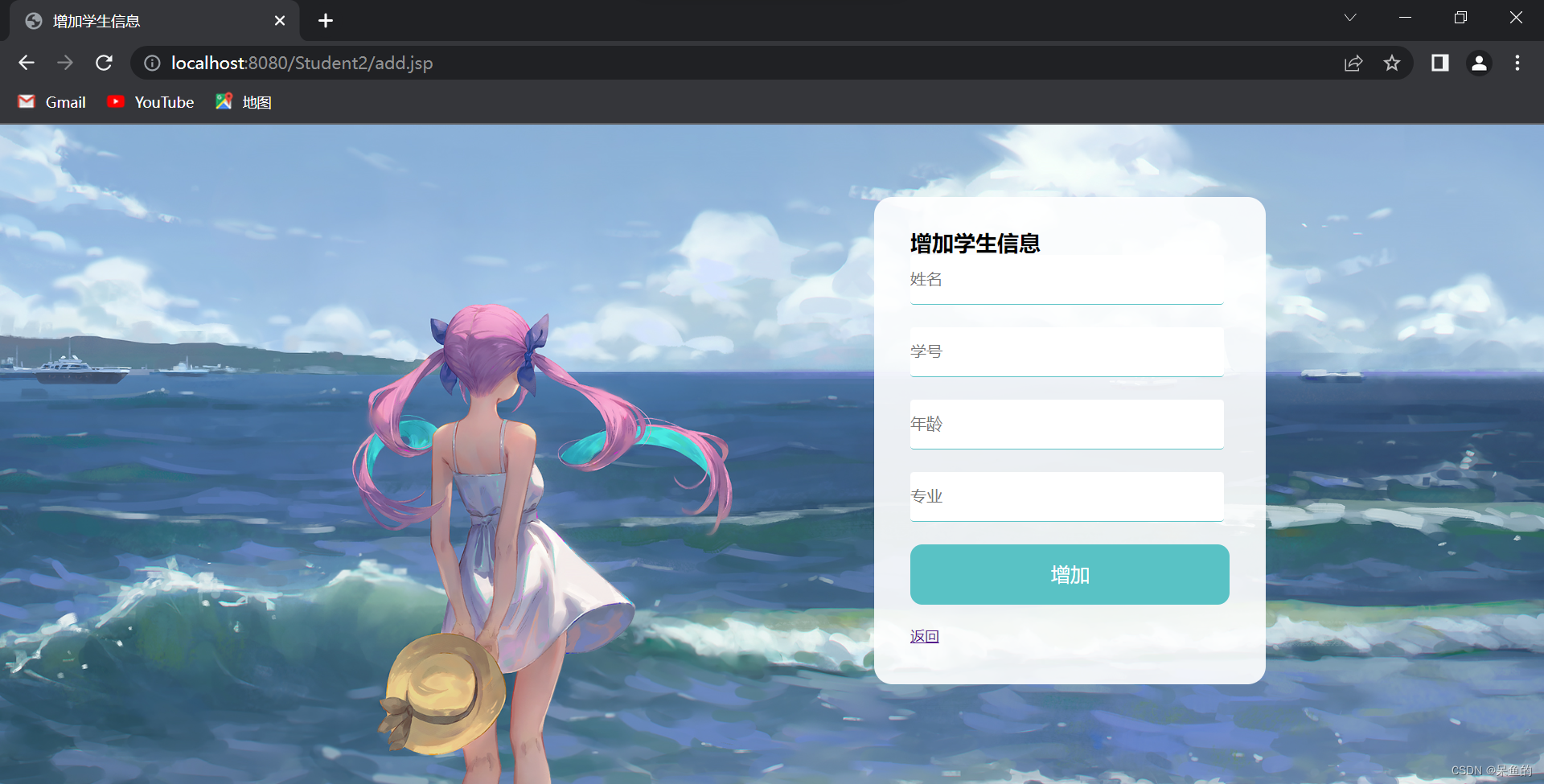
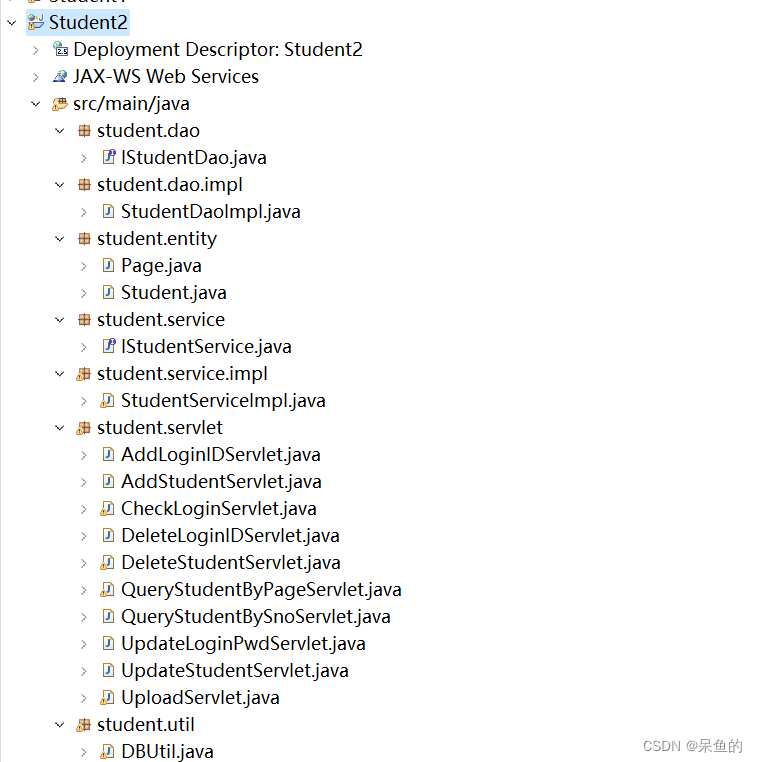
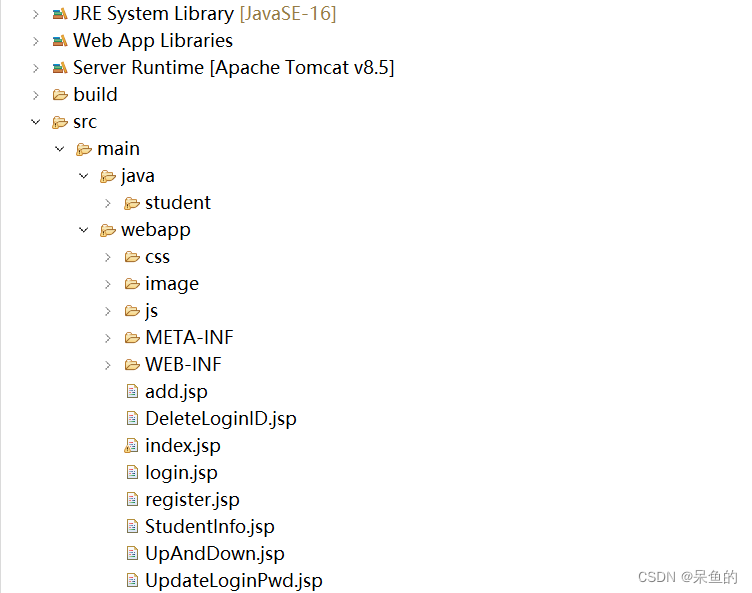
<%@ page language="java" contentType="text/html; charset=UTF-8"
	pageEncoding="UTF-8"%>
<!DOCTYPE html>
<html>
<head>
<link href="css/login.css" type="text/css" rel="stylesheet">
<meta charset="UTF-8">

<title>学生信息管理系统-登录界面</title>
</head>
<body>
	<form action="CheckLoginServlet" method="post">
		<div class="content">
			<div class="wrap">
				<div class="login-box">
					<div class="login-frame">
						<h2>
							用户登录 <a href="register.jsp"> 立即注册</a>
						</h2>
						<div class=item>
							<input type="text" name="UID" placeholder="用户名">
						</div>
						<div class=item>
							<input type="password" name="upwd" placeholder="密码">
						</div>
						<input type="submit" class="login-btn" value="登 录">
						<div class=item1>
							<a href="UpdateLoginPwd.jsp"> 修改密码</a>
							<a	href="DeleteLoginID.jsp"> 注销用户</a>
						</div>
						<%
							String error = (String) request.getAttribute("error");
							String error0 = (String) request.getAttribute("error0");
							String error1 = (String) request.getAttribute("error1");
							String error2 = (String) request.getAttribute("error2");
							String error3 = (String) request.getAttribute("error3");
							String error4 = (String) request.getAttribute("error4");

							if (error != null) {
								if (error.equals("loginError")) {
									out.println("用户名或密码错误!登录失败!");
								} else if (error.equals("nologinError")) {
									response.sendRedirect("QueryStudentByPageServlet");
								}
							}

							if (error0 != null) {
								if (error0.equals("loginError")) {
									out.println("用户名或密码错误!修改失败!");
								} else if (error0.equals("nologinError")) {
									if (error1 != null) {
								if (error1.equals("noupdateError")) {
									out.println("密码修改成功!");
								}
									}
								}
							}
							if (error2 != null) {
								if (error2.equals("loginError")) {
									out.println("用户名或密码错误!注销失败!");
								} else if (error2.equals("nologinError")) {
									if (error3 != null) {
								if (error3.equals("nodeleteError")) {
									out.println("账户注销成功!");
								}
									}
								}
							}
							if (error4 != null) {
								if (error4.equals("noaddError")) {
									out.println("账户注册成功!");
								}
							}
							%>
						</div>
					</div>
				</div>
			</div>
	</form>

</body>


</html>*{margin:0;padding:0;}
a{text-decoration:none;color:#666;}
a:hover{
text-decoration:underline;
color:E4393C;
}
html,body
{
font:12px/150% Arial,Verdana;
}
.wrap{
width:1000px;
margin:0 auto;
}
.left{
float:left;
}
.content{
background:url(../image/login.jpg);
background-size: cover;
width:1280px;
height:559px;
}
.login-frame{
margin:50px 5% 50px 5%;
float:right;
padding:60px;
background:white;
background-color:rgba(255,255,255,0.9);
border-radius:25px;
order-right:1px #bdbdbd solid;
width:280px;
height:230px;
}
.login-frame h2{
font-size:25px;
height:40px;
margin-buttom:25px;
}
.login-frame h2 a{
font-size:15px;
color:#59c2c5;
padding-left:20px;
background:url(../image/icon5.jpg)no-repeat;
}
.login-frame .item{
height:60px;
margin-buttom:40px;
}
.login-frame .item input{
line-height:40px;
width:260px;
border:none;
border-bottom: 1px solid #59c2c5;
}
.login-btn{
display:block;
height:50px;display:block;
height:50px;
color:#fff;
background:#59c2c5;
width:265px;
font-size:16px;
line-height:30px;
text-align:center;
border-radius:10px;
border:none;
color:#fff;
background:#59c2c5;
width:265px;
font-size:16px;
line-height:30px;
text-align:center;
border-radius:10px;
border:none;
}
.login-frame .item1{
dislpay:flex;
justify-content: space-between;
margin-top:1 rem;
}
.login-frame .item1 a{
line-height:40px;
font-size:1.1rem;
margin-top:5 rem;
padding:1rem 3rem;
}<%@ page language="java" contentType="text/html; charset=UTF-8"
pageEncoding="UTF-8"%>
<!DOCTYPE html>
<html>
<head>
<link href="css/index.css" type="text/css" rel="stylesheet">
<meta charset="UTF-8">
<script type = "text/javascript" src = "js/jquery-3.6.0.js"></script>
<script type = "text/javascript">
function check()
{
var UID = $("#UID").val();
var upwd = $("#upwd").val();
var upwd1 = $("#upwd1").val();
if(upwd != upwd1){
alert("两次输入的密码不一致,请重新输入!");
return false;
}
return true;
}
$(document).ready(function(){
});
</script>
<title>注册账号</title>
</head>
<body>
<form action = "AddLoginIDServlet" method = "post" onsubmit = "return check()">
<div class = "content">
<div class = "box">
<div class = "item1">
<h2>用户注册</h2>
</div>
<div class = "item">
<input type = "text" name = "UID" id = "UID" placeholder="账号"/><br/>
</div>
<div class = "item">
<input type = "password" name = "upwd" id = "upwd" placeholder="密码"/><br/>
</div>
<div class = "item">
<input type = "password" name = "upwd1" id = "upwd1" placeholder="确认密码"/><br/>
</div>
<input type = "submit" class = "btn" value = "注册"/><br/>
<a href = "login.jsp">返回</a>
<%
String error4 = (String) request.getAttribute("error4");
if (error4!= null) {
if (error4.equals("addError")) {
out.println("注册失败!账户名已经存在!");
}
}
%>
</div>
</div>
</form>
</body>
</html>*{margin:0;padding:0;}
html,body
{
font:12px/150% Arial,Verdana;
}
.content{
background:url(../image/login.jpg);
background-size: cover;
width:1280px;
height:559px;
}
.box{
margin:60px 18% 60px 18%;
float:right;
padding:30px;
background:white;
background-color:rgba(255,255,255,0.9);
border-radius:15px;
}
.item{
height:60px;
margin-buttom:40px;
}
.item input{
line-height:40px;
width:260px;
border:none;
border-bottom: 1px solid #59c2c5;
border-radius:3px;
}
.item1{
font-size:15px;
height:40px;
}
.btn{
display:block;
height:50px;
color:#fff;
background:#59c2c5;
width:265px;
font-size:16px;
line-height:30px;
text-align:center;
border-radius:10px;
border:none;
}<%@ page language="java" contentType="text/html; charset=UTF-8"
pageEncoding="UTF-8"%>
<!DOCTYPE html>
<html>
<head>
<link href="css/index.css" type="text/css" rel="stylesheet">
<meta charset="UTF-8"><script type = "text/javascript" src = "js/jquery-3.6.0.js"></script>
<script type = "text/javascript">
function check()
{
var upwd = $("#upwd").val();
var upwd1 = $("#upwd1").val();
var upwd2 = $("#upwd2").val();
if(upwd1 != upwd2){
alert("两次输入的密码不一致,请重新输入!");
return false;
}
return true;
}
$(document).ready(function(){
});
</script>
<title>更改账号密码</title>
</head>
<body>
<form action = "UpdateLoginPwdServlet" method = "post" onsubmit = "return check()">
<div class = "content">
<div class = "box">
<div class= "item1"><h2>修改密码</h2></div>
<div class = item>
<input type = "text" name = "UID" id = "UID" placeholder="账号"/><br/>
</div>
<div class = item>
<input type = "password" name = "upwd" id = "upwd" placeholder="旧密码"/><br/>
</div>
<div class = item>
<input type = "password" name = "upwd1" id = "upwd1" placeholder="新密码"/><br/>
</div>
<div class = item>
<input type = "password" name = "upwd2" id = "upwd2" placeholder="确认密码"/><br/>
</div>
<input type = "submit" class = "btn" value = "提交"/><br/>
<a href = "login.jsp">返回</a>
<%
String error0 = (String) request.getAttribute("error0");
if (error0!= null) {
if (error0.equals("loginError")) {
out.println("用户名或密码错误,请重新输入!");
} else if (error0.equals("nologinError")) {
response.sendRedirect("login.jsp");
}
}
%>
</div>
</div>
</form>
</body>
</html><%@ page language="java" contentType="text/html; charset=UTF-8"
pageEncoding="UTF-8"%>
<!DOCTYPE html>
<html>
<head>
<link href="css/index.css" type="text/css" rel="stylesheet">
<meta charset="UTF-8">
<title>注销账号</title>
</head>
<body>
<form action = "DeleteLoginIDServlet" method = "post">
<div class = "content">
<div class = "box">
<div class = "item1">
<h2>注销账号</h2>
</div>
<div class = "item">
<input type = "text" name = "UID" id = "UID" placeholder="账号"/><br/>
</div>
<div class = "item">
<input type = "password" name = "upwd" id = "upwd" placeholder="密码"/><br/>
</div>
<input type = "submit" class = "btn" value = "注销"/><br/>
<a href = "login.jsp">返回</a>
<%
String error2 = (String) request.getAttribute("error2");
if (error2!= null) {
if (error2.equals("loginError")) {
out.println("用户名或密码错误!注销失败!");
}
}
%>
</div>
</div>
</form>
</body>
</html>点击学号进入单个学生信息展示界面,可修改学生信息
点击删除删除学生信息
<%@page import="student.entity.Page"%>
<%@page import="java.util.List"%>
<%@page import="student.entity.Student"%>
<%@ page language="java" contentType="text/html; charset=UTF-8"
    pageEncoding="UTF-8"%>
<!DOCTYPE html>
<html>
<head>
	<script type = "text/javascript" src = "js/jquery-3.6.0.js"></script>

	<script type = "text/javascript">
	 $(document).ready(function(){
	 	$("tr:odd").css("background-color","lightgrey");

	 });
	</script>

<link href="css/show.css" type="text/css" rel="stylesheet">
<meta charset="UTF-8">
<title>学生信息列表</title>
</head>
<body>

	<div class = "content">
	<div class = "box">
	<table  border="2" cellspacing="0">
		<tr>
			<th><h2>学号</h2></th>
			<th><h2>姓名</h2></th>
			<th><h2>年龄</h2></th>
			<th><h2>专业</h2></th>
			<th><h2>操作</h2></th>
		</tr>
		<%
		Page page1 = (Page)request.getAttribute("page1");

		for(Student student:page1.getStudents()){
			%>
			<tr>
				<td><a href = "QueryStudentBySnoServlet?sno=<%=student.getSno()%>"><%=student.getSno() %></a></td>
				<td><%=student.getName() %></td>
				<td><%=student.getAge() %></td>
				<td><%=student.getDept() %></td>
				<td><a href = "DeleteStudentServlet?sno=<%=student.getSno() %>">删除</a></td>
			</tr>
			<%
		}
		%>
		</table>
		<div class = item>
		<a href = "add.jsp">增加学生</a>
		</div>
	<%
		if(page1.getCurrentPage()==page1.getTotalPage()-1){
		%>
		<div class = item>
		<a href = "QueryStudentByPageServlet?currentPage=0">首页</a>
		<a href = "QueryStudentByPageServlet?currentPage=<%=page1.getCurrentPage()-1%>">上一页</a>
		</div>
		<%
		}
		else if(page1.getCurrentPage()==0){
			%>
			<div class = item>
			<a href = "QueryStudentByPageServlet?currentPage=<%=page1.getCurrentPage()+1%>">下一页</a>
			<a href = "QueryStudentByPageServlet?currentPage=<%=page1.getTotalPage()-1%>">尾页</a>
			</div>
			<%
		}
		else{
			%>
			<div class = item>
			<a href = "QueryStudentByPageServlet?currentPage=0">首页</a>
			<a href = "QueryStudentByPageServlet?currentPage=<%=page1.getCurrentPage()-1%>">上一页</a>
			<a href = "QueryStudentByPageServlet?currentPage=<%=page1.getCurrentPage()+1%>">下一页</a>
			<a href = "QueryStudentByPageServlet?currentPage=<%=page1.getTotalPage()-1%>">尾页</a>
			</div>
			<%
		}
		%>
		<input type = "button" value = "上传作业" class = "btn"  onclick = "location = 'UpAndDown.jsp'"/><br/>
			<%
	String error = (String)request.getAttribute("error");
	if(error!=null){
	if(error.equals("addError")){
		out.println("增加失败!");
	}
	else if(error.equals("noaddError")){
		out.println("增加成功!");
	}
	}

	String error1 = (String)request.getAttribute("error1");
	if(error1!=null){
	if(error1.equals("deleteError")){
		out.println("删除失败!");
	}
	else if(error1.equals("nodeleteError")){
		out.println("删除成功!");
	}
	}
	String error2 = (String)request.getAttribute("error2");
	if(error2!=null){
	if(error2.equals("updateError")){
		out.println("修改失败!");
	}
	else if(error2.equals("noupdateError")){
		out.println("修改成功!");
	}
	}


	String error3 = (String)request.getAttribute("error3");
	if(error3!=null){
	if(error3.equals("uploadError")){
		out.println("上传失败!");
	}
	else if(error3.equals("nouploadError")){
		out.println("上传成功!");
	}
	}
	%>
		</div>
		</div>
</body>
</html>*{margin:0;padding:0;}
html,body
{
font:12px/150% Arial,Verdana;
}
.content{
background:url(../image/index.JPG);
background-size: cover;
width:1280px;
height:559px;
}
.box{
margin:60px 18% 60px 18%;
float:right;
padding:30px;
background:white;
background-color:rgba(255,255,255,0.9);
border-radius:15px;
}
.item{
height:40px;
border-radius:15px;
}
.item a{
background-color: lightgrey;
text-decoration: none;
font-size:15px;
color:black;
border-radius:3px;
}
.item1{
font-size:15px;
height:40px;
}
table{
width:100%;
border-collapse:collapse;
}
table body{
diaplay:block;
height:300px;
overflow-y: scroll;
}
table td{
border:1px solid #A6A6A6;
height:60px;
width:300px;
text-align: center;
font-size: 15px;
}
table th{
height:60px;
border:1px solid #A6A6A6;
}<%@page import="student.entity.Student"%>
<%@ page language="java" contentType="text/html; charset=UTF-8"
pageEncoding="UTF-8"%>
<!DOCTYPE html>
<html>
<head>
<meta charset="UTF-8">
<link href="css/index.css" type="text/css" rel="stylesheet">
<title>修改学生信息</title>
</head>
<body>
<%
Student student = (Student)request.getAttribute("student");
%>
<form action = "UpdateStudentServlet" method = "post">
<div class = "content">
<div class = "box">
<div class = "item1">
<h2>修改学生信息</h2>
</div>
<div class = "item">
学号:<input type = "text" name = "sno" value ="<%=student.getSno()%>" readonly = "readonly"/><br/>
</div>
<div class = "item">
姓名:<input type = "text" name = "name" value ="<%=student.getName()%>"/><br/>
</div>
<div class = "item">
年龄:<input type = "text" name = "age" value ="<%=student.getAge()%>"/><br/>
</div>
<div class = "item">
专业:<input type = "text" name = "dept" value ="<%=student.getDept()%>"/><br/>
</div>
<input type = "submit" class = "btn" value = "修改"/>
<a href = "QueryStudentByPageServlet">返回</a>
</div>
</div>
</form>
</body>
</html><%@ page language="java" contentType="text/html; charset=UTF-8"
pageEncoding="UTF-8"%>
<!DOCTYPE html>
<html>
<head>
<meta charset="UTF-8">
<link href="css/index.css" type="text/css" rel="stylesheet">
<script type = "text/javascript" src = "js/jquery-3.6.0.js"></script>
<script type = "text/javascript">
function check()
{
var sname = $("#sname").val();
var sno = $("#sno").val();
var sage = $("#sage").val();
var sdept = $("#sdept").val();
if(!(sno>1&&sno<2000)){
alert("学号有误!必须是1-2000");
return false;
}
if(!(sname.length>1&&sname.length<5)){
alert("姓名有误!必须是2-4位");
return false;
}
if(!(sage>1&&sage<100)){
alert("年龄有误!必须是1-100");
return false;
}
return true;
}
$(document).ready(function(){
});
</script>
<title>增加学生信息</title>
</head>
<body>
<form action = "AddStudentServlet" method = "post" onsubmit = "return check()">
<div class = "content">
<div class = "box">
<div class = "item2">
<h2>增加学生信息</h2>
</div>
<div class = "item">
<input type = "text" name = "name" id = "sname" placeholder="姓名"/><br/>
</div>
<div class = "item">
<input type = "text" name = "sno" id = "sno" placeholder="学号"/><br/>
</div>
<div class = "item">
<input type = "text" name = "age" id = "sage" placeholder="年龄"/><br/>
</div>
<div class = "item">
<input type = "text" name = "dept" id = "sdept" placeholder="专业"/><br/>
</div>
<input type = "submit" class = "btn" value = "增加"/><br/>
<a href = "QueryStudentByPageServlet">返回</a>
</div>
</div>
</form>
</body>
</html><%@ page language="java" contentType="text/html; charset=UTF-8"
pageEncoding="UTF-8"%>
<!DOCTYPE html>
<html>
<head>
<meta charset="UTF-8">
<link href="css/index.css" type="text/css" rel="stylesheet">
<title>上传作业</title>
</head>
<body>
<form action ="UploadServlet" method = "post" enctype = "multipart/form-data">
<div class = "content">
<div class = "box">
<div class = "item2">
<h2>上传作业</h2>
</div>
<div class = "item">
<input type = "text" name="sno" placeholder="学号"/><br/>
</div>
<div class = "item">
<input type = "text" name = "name" placeholder="姓名"/><br/>
</div>
<input type = "file" name = "spiature"/>
<br/>
<br/>
<input type = "submit" class = "btn" value ="上传"/>
<a href = "QueryStudentByPageServlet">返回</a>
</div>
</div>
</form>
</body>
</html>检查登录的用户名和密码是否匹配(CheckLoginServlet.java)
package student.servlet;

import java.io.IOException;
import javax.servlet.ServletException;
import javax.servlet.http.HttpServlet;
import javax.servlet.http.HttpServletRequest;
import javax.servlet.http.HttpServletResponse;

import student.service.IStudentService;
import student.service.impl.StudentServiceImpl;


public class CheckLoginServlet extends HttpServlet {

	protected void doGet(HttpServletRequest request, HttpServletResponse response) throws ServletException, IOException {
		request.setCharacterEncoding("utf-8");
		String ID = request.getParameter("UID");
		String pwd = request.getParameter("upwd");
		IStudentService service = new StudentServiceImpl();
		boolean result = service.checkLoginID(ID,pwd);
		response.setContentType("text/html;charest=UTF-8");
		response.setCharacterEncoding("utf-8");
		if(!result) {
			request.setAttribute("error", "loginError");
		}else {
			request.setAttribute("error", "nologinError");
		}
		request.getRequestDispatcher("login.jsp").forward(request, response);
	}

	protected void doPost(HttpServletRequest request, HttpServletResponse response) throws ServletException, IOException {
		// TODO Auto-generated method stub
		doGet(request, response);
	}

}
注册账户表示层(AddLoginIDServlet.java)
package student.servlet;

import java.io.IOException;
import javax.servlet.ServletException;
import javax.servlet.http.HttpServlet;
import javax.servlet.http.HttpServletRequest;
import javax.servlet.http.HttpServletResponse;

import student.service.IStudentService;
import student.service.impl.StudentServiceImpl;

/**
 * Servlet implementation class AddLoginIDServlet
 */
public class AddLoginIDServlet extends HttpServlet {
	private static final long serialVersionUID = 1L;

	protected void doGet(HttpServletRequest request, HttpServletResponse response) throws ServletException, IOException {
		request.setCharacterEncoding("utf-8");
		String ID = request.getParameter("UID");
		String pwd = request.getParameter("upwd");
		IStudentService studentService = new StudentServiceImpl();
		boolean result = studentService.addLoginID(ID,pwd);

		response.setContentType("text/html;charest=UTF-8");
		response.setCharacterEncoding("utf-8");
		if(!result) {
			request.setAttribute("error4", "addError");
			request.getRequestDispatcher("register.jsp").forward(request, response);
		}else {
			request.setAttribute("error4", "noaddError");
			request.getRequestDispatcher("login.jsp").forward(request, response);
		}

	}

	/**
	 * @see HttpServlet#doPost(HttpServletRequest request, HttpServletResponse response)
	 */
	protected void doPost(HttpServletRequest request, HttpServletResponse response) throws ServletException, IOException {
		// TODO Auto-generated method stub
		doGet(request, response);
	}

}
修改密码表示层(UpdateLoginPwdServlet.java)
package student.servlet;

import java.io.IOException;
import javax.servlet.ServletException;
import javax.servlet.http.HttpServlet;
import javax.servlet.http.HttpServletRequest;
import javax.servlet.http.HttpServletResponse;

import student.service.IStudentService;
import student.service.impl.StudentServiceImpl;

/**
 * Servlet implementation class UpdateLoginPwdServlet
 */
public class UpdateLoginPwdServlet extends HttpServlet {
	private static final long serialVersionUID = 1L;


	protected void doGet(HttpServletRequest request, HttpServletResponse response) throws ServletException, IOException {
		request.setCharacterEncoding("utf-8");
		String ID = request.getParameter("UID");
		String pwd = request.getParameter("upwd");
		String pwd1 = request.getParameter("upwd1");
		IStudentService service = new StudentServiceImpl();
		boolean result = service.checkLoginID(ID,pwd);
		response.setContentType("text/html;charest=UTF-8");
		response.setCharacterEncoding("utf-8");
		if(!result) {
			request.setAttribute("error0", "loginError");
			request.getRequestDispatcher("UpdateLoginPwd.jsp").forward(request, response);
		}else {
			request.setAttribute("error0", "nologinError");
			boolean result1 = service.updateLoginPwd(ID,pwd1);
			if(!result1) {
				request.getRequestDispatcher("UpdateLoginPwd.jsp").forward(request, response);
			}else {
				request.setAttribute("error1", "noupdateError");
				request.getRequestDispatcher("login.jsp").forward(request, response);
			}
		}
	}

	/**
	 * @see HttpServlet#doPost(HttpServletRequest request, HttpServletResponse response)
	 */
	protected void doPost(HttpServletRequest request, HttpServletResponse response) throws ServletException, IOException {
		// TODO Auto-generated method stub
		doGet(request, response);
	}

}
注销用户表示层(DeleteLoginIDServlet.java)
package student.servlet;

import java.io.IOException;
import javax.servlet.ServletException;
import javax.servlet.http.HttpServlet;
import javax.servlet.http.HttpServletRequest;
import javax.servlet.http.HttpServletResponse;

import student.service.IStudentService;
import student.service.impl.StudentServiceImpl;

/**
 * Servlet implementation class DeleteLoginIDServlet
 */
public class DeleteLoginIDServlet extends HttpServlet {
	private static final long serialVersionUID = 1L;

	protected void doGet(HttpServletRequest request, HttpServletResponse response) throws ServletException, IOException {
		request.setCharacterEncoding("utf-8");
		String ID = request.getParameter("UID");
		String pwd = request.getParameter("upwd");
		IStudentService service = new StudentServiceImpl();
		boolean result = service.checkLoginID(ID,pwd);
		boolean result1 = service.deleteLoginID(ID);
		response.setContentType("text/html;charest=UTF-8");
		response.setCharacterEncoding("utf-8");
		if(!result) {
			request.setAttribute("error2", "loginError");
			request.getRequestDispatcher("DeleteLoginID.jsp").forward(request, response);
		}else {
			request.setAttribute("error2", "nologinError");
			if(!result1) {
				request.setAttribute("error3", "deleteError");
				request.getRequestDispatcher("DeleteLoginID.jsp").forward(request, response);
			}else {
				request.setAttribute("error3", "nodeleteError");
				request.getRequestDispatcher("login.jsp").forward(request, response);
		}
		}
	}

	/**
	 * @see HttpServlet#doPost(HttpServletRequest request, HttpServletResponse response)
	 */
	protected void doPost(HttpServletRequest request, HttpServletResponse response) throws ServletException, IOException {
		// TODO Auto-generated method stub
		doGet(request, response);
	}

}
分页显示(QueryStudentByPageServlet.java)
package student.servlet;

import java.io.IOException;
import java.util.List;

import javax.servlet.ServletException;
import javax.servlet.http.HttpServlet;
import javax.servlet.http.HttpServletRequest;
import javax.servlet.http.HttpServletResponse;

import student.entity.Page;
import student.entity.Student;
import student.service.IStudentService;
import student.service.impl.StudentServiceImpl;

public class QueryStudentByPageServlet extends HttpServlet {
	private static final long serialVersionUID = 1L;
    public QueryStudentByPageServlet() {
        super();
    }
	protected void doGet(HttpServletRequest request, HttpServletResponse response) throws ServletException, IOException {
		IStudentService studentService = new StudentServiceImpl();
		int count = studentService.getTotalCount();

		Page page = new Page();


		String cPage = request.getParameter("currentPage");

		if(cPage == null) {
			cPage = "0";
		}
		int currentPage = Integer.parseInt(cPage);
		page.setCurrentPage(currentPage);

		int totalCount = studentService.getTotalCount();
		page.setTotalCount(totalCount);
		int pageSize = 4;

		page.setPageSize(pageSize);

		List<Student> students = studentService.queryStudentsByPage(currentPage, pageSize);

		page.setStudents(students);
		request.setAttribute("page1", page);
		request.getRequestDispatcher("index.jsp").forward(request, response);
	}

	/**
	 * @see HttpServlet#doPost(HttpServletRequest request, HttpServletResponse response)
	 */
	protected void doPost(HttpServletRequest request, HttpServletResponse response) throws ServletException, IOException {
		// TODO Auto-generated method stub
		doGet(request, response);
	}

}
按学号查询学生信息(QueryStudentBySnoServlet.java)
package student.servlet;

import java.io.IOException;
import javax.servlet.ServletException;
import javax.servlet.http.HttpServlet;
import javax.servlet.http.HttpServletRequest;
import javax.servlet.http.HttpServletResponse;

import student.entity.Student;
import student.service.IStudentService;
import student.service.impl.StudentServiceImpl;

public class QueryStudentBySnoServlet extends HttpServlet {

	/**
	 *
	 */
	private static final long serialVersionUID = 1L;

	protected void doGet(HttpServletRequest request, HttpServletResponse response) throws ServletException, IOException {
	request.setCharacterEncoding("UTF-8");
	int sno = Integer.parseInt(request.getParameter("sno"));
	IStudentService service = new StudentServiceImpl();
	Student student = service.queryStudentBySno(sno);
	request.setAttribute("student", student);//将查询到的request信息放在request域中
	request.getRequestDispatcher("StudentInfo.jsp").forward(request,response);
	}

	protected void doPost(HttpServletRequest request, HttpServletResponse response) throws ServletException, IOException {
		doGet(request, response);
	}

}
增加学生信息(AddStudentServlet.java)
package student.servlet;

import java.io.IOException;

import javax.servlet.ServletException;
import javax.servlet.http.HttpServlet;
import javax.servlet.http.HttpServletRequest;
import javax.servlet.http.HttpServletResponse;

import student.entity.Student;
import student.service.IStudentService;
import student.service.impl.StudentServiceImpl;

public class AddStudentServlet extends HttpServlet {

	/**
	 *
	 */
	private static final long serialVersionUID = 1L;

	protected void doGet(HttpServletRequest request, HttpServletResponse response) throws ServletException, IOException {
		request.setCharacterEncoding("utf-8");
		String name = request.getParameter("name");
		int sno = Integer.parseInt(request.getParameter("sno"));
		int age = Integer.parseInt(request.getParameter("age"));
		String dept = request.getParameter("dept");
		Student student = new Student(name, sno, age, dept);

		IStudentService studentService = new StudentServiceImpl();
		boolean result = studentService.addStudent(student);

		response.setContentType("text/html;charest=UTF-8");
		response.setCharacterEncoding("utf-8");
		if(!result) {
			request.setAttribute("error", "addError");
		}else {
			request.setAttribute("error", "noaddError");
		}
		request.getRequestDispatcher("QueryStudentByPageServlet").forward(request, response);
	}

	protected void doPost(HttpServletRequest request, HttpServletResponse response) throws ServletException, IOException {
		doGet(request, response);
	}

}
删除学生信息(DeleteStudentServlet.java)
package student.servlet;

import java.io.IOException;
import javax.servlet.ServletException;
import javax.servlet.http.HttpServlet;
import javax.servlet.http.HttpServletRequest;
import javax.servlet.http.HttpServletResponse;

import student.service.IStudentService;
import student.service.impl.StudentServiceImpl;

/**
 * Servlet implementation class DeleteStudentServlet
 */
public class DeleteStudentServlet extends HttpServlet {

	protected void doGet(HttpServletRequest request, HttpServletResponse response) throws ServletException, IOException {
		request.setCharacterEncoding("utf-8");
		int sno = Integer.parseInt(request.getParameter("sno"));
		IStudentService service = new StudentServiceImpl();
		boolean result = service.deleteStudentBySno(sno);
		response.setContentType("text/html;charest=UTF-8");
		response.setCharacterEncoding("utf-8");
		if(!result) {
			request.setAttribute("error1", "deleteError");
		}else {
			request.setAttribute("error1", "nodeleteError");
		}
		request.getRequestDispatcher("QueryStudentByPageServlet").forward(request, response);
	}

	protected void doPost(HttpServletRequest request, HttpServletResponse response) throws ServletException, IOException {
		// TODO Auto-generated method stub
		doGet(request, response);
	}

}
修改学生信息表示层(UpdateStudentServlet.java)
package student.servlet;

import java.io.IOException;
import javax.servlet.ServletException;
import javax.servlet.http.HttpServlet;
import javax.servlet.http.HttpServletRequest;
import javax.servlet.http.HttpServletResponse;

import student.entity.Student;
import student.service.IStudentService;
import student.service.impl.StudentServiceImpl;

public class UpdateStudentServlet extends HttpServlet {

	/**
	 *
	 */
	private static final long serialVersionUID = 1L;


	protected void doGet(HttpServletRequest request, HttpServletResponse response) throws ServletException, IOException {
		request.setCharacterEncoding("UTF-8");
		String name = request.getParameter("name");
		int sno = Integer.parseInt(request.getParameter("sno"));
		int age = Integer.parseInt(request.getParameter("age"));
		String dept = request.getParameter("dept");
		Student student = new Student(name, age, dept);

		System.out.println(sno);

		IStudentService service = new StudentServiceImpl();
		boolean result = service.updateStudentBySno(sno, student);

		response.setContentType("text/html;charest=UTF-8");
		response.setCharacterEncoding("utf-8");
		if(!result) {
			request.setAttribute("error2", "updateError");
		}else {
			request.setAttribute("error2", "noupdateError");
		}

		request.getRequestDispatcher("QueryStudentByPageServlet").forward(request, response);
	}


	protected void doPost(HttpServletRequest request, HttpServletResponse response) throws ServletException, IOException {
		doGet(request, response);
	}

}
上传作业(UploadServlet.java)
package student.servlet;

import java.io.File;
import java.io.IOException;
import java.util.Iterator;
import java.util.List;

import javax.servlet.ServletException;
import javax.servlet.http.HttpServlet;
import javax.servlet.http.HttpServletRequest;
import javax.servlet.http.HttpServletResponse;

import org.apache.commons.fileupload.FileItem;
import org.apache.commons.fileupload.FileUploadBase;
import org.apache.commons.fileupload.FileUploadException;
import org.apache.commons.fileupload.disk.DiskFileItemFactory;
import org.apache.commons.fileupload.servlet.ServletFileUpload;

import student.service.IStudentService;
import student.service.impl.StudentServiceImpl;


public class UploadServlet extends HttpServlet {
	private static final long serialVersionUID = 1L;

	protected void doGet(HttpServletRequest request, HttpServletResponse response) throws ServletException, IOException {
		request.setCharacterEncoding("UTF-8");
		response.setCharacterEncoding("UTF-8");
		response.setContentType("text/html; charset=UTF-8");
		String name = null;
		int sno = -1;

		boolean isMutipart = ServletFileUpload.isMultipartContent(request);
		if(isMutipart) {
			DiskFileItemFactory factory = new DiskFileItemFactory();
			ServletFileUpload upload = new ServletFileUpload(factory);
			factory.setRepository(new File("D:\\uploadtemp"));
			List<FileItem> items = null;
				try {
					items = upload.parseRequest(request);
				} catch (FileUploadException e) {
					// TODO Auto-generated catch block
					e.printStackTrace();
				}
			Iterator<FileItem> iter = items.iterator();
			while(iter.hasNext()) {
				FileItem item= iter.next();
				String fileName = item.getName();
				String itemName = item.getFieldName();
				if(item.isFormField()) {
					if(itemName.equals("name")){
						name = item.getString("utf-8");
					}else if(itemName.equals("sno")) {
						sno =Integer.parseInt(item.getString("utf-8"));
					}else {

					}
				}else {
					//定义上传路径:指定上传的位置
					String path = "D:\\upload";
					File file = new File(path,fileName);
						try {
							item.write(file);
							} catch (Exception e) {
							e.printStackTrace();
							}
			}
		}
		IStudentService studentService = new StudentServiceImpl();
		boolean result = studentService.upLoadWork(sno,name);

		System.out.println(name+sno);
		System.out.println(result);
		if(!result) {
			request.setAttribute("error3", "uploadError");
			request.getRequestDispatcher("QueryStudentByPageServlet").forward(request, response);

		}else{
			request.setAttribute("error3", "nouploadError");
			request.getRequestDispatcher("QueryStudentByPageServlet").forward(request, response);

		}
		}
	}


	protected void doPost(HttpServletRequest request, HttpServletResponse response) throws ServletException, IOException {
		// TODO Auto-generated method stub
		doGet(request, response);
	}

}
Service接口(IStudentService.java)
package student.service;

import java.util.List;

import student.entity.Student;

public interface IStudentService {
	//查询全部学生信息
	public List<Student> queryAllStudents();
	//按照学号查询学生信息
	public Student queryStudentBySno(int sno);
	//删除学生信息
	public boolean deleteStudentBySno(int sno) ;

	//更改学生信息
	public boolean updateStudentBySno(int sno, Student student) ;

	//增加学生信息
	public boolean addStudent(Student student) ;

	//查询总数据
	public int getTotalCount();
	//分页
	public List<Student> queryStudentsByPage(int current, int pageSize);
	//检查登陆账户和密码
	public boolean checkLoginID(String ID,String pwd);
	//注册账户
	public boolean addLoginID(String ID, String pwd);
	//更改密码
	public boolean updateLoginPwd(String ID,String pwd1);
	//注销账号
	public boolean deleteLoginID(String ID);
	//判断ID是否存在
	public boolean IDExist(String ID);
	//判断上传作业输入的学生信息是否存在
	public boolean upLoadWork(int sno, String name);

}
接口的实现类(StudentServiceImpl.java)
package student.service.impl;

import java.util.List;

import student.dao.IStudentDao;
import student.dao.impl.StudentDaoImpl;
import student.entity.Student;
import student.service.IStudentService;
import student.util.DBUtil;

//业务逻辑层:逻辑性的增删改查(增:查+增),对dao层进行的组装
public class StudentServiceImpl implements IStudentService{
	IStudentDao studentDao = new StudentDaoImpl();
	//查询全部学生信息
	public List<Student> queryAllStudents(){
		return studentDao.queryAllStudents();
	}
	//按照学号查询学生信息
	public Student queryStudentBySno(int sno) {
		return studentDao.queryStudentBySno(sno);

	}
	//删除学生信息
	public boolean deleteStudentBySno(int sno) {
		if(studentDao.isExist(sno)) {
			return studentDao.deleteStudentBySno(sno);
		}
			return false;
	}


	//更改学生信息
	public boolean updateStudentBySno(int sno, Student student) {
			return studentDao.updateStudentBySno(sno, student);
	}


	//增加学生信息
	public boolean addStudent(Student student) {
		if(!studentDao.isExist(student.getSno())) {
			studentDao.addStudent(student);
			return true;
		}else {
			System.out.println("学号重复!");
			return false;
		}
	}

	//查询总条数
	@Override
	public int getTotalCount() {
		return studentDao.getTotalCount();
	}
	//查询当前页的数据集合
	@Override
	public List<Student> queryStudentsByPage(int current, int pageSize) {
		return studentDao.queryStudentByPage(current, pageSize);
	}


	@Override
	public boolean checkLoginID(String ID, String pwd) {
		return studentDao.checkLoginID(ID, pwd);
	}
	@Override
	public boolean addLoginID(String ID, String pwd) {
		return studentDao.addLoginID(ID,pwd);

	}
	@Override
	public boolean updateLoginPwd(String ID, String pwd1) {
		return studentDao.updateLoginPwd(ID,pwd1);
	}
	@Override
	public boolean deleteLoginID(String ID) {
		return studentDao.deleteLoginID(ID);
	}
	@Override
	public boolean IDExist(String ID) {
		return studentDao.IDExist(ID);
	}
	@Override
	public boolean upLoadWork(int sno, String name) {
		return studentDao.upLoadWork(sno,name);
	}


}
接口(IStudentDao.java)
package student.dao;

import java.util.List;

import student.entity.Student;

public interface IStudentDao {
	public boolean updateLoginPwd(String ID,String pwd1);


	//查询全部学生信息
	public List<Student> queryAllStudents();


	//判断此人是否存在
	public boolean isExist(int sno) ;

	//增加学生信息
	public boolean addStudent(Student student);
	//删除学生信息
	public boolean deleteStudentBySno(int sno);

	//根据sno找到要修改的学生,然后再进行修改
	public boolean  updateStudentBySno(int sno,Student student);
	//根据学号查询学生信息
	public Student queryStudentBySno(int sno);

	//查询总数据数
	public int getTotalCount();
	//currentPage:当前页(页码)pageSize:页面大小(每页显示的数据条数)
	public List<Student> queryStudentByPage(int currentPage,int pageSize);

	public boolean checkLoginID(String ID,String pwd);


	public boolean addLoginID(String ID, String pwd);


	public boolean deleteLoginID(String ID);


	public boolean IDExist(String ID);


	public boolean upLoadWork(int sno, String name);
}
接口的实现类(StudentDaoImpl.java)
package student.dao.impl;

import java.sql.Connection;
import java.sql.DriverManager;
import java.sql.PreparedStatement;
import java.sql.ResultSet;
import java.sql.SQLException;
import java.util.ArrayList;
import java.util.List;

import student.dao.IStudentDao;
import student.entity.Student;
import student.util.DBUtil;

public class StudentDaoImpl implements IStudentDao{

	private final String URL = "jdbc:mysql://localhost:3306/STUDENT?useSSL=false&serverTimezone=UTC";
	private final String UserName = "root";
	private final String Pwd = "123456";

	String JDBC_DRIVER = "com.mysql.cj.jdbc.Driver";
	//查询全部学生信息
	public List<Student> queryAllStudents(){
		PreparedStatement pstmt = null;
		Student student = null;
		List<Student> students = new ArrayList<>();
		ResultSet rs = null;
		try {
			String sql = "select * from student1";
			rs = DBUtil.executeQuery(sql, null);
			while(rs.next()) {
				int sno= rs.getInt("sno");
				String name = rs.getString("name");
				int age = rs.getInt("age");
				String dept = rs.getString("dept");
				student = new Student(name, sno, age, dept);
				students.add(student);
			}
			return students;

		} catch(Exception e) {
			e.printStackTrace();
			return null;
		}
		finally {
			DBUtil.closeAll(rs, pstmt, DBUtil.connection);
	}
	}


	//判断此人是否存在
	public boolean isExist(int sno) {
		return queryStudentBySno(sno) == null? false:true;
	}

	//增加学生信息
	public boolean addStudent(Student student) {
		String sql = "insert into student1(name,sno,age,dept) values(?,?,?,?)";
		Object[] params = {student.getName(),student.getSno(),student.getAge(),student.getDept()};
		return DBUtil.executeUpdate(sql, params);
	}
	//删除学生信息
	public boolean deleteStudentBySno(int sno) {
		String sql = "delete from student1 where sno =?";
		Object[] params = {sno};
		return DBUtil.executeUpdate(sql, params);
	}

	//根据sno找到要修改的学生,然后再进行修改
	public boolean  updateStudentBySno(int sno,Student student) {
		String sql = "update student1 set name =?,age=?,dept=? where sno=?";
		Object[] params = {student.getName(),student.getAge(),student.getDept(),sno};

		return DBUtil.executeUpdate(sql, params);

	}
	//根据学号查询学生信息
	public Student queryStudentBySno(int sno){
		PreparedStatement pstmt = null;
		Student student = null;
		Connection connection = null;
		ResultSet rs = null;
		try {
			Class.forName(JDBC_DRIVER);
			connection = DriverManager.getConnection(URL,UserName,Pwd);
			String sql = "select * from student1 where sno = ?";
			pstmt = connection.prepareStatement(sql);
			pstmt.setInt(1, sno);
			rs = pstmt.executeQuery();
			if(rs.next()) {
				int no= rs.getInt("sno");
				String name = rs.getString("name");
				int age = rs.getInt("age");
				String dept = rs.getString("dept");
				student = new Student(name, no, age, dept);
			}
			return student;

		} catch (ClassNotFoundException e) {
			// TODO Auto-generated catch block
			e.printStackTrace();
			return null;
		} catch(SQLException e) {
			e.printStackTrace();
			return null;
		}catch(Exception e) {
			e.printStackTrace();
			return null;
		}
		finally {
			DBUtil.closeAll(rs, pstmt, DBUtil.connection);
				}

	}


	@Override
	public int getTotalCount() {//查询总数据数
		String sql = "select count(1) from student1";
		return DBUtil.getTotalCount(sql);
	}


	@Override
	public List<Student> queryStudentByPage(int currentPage, int pageSize) {
		String sql = "select * from student1 order by sno asc limit ?,?";
		Object[] params = {currentPage*pageSize,pageSize};

		List<Student> students = new ArrayList<>();
		ResultSet rs = DBUtil.executeQuery(sql, params);
		try {
			while(rs.next()) {
				Student student = new Student(rs.getString("name"),rs.getInt("sno"),rs.getInt("age"),rs.getString("dept"));
				students.add(student);
			}
		} catch (SQLException e) {
			e.printStackTrace();
		}catch (Exception e) {
			e.printStackTrace();
		}
		return students;
	}


	@Override
	public boolean checkLoginID(String ID, String pwd){
		int count = 0;
		String sql = "select * from login where ID=? and pwd=?";
		Object[] params = {ID,pwd};
		ResultSet rs = DBUtil.executeQuery(sql, params);
		try {
			while(rs.next()) {
				count++;
			}
			if(count>0)
				return true;
			else
				return false;
		} catch (SQLException e) {
			e.printStackTrace();
			}
				return false;
	}


	@Override
	public boolean addLoginID(String ID, String pwd) {
		// TODO Auto-generated method stub
		String sql = "insert into login(ID,pwd) values(?,?)";
		Object[] params = {ID,pwd};
		return DBUtil.executeUpdate(sql, params);
	}


	@Override
	public boolean updateLoginPwd(String ID, String pwd1) {
		String sql = "update login set pwd =? where ID=?";
		Object[] params = {pwd1,ID};
		return DBUtil.executeUpdate(sql, params);
	}


	@Override
	public boolean deleteLoginID(String ID) {
		String sql = "delete from login where ID =?";
		Object[] params = {ID};
		return DBUtil.executeUpdate(sql, params);
	}


	@Override
	public boolean IDExist(String ID) {
		String sql = "select *from login where ID = ?";
				Object[] params = {ID};
		return DBUtil.executeUpdate(sql, params);
	}


	@Override
	public boolean upLoadWork(int sno, String name) {
		int count = 0;
		String sql = "select *from student1 where sno = ? and name = ?";
		Object[] params = {sno,name};
		ResultSet rs = DBUtil.executeQuery(sql, params);
		try {
			while(rs.next()) {
				count++;
			}
			if(count>0)
				return true;
			else
				return false;
		} catch (SQLException e) {
			e.printStackTrace();
			}
				return false;
	}
}package student.util;
import java.sql.Connection;
import java.sql.DriverManager;
import java.sql.PreparedStatement;
import java.sql.ResultSet;
import java.sql.SQLException;
import java.sql.Statement;
import java.util.ArrayList;
import java.util.List;
import student.entity.Student;
//通用的数据库操作方法
public class DBUtil {
private static final String URL = "jdbc:mysql://localhost:3306/STUDENT?useSSL=false&serverTimezone=UTC";
private static final String UserName = "root";
private static final String Pwd = "123456";
private static final String JDBC_DRIVER = "com.mysql.cj.jdbc.Driver";
public static Connection connection = null;
public static PreparedStatement pstmt = null;
public static ResultSet rs = null;
//查询总数
public static int getTotalCount(String sql){
int count = -1;
try {
pstmt = createPreParedStatement(sql,null);
rs = pstmt.executeQuery();
if(rs.next()) {
count = rs.getInt(1);
}
} catch (SQLException e) {
e.printStackTrace();
}catch (Exception e) {
e.printStackTrace();
}finally {
closeAll(rs,pstmt,connection);
}
return count;
}
//增删改
public static boolean executeUpdate(String sql,Object[] params) {
try {
pstmt = createPreParedStatement(sql,params);
int count = pstmt.executeUpdate();
System.out.println(count);
if(count>0) {
return true;
}
else {
return false;
}
} catch (ClassNotFoundException e) {
e.printStackTrace();
return false;
} catch(SQLException e) {
e.printStackTrace();
return false;
}catch(Exception e) {
e.printStackTrace();
return false;
}
finally {
closeAll(null,pstmt,connection);
}
}
public static void closeAll(ResultSet rs,Statement stmt,Connection connection){
try{
if(rs!=null)rs.close();
if(pstmt!=null)pstmt.close();
if(connection!=null)connection.close();
}catch(SQLException e) {
e.printStackTrace();
}
}
public static PreparedStatement createPreParedStatement(String sql,Object[] params) throws ClassNotFoundException, SQLException {
pstmt = getConnection().prepareStatement(sql);
if(params!=null) {
for(int i = 0;i<params.length;i++) {
pstmt.setObject(i+1, params[i]);
}
}
return pstmt;
}
public static Connection getConnection() throws ClassNotFoundException, SQLException {
Class.forName(JDBC_DRIVER);
return DriverManager.getConnection(URL,UserName,Pwd);
}
//通用的查
public static ResultSet executeQuery(String sql,Object[] params){
List<Student> students = new ArrayList<>();
Student student = null;
try {
pstmt = createPreParedStatement(sql,params);
rs = pstmt.executeQuery();
return rs;
} catch(SQLException e) {
e.printStackTrace();
return null;
}catch(Exception e) {
e.printStackTrace();
return null;
}
}
}
package student.entity;

import java.util.List;

//分页帮助类
public class Page {
	private int currentPage;
	private int pageSize;
	private int totalCount;
	private int totalPage;
	private List<Student> students;
	public Page() {

	}
	public Page(int currentPage, int pageSize, int totalCount, int totalPage, List<Student> students) {
		this.currentPage = currentPage;
		this.pageSize = pageSize;
		this.totalCount = totalCount;
		this.totalPage = totalPage;
		this.students = students;
	}
	public int getCurrentPage() {
		return currentPage;
	}
	public void setCurrentPage(int currentPage) {
		this.currentPage = currentPage;
	}
	public int getPageSize() {
		return pageSize;
	}

	public void setPageSize(int pageSize) {
		this.pageSize = pageSize;
		this.totalPage = this.totalCount%this.pageSize==0?this.totalCount/this.pageSize:this.totalCount/this.pageSize+1;
	}
	public int getTotalCount() {
		return totalCount;
	}
	public void setTotalCount(int totalCount) {
		this.totalCount = totalCount;
	}
	public int getTotalPage() {
		return totalPage;
	}


	public List<Student> getStudents() {
		return students;
	}
	public void setStudents(List<Student> students) {
		this.students = students;
	}
}
package student.entity;

public class Student {
	private String name;
	private int sno;
	private int age;
	private String dept;

	public Student(int sno) {
		this.sno = sno;
	}

	public Student() {

	}
	public Student(String name, int age, String dept) {
		this.name = name;
		this.age = age;
		this.dept = dept;
	}
	public Student(String name, int sno, int age, String dept) {
		this.name = name;
		this.sno = sno;
		this.age = age;
		this.dept = dept;
	}

	public String getName() {
		return name;
	}
	public void setName(String name) {
		this.name = name;
	}
	public int getSno() {
		return sno;
	}
	public void setSno(int sno) {
		this.sno = sno;
	}
	public int getAge() {
		return age;
	}
	public void setAge(int age) {
		this.age = age;
	}
	public String getDept() {
		return dept;
	}
	public void setDept(String dept) {
		this.dept = dept;
	}
	public String toString() {
		return this.getSno()+"-"+this.getName()+"-"+this.getAge()+"-"+this.getDept();

	}
}
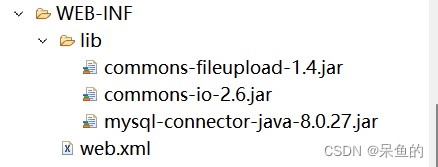
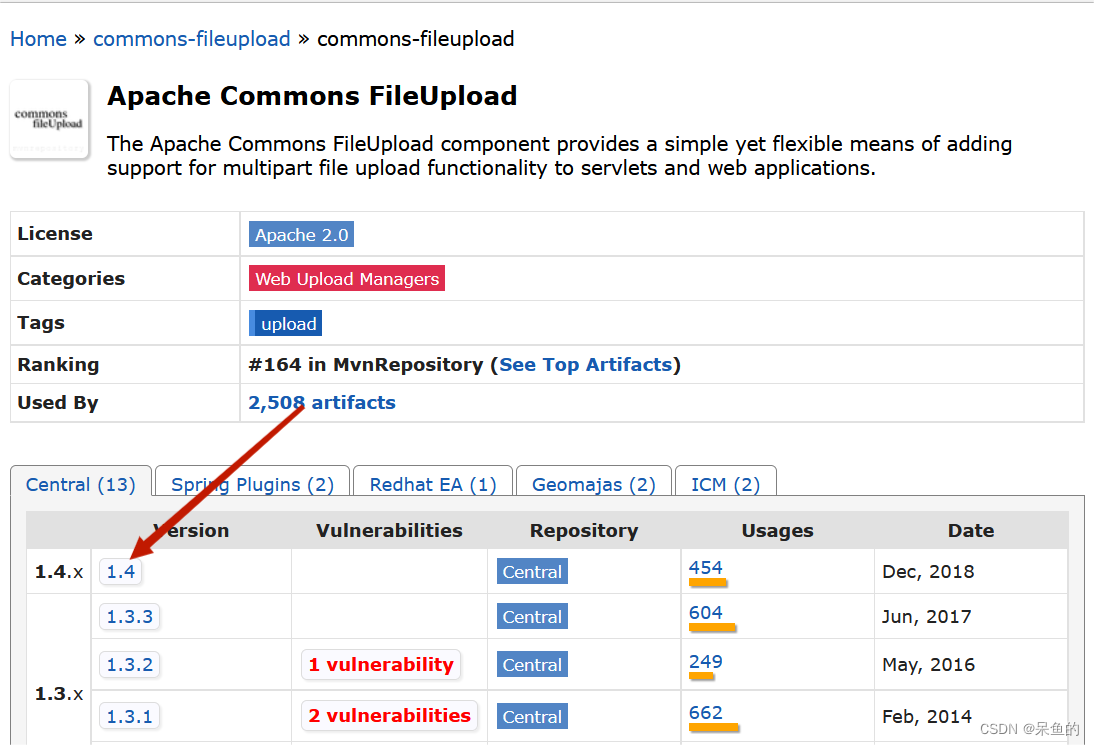
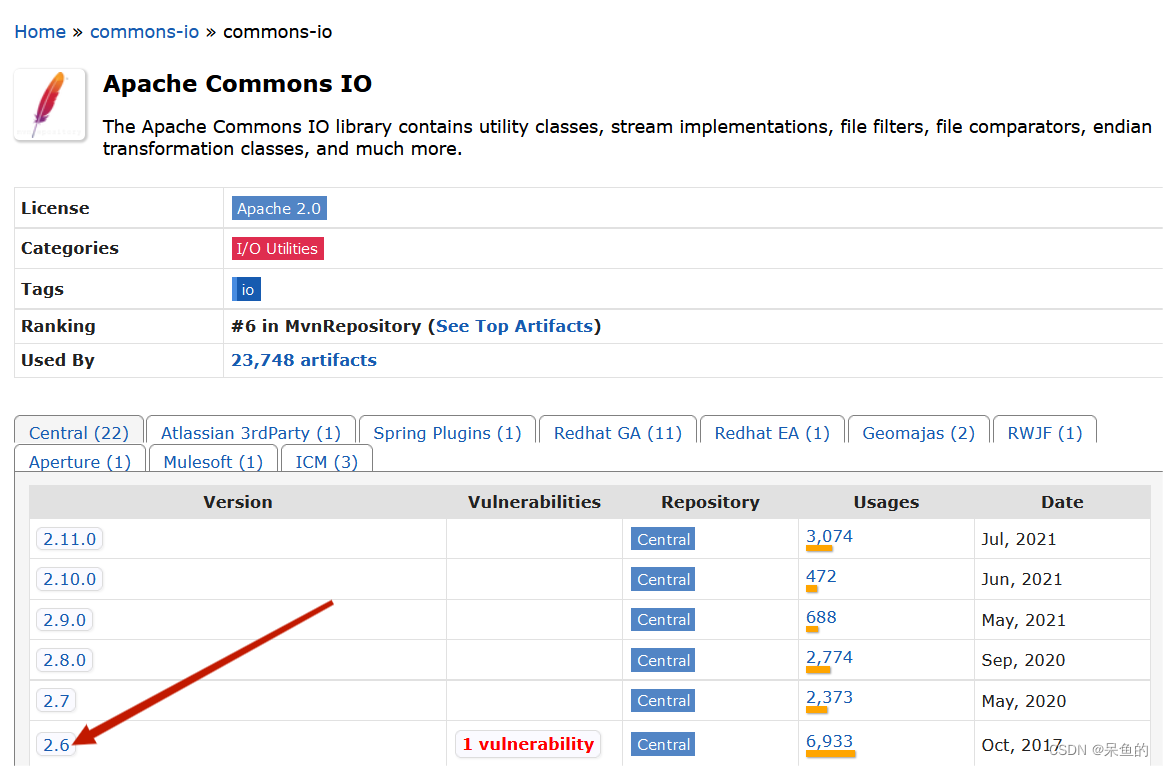
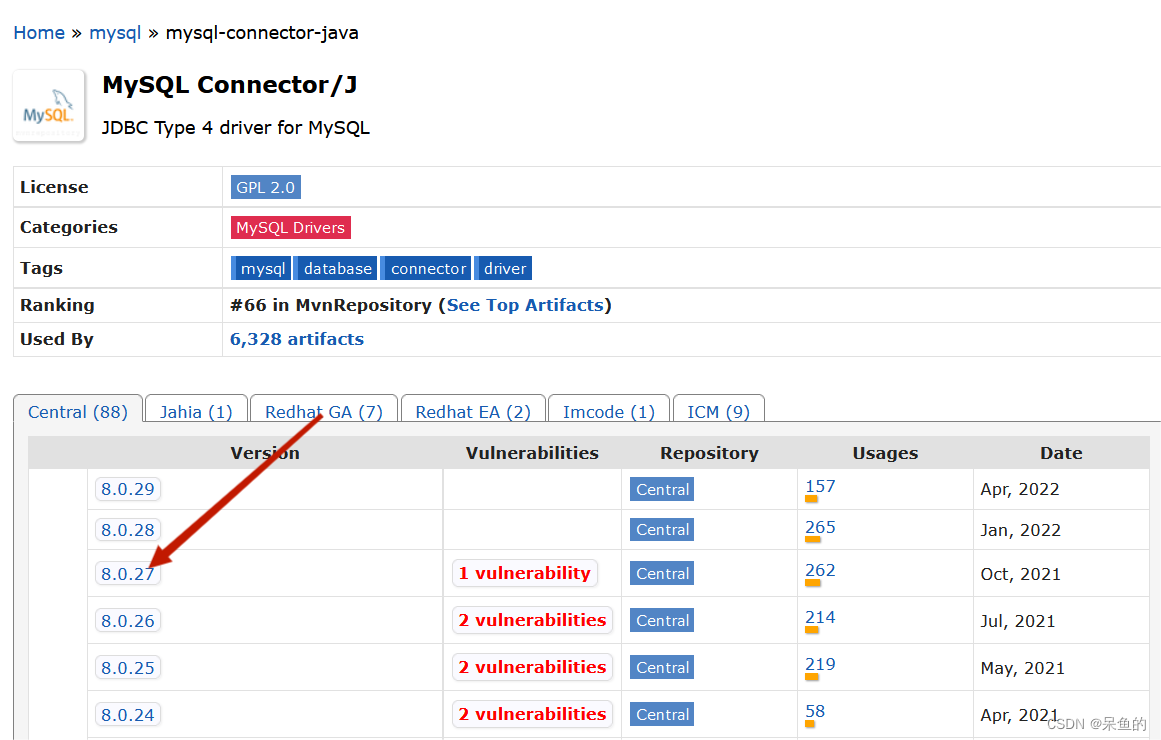
项目需要3个jar包,前两个jar包属于文件上传所需,最后一个为连接数据库的jar包
下载官网地址:https://mvnrepository.com/
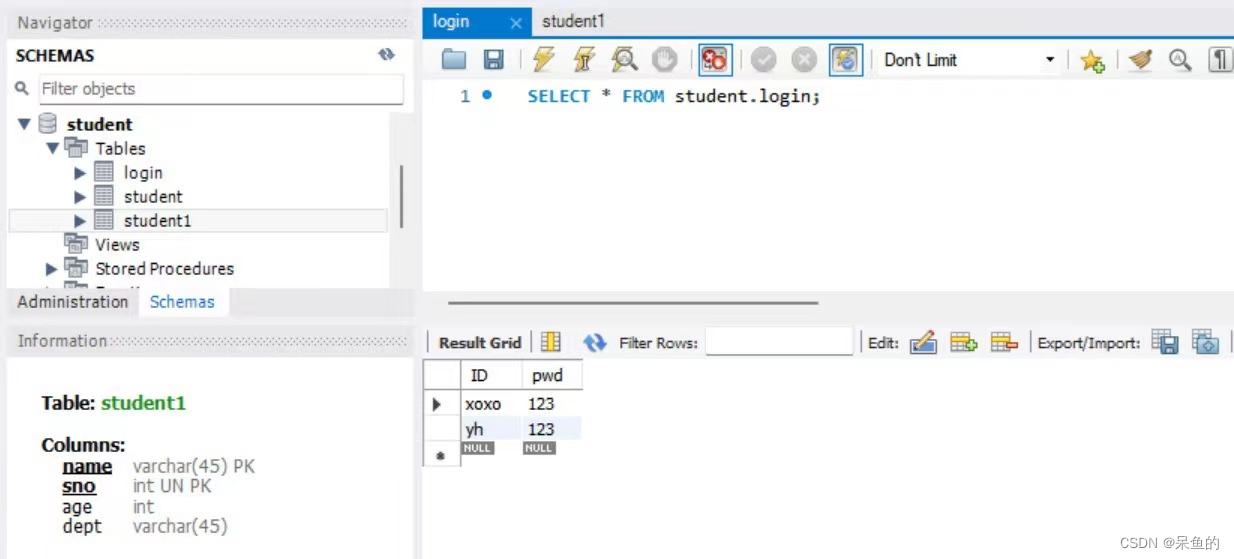
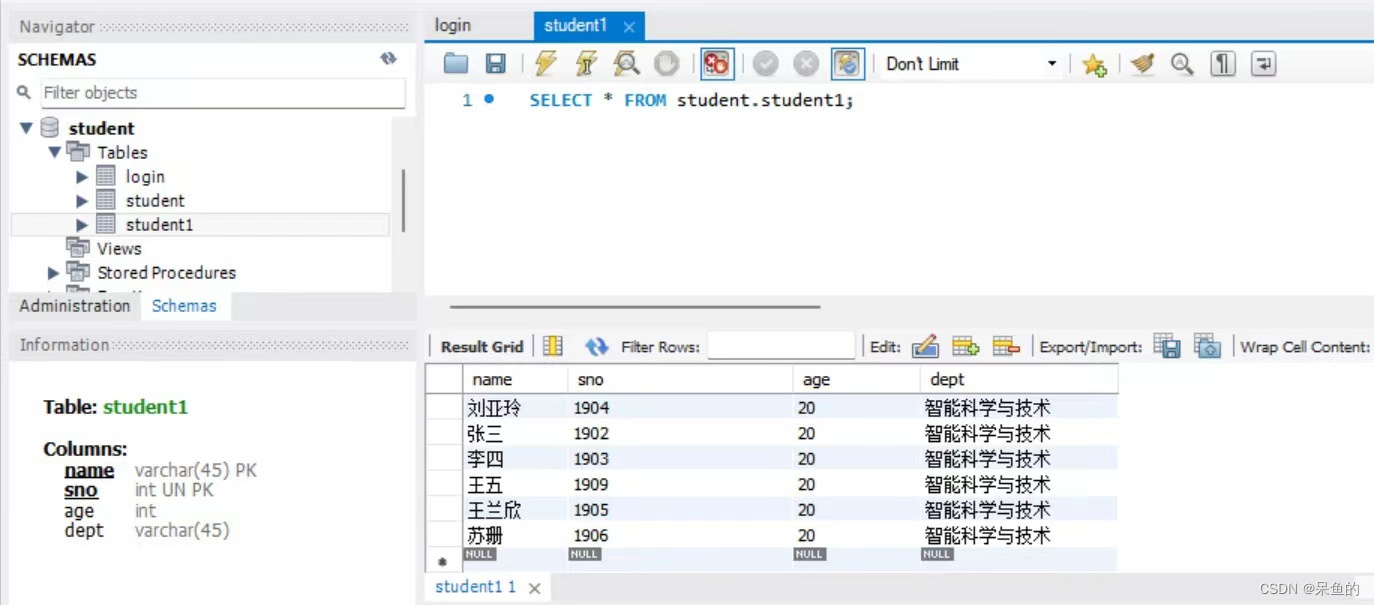
本人用的是mysql数据库,直接在mysql数据库中新建表格
我正在使用i18n从头开始构建一个多语言网络应用程序,虽然我自己可以处理一大堆yml文件,但我说的语言(非常)有限,最终我想寻求外部帮助帮助。我想知道这里是否有人在使用UI插件/gem(与django上的django-rosetta不同)来处理多个翻译器,其中一些翻译器不愿意或无法处理存储库中的100多个文件,处理语言数据。谢谢&问候,安德拉斯(如果您已经在rubyonrails-talk上遇到了这个问题,我们深表歉意) 最佳答案 有一个rails3branchofthetolkgem在github上。您可以通过在Gemfi
大约一年前,我决定确保每个包含非唯一文本的Flash通知都将从模块中的方法中获取文本。我这样做的最初原因是为了避免一遍又一遍地输入相同的字符串。如果我想更改措辞,我可以在一个地方轻松完成,而且一遍又一遍地重复同一件事而出现拼写错误的可能性也会降低。我最终得到的是这样的:moduleMessagesdefformat_error_messages(errors)errors.map{|attribute,message|"Error:#{attribute.to_s.titleize}#{message}."}enddeferror_message_could_not_find(obje
我主要使用Ruby来执行此操作,但到目前为止我的攻击计划如下:使用gemsrdf、rdf-rdfa和rdf-microdata或mida来解析给定任何URI的数据。我认为最好映射到像schema.org这样的统一模式,例如使用这个yaml文件,它试图描述数据词汇表和opengraph到schema.org之间的转换:#SchemaXtoschema.orgconversion#data-vocabularyDV:name:namestreet-address:streetAddressregion:addressRegionlocality:addressLocalityphoto:i
我在MiniTest::Spec和Capybara中使用以下规范:find_field('Email').must_have_css('[autofocus]')检查名为“电子邮件”的字段是否具有autofocus属性。doc说如下:has_css?(path,options={})ChecksifagivenCSSselectorisonthepageorcurrentnode.据我了解,字段“Email”是一个节点,因此调用must_have_css绝对有效!我做错了什么? 最佳答案 通过JonasNicklas得到了答案:No
我安装了ruby版本管理器,并将RVM安装的ruby实现设置为默认值,这样'哪个ruby'显示'~/.rvm/ruby-1.8.6-p383/bin/ruby'但是当我在emacs中打开inf-ruby缓冲区时,它使用安装在/usr/bin中的ruby。有没有办法让emacs像shell一样尊重ruby的路径?谢谢! 最佳答案 我创建了一个emacs扩展来将rvm集成到emacs中。如果您有兴趣,可以在这里获取:http://github.com/senny/rvm.el
我有一个div,它根据表单是否正确提交而改变。我想知道是否可以检查类的特定元素?开始元素看起来像这样。如果输入不正确,添加错误类。 最佳答案 试试这个:browser.div(:id=>"myerrortest").class_name更多信息:http://watir.github.com/watir-webdriver/doc/Watir/HTMLElement.html#class_name-instance_method另一种选择是只查看具有您期望的类的div是否存在browser.div((:id=>"myerrortes
是否有简单的方法来更改默认ISO格式(yyyy-mm-dd)的ActiveAdmin日期过滤器显示格式? 最佳答案 您可以像这样为日期选择器提供额外的选项,而不是覆盖js:=f.input:my_date,as::datepicker,datepicker_options:{dateFormat:"mm/dd/yy"} 关于ruby-on-rails-事件管理员日期过滤器日期格式自定义,我们在StackOverflow上找到一个类似的问题: https://s
电脑0x0000001A蓝屏错误怎么U盘重装系统教学分享。有用户电脑开机之后遇到了系统蓝屏的情况。系统蓝屏问题很多时候都是系统bug,只有通过重装系统来进行解决。那么蓝屏问题如何通过U盘重装新系统来解决呢?来看看以下的详细操作方法教学吧。 准备工作: 1、U盘一个(尽量使用8G以上的U盘)。 2、一台正常联网可使用的电脑。 3、ghost或ISO系统镜像文件(Win10系统下载_Win10专业版_windows10正式版下载-系统之家)。 4、在本页面下载U盘启动盘制作工具:系统之家U盘启动工具。 U盘启动盘制作步骤: 注意:制作期间,U盘会被格式化,因此U盘中的重要文件请注
在应用开发中,有时候我们需要获取系统的设备信息,用于数据上报和行为分析。那在鸿蒙系统中,我们应该怎么去获取设备的系统信息呢,比如说获取手机的系统版本号、手机的制造商、手机型号等数据。1、获取方式这里分为两种情况,一种是设备信息的获取,一种是系统信息的获取。1.1、获取设备信息获取设备信息,鸿蒙的SDK包为我们提供了DeviceInfo类,通过该类的一些静态方法,可以获取设备信息,DeviceInfo类的包路径为:ohos.system.DeviceInfo.具体的方法如下:ModifierandTypeMethodDescriptionstatic StringgetAbiList()Obt
文章目录一、概述简介原理模块二、配置Mysql使用版本环境要求1.操作系统2.mysql要求三、配置canal-server离线下载在线下载上传解压修改配置单机配置集群配置分库分表配置1.修改全局配置2.实例配置垂直分库水平分库3.修改group-instance.xml4.启动监听四、配置canal-adapter1修改启动配置2配置映射文件3启动ES数据同步查询所有订阅同步数据同步开关启动4.验证五、配置canal-admin一、概述简介canal是Alibaba旗下的一款开源项目,Java开发。基于数据库增量日志解析,提供增量数据订阅&消费。Git地址:https://github.co
