主要使用Epplus的的表格转换功能,将表格转换成Json,而Unity中Json的使用要搭配对应结构的类,故顺便将利用表格结构生成对应的类,免除人工创建的麻烦过程。
表格示例:
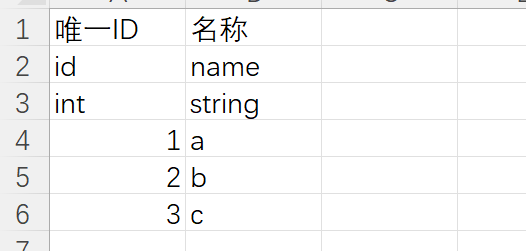
编辑模式下:
生成Json:

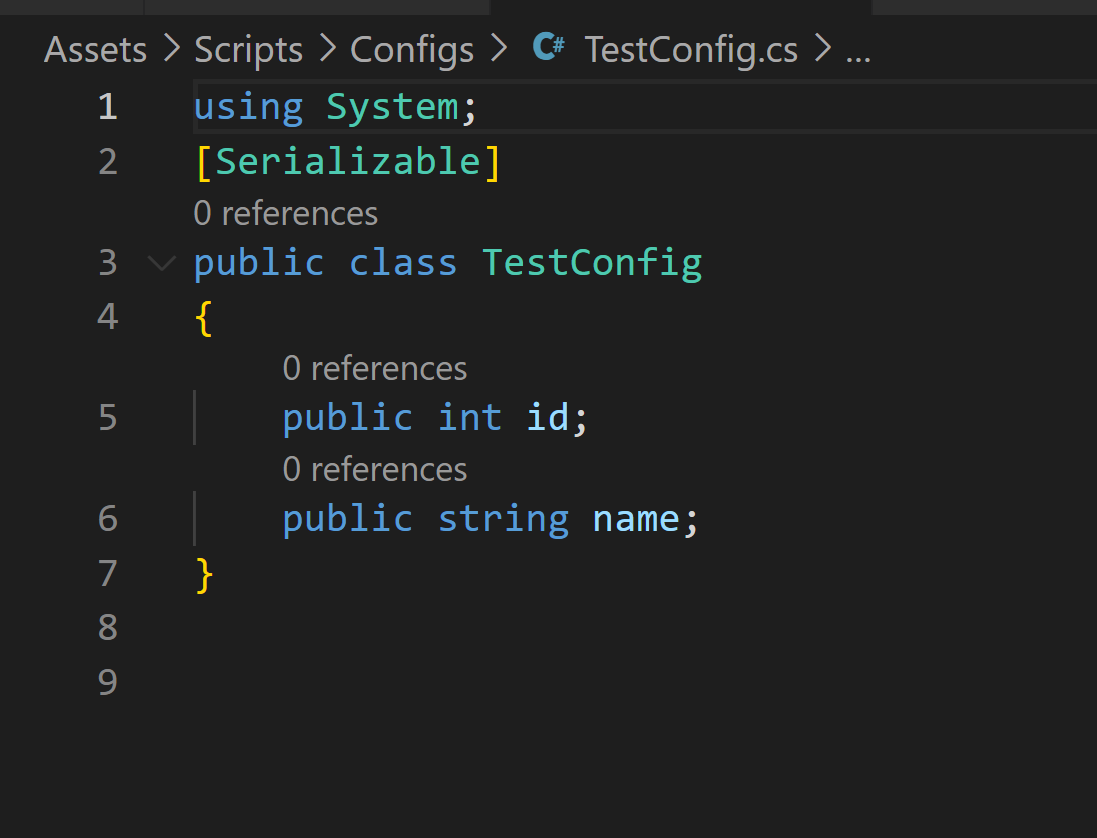
生成Class:
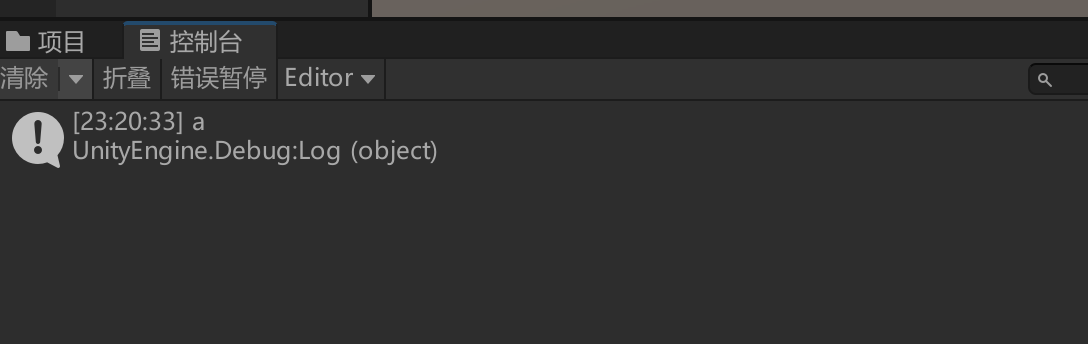
运行时数据读取:

using UnityEngine;
public class JsonDataManager : Singleton<JsonDataManager>
{
    public JsonDataList<T> LoadData<T>()
    {
        string json = Resources.Load<TextAsset>("Json/" + typeof(T).Name).text;
        return JsonUtility.FromJson<JsonDataList<T>>(json);
    }
}
using System.Collections.Generic;
using System;

[Serializable]
public class JsonDataList<T>
{
    public List<T> datas = new List<T>();
}
using UnityEngine;
using UnityEditor;
using System.IO;
using OfficeOpenXml;
using System.Collections.Generic;
using System;
using System.Text;
/// <summary>
/// 使用EPPlus获取表格数据,同时导出对应的Json以及Class.
/// </summary>
public class ExcelExporter
{
    /// <summary>
    /// Excel表格路径
    /// </summary>
    private const string excelPath = "../Assets/Excels";
    /// <summary>
    /// 导出的Json路径
    /// </summary>
    private const string configPath = "../Assets/Resources/Json";
    /// <summary>
    /// 导出的类路径
    /// </summary>
    private const string classPath = "../Assets/Scripts/Configs";

    /// <summary>
    /// 属性行
    /// </summary>
    private const int propertyIndex = 2;
    /// <summary>
    /// 类型行
    /// </summary>
    private const int typeIndex = 3;
    /// <summary>
    /// 值行
    /// </summary>
    private const int valueIndex = 4;


    [MenuItem("Tools/ExportExcel")]
    private static void ExportConfigs()
    {
        try
        {
            FileInfo[] files = Files.LoadFiles(excelPath);

            foreach (var file in files)
            {
                //过滤文件
                if (file.Extension != ".xlsx") continue;
                ExcelPackage excelPackage = new ExcelPackage(file);
                ExcelWorksheets worksheets = excelPackage.Workbook.Worksheets;
                //只导表1
                ExcelWorksheet worksheet = worksheets[1];

                ExportJson(worksheet, Path.GetFileNameWithoutExtension(file.FullName));
                ExportClass(worksheet, Path.GetFileNameWithoutExtension(file.FullName));

            }
            AssetDatabase.Refresh();
        }
        catch (Exception e)
        {
            Debug.LogError(e.ToString());
        }
    }

    /// <summary>
    /// 导出类
    /// </summary>
    private static void ExportClass(ExcelWorksheet worksheet, string fileName)
    {
        string[] properties = GetProperties(worksheet);
        StringBuilder sb = new StringBuilder();
        sb.Append("using System;\t\n");
        sb.Append("[Serializable]\t\n");
        sb.Append($"public class {fileName}Config\n");//类名
        sb.Append("{\n");

        for (int col = 1; col <= properties.Length; col++)
        {
            string fieldType = GetType(worksheet, col);
            string fieldName = properties[col - 1];
            sb.Append($"\tpublic {fieldType} {fieldName};\n");
        }

        sb.Append("}\n\n");
        Files.SaveFile(classPath, string.Format("{0}Config.cs", fileName), sb.ToString());

    }
    /// <summary>
    /// 导出JSON
    /// </summary>
    private static void ExportJson(ExcelWorksheet worksheet, string fileName)
    {
        string str = "";
        int num = 0;
        string[] properties = GetProperties(worksheet);
        for (int col = 1; col <= properties.Length; col++)
        {
            string[] temp = GetValues(worksheet, col);
            num = temp.Length;
            foreach (var value in temp)
            {
                str += GetJsonK_VFromKeyAndValues(properties[col - 1],
                    Convert(GetType(worksheet, col), value)) + ',';
            }
        }
        //获取key:value的字符串
        str = str.Substring(0, str.Length - 1);
        str = GetJsonFromJsonK_V(str, num);
        str = GetUnityJsonFromJson(str);
        Files.SaveFile(configPath, string.Format("{0}Config.json", fileName), str);
    }

    /// <summary>
    /// 获取属性
    /// </summary>
    private static string[] GetProperties(ExcelWorksheet worksheet)
    {
        string[] properties = new string[worksheet.Dimension.End.Column];
        for (int col = 1; col <= worksheet.Dimension.End.Column; col++)
        {
            if (worksheet.Cells[propertyIndex, col].Text == "")
                throw new System.Exception(string.Format("第{0}行第{1}列为空", propertyIndex, col));
            properties[col - 1] = worksheet.Cells[propertyIndex, col].Text;
        }
        return properties;
    }

    /// <summary>
    /// 获取值
    /// </summary>
    private static string[] GetValues(ExcelWorksheet worksheet, int col)
    {
        //容量减去前三行
        string[] values = new string[worksheet.Dimension.End.Row - 3];
        for (int row = valueIndex; row <= worksheet.Dimension.End.Row; row++)
        {
            values[row - valueIndex] = worksheet.Cells[row, col].Text;
        }
        return values;
    }

    /// <summary>
    /// 获取类型
    /// </summary>
    private static string GetType(ExcelWorksheet worksheet, int col)
    {
        return worksheet.Cells[typeIndex, col].Text;
    }

    /// <summary>
    /// 通过类型返回对应值
    /// </summary>
    private static string Convert(string type, string value)
    {
        string res = "";
        switch (type)
        {
            case "int": res = value; break;
            case "int32": res = value; break;
            case "int64": res = value; break;
            case "long": res = value; break;
            case "float": res = value; break;
            case "double": res = value; break;
            case "string": res = $"\"{value}\""; break;
            default:
                throw new Exception($"不支持此类型: {type}");
        }
        return res;
    }

    /// <summary>
    /// 返回key:value
    /// </summary>
    private static string GetJsonK_VFromKeyAndValues(string key, string value)
    {
        return string.Format("\"{0}\":{1}", key, value);
    }

    /// <summary>
    ///获取[key:value]转换为{key:value,key:value},再变成[{key:value,key:value},{key:value,key:value}]
    /// </summary>
    private static string GetJsonFromJsonK_V(string json, int valueNum)
    {
        string str = "";
        string[] strs;
        List<string> listStr = new List<string>();
        strs = json.Split(',');
        listStr.Clear();
        for (int j = 0; j < valueNum; j++)
        {
            listStr.Add("{" + string.Format("{0},{1}", strs[j], strs[j + valueNum]) + "}");
        }
        str = "[";
        foreach (var l in listStr)
        {
            str += l + ',';
        }
        str = str.Substring(0, str.Length - 1);
        str += ']';
        return str;
    }

    /// <summary>
    /// 适应JsonUtility.FromJson函数的转换格式
    /// </summary>
    private static string GetUnityJsonFromJson(string json)
    {
        return "{" + "\"datas\":" + json + "}";
    }

}
using UnityEngine;
using System.IO;
using System.Collections.Generic;

public class Files
{
    public static FileInfo[] LoadFiles(string path)
    {
        path = string.Format("{0}/{1}", Application.dataPath, path);

        if (Directory.Exists(path))
        {
            DirectoryInfo directory = new DirectoryInfo(path);
            List<FileInfo> files = new List<FileInfo>();
            foreach (var file in directory.GetFiles("*"))
            {
                if (file.Name.EndsWith(".meta"))
                    continue;
                if (file.Name.StartsWith("~")) continue;

                files.Add(file);
            }
            return files.ToArray();
        }
        else
        {
            throw new System.Exception("路径不存在");
        }
    }

    public static void SaveFile(string path, string fileName, string fileContent)
    {
        path = string.Format("{0}/{1}", Application.dataPath, path);

        if (Directory.Exists(path))
        {
            path = string.Format("{0}/{1}", path, fileName);
            if (File.Exists(path))
            {
                File.Delete(path);
            }
            File.WriteAllText(path, fileContent);
        }
        else
        {
            throw new System.Exception("路径不存在");
        }
    }
}
我的目标是转换表单输入,例如“100兆字节”或“1GB”,并将其转换为我可以存储在数据库中的文件大小(以千字节为单位)。目前,我有这个:defquota_convert@regex=/([0-9]+)(.*)s/@sizes=%w{kilobytemegabytegigabyte}m=self.quota.match(@regex)if@sizes.include?m[2]eval("self.quota=#{m[1]}.#{m[2]}")endend这有效,但前提是输入是倍数(“gigabytes”,而不是“gigabyte”)并且由于使用了eval看起来疯狂不安全。所以,功能正常,
我想将html转换为纯文本。不过,我不想只删除标签,我想智能地保留尽可能多的格式。为插入换行符标签,检测段落并格式化它们等。输入非常简单,通常是格式良好的html(不是整个文档,只是一堆内容,通常没有anchor或图像)。我可以将几个正则表达式放在一起,让我达到80%,但我认为可能有一些现有的解决方案更智能。 最佳答案 首先,不要尝试为此使用正则表达式。很有可能你会想出一个脆弱/脆弱的解决方案,它会随着HTML的变化而崩溃,或者很难管理和维护。您可以使用Nokogiri快速解析HTML并提取文本:require'nokogiri'h
我正在寻找执行以下操作的正确语法(在Perl、Shell或Ruby中):#variabletoaccessthedatalinesappendedasafileEND_OF_SCRIPT_MARKERrawdatastartshereanditcontinues. 最佳答案 Perl用__DATA__做这个:#!/usr/bin/perlusestrict;usewarnings;while(){print;}__DATA__Texttoprintgoeshere 关于ruby-如何将脚
我正在使用的第三方API的文档状态:"[O]urAPIonlyacceptspaddedBase64encodedstrings."什么是“填充的Base64编码字符串”以及如何在Ruby中生成它们。下面的代码是我第一次尝试创建转换为Base64的JSON格式数据。xa=Base64.encode64(a.to_json) 最佳答案 他们说的padding其实就是Base64本身的一部分。它是末尾的“=”和“==”。Base64将3个字节的数据包编码为4个编码字符。所以如果你的输入数据有长度n和n%3=1=>"=="末尾用于填充n%
我主要使用Ruby来执行此操作,但到目前为止我的攻击计划如下:使用gemsrdf、rdf-rdfa和rdf-microdata或mida来解析给定任何URI的数据。我认为最好映射到像schema.org这样的统一模式,例如使用这个yaml文件,它试图描述数据词汇表和opengraph到schema.org之间的转换:#SchemaXtoschema.orgconversion#data-vocabularyDV:name:namestreet-address:streetAddressregion:addressRegionlocality:addressLocalityphoto:i
我需要读入一个包含数字列表的文件。此代码读取文件并将其放入二维数组中。现在我需要获取数组中所有数字的平均值,但我需要将数组的内容更改为int。有什么想法可以将to_i方法放在哪里吗?ClassTerraindefinitializefile_name@input=IO.readlines(file_name)#readinfile@size=@input[0].to_i@land=[@size]x=1whilex 最佳答案 只需将数组映射为整数:@land边注如果你想得到一条线的平均值,你可以这样做:values=@input[x]
这道题是thisquestion的逆题.给定一个散列,每个键都有一个数组,例如{[:a,:b,:c]=>1,[:a,:b,:d]=>2,[:a,:e]=>3,[:f]=>4,}将其转换为嵌套哈希的最佳方法是什么{:a=>{:b=>{:c=>1,:d=>2},:e=>3,},:f=>4,} 最佳答案 这是一个迭代的解决方案,递归的解决方案留给读者作为练习:defconvert(h={})ret={}h.eachdo|k,v|node=retk[0..-2].each{|x|node[x]||={};node=node[x]}node[
好的,所以我的目标是轻松地将一些数据保存到磁盘以备后用。您如何简单地写入然后读取一个对象?所以如果我有一个简单的类classCattr_accessor:a,:bdefinitialize(a,b)@a,@b=a,bendend所以如果我从中非常快地制作一个objobj=C.new("foo","bar")#justgaveitsomerandomvalues然后我可以把它变成一个kindaidstring=obj.to_s#whichreturns""我终于可以将此字符串打印到文件或其他内容中。我的问题是,我该如何再次将这个id变回一个对象?我知道我可以自己挑选信息并制作一个接受该信
在我的Controller中,我通过以下方式在我的index方法中支持HTML和JSON:respond_todo|format|format.htmlformat.json{renderjson:@user}end在浏览器中拉起它时,它会自然地以HTML呈现。但是,当我对/user资源进行内容类型为application/json的curl调用时(因为它是索引方法),我仍然将HTML作为响应。如何获取JSON作为响应?我还需要说明什么? 最佳答案 您应该将.json附加到请求的url,提供的格式在routes.rb的路径中定义。这
有时我需要处理键/值数据。我不喜欢使用数组,因为它们在大小上没有限制(很容易不小心添加超过2个项目,而且您最终需要稍后验证大小)。此外,0和1的索引变成了魔数(MagicNumber),并且在传达含义方面做得很差(“当我说0时,我的意思是head...”)。散列也不合适,因为可能会不小心添加额外的条目。我写了下面的类来解决这个问题:classPairattr_accessor:head,:taildefinitialize(h,t)@head,@tail=h,tendend它工作得很好并且解决了问题,但我很想知道:Ruby标准库是否已经带有这样一个类? 最佳
