简单来说,我们开发完一个项目后,需要把它打包(一般是dist文件夹),并部署在服务器上。那么,这个打包后的dist文件夹都是静态资源;在我们写项目时,图片、json文件是常见的静态资源,我们的项目的代码发起了一个请求,这个请求得到的资源是动态资源。
与静态资源相关的是vite的静态资源文件夹public 目录。
public 目录应位于你的项目根目录。该目录中的资源在开发时能直接通过 / 根路径访问到,并且打包时会被完整复制到目标目录的根目录下。
引入 public 中的资源永远应该使用根绝对路径 —— 举个例子,public/icon.png 应该在源码中被引用为 /icon.png。
public 中的资源在项目打包时不会被压缩转换、所以这个文件夹下不应该放项目依赖的js文件,通常,放一些网站icon、logo,网页背景图片。
public 目录可以通过 publicDir选项 来配置。
publicDir
● 类型: string | false
● 默认: “public”。
将 publicDir 设定为 false 可以关闭此项功能。
vite项目内可以直接引入各种静态资源文件。我们创建一个最基础的项目,创建index.html、main.js、和package.json核心文件,安装好vite。
// index.html
<body>
  <script src="./main.js" type="module"></script>
</body>
然后在根目录创建测试用的testJs.jpg、testJs.js、testJson.json、testMp4.mp4及testCss.css静态文件。
在main.js中引入并打印:
import imgUrl from "./testJs.jpg";
import js from "./testJs.js";
import testJson from "./testJson.json";
import testMp4 from "./testMp4.mp4";
import testCss from "./testCss.css";

console.log("testCss: ", testCss);
console.log("js: ", js);
console.log("testJson: ", testJson);
console.log("imgUrl: ", imgUrl);
console.log("testMp4: ", testMp4);
执行package.json中的 dev命令(npm run dev)
"scripts": {
    "dev": "vite",
    "build": "vite build"
  },
项目启动后,打开项目链接查看浏览器输出内容
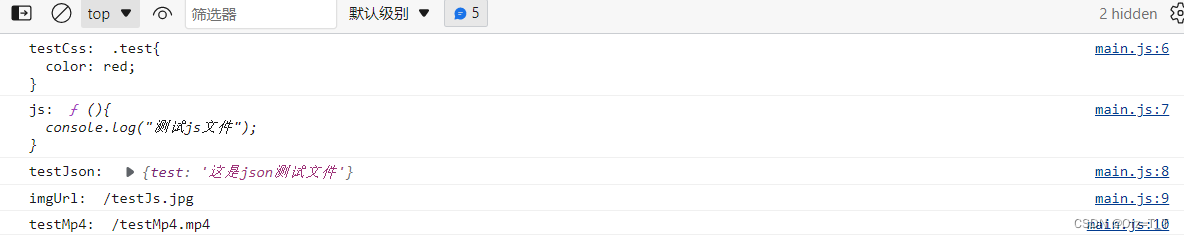
通过打印结果,可以看到所有静态资源都被引入,但是vite对其的处理方式不同。
注:vite对json文件做了预处理,引入的文件直接是对象的键值对形式
常见的图像、媒体和字体文件类型会被vite引入为url,如上述的jpg文件和mp4文件。我们可以使用 assetsInclude选项 配置来扩展内部列表。
// vite.config.js
import { defineConfig } from "vite";
export default defineConfig({
  assetsInclude: ["testJs.js", "testCss.css"]
});

注:这一配置包含json文件类型时会报错
未被包含在内部列表或 assetsInclude 中的资源,可以使用 ?url 后缀显式导入为一个 URL。
import imgUrl from "./testJs.jpg";
import js from "./testJs.js?url";
import testJson from "./testJson.json?url";
import testMp4 from "./testMp4.mp4";
import testCss from "./testCss.css?url";
console.log("testCss: ", testCss);
console.log("js: ", js);
console.log("testJson: ", testJson);
console.log("imgUrl: ", imgUrl);
console.log("testMp4: ", testMp4);
资源可以使用 ?raw 后缀声明作为字符串(源文件)引入。
import imgUrl from "./testJs.jpg?raw";
import js from "./testJs.js?raw";
import testJson from "./testJson.json?raw";
import testMp4 from "./testMp4.mp4?raw";
import testCss from "./testCss.css?raw";
console.log("testCss: ", testCss);
console.log("js: ", js);
console.log("testJson: ", testJson);
console.log("imgUrl: ", imgUrl);
console.log("testMp4: ", testMp4);
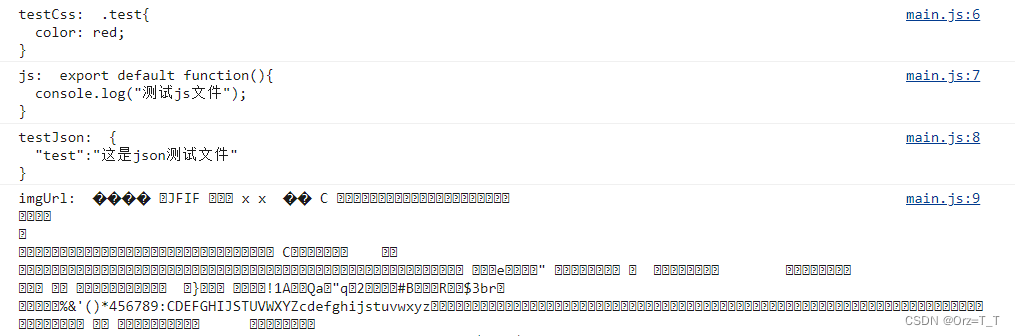
css、js、json都将其内容以文本形式输出。jpg、mp4文件以流的形式输出。
vite会将Svg引入为 URL,和图片一样。
import home from "./home.svg";
console.log("home: ", home);   //打印结果home:  /home.svg

const img = document.createElement("img");
img.src = home;
document.body.appendChild(img);

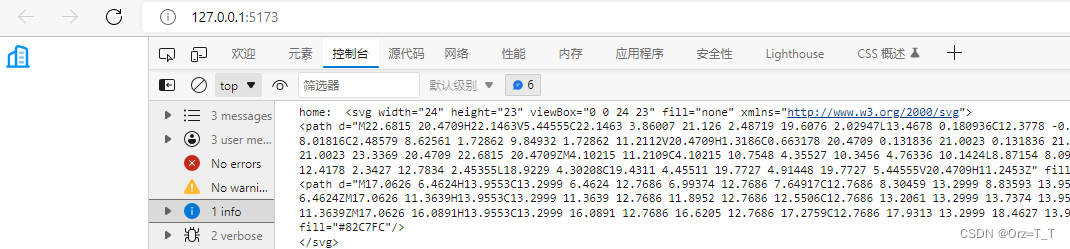
设置为引入为源文件内容,则直接输出其HTML
import home from "./home.svg?raw";
console.log("home: ", home);
document.body.innerHTML = home;
我在MiniTest::Spec和Capybara中使用以下规范:find_field('Email').must_have_css('[autofocus]')检查名为“电子邮件”的字段是否具有autofocus属性。doc说如下:has_css?(path,options={})ChecksifagivenCSSselectorisonthepageorcurrentnode.据我了解,字段“Email”是一个节点,因此调用must_have_css绝对有效!我做错了什么? 最佳答案 通过JonasNicklas得到了答案:No
鉴于我有以下迁移:Sequel.migrationdoupdoalter_table:usersdoadd_column:is_admin,:default=>falseend#SequelrunsaDESCRIBEtablestatement,whenthemodelisloaded.#Atthispoint,itdoesnotknowthatusershaveais_adminflag.#Soitfails.@user=User.find(:email=>"admin@fancy-startup.example")@user.is_admin=true@user.save!ende
我收到这个错误:RuntimeError(自动加载常量Apps时检测到循环依赖当我使用多线程时。下面是我的代码。为什么会这样?我尝试多线程的原因是因为我正在编写一个HTML抓取应用程序。对Nokogiri::HTML(open())的调用是一个同步阻塞调用,需要1秒才能返回,我有100,000多个页面要访问,所以我试图运行多个线程来解决这个问题。有更好的方法吗?classToolsController0)app.website=array.join(',')putsapp.websiteelseapp.website="NONE"endapp.saveapps=Apps.order("
我正在尝试从Postgresql表(table1)中获取数据,该表由另一个相关表(property)的字段(table2)过滤。在纯SQL中,我会这样编写查询:SELECT*FROMtable1JOINtable2USING(table2_id)WHEREtable2.propertyLIKE'query%'这工作正常:scope:my_scope,->(query){includes(:table2).where("table2.property":query)}但我真正需要的是使用LIKE运算符进行过滤,而不是严格相等。然而,这是行不通的:scope:my_scope,->(que
当我尝试安装Ruby时遇到此错误。我试过查看this和this但无济于事➜~brewinstallrubyWarning:YouareusingOSX10.12.Wedonotprovidesupportforthispre-releaseversion.Youmayencounterbuildfailuresorotherbreakages.Pleasecreatepull-requestsinsteadoffilingissues.==>Installingdependenciesforruby:readline,libyaml,makedepend==>Installingrub
我一直致力于让我们的Rails2.3.8应用程序在JRuby下正确运行。一切正常,直到我启用config.threadsafe!以实现JRuby提供的并发性。这导致lib/中的模块和类不再自动加载。使用config.threadsafe!启用:$rubyscript/runner-eproduction'pSim::Sim200Provisioner'/Users/amchale/.rvm/gems/jruby-1.5.1@web-services/gems/activesupport-2.3.8/lib/active_support/dependencies.rb:105:in`co
我真的为这个而疯狂。我一直在搜索答案并尝试我找到的所有内容,包括相关问题和stackoverflow上的答案,但仍然无法正常工作。我正在使用嵌套资源,但无法使表单正常工作。我总是遇到错误,例如没有路线匹配[PUT]"/galleries/1/photos"表格在这里:/galleries/1/photos/1/edit路线.rbresources:galleriesdoresources:photosendresources:galleriesresources:photos照片Controller.rbdefnew@gallery=Gallery.find(params[:galle
我有一个div,它根据表单是否正确提交而改变。我想知道是否可以检查类的特定元素?开始元素看起来像这样。如果输入不正确,添加错误类。 最佳答案 试试这个:browser.div(:id=>"myerrortest").class_name更多信息:http://watir.github.com/watir-webdriver/doc/Watir/HTMLElement.html#class_name-instance_method另一种选择是只查看具有您期望的类的div是否存在browser.div((:id=>"myerrortes
我们目前正在为ROR3.2开发自定义cms引擎。在这个过程中,我们希望成为我们的rails应用程序中的一等公民的几个类类型起源,这意味着它们应该驻留在应用程序的app文件夹下,它是插件。目前我们有以下类型:数据源数据类型查看我在app文件夹下创建了多个目录来保存这些:应用/数据源应用/数据类型应用/View更多类型将随之而来,我有点担心应用程序文件夹被这么多目录污染。因此,我想将它们移动到一个子目录/模块中,该子目录/模块包含cms定义的所有类型。所有类都应位于MyCms命名空间内,目录布局应如下所示:应用程序/my_cms/data_source应用程序/my_cms/data_ty
我正在尝试按Rails相关模型中的字段进行排序。我研究的所有解决方案都没有解决如果相关模型被另一个参数过滤?元素模型classItem相关模型:classPriority我正在使用where子句检索项目:@items=Item.where('company_id=?andapproved=?',@company.id,true).all我需要按相关表格中的“位置”列进行排序。问题在于,在优先级模型中,一个项目可能会被多家公司列出。因此,这些职位取决于他们拥有的company_id。当我显示项目时,它是针对一个公司的,按公司内的职位排序。完成此任务的正确方法是什么?感谢您的帮助。PS-我
