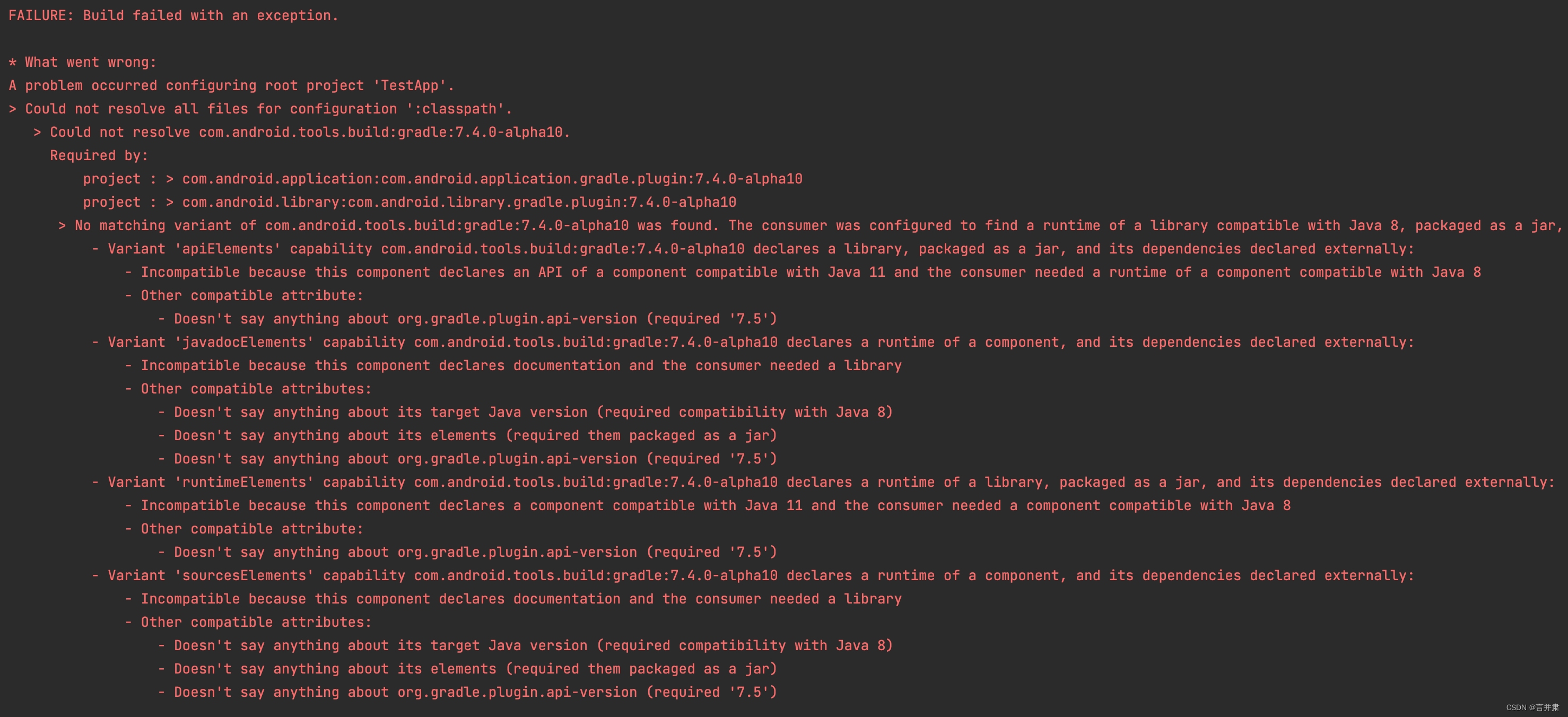
AndroidStudio的项目在build时出现下面的报错:
FAILURE: Build failed with an exception.
What went wrong:
A problem occurred configuring root project ‘TestApp’.
Could not resolve all files for configuration ‘:classpath’.
Could not resolve com.android.tools.build:gradle:7.4.0-alpha10.
Required by:
project : > com.android.application:com.android.application.gradle.plugin:7.4.0-alpha10
project : > com.android.library:com.android.library.gradle.plugin:7.4.0-alpha10
No matching variant of com.android.tools.build:gradle:7.4.0-alpha10 was found. The consumer was configured to find a runtime of a library compatible with Java 8, packaged as a jar, and its dependencies declared externally, as well as attribute ‘org.gradle.plugin.api-version’ with value ‘7.5’ but:
- Variant ‘apiElements’ capability com.android.tools.build:gradle:7.4.0-alpha10 declares a library, packaged as a jar, and its dependencies declared externally:
- Incompatible because this component declares an API of a component compatible with Java 11 and the consumer needed a runtime of a component compatible with Java 8
- Other compatible attribute:
- Doesn’t say anything about org.gradle.plugin.api-version (required ‘7.5’)
- Variant ‘javadocElements’ capability com.android.tools.build:gradle:7.4.0-alpha10 declares a runtime of a component, and its dependencies declared externally:
- Incompatible because this component declares documentation and the consumer needed a library
- Other compatible attributes:
- Doesn’t say anything about its target Java version (required compatibility with Java 8)
- Doesn’t say anything about its elements (required them packaged as a jar)
- Doesn’t say anything about org.gradle.plugin.api-version (required ‘7.5’)
- Variant ‘runtimeElements’ capability com.android.tools.build:gradle:7.4.0-alpha10 declares a runtime of a library, packaged as a jar, and its dependencies declared externally:
- Incompatible because this component declares a component compatible with Java 11 and the consumer needed a component compatible with Java 8
- Other compatible attribute:
- Doesn’t say anything about org.gradle.plugin.api-version (required ‘7.5’)
- Variant ‘sourcesElements’ capability com.android.tools.build:gradle:7.4.0-alpha10 declares a runtime of a component, and its dependencies declared externally:
- Incompatible because this component declares documentation and the consumer needed a library
- Other compatible attributes:
- Doesn’t say anything about its target Java version (required compatibility with Java 8)
- Doesn’t say anything about its elements (required them packaged as a jar)
- Doesn’t say anything about org.gradle.plugin.api-version (required ‘7.5’)Try:
Run with --info or --debug option to get more log output.
Run with --scan to get full insights.
新版本的AndroidStudio出现下面的错误通知:
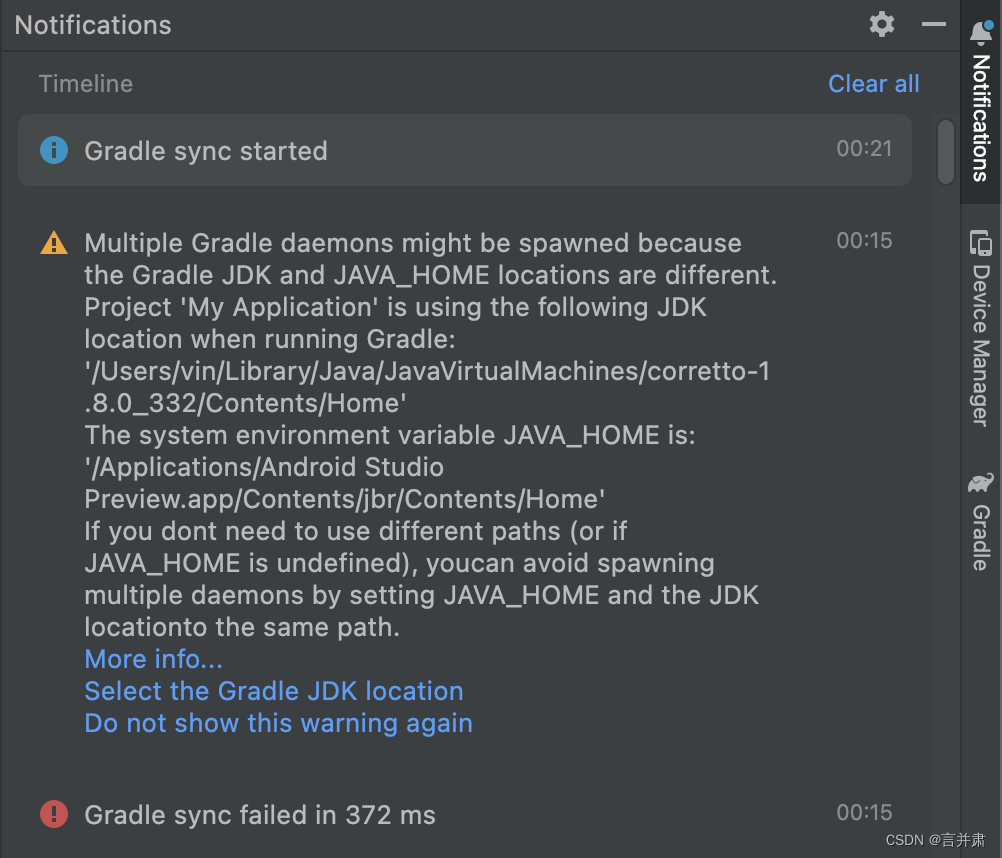
此为Android Studio默认的JDK版本与项目配置的Gradle所需的JDK不一致导致冲突所致。要求选择同一版本的JDK。
在弹出的错误通知中,选择 Select the Gradle JDK location

弹出Gradle设置,将默认的JDK改为和项目一样的版本。
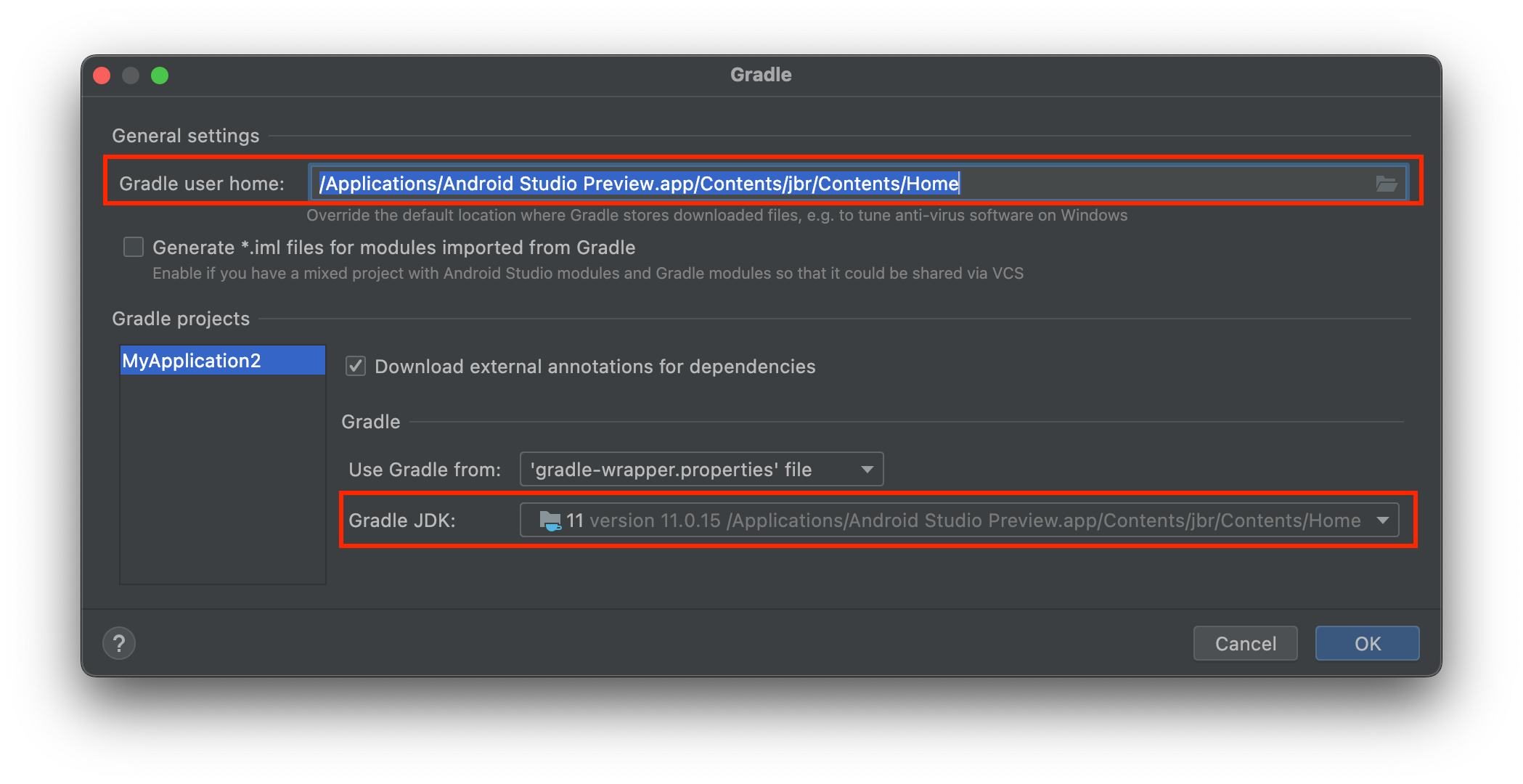
或者进入Preferences->Build,Execution,Deployment->Build Tools->Gradle中,将Gradle user home和项目的Gradle JDK改为一样的版本目录。
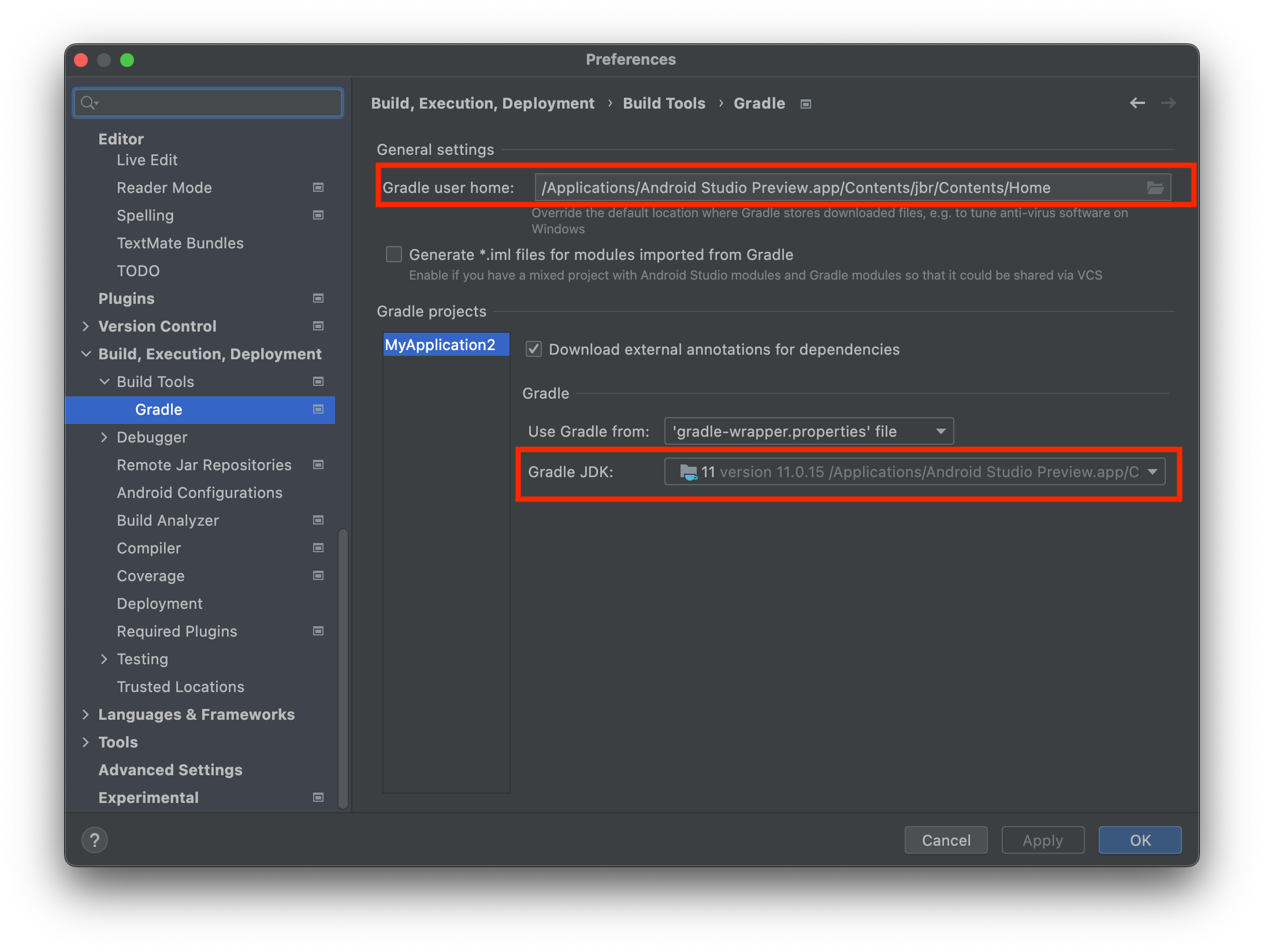
Mac上无法选择 /Applications/Android Studio Preview.app 下的目录,可以直接输入 /Applications/Android Studio Preview.app/Contents/jbr/Contents/Home 在应用程序中的具体地址。
修改的JDK版本按项目要求来设置,有些需要JDK8以上(required compatibility with Java 8)则选择JDK8以上版本。
我已经从我的命令行中获得了一切,所以我可以运行rubymyfile并且它可以正常工作。但是当我尝试从sublime中运行它时,我得到了undefinedmethod`require_relative'formain:Object有人知道我的sublime设置中缺少什么吗?我正在使用OSX并安装了rvm。 最佳答案 或者,您可以只使用“require”,它应该可以正常工作。我认为“require_relative”仅适用于ruby1.9+ 关于ruby-主要:Objectwhenrun
我克隆了一个rails仓库,我现在正尝试捆绑安装背景:OSXElCapitanruby2.2.3p173(2015-08-18修订版51636)[x86_64-darwin15]rails-v在您的Gemfile中列出的或native可用的任何gem源中找不到gem'pg(>=0)ruby'。运行bundleinstall以安装缺少的gem。bundleinstallFetchinggemmetadatafromhttps://rubygems.org/............Fetchingversionmetadatafromhttps://rubygems.org/...Fe
相信很多人在录制视频的时候都会遇到各种各样的问题,比如录制的视频没有声音。屏幕录制为什么没声音?今天小编就和大家分享一下如何录制音画同步视频的具体操作方法。如果你有录制的视频没有声音,你可以试试这个方法。 一、检查是否打开电脑系统声音相信很多小伙伴在录制视频后会发现录制的视频没有声音,屏幕录制为什么没声音?如果当时没有打开音频录制,则录制好的视频是没有声音的。因此,建议在录制前进行检查。屏幕上没有声音,很可能是因为你的电脑系统的声音被禁止了。您只需打开电脑系统的声音,即可录制音频和图画同步视频。操作方法:步骤1:点击电脑屏幕右下侧的“小喇叭”图案,在上方的选项中,选择“声音”。 步骤2:在“声
首先回顾一下拉格朗日定理的内容:函数f(x)是在闭区间[a,b]上连续、开区间(a,b)上可导的函数,那么至少存在一个,使得:通过这个表达式我们可以知道,f(x)是函数的主体,a和b可以看作是主体函数f(x)中所取的两个值。那么可以有, 也就意味着我们可以用来替换 这种替换可以用在求某些多项式差的极限中。方法: 外层函数f(x)是一致的,并且h(x)和g(x)是等价无穷小。此时,利用拉格朗日定理,将原式替换为 ,再进行求解,往往会省去复合函数求极限的很多麻烦。使用要注意:1.要先找到主体函数f(x),即外层函数必须相同。2.f(x)找到后,复合部分是等价无穷小。3.要满足作差的形式。如果是加
深度学习部署:Windows安装pycocotools报错解决方法1.pycocotools库的简介2.pycocotools安装的坑3.解决办法更多Ai资讯:公主号AiCharm本系列是作者在跑一些深度学习实例时,遇到的各种各样的问题及解决办法,希望能够帮助到大家。ERROR:Commanderroredoutwithexitstatus1:'D:\Anaconda3\python.exe'-u-c'importsys,setuptools,tokenize;sys.argv[0]='"'"'C:\\Users\\46653\\AppData\\Local\\Temp\\pip-instal
最近因为项目需要,需要将Android手机系统自带的某个系统软件反编译并更改里面某个资源,并重新打包,签名生成新的自定义的apk,下面我来介绍一下我的实现过程。APK修改,分为以下几步:反编译解包,修改,重打包,修改签名等步骤。安卓apk修改准备工作1.系统配置好JavaJDK环境变量2.需要root权限的手机(针对系统自带apk,其他软件免root)3.Auto-Sign签名工具4.apktool工具安卓apk修改开始反编译本文拿Android系统里面的Settings.apk做demo,具体如何将apk获取出来在此就不过多介绍了,直接进入主题:按键win+R输入cmd,打开命令窗口,并将路
我正在尝试在配备ARMv7处理器的SynologyDS215j上安装ruby2.2.4或2.3.0。我用了optware-ng安装gcc、make、openssl、openssl-dev和zlib。我根据README中的说明安装了rbenv(版本1.0.0-19-g29b4da7)和ruby-build插件。.这些是随optware-ng安装的软件包及其版本binutils-2.25.1-1gcc-5.3.0-6gconv-modules-2.21-3glibc-opt-2.21-4libc-dev-2.21-1libgmp-6.0.0a-1libmpc-1.0.2-1libm
我刚刚安装了带有RVM的Ruby2.2.0,并尝试使用它得到了这个:$rvmuse2.2.0--defaultUsing/Users/brandon/.rvm/gems/ruby-2.2.0dyld:Librarynotloaded:/usr/local/lib/libgmp.10.dylibReferencedfrom:/Users/brandon/.rvm/rubies/ruby-2.2.0/bin/rubyReason:Incompatiblelibraryversion:rubyrequiresversion13.0.0orlater,butlibgmp.10.dylibpro
原始问题Letd(n)bedefinedasthesumofproperdivisorsofn(numberslessthannwhichdivideevenlyinton).Ifd(a)=bandd(b)=a,whereab,thenaandbareanamicablepairandeachofaandbarecalledamicablenumbers.Forexample,theproperdivisorsof220are1,2,4,5,10,11,20,22,44,55and110;therefored(220)=284.Theproperdivisorsof284are1,2,
我正在运行Ubuntu11.10并像这样安装Ruby1.9:$sudoapt-getinstallruby1.9rubygems一切都运行良好,但ri似乎有空文档。ri告诉我文档是空的,我必须安装它们。我执行此操作是因为我读到它会有所帮助:$rdoc--all--ri现在,当我尝试打开任何文档时:$riArrayNothingknownaboutArray我搜索的其他所有内容都是一样的。 最佳答案 这个呢?apt-getinstallri1.8编辑或者试试这个:(非rvm)geminstallrdocrdoc-datardoc-da
