Hello,我是笑小枫,欢迎来到我的世界,喜欢的朋友关注一下我呦,大伙的支持,就是我坚持写下去的动力。
笑小枫个人博客:https://www.xiaoxiaofeng.com
本文主要介绍了在SpringBoot项目下,通过代码和操作步骤,详细的介绍了如何操作PDF。希望可以帮助到准备通过JAVA操作PDF的你。
项目框架用的SpringBoot,但在JAVA中代码都是通用的。
本文涉及pdf操作,如下:
基于PDF模板生成:适用于固定格式的PDF模板,基于内容进行填空,例如:合同信息生成、固定格式表格等等
完全基于代码生成:适用于不固定的PDF,例如:动态表格、动态添加某块内容、不确定的内容大小等不确定的场景
PDF是可移植文档格式,是一种电子文件格式,具有许多其他电子文档格式无法相比的优点。PDF文件格式可以将文字、字型、格式、颜色及独立于设备和分辨率的图形图像等封装在一个文件中。该格式文件还可以包含超文本链接、声音和动态影像等电子信息,支持特长文件,集成度和安全可靠性都较高。在系统开发中通常用来生成比较正式的报告或者合同类的电子文档。
首先需要引入我们的依赖,这里通过maven管理依赖
在pom.xml文件添加以下依赖
<!--pdf操作-->
<!-- https://mvnrepository.com/artifact/com.itextpdf/itextpdf -->
<dependency>
    <groupId>com.itextpdf</groupId>
    <artifactId>itextpdf</artifactId>
    <version>5.5.6</version>
</dependency>
<!-- 这个主要用来设置样式什么的 -->
<dependency>
    <groupId>com.itextpdf</groupId>
    <artifactId>itext-asian</artifactId>
    <version>5.2.0</version>
</dependency>
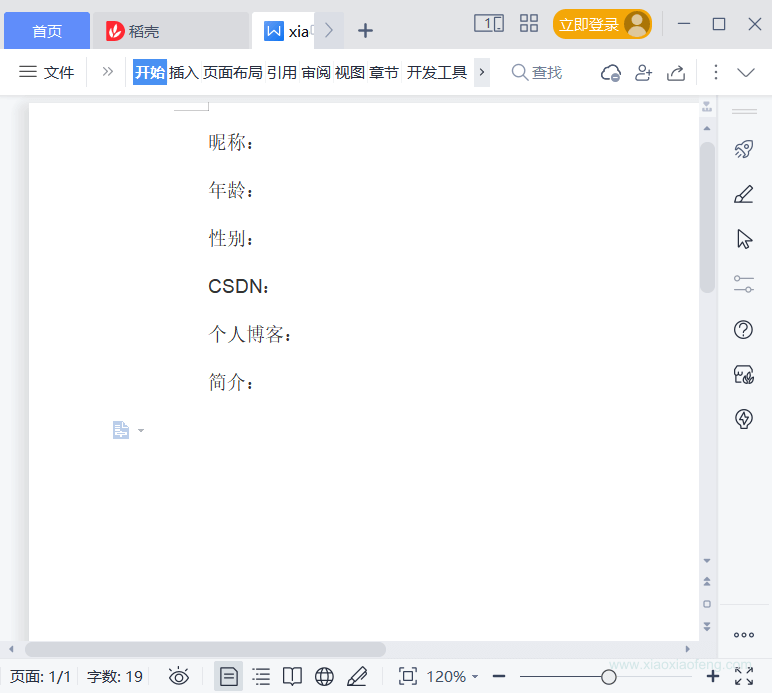
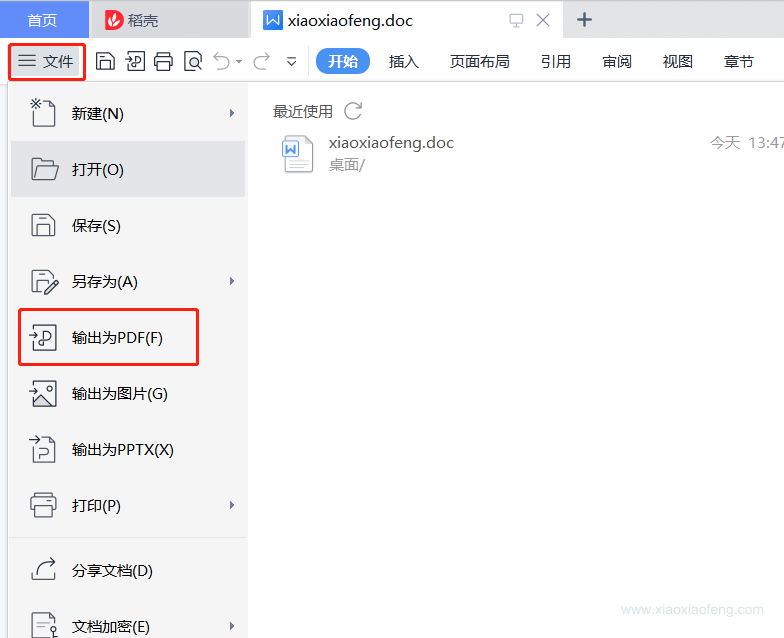
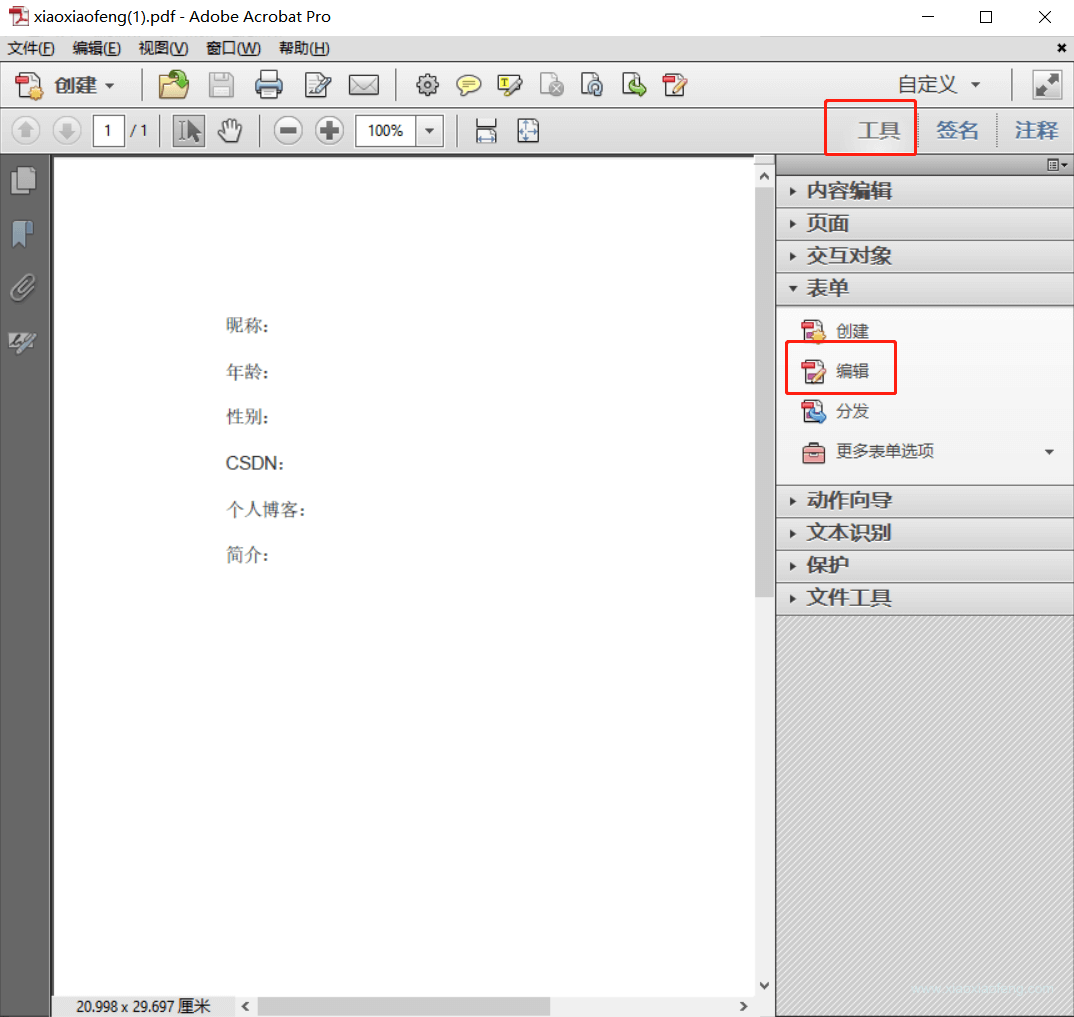
使用Adobe Acrobat软件操作pdf,这里用的是这个软件,只要能实现这个功能,其他的软件也可~
选择表单编辑哈,我们要在对应的坑上添加表单占位
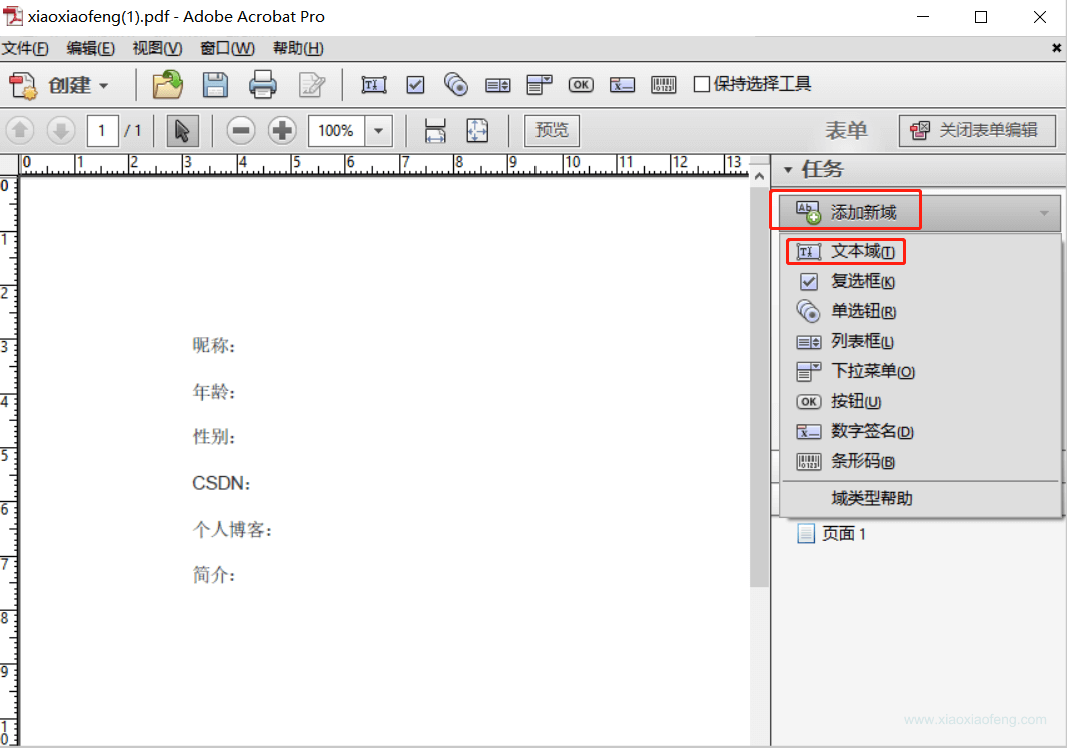
在表单上添加文本域即可,所有的格式都用文本域即可,这里只是占坑。
对应的域名称要与程序的名称对应,方便后面数据填充,不然后面需要手动处理赋值。
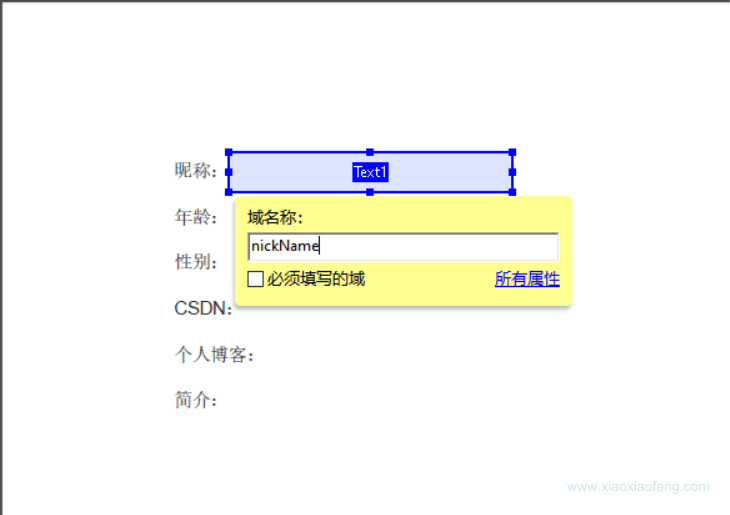
创建个简单的模板吧,要注意填充的空间要充足,不然会出现数据展示不全呦~
效果如下:
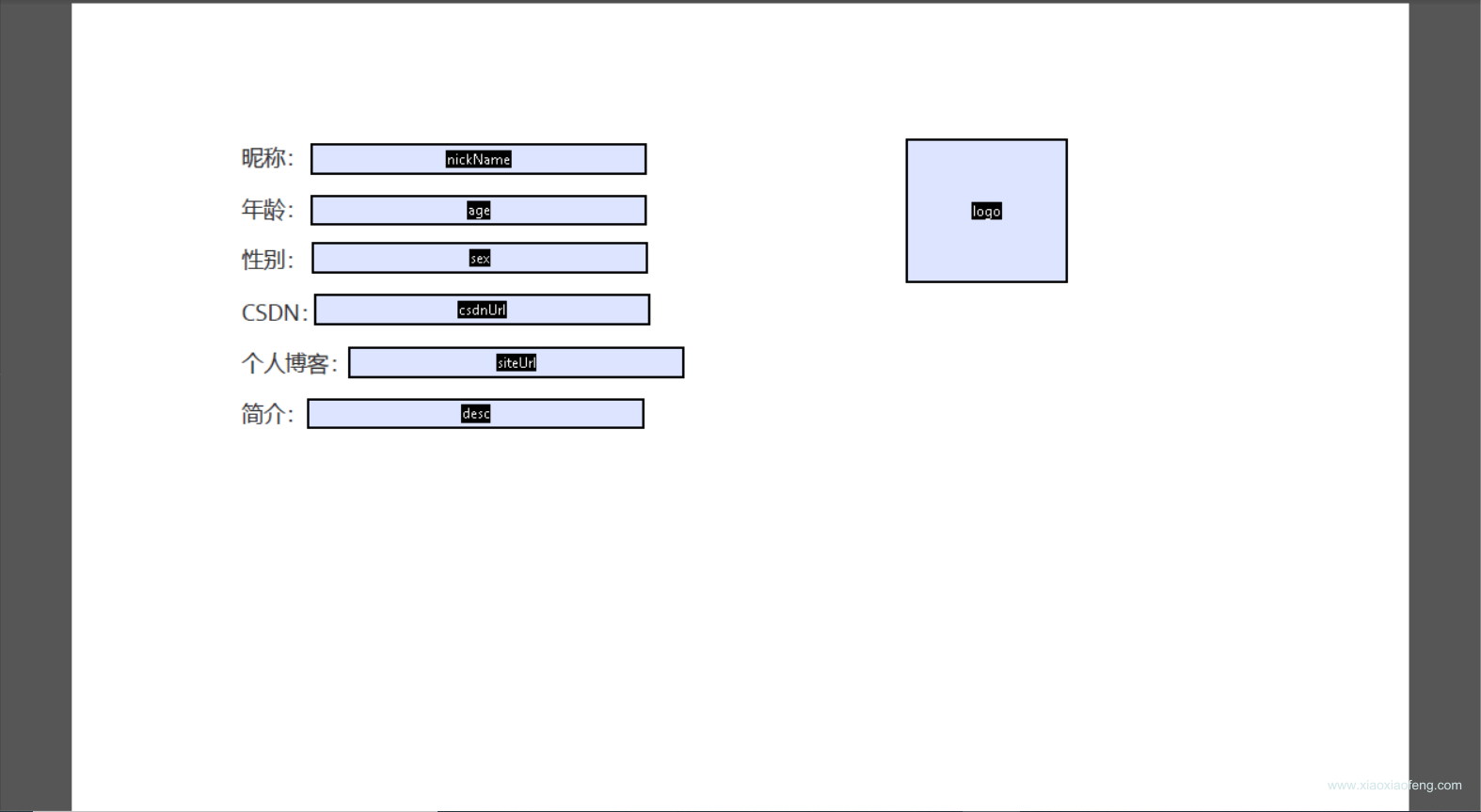
好了,到这里模板就生成好了,我们保存一下,然后放在我们的/resources/templates目录下
在util包下创建PdfUtil.java工具类,代码如下:
package com.maple.demo.util;

import com.itextpdf.text.Document;
import com.itextpdf.text.DocumentException;
import com.itextpdf.text.Image;
import com.itextpdf.text.Rectangle;
import com.itextpdf.text.pdf.*;

import javax.servlet.ServletOutputStream;
import java.io.ByteArrayOutputStream;
import java.io.IOException;
import java.util.Map;
import java.util.Objects;


/**
 * @author 笑小枫
 * @date 2022/8/15
 * @see <a href="https://www.xiaoxiaofeng.com">https://www.xiaoxiaofeng.com</a>
 */
public class PdfUtil {

    private PdfUtil() {

    }

    /**
     * 利用模板生成pdf
     *
     * @param data         写入的数据
     * @param photoMap     图片信息
     * @param out          自定义保存pdf的文件流
     * @param templatePath pdf模板路径
     */
    public static void fillTemplate(Map<String, Object> data, Map<String, String> photoMap, ServletOutputStream out, String templatePath) {
        PdfReader reader;
        ByteArrayOutputStream bos;
        PdfStamper stamper;
        try {
            // 读取pdf模板
            reader = new PdfReader(templatePath);
            bos = new ByteArrayOutputStream();
            stamper = new PdfStamper(reader, bos);
            AcroFields acroFields = stamper.getAcroFields();
            // 赋值
            for (String name : acroFields.getFields().keySet()) {
                String value = data.get(name) != null ? data.get(name).toString() : null;
                acroFields.setField(name, value);
            }

            // 图片赋值
            for (Map.Entry<String, String> entry : photoMap.entrySet()) {
                if (Objects.isNull(entry.getKey())) {
                    continue;
                }
                String key = entry.getKey();
                String url = entry.getValue();
                // 根据地址读取需要放入pdf中的图片
                Image image = Image.getInstance(url);
                // 设置图片在哪一页
                PdfContentByte overContent = stamper.getOverContent(acroFields.getFieldPositions(key).get(0).page);
                // 获取模板中图片域的大小
                Rectangle signRect = acroFields.getFieldPositions(key).get(0).position;
                float x = signRect.getLeft();
                float y = signRect.getBottom();
                // 图片等比缩放
                image.scaleAbsolute(signRect.getWidth(), signRect.getHeight());
                // 图片位置
                image.setAbsolutePosition(x, y);
                // 在该页加入图片
                overContent.addImage(image);
            }

            // 如果为false那么生成的PDF文件还能编辑,一定要设为true
            stamper.setFormFlattening(true);
            stamper.close();
            Document doc = new Document();
            PdfCopy copy = new PdfCopy(doc, out);
            doc.open();
            PdfImportedPage importPage = copy.getImportedPage(new PdfReader(bos.toByteArray()), 1);
            copy.addPage(importPage);
            doc.close();
            bos.close();
        } catch (IOException | DocumentException e) {
            e.printStackTrace();
        }
    }
}
在controller包下创建TestPdfController.java类,并i代码如下:
package com.maple.demo.controller;

import com.maple.demo.util.PdfUtil;
import io.swagger.annotations.Api;
import io.swagger.annotations.ApiOperation;
import lombok.extern.slf4j.Slf4j;
import org.springframework.web.bind.annotation.GetMapping;
import org.springframework.web.bind.annotation.RequestMapping;
import org.springframework.web.bind.annotation.RestController;

import javax.servlet.ServletOutputStream;
import javax.servlet.http.HttpServletResponse;
import java.io.IOException;
import java.util.HashMap;
import java.util.Map;

/**
 * @author 笑小枫
 * @date 2022/8/15
 * @see <a href="https://www.xiaoxiaofeng.com">https://www.xiaoxiaofeng.com</a>
 */
@Slf4j
@RestController
@RequestMapping("/example")
@Api(tags = "实例演示-PDF操作接口")
public class TestPdfController {

    @ApiOperation(value = "根据PDF模板导出PDF")
    @GetMapping("/exportPdf")
    public void exportPdf(HttpServletResponse response) {
        Map<String, Object> dataMap = new HashMap<>(16);
        dataMap.put("nickName", "笑小枫");
        dataMap.put("age", 18);
        dataMap.put("sex", "男");
        dataMap.put("csdnUrl", "https://zhangfz.blog.csdn.net/");
        dataMap.put("siteUrl", "https://www.xiaoxiaofeng.com/");
        dataMap.put("desc", "大家好,我是笑小枫。");

        Map<String, String> photoMap = new HashMap<>(16);
        photoMap.put("logo", "https://profile.csdnimg.cn/C/9/4/2_qq_34988304");

        // 设置response参数,可以打开下载页面
        response.reset();
        response.setCharacterEncoding("UTF-8");
        // 定义输出类型
        response.setContentType("application/PDF;charset=utf-8");
        // 设置名称
        response.setHeader("Content-Disposition", "attachment; filename=" + "xiaoxiaofeng.pdf");
        try (ServletOutputStream out = response.getOutputStream()) {
            // 模板路径记
            PdfUtil.fillTemplate(dataMap, photoMap, out, "src/main/resources/templates/xiaoxiaofeng.pdf");
        } catch (IOException e) {
            e.printStackTrace();
        }
    }
}
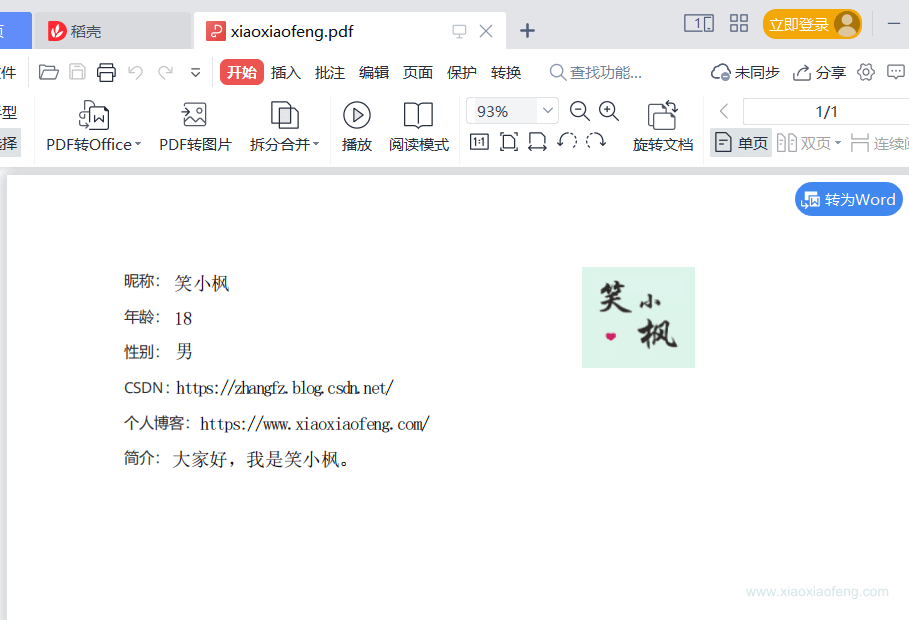
重启项目,在浏览器访问:http://localhost:6666/example/exportPdf
导出的文件效果如下:👇
完全基于代码生成PDF文件,这个就比较定制化了,这里只讲常见的操作,大家可以用作参考:
PDF生成的时候,有没有遇到过丢失中文字体的问题呢,唉~解决一下
先下载字体,这里用黑体演示哈,下载地址:https://www.zitijia.com/downloadpage?itemid=281258939050380345
下载完会得到一个Simhei.ttf文件,对我们就是要它
先在util包下创建一个字体工具类吧,代码如下:
注意:代码中相关的绝对路径要替换成自己的
package com.maple.demo.util;

import com.itextpdf.text.*;
import com.itextpdf.text.pdf.BaseFont;
import com.itextpdf.text.pdf.PdfPTable;

import java.io.IOException;
import java.util.List;

/**
 * @author 笑小枫
 * @date 2022/8/15
 * @see <a href="https://www.xiaoxiaofeng.com">https://www.xiaoxiaofeng.com</a>
 */
public class PdfFontUtil {

    private PdfFontUtil() {
    }

    /**
     * 基础配置,可以放相对路径,这里演示绝对路径,因为字体文件过大,这里不传到项目里面了,需要的自己下载
     * 下载地址:https://www.zitijia.com/downloadpage?itemid=281258939050380345
     */
    public static final String FONT = "D:\\font/Simhei.ttf";

    /**
     * 基础样式
     */
    public static final Font TITLE_FONT = FontFactory.getFont(FONT, BaseFont.IDENTITY_H, 20, Font.BOLD);
    public static final Font NODE_FONT = FontFactory.getFont(FONT, BaseFont.IDENTITY_H, 15, Font.BOLD);
    public static final Font BLOCK_FONT = FontFactory.getFont(FONT, BaseFont.IDENTITY_H, 13, Font.BOLD, BaseColor.BLACK);
    public static final Font INFO_FONT = FontFactory.getFont(FONT, BaseFont.IDENTITY_H, 12, Font.NORMAL, BaseColor.BLACK);
    public static final Font CONTENT_FONT = FontFactory.getFont(FONT, BaseFont.IDENTITY_H, BaseFont.NOT_EMBEDDED);


    /**
     * 段落样式获取
     */
    public static Paragraph getParagraph(String content, Font font, Integer alignment) {
        Paragraph paragraph = new Paragraph(content, font);
        if (alignment != null && alignment >= 0) {
            paragraph.setAlignment(alignment);
        }
        return paragraph;
    }

    /**
     * 图片样式
     */
    public static Image getImage(String imgPath, float width, float height) throws IOException, BadElementException {
        Image image = Image.getInstance(imgPath);
        image.setAlignment(Image.MIDDLE);
        if (width > 0 && height > 0) {
            image.scaleAbsolute(width, height);
        }
        return image;
    }

    /**
     * 表格生成
     */
    public static PdfPTable getPdfTable(int numColumns, float totalWidth) {
        // 表格处理
        PdfPTable table = new PdfPTable(numColumns);
        // 设置表格宽度比例为%100
        table.setWidthPercentage(100);
        // 设置宽度:宽度平均
        table.setTotalWidth(totalWidth);
        // 锁住宽度
        table.setLockedWidth(true);
        // 设置表格上面空白宽度
        table.setSpacingBefore(10f);
        // 设置表格下面空白宽度
        table.setSpacingAfter(10f);
        // 设置表格默认为无边框
        table.getDefaultCell().setBorder(0);
        table.setPaddingTop(50);
        table.setSplitLate(false);
        return table;
    }

    /**
     * 表格内容带样式
     */
    public static void addTableCell(PdfPTable dataTable, Font font, List<String> cellList) {
        for (String content : cellList) {
            dataTable.addCell(getParagraph(content, font, -1));
        }
    }
}
继续在util包下的PdfUtil.java工具类里添加,因为本文涉及到的操作比较多,这里只贴相关代码,最后统一贴一个完成的文件
注意:代码中相关的绝对路径要替换成自己的
	/**
     * 创建PDF,并保存到指定位置
     *
     * @param filePath 保存路径
     */
    public static void createPdfPage(String filePath) {
        // FileOutputStream 需要关闭,释放资源
        try (FileOutputStream outputStream = new FileOutputStream(filePath)) {
            // 创建文档
            Document document = new Document();
            PdfWriter writer = PdfWriter.getInstance(document, outputStream);
            document.open();
            // 报告标题
            document.add(PdfFontUtil.getParagraph("笑小枫的网站介绍", TITLE_FONT, 1));
            document.add(PdfFontUtil.getParagraph("\n网站名称:笑小枫(www.xiaoxiaofeng.com)", INFO_FONT, -1));
            document.add(PdfFontUtil.getParagraph("\n生成时间:2022-07-02\n\n", INFO_FONT, -1));
            // 报告内容
            // 段落标题 + 报表图
            document.add(PdfFontUtil.getParagraph("文章数据统计", NODE_FONT, -1));
            document.add(PdfFontUtil.getParagraph("\n· 网站首页图\n\n", BLOCK_FONT, -1));
            // 设置图片宽高
            float documentWidth = document.getPageSize().getWidth() - document.leftMargin() - document.rightMargin();
            float documentHeight = documentWidth / 580 * 320;
            document.add(PdfFontUtil.getImage("D:\\xiaoxiaofeng.jpg", documentWidth - 80, documentHeight - 80));
            // 数据表格
            document.add(PdfFontUtil.getParagraph("\n· 数据详情\n\n", BLOCK_FONT, -1));
            // 生成6列的表格
            PdfPTable dataTable = PdfFontUtil.getPdfTable(6, 500);
            // 设置表格
            List<String> tableHeadList = tableHead();
            List<List<String>> tableDataList = getTableData();
            PdfFontUtil.addTableCell(dataTable, CONTENT_FONT, tableHeadList);
            for (List<String> tableData : tableDataList) {
                PdfFontUtil.addTableCell(dataTable, CONTENT_FONT, tableData);
            }
            document.add(dataTable);
            document.add(PdfFontUtil.getParagraph("\n· 报表描述\n\n", BLOCK_FONT, -1));
            document.add(PdfFontUtil.getParagraph("数据报告可以监控每天的推广情况," +
                    "可以针对不同的数据表现进行分析,以提升推广效果。", CONTENT_FONT, -1));
            document.newPage();
            document.close();
            writer.close();
        } catch (Exception e) {
            e.printStackTrace();
        }
    }

    /**
     * 模拟数据
     */
    private static List<String> tableHead() {
        List<String> tableHeadList = new ArrayList<>();
        tableHeadList.add("省份");
        tableHeadList.add("城市");
        tableHeadList.add("数量");
        tableHeadList.add("百分比1");
        tableHeadList.add("百分比2");
        tableHeadList.add("百分比3");
        return tableHeadList;
    }

    /**
     * 模拟数据
     */
    private static List<List<String>> getTableData() {
        List<List<String>> tableDataList = new ArrayList<>();
        for (int i = 0; i < 3; i++) {
            List<String> tableData = new ArrayList<>();
            tableData.add("浙江" + i);
            tableData.add("杭州" + i);
            tableData.add("276" + i);
            tableData.add("33.3%");
            tableData.add("34.3%");
            tableData.add("35.3%");
            tableDataList.add(tableData);
        }
        return tableDataList;
    }
在controller包下的TestPdfController.java类中添加代码,因为本文涉及到的操作比较多,这里只贴相关代码,最后统一贴一个完成的文件,相关代码如下:
注意:代码中相关的绝对路径要替换成自己的
	@ApiOperation(value = "测试纯代码生成PDF到指定目录")
    @GetMapping("/createPdfLocal")
    public void create() {
        PdfUtil.createPdfPage("D:\\xxf.pdf");
    }
重启项目,在浏览器访问:http://localhost:6666/example/createPdfLocal
可以在D:\\test目录下看到xxf.pdf文件
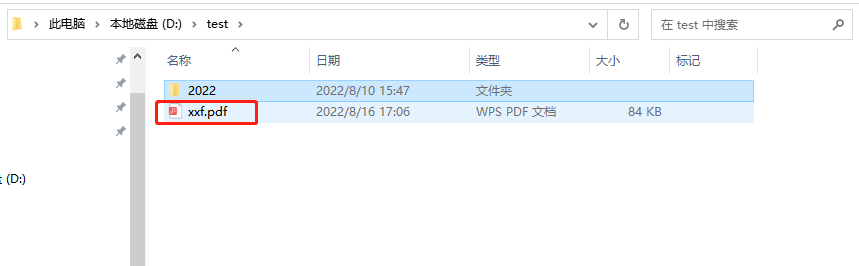
我们打开看一下效果:
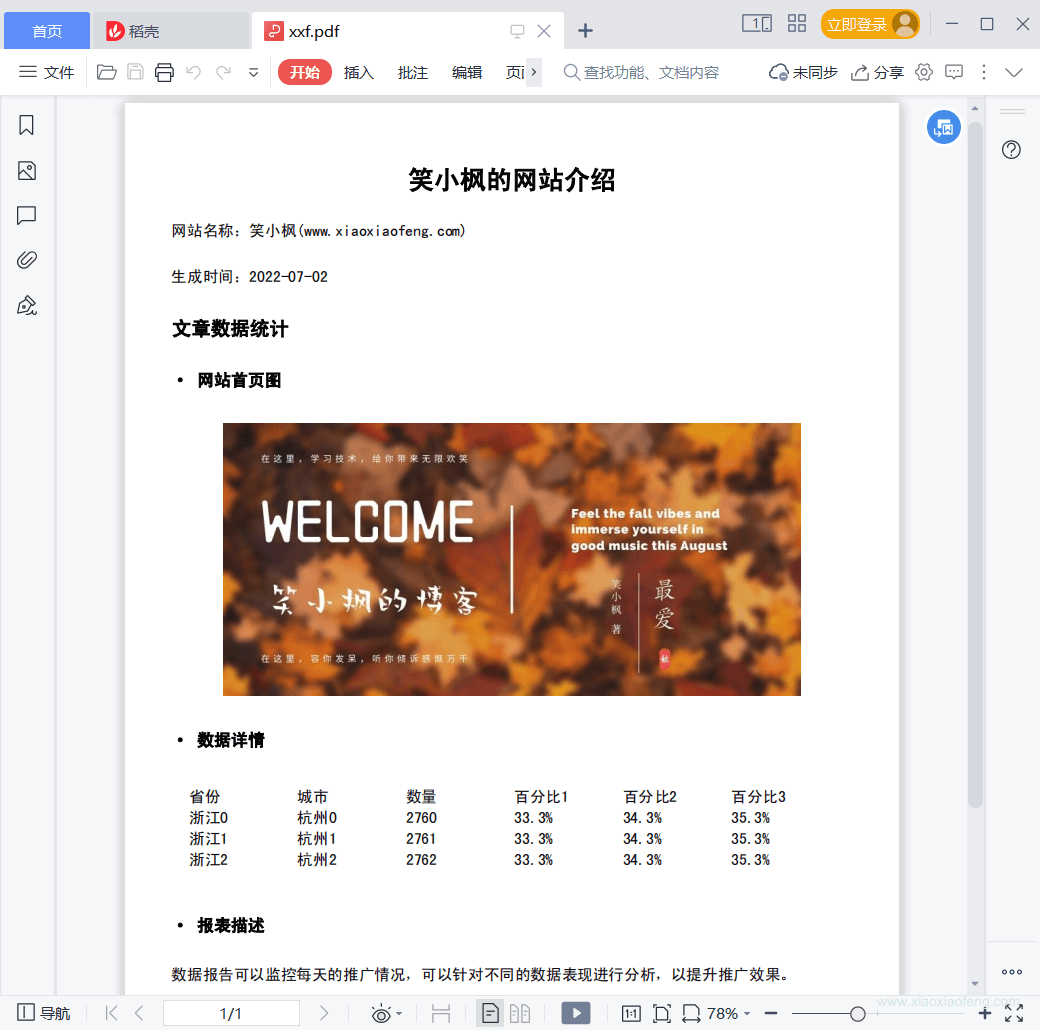
继续在util包下的PdfUtil.java工具类里添加,因为本文涉及到的操作比较多,这里只贴相关代码,最后统一贴一个完成的文件。
/**
     * 合并pdf文件
     *
     * @param files   要合并文件数组(绝对路径如{ "D:\\test\\1.pdf", "D:\\test\\2.pdf" , "D:\\test\\3.pdf"})
     * @param newFile 合并后存放的目录D:\\test\\xxf-merge.pdf
     * @return boolean 生成功返回true, 否則返回false
     */
    public static boolean mergePdfFiles(String[] files, String newFile) {
        boolean retValue = false;
        Document document;
        try (FileOutputStream fileOutputStream = new FileOutputStream(newFile)) {
            document = new Document(new PdfReader(files[0]).getPageSize(1));
            PdfCopy copy = new PdfCopy(document, fileOutputStream);
            document.open();
            for (String file : files) {
                PdfReader reader = new PdfReader(file);
                int n = reader.getNumberOfPages();
                for (int j = 1; j <= n; j++) {
                    document.newPage();
                    PdfImportedPage page = copy.getImportedPage(reader, j);
                    copy.addPage(page);
                }
            }
            retValue = true;
            document.close();
        } catch (Exception e) {
            e.printStackTrace();
        }
        return retValue;
    }
在controller包下的TestPdfController.java类中添加代码,因为本文涉及到的操作比较多,这里只贴相关代码,最后统一贴一个完成的文件,相关代码如下:
注意:代码中相关的绝对路径要替换成自己的
    @ApiOperation(value = "测试合并PDF到指定目录")
    @GetMapping("/mergePdf")
    public Boolean mergePdf() {
        String[] files = {"D:\\test\\1.pdf", "D:\\test\\2.pdf"};
        String newFile = "D:\\test\\xxf-merge.pdf";
        return PdfUtil.mergePdfFiles(files, newFile);
    }
我们首先要准备两个文件D:\\test\\1.pdf,D:\\test\\2.pdf,这里可以指定文件,也可以是生成的pdf文件。
如果是处理生成的文件,这里说下思想:程序创建一个临时目录,注意要唯一命名,然后将生成PDF文件保存到这个目录,然后从这个目录下拿到pdf进行处理,最后处理完成,保存到对应的目录下,删除这个临时目录和下面的文件。这里不做演示。《合并PDF,并下载》里面略有涉及,但是处理的单个文件,稍微改造即可
重启项目,在浏览器访问:http://localhost:6666/example/mergePdf
可以在D:\\test目录下看到xxf-merge文件
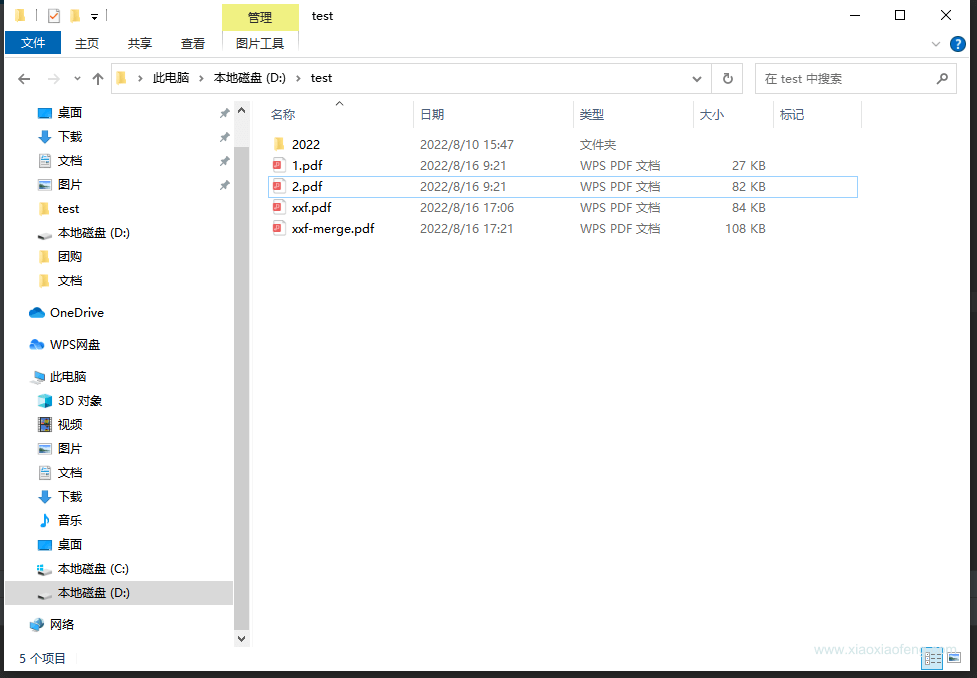
打开看一下效果:
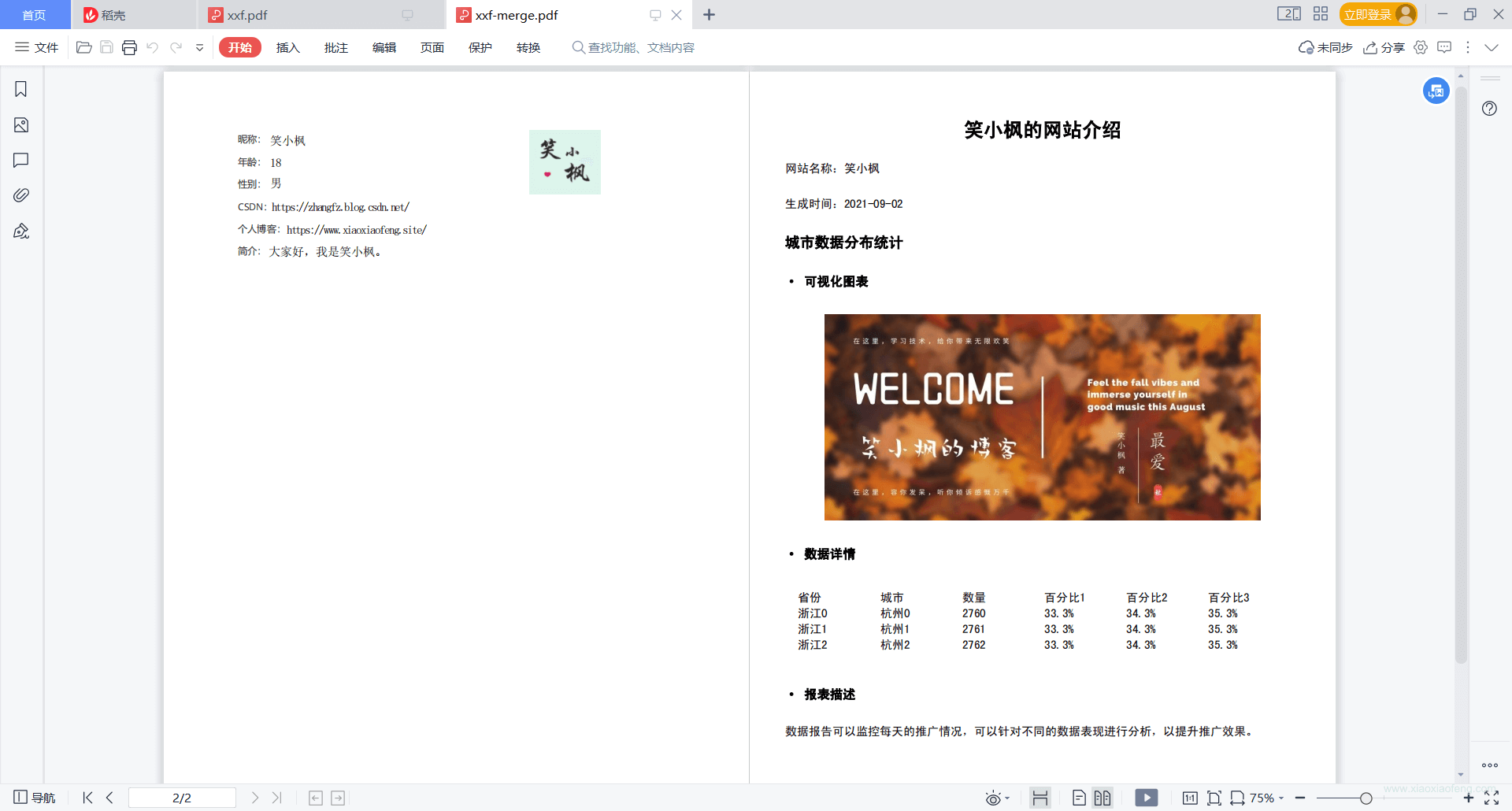
继续在util包下的PdfUtil.java工具类里添加,这里只贴将文件转为输出流,并删除文件的相关代码,合并相关代码见《合并PDF,并保存》的util类。
    /**
     * 读取PDF,读取后删除PDF,适用于生成后需要导出PDF,创建临时文件
     */
    public static void readDeletePdf(String fileName, ServletOutputStream outputStream) {
        File file = new File(fileName);
        if (!file.exists()) {
            System.out.println(fileName + "文件不存在");
        }
        try (InputStream in = new FileInputStream(fileName)) {
            IOUtils.copy(in, outputStream);
        } catch (Exception e) {
            e.printStackTrace();
        } finally {
            try {
                Files.delete(file.toPath());
            } catch (IOException e) {
                e.printStackTrace();
            }
        }
    }
在controller包下的TestPdfController.java类中添加代码,因为本文涉及到的操作比较多,这里只贴相关代码,最后统一贴一个完成的文件,相关代码如下:
注意:代码中相关的绝对路径要替换成自己的
@ApiOperation(value = "测试合并PDF后并导出")
    @GetMapping("/exportMergePdf")
    public void createPdf(HttpServletResponse response) {
        // 设置response参数,可以打开下载页面
        response.reset();
        response.setCharacterEncoding("UTF-8");
        // 定义输出类型
        response.setContentType("application/PDF;charset=utf-8");
        // 设置名称
        response.setHeader("Content-Disposition", "attachment; filename=" + "xiaoxiaofeng.pdf");
        try (ServletOutputStream out = response.getOutputStream()) {
            String[] files = {"D:\\test\\1.pdf", "D:\\test\\2.pdf"};
            // 生成为临时文件,转换为流后,再删除该文件
            String newFile = "src\\main\\resources\\templates\\" + UUID.randomUUID() + ".pdf";
            boolean isOk = PdfUtil.mergePdfFiles(files, newFile);
            if (isOk) {
                PdfUtil.readDeletePdf(newFile, out);
            }
        } catch (IOException e) {
            e.printStackTrace();
        }
    }
重启项目,在浏览器访问:http://localhost:6666/example/exportMergePdf会提示我们下载。
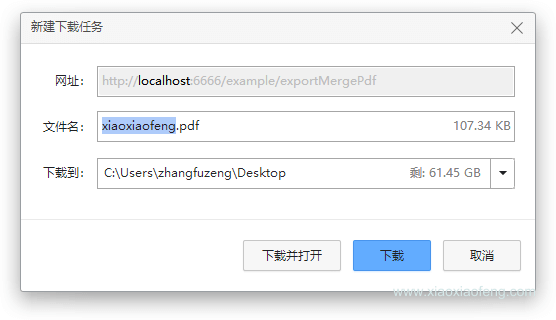
package com.maple.demo.util;

import com.itextpdf.text.Document;
import com.itextpdf.text.DocumentException;
import com.itextpdf.text.Image;
import com.itextpdf.text.Rectangle;
import com.itextpdf.text.pdf.*;
import org.apache.commons.compress.utils.IOUtils;

import javax.servlet.ServletOutputStream;
import java.io.*;
import java.nio.file.Files;
import java.util.ArrayList;
import java.util.List;
import java.util.Map;
import java.util.Objects;

import static com.maple.demo.util.PdfFontUtil.*;

/**
 * @author 笑小枫
 * @date 2022/8/15
 * @see <a href="https://www.xiaoxiaofeng.com">https://www.xiaoxiaofeng.com</a>
 */
public class PdfUtil {

    private PdfUtil() {

    }

    /**
     * 利用模板生成pdf
     *
     * @param data         写入的数据
     * @param photoMap     图片信息
     * @param out          自定义保存pdf的文件流
     * @param templatePath pdf模板路径
     */
    public static void fillTemplate(Map<String, Object> data, Map<String, String> photoMap, ServletOutputStream out, String templatePath) {
        PdfReader reader;
        ByteArrayOutputStream bos;
        PdfStamper stamper;
        try {
            // 读取pdf模板
            reader = new PdfReader(templatePath);
            bos = new ByteArrayOutputStream();
            stamper = new PdfStamper(reader, bos);
            AcroFields acroFields = stamper.getAcroFields();
            // 赋值
            for (String name : acroFields.getFields().keySet()) {
                String value = data.get(name) != null ? data.get(name).toString() : null;
                acroFields.setField(name, value);
            }

            // 图片赋值
            for (Map.Entry<String, String> entry : photoMap.entrySet()) {
                if (Objects.isNull(entry.getKey())) {
                    continue;
                }
                String key = entry.getKey();
                String url = entry.getValue();
                // 根据地址读取需要放入pdf中的图片
                Image image = Image.getInstance(url);
                // 设置图片在哪一页
                PdfContentByte overContent = stamper.getOverContent(acroFields.getFieldPositions(key).get(0).page);
                // 获取模板中图片域的大小
                Rectangle signRect = acroFields.getFieldPositions(key).get(0).position;
                float x = signRect.getLeft();
                float y = signRect.getBottom();
                // 图片等比缩放
                image.scaleAbsolute(signRect.getWidth(), signRect.getHeight());
                // 图片位置
                image.setAbsolutePosition(x, y);
                // 在该页加入图片
                overContent.addImage(image);
            }

            // 如果为false那么生成的PDF文件还能编辑,一定要设为true
            stamper.setFormFlattening(true);
            stamper.close();
            Document doc = new Document();
            PdfCopy copy = new PdfCopy(doc, out);
            doc.open();
            PdfImportedPage importPage = copy.getImportedPage(new PdfReader(bos.toByteArray()), 1);
            copy.addPage(importPage);
            doc.close();
            bos.close();
        } catch (IOException | DocumentException e) {
            e.printStackTrace();
        }
    }

    /**
     * 创建PDF,并保存到指定位置
     *
     * @param filePath 保存路径
     */
    public static void createPdfPage(String filePath) {
        // FileOutputStream 需要关闭,释放资源
        try (FileOutputStream outputStream = new FileOutputStream(filePath)) {
            // 创建文档
            Document document = new Document();
            PdfWriter writer = PdfWriter.getInstance(document, outputStream);
            document.open();
            // 报告标题
            document.add(PdfFontUtil.getParagraph("笑小枫的网站介绍", TITLE_FONT, 1));
            document.add(PdfFontUtil.getParagraph("\n网站名称:笑小枫(www.xiaoxiaofeng.com)", INFO_FONT, -1));
            document.add(PdfFontUtil.getParagraph("\n生成时间:2022-07-02\n\n", INFO_FONT, -1));
            // 报告内容
            // 段落标题 + 报表图
            document.add(PdfFontUtil.getParagraph("文章数据统计", NODE_FONT, -1));
            document.add(PdfFontUtil.getParagraph("\n· 网站首页图\n\n", BLOCK_FONT, -1));
            // 设置图片宽高
            float documentWidth = document.getPageSize().getWidth() - document.leftMargin() - document.rightMargin();
            float documentHeight = documentWidth / 580 * 320;
            document.add(PdfFontUtil.getImage("D:\\xiaoxiaofeng.jpg", documentWidth - 80, documentHeight - 80));
            // 数据表格
            document.add(PdfFontUtil.getParagraph("\n· 数据详情\n\n", BLOCK_FONT, -1));
            // 生成6列的表格
            PdfPTable dataTable = PdfFontUtil.getPdfTable(6, 500);
            // 设置表格
            List<String> tableHeadList = tableHead();
            List<List<String>> tableDataList = getTableData();
            PdfFontUtil.addTableCell(dataTable, CONTENT_FONT, tableHeadList);
            for (List<String> tableData : tableDataList) {
                PdfFontUtil.addTableCell(dataTable, CONTENT_FONT, tableData);
            }
            document.add(dataTable);
            document.add(PdfFontUtil.getParagraph("\n· 报表描述\n\n", BLOCK_FONT, -1));
            document.add(PdfFontUtil.getParagraph("数据报告可以监控每天的推广情况," +
                    "可以针对不同的数据表现进行分析,以提升推广效果。", CONTENT_FONT, -1));
            document.newPage();
            document.close();
            writer.close();
        } catch (Exception e) {
            e.printStackTrace();
        }
    }

    /**
     * 模拟数据
     */
    private static List<String> tableHead() {
        List<String> tableHeadList = new ArrayList<>();
        tableHeadList.add("省份");
        tableHeadList.add("城市");
        tableHeadList.add("数量");
        tableHeadList.add("百分比1");
        tableHeadList.add("百分比2");
        tableHeadList.add("百分比3");
        return tableHeadList;
    }

    /**
     * 模拟数据
     */
    private static List<List<String>> getTableData() {
        List<List<String>> tableDataList = new ArrayList<>();
        for (int i = 0; i < 3; i++) {
            List<String> tableData = new ArrayList<>();
            tableData.add("浙江" + i);
            tableData.add("杭州" + i);
            tableData.add("276" + i);
            tableData.add("33.3%");
            tableData.add("34.3%");
            tableData.add("35.3%");
            tableDataList.add(tableData);
        }
        return tableDataList;
    }

    /**
     * 合并pdf文件
     *
     * @param files   要合并文件数组(绝对路径如{ "D:\\test\\1.pdf", "D:\\test\\2.pdf" , "D:\\test\\3.pdf"})
     * @param newFile 合并后存放的目录D:\\test\\xxf-merge.pdf
     * @return boolean 生成功返回true, 否則返回false
     */
    public static boolean mergePdfFiles(String[] files, String newFile) {
        boolean retValue = false;
        Document document;
        try (FileOutputStream fileOutputStream = new FileOutputStream(newFile)) {
            document = new Document(new PdfReader(files[0]).getPageSize(1));
            PdfCopy copy = new PdfCopy(document, fileOutputStream);
            document.open();
            for (String file : files) {
                PdfReader reader = new PdfReader(file);
                int n = reader.getNumberOfPages();
                for (int j = 1; j <= n; j++) {
                    document.newPage();
                    PdfImportedPage page = copy.getImportedPage(reader, j);
                    copy.addPage(page);
                }
            }
            retValue = true;
            document.close();
        } catch (Exception e) {
            e.printStackTrace();
        }
        return retValue;
    }

    /**
     * 读取PDF,读取后删除PDF,适用于生成后需要导出PDF,创建临时文件
     */
    public static void readDeletePdf(String fileName, ServletOutputStream outputStream) {
        File file = new File(fileName);
        if (!file.exists()) {
            System.out.println(fileName + "文件不存在");
        }
        try (InputStream in = new FileInputStream(fileName)) {
            IOUtils.copy(in, outputStream);
        } catch (Exception e) {
            e.printStackTrace();
        } finally {
            try {
                Files.delete(file.toPath());
            } catch (IOException e) {
                e.printStackTrace();
            }
        }
    }
}
package com.maple.demo.util;

import com.itextpdf.text.*;
import com.itextpdf.text.pdf.BaseFont;
import com.itextpdf.text.pdf.PdfPTable;

import java.io.IOException;
import java.util.List;

/**
 * @author 笑小枫
 * @date 2022/8/15
 * @see <a href="https://www.xiaoxiaofeng.com">https://www.xiaoxiaofeng.com</a>
 */
public class PdfFontUtil {

    private PdfFontUtil() {
    }

    /**
     * 基础配置,可以放相对路径,这里演示绝对路径,因为字体文件过大,这里不传到项目里面了,需要的自己下载
     * 下载地址:https://www.zitijia.com/downloadpage?itemid=281258939050380345
     */
    public static final String FONT = "D:\\font/Simhei.ttf";

    /**
     * 基础样式
     */
    public static final Font TITLE_FONT = FontFactory.getFont(FONT, BaseFont.IDENTITY_H, 20, Font.BOLD);
    public static final Font NODE_FONT = FontFactory.getFont(FONT, BaseFont.IDENTITY_H, 15, Font.BOLD);
    public static final Font BLOCK_FONT = FontFactory.getFont(FONT, BaseFont.IDENTITY_H, 13, Font.BOLD, BaseColor.BLACK);
    public static final Font INFO_FONT = FontFactory.getFont(FONT, BaseFont.IDENTITY_H, 12, Font.NORMAL, BaseColor.BLACK);
    public static final Font CONTENT_FONT = FontFactory.getFont(FONT, BaseFont.IDENTITY_H, BaseFont.NOT_EMBEDDED);


    /**
     * 段落样式获取
     */
    public static Paragraph getParagraph(String content, Font font, Integer alignment) {
        Paragraph paragraph = new Paragraph(content, font);
        if (alignment != null && alignment >= 0) {
            paragraph.setAlignment(alignment);
        }
        return paragraph;
    }

    /**
     * 图片样式
     */
    public static Image getImage(String imgPath, float width, float height) throws IOException, BadElementException {
        Image image = Image.getInstance(imgPath);
        image.setAlignment(Image.MIDDLE);
        if (width > 0 && height > 0) {
            image.scaleAbsolute(width, height);
        }
        return image;
    }

    /**
     * 表格生成
     */
    public static PdfPTable getPdfTable(int numColumns, float totalWidth) {
        // 表格处理
        PdfPTable table = new PdfPTable(numColumns);
        // 设置表格宽度比例为%100
        table.setWidthPercentage(100);
        // 设置宽度:宽度平均
        table.setTotalWidth(totalWidth);
        // 锁住宽度
        table.setLockedWidth(true);
        // 设置表格上面空白宽度
        table.setSpacingBefore(10f);
        // 设置表格下面空白宽度
        table.setSpacingAfter(10f);
        // 设置表格默认为无边框
        table.getDefaultCell().setBorder(0);
        table.setPaddingTop(50);
        table.setSplitLate(false);
        return table;
    }

    /**
     * 表格内容带样式
     */
    public static void addTableCell(PdfPTable dataTable, Font font, List<String> cellList) {
        for (String content : cellList) {
            dataTable.addCell(getParagraph(content, font, -1));
        }
    }
}
package com.maple.demo.controller;

import com.maple.demo.util.PdfUtil;
import io.swagger.annotations.Api;
import io.swagger.annotations.ApiOperation;
import lombok.extern.slf4j.Slf4j;
import org.springframework.web.bind.annotation.GetMapping;
import org.springframework.web.bind.annotation.RequestMapping;
import org.springframework.web.bind.annotation.RestController;

import javax.servlet.ServletOutputStream;
import javax.servlet.http.HttpServletResponse;
import java.io.IOException;
import java.util.HashMap;
import java.util.Map;
import java.util.UUID;

/**
 * @author 笑小枫
 * @date 2022/8/15
 * @see <a href="https://www.xiaoxiaofeng.com">https://www.xiaoxiaofeng.com</a>
 */
@Slf4j
@RestController
@RequestMapping("/example")
@Api(tags = "实例演示-PDF操作接口")
public class TestPdfController {

    @ApiOperation(value = "根据PDF模板导出PDF")
    @GetMapping("/exportPdf")
    public void exportPdf(HttpServletResponse response) {
        Map<String, Object> dataMap = new HashMap<>(16);
        dataMap.put("nickName", "笑小枫");
        dataMap.put("age", 18);
        dataMap.put("sex", "男");
        dataMap.put("csdnUrl", "https://zhangfz.blog.csdn.net/");
        dataMap.put("siteUrl", "https://www.xiaoxiaofeng.com/");
        dataMap.put("desc", "大家好,我是笑小枫。");

        Map<String, String> photoMap = new HashMap<>(16);
        photoMap.put("logo", "https://profile.csdnimg.cn/C/9/4/2_qq_34988304");

        // 设置response参数,可以打开下载页面
        response.reset();
        response.setCharacterEncoding("UTF-8");
        // 定义输出类型
        response.setContentType("application/PDF;charset=utf-8");
        // 设置名称
        response.setHeader("Content-Disposition", "attachment; filename=" + "xiaoxiaofeng.pdf");
        try {
            ServletOutputStream out = response.getOutputStream();
            // 模板路径记
            PdfUtil.fillTemplate(dataMap, photoMap, out, "src/main/resources/templates/xiaoxiaofeng.pdf");
        } catch (IOException e) {
            e.printStackTrace();
        }
    }

    @ApiOperation(value = "测试纯代码生成PDF到指定目录")
    @GetMapping("/createPdfLocal")
    public void create() {
        PdfUtil.createPdfPage("D:\\test\\xxf.pdf");
    }

    @ApiOperation(value = "测试合并PDF到指定目录")
    @GetMapping("/mergePdf")
    public Boolean mergePdf() {
        String[] files = {"D:\\test\\1.pdf", "D:\\test\\2.pdf"};
        String newFile = "D:\\test\\xxf-merge.pdf";
        return PdfUtil.mergePdfFiles(files, newFile);
    }

    @ApiOperation(value = "测试合并PDF后并导出")
    @GetMapping("/exportMergePdf")
    public void createPdf(HttpServletResponse response) {
        // 设置response参数,可以打开下载页面
        response.reset();
        response.setCharacterEncoding("UTF-8");
        // 定义输出类型
        response.setContentType("application/PDF;charset=utf-8");
        // 设置名称
        response.setHeader("Content-Disposition", "attachment; filename=" + "xiaoxiaofeng.pdf");
        try (ServletOutputStream out = response.getOutputStream()) {
            String[] files = {"D:\\test\\1.pdf", "D:\\test\\2.pdf"};
            // 生成为临时文件,转换为流后,再删除该文件
            String newFile = "src\\main\\resources\\templates\\" + UUID.randomUUID() + ".pdf";
            boolean isOk = PdfUtil.mergePdfFiles(files, newFile);
            if (isOk) {
                PdfUtil.readDeletePdf(newFile, out);
            }
        } catch (IOException e) {
            e.printStackTrace();
        }
    }
}
本系列的源码已同步在Github:https://github.com/hack-feng/maple-demo
我有一个Ruby程序,它使用rubyzip压缩XML文件的目录树。gem。我的问题是文件开始变得很重,我想提高压缩级别,因为压缩时间不是问题。我在rubyzipdocumentation中找不到一种为创建的ZIP文件指定压缩级别的方法。有人知道如何更改此设置吗?是否有另一个允许指定压缩级别的Ruby库? 最佳答案 这是我通过查看rubyzip内部创建的代码。level=Zlib::BEST_COMPRESSIONZip::ZipOutputStream.open(zip_file)do|zip|Dir.glob("**/*")d
关闭。这个问题是opinion-based.它目前不接受答案。想要改进这个问题?更新问题,以便editingthispost可以用事实和引用来回答它.关闭4年前。Improvethisquestion我想在固定时间创建一系列低音和高音调的哔哔声。例如:在150毫秒时发出高音调的蜂鸣声在151毫秒时发出低音调的蜂鸣声200毫秒时发出低音调的蜂鸣声250毫秒的高音调蜂鸣声有没有办法在Ruby或Python中做到这一点?我真的不在乎输出编码是什么(.wav、.mp3、.ogg等等),但我确实想创建一个输出文件。
在MRIRuby中我可以这样做:deftransferinternal_server=self.init_serverpid=forkdointernal_server.runend#Maketheserverprocessrunindependently.Process.detach(pid)internal_client=self.init_client#Dootherstuffwithconnectingtointernal_server...internal_client.post('somedata')ensure#KillserverProcess.kill('KILL',
我正在编写一个小脚本来定位aws存储桶中的特定文件,并创建一个临时验证的url以发送给同事。(理想情况下,这将创建类似于在控制台上右键单击存储桶中的文件并复制链接地址的结果)。我研究过回形针,它似乎不符合这个标准,但我可能只是不知道它的全部功能。我尝试了以下方法:defauthenticated_url(file_name,bucket)AWS::S3::S3Object.url_for(file_name,bucket,:secure=>true,:expires=>20*60)end产生这种类型的结果:...-1.amazonaws.com/file_path/file.zip.A
这里是Ruby新手。完成一些练习后碰壁了。练习:计算一系列成绩的字母等级创建一个方法get_grade来接受测试分数数组。数组中的每个分数应介于0和100之间,其中100是最大分数。计算平均分并将字母等级作为字符串返回,即“A”、“B”、“C”、“D”、“E”或“F”。我一直返回错误:avg.rb:1:syntaxerror,unexpectedtLBRACK,expecting')'defget_grade([100,90,80])^avg.rb:1:syntaxerror,unexpected')',expecting$end这是我目前所拥有的。我想坚持使用下面的方法或.join,
我是Rails的新手,所以请原谅简单的问题。我正在为一家公司创建一个网站。那家公司想在网站上展示它的客户。我想让客户自己管理这个。我正在为“客户”生成一个表格,我想要的三列是:公司名称、公司描述和Logo。对于名称,我使用的是name:string但不确定如何在脚本/生成脚手架终端命令中最好地创建描述列(因为我打算将其设置为文本区域)和图片。我怀疑描述(我想成为一个文本区域)应该仍然是描述:字符串,然后以实际形式进行调整。不确定如何处理图片字段。那么……说来话长:我在脚手架命令中输入什么来生成描述和图片列? 最佳答案 对于“文本”数
我需要一个表,其中行实际上是2行表,一个嵌套表是..我怎样才能在Prawn中做到这一点?也许我需要延期..但哪一个? 最佳答案 现在支持子表:Prawn::Document.generate("subtable.pdf")do|pdf|subtable=pdf.make_table([["sub"],["table"]])pdf.table([[subtable,"original"]])end 关于ruby-on-rails-PrawnPDF:Ineedtogeneratenested
我正在使用RubyonRails3.0.9,我想生成一个传递一些自定义参数的link_toURL。也就是说,有一个articles_path(www.my_web_site_name.com/articles)我想生成如下内容:link_to'Samplelinktitle',...#HereIshouldimplementthecode#=>'http://www.my_web_site_name.com/articles?param1=value1¶m2=value2&...我如何编写link_to语句“alàRubyonRailsWay”以实现该目的?如果我想通过传递一些
有这些railscast。http://railscasts.com/episodes/218-making-generators-in-rails-3有了这个,你就会知道如何创建样式表和脚手架生成器。http://railscasts.com/episodes/216-generators-in-rails-3通过这个,您可以了解如何添加一些文件来修改脚手架View。我想把两者结合起来。我想创建一个生成器,它也可以创建脚手架View。有点像RyanBates漂亮的生成器或web_app_themegem(https://github.com/pilu/web-app-theme)。我
导读语言模型给我们的生产生活带来了极大便利,但同时不少人也利用他们从事作弊工作。如何规避这些难辨真伪的文字所产生的负面影响也成为一大难题。在3月9日智源Live第33期活动「DetectGPT:判断文本是否为机器生成的工具」中,主讲人Eric为我们讲解了DetectGPT工作背后的思路——一种基于概率曲率检测的用于检测模型生成文本的工具,它可以帮助我们更好地分辨文章的来源和可信度,对保护信息真实、防止欺诈等方面具有重要意义。本次报告主要围绕其功能,实现和效果等展开。(文末点击“阅读原文”,查看活动回放。)Ericmitchell斯坦福大学计算机系四年级博士生,由ChelseaFinn和Chri
