大家好,我是沐风晓月,本文首发于csdn 博客专栏【linux基本功-系统服务实战】,希望给想要学习架构的小伙伴打造一套系统的专栏,一起学习,共同进步。本文主要讲解nginx实现虚拟主机及访问认证
🏠个人主页:我是沐风晓月
🧑个人简介:大家好,我是沐风晓月,双一流院校计算机专业,阿里云博客专家
😉😉 💕 座右铭:先努力成长自己,再帮助更多的人,一起加油进步
🍺🍺🍺 💕欢迎大家:这里是CSDN,我总结知识的地方,喜欢的话请三连,有问题请私信
专栏持续更新中,欢迎关注,订阅:
文章目录
主配置文件:/usr/local/nginx/conf/nginx.conf
在conf路径下:
[root@mufeng41 conf]# pwd
/usr/local/nginx/conf
[root@mufeng41 conf]# ls
fastcgi.conf          fastcgi_params.default  mime.types          nginx.conf.default   uwsgi_params
fastcgi.conf.default  koi-utf                 mime.types.default  scgi_params          uwsgi_params.default
fastcgi_params        koi-win                 nginx.conf          scgi_params.default  win-utf
[root@mufeng41 conf]#
| 配置文件 | 作用 |
|---|---|
| nginx.conf | nginx的基本配置文件 |
| mime.cnf | MIME类型关联的扩展文件 |
| fastcgi.conf | 与fastcgi相关的配置 |
| proxy.conf | 与proxy相关的配置 |
| sites.conf | 配置nginx提供的网站,包括虚拟主机常见的配置文件及其作用 |
主配置文件:/usr/local/nginx/conf/nginx.conf
常用的配置如下:
[root@ mufeng ~]# cat /usr/local/nginx/conf/nginx.conf

(1)user  nginx;  #配置运行nginx的用户
(2)worker_processes  2; #初始的子进程数量
(3)worker_connections  1024; #配置单个进程处理的最大请求连接数
(4)server{  #配置虚拟主机
(5)listen	#配置虚拟主机监听端口
(6)server_name #配置服务器域名
(7)location  匹配规则 { }   #配置匹配特定的url
(8)root   #配置网站根目录
(9)index  #配置虚拟主机的默认首页
(10)error_page  404              /404.html; #解释:当出现404的时候,要重定向到网站根目录下的404.html页面
}
一个Nginx配置文件通常包含3个模块:
  # 全局块
 user mufeng;
 worker_processes  2;  ## 默认1,一般建议设成CPU核数1-2倍
 error_log  logs/error.log; ## 错误日志路径
 pid  logs/nginx.pid; ## 进程id

 # Events块
 events {
   # 使用epoll的I/O 模型处理轮询事件。
   # 可以不设置,nginx会根据操作系统选择合适的模型
   use epoll;

   # 工作进程的最大连接数量, 默认1024个
   worker_connections  2048;

   # http层面的keep-alive超时时间
   keepalive_timeout 60;

   # 客户端请求头部的缓冲区大小
   client_header_buffer_size 2k;
 }

 # http块
 http {

   include mime.types;  # 导入文件扩展名与文件类型映射表
   default_type application/octet-stream;  # 默认文件类型

   # 日志格式及access日志路径
   log_format   main '$remote_addr - $remote_user [$time_local]  $status '
     '"$request" $body_bytes_sent "$http_referer" '
     '"$http_user_agent" "$http_x_forwarded_for"';
   access_log   logs/access.log  main;

   # 允许sendfile方式传输文件,默认为off。
   sendfile     on;
   tcp_nopush   on; # sendfile开启时才开启。

   # http server块
   # 简单反向代理
   server {
     listen       80;
     server_name  domain2.com www.domain2.com;
     access_log   logs/domain2.access.log  main;

     # 转发动态请求到web应用服务器
     location / {
       proxy_pass      http://127.0.0.1:8000;
       deny 192.24.40.8;  # 拒绝的ip
       allow 192.24.40.6; # 允许的ip
     }

     # 错误页面
     error_page   500 502 503 504  /50x.html;
         location = /50x.html {
             root   html;
         }
   }

   # 负载均衡
   upstream backend_server {
     server 192.168.0.1:8000 weight=5; # weight越高,权重越大
     server 192.168.0.2:8000 weight=1;
     server 192.168.0.3:8000;
     server 192.168.0.4:8001 backup; # 热备
   }

   server {
     listen          80;
     server_name     big.server.com;
     access_log      logs/big.server.access.log main;

     charset utf-8;
     client_max_body_size 10M; # 限制用户上传文件大小,默认1M

     location / {
       # 使用proxy_pass转发请求到通过upstream定义的一组应用服务器
       proxy_pass      http://backend_server;
       proxy_set_header X-Forwarded-For $proxy_add_x_forwarded_for;
       proxy_set_header Host $http_host;
       proxy_redirect off;
       proxy_set_header X-Real-IP  $remote_addr;
     }

   }
 }
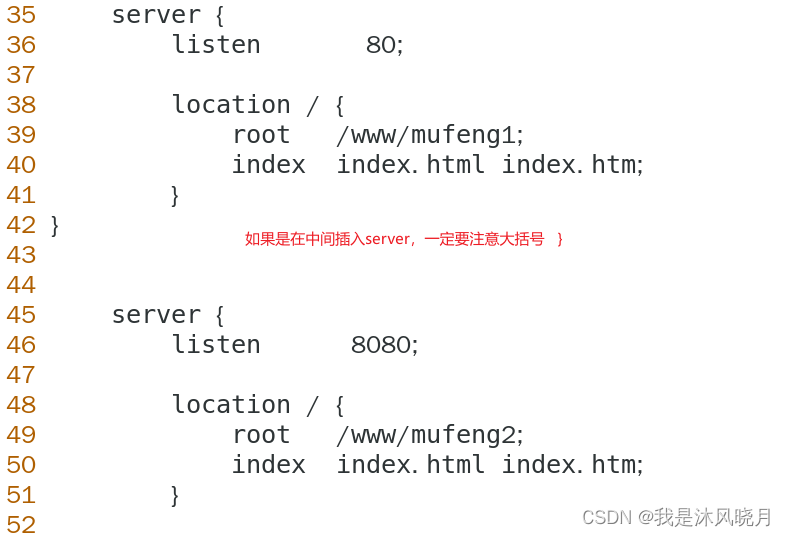
[root@mufeng41 conf]# vim nginx.conf
插入代码:
 server {
        listen       80;

        location / {
            root   /www/mufeng1;
            index  index.html index.htm;
        }
}


    server {
        listen       8080;

        location / {
            root   /www/mufeng2;
            index  index.html index.htm;
        }
        }
[root@mufeng41 nginx-1.22.1]# nginx -t
nginx: the configuration file /usr/local/nginx/conf/nginx.conf syntax is ok
nginx: configuration file /usr/local/nginx/conf/nginx.conf test is successful
[root@mufeng41 nginx-1.22.1]#
[root@mufeng41 nginx-1.22.1]# nginx -s reload
[root@mufeng41 conf]# mkdir -p /www/mufeng1  /www/mufeng2
[root@mufeng41 conf]# touch /www/mufeng1/index.html
[root@mufeng41 conf]# touch /www/mufeng2/index.html
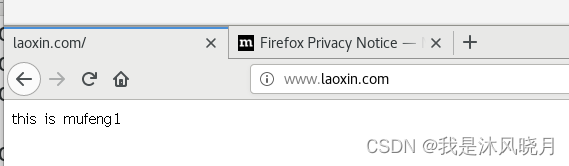
[root@mufeng41 conf]# echo "this is mufeng1" >> /www/mufeng1/index.html
[root@mufeng41 conf]# echo "this is mufeng2" >> /www/mufeng2/index.html
[root@mufeng41 nginx-1.22.1]# curl 192.168.1.41:8080
this is mufeng2
[root@mufeng41 nginx-1.22.1]# curl 192.168.1.41:80
有时候你测试出来,显示的是默认访问html,删掉默认的html里的内容即可:
[root@mufeng41 html]# rm -rf ./*
[root@mufeng41 html]# ls
[root@mufeng41 html]# pwd
/usr/local/nginx/html
[root@mufeng41 html]# curl 192.168.1.41:80
this is mufeng1
[root@mufeng41 html]# ifconfig |head  -3
ens32: flags=4163<UP,BROADCAST,RUNNING,MULTICAST>  mtu 1500
        inet 192.168.1.41  netmask 255.255.255.0  broadcast 192.168.1.255
        inet6 fe80::d524:3f3e:45ed:79c3  prefixlen 64  scopeid 0x20<link>
[root@mufeng41 html]# ifconfig ens32:0 192.168.1.42/24
[root@mufeng41 html]# ifconfig |grep inet
        inet 192.168.1.41  netmask 255.255.255.0  broadcast 192.168.1.255
        inet6 fe80::d524:3f3e:45ed:79c3  prefixlen 64  scopeid 0x20<link>
        inet 192.168.1.42  netmask 255.255.255.0  broadcast 192.168.1.255
        inet 127.0.0.1  netmask 255.0.0.0
        inet6 ::1  prefixlen 128  scopeid 0x10<host>
        inet 192.168.122.1  netmask 255.255.255.0  broadcast 192.168.122.255
[root@mufeng41 html]#
[root@mufeng41 mufeng2]# cat /usr/local/nginx/conf/nginx.conf |tail -22
    #}

 server {
        listen       192.168.1.41:80;
	server_name  192.168.1.41;
        location / {
            root   /www/mufeng1;
            index  index.html index.htm;
        }
}


    server {
        listen       192.168.1.42:80;
        server_name  192.168.1.42;
        location / {
            root   /www/mufeng2;
            index  index.html index.htm;
        }
        }

}
[root@mufeng41 mufeng2]# cat /etc/hosts
127.0.0.1   localhost localhost.localdomain localhost4 localhost4.localdomain4
::1         localhost localhost.localdomain localhost6 localhost6.localdomain6
192.168.1.41 mufeng41
192.168.1.42 mufeng41
[root@mufeng41 mufeng2]# nginx -s stop
[root@mufeng41 mufeng2]# nginx
[root@mufeng41 mufeng2]# nginx -t
nginx: the configuration file /usr/local/nginx/conf/nginx.conf syntax is ok
nginx: configuration file /usr/local/nginx/conf/nginx.conf test is successful
[root@mufeng41 mufeng2]# curl 192.168.1.41
this is mufeng1
[root@mufeng41 mufeng2]# curl 192.168.1.42
this is mufeng2
[root@mufeng41 mufeng2]# vim /etc/hosts
[root@mufeng41 mufeng2]# cat !$
cat /etc/hosts
127.0.0.1   localhost localhost.localdomain localhost4 localhost4.localdomain4
::1         localhost localhost.localdomain localhost6 localhost6.localdomain6
192.168.1.41 www.laoxin.com
192.168.1.41 www.itlaoxin.com
[root@mufeng41 mufeng2]#
[root@mufeng41 mufeng2]# cat /usr/local/nginx/conf/nginx.conf |tail -22
    #}

 server {
        listen       80;
	server_name  www.laoxin.com;
        location / {
            root   /www/mufeng1;
            index  index.html index.htm;
        }
}


    server {
        listen      80;
        server_name  www.itlaoxin.com;
        location / {
            root   /www/mufeng2;
            index  index.html index.htm;
        }
        }

}
[root@mufeng41 mufeng2]#
root@mufeng41 mufeng2]# nginx -t
nginx: the configuration file /usr/local/nginx/conf/nginx.conf syntax is ok
nginx: configuration file /usr/local/nginx/conf/nginx.conf test is successful
[root@mufeng41 mufeng2]# nginx -s reload
[root@mufeng41 mufeng2]#
[root@mufeng41 mufeng2]# nginx -s stop
[root@mufeng41 mufeng2]# nginx
[root@mufeng41 mufeng2]# curl www.itlaoxin.com
this is mufeng2
[root@mufeng41 mufeng2]# curl www.laoxin.com
this is mufeng1
[root@mufeng41 mufeng2
[root@mufeng41 mufeng2]# cat /usr/local/nginx/conf/nginx.conf |tail -15

 server {
        listen       80;
	server_name  www.laoxin.com;
        location / {
            root   /www/mufeng1;
            index  index.html index.htm;
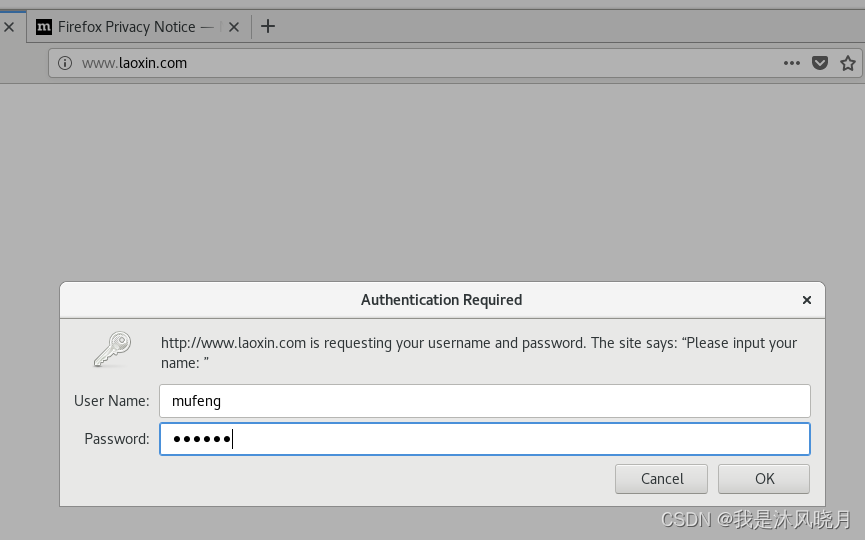
	    auth_basic  "Please input your name: ";
            auth_basic_user_file /usr/local/nginx/conf/nginxpasswd;
        }
}

}
[root@mufeng41 mufeng2]# useradd mufeng

[root@mufeng41 mufeng2]# yum install http* -y &>/dev/null && echo "ok"
ok
[root@mufeng41 mufeng2]# htpasswd -c /usr/local/nginx/conf/nginxpasswd mufeng
New password:
Re-type new password:
Adding password for user mufeng
[root@mufeng41 mufeng2]#
[root@mufeng41 mufeng2]# nginx -s stop
[root@mufeng41 mufeng2]# nginx
 server {
        listen       80;
        server_name  www.laoxin.com;
        location / {
            root   /www/mufeng1;
            index  index.html index.htm;
            allow 192.168.1.; #allow允许某个ip地址或者网段访问
            deny all; 拒绝某个ip或者网段访问
        }
}

#备注:优先级自上而下,优先匹配上面的规则,其次是下面的规则
💕 好啦,这就是今天要分享给大家的全部内容了,我们下期再见!
💕 博客主页:mufeng.blog.csdn.net
💕 本文由沐风晓月原创,首发于CSDN博客
💕 全力以赴,持续学习,不负如来不负卿,喜欢的话记得点赞收藏哦
类classAprivatedeffooputs:fooendpublicdefbarputs:barendprivatedefzimputs:zimendprotecteddefdibputs:dibendendA的实例a=A.new测试a.foorescueputs:faila.barrescueputs:faila.zimrescueputs:faila.dibrescueputs:faila.gazrescueputs:fail测试输出failbarfailfailfail.发送测试[:foo,:bar,:zim,:dib,:gaz].each{|m|a.send(m)resc
我有一个包含模块的模型。我想在模块中覆盖模型的访问器方法。例如:classBlah这显然行不通。有什么想法可以实现吗? 最佳答案 您的代码看起来是正确的。我们正在毫无困难地使用这个确切的模式。如果我没记错的话,Rails使用#method_missing作为属性setter,因此您的模块将优先,阻止ActiveRecord的setter。如果您正在使用ActiveSupport::Concern(参见thisblogpost),那么您的实例方法需要进入一个特殊的模块:classBlah
我的瘦服务器配置了nginx,我的ROR应用程序正在它们上运行。在我发布代码更新时运行thinrestart会给我的应用程序带来一些停机时间。我试图弄清楚如何优雅地重启正在运行的Thin实例,但找不到好的解决方案。有没有人能做到这一点? 最佳答案 #Restartjustthethinserverdescribedbythatconfigsudothin-C/etc/thin/mysite.ymlrestartNginx将继续运行并代理请求。如果您将Nginx设置为使用多个上游服务器,例如server{listen80;server
我正在使用Sequel构建一个愿望list系统。我有一个wishlists和itemstable和一个items_wishlists连接表(该名称是续集选择的名称)。items_wishlists表还有一个用于facebookid的额外列(因此我可以存储opengraph操作),这是一个NOTNULL列。我还有Wishlist和Item具有续集many_to_many关联的模型已建立。Wishlist类也有:selectmany_to_many关联的选项设置为select:[:items.*,:items_wishlists__facebook_action_id].有没有一种方法可以
我有一个用户工厂。我希望默认情况下确认用户。但是鉴于unconfirmed特征,我不希望它们被确认。虽然我有一个基于实现细节而不是抽象的工作实现,但我想知道如何正确地做到这一点。factory:userdoafter(:create)do|user,evaluator|#unwantedimplementationdetailshereunlessFactoryGirl.factories[:user].defined_traits.map(&:name).include?(:unconfirmed)user.confirm!endendtrait:unconfirmeddoenden
我已经构建了一些serverspec代码来在多个主机上运行一组测试。问题是当任何测试失败时,测试会在当前主机停止。即使测试失败,我也希望它继续在所有主机上运行。Rakefile:namespace:specdotask:all=>hosts.map{|h|'spec:'+h.split('.')[0]}hosts.eachdo|host|begindesc"Runserverspecto#{host}"RSpec::Core::RakeTask.new(host)do|t|ENV['TARGET_HOST']=hostt.pattern="spec/cfengine3/*_spec.r
我有一个存储主机名的Ruby数组server_names。如果我打印出来,它看起来像这样:["hostname.abc.com","hostname2.abc.com","hostname3.abc.com"]相当标准。我想要做的是获取这些服务器的IP(可能将它们存储在另一个变量中)。看起来IPSocket类可以做到这一点,但我不确定如何使用IPSocket类遍历它。如果它只是尝试像这样打印出IP:server_names.eachdo|name|IPSocket::getaddress(name)pnameend它提示我没有提供服务器名称。这是语法问题还是我没有正确使用类?输出:ge
华为OD机试题本篇题目:明明的随机数题目输入描述输出描述:示例1输入输出说明代码编写思路最近更新的博客华为od2023|什么是华为od,od薪资待遇,od机试题清单华为OD机试真题大全,用Python解华为机试题|机试宝典【华为OD机试】全流程解析+经验分享,题型分享,防作弊指南华为o
C#实现简易绘图工具一.引言实验目的:通过制作窗体应用程序(C#画图软件),熟悉基本的窗体设计过程以及控件设计,事件处理等,熟悉使用C#的winform窗体进行绘图的基本步骤,对于面向对象编程有更加深刻的体会.Tutorial任务设计一个具有基本功能的画图软件**·包括简单的新建文件,保存,重新绘图等功能**·实现一些基本图形的绘制,包括铅笔和基本形状等,学习橡皮工具的创建**·设计一个合理舒适的UI界面**注明:你可能需要先了解一些关于winform窗体应用程序绘图的基本知识,以及关于GDI+类和结构的知识二.实验环境Windows系统下的visualstudio2017C#窗体应用程序三.
MIMO技术的优缺点优点通过下面三个增益来总体概括:阵列增益。阵列增益是指由于接收机通过对接收信号的相干合并而活得的平均SNR的提高。在发射机不知道信道信息的情况下,MIMO系统可以获得的阵列增益与接收天线数成正比复用增益。在采用空间复用方案的MIMO系统中,可以获得复用增益,即信道容量成倍增加。信道容量的增加与min(Nt,Nr)成正比分集增益。在采用空间分集方案的MIMO系统中,可以获得分集增益,即可靠性性能的改善。分集增益用独立衰落支路数来描述,即分集指数。在使用了空时编码的MIMO系统中,由于接收天线或发射天线之间的间距较远,可认为它们各自的大尺度衰落是相互独立的,因此分布式MIMO
