新建项目,选择"Bottom Navigation Activity"后,点击"Next"。
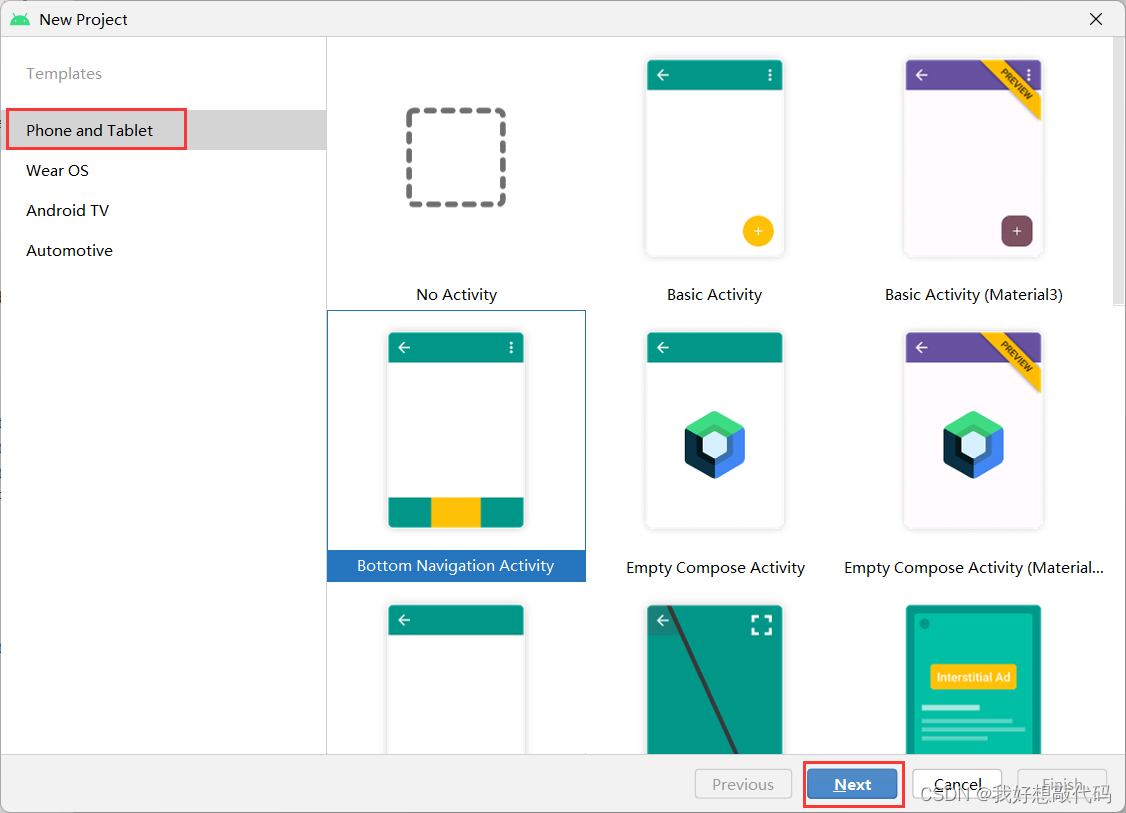
该界面布局为:BottomNavigationView+fragment。
在BottomNavigationView里,app:menu:底部导航栏按钮菜单。
在fragment里,app:navGraph:关联导航图。
<?xml version="1.0" encoding="utf-8"?>
<androidx.constraintlayout.widget.ConstraintLayout xmlns:android="http://schemas.android.com/apk/res/android"
    xmlns:app="http://schemas.android.com/apk/res-auto"
    android:id="@+id/container"
    android:layout_width="match_parent"
    android:layout_height="match_parent">

    <com.google.android.material.bottomnavigation.BottomNavigationView
        android:id="@+id/nav_view"
        android:layout_width="0dp"
        android:layout_height="wrap_content"
        android:layout_marginStart="0dp"
        android:layout_marginEnd="0dp"
        android:background="?android:attr/windowBackground"
        app:layout_constraintBottom_toBottomOf="parent"
        app:layout_constraintLeft_toLeftOf="parent"
        app:layout_constraintRight_toRightOf="parent"
        app:menu="@menu/bottom_nav_menu" />//底部的导航按钮

    <fragment
        android:id="@+id/nav_host_fragment_activity_main"
        android:name="androidx.navigation.fragment.NavHostFragment"
        android:layout_width="match_parent"
        android:layout_height="match_parent"
        app:defaultNavHost="true"
        app:layout_constraintBottom_toTopOf="@id/nav_view"
        app:layout_constraintLeft_toLeftOf="parent"
        app:layout_constraintRight_toRightOf="parent"
        app:layout_constraintTop_toTopOf="parent"
        app:navGraph="@navigation/mobile_navigation" />//导航图

</androidx.constraintlayout.widget.ConstraintLayout>在该文件里面定义底部的导航按钮,每一个item代表一个导航按钮。最多可显示五个导航按钮,开始系统默认创建3个导航按钮,可根据自己的需要自行添加。
说明:
<?xml version="1.0" encoding="utf-8"?>
<menu xmlns:android="http://schemas.android.com/apk/res/android">

    <item
        android:id="@+id/navigation_home"
        android:icon="@mipmap/bottom_btn1"
        android:title="账单" />

    <item
        android:id="@+id/navigation_dashboard"
        android:icon="@mipmap/bottom_btn2"
        android:title="图表" />

    <item
        android:id="@+id/navigation_notifications"
        android:icon="@mipmap/bottom_btn3"
        android:title="记账" />
    <item
        android:id="@+id/navigation_blank"
        android:icon="@mipmap/bottom_btn5"
        android:title="我的" />

</menu>该文件的作用为:定义fragment。
说明:
<?xml version="1.0" encoding="utf-8"?>
<navigation xmlns:android="http://schemas.android.com/apk/res/android"
    xmlns:app="http://schemas.android.com/apk/res-auto"
    xmlns:tools="http://schemas.android.com/tools"
    android:id="@+id/mobile_navigation"
    app:startDestination="@+id/navigation_home"> //开始默认显示的fragment

    <fragment
        android:id="@+id/navigation_home"
        android:name="com.example.ji_zhang_ben.ui.home.HomeFragment"
        android:label="账单"
        tools:layout="@layout/fragment_home" />

    <fragment
        android:id="@+id/navigation_dashboard"
        android:name="com.example.ji_zhang_ben.ui.dashboard.DashboardFragment"
        android:label="图表"
        tools:layout="@layout/fragment_dashboard" />

    <fragment
        android:id="@+id/navigation_notifications"
        android:name="com.example.ji_zhang_ben.ui.notifications.NotificationsFragment"
        android:label="记账"
        tools:layout="@layout/fragment_notifications" />

    <fragment
        android:id="@+id/navigation_blank"
        android:name="com.example.ji_zhang_ben.ui.blank.BlankFragment"
        android:label="我的"
        tools:layout="@layout/fragment_blank" />
</navigation>package com.example.ji_zhang_ben;
import android.os.Bundle;
import com.google.android.material.bottomnavigation.BottomNavigationView;
import androidx.appcompat.app.AppCompatActivity;
import androidx.navigation.NavController;
import androidx.navigation.Navigation;
import androidx.navigation.ui.AppBarConfiguration;
import androidx.navigation.ui.NavigationUI;
import com.example.ji_zhang_ben.databinding.ActivityMainBinding;
public class MainActivity extends AppCompatActivity {
private ActivityMainBinding binding;
@Override
protected void onCreate(Bundle savedInstanceState) {
super.onCreate(savedInstanceState);
binding = ActivityMainBinding.inflate(getLayoutInflater());
setContentView(binding.getRoot());
BottomNavigationView navView = findViewById(R.id.nav_view);
AppBarConfiguration appBarConfiguration = new AppBarConfiguration.Builder(
R.id.navigation_home, R.id.navigation_dashboard, R.id.navigation_notifications,R.id.navigation_blank)
.build();
NavController navController = Navigation.findNavController(this, R.id.nav_host_fragment_activity_main);
NavigationUI.setupActionBarWithNavController(this, navController, appBarConfiguration);
NavigationUI.setupWithNavController(binding.navView, navController);
}
}4个Fragment相应的Java类代码同理,只举例其中一个。
package com.example.ji_zhang_ben.ui.home;

import android.os.Bundle;
import android.view.LayoutInflater;
import android.view.View;
import android.view.ViewGroup;
import androidx.annotation.NonNull;
import androidx.fragment.app.Fragment;
import com.example.ji_zhang_ben.R;


public class HomeFragment extends Fragment {

    public View onCreateView(@NonNull LayoutInflater inflater,
                             ViewGroup container, Bundle savedInstanceState) {
        View view= inflater.inflate(R.layout.fragment_home, container, false);
        return view;                   //相应的布局文件
    }

}

我有一个用户工厂。我希望默认情况下确认用户。但是鉴于unconfirmed特征,我不希望它们被确认。虽然我有一个基于实现细节而不是抽象的工作实现,但我想知道如何正确地做到这一点。factory:userdoafter(:create)do|user,evaluator|#unwantedimplementationdetailshereunlessFactoryGirl.factories[:user].defined_traits.map(&:name).include?(:unconfirmed)user.confirm!endendtrait:unconfirmeddoenden
华为OD机试题本篇题目:明明的随机数题目输入描述输出描述:示例1输入输出说明代码编写思路最近更新的博客华为od2023|什么是华为od,od薪资待遇,od机试题清单华为OD机试真题大全,用Python解华为机试题|机试宝典【华为OD机试】全流程解析+经验分享,题型分享,防作弊指南华为o
C#实现简易绘图工具一.引言实验目的:通过制作窗体应用程序(C#画图软件),熟悉基本的窗体设计过程以及控件设计,事件处理等,熟悉使用C#的winform窗体进行绘图的基本步骤,对于面向对象编程有更加深刻的体会.Tutorial任务设计一个具有基本功能的画图软件**·包括简单的新建文件,保存,重新绘图等功能**·实现一些基本图形的绘制,包括铅笔和基本形状等,学习橡皮工具的创建**·设计一个合理舒适的UI界面**注明:你可能需要先了解一些关于winform窗体应用程序绘图的基本知识,以及关于GDI+类和结构的知识二.实验环境Windows系统下的visualstudio2017C#窗体应用程序三.
MIMO技术的优缺点优点通过下面三个增益来总体概括:阵列增益。阵列增益是指由于接收机通过对接收信号的相干合并而活得的平均SNR的提高。在发射机不知道信道信息的情况下,MIMO系统可以获得的阵列增益与接收天线数成正比复用增益。在采用空间复用方案的MIMO系统中,可以获得复用增益,即信道容量成倍增加。信道容量的增加与min(Nt,Nr)成正比分集增益。在采用空间分集方案的MIMO系统中,可以获得分集增益,即可靠性性能的改善。分集增益用独立衰落支路数来描述,即分集指数。在使用了空时编码的MIMO系统中,由于接收天线或发射天线之间的间距较远,可认为它们各自的大尺度衰落是相互独立的,因此分布式MIMO
遍历文件夹我们通常是使用递归进行操作,这种方式比较简单,也比较容易理解。本文为大家介绍另一种不使用递归的方式,由于没有使用递归,只用到了循环和集合,所以效率更高一些!一、使用递归遍历文件夹整体思路1、使用File封装初始目录,2、打印这个目录3、获取这个目录下所有的子文件和子目录的数组。4、遍历这个数组,取出每个File对象4-1、如果File是否是一个文件,打印4-2、否则就是一个目录,递归调用代码实现publicclassSearchFile{publicstaticvoidmain(String[]args){//初始目录Filedir=newFile("d:/Dev");Datebeg
通常,数组被实现为内存块,集合被实现为HashMap,有序集合被实现为跳跃列表。在Ruby中也是如此吗?我正在尝试从性能和内存占用方面评估Ruby中不同容器的使用情况 最佳答案 数组是Ruby核心库的一部分。每个Ruby实现都有自己的数组实现。Ruby语言规范只规定了Ruby数组的行为,并没有规定任何特定的实现策略。它甚至没有指定任何会强制或至少建议特定实现策略的性能约束。然而,大多数Rubyist对数组的性能特征有一些期望,这会迫使不符合它们的实现变得默默无闻,因为实际上没有人会使用它:插入、前置或追加以及删除元素的最坏情况步骤复
在ruby中,你可以这样做:classThingpublicdeff1puts"f1"endprivatedeff2puts"f2"endpublicdeff3puts"f3"endprivatedeff4puts"f4"endend现在f1和f3是公共(public)的,f2和f4是私有(private)的。内部发生了什么,允许您调用一个类方法,然后更改方法定义?我怎样才能实现相同的功能(表面上是创建我自己的java之类的注释)例如...classThingfundeff1puts"hey"endnotfundeff2puts"hey"endendfun和notfun将更改以下函数定
我目前有一个reddit克隆类型的网站。我正在尝试根据我的用户之前喜欢的帖子推荐帖子。看起来K最近邻或k均值是执行此操作的最佳方法。我似乎无法理解如何实际实现它。我看过一些数学公式(例如k表示维基百科页面),但它们对我来说并没有真正意义。有人可以推荐一些伪代码,或者可以查看的地方,以便我更好地了解如何执行此操作吗? 最佳答案 K最近邻(又名KNN)是一种分类算法。基本上,您采用包含N个项目的训练组并对它们进行分类。如何对它们进行分类完全取决于您的数据,以及您认为该数据的重要分类特征是什么。在您的示例中,这可能是帖子类别、谁发布了该项
我查看了Stripedocumentationonerrors,但我仍然无法正确处理/重定向这些错误。基本上无论发生什么,我都希望他们返回到edit操作(通过edit_profile_path)并向他们显示一条消息(无论成功与否)。我在edit操作上有一个表单,它可以POST到update操作。使用有效的信用卡可以正常工作(费用在Stripe仪表板中)。我正在使用Stripe.js。classExtrasController5000,#amountincents:currency=>"usd",:card=>token,:description=>current_user.email)
虽然1.8.7的构建我似乎有一个向后移植的Shellwords::shellescape版本,但我知道该方法是1.9的一个特性,在1.8的早期版本中绝对不支持.有谁知道我在哪里可以找到(以Gem形式或仅作为片段)针对Ruby转义的Bourne-shell命令的强大独立实现? 最佳答案 您也可以从shellwords.rb中复制您想要的内容。在Ruby的颠覆存储库的主干中(即GPLv2'd):defshellescape(str)#Anemptyargumentwillbeskipped,soreturnemptyquotes.ret



