参考博客[1],使用谷歌浏览器的开发者工具,提取http的表单信息。
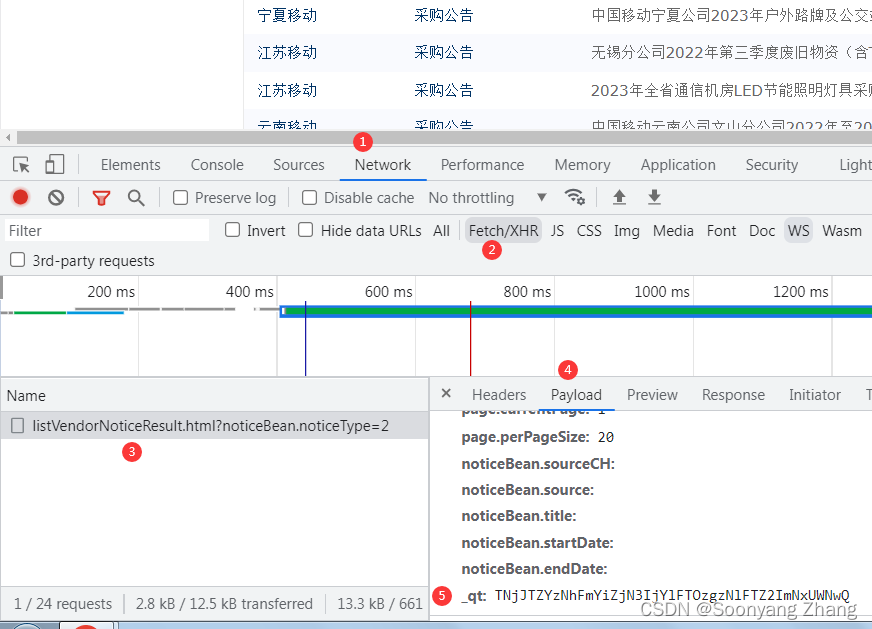
http post 中的表单信息,需要含有_qt信息。网站使用_qt做反爬虫措施。_qt由服务器返回,在不同的会话中,值是变化的。如果缺少_qt的信息,post的返回状态码是403。
在会话建立后,当客户端发送http get信息后,返回的页面中含有_qt的信息。主页另存为html,用文本编辑工具打开,可以看到_qt。
$.ajax({
			type : "POST",
			url : url,
			cache : false,
			processData : true,
			data : formData+ /*TZYz*/"&"//"/*"
				///'"'*/
			/*0!caigou8*/+'_'/*JTZY*/+'q'/*ZYzNh5*/+'t'/*zNhFm076*/+'='/**/
				+//"/*"
				//*/
				/*NhFmYiZj5"*/'TNjJTZYzNhFmYi'+/*"*'mYi5*///"
				/*JTZY*/'ZjN3IjYlFTOzgzNlFTZ2ImNxUWNwQ'///*ANjJTZYzNhFJyu*/
			,success : function(responseData) {
				$("#searchResult").html(responseData);
				if ($("#totalRecordNum").val() == 0) {
					var msg="<font color='red' size='3em'>查无结果!</font>";
					$("#searchResult").html(msg);
				} else {
					$("#searchResult").html(responseData);
				}

				$('body').loadingmask('close');
			}
		});
可以看到javascript中添加了一些注释,做了混淆。本项目中提取_qt值的代码,通过字符串"0!caigou8"定位第一行,"success"定位最后一行。
def _parser_qt(text):
    f= io.StringIO(text)
    content=[]
    locate_caigou8=False
    while True:
        line=f.readline()
        if not line:
            break
        else:
            if locate_caigou8 is False and "0!caigou8" in line:
                locate_caigou8=True
            if locate_caigou8:
                if "success" in line:
                    break
                t=line.strip()
                t=_remove_annotation(t)
                if len(t)>0:
                    content.append(t)
    length=len(content)
    qt=_strip_token(content[2],"'+")+_strip_token(content[3],"'+")
    return qt
http post相关代码。如果想要请求其他省份的数据,请修form_data信息。
def request_page_index(session,cookie,qt,post_headers,page_index,retry=1,info_dir=None):
    success=False
    per_page_size=20
    province='YN'
    #https://zhuanlan.zhihu.com/p/31856224
    province_ch='云南'
    form_data={
        'page.currentPage':str(page_index),
        'page.perPageSize':str(per_page_size),
        'noticeBean.sourceCH':province_ch,
        'noticeBean.source':province,
        'noticeBean.title':'',
        'noticeBean.startDate':'',
        'noticeBean.endDate':'',
        '_qt':qt
    }
    post_headers['cookie']=cookie
    #https://blog.csdn.net/weixin_51111267/article/details/124616848
    post_content=post_emit(session,post_url,post_headers,form_data,retry)
    if post_content is None:
        logging.warn("fail to download notice page {}".format(page_index))
        return success
    success=True
    if info_dir:
        pathname=info_dir+province+"_"+str(page_index)+".txt"
        save_notice_page(pathname,post_content)
    return success
客户端发送http post消息后,服务器返回招标索引信息。对应的结果在浏览器中的展示如图。
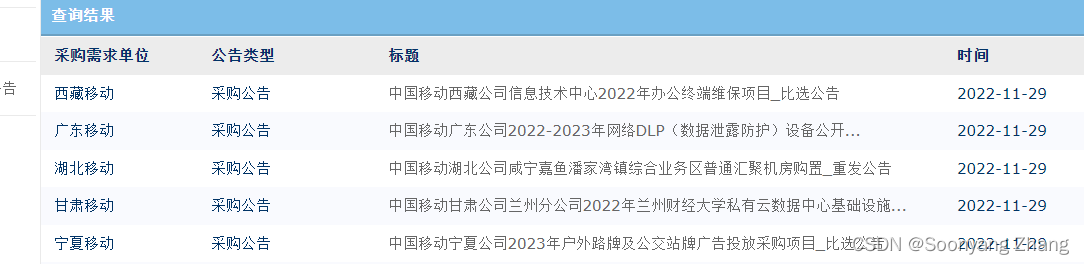
save_notice_page提取返回网页中包含的项目名称和id信息。处理获的结果可以在page-index文件夹中看到。
def save_notice_page(pathname,html_content):
    title2id=hp.get_onclick_info(html_content)
    fm.save_title2id(title2id,pathname)
html_parser.py
def get_onclick_info(html_content):
   soup = BeautifulSoup(html_content, 'lxml')
   tr_all=soup.find_all("tr")
   length=len(tr_all)
   dic={}
   for i in range(length):
   #{'class': [], 'onmousemove': 'cursorOver(this)', 'onmouseout': 'cursorOut(this)', 'onclick': "selectResult('901888')"}
   # type(attrs) is  dict
       if tr_all[i].attrs and 'onclick' in tr_all[i].attrs:
           id=_parser_id(tr_all[i].attrs['onclick'])
           if len(id)>0:
               ahref=tr_all[i].find("a")
               if 'title' in ahref.attrs:
                   dic.update({ahref.attrs['title']:id})
               elif len(ahref.contents)>0:
                   dic.update({ahref.contents[0]:id})
   return dic
根据page_index中保存的id信息,构造page_url,并下载网页内容,结构保存在resource文件夹中。
def download_notice_batch(index_list,resource_dir,suffix=".txt"):
   requests.packages.urllib3.util.ssl_.DEFAULT_CIPHERS += ':HIGH:!DH:!aNULL'
   for i in range(len(index_list)):
       user_agent=random.choice(ua_list)
       login_headers['User-Agent']=user_agent
       session=requests.session()
       path_name=index_list[i]
       id2title=fm.extrac_id2title(path_name)
       pos2=path_name.rfind('.')
       pos1=path_name.rfind('/')
       name=path_name[pos1+1:pos2]
       new_path=resource_dir+name+'/'
       fm.mkdir(new_path)
       for item in id2title.items():
           id=item[0]
           page_url=url_base+id+""
           dest_name=new_path+id+suffix
           if open_page(session,page_url,login_headers,dest_name) is False:
               logging.warn("download failure {} {}".format(name,dest_name))
       session.close()
按照甲方要求,提取数据。如需提取其他信息,请对parser_notice_content函数进行定制。
def process_page_batch(index_list,resource_dir,csv_name,suffix=".txt"):
   csv_f=open(csv_name,"w")
   delimiter='|'
   csv_f.write("index|page_id|title|no_tax|with_tax|duration|company|people|tel|\n")
github给出的连接中,给出了安装依赖。
1 获取网页索引
下载第1页到第10页,如果提示失败,请重新运行指令。结果保存在page-index文件夹。
python index_main.py --range=1:10
2 下载网页
根据page-index中的文件内容,下载网页通知。
python page-main.py
3 信息提取
python get_csv.py
结果保存在result.csv文件中。由于提取的信息中很有逗号,result.csv中使用符号|作为分隔符。使用excel打开前,请修改系统默认列表分割符,参考设置windows中的列表分隔符。excel打开csv之后,可以另存为xlsl文件。之后可以把系统默认列表分隔符改回去。
之前请求网页索引,一直不知道怎么设置qt的值,总是得到403的响应。在这里一直卡了三天。解决qt之后,项目的完成又花了三天时间。
Reference:
[1]爬虫之爬取中国移动采购与招标网
[2]code-repo
大约一年前,我决定确保每个包含非唯一文本的Flash通知都将从模块中的方法中获取文本。我这样做的最初原因是为了避免一遍又一遍地输入相同的字符串。如果我想更改措辞,我可以在一个地方轻松完成,而且一遍又一遍地重复同一件事而出现拼写错误的可能性也会降低。我最终得到的是这样的:moduleMessagesdefformat_error_messages(errors)errors.map{|attribute,message|"Error:#{attribute.to_s.titleize}#{message}."}enddeferror_message_could_not_find(obje
我主要使用Ruby来执行此操作,但到目前为止我的攻击计划如下:使用gemsrdf、rdf-rdfa和rdf-microdata或mida来解析给定任何URI的数据。我认为最好映射到像schema.org这样的统一模式,例如使用这个yaml文件,它试图描述数据词汇表和opengraph到schema.org之间的转换:#SchemaXtoschema.orgconversion#data-vocabularyDV:name:namestreet-address:streetAddressregion:addressRegionlocality:addressLocalityphoto:i
在Ruby中可以使用哪些替代方法来ping一个ip地址?标准库“ping”库的功能似乎非常有限。我对在这里滚动我自己的代码不感兴趣。有没有好的gem?我应该接受它并忍受它吗?(我在Linux上使用Ruby1.8.6编写代码) 最佳答案 net-ping值得一看。它允许TCPping(如标准rubyping),但也允许UDP、HTTP和ICMPping。ICMPping需要root权限,但其他则不需要。 关于ruby-Pingruby网站?,我们在StackOverflow上找到一个类
在应用开发中,有时候我们需要获取系统的设备信息,用于数据上报和行为分析。那在鸿蒙系统中,我们应该怎么去获取设备的系统信息呢,比如说获取手机的系统版本号、手机的制造商、手机型号等数据。1、获取方式这里分为两种情况,一种是设备信息的获取,一种是系统信息的获取。1.1、获取设备信息获取设备信息,鸿蒙的SDK包为我们提供了DeviceInfo类,通过该类的一些静态方法,可以获取设备信息,DeviceInfo类的包路径为:ohos.system.DeviceInfo.具体的方法如下:ModifierandTypeMethodDescriptionstatic StringgetAbiList()Obt
我遇到了这个奇怪的错误.../Users/gideon/Documents/ca_ruby/rubytactoe/lib/player.rb:13:in`gets':Isadirectory-spec(Errno::EISDIR)player_spec.rb:require_relative'../spec_helper'#theuniverseisvastandinfinite...itcontainsagame....butnoplayersdescribe"tictactoegame"docontext"theplayerclass"doit"musthaveahumanplay
我有两个文本文件,master.txt和926.txt。如果926.txt中有一行不在master.txt中,我想写入一个新文件notinbook.txt。我写了我能想到的最好的东西,但考虑到我是一个糟糕的/新手程序员,它失败了。这是我的东西g=File.new("notinbook.txt","w")File.open("926.txt","r")do|f|while(line=f.gets)x=line.chompifFile.open("master.txt","w")do|h|endwhile(line=h.gets)ifline.chomp!=xputslineendende
我需要从站点抓取数据,但它需要我先登录。我一直在使用hpricot成功地抓取其他网站,但我是使用mechanize的新手,我真的对如何使用它感到困惑。我看到这个例子经常被引用:require'rubygems'require'mechanize'a=Mechanize.newa.get('http://rubyforge.org/')do|page|#Clicktheloginlinklogin_page=a.click(page.link_with(:text=>/LogIn/))#Submittheloginformmy_page=login_page.form_with(:act
我使用raise(ConfigurationError.new(msg))引发错误我试着用rspec测试一下:expect{Base.configuration.username}.toraise_error(ConfigurationError,message)但这行不通。我该如何测试呢?目标是匹配message。 最佳答案 您可以使用正则表达式匹配错误消息:it{expect{Foo.bar}.toraise_error(NoMethodError,/private/)}这将检查NoMethodError是否由privateme
我最近一直在查看一些gem的源代码。我经常看到的一个习惯用法是使用嵌套模块,其中包含连接到版本字符串中的版本常量,即围绕此类事物的变体:moduleChunkyBaconmoduleVersionMAJOR=0MINOR=6TINY=2endVERSION=[Version::MAJOR,Version::MINOR,Version::TINY].compact*'.'end以这种方式存储库版本信息有什么好处(如果有的话)?为什么不这样做:moduleChunkyBaconVERSION='0.6.2'.freezeend 最佳答案
如何使用如下两个数组构建一个数组:名称=[a,b,c]how_many_of_each[3,5,2]得到my_array=[a,a,a,b,b,b,b,b,c,c] 最佳答案 使用zip、flat_map和数组乘法:irb(main):001:0>value=[:a,:b,:c]=>[:a,:b,:c]irb(main):002:0>times=[3,5,2]=>[3,5,2]irb(main):003:0>value.zip(times).flat_map{|v,t|[v]*t}=>[:a,:a,:a,:b,:b,:b,:b,:b
