设为「⭐️ 星标」带你从基础入门 到 全栈实践 再到 放弃学习!
涉及 网络安全运维、应用开发、物联网IOT、学习路径 、个人感悟 等知识分享。
希望各位看友多多支持【关注、点赞、评论、收藏、投币】,助力每一个梦想。
【WeiyiGeek Blog's - 花开堪折直须折,莫待无花空折枝 】
作者主页: 【 https://weiyigeek.top 】
博客地址: 【 https://blog.weiyigeek.top 】
作者答疑学习交流群:欢迎各位志同道合的朋友一起学习交流【点击 ? 加入交流群】, 或者关注公众号回复【学习交流群】。
首发地址: https://mp.weixin.qq.com/s/mew5xq7v-xH9Jc6ecUB8ww
本章将主要给各位看友介绍表单form中常用的标签元素属性,本节标签一览如下所示:
<form> : 定义供用户输入的 HTML 表单。<label> : 定义 input 元素的标注。<input> : 定义输入控件。<textarea> : 定义多行的文本输入控件。<button> : 定义按钮。<select> : 定义选择列表(下拉列表)。<optgroup> : 定义选择列表中相关选项的组合。<option> : 定义选择列表中的选项。<legend> : 定义 fieldset 元素的标题。<fieldset> : 定义围绕表单中元素的边框。<datalist> HTML5 : 定义下拉列表。<output> HTML5 : 定义输出的一些类型。<keygen> HTML5 : 定义生成密钥。<isindex> : 定义与文档相关的可搜索索引。HTML5 中不支持描述: 表单是一个包含表单元素的区域,表单元素是允许用户在表单中输入内容,其包含 文本框、文本域(textarea)、按钮、下拉列表、单选框(radio-buttons)、复选框(checkboxes)等元素都要放在form标签里面或者进行form的id值的调用,否则提交的数据到不了后端。
属性:
text/plain、multipart/form-data、application/x-www-form-urlencoded)。name: text, search, url, telephone, email, password, date pickers)域应该拥有自动填充功能,在某些浏览中需要开启自动填充才能使其生效, 设置 on 或 off。name: text, search, url, telephone, email, password, date pickers)域应该拥有自动填充功能,在某些浏览中需要开启自动填充才能使其生效。示例:
<!-- 1.指定表单提交给后端的地址以及方法,实现自动填充。 -->
<form action="https://api.weiygeeek.top/v2/version.jsp" method="get" autocomplete="on">     <!--启动自动显现上一次输入过的数据,当用户在自动完成域中开始输入时,浏览器应该在该域中显示填写的选项 -->
  <label for="username">First name: </label><input type="text" name="username"/><br/>
  <label for="email">E-mail: </label><input type="email" name="email" autocomplete="off"/>   <!--取消自动显现上一次输入过的数据 -->
</form>
补充扩展
Get 请求:用于没有敏感信息,且少量数据的提交,其表单数据在页面地址栏中是可见的,例如
action page.php?firstname=Mickey&lastname=Mouse
Post 请求:通常用于敏感信息以及大量数据的提交,它更加安全其在页面地址栏中被提交的数据是不可见的。
描述: 该元素(标签)表示用户界面中某个元素的说明, 其通常与input连用,它可以标签文本不仅与其相应的文本输入元素在视觉上相关联,也可以点击关联的标签来聚焦或者激活这个输入元素,就像直接点击输入元素一样。
属性:
示例:
<!-- # 方式1.lable 与 input 属性绑定。 -->
<label for="url">URL: </label> <input type="text" name="url" value="https://blog.weiyigeek.top" />

<!-- # 方式2.将input直接放在label里,此时则不需要 for 和 id 属性,因为关联已隐含存在 -->
<label> URL:
  <input type="text" name="url" value="https://blog.weiyigeek.top" />
</label>
描述: 该元素用于为基于 Web 的表单创建交互式控件,以便接受来自用户的数据。取决于设备和用户代理不同,表单可以使用各种类型的输入数据和控件。<input> 元素是目前是 HTML 中最强大、最复杂的元素之一,因为它有大量的输入类型和属性组合。
属性:
| 属性 | 类型 | 描述 |
|---|---|---|
accept |
file |
文件上传控件中预期文件类型的提示 |
alt |
image |
图片类型的 alt 属性。对无障碍是必需的 |
autocomplete |
除了 checkbox、radio 和按钮以外 |
表单自动填充特性提示 |
capture |
file |
文件上传控件中媒体捕获方法的提示 |
checked |
checkbox、radio |
控件是否选中 |
dirname |
search、text |
表单字段的名称,用于在提交表单时发送元素的方向性 |
disabled |
所有类型 | 表单控件是否禁用 |
form |
所有类型 | 将控件联系到表单元素中 |
formaction |
image、submit |
要提交表单的 URL 地址 |
formenctype |
image、submit |
提交表单时使用的表单数据编码类型 |
formmethod |
image、submit |
提交表单时所使用的 HTTP 方法 |
formnovalidate |
image、submit |
绕过表单提交时的表单控件验证 |
formtarget |
image、submit |
提交表单时的浏览上下文 |
height |
image |
与 ![img]() 元素的 height 属性有相同含义,垂直方向上的维度值 |
list |
除了 hidden、password、checkbox、radio 和按钮以外 |
自动完成选项的 `` 的 id 属性的值 |
max |
date、month、week、time、datetime-local、number、range |
最大值 |
maxlength |
text、search、url、tel、email、password |
value 的最大长度(字符数) |
min |
date、month、week、time、datetime-local、number、range |
最小值 |
minlength |
text、search、url、tel、email、password |
value 的最小长度(字符数) |
multiple |
email、file |
布尔值。是否允许多个值 |
name |
所有类型 | 表单的控件名称,作为键值对的一部分与表单一同提交 |
pattern |
text、search、url、tel、email、password |
为了使得 value 有效,必须符合的模式(正在) |
placeholder |
text、search、url、tel、email、password、number |
当没有值设定时,出现在表单控件上的文字 |
readonly |
除了 hidden、range、color、checkbox、radio 和按钮以外 |
布尔值。如果存在,其中的值将不可编辑。 |
required |
除了 hidden、range、color 和按钮以外 |
布尔值。如果存在,一个值是必需的,或者必须勾选该值才能提交表格。 |
size |
text、search、url、tel、email、password |
控件的尺寸 |
src |
image |
与 ![img]() 元素的 src 属性含义相同,图片资源的地址 |
step |
date、month、week、time、datetime-local、number、range |
有效的增量值 |
type |
所有类型 | 表单控件的类型 |
value |
所有类型 | 表单控件的初始值 |
width |
image |
与 ![img]() 元素的 width 属性含义相同 |
type 属性: 指定该标签值的类型,其类型如下所示:
| type类型 | 说明 |
|---|---|
| text | 文本框 |
| password | 密码框 |
| radio | 单选框 |
| checkbox | 多选框 |
| 邮箱格式 | |
| tel | 电话格式 |
| search | 搜索格式 |
| url | Url格式 |
| range | 左右范围格式 |
| number | 数字加减格式 |
| color | 用于指定颜色的控件 |
| file | 上传文件 |
| hidden | 隐藏Input输入框 |
| time | 时间选择器(mobile) |
| week、month | 周数、日期选择器 (mobile) |
| date | 日期选择器 (mobile) |
| datetime | 日期时间选择器 (mobile) |
| datetime-local | 输入日期和时间的控件,不包括时区。 |
| image | 设置按钮外观 |
示例
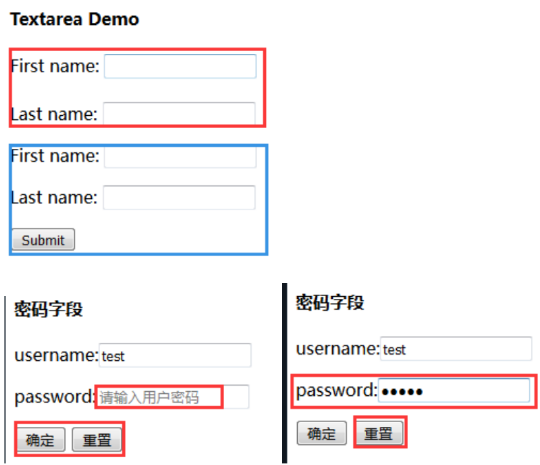
<input type="text"> 标签来设定,当用户要在表单中键入字母、数字等内容时,就会用到文本域, 并且当用户单击确认按钮时,表单的内容会被传送到服务端。<form method="get" action="service.php">
<label for="first-name">First name:</label>
<input type="text" name="first-name"><br>
<label>Last name: <input type="text" name="last-name"></label>
<input type="submit" value="确定" name="submit" /> <!-- 提交按钮 -->
<input type="reset" value="重置" name="reset" /> <!-- 重置按钮 -->
</form>
<!-- 注意:表单本身是不可见的,并且注意一个文本字段的默认宽度是20个字符。 -->
<input type="password"> 来定义, 通常在输入敏感信息时需要使用该标签。<form action="info.php" method="get">
<label>username:<input type="text" name="username" placeholder="请输入用户名" /></label> <!--placeholder属性可以提示用户输入-->
<label>password:<input type="password" name="password" placeholder="请输入用户密码" /></label>
</form>
<!-- 注意: 密码字段字符不会明文显示,而是以星号或圆点替代。 -->
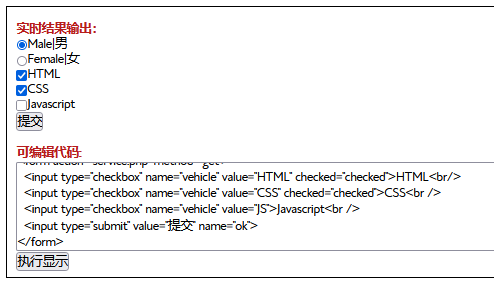
<input type="radio|checkbox"> 标签定义了表单单选框选项以及多选按钮。<!-- 单选框 -->
<form action="info.php" method="post">
<input type="radio" name="sex" value="male">Male|男<br/>
<input type="radio" name="sex" value="female">Female|女<br/>
</form>
<!-- 多选框 -->
<form action="service.php" method="get">
<input type="checkbox" name="vehicle" value="HTML" checked="checked">HTML<br/>
<input type="checkbox" name="vehicle" value="CSS" checked="checked">CSS<br />
<input type="checkbox" name="vehicle" value="JS">Javascript<br />
<input type="submit" value="提交" name="ok">
</form>
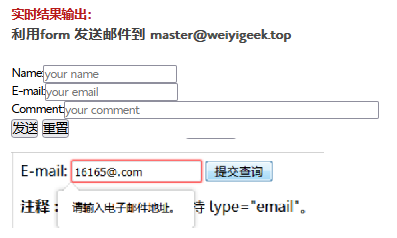
<h4>利用form 发送邮件到 master@weiyigeek.top</h4>
<form action="MAILTO:master@weiyigeek.top" method="post" enctype="text/plain">
  Name:<input type="text" name="name" placeholder="your name"><br>
  E-mail:<input type="email" name="mail" placeholder="your email"><br>
  Comment:<input type="text" name="comment" placeholder="your comment" size="50"><br>
  <input type="submit" value="发送">
  <input type="reset" value="重置">
</form>

<!-- 注意: 某些智能手机会识别 email 类型,并在键盘增加 ".com" 以匹配电子邮件输入。 -->

<form action="/demo/demo_form.asp">
  E-mail:
  <input type="email" name="email">
  <input type="submit">
</form>
<form action="search.asp">
  搜索谷歌:<input type="search" name="blog-search">
  <input type="submit">
</form>
<form> Telephone:<input type="tel" name="usrtel"></form>
<form>
  Quantity (between 1 and 5):
  <input type="number" name="quantity" min="1" max="5">
  <!-- 按照+10进行加减 -->
  <input type="number" name="points" min="0" max="100" step="10" value="30">
</form>
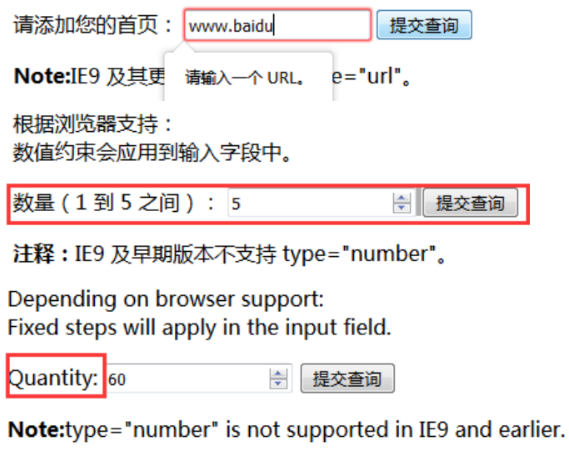
<form>
  Blog:<input type="url" name="homepage">
</form>
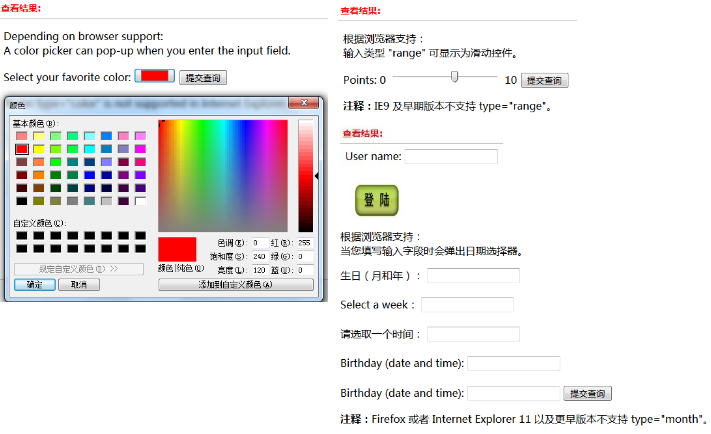
Select your favorite color:
<input type="color" name="favcolor" value="#ff0000">
Points: 0<input type="range" name="points" min="0" max="10">10
User name: <input type="text" name="user_name" /><br />
<input type="image" src="http://weiyigeek.top/img/login.jpg" width="99" height="99" />
<!-- 语法 -->
<input type="date">  日期的输入字段
<input type="month"> 选择月份和年份
<input type="week">  选择周和年
<input type="time">  选择时间(无时区)
<input type="datetime"> 选择日期和时间(有时区)
<input type="datetime-local"> 选择日期和时间(无时区)

<!-- 示例 -->
生日:<input type="date" name="bday">
生日(月和年):<input type="month" name="bday_month"><br /><br />
Select a week:<input type="week" name="year_week"><br /><br />
请选取一个时间:<input type="time" name="usr_time"><br /><br />
Birthday (date and time): <input type="datetime" name="bday_time"><br /><br />
Birthday (date and time): <input type="datetime-local" name="bday_time">
<label for="avatar">Choose a profile picture:</label>
<input type="file" id="avatar" name="avatar" accept="image/png, image/jpeg">

<!-- accept 允许的格式 -->
accept=".png, .jpg, .jpeg"
<!--
字符串 audio/*,表示“任何音频文件”。
字符串 video/*,表示“任何视频文件”。
字符串 image/*,表示“任何图片文件”。
字符串 .doc,.docx,.xml,application/msword,application/vnd.openxmlformats-officedocument.wordprocessingml.document ,表示接受类似于 MS Word 文档的任何文件。
-->

<!-- capture 说明 -->
capture (en-US) 属性是一个字符串(在移动设备上使用才能体现),如果 accept (en-US) 属性指出了 input 是图片或者视频类型,则它指定了使用哪个摄像头去获取这些数据。
值 user 表示应该使用前置摄像头和(或)麦克风,值 environment 表示应该使用后置摄像头和(或)麦克风
<label for="picture">拍张照片你的脸:</label>
<input type="file"
       name="picture"
       accept="image/*"
       capture="user">
<label for="voice">记录你的声音:</label>
<input type="file"
       name="voice"
       accept="audio/*"
       capture>

<!-- multiple 说明-->
multiple (en-US) 文件 input 允许用户选择多个文件。
<form method="post" enctype="multipart/form-data">
  <label for="file">选择要上传的文件</label>
  <input type="file" id="file" name="file" multiple />
  <button>提交</button>
</form>
<form action="weiyigeek.asp" method="get" autocomplete="on" novalidate="true" autofocus="autofocus">
<!-- autocomplete 属性规定 form 或 input 域应该拥有自动完成功能 -->
<!-- novalidate 属性规定在提交表单时不应该验证 form 或 input 域 -->
<!-- autofocus 属性规定在页面加载时,域自动地获得焦点 -->
<!-- form 属性规定输入域所属的一个或多个表单 -->
<!-- 表form override attributes 单重写属性允许您重写 form 元素的某些属性设定 -->
  <input type="submit" formaction="demo_admin.asp" value="Submit as admin" />              <!-- 更换action提交的地址 -->
  <input type="submit" formnovalidate="true" value="Submit without validation" /> <!-- 当提交表单时不对表单数据(输入)进行验证 -->

<!-- image 类型的 height 和 width 属性规定 input 标签的图像高度和宽度 -->
  <input type="image" src="img_submit.gif" width="99" height="99" />

<!-- list 属性规定输入域的 datalist,datalist 是输入域的选项列表。 -->
  Webpage: <input type="url" list="url_list" name="link" />
  <datalist id="url_list">
  <option label="Index" value="https://www.weiygeek.top">
  <option label="Blog" value="https://blog.weiygeek.top">
  <option label="Tools" value="https://tools.weiygeek.top">
  </datalist>

<!-- min、max 和 step 属性用于为包含数字或日期的 input 类型规定限定(约束) -->
  Points: <input type="number" name="points" min="0" max="10" step="3" />

<!-- multiple 属性规定输入域中可选择多个值。 -->
  Select images: <input type="file" name="img" multiple="multiple" />

<!-- pattern 属性规定用于验证 input 域的模式(pattern),模式(pattern) 是正 则表达式regEXP(直接注意,指定输入进行正则) -->
  Country code: <input type="text" name="country_code" pattern="[A-z]{3}" title="Three letter country code" />  <!--这里的titile有提示的功能-->
  <input type="submit" />

<!-- placeholder 属性提供一种提示(hint),描述输入域所期待的值。 -->
  <input type="search" name="user_search"  placeholder="Search W3School" />

<!-- required 属性规定必须在提交之前填写输入域(不能为空)。 -->
  Name: <input type="text" name="usr_name" required="required" />
</form>
描述: 该元素表示一个多行纯文本编辑控件,当你希望用户输入一段相当长的(可容纳无限数量)、不限格式的文本,例如评论或反馈表单中的一段意见时,这很有用。其默认字体是等宽字体(通常是 Courier)
属性:
默认为 soft 在到达元素最大宽度的时候,不会自动插入换行符.
设置为hard时,在文本到达元素最大宽度的时候,浏览器自动插入换行符 (CR+LF) 。
示例:
<!-- 案例1 -->
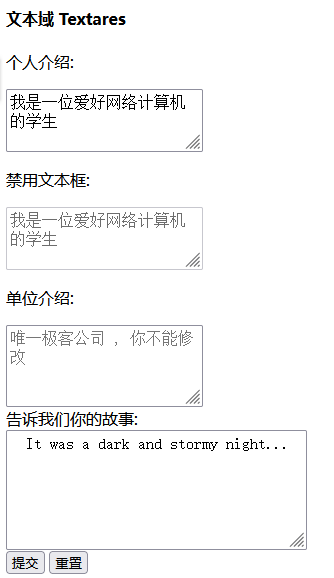
<label for="story">告诉我们你的故事:</label>
<textarea id="story" name="story" rows="5" cols="33">
It was a dark and stormy night...
</textarea>

<!-- 案例2 -->
<form action="service.php" method="get">
  <p>个人介绍:</p>
  <textarea placeholder="请输入你的个人简介,而且是必须填写得" cols="20" rows="2" required></textarea><br />
  <p>禁用文本框:</p>
  <textarea placeholder="请输入你的个人简介,而且是必须填写得" cols="20" rows="2" disabled>我是一位爱好网络计算机的学生</textarea><br />
  <p>单位介绍:</p>
  <textarea placeholder="唯一极客公司 , 你不能修改" cols="20" rows="3" readonly autofocus ></textarea><br />
  <input type="submit" value="提交" name="submit" />
  <input type="reset" value="重置" name="reset" />
</form>
温馨提示:在文本输入区内的文本行间,用 "%OD%OA" (回车/换行)进行分隔。
温馨提示:虽然你通过 cols 和 rows 属性来规定 textarea 的尺寸,不过更好的办法是使用 CSS 的 height 和 width 属性。
描述: 该元素可以如其意定义一个按钮,在其元素内部您可以放置内容,比如文本或图像,这是该元素与使用 <input> 元素创建的按钮之间的不同之处。
属性:
submit类型,将表单里面的数据分别提交到后端文件进行处理。application/x-www-form-urlencoded、multipart/form-data、text/plain。_self,_top,_blank,_parent)温馨提示: 请始终为 <button> 元素规定 type 属性 (三种类型),不同的浏览器对 <button> 元素的 type 属性使用不同的默认值,提交的话建议使用input, 但是前者更容易使用css样式。
示例
<!-- 示例1.type 属性 -->
<button type="button" onclick="alert('你好,世界,HTML!')">点我!点我!</button>

<!-- 示例2.formaction 、formenctype 、formnovalidate属性 -->
<form action="info.php" method="get">
  First name: <input type="text" name="fname" /><br>
  <button type="submit">提交</button><br>
  <button type="submit" formaction="demo-info.php" formenctype="text/plain">提交</button>
  <button type="submit" formnovalidate>不验证提交</button>
</form>
综合实践:
示例文件: https://github.com/WeiyiGeek/DevelopLearnig/blob/main/fore-end/HTML/example/study/03.DivisionSection.html
描述: select 元素可创建单选或多选菜单, 其元素中的 <option> 标签用于定义列表中的可用选项。
属性:
示例:
下拉列表的两种实现方式:
<!-- 方式1:常规 -->
<select name="username" value="">
  <option value="1">Dimond</option>
  <option value="2">vertical</option>
</select>

<!-- 方式2:datalist -->
<input name="type" type="number" list="recordtype" placeholder="类型选择" required class="form-control">
<datalist id="recordtype">
  <option value="1">vertical</option>
</datalist>
描述: option 元素定义下拉列表中的一个选项(一个条目),浏览器将该标签中的内容作为 <select> 标签的菜单或是滚动列表中的一个元素显示, 所以该元素位于 select 元素内部。
属性:
<optgroup> 时所使用的标注注释:
<option> 标签可以在不带有任何属性的情况下使用,但是您通常需要使用 value 属性,此属性会指示出被送往服务器的内容。如果列表选项很多,可以使用 <optgroup> 标签对相关选项进行组合。<select> 元素中选中多个选项,用户可以按住 Ctrl, Command, 或 Shift 键(取决于你的操作系统)然后鼠标点击不同选项以选择或取消选择。示例:
<!-- 示例1.简单示例 -->
<form action="https://weiyigeek.top/cars.php" method="get">
  <select name="cars">
    <option value="">--Please choose an option--</option>
    <option value="领克">领克</option>
    <option value="吉利">吉利</option>
    <option value="长安">长安</option>
  </select>
</form>

<!-- 示例2.下面是设置显示多个选项和必须填写多选,并且用form来绑定提交的form表单 -->
<select name="carlist" form="weiyigeek" size="4" required multiple>
  <option value="volvo">Volvo</option>
  <option value="saab">Saab</option>
  <option value="opel">Opel</option>
  <option value="audi">Audi</option>
</select>

<!-- 示例3.设置默认选择的而且第二项无法选择 -->
<form>
<select name="cars">
  <option value="volvo">Volvo</option>
  <option value="saab" disabled>Saab</option>
  <option value="fiat" selected="selected">Fiat</option>
  <option value="audi">Audi</option>
</select>
</form>
描述: 该元素经常用于把相关的选项组合在一起,如果你有很多的选项组合, 你可以使用<optgroup> 标签能够很简单的将相关选项组合在一起。
属性:
示例:
<form class="cars" action="index.html" method="post">
  <select form="weiyigeek" name="cars">
    <optgroup label="国产">
        <option value="长安">长安</option>
        <option value="吉利">吉利</option>
    </optgroup>
    <optgroup label="合资">
        <option value="大众">大众</option>
        <option value="丰田">丰田</option>
    </optgroup>
  </select>
</form>

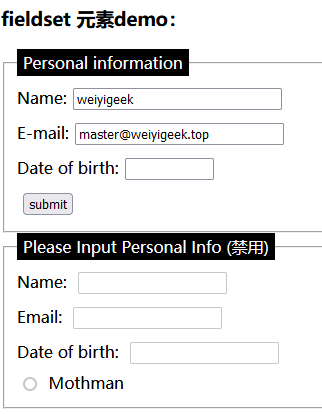
描述: 该元素用于对表单中的控制元素进行分组(也包括 label 元素).
属性:
<fieldset> 的所有子代表单控件也会继承这个属性。<form> 元素的 id 属性值以将 <fieldset> 设置成这个 <form> 的一部分。描述: 该元素用于表示其父元素 <fieldset> 的内容标题。
示例:
<style>
legend {
  background-color: #000;
  color: #fff;
  padding: 3px 6px;
}
input {
  margin: 0.4rem;
}
</style>

<form class="info" action="index.html" method="post">
<fieldset disabled>
  <legend>Please Input Personal Info</legend>
  Name: <input type="text"><br>
  Email: <input type="text"><br>
  Date of birth: <input type="text"><br>
  <input type="radio" id="mothman" name="monster" value="M" />
  <label for="mothman">Mothman</label>
</fieldset>
</form>
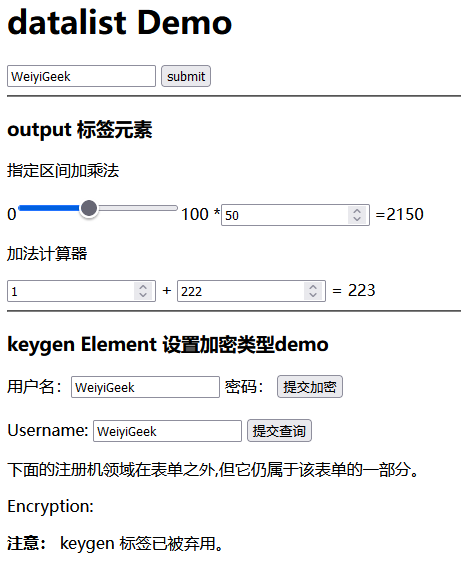
描述: 标签规定了 <input> 元素可能的选项列表,"自动完成"的特性, 用户能看到一个下拉列表,里边的选项是预先定义好的,将作为用户的输入数据。(PS: 输入的时候可以提示补全你输入的值,其元素并不会像select元素一样显示)
属性:
<input> 元素的 list 属性来绑定 <datalist> 元素(id引用list属性值)。示例:
<form action="server.php" method="get">
<!-- 温馨提示: 注意此处,id引用list的属性值. -->
<input list="browsers" name="weiyigeek">
<datalist id="browsers">
  <option value="Internet Explorer">
  <option value="Firefox">
  <option value="Chrome">
  <option value="Opera">
  <option value="Safari">
</datalist>
<input type="submit">
</form>
描述: 该标签是html5新增标签,是使用来定义不同类型的输出(比如:脚本的输出),output标签通常和form表单一起使用,用来输出显示计算结果。
属性:
示例:
<!-- 示例1.在用户输入时触发. -->
<form oninput="x.value=parseInt(a.value)+parseInt(b.value)">
  0<input type="range" id="a" value="50">100 + <input type="number" id="b" value="50">
  =
  <output name="x" for="a b"></output>
</form>

<!-- 示例2.加法计算器. -->
<form oninput="x.value=parseInt(a.value)+parseInt(b.value)">
  <input type="number" id="a" value="0"> +
  <input type="number" id="b" value="0"> =
  <output name="x" for="a b">0</output>
</form>
描述: 该元素是为了方便生成密钥材料和提交作为 HTML form 的一部分的公钥。这种机制被用于设计基于 Web 的证书管理系统。按照预想,<keygen> 元素将用于 HTML 表单与其他的所需信息一起构造一个证书请求,该处理的结果将是一个带有签名的证书。
属性:
椭圆曲线)。示例:
<!-- 简单示例 -->
<keygen name="name" challenge="challenge string" keytype="type" keyparams="pqg-params">

<!-- 综合示例 -->
<form action="demo_keygen.php" method="get" id="secureformid">
  Username: <input type="text" name="usr_name">
  <input type="submit">
</form>
<p>下面的注册机领域在表单之外,但它仍属于该表单的一部分。</p>
Encryption: <keygen name="security" form="secureformid">

综合示例:
代码示例: https://github.com/WeiyiGeek/DevelopLearnig/blob/main/fore-end/HTML/example/study/08.Input.html
执行结果:
原文地址: https://blog.weiyigeek.top/2023/3-14-721.html
本文至此完毕,更多技术文章,尽情期待下一章节!
专栏书写不易,如果您觉得这个专栏还不错的,请给这篇专栏 【点个赞、投个币、收个藏、关个注,转个发,留个言】(人间六大情),这将对我的肯定,谢谢!。
点击 ? 关注「 全栈工程师修炼指南」公众号
微信沟通交流: weiyigeeker (点击添加)
交流沟通群:629184198 或 关注公众号回复【学习交流群】
温馨提示: 由于作者水平有限,本章错漏缺点在所难免,希望读者批评指正,并请在文章末尾留下您宝贵的经验知识,联系邮箱地址 master@weiyigeek.top 或者关注公众号 WeiyiGeek 联系我。

我想将html转换为纯文本。不过,我不想只删除标签,我想智能地保留尽可能多的格式。为插入换行符标签,检测段落并格式化它们等。输入非常简单,通常是格式良好的html(不是整个文档,只是一堆内容,通常没有anchor或图像)。我可以将几个正则表达式放在一起,让我达到80%,但我认为可能有一些现有的解决方案更智能。 最佳答案 首先,不要尝试为此使用正则表达式。很有可能你会想出一个脆弱/脆弱的解决方案,它会随着HTML的变化而崩溃,或者很难管理和维护。您可以使用Nokogiri快速解析HTML并提取文本:require'nokogiri'h
我得到了一个包含嵌套链接的表单。编辑时链接字段为空的问题。这是我的表格:Editingkategori{:action=>'update',:id=>@konkurrancer.id})do|f|%>'Trackingurl',:style=>'width:500;'%>'Editkonkurrence'%>|我的konkurrencer模型:has_one:link我的链接模型:classLink我的konkurrancer编辑操作:defedit@konkurrancer=Konkurrancer.find(params[:id])@konkurrancer.link_attrib
我试图使用yard记录一些Ruby代码,尽管我所做的正是所描述的here或here#@param[Integer]thenumberoftrials(>=0)#@param[Float]successprobabilityineachtrialdefinitialize(n,p)#initialize...end虽然我仍然得到这个奇怪的错误@paramtaghasunknownparametername:the@paramtaghasunknownparametername:success然后生成的html看起来很奇怪。我称yard为:$yarddoc-mmarkdown我做错了什么?
在我的Controller中,我通过以下方式在我的index方法中支持HTML和JSON:respond_todo|format|format.htmlformat.json{renderjson:@user}end在浏览器中拉起它时,它会自然地以HTML呈现。但是,当我对/user资源进行内容类型为application/json的curl调用时(因为它是索引方法),我仍然将HTML作为响应。如何获取JSON作为响应?我还需要说明什么? 最佳答案 您应该将.json附加到请求的url,提供的格式在routes.rb的路径中定义。这
所以我在关注Railscast,我注意到在html.erb文件中,ruby代码有一个微弱的背景高亮效果,以区别于其他代码HTML文档。我知道Ryan使用TextMate。我正在使用SublimeText3。我怎样才能达到同样的效果?谢谢! 最佳答案 为SublimeText安装ERB包。假设您安装了SublimeText包管理器*,只需点击cmd+shift+P即可获得命令菜单,然后键入installpackage并选择PackageControl:InstallPackage获取包管理器菜单。在该菜单中,键入ERB并在看到包时选择
我有一个服务模型/表及其注册表。在表单中,我几乎拥有服务的所有字段,但我想在验证服务对象之前自动设置其中一些值。示例:--服务Controller#创建Action:defcreate@service=Service.new@service_form=ServiceFormObject.new(@service)@service_form.validate(params[:service_form_object])and@service_form.saverespond_with(@service_form,location:admin_services_path)end在验证@ser
我正在使用Rails构建一个简单的聊天应用程序。当用户输入url时,我希望将其输出为html链接(即“url”)。我想知道在Ruby中是否有任何库或众所周知的方法可以做到这一点。如果没有,我有一些不错的正则表达式示例代码可以使用... 最佳答案 查看auto_linkRails提供的辅助方法。这会将所有URL和电子邮件地址变成可点击的链接(htmlanchor标记)。这是文档中的代码示例。auto_link("Gotohttp://www.rubyonrails.organdsayhellotodavid@loudthinking.
查看我的Ruby代码:h=Hash.new([])h[0]=:word1h[1]=h[1]输出是:Hash={0=>:word1,1=>[:word2,:word3],2=>[:word2,:word3]}我希望有Hash={0=>:word1,1=>[:word2],2=>[:word3]}为什么要附加第二个哈希元素(数组)?如何将新数组元素附加到第三个哈希元素? 最佳答案 如果您提供单个值作为Hash.new的参数(例如Hash.new([]),完全相同的对象将用作每个缺失键的默认值。这就是您所拥有的,那是你不想要的。您可以改用
我正在学习http://ruby.railstutorial.org/chapters/static-pages上的RubyonRails教程并遇到以下错误StaticPagesHomepageshouldhavethecontent'SampleApp'Failure/Error:page.shouldhave_content('SampleApp')Capybara::ElementNotFound:Unabletofindxpath"/html"#(eval):2:in`text'#./spec/requests/static_pages_spec.rb:7:in`(root)'
我有一个div,它根据表单是否正确提交而改变。我想知道是否可以检查类的特定元素?开始元素看起来像这样。如果输入不正确,添加错误类。 最佳答案 试试这个:browser.div(:id=>"myerrortest").class_name更多信息:http://watir.github.com/watir-webdriver/doc/Watir/HTMLElement.html#class_name-instance_method另一种选择是只查看具有您期望的类的div是否存在browser.div((:id=>"myerrortes
