2022年九月更新:
在原来的基础上,我使用了yolov5代替了opencv的目标检测算法辅助相机进行三维坐标的获取,并成功用获取的坐标实时控制机械臂,感兴趣的话可以看我b站里的视频,视频下方也有开源的链接:【软核】我给自己开发了一条机械臂 双目视觉 目标检测_哔哩哔哩_bilibili
以下为原答案:
对着csdn和b站研究了几天双目视觉,算是能粗略的实现一些功能了。在这里记录一下思路,顺便记录一下遇到的坑。
先看一下最终成果吧,实现对物体的追踪和显示三维像素坐标:
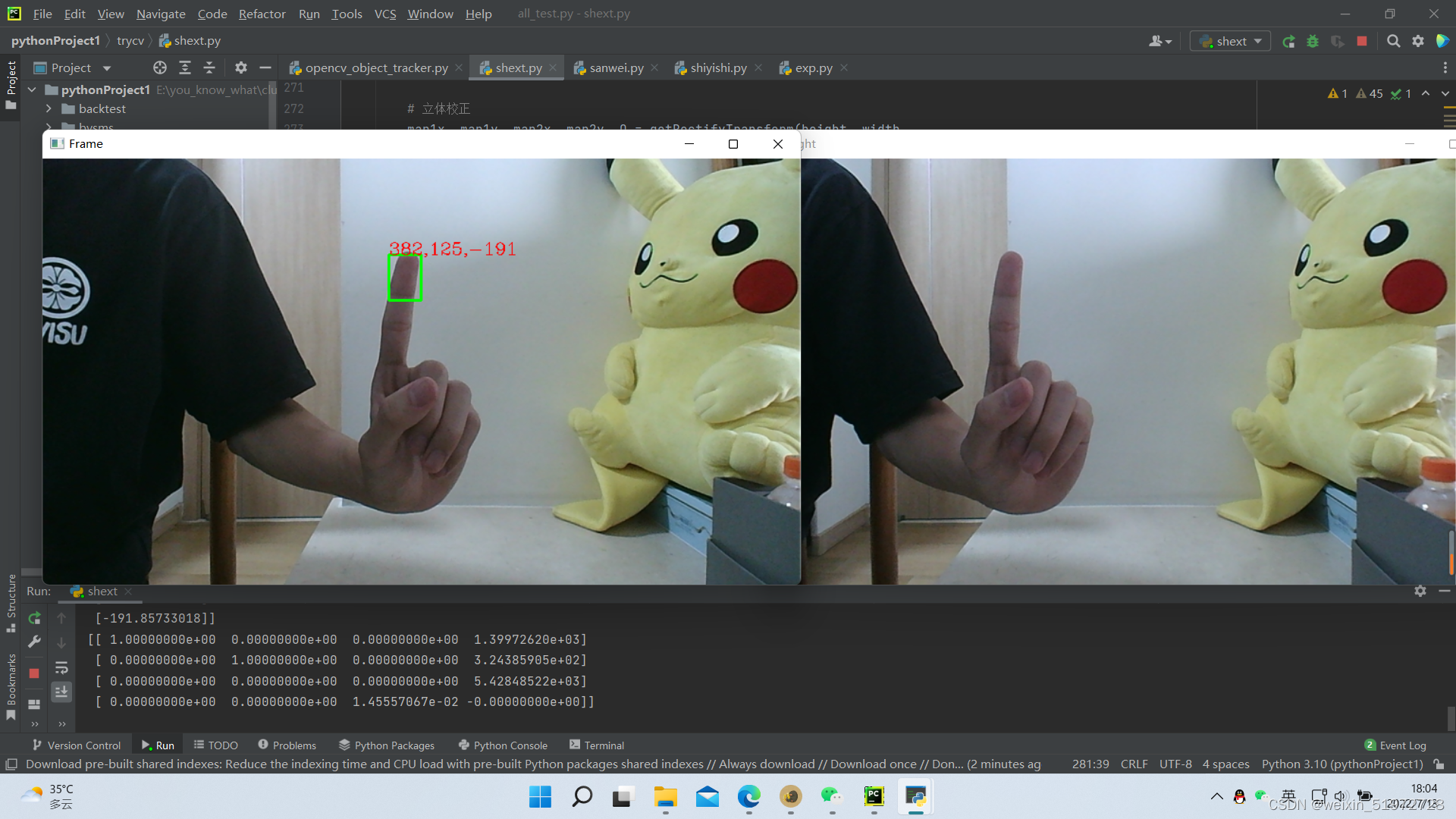
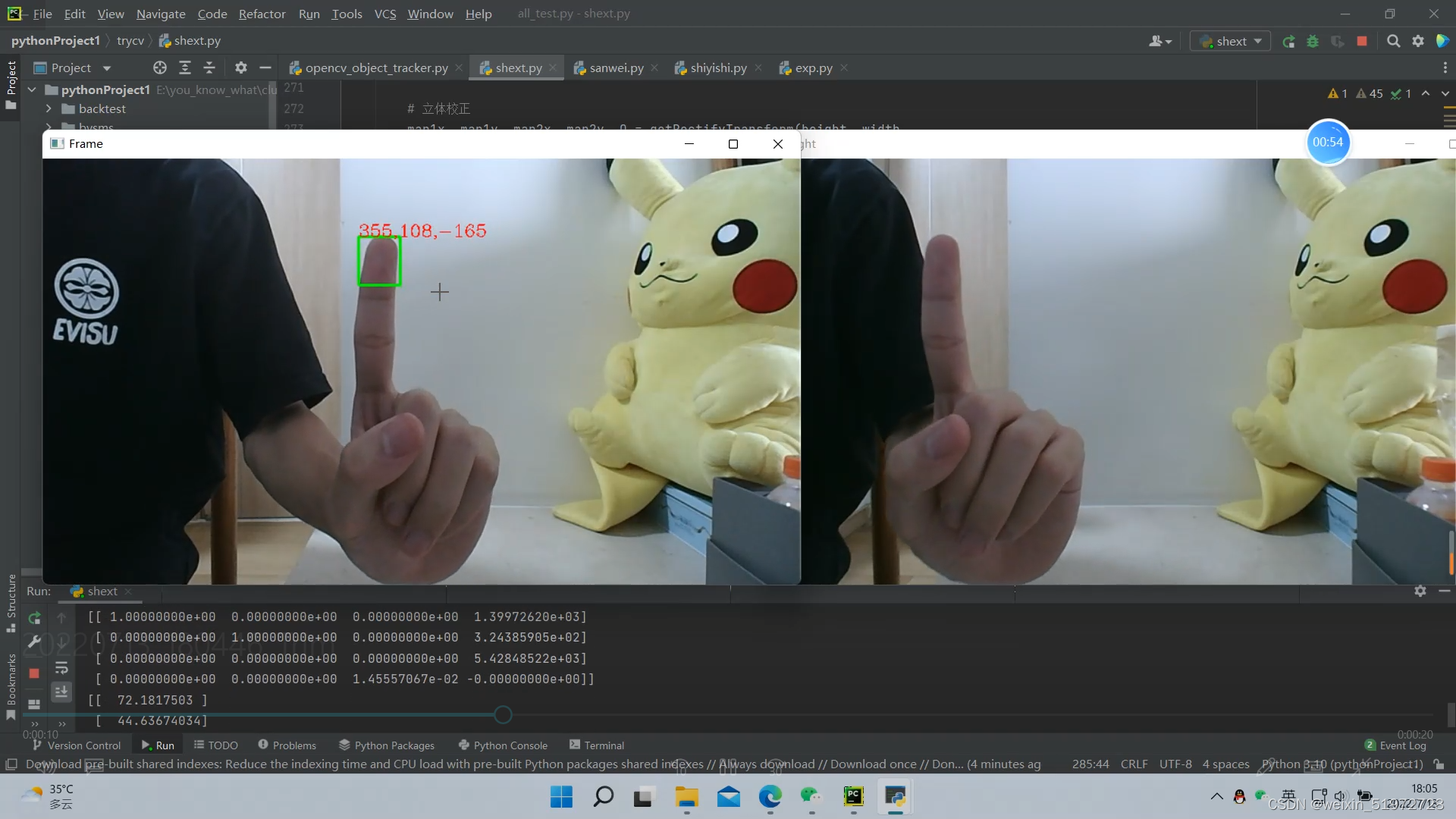 再说一下具体的步骤
一、相机标定
使用双目相机的前提都是先获取相机的内参和外参,有些贵一点的相机出厂时会把这些参数一起给你,比较普通的相机就需要我们自己标定了。我是通过matlab标定的,具体步骤可以看这篇博客:Matlab双目相机标定_indigo love的博客-CSDN博客_matlab双目相机标定
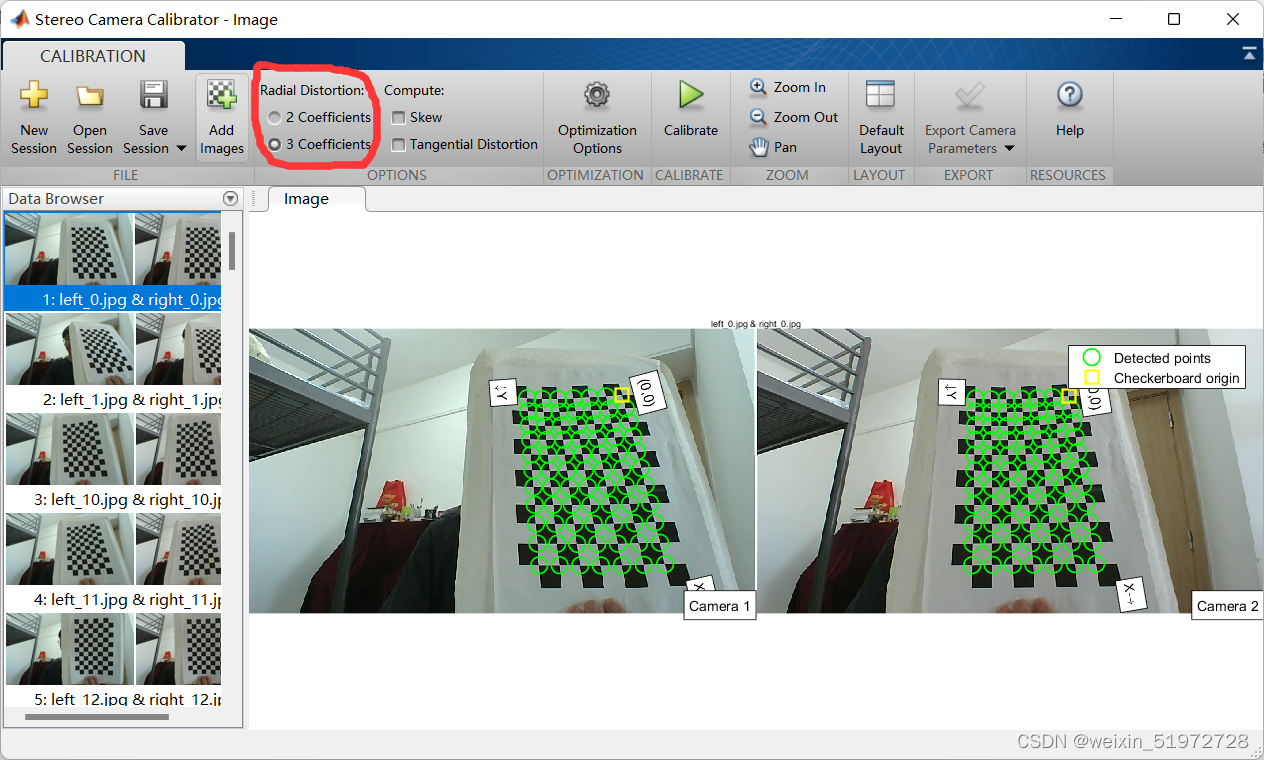
里面讲的都很详细了,给的代码都可以直接运行,但是要注意一个细节。在matlab标定的界面,这个选项默认是给2个参数的,我们要手动勾选到三个参数,不然最后输出的相机参数就会不太一样
这里我们先把标定的结果放到一个叫stereoconfig.py的文件里,方便后面使用
import numpy as np

class stereoCamera(object):
    def __init__(self):
        # 左相机内参
        self.cam_matrix_left = np.array([[684.8165, 0, 637.2704], [0, 685.4432, 320.5347],
                                         [0, 0, 1]])
        # 右相机内参
        self.cam_matrix_right = np.array([[778.2081, 0, 602.9231], [0, 781.9883, 319.6632],
                                          [0, 0, 1]])

        # 左右相机畸变系数:[k1, k2, p1, p2, k3]
        self.distortion_l = np.array([[0.1342, -0.3101, 0, 0, 0.1673]])
        self.distortion_r = np.array([[0.4604, -2.3963, 0, 0, 5.2266]])

        # 旋转矩阵
        self.R = np.array([[0.9993, -0.0038, -0.0364],
                          [0.0033, 0.9999, -0.0143],
                          [0.0365, 0.0142, 0.9992]])
        # 平移矩阵
        self.T = np.array([[-44.8076], [5.7648], [51.7586]])

        # 主点列坐标的差
        self.doffs = 0.0

        # 指示上述内外参是否为经过立体校正后的结果
        self.isRectified = False

    def setMiddleBurryParams(self):
        self.cam_matrix_left = np.array([[684.8165, 0, 637.2704], [0, 685.4432, 320.5347],
                                         [0, 0, 1]])
        self.cam_matrix_right = np.array([[778.2081, 0, 602.9231], [0, 781.9883, 319.6632],
                                          [0, 0, 1]])
        self.distortion_l = np.array([[0.1342, -0.3101, 0, 0, 0.1673]])
        self.distortion_r = np.array([[0.4604, -2.3963, 0, 0, 5.2266]])
        self.R = np.array([[0.9993, -0.0038, -0.0364],
                          [0.0033, 0.9999, -0.0143],
                          [0.0365, 0.0142, 0.9992]])
        self.T = np.array([[-44.8076], [5.7648], [51.7586]])
        self.doffs = 131.111
        self.isRectified = True
二、关于如何用python打开两个摄像头
其实这应该不算是重点,但是真的卡了我很久......所以还是说一说。
首先,双目摄像头虽然有两个摄像头,但他们用的是同一个串口号,也就是说camera = cv2.VideoCapture(0),给的id是0,那么它已经是打开了两个摄像头了,但是如果你只运行这一行代码你只能看到左摄像头,为什么呢?其实不是另一个摄像头没打开,而是你默认的窗口大小不够大,所以只能看到一个摄像头,对于2560×720的摄像头用下面的代码可以切割窗口,开两个窗口让两个摄像头都显示。1480的摄像头可以参考这篇博客,反正我主要也是复制的他的OpenCV 打开双目摄像头(python版)_一颗小树x的博客-CSDN博客_opencv打开双目摄像头
我建议还是一个开两个窗口,分别显示左摄像头和右摄像头,当然你也可以让两个摄像头显示在一个窗口里,用相应的方法切割窗口就行,不细说。
# -*- coding: utf-8 -*-
import cv2
import time


AUTO = False  # 自动拍照,或手动按s键拍照
INTERVAL = 2 # 自动拍照间隔

cv2.namedWindow("left")
cv2.namedWindow("right")
camera = cv2.VideoCapture(0)

# 设置分辨率左右摄像机同一频率,同一设备ID;左右摄像机总分辨率2560x720;分割为两个1280x720
camera.set(cv2.CAP_PROP_FRAME_WIDTH,2560)
camera.set(cv2.CAP_PROP_FRAME_HEIGHT,720)

counter = 0
utc = time.time()
folder = "./SaveImage/" # 拍照文件目录

def shot(pos, frame):
    global counter
    path = folder + pos + "_" + str(counter) + ".jpg"

    cv2.imwrite(path, frame)
    print("snapshot saved into: " + path)

while True:
    ret, frame = camera.read()
    print("ret:",ret)
    # 裁剪坐标为[y0:y1, x0:x1]    HEIGHT * WIDTH
    left_frame = frame[0:720, 0:1280]
    right_frame = frame[0:720, 1280:2560]

    cv2.imshow("left", left_frame)
    cv2.imshow("right", right_frame)

    now = time.time()
    if AUTO and now - utc >= INTERVAL:
        shot("left", left_frame)
        shot("right", right_frame)
        counter += 1
        utc = now

    key = cv2.waitKey(1)
    if key == ord("q"):
        break
    elif key == ord("s"):
        shot("left", left_frame)
        shot("right", right_frame)
        counter += 1
camera.release()
cv2.destroyWindow("left")
cv2.destroyWindow("right")
三、目标追踪的实现
本文的思路是先实现单目相机(即左相机)的目标追踪,实现目标追踪后左相机目标处的二维像素坐标就得到了,再把左相机目标处的二维像素坐标加上 “视差” 就得到了右相机目标处的像素二维坐标。得到两个坐标后再利用最小二乘法得到第三维的像素坐标。
总之,先贴出单目相机的目标追踪代码:
import cv2


vs = cv2.VideoCapture(0)    # 参数0表示第一个摄像头
cv2.namedWindow("Frame")

# 判断视频是否打开
if (vs.isOpened()):
    print('camera Opened')
else:
    print('摄像头未打开')

OPENCV_OBJECT_TRACKERS = {
    "csrt": cv2.TrackerCSRT_create, "kcf": cv2.TrackerKCF_create,
    "boosting": cv2.TrackerBoosting_create, "mil": cv2.TrackerMIL_create,
    "tld": cv2.TrackerTLD_create,
    "medianflow": cv2.TrackerMedianFlow_create, "mosse": cv2.TrackerMOSSE_create
}
trackers=cv2.MultiTracker_create()

while True:
    frame=vs.read()
    frame=frame[1]
    if frame is None:
        break

    # 设置摄像头尺寸
    (h,w) = frame.shape[:2]
    width = 800
    r = width / float(w)
    dim = (width, int(h * r))
    frame = cv2.resize(frame, dim, interpolation = cv2.INTER_AREA)

    # 对做摄像头做目标识别初始化
    (success,boxes)=trackers.update(frame)

    # 画图的循环
    for box in boxes:
        (x,y,w,h)=[int(v) for v in box]
        cv2.rectangle(frame, (x, y), (x + w, y + h), (0, 255, 0), 2)

    cv2.imshow('Frame', frame)

    # 按键判断是否设置了新的目标
    key=cv2.waitKey(10) & 0xFF
    if key == ord('s'):
        box=cv2.selectROI('Frame', frame, fromCenter=False, showCrosshair=True)
        tracker=cv2.TrackerCSRT_create()
        print(type(box),type(box[0]),box[1],box)
        trackers.add(tracker, frame, box)
    elif key == 27:
        break
vs.release()
cv2.destroyAllWindows()
运行之后弹出一个Frame窗口,按下按键“s”图像就会静止,可以用鼠标画一个框,然后再按空格就会开始目标追踪了。
四、z轴坐标的获取
这应该是比较核心的部分了,思路就是我在第三部分开头里说的。
(1)计算视差
这个函数会返回一个值disp,就是视差(disparity),视差的定义是disparity=ul-ur,即左图的像素坐标减去右图的像素坐标。视差越大,说明该点距离摄像头越近,这很好理解啊,把双目相机想象成你的眼睛,当你不停的闭一只眼,睁开另一只眼,你会发现视线里的物体会移动,且越近的物体移动的距离越大。是吧?
# 视差计算
def stereoMatchSGBM(left_image, right_image, down_scale=False):
    # SGBM匹配参数设置
    if left_image.ndim == 2:
        img_channels = 1
    else:
        img_channels = 3
    blockSize = 3
    paraml = {'minDisparity': 0,
              'numDisparities': 64,
              'blockSize': blockSize,
              'P1': 8 * img_channels * blockSize ** 2,
              'P2': 32 * img_channels * blockSize ** 2,
              'disp12MaxDiff': 1,
              'preFilterCap': 63,
              'uniquenessRatio': 15,
              'speckleWindowSize': 100,
              'speckleRange': 1,
              'mode': cv2.STEREO_SGBM_MODE_SGBM_3WAY
              }
    # 构建SGBM对象
    left_matcher = cv2.StereoSGBM_create(**paraml)
    paramr = paraml
    paramr['minDisparity'] = -paraml['numDisparities']
    right_matcher = cv2.StereoSGBM_create(**paramr)

    # 计算视差图
    size = (left_image.shape[1], left_image.shape[0])
    if down_scale == False:
        disparity_left = left_matcher.compute(left_image, right_image)
        disparity_right = right_matcher.compute(right_image, left_image)
    else:
        left_image_down = cv2.pyrDown(left_image)
        right_image_down = cv2.pyrDown(right_image)
        factor = left_image.shape[1] / left_image_down.shape[1]

        disparity_left_half = left_matcher.compute(left_image_down, right_image_down)
        disparity_right_half = right_matcher.compute(right_image_down, left_image_down)
        disparity_left = cv2.resize(disparity_left_half, size, interpolation=cv2.INTER_AREA)
        disparity_right = cv2.resize(disparity_right_half, size, interpolation=cv2.INTER_AREA)
        disparity_left = factor * disparity_left
        disparity_right = factor * disparity_right

    # 真实视差(因为SGBM算法得到的视差是×16的)
    trueDisp_left = disparity_left.astype(np.float32) / 16.
    trueDisp_right = disparity_right.astype(np.float32) / 16.

    return trueDisp_left, trueDisp_right
(2)目标处的左右像素点计算
得到了视差大小之后,就可以根据视差计算两边像素点的坐标了。disp是我们之前求出的视差的参数。注意这里是disp(yy,xx)而不是disp(xx,yy) ,你看下disp的长度和宽度就知道了
    # 画图的循环,(x,y)和(x+w,y+h)是你画的框的左上角和右下角的两个坐标哈
    for box in boxes:
        (x, y, w, h)=[int(v) for v in box]
        cv2.rectangle(left_frame, (x, y), (x + w, y + h), (0, 255, 0), 2)

        # 转化成框框中点的坐标
        xx = round((2*x+w)/2)
        yy = round((2*y+h)/2)

        # xr和yr是右相机相应点的像素坐标
        xr = xx+disp[yy, xx]
        yr = yy
(3)z轴坐标计算
我只知道视差越小,深度越深。视差转化为现实坐标的我也不太懂原理,这个是其他人的代码。
def getDepthMapWithConfig(config : stereoconfig.stereoCamera) -> np.ndarray:
    fb = config.cam_matrix_left[0, 0] * (-config.T[0])
    doffs = config.doffs
    disparity=dot_disp
    depth = fb/(disparity + doffs)
    return depth
五、最终结果
我把所有代码都贴一下吧
import cv2
import argparse
import numpy as np
import stereoconfig

# 左相机内参
leftIntrinsic = np.array([[684.8165, 0, 637.2704], [0, 685.4432, 320.5347],
                                 [0, 0, 1]])
# 右相机内参
rightIntrinsic = np.array([[778.2081, 0, 602.9231], [0, 781.9883, 319.6632],
                                  [0, 0, 1]])


# 旋转矩阵
leftRotation = np.array([[1, 0, 0],           # 旋转矩阵
                         [0, 1, 0],
                         [0, 0, 1]])
rightRotation = np.array([[0.9993, -0.0038, -0.0364],
                   [0.0033, 0.9999, -0.0143],
                   [0.0365, 0.0142, 0.9992]])

# 平移矩阵
rightTranslation = np.array([[-44.8076], [5.7648], [51.7586]])
leftTranslation = np.array([[0],              # 平移矩阵
                            [0],
                            [0]])

def getDepthMapWithConfig(config : stereoconfig.stereoCamera) -> np.ndarray:
    fb = config.cam_matrix_left[0, 0] * (-config.T[0])
    doffs = config.doffs
    disparity=dot_disp
    depth = fb/(disparity + doffs)
    return depth

# 预处理
def preprocess(img1, img2):
    # 彩色图->灰度图
    if (img1.ndim == 3):
        img1 = cv2.cvtColor(img1, cv2.COLOR_BGR2GRAY)  # 通过OpenCV加载的图像通道顺序是BGR
    if (img2.ndim == 3):
        img2 = cv2.cvtColor(img2, cv2.COLOR_BGR2GRAY)

    # 直方图均衡
    img1 = cv2.equalizeHist(img1)
    img2 = cv2.equalizeHist(img2)

    return img1, img2


# 消除畸变
def undistortion(image, camera_matrix, dist_coeff):
    undistortion_image = cv2.undistort(image, camera_matrix, dist_coeff)

    return undistortion_image


# 获取畸变校正和立体校正的映射变换矩阵、重投影矩阵
# @param:config是一个类,存储着双目标定的参数:config = stereoconfig.stereoCamera()
def getRectifyTransform(height, width, config):
    # 读取内参和外参
    left_K = config.cam_matrix_left
    right_K = config.cam_matrix_right
    left_distortion = config.distortion_l
    right_distortion = config.distortion_r
    R = config.R
    T = config.T

    # 计算校正变换
    R1, R2, P1, P2, Q, roi1, roi2 = cv2.stereoRectify(left_K, left_distortion, right_K, right_distortion,
                                                      (width, height), R, T, alpha=0)

    map1x, map1y = cv2.initUndistortRectifyMap(left_K, left_distortion, R1, P1, (width, height), cv2.CV_32FC1)
    map2x, map2y = cv2.initUndistortRectifyMap(right_K, right_distortion, R2, P2, (width, height), cv2.CV_32FC1)

    return map1x, map1y, map2x, map2y, Q


# 畸变校正和立体校正
def rectifyImage(image1, image2, map1x, map1y, map2x, map2y):
    rectifyed_img1 = cv2.remap(image1, map1x, map1y, cv2.INTER_AREA)
    rectifyed_img2 = cv2.remap(image2, map2x, map2y, cv2.INTER_AREA)

    return rectifyed_img1, rectifyed_img2


# 视差计算
def stereoMatchSGBM(left_image, right_image, down_scale=False):
    # SGBM匹配参数设置
    if left_image.ndim == 2:
        img_channels = 1
    else:
        img_channels = 3
    blockSize = 3
    paraml = {'minDisparity': 0,
              'numDisparities': 64,
              'blockSize': blockSize,
              'P1': 8 * img_channels * blockSize ** 2,
              'P2': 32 * img_channels * blockSize ** 2,
              'disp12MaxDiff': 1,
              'preFilterCap': 63,
              'uniquenessRatio': 15,
              'speckleWindowSize': 100,
              'speckleRange': 1,
              'mode': cv2.STEREO_SGBM_MODE_SGBM_3WAY
              }
    # 构建SGBM对象
    left_matcher = cv2.StereoSGBM_create(**paraml)
    paramr = paraml
    paramr['minDisparity'] = -paraml['numDisparities']
    right_matcher = cv2.StereoSGBM_create(**paramr)

    # 计算视差图
    size = (left_image.shape[1], left_image.shape[0])
    if down_scale == False:
        disparity_left = left_matcher.compute(left_image, right_image)
        disparity_right = right_matcher.compute(right_image, left_image)
    else:
        left_image_down = cv2.pyrDown(left_image)
        right_image_down = cv2.pyrDown(right_image)
        factor = left_image.shape[1] / left_image_down.shape[1]

        disparity_left_half = left_matcher.compute(left_image_down, right_image_down)
        disparity_right_half = right_matcher.compute(right_image_down, left_image_down)
        disparity_left = cv2.resize(disparity_left_half, size, interpolation=cv2.INTER_AREA)
        disparity_right = cv2.resize(disparity_right_half, size, interpolation=cv2.INTER_AREA)
        disparity_left = factor * disparity_left
        disparity_right = factor * disparity_right

    # 真实视差(因为SGBM算法得到的视差是×16的)
    trueDisp_left = disparity_left.astype(np.float32) / 16.
    trueDisp_right = disparity_right.astype(np.float32) / 16.

    return trueDisp_left, trueDisp_right


# 将h×w×3数组转换为N×3的数组
def hw3ToN3(points):
    height, width = points.shape[0:2]

    points_1 = points[:, :, 0].reshape(height * width, 1)
    points_2 = points[:, :, 1].reshape(height * width, 1)
    points_3 = points[:, :, 2].reshape(height * width, 1)

    points_ = np.hstack((points_1, points_2, points_3))

    return points_


def getDepthMapWithQ(disparityMap: np.ndarray, Q: np.ndarray) -> np.ndarray:
    points_3d = cv2.reprojectImageTo3D(disparityMap, Q)
    depthMap = points_3d[:, :, 2]
    reset_index = np.where(np.logical_or(depthMap < 0.0, depthMap > 65535.0))
    depthMap[reset_index] = 0

    return depthMap.astype(np.float32)


def getDepthMapWithConfig(config : stereoconfig.stereoCamera) -> np.ndarray:
    fb = config.cam_matrix_left[0, 0] * (-config.T[0])
    doffs = config.doffs
    disparity=dot_disp
    depth = fb/(disparity + doffs)
    return depth


vs = cv2.VideoCapture(0)    # 参数0表示第一个摄像头
cv2.namedWindow("Frame")

# 分配摄像头分辨率
vs.set(cv2.CAP_PROP_FRAME_WIDTH, 2560)
vs.set(cv2.CAP_PROP_FRAME_HEIGHT, 720)


# 判断视频是否打开
if (vs.isOpened()):
    print('camera Opened')
else:
    print('摄像头未打开')

OPENCV_OBJECT_TRACKERS = {
    "csrt": cv2.TrackerCSRT_create, "kcf": cv2.TrackerKCF_create,
    "boosting": cv2.TrackerBoosting_create, "mil": cv2.TrackerMIL_create,
    "tld": cv2.TrackerTLD_create,
    "medianflow": cv2.TrackerMedianFlow_create, "mosse": cv2.TrackerMOSSE_create
}

trackers=cv2.MultiTracker_create()

# 读取相机内参和外参
# 使用之前先将标定得到的内外参数填写到stereoconfig.py中的StereoCamera类中
config = stereoconfig.stereoCamera()
config.setMiddleBurryParams()
print(config.cam_matrix_left)

while True:
    frame=vs.read()
    frame=frame[1]
    if frame is None:
        break
    # 设置右摄像头尺寸
    right_frame = frame[0:720, 1280:2560]
    (h,w) = right_frame.shape[:2]
    width = 800
    r = width / float(w)
    dim = (width, int(h * r))
    right_frame = cv2.resize(right_frame, dim, interpolation = cv2.INTER_AREA)

    # 设置左摄像头尺寸
    left_frame = frame[0:720, 0:1280]
    (h,w) = left_frame.shape[:2]
    width = 800
    r = width / float(w)
    dim = (width, int(h * r))
    left_frame = cv2.resize(left_frame, dim, interpolation = cv2.INTER_AREA)

    # 对做摄像头做目标识别初始化
    (success,boxes)=trackers.update(left_frame)

    # 画图的循环
    for box in boxes:
        (x, y, w, h)=[int(v) for v in box]
        cv2.rectangle(left_frame, (x, y), (x + w, y + h), (0, 255, 0), 2)

        # 转化成框框中点的坐标
        xx = round((2*x+w)/2)
        yy = round((2*y+h)/2)

        # 读取一帧图片
        iml = left_frame  # 左图
        imr = right_frame  # 右图
        height, width = iml.shape[0:2]

        # 立体校正
        map1x, map1y, map2x, map2y, Q = getRectifyTransform(height, width,
                                                            config)  # 获取用于畸变校正和立体校正的映射矩阵以及用于计算像素空间坐标的重投影矩阵
        iml_rectified, imr_rectified = rectifyImage(iml, imr, map1x, map1y, map2x, map2y)
        print(Q)

        # 立体匹配
        iml_, imr_ = preprocess(iml, imr)  # 预处理,一般可以削弱光照不均的影响,不做也可以
        disp, _ = stereoMatchSGBM(iml, imr, False)  # 这里传入的是未经立体校正的图像,因为我们使用的middleburry图片已经是校正过的了
        dot_disp=disp[yy][xx]
        cv2.imwrite('disaprity.jpg', disp * 4)

        # xr和yr是右相机相应点的像素坐标
        z=getDepthMapWithConfig(config)
        text = str(xx)+','+str(yy)+','+str(z)
        cv2.putText(left_frame, text, (x, y), cv2.FONT_HERSHEY_COMPLEX, 0.6, (0, 0, 255), 1)

    # 显示两个框
    cv2.imshow("right", right_frame)
    cv2.imshow('Frame', left_frame)

    # 按键判断是否设置新的目标
    key=cv2.waitKey(10) & 0xFF
    if key == ord('s'):
        box=cv2.selectROI('Frame', left_frame, fromCenter=False, showCrosshair=True)
        tracker=cv2.TrackerCSRT_create()
        print(type(box),type(box[0]),box[1],box)
        trackers.add(tracker, left_frame, box)
    elif key == 27:
        break
vs.release()
cv2.destroyAllWindows()
关闭。这个问题是opinion-based.它目前不接受答案。想要改进这个问题?更新问题,以便editingthispost可以用事实和引用来回答它.关闭4年前。Improvethisquestion我想在固定时间创建一系列低音和高音调的哔哔声。例如:在150毫秒时发出高音调的蜂鸣声在151毫秒时发出低音调的蜂鸣声200毫秒时发出低音调的蜂鸣声250毫秒的高音调蜂鸣声有没有办法在Ruby或Python中做到这一点?我真的不在乎输出编码是什么(.wav、.mp3、.ogg等等),但我确实想创建一个输出文件。
如何在buildr项目中使用Ruby?我在很多不同的项目中使用过Ruby、JRuby、Java和Clojure。我目前正在使用我的标准Ruby开发一个模拟应用程序,我想尝试使用Clojure后端(我确实喜欢功能代码)以及JRubygui和测试套件。我还可以看到在未来的不同项目中使用Scala作为后端。我想我要为我的项目尝试一下buildr(http://buildr.apache.org/),但我注意到buildr似乎没有设置为在项目中使用JRuby代码本身!这看起来有点傻,因为该工具旨在统一通用的JVM语言并且是在ruby中构建的。除了将输出的jar包含在一个独特的、仅限ruby
在rails源中:https://github.com/rails/rails/blob/master/activesupport/lib/active_support/lazy_load_hooks.rb可以看到以下内容@load_hooks=Hash.new{|h,k|h[k]=[]}在IRB中,它只是初始化一个空哈希。和做有什么区别@load_hooks=Hash.new 最佳答案 查看rubydocumentationforHashnew→new_hashclicktotogglesourcenew(obj)→new_has
有没有办法在这个简单的get方法中添加超时选项?我正在使用法拉第3.3。Faraday.get(url)四处寻找,我只能先发起连接后应用超时选项,然后应用超时选项。或者有什么简单的方法?这就是我现在正在做的:conn=Faraday.newresponse=conn.getdo|req|req.urlurlreq.options.timeout=2#2secondsend 最佳答案 试试这个:conn=Faraday.newdo|conn|conn.options.timeout=20endresponse=conn.get(url
我的主要目标是能够完全理解我正在使用的库/gem。我尝试在Github上从头到尾阅读源代码,但这真的很难。我认为更有趣、更温和的踏脚石就是在使用时阅读每个库/gem方法的源代码。例如,我想知道RubyonRails中的redirect_to方法是如何工作的:如何查找redirect_to方法的源代码?我知道在pry中我可以执行类似show-methodmethod的操作,但我如何才能对Rails框架中的方法执行此操作?您对我如何更好地理解Gem及其API有什么建议吗?仅仅阅读源代码似乎真的很难,尤其是对于框架。谢谢! 最佳答案 Ru
我有一个存储主机名的Ruby数组server_names。如果我打印出来,它看起来像这样:["hostname.abc.com","hostname2.abc.com","hostname3.abc.com"]相当标准。我想要做的是获取这些服务器的IP(可能将它们存储在另一个变量中)。看起来IPSocket类可以做到这一点,但我不确定如何使用IPSocket类遍历它。如果它只是尝试像这样打印出IP:server_names.eachdo|name|IPSocket::getaddress(name)pnameend它提示我没有提供服务器名称。这是语法问题还是我没有正确使用类?输出:ge
我想获取模块中定义的所有常量的值:moduleLettersA='apple'.freezeB='boy'.freezeendconstants给了我常量的名字:Letters.constants(false)#=>[:A,:B]如何获取它们的值的数组,即["apple","boy"]? 最佳答案 为了做到这一点,请使用mapLetters.constants(false).map&Letters.method(:const_get)这将返回["a","b"]第二种方式:Letters.constants(false).map{|c
我的假设是moduleAmoduleBendend和moduleA::Bend是一样的。我能够从thisblog找到解决方案,thisSOthread和andthisSOthread.为什么以及什么时候应该更喜欢紧凑语法A::B而不是另一个,因为它显然有一个缺点?我有一种直觉,它可能与性能有关,因为在更多命名空间中查找常量需要更多计算。但是我无法通过对普通类进行基准测试来验证这一点。 最佳答案 这两种写作方法经常被混淆。首先要说的是,据我所知,没有可衡量的性能差异。(在下面的书面示例中不断查找)最明显的区别,可能也是最著名的,是你的
几个月前,我读了一篇关于rubygem的博客文章,它可以通过阅读代码本身来确定编程语言。对于我的生活,我不记得博客或gem的名称。谷歌搜索“ruby编程语言猜测”及其变体也无济于事。有人碰巧知道相关gem的名称吗? 最佳答案 是这个吗:http://github.com/chrislo/sourceclassifier/tree/master 关于ruby-寻找通过阅读代码确定编程语言的rubygem?,我们在StackOverflow上找到一个类似的问题:
我安装了ruby版本管理器,并将RVM安装的ruby实现设置为默认值,这样'哪个ruby'显示'~/.rvm/ruby-1.8.6-p383/bin/ruby'但是当我在emacs中打开inf-ruby缓冲区时,它使用安装在/usr/bin中的ruby。有没有办法让emacs像shell一样尊重ruby的路径?谢谢! 最佳答案 我创建了一个emacs扩展来将rvm集成到emacs中。如果您有兴趣,可以在这里获取:http://github.com/senny/rvm.el
