以flask为例,使用指令
pip install flask
即可安装
其他选项:
install	安装库
uninstall	卸载库
list	列出已经安装的库
show	列出已安装的库的详细信息
search	通过PyPI搜索库
help	帮助命令
官网获取源文件,进行安装
官网获取whl文件进行安装,这样的好处是可以离线安装,但是如果一个一个的获取whl文件,会比较麻烦,而且,不同的包会存在依赖,所以我们最好的方式是通过pip 在线安装,然后获取到whl文件的路径,后按照路径批量下载,后按照顺序进行安装。
pip install pipenv
pipenv环境创建以及使用特定python版本
pipenv  --python=/usr/bin/python3 #指定python版本
pipenv shell # 创建虚拟环境
exit #退出环境
pipenv --rm #删除环境


pip list
pip install flask
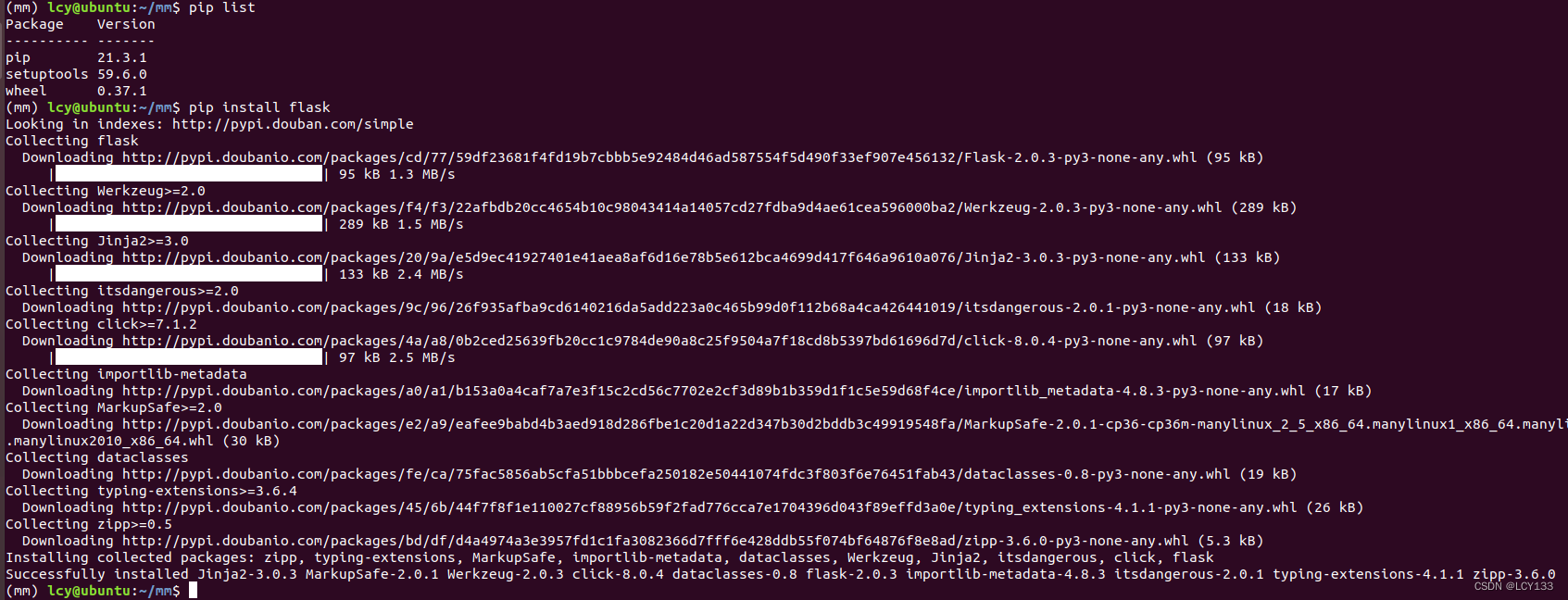
从中可以看到下载各种库的记录很规整,可以进行使用,要使用的话可以将下载的返回内容导入一个requirement.txt文件内。
指令:pip install flask >> requirement.txt
requirement.txt内容
Looking in indexes: http://pypi.douban.com/simple
Collecting flask
  Downloading http://pypi.doubanio.com/packages/cd/77/59df23681f4fd19b7cbbb5e92484d46ad587554f5d490f33ef907e456132/Flask-2.0.3-py3-none-any.whl (95 kB)
Collecting itsdangerous>=2.0
  Downloading http://pypi.doubanio.com/packages/9c/96/26f935afba9cd6140216da5add223a0c465b99d0f112b68a4ca426441019/itsdangerous-2.0.1-py3-none-any.whl (18 kB)
Collecting click>=7.1.2
  Downloading http://pypi.doubanio.com/packages/4a/a8/0b2ced25639fb20cc1c9784de90a8c25f9504a7f18cd8b5397bd61696d7d/click-8.0.4-py3-none-any.whl (97 kB)
Collecting Werkzeug>=2.0
  Downloading http://pypi.doubanio.com/packages/f4/f3/22afbdb20cc4654b10c98043414a14057cd27fdba9d4ae61cea596000ba2/Werkzeug-2.0.3-py3-none-any.whl (289 kB)
Collecting Jinja2>=3.0
  Downloading http://pypi.doubanio.com/packages/20/9a/e5d9ec41927401e41aea8af6d16e78b5e612bca4699d417f646a9610a076/Jinja2-3.0.3-py3-none-any.whl (133 kB)
Collecting importlib-metadata
  Downloading http://pypi.doubanio.com/packages/a0/a1/b153a0a4caf7a7e3f15c2cd56c7702e2cf3d89b1b359d1f1c5e59d68f4ce/importlib_metadata-4.8.3-py3-none-any.whl (17 kB)
Collecting MarkupSafe>=2.0
  Downloading http://pypi.doubanio.com/packages/e2/a9/eafee9babd4b3aed918d286fbe1c20d1a22d347b30d2bddb3c49919548fa/MarkupSafe-2.0.1-cp36-cp36m-manylinux_2_5_x86_64.manylinux1_x86_64.manylinux_2_12_x86_64.manylinux2010_x86_64.whl (30 kB)
Collecting dataclasses
  Downloading http://pypi.doubanio.com/packages/fe/ca/75fac5856ab5cfa51bbbcefa250182e50441074fdc3f803f6e76451fab43/dataclasses-0.8-py3-none-any.whl (19 kB)
Collecting zipp>=0.5
  Downloading http://pypi.doubanio.com/packages/bd/df/d4a4974a3e3957fd1c1fa3082366d7fff6e428ddb55f074bf64876f8e8ad/zipp-3.6.0-py3-none-any.whl (5.3 kB)
Collecting typing-extensions>=3.6.4
  Downloading http://pypi.doubanio.com/packages/45/6b/44f7f8f1e110027cf88956b59f2fad776cca7e1704396d043f89effd3a0e/typing_extensions-4.1.1-py3-none-any.whl (26 kB)
Installing collected packages: zipp, typing-extensions, MarkupSafe, importlib-metadata, dataclasses, Werkzeug, Jinja2, itsdangerous, click, flask
Successfully installed Jinja2-3.0.3 MarkupSafe-2.0.1 Werkzeug-2.0.3 click-8.0.4 dataclasses-0.8 flask-2.0.3 importlib-metadata-4.8.3 itsdangerous-2.0.1 typing-extensions-4.1.1 zipp-3.6.0
参考文章:https://www.cnblogs.com/nwnusun/p/16970717.html
代码如下:
import sys
import os
import re
import subprocess

baseDir = os.path.dirname(os.path.dirname(os.path.abspath(__file__)))
sys.path.append(baseDir)
file_path = 'requirement.txt'
mm = []

def command_func(command):
    #command = command
    #command = 'wget {}'.format(n[2])
    process = subprocess.Popen(command, shell=True, stdout=subprocess.PIPE, stderr=subprocess.PIPE)
    process.wait()
    # 获取命令的输出和错误信息
    output = process.stdout.read()
    error = process.stderr.read()
    # 将输出和错误信息解码为字符串
    output = output.decode(encoding="utf-8")
    error = error.decode(encoding="utf-8")
    # 返回命令的输出和错误信息
    result = {"output": output, "error": error}
    #print(result)

with open(file_path,mode='rt') as file_object:
    for line in file_object:
        if line.startswith('  Dow'):
        #if 'Downloading' in line:
            #mm.append(line)
            n = re.split(r"\s+",line)
            mm.append(n[2])
            #command = 'wget {}'.format(n[2])
            #command_func(command)

file_pip_path = 'install.txt'
with open(file_pip_path,'wt') as file_object2:
    for url in mm:
        #print(url)
        file = url.split('/')[-1]
        file_object2.write(file+'\n')
        #print(url)
# for url in mm:
#     file = url.split('/')[-1]
#     print(file)

mm = os.listdir()
base_dir = os.path.dirname(os.path.abspath(__file__))
name = 'package'
file_path = os.path.join(base_dir,name)
for file in mm:
    if file.endswith('whl'):
        command = 'mv {} {}'.format(file,file_path)
        command_func(command)
获取到的install.txt文件内容:
Flask-2.0.3-py3-none-any.whl
itsdangerous-2.0.1-py3-none-any.whl
click-8.0.4-py3-none-any.whl
Werkzeug-2.0.3-py3-none-any.whl
Jinja2-3.0.3-py3-none-any.whl
importlib_metadata-4.8.3-py3-none-any.whl
MarkupSafe-2.0.1-cp36-cp36m-manylinux_2_5_x86_64.manylinux1_x86_64.manylinux_2_12_x86_64.manylinux2010_x86_64.whl
dataclasses-0.8-py3-none-any.whl
zipp-3.6.0-py3-none-any.whl
typing_extensions-4.1.1-py3-none-any.whl
import os
import subprocess
base_dir = os.path.dirname(os.path.abspath(__file__))
file = 'install.txt'
file_path = os.path.join(base_dir,file)

def command_func(command):
    #command = command
    #command = 'wget {}'.format(n[2])
    process = subprocess.Popen(command, shell=True, stdout=subprocess.PIPE, stderr=subprocess.PIPE)
    process.wait()
    # 获取命令的输出和错误信息
    output = process.stdout.read()
    error = process.stderr.read()
    # 将输出和错误信息解码为字符串
    output = output.decode(encoding="utf-8")
    error = error.decode(encoding="utf-8")
    # 返回命令的输出和错误信息
    result = {"output": output, "error": error}
    print(result)

with open(file_path,mode='rt') as file_object:
    for file in file_object:
        command = "pip install {}".format(file)
        command_func(command)
我正在使用i18n从头开始构建一个多语言网络应用程序,虽然我自己可以处理一大堆yml文件,但我说的语言(非常)有限,最终我想寻求外部帮助帮助。我想知道这里是否有人在使用UI插件/gem(与django上的django-rosetta不同)来处理多个翻译器,其中一些翻译器不愿意或无法处理存储库中的100多个文件,处理语言数据。谢谢&问候,安德拉斯(如果您已经在rubyonrails-talk上遇到了这个问题,我们深表歉意) 最佳答案 有一个rails3branchofthetolkgem在github上。您可以通过在Gemfi
关闭。这个问题是opinion-based.它目前不接受答案。想要改进这个问题?更新问题,以便editingthispost可以用事实和引用来回答它.关闭4年前。Improvethisquestion我想在固定时间创建一系列低音和高音调的哔哔声。例如:在150毫秒时发出高音调的蜂鸣声在151毫秒时发出低音调的蜂鸣声200毫秒时发出低音调的蜂鸣声250毫秒的高音调蜂鸣声有没有办法在Ruby或Python中做到这一点?我真的不在乎输出编码是什么(.wav、.mp3、.ogg等等),但我确实想创建一个输出文件。
我想为Heroku构建一个Rails3应用程序。他们使用Postgres作为他们的数据库,所以我通过MacPorts安装了postgres9.0。现在我需要一个postgresgem并且共识是出于性能原因你想要pggem。但是我对我得到的错误感到非常困惑当我尝试在rvm下通过geminstall安装pg时。我已经非常明确地指定了所有postgres目录的位置可以找到但仍然无法完成安装:$envARCHFLAGS='-archx86_64'geminstallpg--\--with-pg-config=/opt/local/var/db/postgresql90/defaultdb/po
我看到这个错误:translationmissing:da.datetime.distance_in_words.about_x_hours我的语言环境文件:http://pastie.org/2944890我的看法:我已将其添加到我的application.rb中:config.i18n.load_path+=Dir[Rails.root.join('my','locales','*.{rb,yml}').to_s]config.i18n.default_locale=:da如果我删除I18配置,帮助程序会处理英语。更新:我在config/enviorments/devolpment
我打算为ruby脚本创建一个安装程序,但我希望能够确保机器安装了RVM。有没有一种方法可以完全离线安装RVM并且不引人注目(通过不引人注目,就像创建一个可以做所有事情的脚本而不是要求用户向他们的bash_profile或bashrc添加一些东西)我不是要脚本本身,只是一个关于如何走这条路的快速指针(如果可能的话)。我们还研究了这个很有帮助的问题:RVM-isthereawayforsimpleofflineinstall?但有点误导,因为答案只向我们展示了如何离线在RVM中安装ruby。我们需要能够离线安装RVM本身,并查看脚本https://raw.github.com/wayn
我有一个奇怪的问题:我在rvm上安装了rubyonrails。一切正常,我可以创建项目。但是在我输入“railsnew”时重新启动后,我有“程序'rails'当前未安装。”。SystemUbuntu12.04ruby-v"1.9.3p194"gemlistactionmailer(3.2.5)actionpack(3.2.5)activemodel(3.2.5)activerecord(3.2.5)activeresource(3.2.5)activesupport(3.2.5)arel(3.0.2)builder(3.0.0)bundler(1.1.4)coffee-rails(
我刚刚为fedora安装了emacs。我想用emacs编写ruby。为ruby提供代码提示、代码完成类型功能所需的工具、扩展是什么? 最佳答案 ruby-mode已经包含在Emacs23之后的版本中。不过,它也可以通过ELPA获得。您可能感兴趣的其他一些事情是集成RVM、feature-mode(Cucumber)、rspec-mode、ruby-electric、inf-ruby、rinari(用于Rails)等。这是我当前用于Ruby开发的Emacs配置:https://github.com/citizen428/emacs
我正在尝试在我的centos服务器上安装therubyracer,但遇到了麻烦。$geminstalltherubyracerBuildingnativeextensions.Thiscouldtakeawhile...ERROR:Errorinstallingtherubyracer:ERROR:Failedtobuildgemnativeextension./usr/local/rvm/rubies/ruby-1.9.3-p125/bin/rubyextconf.rbcheckingformain()in-lpthread...yescheckingforv8.h...no***e
我的最终目标是安装当前版本的RubyonRails。我在OSXMountainLion上运行。到目前为止,这是我的过程:已安装的RVM$\curl-Lhttps://get.rvm.io|bash-sstable检查已知(我假设已批准)安装$rvmlistknown我看到当前的稳定版本可用[ruby-]2.0.0[-p247]输入命令安装$rvminstall2.0.0-p247注意:我也试过这些安装命令$rvminstallruby-2.0.0-p247$rvminstallruby=2.0.0-p247我很快就无处可去了。结果:$rvminstall2.0.0-p247Search
我实际上是在尝试使用RVM在我的OSX10.7.5上更新ruby,并在输入以下命令后:rvminstallruby我得到了以下回复:Searchingforbinaryrubies,thismighttakesometime.Checkingrequirementsforosx.Installingrequirementsforosx.Updatingsystem.......Errorrunning'requirements_osx_brew_update_systemruby-2.0.0-p247',pleaseread/Users/username/.rvm/log/138121
