草庐IT

Unix 网络编程:Socket 状态图&编程参数

禅与计算机程序设计艺术 2023-07-27 原文

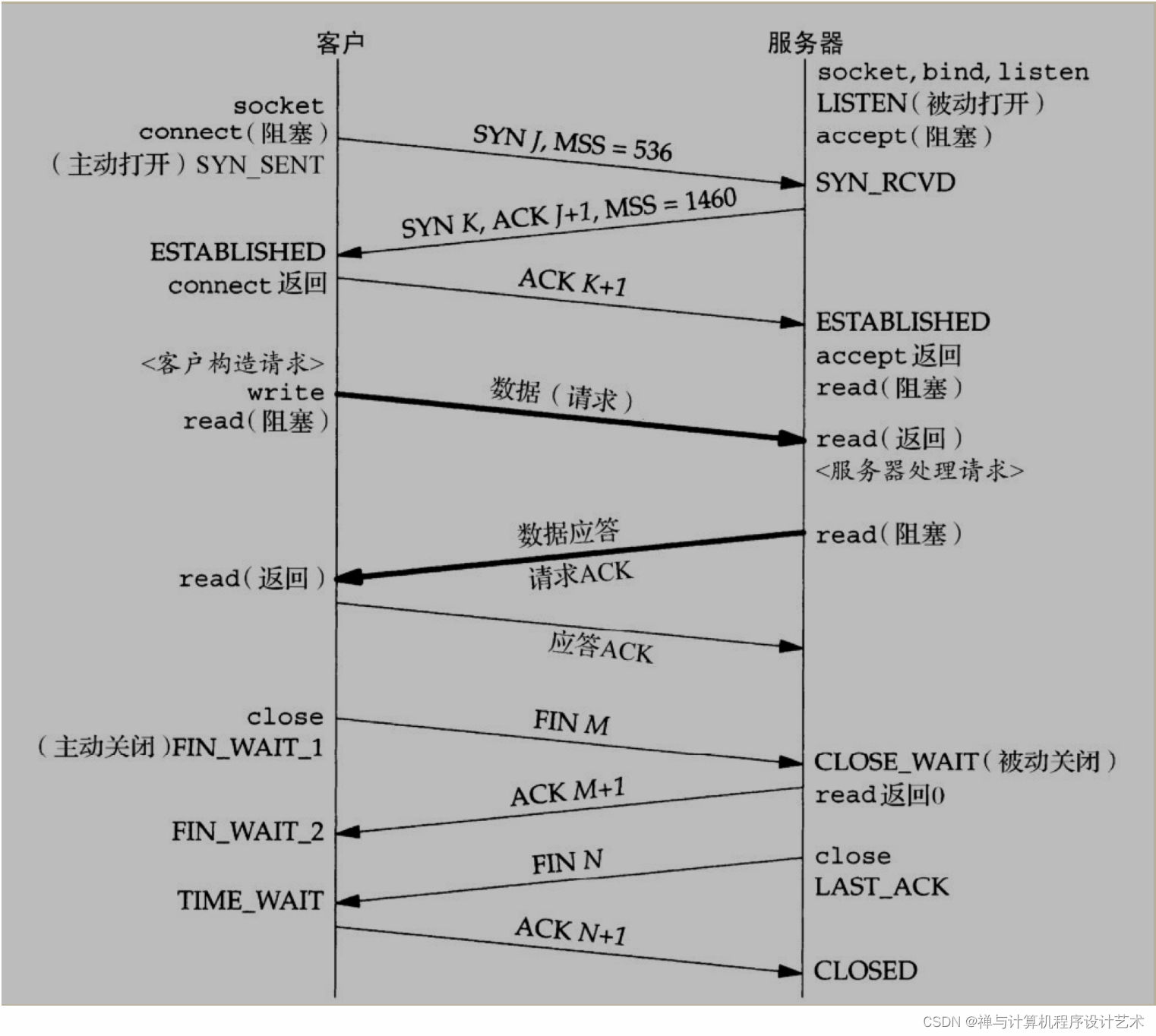
Socket 状态转换图


TCP 标志位解释

Flags (9 bits) (aka Control bits) . Contains 9 1-bit flags

  • NS (1 bit): ECN-nonce - concealment protection (experimental: see RFC 3540).
  • CWR (1 bit): Congestion Window Reduced (CWR) flag is set by the sending host to indicate that it received a TCP segment with the ECE flag set and had responded in congestion control mechanism (added to header by RFC 3168).
  • ECE (1 bit): ECN-Echo has a dual role, depending on the value of the SYN flag. It indicates:
    • If the SYN flag is set (1), that the TCP peer is ECN capable.
    • If the SYN flag is clear (0), that a packet with Congestion Experienced flag set (ECN=11) in the IP header was received during normal transmission (added to header by RFC 3168). This serves as an indication of network congestion (or impending congestion) to the TCP sender.
  • URG (1 bit): indicates that the Urgent pointer field is significant
  • ACK (1 bit): indicates that the Acknowledgment field is significant. All packets after the initial SYN packet sent by the client should have this flag set.
  • PSH (1 bit): Push function. Asks to push the buffered data to the receiving application.
  • RST (1 bit): Reset the connection
  • SYN (1 bit): Synchronize sequence numbers. Only the first packet sent from each end should have this flag set. Some other flags and fields change meaning based on this flag, and some are only valid when it is set, and others when it is clear.
  • FIN (1 bit): Last packet from sender.

SO_BACKLOG

书中对这个参数的描述是这样子的:

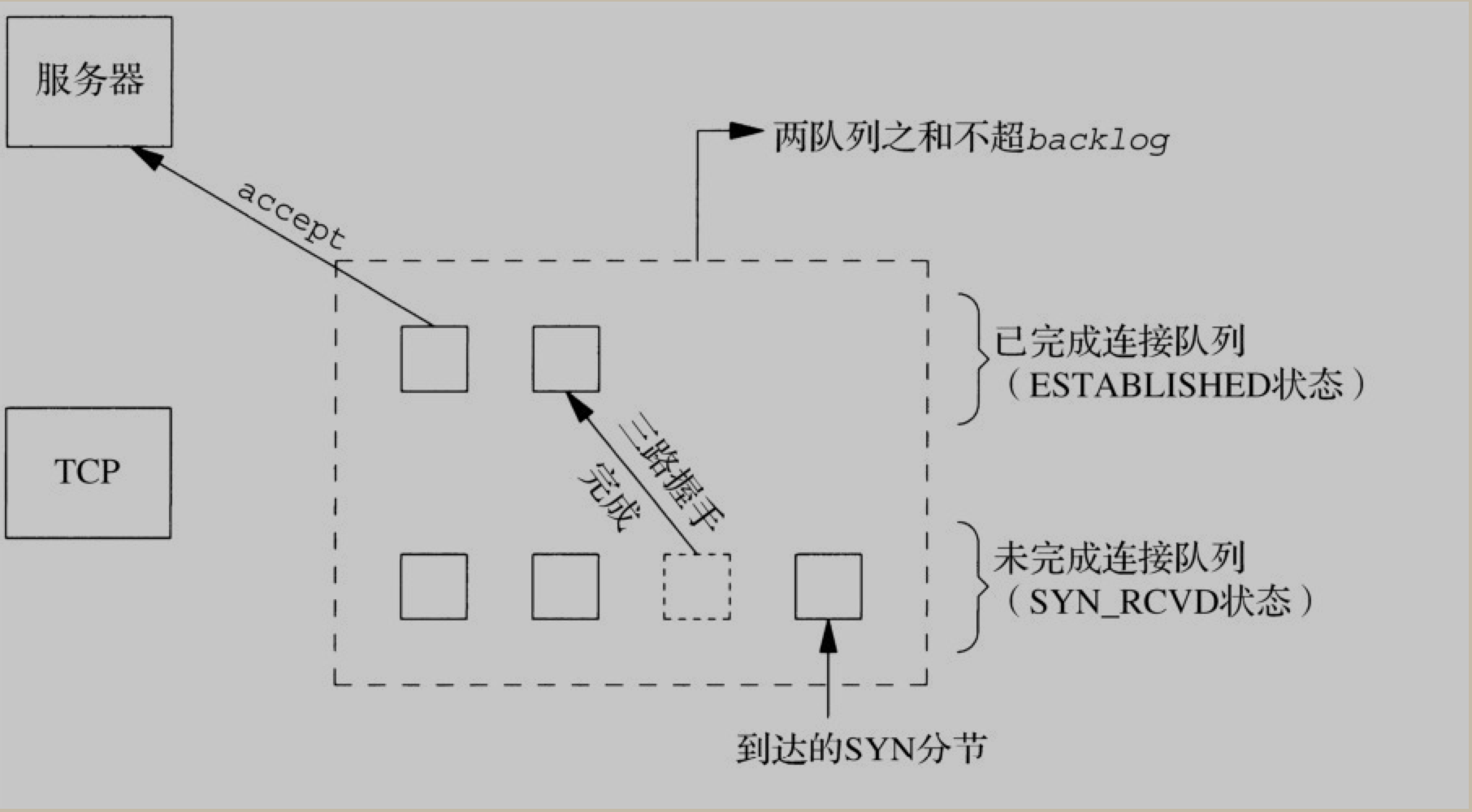
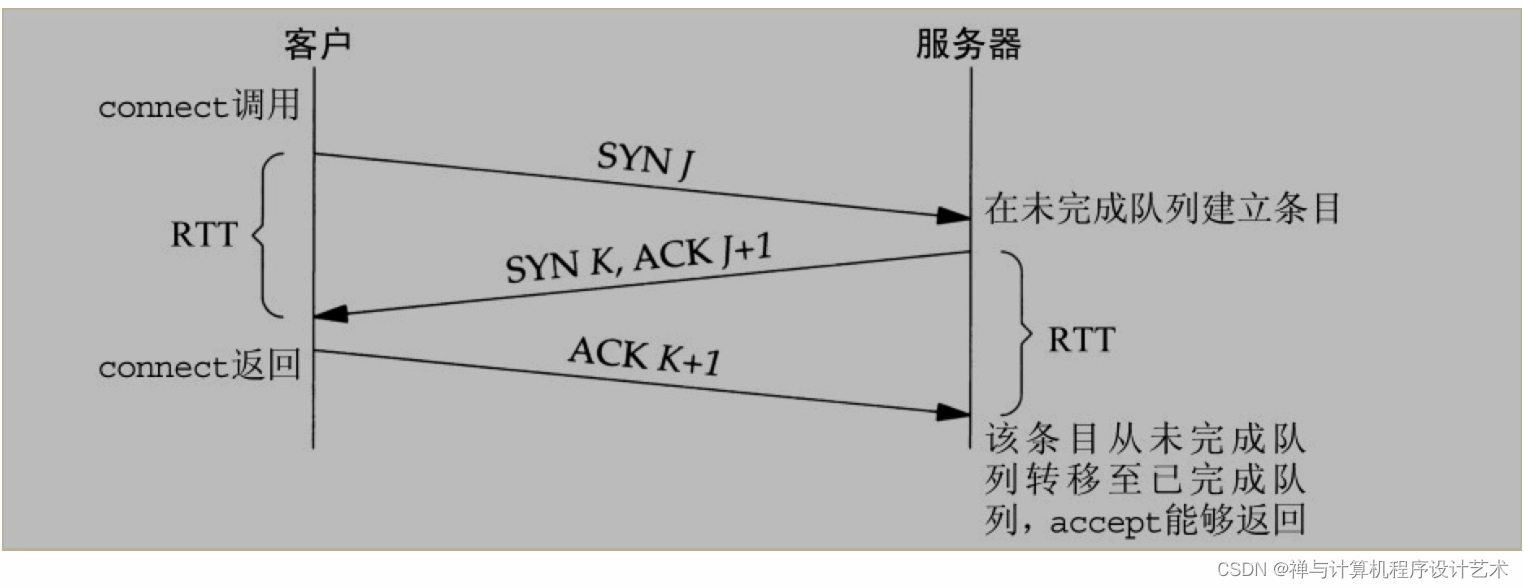
内核为任何一个给定的监听套接字维护两个队列: 1. 未完成连接队列(incomplement connection queue), 每个这样的 SYN 分节对应其中一项: 已由某个客户发出并到达服务器, 而服务器正在等待完成相应的TCP三次握手过程. 这些套接字处于 SYN_RCVD 状态 2. 已完成连接队列(completed connection queue), 每个已完成 TCP 三次握手过程的客户对应其中一项. 这些套接字处于 ESTABLISHED 状态

根据书中描述, 这个参数比较模糊. 曾被定义为是上面两个队列之和的最大值. 源自 Berkeley 的实现, 给 backlog 增加了一个模糊因子: 1.5 * backlog.

不过, 不要把 backlog 设置为0, 如果你不想监听套接字, 那就关掉它.

4.2BSD 版本支持的最大值为 5. 但当今许多系统允许修改该值.

更多详细内容, 可以参考 <Unix 网络编程> 第四章 4.5 小节

BSD 与 Linux 中的区别

这里只是对 How TCP backlog works in Linux 这篇文章的一些摘要及简要翻译

  • BSD 中的实现, 虽然也是区分这两个队列了(SYN 与 ESTABLISHED), 但 backlog 的参数值, 则为这两个队列之和的最大值.
  • Linux 2.2 之后的版本. backlog 指定了 completely established 队列的长度(即 ESTABLISHED), 而不是 incomplement connection (即 SYN) 队列的长度. 在 Linux 中, 可以通过修改 /proc/sys/net/ipv4/tcp_max_syn_backlog 的值来修改 SYN 队列的长度大小. 也就意味着, 在现代的 Linux 系统中, SYN 队列的长度是由操作系统级别来设置的, 而 ESTABLISHED 队列(也称为 ACCEPT 队列), 则是由应用程序来指定.

在Linux中, 如果收到一个三次握手的 ACK 数据包并且accept 队列已经满了, 它通常会忽略该数据包. 这听起来比较奇怪, 但记住, 有一个计时器与 SYN RECEIVED 状态相关: 如果没有收到 ACK 包(或者如果它被忽略, 如在这里考虑的情况), 那么 TCP 实现将重新发送 SYN / ACK 分组(具体是由 /proc/sys/net/ipv4/tcp_synack_retries指定尝试的次数)

但是, 如果开启(值为1, 目前为止, Linux 默认为0)了 /proc/sys/net/ipv4/tcp_abort_on_overflow 的话, 则会立即发送一个 RST 数据包给客户端.


1
2
3
4
5
6
7
8
9
10
11
 
    
cat /proc/sys/net/ipv4/tcp_synack_retries
2
cat /proc/sys/net/ipv4/tcp_max_syn_backlog
1024
cat /proc/sys/net/core/somaxconn
128
cat /proc/sys/net/ipv4/tcp_abort_on_overflow
0

设置 somaxconn 的值:


1
2
3
4
5
6
7
8
9
 
    
查看
sysctl -n net.core.somaxconn
设置
sudo sysctl -w net.core.somaxconn=1024
sudo sysctl -p
再次查看:
sysctl -n net.core.somaxconn

注意

  1. 如果设置了 syncookies 为开启状态, 则系统会忽略 /proc/sys/net/ipv4/tcp_max_syn_backlog 设置的值, 理论上是变成无上限的.(好像现代的Linux, 都是开启了的~)


    1
    2
    3
    4
    5
    6
    7
    8
    9
    10
    11
    12
    13
    14
    15
    16
    17
    18
     
          
    查看:
    sysctl -n net.ipv4.tcp_syncookies
    cat /proc/sys/net/ipv4/tcp_syncookies
    设置:
    sudo echo 1 > /proc/sys/net/ipv4/tcp_syncookies
    永久设置:
    vim /etc/sysctl.conf
    添加或修改:
    net.ipv4.tcp_syncookies = 1
    然后再执行以下命令
    sudo sysctl -p
  2. 如果应用层的 backlog 参数大于 /proc/sys/net/core/somaxconn 中的值, 则自动截断为 /proc/sys/net/core/somaxconn 的数值. 这意味着, 实际的 backlog 大小为 min(backlog, /proc/sys/net/core/somaxconn) 的值.(通过 man listen 最后一部分可知)


1
2
3
4
5
 
     
The behavior of the backlog argument on TCP sockets changed with Linux 2.2. Now it specifies the queue length for completely established sockets waiting to be accepted, instead of the number o> f incomplete connection requests. The maximum length of the
queue for incomplete sockets can be set using /proc/sys/net/ipv4/tcp_max_syn_backlog. When syncookies are enabled there is no logical maximum length and this setting is ignored. See tcp( 7) for more> information.
If the backlog argument is greater than the value in /proc/sys/net/core/somaxconn, then it is silently truncated to that value; the default value in this file is 128. In kernels before 2.4 .25, this l> imit was a hard coded value, SOMAXCONN, with the value
128.

Nginx 中的 backlog 设置

适当修改内核参数 net.core.somaxconn 大小, (如果设置超过了 512, 则也要修改 Nginx 的 listen 指令的 backlog 参数大小以匹配该参数)

net.core.netdev_max_backlog 在高带宽情况下, 可以调大该参数.

netdev_max_backlog

这个是网卡级别的 backlog 参数.


1
2
3
4
5
6
7
8
9
10
11
12
 
    
cat /proc/sys/net/core/netdev_max_backlog
1000
sysctl -n net.core.netdev_max_backlog
修改:
sudo sysctl -w net.core.netdev_max_backlog=2000
sudo sysctl -p
永久修改:
则修改 /etc/sysctl.conf 文件
 
    
1
2
3
4
5
 
    
命令行执行:
sudo sysctl -w net.core.netdev_max_backlog=2000; sudo sysctl -w net.core.somaxconn=65535
nginx 配置里修改:
listen 80 backlog=65535;

参考资料

TCP 层

man 7 tcp

这两个是每个 socket 的读写缓冲区大小.

Linux 操作系统级别分别对应: 操作系统会在这范围内根据内存压力进行动态调整


1
2
3
4
5
6
7
8
9
10
11
12
13
14
15
16
17
18
19
 
    
读缓冲区, 也称为接收缓冲区(receive buffer)
cat /proc/sys/net/ipv4/tcp_rmem
4096 87380 6291456
上面三个数字, 分别表示 min, default, max.
min 的默认值为 PAGE_SIZE
default 的默认值, 由 net.core.rmem_default 来指定.
max: max(87380, min(4 MB, tcp_mem[1]*PAGE_SIZE/128))
写缓冲区, 也称为发送缓冲区(send buffer)
/proc/sys/net/ipv4/tcp_wmem
4096 16384 4194304
上面三个数字, 分别表示 min, default, max
min 的默认值为 PAGE_SIZE
default 的默认值, 由 net.core.wmem_default 来指定.
max: max(65536, min(4 MB, tcp_mem[1]*PAGE_SIZE/128))

注意, 操作系统上面的 min, max 并不是使用来限制 SO_SNDBUF 的大小的.

Socket 层

man 7 socket


1
2
3
4
5
6
7
8
 
    
SO_RCVBUF
Sets or gets the maximum socket receive buffer in bytes. The kernel doubles this value (to allow space for bookkeeping overhead) when it is set using setsockopt(2), and this doubled value is returned by getsockopt(2). The default value is set by the
/proc/sys/net/core/rmem_default file, and the maximum allowed value is set by the /proc/sys/net/core/rmem_max file. The minimum (doubled) value for this option is 256.
SO_SNDBUF
Sets or gets the maximum socket send buffer in bytes. The kernel doubles this value (to allow space for bookkeeping overhead) when it is set using setsockopt(2), and this doubled value is returned by getsockopt(2). The default value is set by the
/proc/sys/net/core/wmem_default file and the maximum allowed value is set by the /proc/sys/net/core/wmem_max file. The minimum (doubled) value for this option is 2048.

SO_REUSEADDR

man 7 socket 参考 SO_REUSEADDR 小节


1
2
3
 
    
Indicates that the rules used in validating addresses supplied in a bind(2) call should allow reuse of local addresses. For AF_INET sockets this means that a socket may bind, except when there is an active listening socket bound to the address. When
the listening socket is bound to INADDR_ANY with a specific port then it is not possible to bind to this port for any local address. Argument is an integer boolean flag

参考资料

SO_TIMEOUT (应用层设置)

man 7 socket 参考 SO_RCVTIMEO and SO_SNDTIMEO 小节


1
2
3
4
5
 
    
SO_RCVTIMEO and SO_SNDTIMEO
Specify the receiving or sending timeouts until reporting an error. The argument is a struct timeval. If an input or output function blocks for this period of time, and data has been sent or received, the return value of that function will be the
amount of data transferred; if no data has been transferred and the timeout has been reached then -1 is returned with errno set to EAGAIN or EWOULDBLOCK, or EINPROGRESS ( for connect(2)) just as if the socket was specified to be nonblocking. If the
timeout is set to zero (the default) then the operation will never timeout. Timeouts only have effect for system calls that perform socket I/O (e.g., read(2), recvmsg(2), send(2), sendmsg(2)); timeouts have no effect for select(2), poll(2),
epoll_wait(2), and so on.

SO_KEEPALIVE

man 7 socket 参考 SO_KEEPALIVE 小节


1
 
    
Enable sending of keep-alive messages on connection-oriented sockets. Expects an integer boolean flag.

SO_LINGER 参数

man 7 socket 参考 SO_LINGER 小节


1
2
3
4
5
6
7
8
9
 
    
Sets or gets the SO_LINGER option. The argument is a linger structure.
struct linger {
int l_onoff; /* linger active */
int l_linger; /* how many seconds to linger for */
};
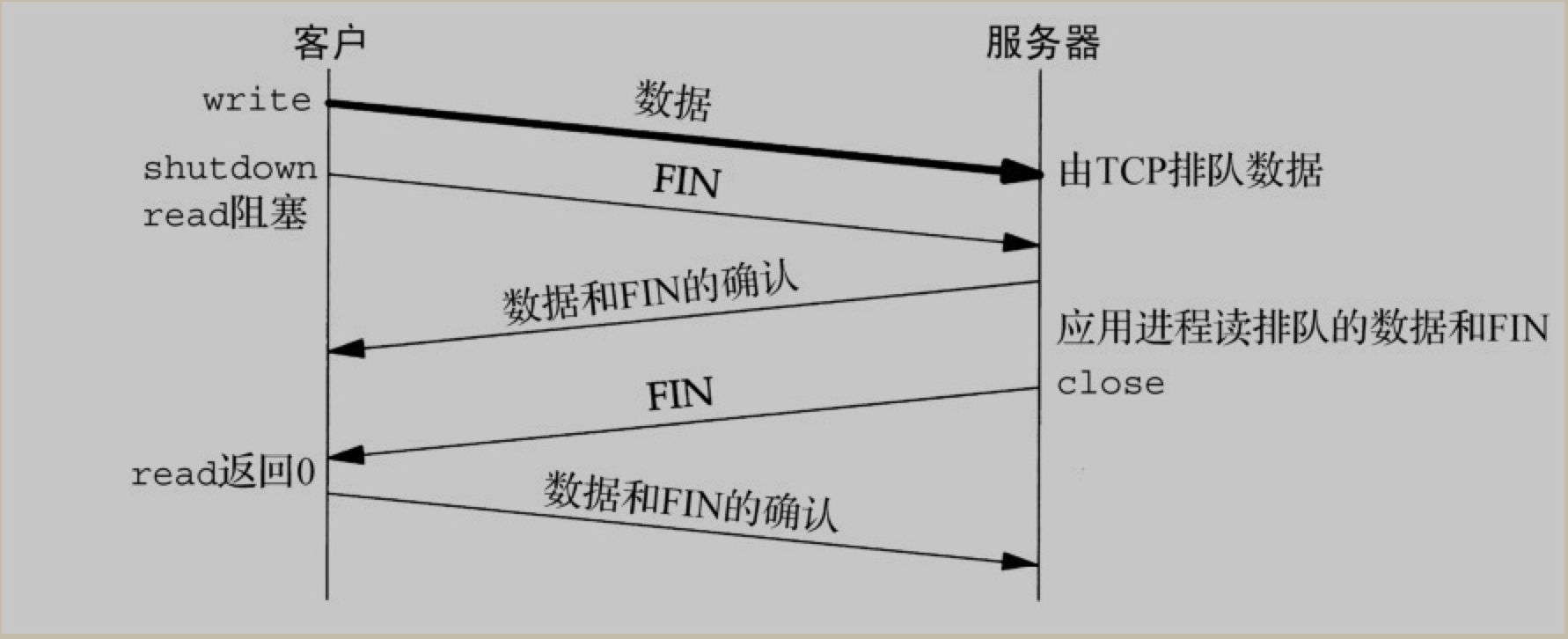
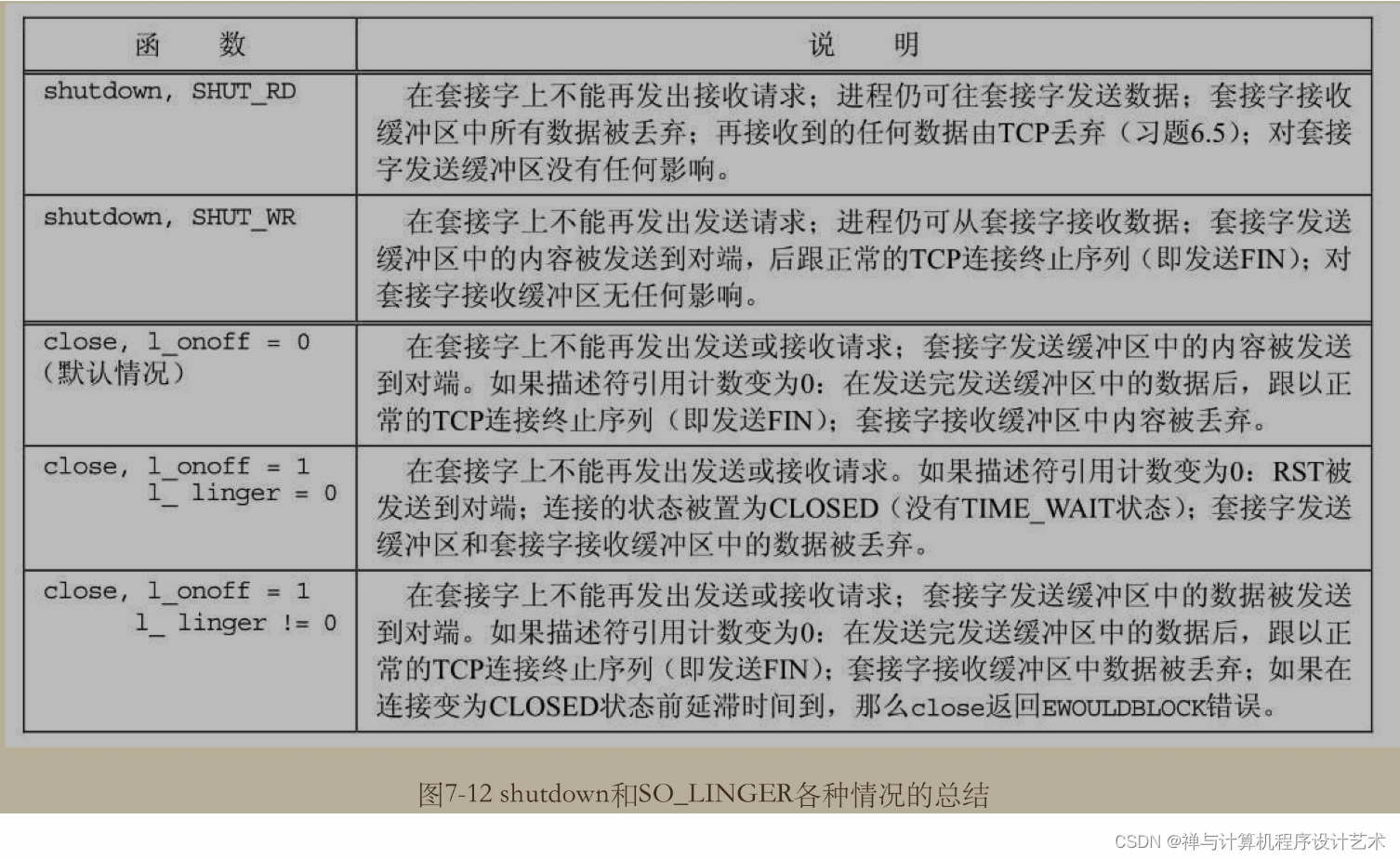
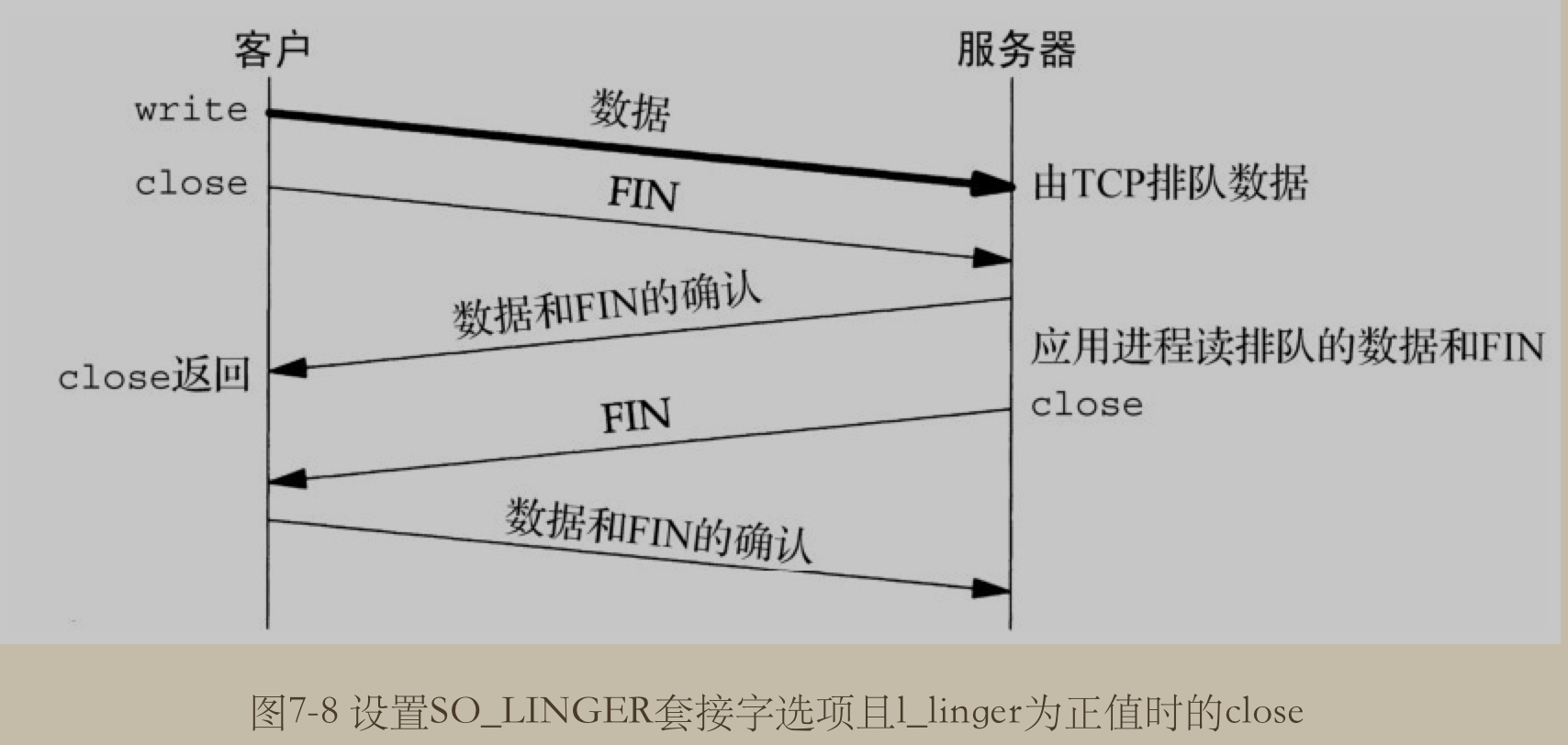
When enabled, a close(2) or shutdown(2) will not return until all queued messages for the socket have been successfully sent or the linger timeout has been reached. Otherwise, the call returns immediately and the closing is done in the background.
When the socket is closed as part of exit(2), it always lingers in the background.

即它是用来控制, 当在 socket 上调用 close 或 shutdown 方法时的行为. 如果开启了 linger , 则 socket 会在调用这两个方法完成之前一直等待socket 的队列消息已经全部成功发送或在 linger 超时时才返回.
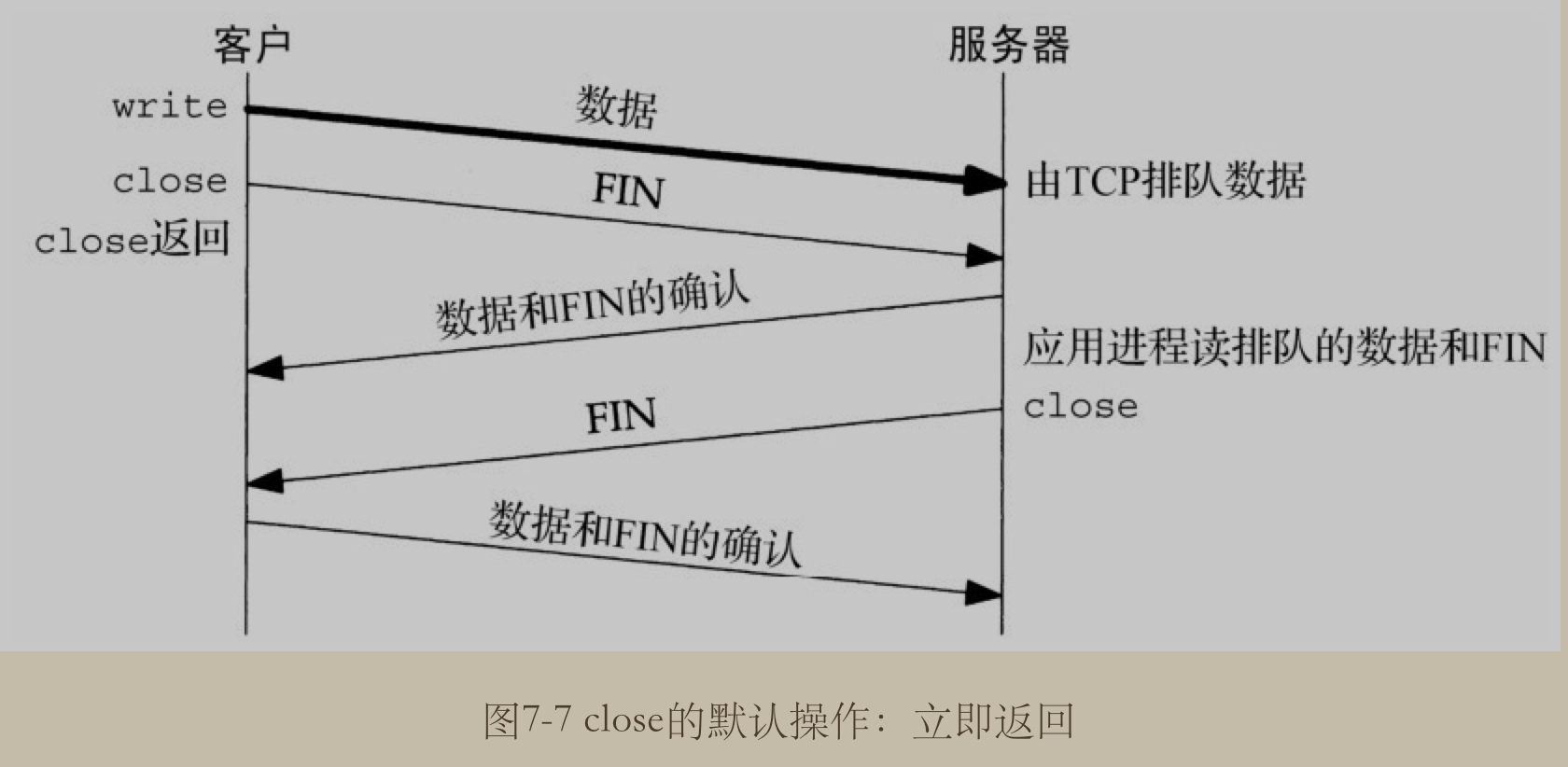
如果是关闭这个行为的话, 则调用这两个方法时, 立即关闭并返回.(这是默认的行为)
总结


Netty 中的 SO 前缀参数列表


1
2
3
4
5
6
7
8
 
    
public static final ChannelOption<Boolean> SO_BROADCAST = valueOf( "SO_BROADCAST");
public static final ChannelOption<Boolean> SO_KEEPALIVE = valueOf( "SO_KEEPALIVE");
public static final ChannelOption<Integer> SO_SNDBUF = valueOf( "SO_SNDBUF");
public static final ChannelOption<Integer> SO_RCVBUF = valueOf( "SO_RCVBUF");
public static final ChannelOption<Boolean> SO_REUSEADDR = valueOf( "SO_REUSEADDR");
public static final ChannelOption<Integer> SO_LINGER = valueOf( "SO_LINGER");
public static final ChannelOption<Integer> SO_BACKLOG = valueOf( "SO_BACKLOG");
public static final ChannelOption<Integer> SO_TIMEOUT = valueOf( "SO_TIMEOUT");

TCP 中的 TCP_NODELAY 参数

man 7 tcp

如果开启它的话(即为true或1), 表示禁止 TCP 的 Nagle 算法. 默认情况下, 该算法是启动的. 注意, 这个参数会被 TCP_CORK 参数覆盖, 但是, 即使设置了 TCP_CORKTCP_NODELAY 参数也会强制显式地冲刷缓冲区.


1
2
3
4
 
    
TCP_NODELAY
If set, disable the Nagle algorithm. This means that segments are always sent as soon as possible, even if there is only a small amount of data. When not set, data is buffered until there is a sufficient amount to send out, thereby avoiding the fre‐
quent sending of small packets, which results in poor utilization of the network. This option is overridden by TCP_CORK; however, setting this option forces an explicit flush of pending output, even if TCP_CORK is currently set.

Nagle 算法

内容从 <Unix 网络编程> 中摘录出来~

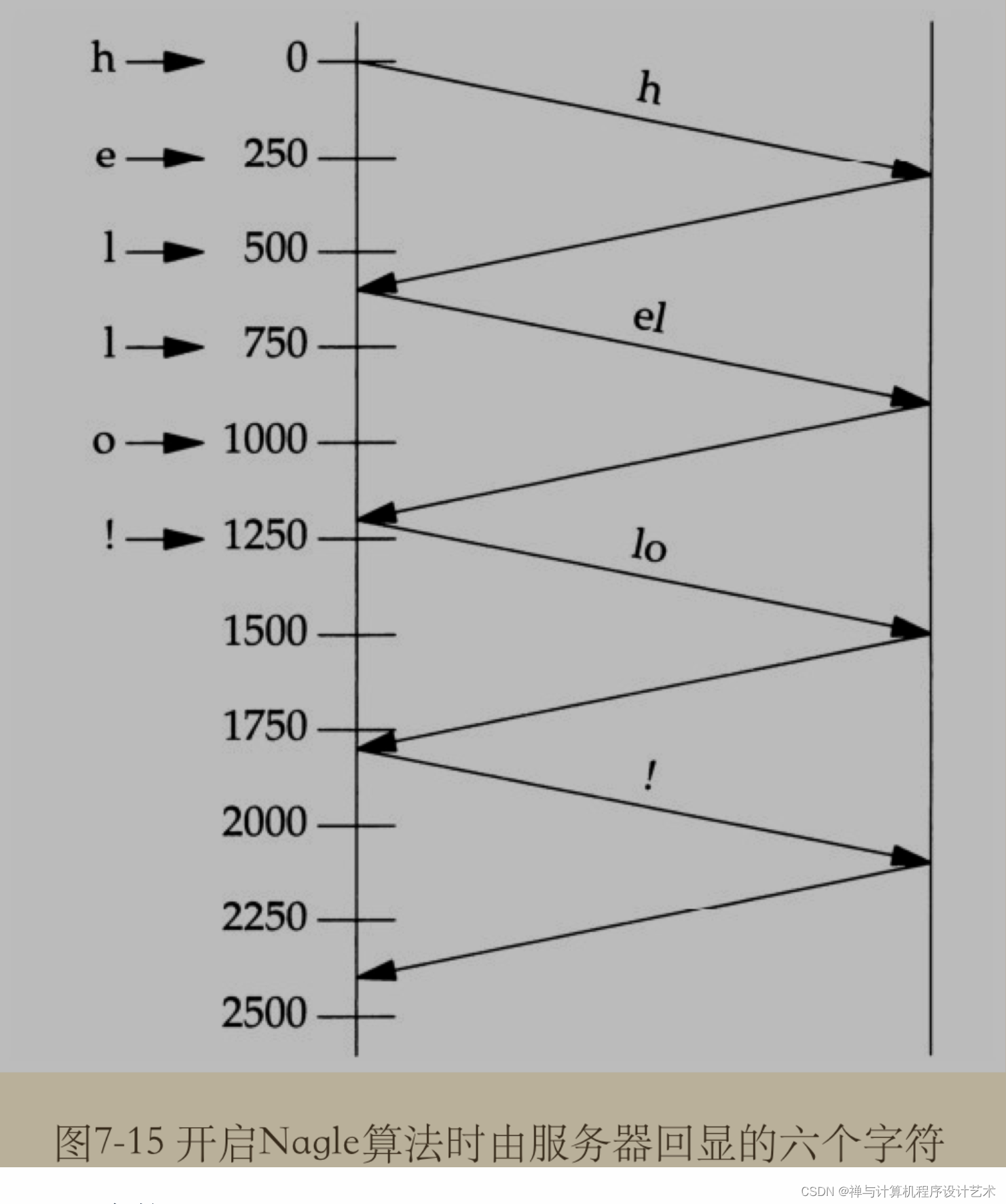
目的在于减少广域网WAN上小分组的数目. 该算法指出: 如果给定连接上有待确认数据(outstanding data), 那么原本应该作为用户写操作之响应的在该连接上立即发送相应小分组的行为就不会发生, 直到现有数据被确认为止. 这里的小分组的定义是小于 MSS (Max Segment Size) 的任何分组. TCP 总是尽可能地发送最大大小的分组, Nagle 算法的目的在于防止一个连接在任何时刻有多个小分组待确认.

与之联合使用的另一个算法为 ACK 延迟算法, delayed ACK algorithm, 该算法使得 TCP 在接收到数据后, 不立即发送ACK, 而是等待一小段时间(典型为 20~200ms), 然后才发送 ACK. TCP 期待在这小段时间内自身有数据发送回对端, 被延迟的ACK, 就可以由这些数据捎带, 从而省掉一个 TCP 分节.

 

TCP_CORK 参数

Linux 2.2 开始

如果设置该参数, 表示不要发送部分分组(或叫分帧). 所有队列中的部分分组在清除该标志时会再次发送. 这对于在调用 sendfile(2) 之前预先确定头文件或用于吞吐量优化很有用. 按目前的实现, TCP_SORK 输出时间的上限为 200ms, 如果达到此上限, 则队列中的数据会自动进行传输. 自 Linux 2.5.71 以来, 这个选项只能与 TCP_NODELAY 结合使用.


1
2
3
4
 
    
If set, don 't send out partial frames. All queued partial frames are sent when the option is cleared again. This is useful for prepending headers before calling sendfile(2), or for throughput optimization. As currently implemented, there is a 200
millisecond ceiling on the time for which output is corked by TCP_CORK. If this ceiling is reached, then queued data is automatically transmitted. This option can be combined with TCP_NODELAY only since Linux 2.5.71. This option should not be used
in code intended to be portable

Linux 内核参数 tcp_low_latency


1
2
3
4
 
    
tcp_low_latency (Boolean; default: disabled; since Linux 2.4.21/2.6)
If enabled, the TCP stack makes decisions that prefer lower latency as opposed to higher throughput. It this option is disabled, then higher throughput is preferred. An example of an application where this default should be changed would be a
Beowulf compute cluster

即 TCP 栈是否开启低延迟优先. (默认是关的, 即吞吐量优先).

1
2
cat /proc/sys/net/ipv4/tcp_low_latency
0

有关Unix 网络编程:Socket 状态图&编程参数的更多相关文章

  1. ruby - 在 Ruby 程序执行时阻止 Windows 7 PC 进入休眠状态 - 2

    我需要在客户计算机上运行Ruby应用程序。通常需要几天才能完成(复制大备份文件)。问题是如果启用sleep,它会中断应用程序。否则,计算机将持续运行数周,直到我下次访问为止。有什么方法可以防止执行期间休眠并让Windows在执行后休眠吗?欢迎任何疯狂的想法;-) 最佳答案 Here建议使用SetThreadExecutionStateWinAPI函数,使应用程序能够通知系统它正在使用中,从而防止系统在应用程序运行时进入休眠状态或关闭显示。像这样的东西:require'Win32API'ES_AWAYMODE_REQUIRED=0x0

  2. ruby-on-rails - rails : "missing partial" when calling 'render' in RSpec test - 2

    我正在尝试测试是否存在表单。我是Rails新手。我的new.html.erb_spec.rb文件的内容是:require'spec_helper'describe"messages/new.html.erb"doit"shouldrendertheform"dorender'/messages/new.html.erb'reponse.shouldhave_form_putting_to(@message)with_submit_buttonendendView本身,new.html.erb,有代码:当我运行rspec时,它失败了:1)messages/new.html.erbshou

  3. ruby-on-rails - 由于 "wkhtmltopdf",PDFKIT 显然无法正常工作 - 2

    我在从html页面生成PDF时遇到问题。我正在使用PDFkit。在安装它的过程中,我注意到我需要wkhtmltopdf。所以我也安装了它。我做了PDFkit的文档所说的一切......现在我在尝试加载PDF时遇到了这个错误。这里是错误:commandfailed:"/usr/local/bin/wkhtmltopdf""--margin-right""0.75in""--page-size""Letter""--margin-top""0.75in""--margin-bottom""0.75in""--encoding""UTF-8""--margin-left""0.75in""-

  4. ruby-openid:执行发现时未设置@socket - 2

    我在使用omniauth/openid时遇到了一些麻烦。在尝试进行身份验证时,我在日志中发现了这一点:OpenID::FetchingError:Errorfetchinghttps://www.google.com/accounts/o8/.well-known/host-meta?hd=profiles.google.com%2Fmy_username:undefinedmethod`io'fornil:NilClass重要的是undefinedmethodio'fornil:NilClass来自openid/fetchers.rb,在下面的代码片段中:moduleNetclass

  5. ruby-on-rails - 'compass watch' 是如何工作的/它是如何与 rails 一起使用的 - 2

    我在我的项目目录中完成了compasscreate.和compassinitrails。几个问题:我已将我的.sass文件放在public/stylesheets中。这是放置它们的正确位置吗?当我运行compasswatch时,它不会自动编译这些.sass文件。我必须手动指定文件:compasswatchpublic/stylesheets/myfile.sass等。如何让它自动运行?文件ie.css、print.css和screen.css已放在stylesheets/compiled。如何在编译后不让它们重新出现的情况下删除它们?我自己编译的.sass文件编译成compiled/t

  6. ruby-on-rails - 如何从 format.xml 中删除 <hash></hash> - 2

    我有一个对象has_many应呈现为xml的子对象。这不是问题。我的问题是我创建了一个Hash包含此数据,就像解析器需要它一样。但是rails自动将整个文件包含在.........我需要摆脱type="array"和我该如何处理?我没有在文档中找到任何内容。 最佳答案 我遇到了同样的问题;这是我的XML:我在用这个:entries.to_xml将散列数据转换为XML,但这会将条目的数据包装到中所以我修改了:entries.to_xml(root:"Contacts")但这仍然将转换后的XML包装在“联系人”中,将我的XML代码修改为

  7. ruby - 检查 "command"的输出应该包含 NilClass 的意外崩溃 - 2

    为了将Cucumber用于命令行脚本,我按照提供的说明安装了arubagem。它在我的Gemfile中,我可以验证是否安装了正确的版本并且我已经包含了require'aruba/cucumber'在'features/env.rb'中为了确保它能正常工作,我写了以下场景:@announceScenario:Testingcucumber/arubaGivenablankslateThentheoutputfrom"ls-la"shouldcontain"drw"假设事情应该失败。它确实失败了,但失败的原因是错误的:@announceScenario:Testingcucumber/ar

  8. ruby-on-rails - Rails 3.2.1 中 ActionMailer 中的未定义方法 'default_content_type=' - 2

    我在我的项目中添加了一个系统来重置用户密码并通过电子邮件将密码发送给他,以防他忘记密码。昨天它运行良好(当我实现它时)。当我今天尝试启动服务器时,出现以下错误。=>BootingWEBrick=>Rails3.2.1applicationstartingindevelopmentonhttp://0.0.0.0:3000=>Callwith-dtodetach=>Ctrl-CtoshutdownserverExiting/Users/vinayshenoy/.rvm/gems/ruby-1.9.3-p0/gems/actionmailer-3.2.1/lib/action_mailer

  9. ruby-on-rails - 如何在 ruby​​ 中使用两个参数异步运行 exe? - 2

    exe应该在我打开页面时运行。异步进程需要运行。有什么方法可以在ruby​​中使用两个参数异步运行exe吗?我已经尝试过ruby​​命令-system()、exec()但它正在等待过程完成。我需要用参数启动exe,无需等待进程完成是否有任何ruby​​gems会支持我的问题? 最佳答案 您可以使用Process.spawn和Process.wait2:pid=Process.spawn'your.exe','--option'#Later...pid,status=Process.wait2pid您的程序将作为解释器的子进程执行。除

  10. ruby-on-rails - 如何优雅地重启 thin + nginx? - 2

    我的瘦服务器配置了nginx,我的ROR应用程序正在它们上运行。在我发布代码更新时运行thinrestart会给我的应用程序带来一些停机时间。我试图弄清楚如何优雅地重启正在运行的Thin实例,但找不到好的解决方案。有没有人能做到这一点? 最佳答案 #Restartjustthethinserverdescribedbythatconfigsudothin-C/etc/thin/mysite.ymlrestartNginx将继续运行并代理请求。如果您将Nginx设置为使用多个上游服务器,例如server{listen80;server

随机推荐