@
提示:本文仅供学习交流,请勿用于非法活动!
本文大概内容:
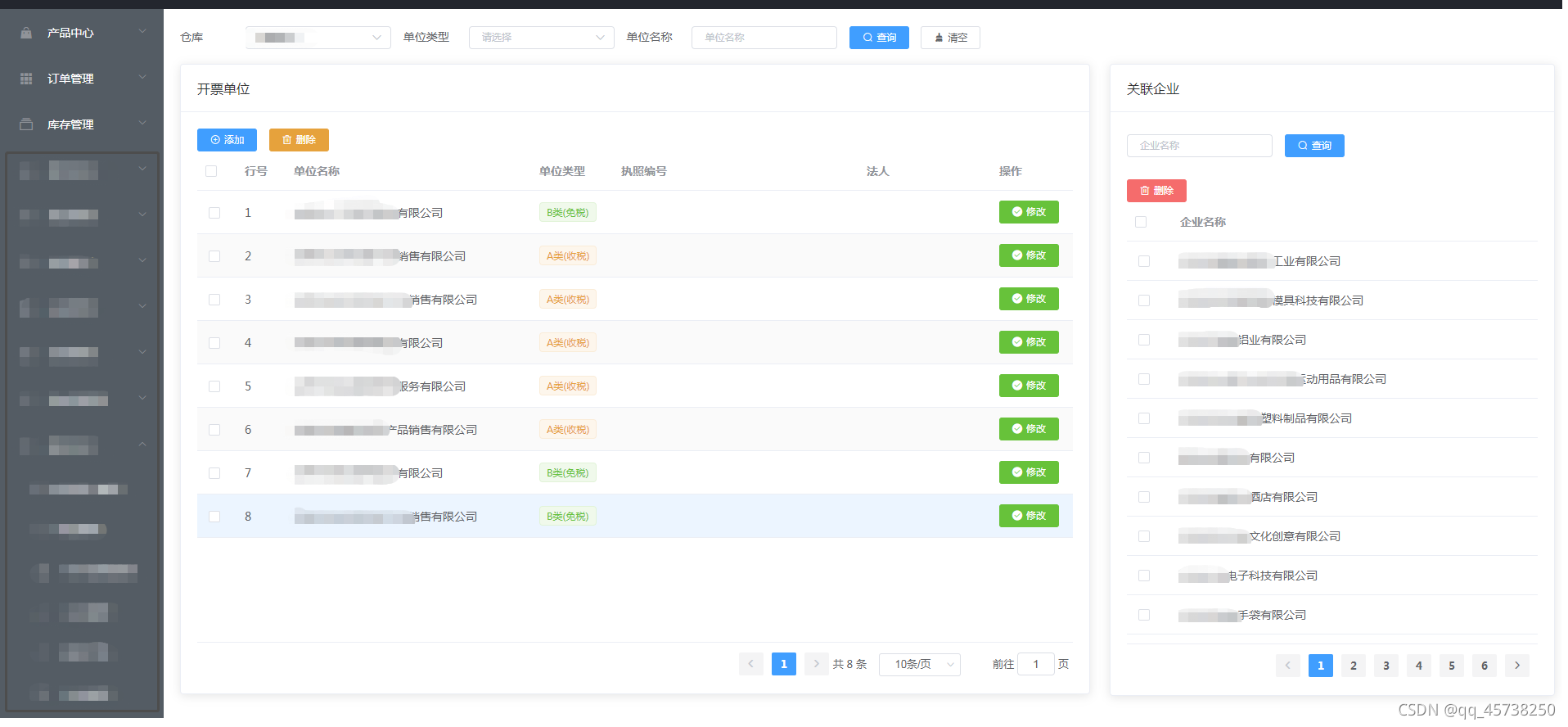
例如:随着ElementUI前后端交互的技术的更新,用户的的体验越来越好。本文主要针对用户在保持原页面结构,再添加另一个页面,并可以按需要调整两个页面之间的比例大小.
示例:如下图,我们在原来页面增删查改及基础上,选中某一行,点击该公司后,直接在该页面展示关联的所有企业客户的页面,并且实现查询、批量删除、分页等功能。(注意:弹框也可以实现,但是我们希望可以少去打开及关闭弹框的操作步骤,而且同一页面显示更直接、方便)
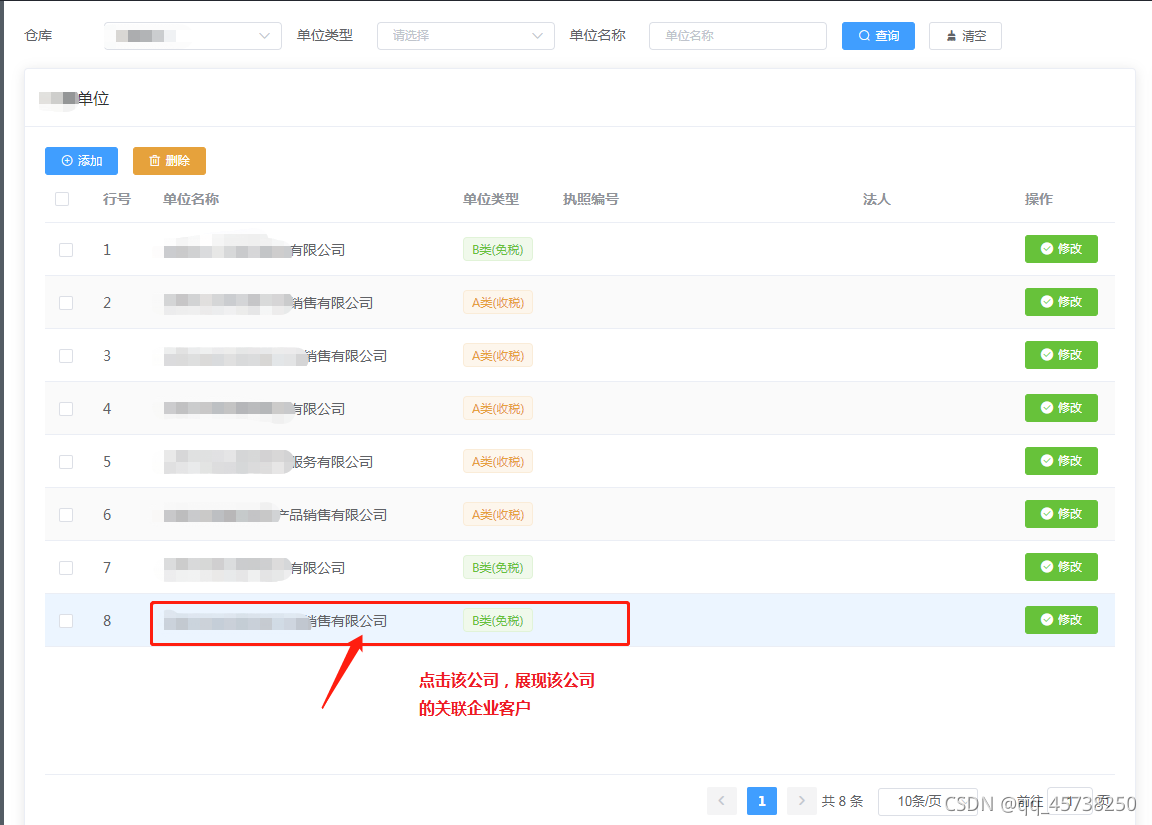
如:要展示的页面
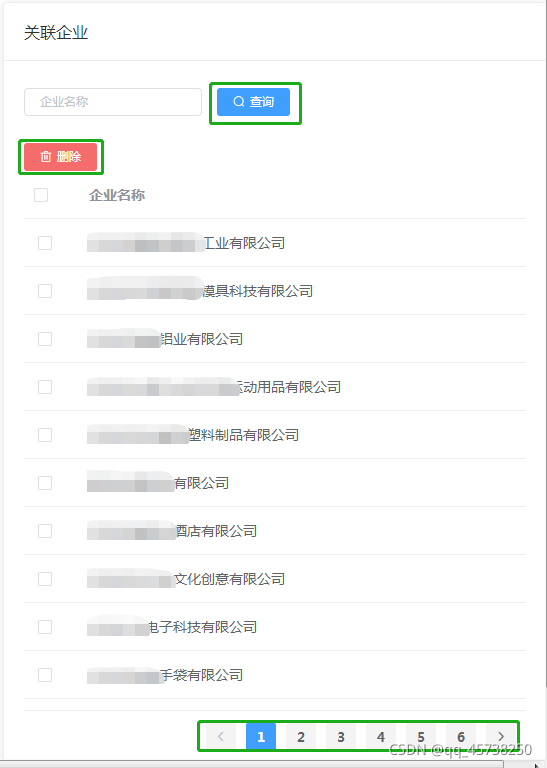
第1页面的代码如下(示例):
// 前面搜索框的代码省略....
<el-table stripe style="width:100%;" ref="table" :data="tableData" :default-sort="defaultSort"
             height="600px"  row-key="id" highlight-current-row @row-click="companyClick"
             @selection-change="handleSelection" @sort-change="handleSort">
       <el-table-column  prop="id" label="ID" type="selection"></el-table-column>
       <el-table-column type="index" width="60px" label="行号"></el-table-column>
       <el-table-column  prop="name" label="单位名称" width="300"></el-table-column>
       <el-table-column  prop="type" label="单位类型" width="100">
           <template slot-scope="scope">
               <el-tag v-if="scope.row.type === 'A'" size="small" type="warning">A类(收税)</el-tag>
               <el-tag v-else size="small" type="success">B类(免税)</el-tag>
           </template>
       </el-table-column>
// 中间省略若干....
       <el-table-column fixed="right" label="操作" width="100">
           <template slot-scope="scope">
               <el-button size="mini" type="success" icon="icon iconfont icon-jihuopeizhi"
                          @click="handleInvCo(scope.row)">修改
               </el-button>
           </template>
       </el-table-column>
   </el-table>

   <el-pagination background highlight-current-row
                  @size-change="handleSizeChange" @current-change="handleCurChange"
                  :current-page="curPage" :page-size="pageSize" :page-sizes="pageSizes" :total="total"
                  layout="prev, pager, next, total, sizes, jumper">
   </el-pagination>
第2页面的代码如下(示例):
<span slot="header">关联企业</span>
       <el-form ref="companySearchForm" :model="filterParams" :inline="true"  >
           <el-form-item >
               <el-input v-model="filterParams.companyName" placeholder="企业名称" size="mini"></el-input>
           </el-form-item>
           <el-form-item>
               <el-button type="primary" icon="el-icon-search" @click="getPageCompany" size="mini">查询</el-button>
           </el-form-item>
       </el-form>
           <el-button type="danger" icon="el-icon-delete" @click="deleteAll" size="mini">删除</el-button>
       <el-table ref="table" :data="companyTableData" height="540px"   @selection-change="handleSelection">
           <el-table-column prop="companyid" label="companyid" type="selection"  width="55"></el-table-column>
           <el-table-column prop="companyName" label="企业名称"></el-table-column>
       </el-table>
       <el-pagination  background  layout="prev, pager, next" :total="pageTotal" @current-change="currentChange" >
       </el-pagination>
 <el-row :gutter="24">
                    <el-col :span="16">
                        <el-card>
                            <span slot="header">开票单位</span>
                            <div>
                                <el-row>
                                    <el-button size="mini"  type="primary" icon="el-icon-circle-plus-outline" @click="addInvCo()">添加</el-button>
                                    <el-button type="warning" icon="el-icon-delete" size="mini" @click="handleDeletes()">删除</el-button>
                                </el-row>


                                <el-table stripe style="width:100%;" ref="table" :data="tableData" :default-sort="defaultSort"
                                          height="600px"  row-key="id" highlight-current-row @row-click="companyClick"
                                          @selection-change="handleSelection" @sort-change="handleSort">
                                    <el-table-column  prop="id" label="ID" type="selection"></el-table-column>
                                    <el-table-column type="index" width="60px" label="行号"></el-table-column>
                                    <el-table-column  prop="name" label="单位名称" width="300"></el-table-column>
                                    <el-table-column  prop="type" label="单位类型" width="100">
                                        <template slot-scope="scope">
                                            <el-tag v-if="scope.row.type === 'A'" size="small" type="warning">A类(收税)</el-tag>
                                            <el-tag v-else size="small" type="success">B类(免税)</el-tag>
                                        </template>
                                    </el-table-column>
                                    <el-table-column  prop="license" label="执照编号" width="300"></el-table-column>
                                    <el-table-column  prop="legalPerson" label="法人" width="150"></el-table-column>

                                    <el-table-column fixed="right" label="操作" width="100">
                                        <template slot-scope="scope">
                                            <el-button size="mini" type="success" icon="icon iconfont icon-jihuopeizhi"
                                                       @click="handleInvCo(scope.row)">修改
                                            </el-button>
                                        </template>
                                    </el-table-column>
                                </el-table>
                                <el-row style="text-align: right;margin-top: 10px">
                                    <el-pagination background highlight-current-row
                                                   @size-change="handleSizeChange" @current-change="handleCurChange"
                                                   :current-page="curPage" :page-size="pageSize" :page-sizes="pageSizes" :total="total"
                                                   layout="prev, pager, next, total, sizes, jumper">
                                    </el-pagination>
                                </el-row>
                            </div>
                        </el-card>
                    </el-col>
                    <el-col :span="8">
                        <el-card>
                            <span slot="header">关联企业</span>
                            <div>
                                <el-form ref="companySearchForm" :model="filterParams" :inline="true"  >
                                    <el-form-item >
                                        <el-input v-model="filterParams.companyName" placeholder="企业名称" size="mini"></el-input>
                                    </el-form-item>
                                    <el-form-item>
                                        <el-button type="primary" icon="el-icon-search" @click="getPageCompany" size="mini">查询</el-button>
                                    </el-form-item>
                                </el-form>
                                <el-row>
                                    <el-button type="danger" icon="el-icon-delete" @click="deleteAll" size="mini">删除</el-button>
                                </el-row>
                                <el-table ref="table" :data="companyTableData" height="540px"   @selection-change="handleSelection">
                                    <el-table-column prop="companyid" label="companyid" type="selection"  width="55"></el-table-column>
                                    <el-table-column prop="companyName" label="企业名称"></el-table-column>
                                </el-table>
                                <el-row style="text-align: right;margin-top: 10px">
                                    <el-pagination  background  layout="prev, pager, next" :total="pageTotal" @current-change="currentChange" >
                                    </el-pagination>
                                </el-row>
                            </div>
                        </el-card>
                    </el-col>
                </el-row>
上述方法代码如下:
	// 点击开票单位获取相关公司客户
	companyClick: function(row){
              var _this = this;
              _this.filterParams.current = 1;
              _this.filterParams.invoiceCompanyid = row.id;
              _this.getPageCompany();
          },
      // 第2页面根据不同页面查询结果
     currentChange: function (current) {
                this.filterParams.current = current;
                this.getPageCompany();
            },
       // 第2页面查询公司客户的方法(上述点击查询方法也是这个)
      getPageCompany: function(){
               var _this = this;
               _this.doGetData(_this.companyBindListUrl,_this.filterParams,function (r) {
                   if(r.success){
                       _this.companyTableData = r.data;
                       _this.pageTotal = r.total;
                   }
               })
           },
随心所往,看见未来。Follow your heart,see night!
欢迎点赞、关注、留言,一起学习、交流!
我得到了一个包含嵌套链接的表单。编辑时链接字段为空的问题。这是我的表格:Editingkategori{:action=>'update',:id=>@konkurrancer.id})do|f|%>'Trackingurl',:style=>'width:500;'%>'Editkonkurrence'%>|我的konkurrencer模型:has_one:link我的链接模型:classLink我的konkurrancer编辑操作:defedit@konkurrancer=Konkurrancer.find(params[:id])@konkurrancer.link_attrib
这道题是thisquestion的逆题.给定一个散列,每个键都有一个数组,例如{[:a,:b,:c]=>1,[:a,:b,:d]=>2,[:a,:e]=>3,[:f]=>4,}将其转换为嵌套哈希的最佳方法是什么{:a=>{:b=>{:c=>1,:d=>2},:e=>3,},:f=>4,} 最佳答案 这是一个迭代的解决方案,递归的解决方案留给读者作为练习:defconvert(h={})ret={}h.eachdo|k,v|node=retk[0..-2].each{|x|node[x]||={};node=node[x]}node[
我正在使用Sequel构建一个愿望list系统。我有一个wishlists和itemstable和一个items_wishlists连接表(该名称是续集选择的名称)。items_wishlists表还有一个用于facebookid的额外列(因此我可以存储opengraph操作),这是一个NOTNULL列。我还有Wishlist和Item具有续集many_to_many关联的模型已建立。Wishlist类也有:selectmany_to_many关联的选项设置为select:[:items.*,:items_wishlists__facebook_action_id].有没有一种方法可以
我有一个用户工厂。我希望默认情况下确认用户。但是鉴于unconfirmed特征,我不希望它们被确认。虽然我有一个基于实现细节而不是抽象的工作实现,但我想知道如何正确地做到这一点。factory:userdoafter(:create)do|user,evaluator|#unwantedimplementationdetailshereunlessFactoryGirl.factories[:user].defined_traits.map(&:name).include?(:unconfirmed)user.confirm!endendtrait:unconfirmeddoenden
下面例子中的Nested和Child有什么区别?是否只是同一事物的不同语法?classParentclassNested...endendclassChild 最佳答案 不,它们是不同的。嵌套:Computer之外的“Processor”类只能作为Computer::Processor访问。嵌套为内部类(namespace)提供上下文。对于ruby解释器Computer和Computer::Processor只是两个独立的类。classComputerclassProcessor#Tocreateanobjectforthisc
我的假设是moduleAmoduleBendend和moduleA::Bend是一样的。我能够从thisblog找到解决方案,thisSOthread和andthisSOthread.为什么以及什么时候应该更喜欢紧凑语法A::B而不是另一个,因为它显然有一个缺点?我有一种直觉,它可能与性能有关,因为在更多命名空间中查找常量需要更多计算。但是我无法通过对普通类进行基准测试来验证这一点。 最佳答案 这两种写作方法经常被混淆。首先要说的是,据我所知,没有可衡量的性能差异。(在下面的书面示例中不断查找)最明显的区别,可能也是最著名的,是你的
我有一个名为posts的模型,它有很多附件。附件模型使用回形针。我制作了一个用于创建附件的独立模型,效果很好,这是此处说明的View(https://github.com/thoughtbot/paperclip):@attachment,:html=>{:multipart=>true}do|form|%>posts中的嵌套表单如下所示:prohibitedthispostfrombeingsaved:@attachment,:html=>{:multipart=>true}do|at_form|%>附件记录已创建,但它是空的。文件未上传。同时,帖子已成功创建...有什么想法吗?
我真的为这个而疯狂。我一直在搜索答案并尝试我找到的所有内容,包括相关问题和stackoverflow上的答案,但仍然无法正常工作。我正在使用嵌套资源,但无法使表单正常工作。我总是遇到错误,例如没有路线匹配[PUT]"/galleries/1/photos"表格在这里:/galleries/1/photos/1/edit路线.rbresources:galleriesdoresources:photosendresources:galleriesresources:photos照片Controller.rbdefnew@gallery=Gallery.find(params[:galle
我的问题的一个例子是体育游戏。一场体育比赛有两支球队,一支主队和一支客队。我的事件记录模型如下:classTeam"Team"has_one:away_team,:class_name=>"Team"end我希望能够通过游戏访问一个团队,例如:Game.find(1).home_team但我收到一个单元化常量错误:Game::team。谁能告诉我我做错了什么?谢谢, 最佳答案 如果Gamehas_one:team那么Rails假设您的teams表有一个game_id列。不过,您想要的是games表有一个team_id列,在这种情况下
目前,Itembelongs_toCompany和has_manyItemVariants。我正在尝试使用嵌套的fields_for通过Item表单添加ItemVariant字段,但是使用:item_variants不显示该表单。只有当我使用单数时才会显示。我检查了我的关联,它们似乎是正确的,这可能与嵌套在公司下的项目有关,还是我遗漏了其他东西?提前致谢。注意:下面的代码片段中省略了不相关的代码。编辑:不知道这是否相关,但我正在使用CanCan进行身份验证。routes.rbresources:companiesdoresources:itemsenditem.rbclassItemi
