
💌 所属专栏:【微信小程序开发教程】
😀 作 者:我是夜阑的狗🐶
🚀 个人简介:一个正在努力学技术的CV工程师,专注基础和实战分享 ,欢迎咨询!
💖 欢迎大家:这里是CSDN,我总结知识的地方,喜欢的话请三连,有问题请私信 😘 😘 😘
文章目录
大家好,又见面了,我是夜阑的狗🐶,本文是专栏【微信小程序开发教程】专栏的第46篇文章;
今天开始学习微信小程序的第28天💖💖💖,开启新的征程,记录最美好的时刻🎉,每天进步一点点。
专栏地址:【微信小程序开发教程】, 此专栏是我是夜阑的狗微信小程序开发过程的总结,希望能够加深自己的印象,以及帮助到其他的小伙伴😉😉。
如果文章有什么需要改进的地方还请大佬不吝赐教👏👏。
前面已经介绍了分包-独立分包 & 分包预下载,通过栗子学习了如何设置独立分包以及分包预下载。接下来就来根据前面学的知识,在案例 - 自定义 tabBar上进行实践。话不多说,让我们原文再续,书接上回吧。

首先来看一下页面演示效果,页面中有下方标签栏是自定义 tabBar。自定义 tabBar 可以让开发者更加灵活地设置 tabBar 样式,以满足更多个性化的场景。
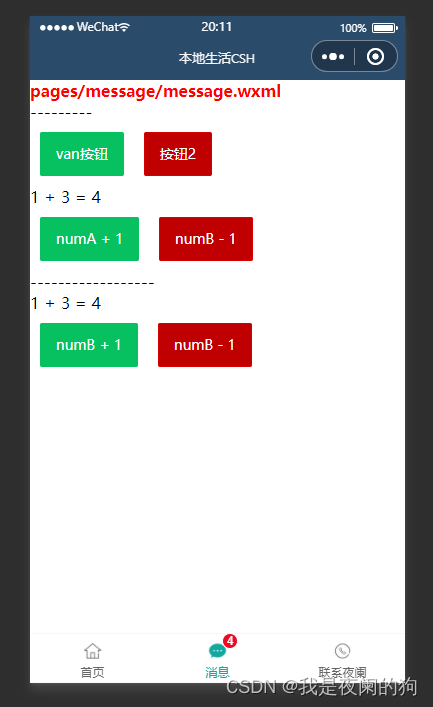
在此案例中,用到的主要知识点如下:
首先来实现 tabBar 标签栏,自定义 tabBar 可分为 3 大步骤,分别是:
在 app.json 中的 tabBar 项指定 custom 字段,同时其余 tabBar 相关配置也补充完整。所有 tab 页的 json 里需声明 usingComponents 项,也可以在 app.json 全局开启。
app.json
{
  "tabBar": {
    "custom": true,
    "list": [{
      "pagePath": "pages/home/home",
      "text": "首页",
      "iconPath": "/images/home.png",
      "selectedIconPath": "/images/home-active.png"
    },{
      "pagePath": "pages/message/message",
      "text": "消息",
      "iconPath": "/images/message.png",
      "selectedIconPath": "/images/message-active.png"
    },{
      "pagePath": "pages/contact/contact",
      "text": "联系夜阑",
      "iconPath": "/images/contact.png",
      "selectedIconPath": "/images/contact-active.png"
    }]
  },
}
注意:当配置自定义 tarBar 页面时,list 属性不能删除,为了保证低版本兼容以及区分哪些页面是 tab 页,tabBar 的相关配置项需完整声明,但这些字段不会作用于自定义 tabBar 的渲染。
在代码根目录下添加入口文件,这里的文件夹名一定是 custom-tab-bar,然后在创建 index 组件(index命名也不能随便改,就用 index,否则无法识别)。
当 custom 参数为 true 时,小程序就会自动识别 custom-tab-bar 里面的文件,并将其渲染出来。
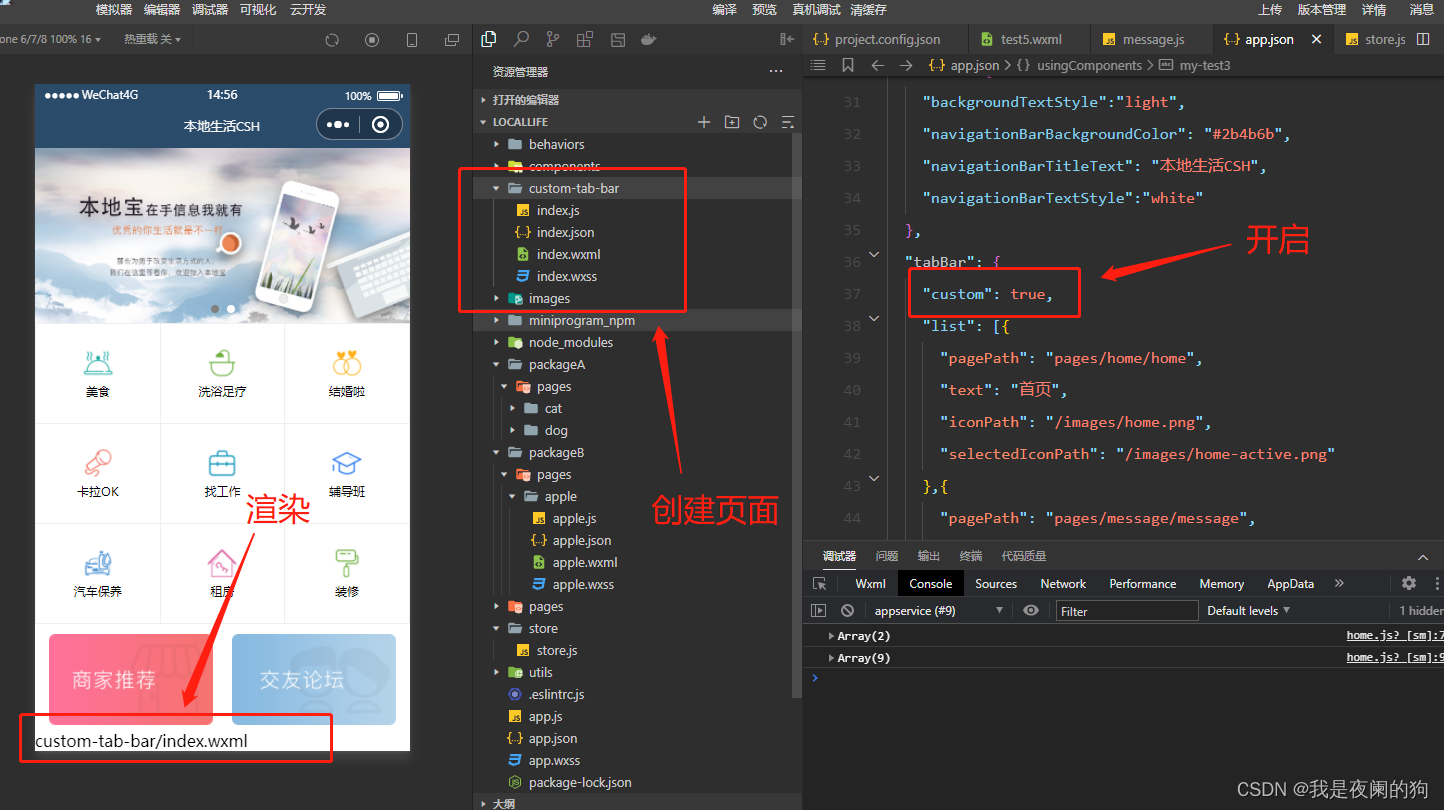
用自定义组件的方式编写即可,该自定义组件完全接管 tabBar 的渲染。另外,自定义组件新增 getTabBar 接口,可获取当前页面下的自定义 tabBar 组件实例。这里使用 Vant Weapp 底部导航栏,用于在不同页面之间进行切换。
1、引入
在 app.json 或 index.json 中引入组件,这里对组件进行全局引用,具体代码如下所示:
app.json
{
  "usingComponents":{
    "my-test1": "/components/test1/test1",
    "my-test2": "/components/test2/test2",
    "my-test3": "/components/test3/test3",
    "my-test4": "/components/test4/test4",
    "my-test5": "/components/test5/test5",
    "van-button": "@vant/weapp/button/index",
    "my-numbers": "./components/numbers/numbers",
    "van-tabbar": "@vant/weapp/tabbar/index",
    "van-tabbar-item": "@vant/weapp/tabbar-item/index"
  },
}
2、基础用法
index.wxml
<van-tabbar active="{{ active }}" bind:change="onChange">
  <van-tabbar-item icon="home-o">标签</van-tabbar-item>
  <van-tabbar-item icon="search">标签</van-tabbar-item>
  <van-tabbar-item icon="friends-o">标签</van-tabbar-item>
  <van-tabbar-item icon="setting-o">标签</van-tabbar-item>
</van-tabbar>
index.js
Component({
  /**
   * 组件的初始数据
   */
  data: {
    active: 0,
  },
  /**
   * 组件的方法列表
   */
  methods: {
    onChange(event) {
      // event.detail 的值为当前选中项的索引
      this.setData({ active: event.detail });
    },
  }
})
可以来看一下运行效果:
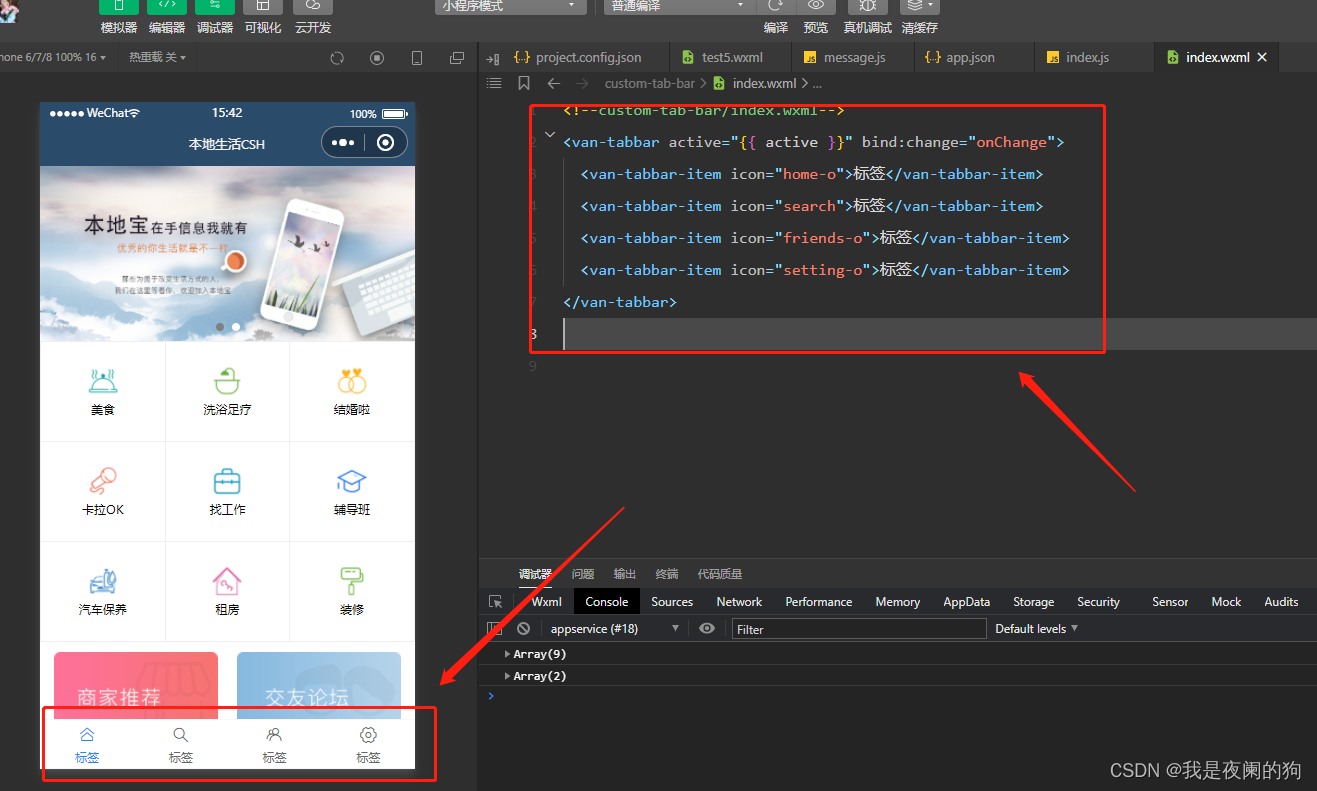
3、自定义图标
知道怎么引用 Vant 组件之后,接下来就根据需求来对其进行修改,可以通过 slot 自定义图标,其中 icon slot 代表未选中状态下的图标,icon-active slot 代表选中状态下的图标。来看一下 vant 提供的参数 TabbarItem Slot:
| 名称 | 说明 |
|---|---|
| icon | 未选中时的图标 |
| icon-active | 选中时的图标 |
index.wxml
通过 wx: for 将标签栏渲染到页面上。
<van-tabbar active="{{active}}" bind:change="onChange">
  <van-tabbar-item wx:for="{{list}}" wx:key="index">
    <image
      slot="icon"
      src="{{ item.iconPath }}"
      mode="aspectFit"
      style="width: 25px; height: 25px;"
    />
    <image
      slot="icon-active"
      src="{{ item.selectedIconPath }}"
      mode="aspectFit"
      style="width: 25px; height: 25px;"
    />
    {{item.text}}
  </van-tabbar-item>
</van-tabbar>
index.js
将 app.json 里的 list 数组放在自定义 tabBar 组件中的 data 数据,然后通过循环渲染到页面上。
Component({
  /**
   * 组件的初始数据
   */
  data: {
    active: 0,
    "list": [{
      "pagePath": "pages/home/home",
      "text": "首页",
      "iconPath": "/images/home.png",
      "selectedIconPath": "/images/home-active.png"
    },{
      "pagePath": "pages/message/message",
      "text": "消息",
      "iconPath": "/images/message.png",
      "selectedIconPath": "/images/message-active.png"
    },{
      "pagePath": "pages/contact/contact",
      "text": "联系夜阑",
      "iconPath": "/images/contact.png",
      "selectedIconPath": "/images/contact-active.png"
    }]
  },

  /**
   * 组件的方法列表
   */
  methods: {
    onChange(event) {
      // event.detail 的值为当前选中项的索引
      this.setData({ active: event.detail });
    },
  }
})
此时可以看到已经成功把 list 数组里的图片都渲染出来了,来看一下运行效果:
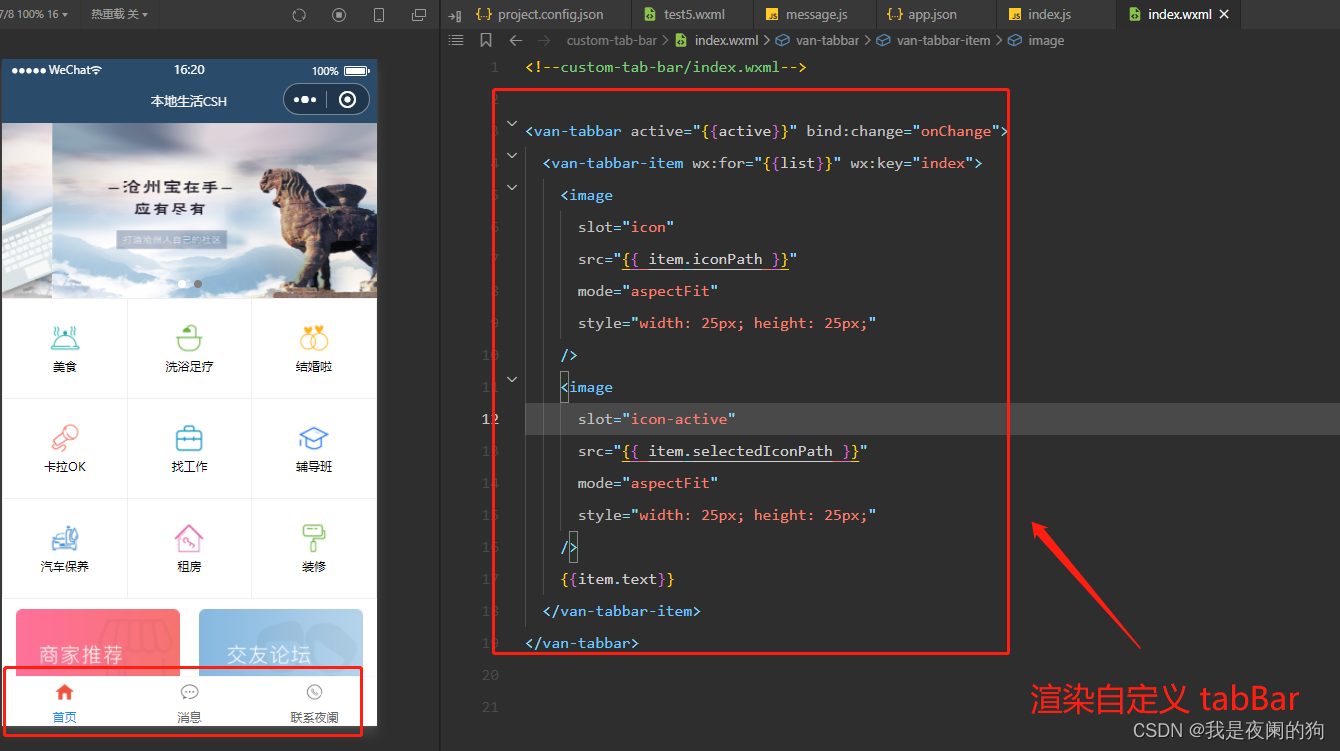
详细步骤,可以参考小程序官方给出的 文档 。
通过 van-tabbar-item 上 info 属性可以对 tabBar 渲染数字,具体代码如下所示:
index.wxml
<van-tabbar active="{{active}}" bind:change="onChange">
  <van-tabbar-item wx:for="{{list}}" wx:key="index" info="2">
    <image
      slot="icon"
      src="{{ item.iconPath }}"
      mode="aspectFit"
      style="width: 25px; height: 25px;"
    />
    <image
      slot="icon-active"
      src="{{ item.selectedIconPath }}"
      mode="aspectFit"
      style="width: 25px; height: 25px;"
    />
    {{item.text}}
  </van-tabbar-item>
</van-tabbar>
可以看当对 tabBar 加上数字徽标时,就溢出 tabBar 页面范围。此时需要美化 tabBar 页面, 通过调试器可以看到,图标与标签名中间有间隔。
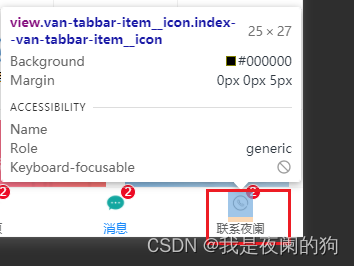
在网页开发中,橘黄色的部分代表 margin 。
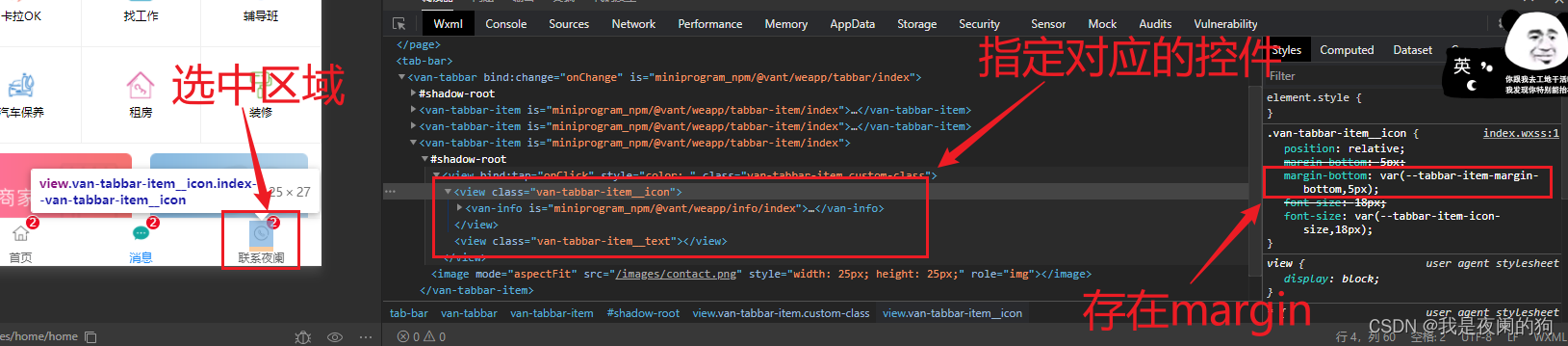
从上图可以发现,margin-bottom: var(--tabbar-item-margin-bottom,5px);,其中 var 是css中用来引用变量的,当 --tabbar-item-margin-bottom 不存在的时候,就默认为 5px。所以只要重置其 margin-bottom 的值,数字徽标就不会超出 tabBar 范围。
index.wxss
.van-tabbar-item{
  --tabbar-item-margin-bottom: 0,
}
注意:在自定义组件中使用 Vant Weapp 组件时,需开启 styleIsolation: ‘shared’ 选项
index.js
Component({
  options: {
    styleIsolation: 'shared',
  },
});
可以来看一下运行效果:
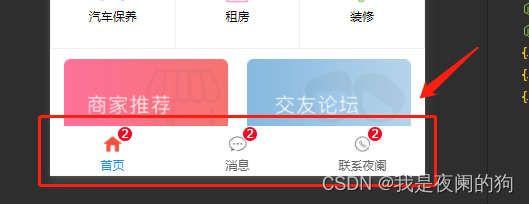
在实际开发过程中,并不是所以图标都需要添加数字徽标的,所以不能 info 属性将其写死。这里需要把 store 里面的数据绑定组件中进行使用,然后通过数据监听器将数据变化传到数字图标上,具体代码如下所示:
index.wxml
通过判断是否有 info 属性来显示该数字图标,当 info 属性不存在或者为 0 的时候都不显示。
<van-tabbar active="{{active}}" bind:change="onChange">
  <van-tabbar-item wx:for="{{list}}" wx:key="index" info="{{item.info ? item.info : ''}}">
    <image
      slot="icon"
      src="{{ item.iconPath }}"
      mode="aspectFit"
      style="width: 25px; height: 25px;"
    />
    <image
      slot="icon-active"
      src="{{ item.selectedIconPath }}"
      mode="aspectFit"
      style="width: 25px; height: 25px;"
    />
    {{item.text}}
  </van-tabbar-item>
</van-tabbar>
index.js
在消息图标后添加 info 属性。
// custom-tab-bar/index.js
// 导入
import {storeBindingsBehavior} from 'mobx-miniprogram-bindings'
import {store} from '../store/store'

Component({
  // 挂载
  behaviors: [storeBindingsBehavior],
  // 全局数据操作
  storeBindings: {
    store,
    fields:{
      sum: 'sum'
    },
    actions: {}
  },

  // 数据监听
  observers:{
    "sum": function (value){
      this.setData({
        "list[1].info": value
      })
    }
  },
  /**
   * 组件的初始数据
   */
  data: {
    active: 0,
    "list": [{
      "pagePath": "pages/home/home",
      "text": "首页",
      "iconPath": "/images/home.png",
      "selectedIconPath": "/images/home-active.png"
    },{
      "pagePath": "pages/message/message",
      "text": "消息",
      "iconPath": "/images/message.png",
      "selectedIconPath": "/images/message-active.png",
      info: 2
    },{
      "pagePath": "pages/contact/contact",
      "text": "联系夜阑",
      "iconPath": "/images/contact.png",
      "selectedIconPath": "/images/contact-active.png"
    }]
  },
})
可以看到对全局数据进行操作时,消息的数字徽标也会随着变化,运行效果如下所示:
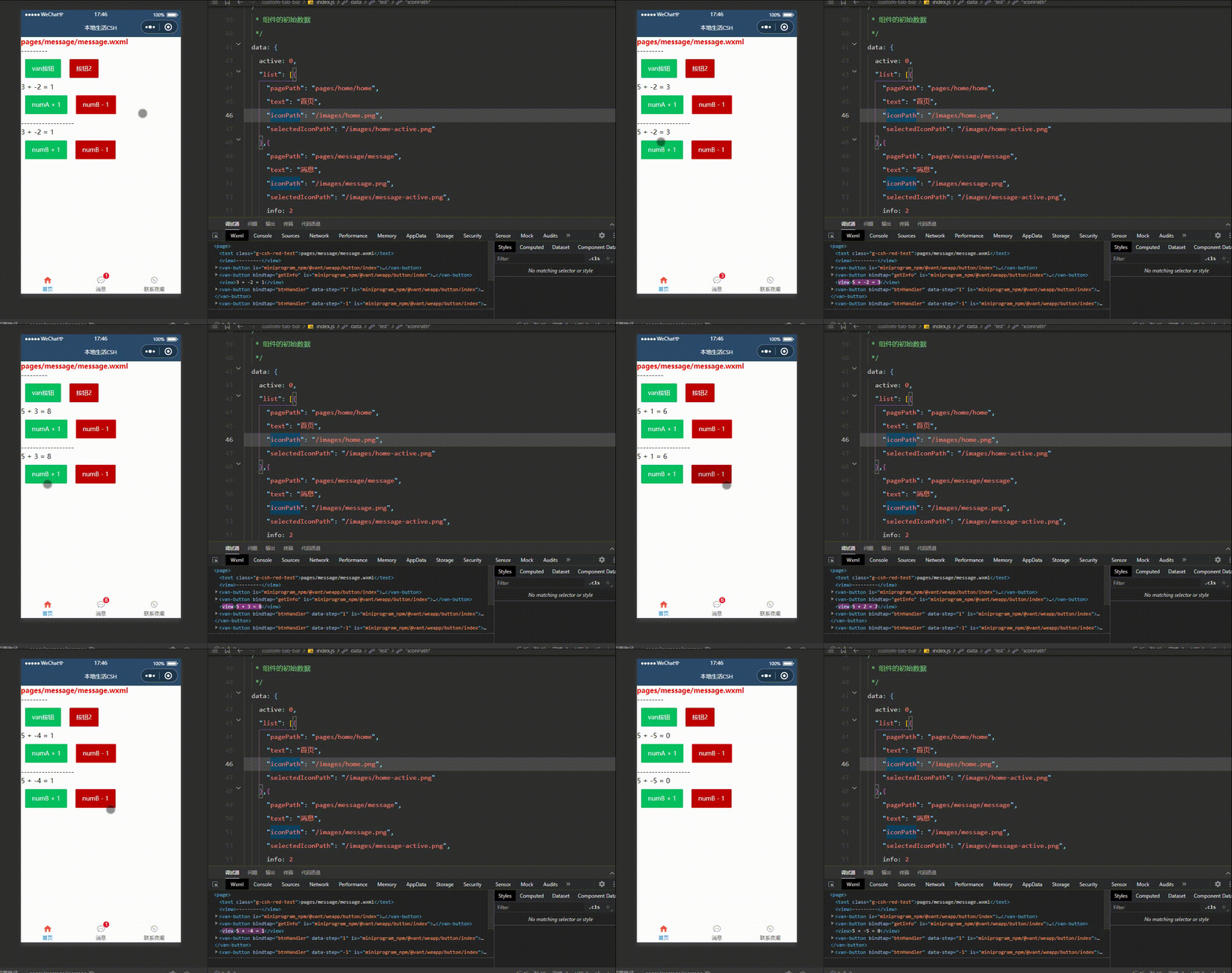
通过监听 tabBar 的 change 事件,得到当前选中项的索引,根据这个索引找到对应页面路径,最后用 wx.switchTab 进行页面跳转。
store.js
不用在组件data 里面定义选中项的索引,不然会出现问题(坑点),最好定义在 store 中,先在 store 定义变量和修改方法。
export const store = observable({
  // 需要挂载的数据 -- 数据字段
  numA: 1,
  numB: 3,
  name: "我是夜阑的狗",
  activeTabBarIndex: 0,
  // 计算属性 -- get为修饰符
  get sum(){
    return this.numA + this.numB;
  },
  // actions 函数,专门来修改 store 中数据的值
  updateNum1: action(function(step){
    this.numA += step;
  }),
  updateNum2: action(function(step){
    this.numB += step;
  }),
  updateName: action(function(name){
    this.name = name;
  }),
  updateActiveTabBarIndex: action(function(index){
    this.activeTabBarIndex = index;
  })
})
index.js
将全局数据里的索引变量和修改方法挂载到组件中。
// custom-tab-bar/index.js
// 导入
import {storeBindingsBehavior} from 'mobx-miniprogram-bindings'
import {store} from '../store/store'

Component({
  // 挂载
  behaviors: [storeBindingsBehavior],

  // 全局数据操作
  storeBindings: {
    store,
    fields:{
      sum: 'sum',
      active: 'activeTabBarIndex'
    },
    actions: {
      updateActive: 'updateActiveTabBarIndex'
    }
  },

  /**
   * 组件的方法列表
   */
  methods: {
    onChange(event) {
      // event.detail 的值为当前选中项的索引
      // this.setData({ active: event.detail });
      this.updateActive(event.detail);
      wx.switchTab({
        url: this.data.list[event.detail].pagePath,
      })
    },
  }
})
注意:这里页面路径 一定要以斜线根路径开头,否则无法识别。
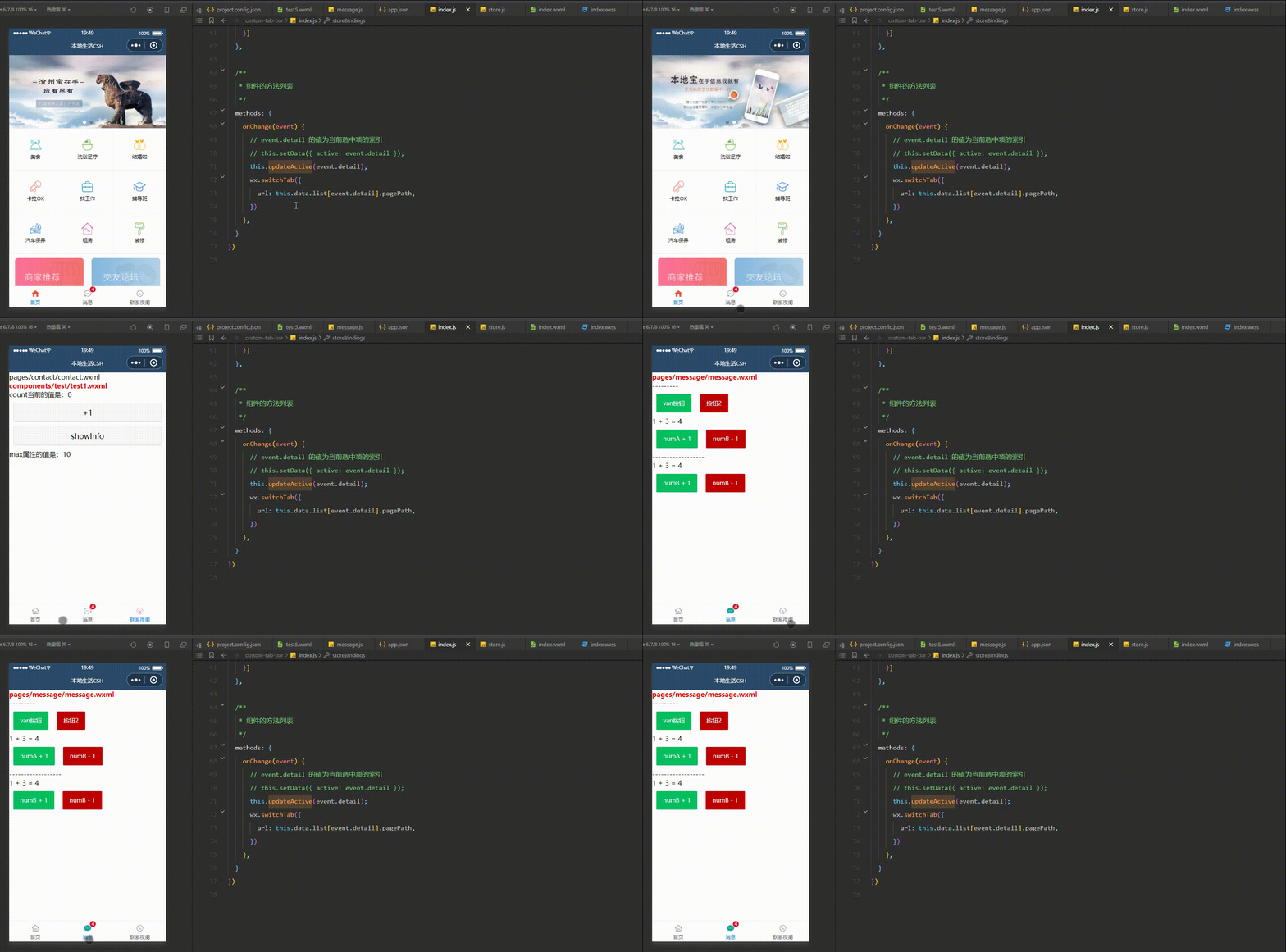
可以来看一下运行效果:
最后就是来修改 tabBar 选中项文本的颜色值,来看一下 Vant 提供 tabBar 参数 Tabbar Props :
| 参数 | 说明 | 类型 | 默认值 |
|---|---|---|---|
| active | 当前选中标签的索引 | number | - |
| fixed | 是否固定在底部 | boolean | true |
| placeholder | 固定在底部时,是否在标签位置 生成一个等高的占位元素 | boolean | false |
| border | 是否展示外边框 | boolean | true |
| z-index | 元素 z-index | number | 1 |
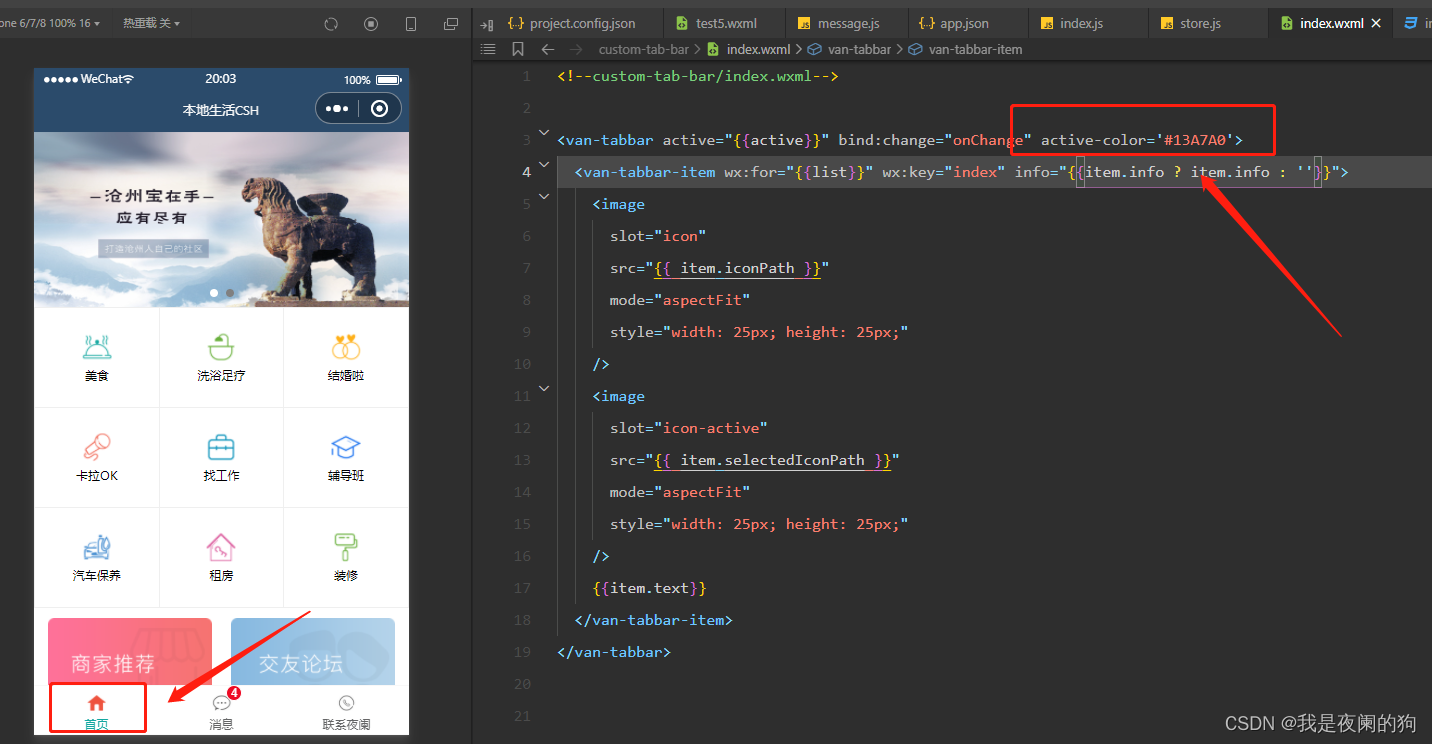
| active-color | 选中标签的颜色 | string | #1989fa |
| inactive-color | 未选中标签的颜色 | string | #7d7e80 |
| safe-area-inset-bottom | 是否为 iPhoneX 留出底部安全距离 | boolean | true |
index.wxml
<van-tabbar active="{{active}}" bind:change="onChange" active-color='#13A7A0'>
  <van-tabbar-item wx:for="{{list}}" wx:key="index" info="{{item.info ? item.info : ''}}">
    <image
      slot="icon"
      src="{{ item.iconPath }}"
      mode="aspectFit"
      style="width: 25px; height: 25px;"
    />
    <image
      slot="icon-active"
      src="{{ item.selectedIconPath }}"
      mode="aspectFit"
      style="width: 25px; height: 25px;"
    />
    {{item.text}}
  </van-tabbar-item>
</van-tabbar>
可以来看一下运行效果:
感谢观看,这里就是案例 - 自定义 tabBar的介绍,如果觉得有帮助,请给文章点个赞吧,让更多的人看到。🌹 🌹 🌹

也欢迎你,关注我。👍 👍 👍
原创不易,还希望各位大佬支持一下,你们的点赞、收藏和留言对我真的很重要!!!💕 💕 💕 最后,本文仍有许多不足之处,欢迎各位认真读完文章的小伙伴们随时私信交流、批评指正!下期再见。🎉
更多专栏订阅:
- 😀 【LeetCode题解(持续更新中)】
- 🚝 【Java Web项目构建过程】
- 💛 【微信小程序开发教程】
- ⚽ 【JavaScript随手笔记】
- 🤩 【大数据学习笔记(华为云)】
- 🦄 【程序错误解决方法(建议收藏)】
- 🚀 【软件安装教程】
订阅更多,你们将会看到更多的优质内容!!
我正在尝试设置一个puppet节点,但rubygems似乎不正常。如果我通过它自己的二进制文件(/usr/lib/ruby/gems/1.8/gems/facter-1.5.8/bin/facter)在cli上运行facter,它工作正常,但如果我通过由rubygems(/usr/bin/facter)安装的二进制文件,它抛出:/usr/lib/ruby/1.8/facter/uptime.rb:11:undefinedmethod`get_uptime'forFacter::Util::Uptime:Module(NoMethodError)from/usr/lib/ruby
我在我的项目中添加了一个系统来重置用户密码并通过电子邮件将密码发送给他,以防他忘记密码。昨天它运行良好(当我实现它时)。当我今天尝试启动服务器时,出现以下错误。=>BootingWEBrick=>Rails3.2.1applicationstartingindevelopmentonhttp://0.0.0.0:3000=>Callwith-dtodetach=>Ctrl-CtoshutdownserverExiting/Users/vinayshenoy/.rvm/gems/ruby-1.9.3-p0/gems/actionmailer-3.2.1/lib/action_mailer
我想向我的Controller传递一个参数,它是一个简单的复选框,但我不知道如何在模型的form_for中引入它,这是我的观点:{:id=>'go_finance'}do|f|%>Transferirde:para:Entrada:"input",:placeholder=>"Quantofoiganho?"%>Saída:"output",:placeholder=>"Quantofoigasto?"%>Nota:我想做一个额外的复选框,但我该怎么做,模型中没有一个对象,而是一个要检查的对象,以便在Controller中创建一个ifelse,如果没有检查,请帮助我,非常感谢,谢谢
我已经从我的命令行中获得了一切,所以我可以运行rubymyfile并且它可以正常工作。但是当我尝试从sublime中运行它时,我得到了undefinedmethod`require_relative'formain:Object有人知道我的sublime设置中缺少什么吗?我正在使用OSX并安装了rvm。 最佳答案 或者,您可以只使用“require”,它应该可以正常工作。我认为“require_relative”仅适用于ruby1.9+ 关于ruby-主要:Objectwhenrun
我有一些代码在几个不同的位置之一运行:作为具有调试输出的命令行工具,作为不接受任何输出的更大程序的一部分,以及在Rails环境中。有时我需要根据代码的位置对代码进行细微的更改,我意识到以下样式似乎可行:print"Testingnestedfunctionsdefined\n"CLI=trueifCLIdeftest_printprint"CommandLineVersion\n"endelsedeftest_printprint"ReleaseVersion\n"endendtest_print()这导致:TestingnestedfunctionsdefinedCommandLin
我有一个只接受一个参数的方法:defmy_method(number)end如果使用number调用方法,我该如何引发错误??通常,我如何定义方法参数的条件?比如我想在调用的时候报错:my_method(1) 最佳答案 您可以添加guard在函数的开头,如果参数无效则引发异常。例如:defmy_method(number)failArgumentError,"Inputshouldbegreaterthanorequalto2"ifnumbereputse.messageend#=>Inputshouldbegreaterthano
我使用Ember作为我的前端和GrapeAPI来为我的API提供服务。前端发送类似:{"service"=>{"name"=>"Name","duration"=>"30","user"=>nil,"organization"=>"org","category"=>nil,"description"=>"description","disabled"=>true,"color"=>nil,"availabilities"=>[{"day"=>"Saturday","enabled"=>false,"timeSlots"=>[{"startAt"=>"09:00AM","endAt"=>
我想获取模块中定义的所有常量的值:moduleLettersA='apple'.freezeB='boy'.freezeendconstants给了我常量的名字:Letters.constants(false)#=>[:A,:B]如何获取它们的值的数组,即["apple","boy"]? 最佳答案 为了做到这一点,请使用mapLetters.constants(false).map&Letters.method(:const_get)这将返回["a","b"]第二种方式:Letters.constants(false).map{|c
我正在阅读一本关于Ruby的书,作者在编写类初始化定义时使用的形式与他在本书前几节中使用的形式略有不同。它看起来像这样:classTicketattr_accessor:venue,:datedefinitialize(venue,date)self.venue=venueself.date=dateendend在本书的前几节中,它的定义如下:classTicketattr_accessor:venue,:datedefinitialize(venue,date)@venue=venue@date=dateendend在第一个示例中使用setter方法与在第二个示例中使用实例变量之间是
我正在使用RubyonRails3.0.9,我想生成一个传递一些自定义参数的link_toURL。也就是说,有一个articles_path(www.my_web_site_name.com/articles)我想生成如下内容:link_to'Samplelinktitle',...#HereIshouldimplementthecode#=>'http://www.my_web_site_name.com/articles?param1=value1¶m2=value2&...我如何编写link_to语句“alàRubyonRailsWay”以实现该目的?如果我想通过传递一些
