 点击Next

dependencies {
    implementation 'com.tencent:mmkv-static:1.0.23'
}apply from: "config.gradle"
buildscript {
ext.kotlin_version = '1.4.31'
repositories {
mavenCentral()
google()
maven { url "https://jitpack.io" }
}
dependencies {
classpath 'com.android.tools.build:gradle:4.0.2'
classpath "org.jetbrains.kotlin:kotlin-gradle-plugin:$kotlin_version"
// NOTE: Do not place your application dependencies here; they belong
// in the individual module build.gradle files
}
}
allprojects {
repositories {
mavenCentral()
google()
maven { url "https://jitpack.io" }
maven { url "https://s01.oss.sonatype.org/content/groups/public" }
maven {url 'http://maven.aliyun.com/nexus/content/groups/public/'}
}
/*Partial dependency libraries introduce existing dependencies, which are handled in the following way in order to unify their versions*/
configurations.all {
resolutionStrategy.eachDependency { details ->
def requested = details.requested
if (requested.group == 'org.jetbrains.kotlin') {
if (requested.name.startsWith("kotlin-stdlib")) {
details.useVersion '1.4.31'
}
}
}
}
}
task clean(type: Delete) {
delete rootProject.buildDir
}
这样我们就可以开始写代码了 因为我们要写一个登录&注册一体的功能 所以这里我重新创建一个LoginActivity用来登录使用 将MainActivity用来登录成功后跳转的指向页面
4.画一个登录注册页面(activity_login.xml)
简单效果图
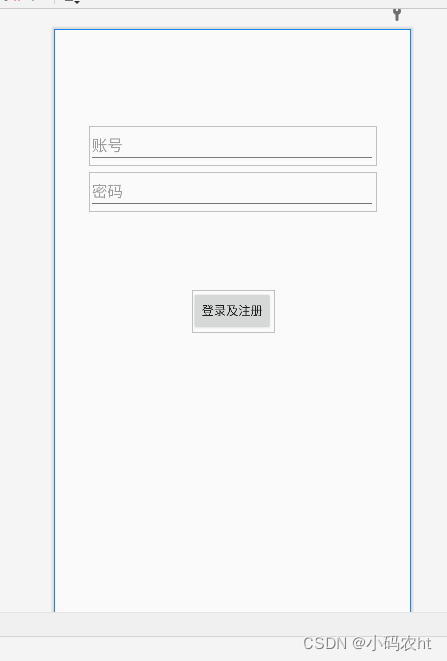
上图代码
<?xml version="1.0" encoding="utf-8"?>
<androidx.constraintlayout.widget.ConstraintLayout xmlns:android="http://schemas.android.com/apk/res/android"
    xmlns:app="http://schemas.android.com/apk/res-auto"
    xmlns:tools="http://schemas.android.com/tools"
    android:id="@+id/container"
    android:layout_width="match_parent"
    android:layout_height="match_parent"
    android:paddingLeft="@dimen/dp_16"
    android:paddingTop="@dimen/dp_16"
    android:paddingRight="@dimen/dp_16"
    android:paddingBottom="@dimen/dp_16"
    tools:context=".ui.LoginActivity">

    <EditText
        android:id="@+id/username"
        android:layout_width="@dimen/dp_0"
        android:layout_height="wrap_content"
        android:layout_marginStart="@dimen/dp_24"
        android:layout_marginTop="@dimen/dp_96"
        android:layout_marginEnd="@dimen/dp_24"
        android:hint="@string/prompt_email"
        android:inputType="textEmailAddress"
        android:selectAllOnFocus="true"
        app:layout_constraintEnd_toEndOf="parent"
        app:layout_constraintStart_toStartOf="parent"
        app:layout_constraintTop_toTopOf="parent" />

    <EditText
        android:id="@+id/password"
        android:layout_width="@dimen/dp_0"
        android:layout_height="wrap_content"
        android:layout_marginStart="@dimen/dp_24"
        android:layout_marginTop="@dimen/dp_8"
        android:layout_marginEnd="@dimen/dp_24"
        android:hint="@string/prompt_password"
        android:imeActionLabel="@string/action_sign_in_short"
        android:imeOptions="actionDone"
        android:inputType="textPassword"
        android:selectAllOnFocus="true"
        app:layout_constraintEnd_toEndOf="parent"
        app:layout_constraintStart_toStartOf="parent"
        app:layout_constraintTop_toBottomOf="@+id/username" />

    <Button
        android:id="@+id/login"
        android:layout_width="wrap_content"
        android:layout_height="wrap_content"
        android:layout_gravity="start"
        android:layout_marginStart="@dimen/dp_48"
        android:layout_marginTop="@dimen/dp_16"
        android:layout_marginEnd="@dimen/dp_48"
        android:layout_marginBottom="@dimen/dp_64"
        android:text="@string/action_sign_in"
        app:layout_constraintBottom_toBottomOf="parent"
        app:layout_constraintEnd_toEndOf="parent"
        app:layout_constraintStart_toStartOf="parent"
        app:layout_constraintTop_toBottomOf="@+id/password"
        app:layout_constraintVertical_bias="0.2" />

</androidx.constraintlayout.widget.ConstraintLayout>package com.example.htkotlinmvvmdemo1.ui
import android.os.Bundle
import androidx.activity.viewModels
import androidx.lifecycle.lifecycleScope
import com.caspar.base.base.BaseActivity
import com.caspar.base.ext.acStart
import com.caspar.base.utils.MMKVUtil
import com.example.htkotlinmvvmdemo1.config.Constant.LOGINUSERNAME
import com.example.htkotlinmvvmdemo1.databinding.ActivityLoginBinding
import com.example.htkotlinmvvmdemo1.ui.viewmodel.LoginViewModel
import kotlinx.coroutines.delay
import kotlinx.coroutines.launch
/**
* "ht" 创建 2021/12/23
* 界面名称以及功能: 登录界面
*/
class LoginActivity : BaseActivity<ActivityLoginBinding>() {
private val loginViewModel: LoginViewModel by viewModels()
override fun initView(savedInstanceState: Bundle?) {
//判断账号不为空证明已经注册过了这是点击退出后跳回登录界面 默认将存储的账号显示出来当然也可以不写
if (MMKVUtil.decodeString(LOGINUSERNAME).isNotEmpty()) {
mBindingView.username.setText(MMKVUtil.decodeString(LOGINUSERNAME))
}
mBindingView.apply {
//这里实现点击登录后的处理
mBindingView.login.setOnClickListener {
//kotlin的语法很简洁 这里的意思是我们将输入的账号密码进行判断不为空即走下面的跳转方法
if (loginViewModel.userEmpty(
mBindingView.username.text.toString(),
mBindingView.password.text.toString()
)
) {
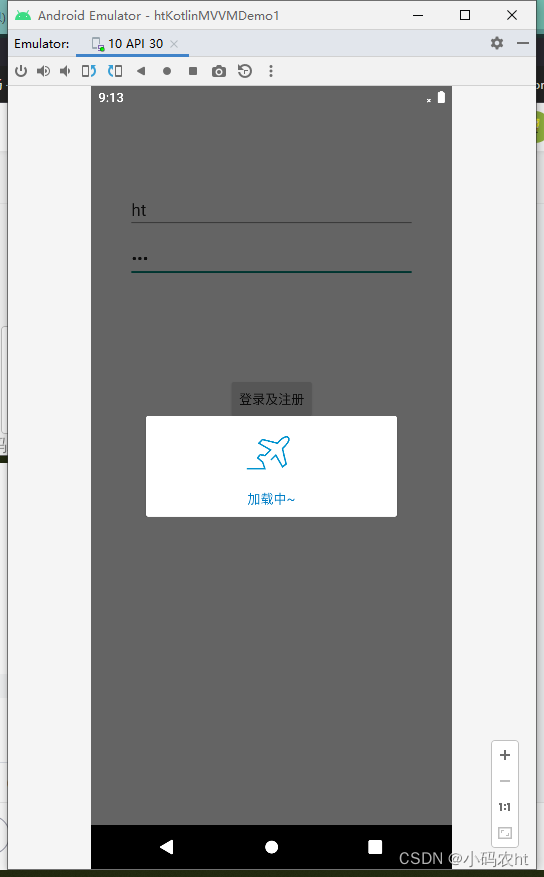
//kotlin协程实现2秒延迟跳转
lifecycleScope.launch {
showDialog()
delay(2000)
stopDialog()
acStart<MainActivity>()
finish()
}
}
}
}
}
override fun initIntent() {
}
}我这里用的是mvvm架构 所以我在贴一下这里的LoginViewModel
package com.example.htkotlinmvvmdemo1.ui.viewmodel

import android.app.Application
import com.caspar.base.base.BaseViewModel
import com.example.htkotlinmvvmdemo1.config.Constant
import com.caspar.base.utils.MMKVUtil

/**
 *  "ht" 创建 2021/12/23
 *   界面名称以及功能: 登录界面
 */
class LoginViewModel(application: Application) : BaseViewModel(application) {
    fun userEmpty(userName: String, userPassword: String): Boolean {
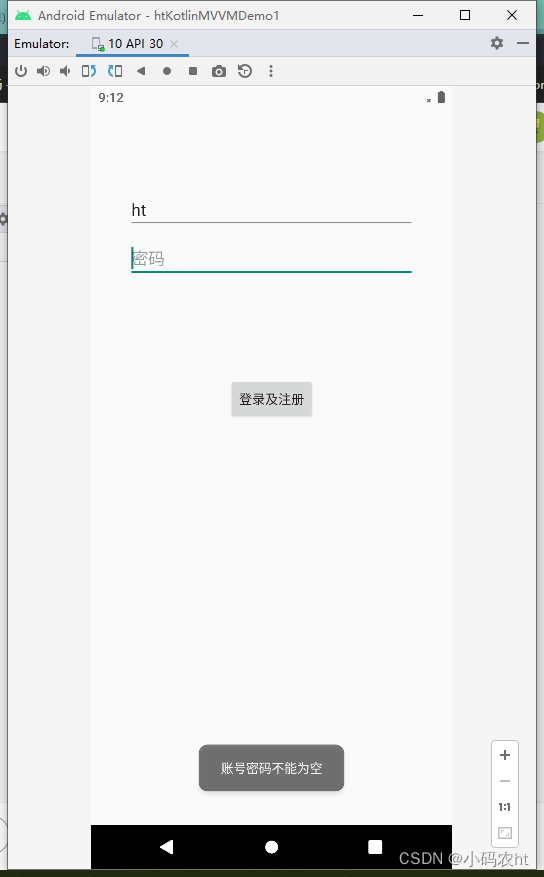
        //这里的意思是用户名或者密码如果有一个为空就返回false并提示(当然我们也可以添加其他判断比如只能输入数字等等我们这里就不多判断了懂就行)
        return if (userName.isEmpty() || userPassword.isEmpty()) {
            toast("账号密码不能为空")
            false
        } else {
            //这里的意思是用户名和密码都不为空就保存下来并返回true后执行延迟跳转(这里我将  MMKV封装了我会贴在下面的)
            MMKVUtil.encode(Constant.LOGINUSERNAME, userName)
            MMKVUtil.encode(Constant.LOGINPASSWORD, userPassword)
            true
        }
    }


}
这样我们就已经实现了简单的登录注册了 当然我们app一般会有启动页 然后配合启动页去判断有没有注册过 如果注册过我们可以通过MMKV获取储存的账号密码直接登录不需要在跳到登录界面,如果你会问那怎么退出呢 当然我们可以储存那也可以删除 只要在app里添加退出登录 将账号密码清空跳到登录界面重新注册登录,还可以在下次在登录时我们判断账号密码为空了 就跳到登录界面重新注册登录
我里面用到ViewBinding并且封装了BaseActivity大家可以去看我第二个文章直接复制至于协程用法后面我在梳理一下
上面只是很简单的一个登录逻辑 相信大家都看得懂 主要是最基础东西 可能更适合新手吧!
1.登录验证失败
2.验证通过延迟跳转
3.登录成功跳转MainActivity
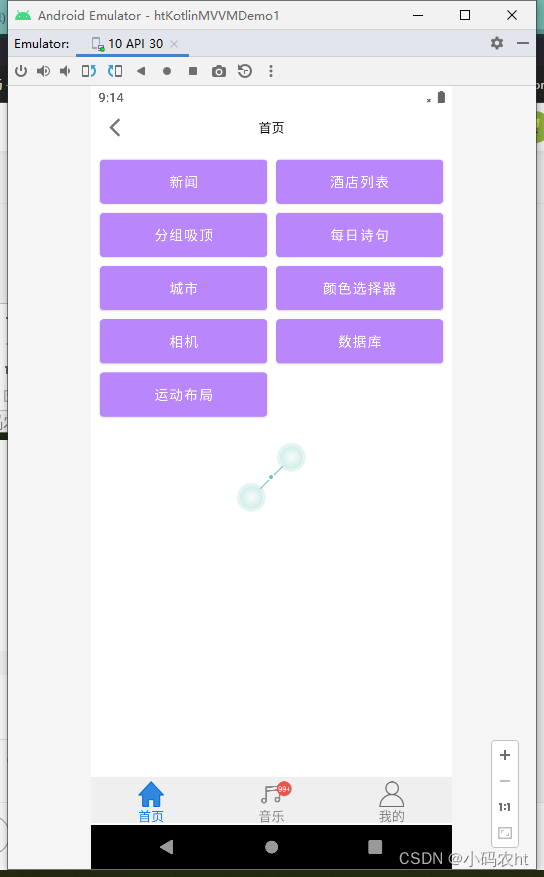
(1) room数据增删改
(2)模糊搜索
(3)Motionlayout动画布局
(4)相机相册权限申请选择并设置圆角等样式
(5)骨架屏加载
(6)图片中提取选中颜色
(7)RecyclerView多级显示+吸顶
(8)CoordinatorLayout+AppBarLayout+CollapsingToolbarLayout基本使用
(9)Retrofit2+Coroutine(协程)+Flow实现网路请求加数据回调发送等等
(10)实现多语言切换
(10)集成高德地图实现中英文切换 3D地图等显示以及基本配置
(11)一些好用得第三方库如Player音乐播放器,BaseRecyclerViewAdapterHelper万能适配, AgentWeb轻量级而且功能强大的 Web 库
反正是很杂就是想到什么就试着写写玩也方便自己用得时候直接拿来用。
最后想说各位码友可以q我大家多多交流!!!!!!!end~
使用带有Rails插件的vim,您可以创建一个迁移文件,然后一次性打开该文件吗?textmate也可以这样吗? 最佳答案 你可以使用rails.vim然后做类似的事情::Rgeneratemigratonadd_foo_to_bar插件将打开迁移生成的文件,这正是您想要的。我不能代表textmate。 关于ruby-使用VimRails,您可以创建一个新的迁移文件并一次性打开它吗?,我们在StackOverflow上找到一个类似的问题: https://sta
我需要从一个View访问多个模型。以前,我的links_controller仅用于提供以不同方式排序的链接资源。现在我想包括一个部分(我假设)显示按分数排序的顶级用户(@users=User.all.sort_by(&:score))我知道我可以将此代码插入每个链接操作并从View访问它,但这似乎不是“ruby方式”,我将需要在不久的将来访问更多模型。这可能会变得很脏,是否有针对这种情况的任何技术?注意事项:我认为我的应用程序正朝着单一格式和动态页面内容的方向发展,本质上是一个典型的网络应用程序。我知道before_filter但考虑到我希望应用程序进入的方向,这似乎很麻烦。最终从任何
我想要做的是有2个不同的Controller,client和test_client。客户端Controller已经构建,我想创建一个test_clientController,我可以使用它来玩弄客户端的UI并根据需要进行调整。我主要是想绕过我在客户端中内置的验证及其对加载数据的管理Controller的依赖。所以我希望test_clientController加载示例数据集,然后呈现客户端Controller的索引View,以便我可以调整客户端UI。就是这样。我在test_clients索引方法中试过这个:classTestClientdefindexrender:template=>
如果您尝试在Ruby中的nil对象上调用方法,则会出现NoMethodError异常并显示消息:"undefinedmethod‘...’fornil:NilClass"然而,有一个tryRails中的方法,如果它被发送到一个nil对象,它只返回nil:require'rubygems'require'active_support/all'nil.try(:nonexisting_method)#noNoMethodErrorexceptionanymore那么try如何在内部工作以防止该异常? 最佳答案 像Ruby中的所有其他对象
关闭。这个问题需要detailsorclarity.它目前不接受答案。想改进这个问题吗?通过editingthispost添加细节并澄清问题.关闭8年前。Improvethisquestion为什么SecureRandom.uuid创建一个唯一的字符串?SecureRandom.uuid#=>"35cb4e30-54e1-49f9-b5ce-4134799eb2c0"SecureRandom.uuid方法创建的字符串从不重复?
我有一个正在构建的应用程序,我需要一个模型来创建另一个模型的实例。我希望每辆车都有4个轮胎。汽车模型classCar轮胎模型classTire但是,在make_tires内部有一个错误,如果我为Tire尝试它,则没有用于创建或新建的activerecord方法。当我检查轮胎时,它没有这些方法。我该如何补救?错误是这样的:未定义的方法'create'forActiveRecord::AttributeMethods::Serialization::Tire::Module我测试了两个环境:测试和开发,它们都因相同的错误而失败。 最佳答案
我是Google云的新手,我正在尝试对其进行首次部署。我的第一个部署是RubyonRails项目。我基本上是在关注thisguideinthegoogleclouddocumentation.唯一的区别是我使用的是我自己的项目,而不是他们提供的“helloworld”项目。这是我的app.yaml文件runtime:customvm:trueentrypoint:bundleexecrackup-p8080-Eproductionconfig.ruresources:cpu:0.5memory_gb:1.3disk_size_gb:10当我转到我的项目目录并运行gcloudprevie
当我在我的Rails应用程序根目录中运行rakedoc:app时,API文档是使用/doc/README_FOR_APP作为主页生成的。我想向该文件添加.rdoc扩展名,以便它在GitHub上正确呈现。更好的是,我想将它移动到应用程序根目录(/README.rdoc)。有没有办法通过修改包含的rake/rdoctask任务在我的Rakefile中执行此操作?是否有某个地方可以查找可以修改的主页文件的名称?还是我必须编写一个新的Rake任务?额外的问题:Rails应用程序的两个单独文件/README和/doc/README_FOR_APP背后的逻辑是什么?为什么不只有一个?
我想在Ruby中创建一个用于开发目的的极其简单的Web服务器(不,不想使用现成的解决方案)。代码如下:#!/usr/bin/rubyrequire'socket'server=TCPServer.new('127.0.0.1',8080)whileconnection=server.acceptheaders=[]length=0whileline=connection.getsheaders想法是从命令行运行这个脚本,提供另一个脚本,它将在其标准输入上获取请求,并在其标准输出上返回完整的响应。到目前为止一切顺利,但事实证明这真的很脆弱,因为它在第二个请求上中断并出现错误:/usr/b
我想让一个yaml对象引用另一个,如下所示:intro:"Hello,dearuser."registration:$introThanksforregistering!new_message:$introYouhaveanewmessage!上面的语法只是它如何工作的一个例子(这也是它在thiscpanmodule中的工作方式。)我正在使用标准的rubyyaml解析器。这可能吗? 最佳答案 一些yaml对象确实引用了其他对象:irb>require'yaml'#=>trueirb>str="hello"#=>"hello"ir
