草庐IT

Bootstrap4 表单

runoob 2023-04-06 原文

Bootstrap4 表单

在本章中,我们将学习如何使用 Bootstrap 创建表单。Bootstrap 通过一些简单的 HTML 标签和扩展的类即可创建出不同样式的表单。

表单元素 <input>, <textarea>, 和 <select> elements 在使用 .form-control 类的情况下,宽度都是设置为 100%。

Bootstrap4 表单布局

  • 堆叠表单 (全屏宽度):垂直方向
  • 内联表单:水平方向

Bootstrap 提供了两种类型的表单布局:


堆叠表单

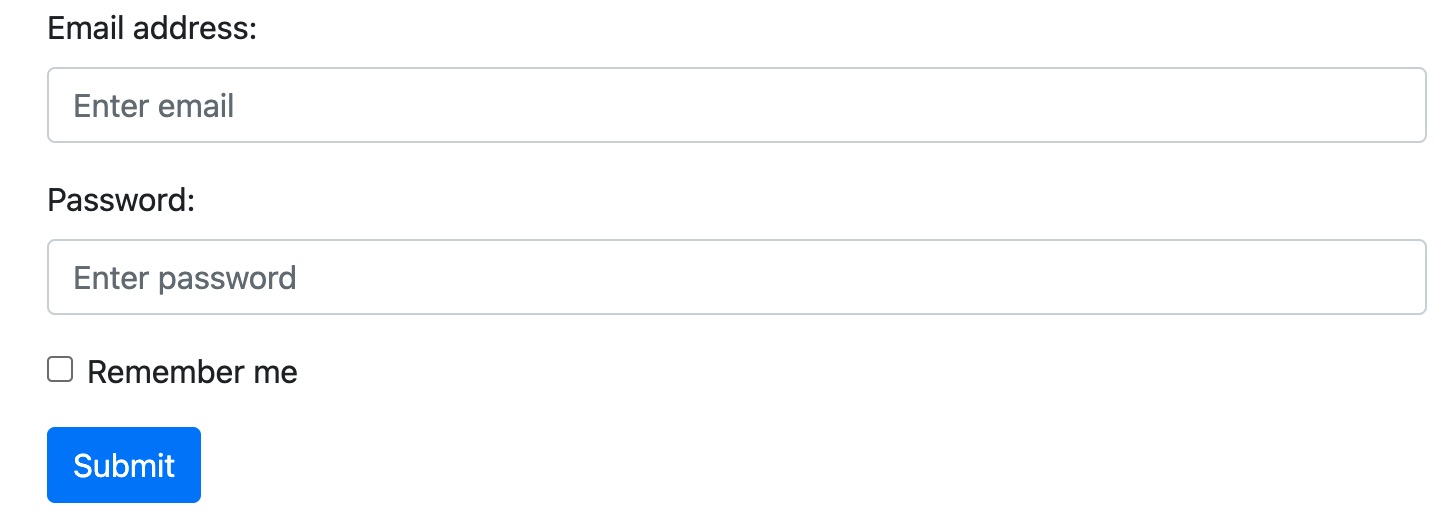
以下实例使用两个输入框,一个复选框,一个提交按钮来创建堆叠表单:

实例

<form action=""> <div class="form-group"> <label for="email">Email address:</label> <input type="email" class="form-control" placeholder="Enter email" id="email"> </div> <div class="form-group"> <label for="pwd">Password:</label> <input type="password" class="form-control" placeholder="Enter password" id="pwd"> </div> <div class="form-group form-check"> <label class="form-check-label"> <input class="form-check-input" type="checkbox"> Remember me </label> </div> <button type="submit" class="btn btn-primary">Submit</button> </form>

尝试一下 »

显示效果:


内联表单

所有内联表单中的元素都是左对齐的。

注意:在屏幕宽度小于 576px 时为垂直堆叠,如果屏幕宽度大于等于576px时表单元素才会显示在同一个水平线上。

内联表单需要在 <form> 元素上添加 .form-inline类。

以下实例使用两个输入框,一个复选框,一个提交按钮来创建内联表单:

实例

<form class="form-inline"> <label for="email">Email address:</label> <input type="email" class="form-control" id="email"> <label for="pwd">Password:</label> <input type="password" class="form-control" id="pwd"> <div class="form-check"> <label class="form-check-label"> <input class="form-check-input" type="checkbox"> Remember me </label> </div> <button type="submit" class="btn btn-primary">Submit</button> </form>

尝试一下 »

显示效果:

上面的实例元素排列看起来很紧凑,可以使用 .mr-sm-2 类来设置右边距,使用.mb-2 类设置底部边距:

实例

<form class="form-inline" action=""> <label for="email" class="mr-sm-2">Email address:</label> <input type="email" class="form-control mb-2 mr-sm-2" placeholder="Enter email" id="email"> <label for="pwd" class="mr-sm-2">Password:</label> <input type="password" class="form-control mb-2 mr-sm-2" placeholder="Enter password" id="pwd"> <div class="form-check mb-2 mr-sm-2"> <label class="form-check-label"> <input class="form-check-input" type="checkbox"> Remember me </label> </div> <button type="submit" class="btn btn-primary mb-2">Submit</button> </form>

尝试一下 »

显示效果:

表单行/网格

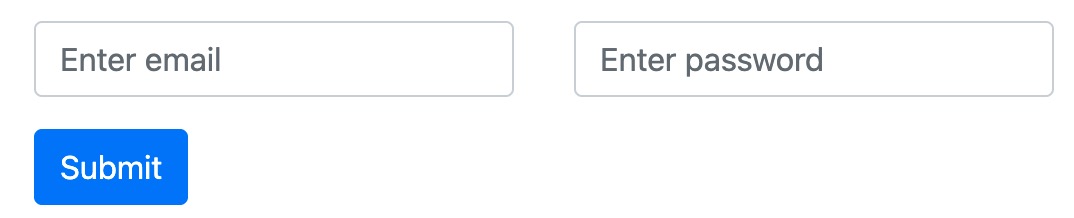
我们还可以使用 .col 类来控制表单元素的宽度和对齐方式,不需要使用间距类。 .col 类来控制的表单需要放在 .row 容器中。

以下实例将两个列并排显示:

实例

<form> <div class="row"> <div class="col"> <input type="text" class="form-control" id="email" placeholder="Enter email" name="email"> </div> <div class="col"> <input type="password" class="form-control" placeholder="Enter password" name="pswd"> </div> </div> </form>

尝试一下 »

显示效果:

如果网格要使用比较小的间距可以使用 .form-row 替代 .row:

实例

<form> <div class="form-row"> <div class="col"> <input type="text" class="form-control" id="email" placeholder="Enter email" name="email"> </div> <div class="col"> <input type="password" class="form-control" placeholder="Enter password" name="pswd"> </div> </div> </form>

尝试一下 »

表单验证

我们可以使用不同的验证类来设置表单的验证功能。

.was-validated.needs-validation 添加到 <form> 元素中,input 输入字段将具有绿色(有效)或红色(无效)边框效果,用于说明表单是否需要输入内容。

.valid-feedback.invalid-feedback 类用来告诉用户缺少什么信息,或者在提交表单之前需要完成什么。

实例

使用 .was-validated 类显示表单在提交之前需要填写的内容:

<form action="" class="was-validated"> <div class="form-group"> <label for="uname">Username:</label> <input type="text" class="form-control" id="uname" placeholder="Enter username" name="uname" required> <div class="valid-feedback">验证成功!</div> <div class="invalid-feedback">请输入用户名!</div> </div> <div class="form-group"> <label for="pwd">Password:</label> <input type="password" class="form-control" id="pwd" placeholder="Enter password" name="pswd" required> <div class="valid-feedback">验证成功!</div> <div class="invalid-feedback">请输入密码!</div> </div> <div class="form-group form-check"> <label class="form-check-label"> <input class="form-check-input" type="checkbox" name="remember" required> 同意协议 <div class="valid-feedback">验证成功!</div> <div class="invalid-feedback">同意协议才能提交。</div> </label> </div> <button type="submit" class="btn btn-primary">提交</button> </form>

尝试一下 »

实例

使用 .needs-validation,它将在表单提交之后验证缺少的内容。这里需要添加一些 JavaScript 代码才能使代码正常工作:

<form action="" class="needs-validation" novalidate> <div class="form-group"> <label for="uname">Username:</label> <input type="text" class="form-control" id="uname" placeholder="Enter username" name="uname" required> <div class="valid-feedback">验证成功!</div> <div class="invalid-feedback">请输入用户名!</div> </div> <div class="form-group"> <label for="pwd">Password:</label> <input type="password" class="form-control" id="pwd" placeholder="Enter password" name="pswd" required> <div class="valid-feedback">验证成功!</div> <div class="invalid-feedback">请输入密码!</div> </div> <div class="form-group form-check"> <label class="form-check-label"> <input class="form-check-input" type="checkbox" name="remember" required> 同意协议 <div class="valid-feedback">验证成功!</div> <div class="invalid-feedback">同意协议才能提交。</div> </label> </div> <button type="submit" class="btn btn-primary">提交</button> </form> <script> // 如果验证不通过禁止提交表单 (function() { 'use strict'; window.addEventListener('load', function() { // 获取表单验证样式 var forms = document.getElementsByClassName('needs-validation'); // 循环并禁止提交 var validation = Array.prototype.filter.call(forms, function(form) { form.addEventListener('submit', function(event) { if (form.checkValidity() === false) { event.preventDefault(); event.stopPropagation(); } form.classList.add('was-validated'); }, false); }); }, false); })(); </script>

尝试一下 »

有关Bootstrap4 表单的更多相关文章

  1. ruby-on-rails - Rails 编辑表单不显示嵌套项 - 2

    我得到了一个包含嵌套链接的表单。编辑时链接字段为空的问题。这是我的表格:Editingkategori{:action=>'update',:id=>@konkurrancer.id})do|f|%>'Trackingurl',:style=>'width:500;'%>'Editkonkurrence'%>|我的konkurrencer模型:has_one:link我的链接模型:classLink我的konkurrancer编辑操作:defedit@konkurrancer=Konkurrancer.find(params[:id])@konkurrancer.link_attrib

  2. ruby - 将 Bootstrap Less 添加到 Sinatra - 2

    我有一个ModularSinatra应用程序,我正在尝试将Bootstrap添加到应用程序中。get'/bootstrap/application.css'doless:"bootstrap/bootstrap"end我在views/bootstrap中有所有less文件,包括bootstrap.less。我收到这个错误:Less::ParseErrorat/bootstrap/application.css'reset.less'wasn'tfound.Bootstrap.less的第一行是://CSSReset@import"reset.less";我尝试了所有不同的路径格式,但它

  3. ruby - 如何在 Rails 4 中使用表单对象之前的验证回调? - 2

    我有一个服务模型/表及其注册表。在表单中,我几乎拥有服务的所有字段,但我想在验证服务对象之前自动设置其中一些值。示例:--服务Controller#创建Action:defcreate@service=Service.new@service_form=ServiceFormObject.new(@service)@service_form.validate(params[:service_form_object])and@service_form.saverespond_with(@service_form,location:admin_services_path)end在验证@ser

  4. ruby-on-rails - 从 ActiveAdmin has_many 表单助手中删除 "Add new"按钮 - 2

    我在事件管理员编辑页面中有嵌套资源,但我只想允许管理员编辑现有资源的内容,而不是添加新的嵌套资源。我的代码看起来像这样:formdo|f|f.inputsdof.input:authorf.input:contentf.has_many:commentsdo|comment_form|comment_form.input:contentcomment_form.input:_destroy,as::boolean,required:false,label:'Remove'endendf.actionsend但它在输入下添加了“添加新评论”按钮。我怎样才能禁用它,并只为主窗体保留f.ac

  5. css - Rails 4.1 和 Bootstrap 3 字形图标不工作 - 2

    我正在尝试消除使用Bootstrap3的Rails4元素中的glyphicon错误。我没有使用任何Bootstrapgem将其添加到Assets管道中。我手动将bootstrap.css和bootstrap.js添加到各自的app/assets目录下,分别添加到application.css和application.js什么的我现在在网络浏览器的控制台中看到以下内容:GEThttp://localhost:3000/fonts/glyphicons-halflings-regular.woff404(NotFound)localhost/:1GEThttp://localhost:30

  6. ruby-on-rails - 用于 Rails 的 HAML 表单 - 2

    我目前正在尝试将ERB布局转换为HAML。这是我不断收到的错误:index.html.haml:18:syntaxerror,unexpected')'));}\n#{_hamlout.format_...这是HAML页面:.row-fluid.span6%h2TodoList.span6%h2{:style=>"text-align:right;"}document.write(today)%hr.divider.row-fluid.span6%h2.small_headNewTask=render:partial=>'layouts/form_errors',:locals=>{:

  7. ruby-on-rails - 如何在 Rails 中为现有模型生成表单? - 2

    为现有模型生成单个文件(_form.html.erb)的命令是什么?在Rails3中工作。谢谢。 最佳答案 这听起来可能很傻,但请听我说完……当我想开始清洁时,我自己也做过几次这样的事情。以下是一个脚本,它将读取您的模式并生成必要的生成命令来重现它:require'rubygems'require'active_support/core_ext'schema=File.read('db/schema.rb')schema.scan(/create_table"(\w+)",.*?\n(.*?)\nend/m).eachdo|name

  8. ruby-on-rails - Ruby on Rails : if current page? 是主页,不显示表单 - 2

    我不想显示表单,但前提是当前页面不是主页这是我目前所拥有的...我有我的路线设置:root'projects#index'我的看法:'projects',:action=>'index'))%>showsomestuff如果url是localhost:3000/projects,则不会显示但是它显示了它的localhost:3000所以我需要以某种方式确保它不会显示主页。另外,我有主页的搜索参数,但我仍然不想显示它是否像localhost:3000/projects?search=blahblahblah 最佳答案 使用root_p

  9. ruby-on-rails - 在多个页面上使用相同表单的 Rails 最佳实践 - 2

    我正在开发一个Rails2.3.1网站。在整个网站中,我需要一个用于在各种页面(主页、创建帖子页面、帖子列表页面、评论列表页面等)上创建帖子的表单——只要说这个表单需要在由各种Controller)。这些页面中的每一个都显示在相应的Controller/操作中检索到的各种其他信息。例如,主页列出了最新的10篇文章、从数据库中提取的内容等。因此,我已将帖子创建表单移动到它自己的部分中,并将该部分包含在所有必要的页面中。请注意,部分POST中的表单到/questions(路由到PostsController::create——这是默认的Rails行为)。我遇到的问题是当Posts表单没有正

  10. ruby-on-rails - Postgres 范围字段 + Rails 表单 - 2

    是否有集成Postgresrangetypes的标准方法?使用Rails表单助手?我基本上需要一个最小和最大字段,它们在保存时转换为一个范围。有什么想法吗? 最佳答案 起初我在想这样的事情:classModeldelegate:begin,:end,to::range,prefix:true,allow_nil:true#Replace:rangewithyourfieldnameend获取方法:range_begin,range_end。我检查了文档,这些方法是只读的。所以你还需要二传手:classModeldelegate:be

随机推荐