目录
(6)rem关键字用于注释,bat脚本运行的时候就不会执行该行语句了
ii)将bat文件使用txt编辑,然后另存为时选择 ANSI 编码格式
(11)start标识符可用于调用其他程序,如可执行文件exe
(12)读取dos输入,这里需要用到set标识符,还有参数/p
(13)bat的函数声明,需要用到 特殊字符 :(英文的冒号)
(14)goto标识符可用于函数跳转,其中特别的是 goto :eof 可用于停止往下继续执行命令行
(15)call标识符也可以用于调用函数,也可以调用别的bat脚本
(17)%errorlevel% 是脚本内置变量,等于0时代表前面命令执行没有报错
i)for 进阶 delims(分隔符),读取的字符串会以这些分隔符进行拆分成多个子字符串
ii)for 进阶 token(标识列),读取的字符串列会以标识列索引赋值给变量
bat批处理脚本是一门比较冷门的脚本语言,适用于windows。在实际的项目开发中,在windows系统中的开发语言不少是需要搭建很复杂的环境或编写好的程序需要编译成相应可执行文件才能使用,因此偶尔会希望有个语言不需要编译且容易获得——bat批处理脚本就是这样一门windows脚本语言。
废话不多说,直接进主题:
打印程序猿口号:“hello world”
rem test.bat
echo hello world
pause
打印结果如下:

echo "hello" "world"
pause
拼接结果如下:

那首先我们得知道bat中变量是怎么声明和赋值的。这里需要用set标识符
PS:bat对标识符后的等于"="号之间的空格格式要求严格,标识符后不要有空格!
set param1=hello
set param2=world
echo %param1%%param2%ok
pause使用变量的时候,需要给变量前后百分号%。拼接字符串结果如下
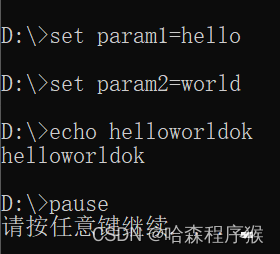
@echo off
set param1=hello
set param2=world
echo %param1%%param2%ok
pause
@echo off 是关闭回显的意思,相对的 @echo on 可以打开回显
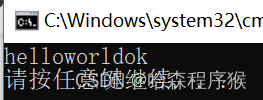
@echo off
title this is a test
set param1=hello
set param2=world
echo %param1%%param2%
pause
设置标题后的结果如下:

@echo off
title this is a test
set param1=hello
set param2=world
rem echo 这里不执行,下面这句是echo拼接语句
echo %param1%%param2%
pause
注释语句不执行结果如下:

@echo off
title this is a test
echo %cd%
echo %~dp0
pause
当前路径打印结果如下:

@echo off
title this is a test
echo %cd%
cd test
echo %cd%
pause
进入文件夹结果如下:

PS: cd .. 则是返回上一层文件夹
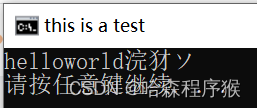
@echo off
chcp 65001
title this is a test
set param1=hello
set param2=world
echo %param1%%param2%你好
pause 

@echo off
title this is a test
start werl
pause
调用exe结果如下:
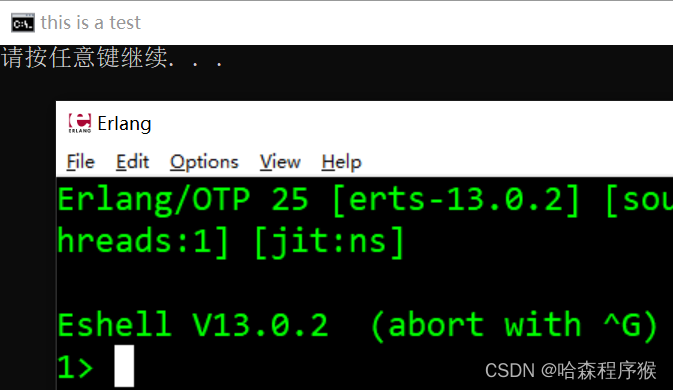
格式是 set /p 变量=提示语等
@echo off
title this is a test
set /p inp=请输入:
echo %inp%
pause
读取输入结果如下:

@echo off
title this is a test

:fun_main
	echo 这是个测试函数

:fun_test
	echo 测试函数+1

pause
bat是串行执行命令行,所以如果没有命令控制,bat会将所有的命令行和函数从上到下全部执行
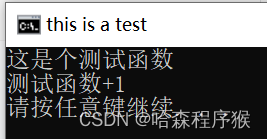
@echo off
title this is a test

:fun_main
	echo 这是个测试函数
	pause
	goto :eof

:fun_test
	echo 测试函数+1
	pause
	goto :eof

pause
:fun_test 函数不再继续被执行,结果如下:

@echo off
title this is a test

:fun_main
	echo 这是个测试函数
	call :fun_test
	pause
	goto :eof

:fun_test
	echo 测试函数+1
	goto :eof

pause
函数调用结果如下:

@echo off
title this is a test

:fun_main
	echo 这是个测试函数
	call :fun_test
	if %errorlevel%==0 (
		call :fun_aa
	)
	pause
	goto :eof

:fun_aa
	echo 前面调用没有报错
	goto :eof

:fun_test
	echo 测试函数+1
	goto :eof

pause
判断语句执行结果如下:
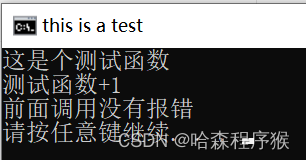
dir /b 指定目录 这个语法可以用于获得指定目录下的所有文件和文件夹
for /f 遍历指定目录下所有的文件和文件夹
for /d 遍历指定目录下所有的文件夹
for /r 遍历指定目录下所有的文件和子文件夹中的文件
%%i 则是声明的变量,可以是任意的变量名,但变量名前面必须加上两个百分号%%
@echo off
title this is a test

:fun_main
	set curdir=%~dp0test1\
	echo 有后缀的是文件,无后缀的是文件夹
	for /f %%i in ('dir /b "%curdir%"') do (
		echo %%i
	)
	pause
	goto :eof
@echo off
title this is a test

:fun_main=
	for /f "delims=,/" %%i in (test.txt) do (
		echo %%i
	)
	pause
	goto :eof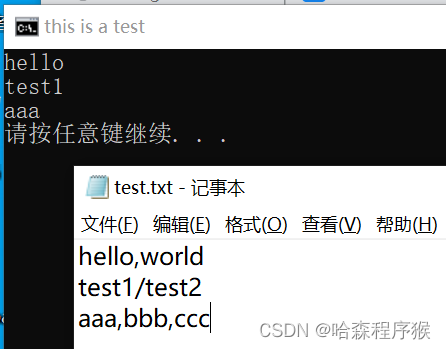
@echo off
title this is a test

:fun_main=
	for /f "delims=,/ tokens=1,2" %%a in (test.txt) do (
		echo 索引1:%%a
		echo 索引2:%%b
	)
	pause
	goto :eof
@echo off
title this is a test

:fun_main
	set curdir=%~dp0test1\
	dir /b %curdir%>>testaa.txt
	pause
	goto :eof
@echo off
title this is a test

:fun_main
	set curdir=%~dp0test1\
	dir /b %curdir%>nul
	pause
	goto :eof
执行结果不会产生其他数据
echo 字符串 | findstr 子字符串 >nul && (
包含时的情况
)
包含的情况如下:
@echo off
title this is a test

:fun_main
	set strname=hello
	set teststr=213123 hello world
	echo %teststr% | findstr %strname% >nul && (
		echo %teststr% 中包含 %strname%
		pause
		goto :eof
	)
	echo %teststr% 中不包含 %strname%
	pause
	goto :eof
不包含的情况如下:
@echo off
title this is a test

:fun_main
	set strname=hel2lo
	set teststr=213123 hello world
	echo %teststr% | findstr %strname% >nul && (
		echo %teststr% 中包含 %strname%
		pause
		goto :eof
	)
	echo %teststr% 中不包含 %strname%
	pause
	goto :eof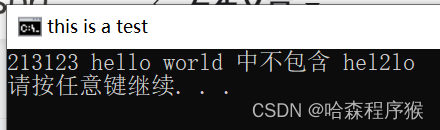
@echo off
title this is a test

:fun_main
	set teststr=213123 hello world
	set teststr=%teststr: =%
	echo %teststr%
	pause
	goto :eof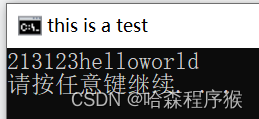
@echo off
title this is a test

:fun_main
	set teststr=*213123 hello world##
	echo %teststr%
	set teststr=%teststr:~1,-1%
	echo %teststr%
	pause
	goto :eof
@echo off
title this is a test

:fun_main
	copy .\test.txt .\aa\ >nul
	pause
goto :eofdel /f 强制删除只读文件
del /s 从所有的目录下删除指定文件
del /q 安静模式
@echo off
title this is a test

:fun_main
	del /f /s /q test.txt >nul
	pause
	goto :eof
我有一个Ruby程序,它使用rubyzip压缩XML文件的目录树。gem。我的问题是文件开始变得很重,我想提高压缩级别,因为压缩时间不是问题。我在rubyzipdocumentation中找不到一种为创建的ZIP文件指定压缩级别的方法。有人知道如何更改此设置吗?是否有另一个允许指定压缩级别的Ruby库? 最佳答案 这是我通过查看rubyzip内部创建的代码。level=Zlib::BEST_COMPRESSIONZip::ZipOutputStream.open(zip_file)do|zip|Dir.glob("**/*")d
我试图在一个项目中使用rake,如果我把所有东西都放到Rakefile中,它会很大并且很难读取/找到东西,所以我试着将每个命名空间放在lib/rake中它自己的文件中,我添加了这个到我的rake文件的顶部:Dir['#{File.dirname(__FILE__)}/lib/rake/*.rake'].map{|f|requiref}它加载文件没问题,但没有任务。我现在只有一个.rake文件作为测试,名为“servers.rake”,它看起来像这样:namespace:serverdotask:testdoputs"test"endend所以当我运行rakeserver:testid时
我的目标是转换表单输入,例如“100兆字节”或“1GB”,并将其转换为我可以存储在数据库中的文件大小(以千字节为单位)。目前,我有这个:defquota_convert@regex=/([0-9]+)(.*)s/@sizes=%w{kilobytemegabytegigabyte}m=self.quota.match(@regex)if@sizes.include?m[2]eval("self.quota=#{m[1]}.#{m[2]}")endend这有效,但前提是输入是倍数(“gigabytes”,而不是“gigabyte”)并且由于使用了eval看起来疯狂不安全。所以,功能正常,
Rails2.3可以选择随时使用RouteSet#add_configuration_file添加更多路由。是否可以在Rails3项目中做同样的事情? 最佳答案 在config/application.rb中:config.paths.config.routes在Rails3.2(也可能是Rails3.1)中,使用:config.paths["config/routes"] 关于ruby-on-rails-Rails3中的多个路由文件,我们在StackOverflow上找到一个类似的问题
给定这段代码defcreate@upgrades=User.update_all(["role=?","upgraded"],:id=>params[:upgrade])redirect_toadmin_upgrades_path,:notice=>"Successfullyupgradeduser."end我如何在该操作中实际验证它们是否已保存或未重定向到适当的页面和消息? 最佳答案 在Rails3中,update_all不返回任何有意义的信息,除了已更新的记录数(这可能取决于您的DBMS是否返回该信息)。http://ar.ru
对于具有离线功能的智能手机应用程序,我正在为Xml文件创建单向文本同步。我希望我的服务器将增量/差异(例如GNU差异补丁)发送到目标设备。这是计划:Time=0Server:hasversion_1ofXmlfile(~800kiB)Client:hasversion_1ofXmlfile(~800kiB)Time=1Server:hasversion_1andversion_2ofXmlfile(each~800kiB)computesdeltaoftheseversions(=patch)(~10kiB)sendspatchtoClient(~10kiBtransferred)Cl
我正在寻找执行以下操作的正确语法(在Perl、Shell或Ruby中):#variabletoaccessthedatalinesappendedasafileEND_OF_SCRIPT_MARKERrawdatastartshereanditcontinues. 最佳答案 Perl用__DATA__做这个:#!/usr/bin/perlusestrict;usewarnings;while(){print;}__DATA__Texttoprintgoeshere 关于ruby-如何将脚
使用带有Rails插件的vim,您可以创建一个迁移文件,然后一次性打开该文件吗?textmate也可以这样吗? 最佳答案 你可以使用rails.vim然后做类似的事情::Rgeneratemigratonadd_foo_to_bar插件将打开迁移生成的文件,这正是您想要的。我不能代表textmate。 关于ruby-使用VimRails,您可以创建一个新的迁移文件并一次性打开它吗?,我们在StackOverflow上找到一个类似的问题: https://sta
好的,所以我的目标是轻松地将一些数据保存到磁盘以备后用。您如何简单地写入然后读取一个对象?所以如果我有一个简单的类classCattr_accessor:a,:bdefinitialize(a,b)@a,@b=a,bendend所以如果我从中非常快地制作一个objobj=C.new("foo","bar")#justgaveitsomerandomvalues然后我可以把它变成一个kindaidstring=obj.to_s#whichreturns""我终于可以将此字符串打印到文件或其他内容中。我的问题是,我该如何再次将这个id变回一个对象?我知道我可以自己挑选信息并制作一个接受该信
我正在编写一个小脚本来定位aws存储桶中的特定文件,并创建一个临时验证的url以发送给同事。(理想情况下,这将创建类似于在控制台上右键单击存储桶中的文件并复制链接地址的结果)。我研究过回形针,它似乎不符合这个标准,但我可能只是不知道它的全部功能。我尝试了以下方法:defauthenticated_url(file_name,bucket)AWS::S3::S3Object.url_for(file_name,bucket,:secure=>true,:expires=>20*60)end产生这种类型的结果:...-1.amazonaws.com/file_path/file.zip.A
