SpringBoot版本2.7.x支持的最高ES版本为7.17.4
版本选择:ES、kibana、IK均为7.17.4
注意:kibana运行需要nodejs支持且存在版本兼容问题-->nodejs版本选择16.14.2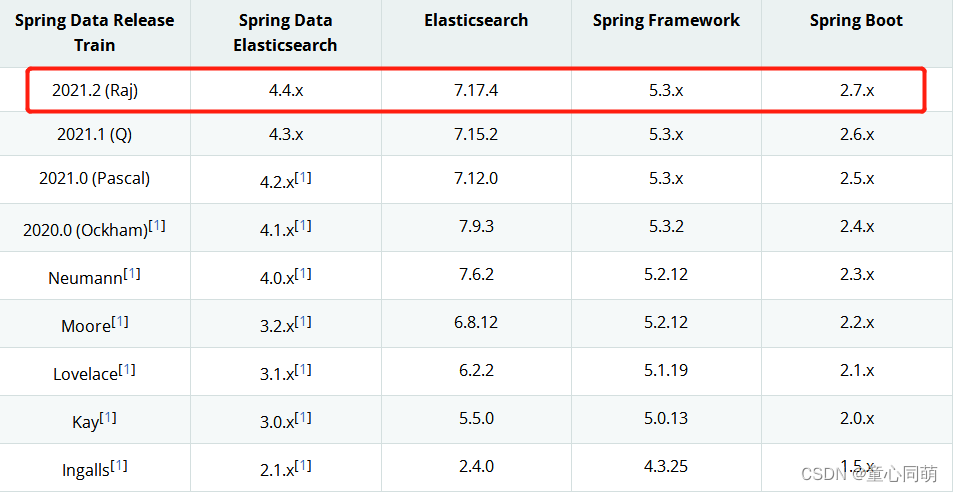
注意:ES配置elasticsearch.yml
cluster.name: my-application
node.name: node-1
network.host: 0.0.0.0
http.port: 9200
cluster.initial_master_nodes: ["node-1"]
http.cors.enabled: true
http.cors.allow-origin: "*"1.启动命令
elasticsearch -d
nohup kibana >/dev/null 2>&1 &
nohup npm start >/dev/null 2>&1 &
2.查看命令
ps -ef | grep -i elasticsearch
ps -ef | grep -i kibana
ps -ef | grep -i grunt
3.访问命令
192.168.1.102:9200
192.168.1.102:5601
192.168.1.102:9100<?xml version="1.0" encoding="UTF-8"?>
<project xmlns="http://maven.apache.org/POM/4.0.0" xmlns:xsi="http://www.w3.org/2001/XMLSchema-instance"
xsi:schemaLocation="http://maven.apache.org/POM/4.0.0 https://maven.apache.org/xsd/maven-4.0.0.xsd">
<modelVersion>4.0.0</modelVersion>
<parent>
<groupId>org.springframework.boot</groupId>
<artifactId>spring-boot-starter-parent</artifactId>
<version>2.7.3</version>
<relativePath/> <!-- lookup parent from repository -->
</parent>
<groupId>com.es</groupId>
<artifactId>es</artifactId>
<version>0.0.1-SNAPSHOT</version>
<name>es</name>
<description>es</description>
<properties>
<java.version>1.8</java.version>
<elasticsearch.version>7.17.4</elasticsearch.version>
</properties>
<dependencies>
<dependency>
<groupId>org.springframework.boot</groupId>
<artifactId>spring-boot-starter-data-elasticsearch</artifactId>
</dependency>
<dependency>
<groupId>org.springframework.boot</groupId>
<artifactId>spring-boot-starter-web</artifactId>
</dependency>
<dependency>
<groupId>org.springframework.boot</groupId>
<artifactId>spring-boot-devtools</artifactId>
<scope>runtime</scope>
<optional>true</optional>
</dependency>
<dependency>
<groupId>org.springframework.boot</groupId>
<artifactId>spring-boot-configuration-processor</artifactId>
<optional>true</optional>
</dependency>
<dependency>
<groupId>org.projectlombok</groupId>
<artifactId>lombok</artifactId>
<optional>true</optional>
</dependency>
<dependency>
<groupId>org.springframework.boot</groupId>
<artifactId>spring-boot-starter-test</artifactId>
<scope>test</scope>
</dependency>
<dependency>
<groupId>com.alibaba.fastjson2</groupId>
<artifactId>fastjson2</artifactId>
<version>2.0.12</version>
</dependency>
<dependency>
<!-- jsoup HTML parser library @ https://jsoup.org/ -->
<groupId>org.jsoup</groupId>
<artifactId>jsoup</artifactId>
<version>1.15.3</version>
</dependency>
<!-- thymeleaf -->
<dependency>
<groupId>org.springframework.boot</groupId>
<artifactId>spring-boot-starter-thymeleaf</artifactId>
</dependency>
</dependencies>
<build>
<plugins>
<plugin>
<groupId>org.springframework.boot</groupId>
<artifactId>spring-boot-maven-plugin</artifactId>
<configuration>
<excludes>
<exclude>
<groupId>org.projectlombok</groupId>
<artifactId>lombok</artifactId>
</exclude>
</excludes>
</configuration>
</plugin>
</plugins>
</build>
</project>package com.es.config;
import org.apache.http.HttpHost;
import org.elasticsearch.client.RestClient;
import org.elasticsearch.client.RestHighLevelClient;
import org.springframework.context.annotation.Bean;
import org.springframework.context.annotation.Configuration;
@Configuration
public class EsConfig {
@Bean
public RestHighLevelClient restHighLevelClient() {
RestHighLevelClient client = new RestHighLevelClient(
RestClient.builder(
new HttpHost("192.168.1.102", 9200, "http")
)
);
return client;
}
}
package com.es.entity;

import lombok.AllArgsConstructor;
import lombok.Data;
import lombok.NoArgsConstructor;
import org.springframework.stereotype.Component;

@Data
@AllArgsConstructor
@NoArgsConstructor
public class Student {

	private String id;

	private String name;

	private int age;

	private String phone;

}
package com.es.entity;
import lombok.AllArgsConstructor;
import lombok.Data;
import lombok.NoArgsConstructor;
@Data
@NoArgsConstructor
@AllArgsConstructor
public class Good {
private String name;
private String price;
private String img;
}package com.es;
import com.alibaba.fastjson2.JSON;
import com.es.entity.Good;
import com.es.entity.Student;
import org.elasticsearch.action.admin.indices.delete.DeleteIndexRequest;
import org.elasticsearch.action.bulk.BulkRequest;
import org.elasticsearch.action.bulk.BulkResponse;
import org.elasticsearch.action.delete.DeleteRequest;
import org.elasticsearch.action.delete.DeleteResponse;
import org.elasticsearch.action.get.GetRequest;
import org.elasticsearch.action.get.GetResponse;
import org.elasticsearch.action.index.IndexRequest;
import org.elasticsearch.action.index.IndexResponse;
import org.elasticsearch.action.search.SearchRequest;
import org.elasticsearch.action.search.SearchResponse;
import org.elasticsearch.action.support.master.AcknowledgedResponse;
import org.elasticsearch.action.update.UpdateRequest;
import org.elasticsearch.action.update.UpdateResponse;
import org.elasticsearch.client.RequestOptions;
import org.elasticsearch.client.RestHighLevelClient;
import org.elasticsearch.client.indices.CreateIndexRequest;
import org.elasticsearch.client.indices.CreateIndexResponse;
import org.elasticsearch.client.indices.GetIndexRequest;
import org.elasticsearch.common.text.Text;
import org.elasticsearch.core.TimeValue;
import org.elasticsearch.index.query.MatchAllQueryBuilder;
import org.elasticsearch.index.query.QueryBuilders;
import org.elasticsearch.index.query.TermQueryBuilder;
import org.elasticsearch.search.SearchHit;
import org.elasticsearch.search.builder.SearchSourceBuilder;
import org.elasticsearch.search.fetch.subphase.FetchSourceContext;
import org.elasticsearch.search.fetch.subphase.highlight.HighlightBuilder;
import org.elasticsearch.search.fetch.subphase.highlight.HighlightField;
import org.elasticsearch.xcontent.XContentType;
import org.jsoup.Jsoup;
import org.jsoup.nodes.Document;
import org.jsoup.nodes.Element;
import org.jsoup.select.Elements;
import org.junit.jupiter.api.Test;
import org.springframework.beans.factory.annotation.Autowired;
import org.springframework.boot.test.context.SpringBootTest;
import java.net.URL;
import java.util.ArrayList;
import java.util.Map;
import java.util.concurrent.TimeUnit;
@SpringBootTest
class EsApplicationTests {
@Autowired
RestHighLevelClient client;
/**
* 创建索引
*/
@Test
void createIndex() throws Exception {
CreateIndexRequest request = new CreateIndexRequest("myindex");
CreateIndexResponse response = client.indices().create(request, RequestOptions.DEFAULT);
System.out.println(response);
}
/**
* 判断索引存在
*/
@Test
void existsIndex() throws Exception {
GetIndexRequest request = new GetIndexRequest("myindex");
boolean exists = client.indices().exists(request, RequestOptions.DEFAULT);
System.out.println(exists);
}
/**
* 删除索引
*/
@Test
void deleteIndex() throws Exception {
DeleteIndexRequest request = new DeleteIndexRequest("myindex");
AcknowledgedResponse response = client.indices().delete(request, RequestOptions.DEFAULT);
boolean acknowledged = response.isAcknowledged();
System.out.println(acknowledged);
}
/**
* 创建文档
*/
@Test
void createDoc() throws Exception {
Student student = new Student("111", "张三", 33, "111222333"); // 文档数据
IndexRequest request = new IndexRequest("myindex");
request.id(student.getId());
request.source(JSON.toJSONString(student), XContentType.JSON); // 文档数据添加到索引
IndexResponse response = client.index(request, RequestOptions.DEFAULT); // 执行
System.out.println(response.toString());
System.out.println(response.status());
}
/**
* 判断文档存在
*/
@Test
void existsDoc() throws Exception {
GetRequest request = new GetRequest("myindex", "111");
request.fetchSourceContext(new FetchSourceContext(false));
boolean exists = client.exists(request, RequestOptions.DEFAULT);
System.out.println(exists);
}
/**
* 获取文档
*/
@Test
void getDoc() throws Exception {
GetRequest request = new GetRequest("myindex", "111");
request.fetchSourceContext(new FetchSourceContext(false));
GetResponse response = client.get(request, RequestOptions.DEFAULT);
String source = response.getSourceAsString();
System.out.println(source);
System.out.println(response);
}
/**
* 删除文档
*/
@Test
void deleteDoc() throws Exception {
DeleteRequest request = new DeleteRequest("myindex", "111");
request.timeout("2s");
DeleteResponse response = client.delete(request, RequestOptions.DEFAULT);
System.out.println(response);
}
/**
* 更新文档
*/
@Test
void updateDoc() throws Exception {
UpdateRequest request = new UpdateRequest("myindex", "111");
request.timeout("2s");
Student student = new Student("111", "张四", 44, "444555666");
request.doc(JSON.toJSONString(student), XContentType.JSON);
UpdateResponse response = client.update(request, RequestOptions.DEFAULT);
System.out.println(response);
}
/**
* 批量操作文档
*/
@Test
void bulkOperateDoc() throws Exception {
ArrayList<Student> studentList = new ArrayList<>();
studentList.add(new Student("1", "一桶", 11, "aaa"));
studentList.add(new Student("2", "二条", 22, "sss"));
studentList.add(new Student("3", "三万", 33, "ddd"));
studentList.add(new Student("9", "发财", 44, "fff"));
studentList.add(new Student("4", "白板", 55, "ggg"));
studentList.add(new Student("5", "东风", 66, "hhh"));
studentList.add(new Student("6", "南风", 77, "jjj"));
studentList.add(new Student("7", "西风", 88, "kkk"));
studentList.add(new Student("8", "北风", 99, "lll"));
BulkRequest request = new BulkRequest();
request.timeout("30s");
// 批量创建文档
for (Student student : studentList) {
request.add(new IndexRequest("myindex").id(student.getId()).source(JSON.toJSONString(student), XContentType.JSON));
}
// 批量更新文档
// for (Student student : studentList) {
// student.setAge(student.getAge()+100); // 年龄+100
// request.add(new UpdateRequest("myindex", student.getId()).doc(JSON.toJSONString(student), XContentType.JSON));
// }
// 批量删除文档
// for (Student student : studentList) {
// request.add(new DeleteRequest("myindex", student.getId()));
// }
BulkResponse response = client.bulk(request, RequestOptions.DEFAULT);
System.out.println(response);
}
/**
* 文档查询
*/
@Test
void searchDoc() throws Exception {
SearchRequest request = new SearchRequest("myindex");
SearchSourceBuilder builder = new SearchSourceBuilder();
// 超时时间
builder.timeout(new TimeValue(60, TimeUnit.SECONDS));
// 设置分页
builder.from(0);
builder.size(5);
// 精确匹配
// builder.query(QueryBuilders.matchPhraseQuery("name", "东风")); // 查到
builder.query(QueryBuilders.matchPhraseQuery("name", "风")); // 查到
// builder.query(QueryBuilders.matchPhraseQuery("age", "111")); // 查到
// builder.query(QueryBuilders.matchPhraseQuery("age", "1")); // 查不到
// builder.query(QueryBuilders.rangeQuery("age").gt(130).lt(180)); // 查到
// 高亮显示
HighlightBuilder hBuild = new HighlightBuilder();
hBuild.field("name");
hBuild.requireFieldMatch(false); // 单条结果只高亮一个
hBuild.preTags("<span style='color:red'>");
hBuild.postTags("</span>");
builder.highlighter(hBuild);
request.source(builder);
SearchResponse response = client.search(request, RequestOptions.DEFAULT);
// 结果数据
for (SearchHit hit : response.getHits()) {
Map<String, Object> map = hit.getSourceAsMap();
System.out.println(map);
}
// 高亮数据
for (SearchHit hit : response.getHits()) {
Map<String, HighlightField> map = hit.getHighlightFields();
System.out.println(map);
}
// 高亮数据解析到结果数据中
for (SearchHit hit : response.getHits()) {
Map<String, Object> map = hit.getSourceAsMap(); // {phone=hhh, name=东风, id=5, age=166}
Map<String, HighlightField> highlightFields = hit.getHighlightFields(); // {name=[name], fragments[[东<span style='color:red'>风</span>]]}
HighlightField field = highlightFields.get("name");
if (field!=null) {
Text[] fragments = field.fragments();
StringBuilder sb = new StringBuilder();
for (Text fragment : fragments) {
sb.append(fragment);
}
map.put("name", sb.toString()); // {phone=hhh, name=东<span style='color:red'>风</span>, id=5, age=166}
}
System.out.println(map);
}
}
/**
* jsoup获取网页数据并存入ES
*/
@Test
void jsoupCreateDoc() throws Exception {
ArrayList<Good> goodList = new ArrayList<>();
// jsoup获取数据并存入集合
Document document = Jsoup.connect("https://search.jd.com/Search?keyword=oracle").get();
Elements elements = document.getElementById("J_goodsList").getElementsByTag("li");
for (Element e : elements) {
String name = e.getElementsByClass("p-name").eq(0).text();
String price = e.getElementsByClass("p-price").eq(0).text();
String img = e.getElementsByTag("img").eq(0).attr("data-lazy-img");
goodList.add(new Good(name, price, img));
}
// 集合数据存入ES的good_index索引下
BulkRequest request = new BulkRequest();
request.timeout("1m");
for (Good good : goodList) {
request.add(new IndexRequest("good_index").source(JSON.toJSONString(good), XContentType.JSON));
}
BulkResponse response = client.bulk(request, RequestOptions.DEFAULT);
System.out.println(!response.hasFailures());
}
}


我在app/helpers/sessions_helper.rb中有一个帮助程序文件,其中包含一个方法my_preference,它返回当前登录用户的首选项。我想在集成测试中访问该方法。例如,这样我就可以在测试中使用getuser_path(my_preference)。在其他帖子中,我读到这可以通过在测试文件中包含requiresessions_helper来实现,但我仍然收到错误NameError:undefinedlocalvariableormethod'my_preference'.我做错了什么?require'test_helper'require'sessions_hel
我一直很高兴地使用DelayedJob习惯用法:foo.send_later(:bar)这会调用DelayedJob进程中对象foo的方法bar。我一直在使用DaemonSpawn在我的服务器上启动DelayedJob进程。但是...如果foo抛出异常,Hoptoad不会捕获它。这是任何这些包中的错误...还是我需要更改某些配置...或者我是否需要在DS或DJ中插入一些异常处理来调用Hoptoad通知程序?回应下面的第一条评论。classDelayedJobWorker 最佳答案 尝试monkeypatchingDelayed::W
文章目录一、概述简介原理模块二、配置Mysql使用版本环境要求1.操作系统2.mysql要求三、配置canal-server离线下载在线下载上传解压修改配置单机配置集群配置分库分表配置1.修改全局配置2.实例配置垂直分库水平分库3.修改group-instance.xml4.启动监听四、配置canal-adapter1修改启动配置2配置映射文件3启动ES数据同步查询所有订阅同步数据同步开关启动4.验证五、配置canal-admin一、概述简介canal是Alibaba旗下的一款开源项目,Java开发。基于数据库增量日志解析,提供增量数据订阅&消费。Git地址:https://github.co
前置步骤我们都操作完了,这篇开始介绍jenkins的集成。话不多说,看操作1、登录进入jenkins后会让你选择安装插件,选择第一个默认的就行。安装完成后设置账号密码,重新登录。2、配置JDK和Git都需要执行路径,所以需要先把执行路径找到,先进入服务器的docker容器,2.1JDK的路径root@69eef9ee86cf:/usr/bin#echo$JAVA_HOME/usr/local/openjdk-82.2Git的路径root@69eef9ee86cf:/#whichgit/usr/bin/git3、先配置JDK和Git。点击:ManageJenkins>>GlobalToolCon
ES一、简介1、ElasticStackES技术栈:ElasticSearch:存数据+搜索;QL;Kibana:Web可视化平台,分析。LogStash:日志收集,Log4j:产生日志;log.info(xxx)。。。。使用场景:metrics:指标监控…2、基本概念Index(索引)动词:保存(插入)名词:类似MySQL数据库,给数据Type(类型)已废弃,以前类似MySQL的表现在用索引对数据分类Document(文档)真正要保存的一个JSON数据{name:"tcx"}二、入门实战{"name":"DESKTOP-1TSVGKG","cluster_name":"elasticsear
三分钟集成Tap防沉迷SDK(Unity版)一、SDK介绍基于国家对上线所有游戏必须增加防沉迷功能的政策下,TapTap推出防沉迷SDK,供游戏开发者进行接入;允许未成年用户在周五、六、日以及法定节假日晚上8:00-9:00进行游戏,防沉谜时间段进入游戏会弹窗进行提示!开发环境要求:Unity2019.4或更高版本iOS10或更高版本Android5.0(APIlevel21)或更高版本🔗Unity集成Demo参考链接🔗UnityTapSDK功能体验APK下载链接二、集成前准备1.创建应用进入开发者后台,按照提示开始创建应用;2.开通服务在使用TDS实名认证和防沉迷服务之前,需要在上面创建的应
我被这个难住了。到目前为止教程中的一切都进行得很顺利,但是当我将这段代码添加到我的/spec/requests/users_spec.rb文件中时,事情开始变得糟糕:describe"success"doit"shouldmakeanewuser"dolambdadovisitsignup_pathfill_in"Name",:with=>"ExampleUser"fill_in"Email",:with=>"ryan@example.com"fill_in"Password",:with=>"foobar"fill_in"Confirmation",:with=>"foobar"cl
我需要一些指导来了解如何将Angular整合到rails中。选择Rails的原因:我喜欢他们偏执的做事方式。还有迁移,gem真的很酷。使用angular的原因:我正在研究和寻找最适合SPA的框架。Backbone似乎太抽象了。我不得不在Angular和Ember之间做出选择。我首先开始阅读Angular,它对我来说很有意义。所以我从来没有去读过关于ember的文章。使用Angular和Rails的原因:我研究并尝试使用小型框架,例如grape、slim(是的,我也使用php)。但我觉得需要坚持项目的长期范围。我个人喜欢用Rails的方式做事。这就是我需要帮助的地方,我在Rails4中有
有没有人有在Maven中运行用Ruby编写的单元测试的经验。任何输入,如要使用的库/maven插件,将不胜感激!我们已经在使用Maven+hudson+Junit。但是我们正在引入Ruby单元测试,找不到任何同样好的组合。 最佳答案 我建议让Maven使用ExecMavenPlugin启动rake测试(exec:exec目标)并使用ci_reportergem生成单元测试结果的XML文件,Hudson、Bamboo等可以读取该文件,以与JUnit测试相同的格式显示测试结果。如果您不需要使用mvntest运行Ruby测试,您也可以只使
目前我有一小套针对我的网络服务器运行的集成测试,它发出请求并断言一些关于响应应该是什么的假设。这些是用Ruby编写的,生成http请求。我一直在看Gatling作为压力测试工具,但我想知道它是否也可以用于集成测试。这样,所有端点请求都可以在压力测试和集成测试中重复使用。我可能在这里失去了一些东西,因为没有RSpec的BDD,但不必两次创建相同的测试。有没有人有这样使用gatling的经验? 最佳答案 您可以使用AssertionAPI并设置验收标准。但是,Gatling不是浏览器,不会运行/测试您的Javascript,因此这种方法
