本项目主要基于python实现的多人聊天室,主要的功能如下:
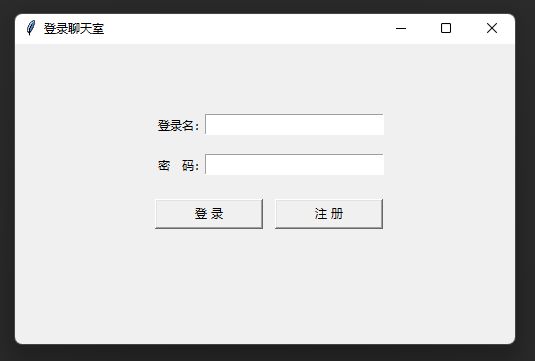
登录:
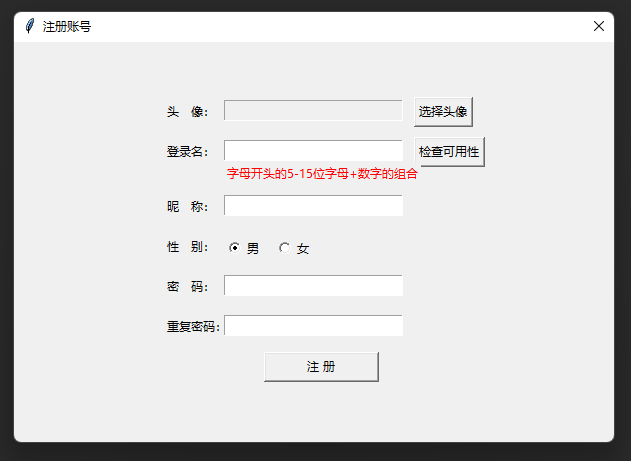
注册:
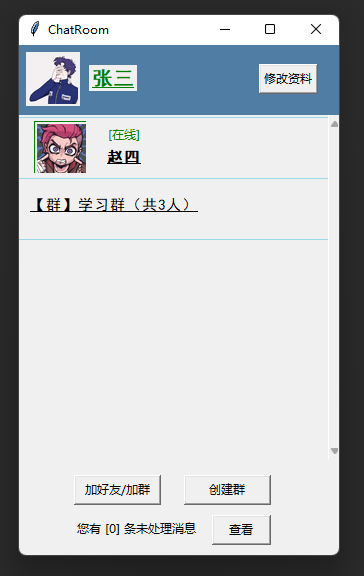
登录后主界面:
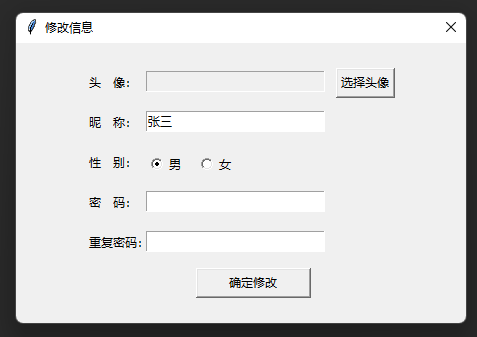
点击右上方“修改资料”:
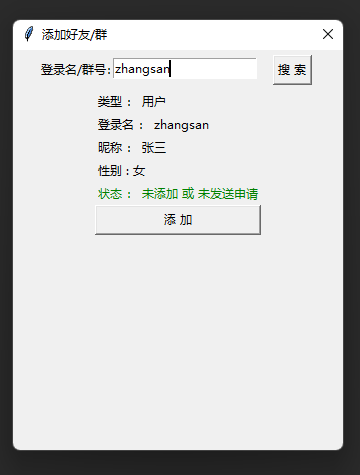
添加好友或群:
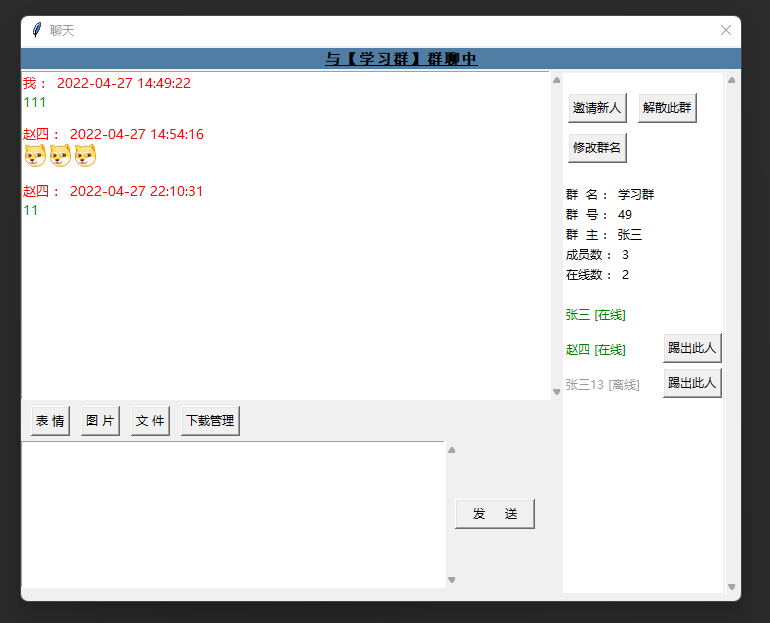
双击好友或群打开聊天窗口:
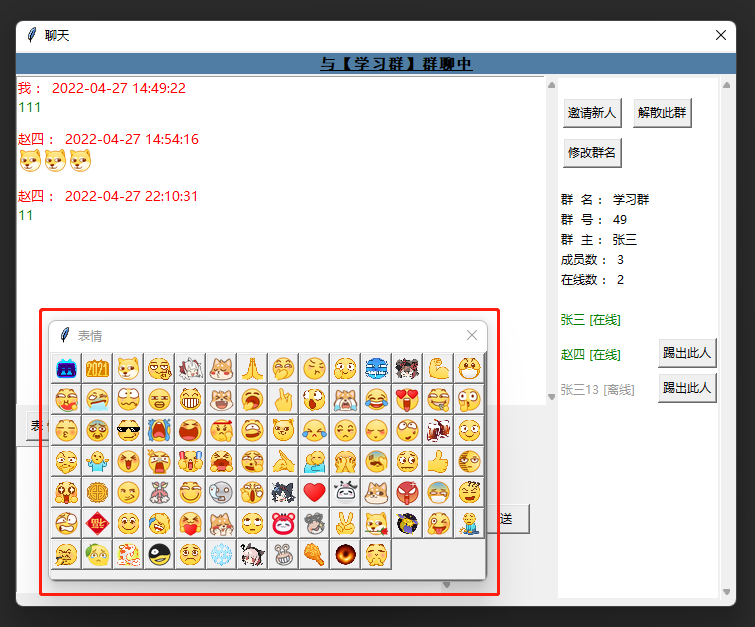
点击表情按钮选择发送的表情:
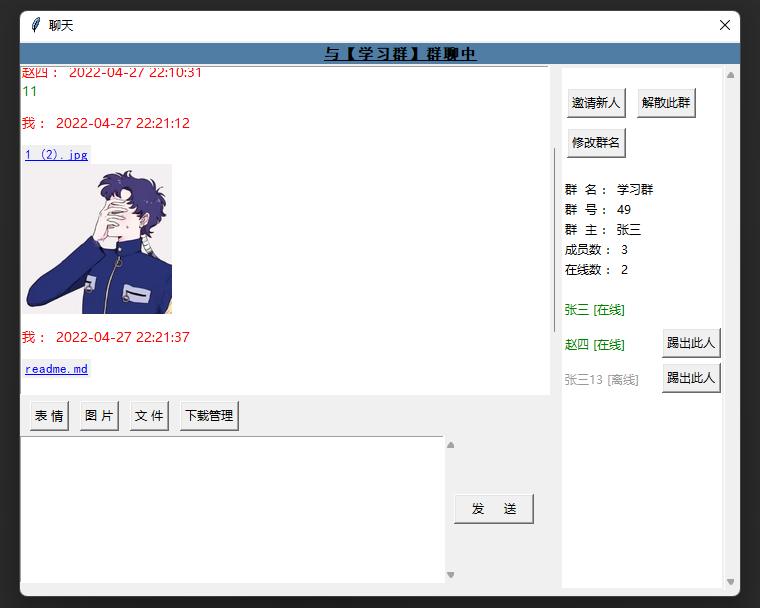
发送图片可以预览,点击文件名称直接打开:
配置文件:server.conf
配置服务器ip、http端口、socket端口、数据库的账号密码、是否启用新消息提示音
[server]
SERVER_IP = 127.0.0.1
HTTP_PORT = 8000
SOCKET_PORT = 8001
SQLALCHEMY_DATABASE_URI = mysql://root:root@127.0.0.1:3306/chatdb
ENABLE_MUSIC = 0
服务端主要代码:ChatServer.py
维持Socket通信、开启Flask进行http
# controller定义
@app.route('/login', methods=['POST'])
def login():
    try:
        params = request.values
        login_name = params['loginName']
        pwd = params['pwd']
        md5 = hashlib.md5()
        md5.update(pwd.encode(encoding='utf-8'))
        password = md5.hexdigest()

        users = Users.query.filter(Users.loginName == login_name)\
            .filter(Users.pwd == password).all()
        if len(users) == 0:
            return Result.fail('账号不存在或密码错误')
        else:
            # 服务返回uid,客户端打开好友界面后,凭借此uid与服务器进行socket连接
            uid = users[0].id
            # 已存在uid:已登录,重新登录,原登录退出连接,退出程序
            if uid in online_users.keys():
                # logout
                connection = online_users[int(uid)]
                send_msg = {'type': UtilsAndConfig.SYSTEM_LOGOUT}
                connection.send(json.dumps(send_msg).encode())
            online_users[uid] = None

            return Result.success(uid)
    except Exception as e:
        return Result.fail('参数异常')

# 监听socket
def socket_listen_thread():
    while True:
        connection, address = mySocket.accept()
        # 用户连接携带的uid,判断是否和服务器相同
        data_dic = json.loads(connection.recv(1024).decode())

        uid = None
        if data_dic['type'] == UtilsAndConfig.CONNECTION_REQUEST:
            uid = int(data_dic['uid'])
        else:
            connection.send(UtilsAndConfig.CONNECTION_NOT_ALLOWED.encode())
        if uid in online_users.keys():
            # 可建立连接
            online_users[uid] = connection
            connection.send(UtilsAndConfig.CONNECTION_ALLOWED.encode())

            # 通知好友们,我上线了
            friends = get_friends_by_uid(uid)
            for f in friends:
                if f.id in online_users.keys():
                    friend_connection = online_users[f.id]
                    send_msg = {'type': UtilsAndConfig.FRIENDS_ONLINE_CHANGED, 'uid': uid, 'online': 1}
                    friend_connection.send(json.dumps(send_msg).encode())

            # 创建子线程,保持通信
            keep_link_thread = threading.Thread(target=socket_keep_link_thread, args=(connection, ))
            keep_link_thread.setDaemon(True)
            keep_link_thread.start()
        else:
            connection.send(UtilsAndConfig.CONNECTION_NOT_ALLOWED.encode())


def socket_keep_link_thread(connection):
    while True:
        try:
            msg = connection.recv(1024).decode()
            if not msg:
                if connection in online_users.values():
                    uid = list(online_users.keys())[list(online_users.values()).index(connection)]
                    online_users.pop(uid)
                    friends = get_friends_by_uid(uid)
                    for f in friends:
                        if f.id in online_users.keys():
                            friend_connection = online_users[f.id]
                            send_msg = {'type': UtilsAndConfig.FRIENDS_ONLINE_CHANGED, 'uid': uid, 'online': 0}
                            friend_connection.send(json.dumps(send_msg).encode())
                    connection.close()
                return
            else:
                msg_json = json.loads(str(msg))
                # 发消息
                if msg_json['type'] == UtilsAndConfig.CHAT_SEND_MSG:
                    to_id = msg_json['toId']
                    is_friend = msg_json['isFriend']
                    from_uid = msg_json['fromId']
                    send_time = msg_json['sendTime']
                    msg_text = msg_json['msgText']

                    data = {'from_uid': from_uid, 'to_id': to_id, 'send_time': send_time, 'msg_text': msg_text,
                            'is_friend': is_friend, 'type': '', 'msg_type': 'train'}
                    # 通知接收方,收到新消息
                    if is_friend == 1:
                        if to_id in online_users.keys():
                            friend_connection = online_users[to_id]
                            data['type'] = UtilsAndConfig.CHAT_HAS_NEW_MSG
                            friend_connection.send(json.dumps(data).encode())

                            # 通知发送方,发送成功
                            data['type'] = UtilsAndConfig.CHAT_SEND_MSG_SUCCESS
                            connection.send(json.dumps(data).encode())
                        else:
                            # 通知发送方,发送失败,对方不在线
                            data['type'] = UtilsAndConfig.CHAT_SEND_MSG_ERR
                            connection.send(json.dumps(data).encode())
                    else:
                        # 群
                        members = get_group_members(to_id)
                        members_online = False
                        for m in members:
                            if m.uId in online_users.keys() and m.uId != from_uid:
                                members_online = True
                                member_connection = online_users[m.uId]
                                data['type'] = UtilsAndConfig.CHAT_HAS_NEW_MSG
                                member_connection.send(json.dumps(data).encode())
                        if members_online:
                            # 通知发送方,发送成功
                            data['type'] = UtilsAndConfig.CHAT_SEND_MSG_SUCCESS
                            connection.send(json.dumps(data).encode())
                        else:
                            # 通知发送方,发送失败,对方不在线
                            data['type'] = UtilsAndConfig.CHAT_SEND_MSG_ERR
                            connection.send(json.dumps(data).encode())
                if msg_json['type'] == UtilsAndConfig.CHAT_SEND_FILE:
                    from_id = msg_json['from_id']
                    to_id = msg_json['to_id']
                    is_friend = msg_json['is_friend']
                    send_date = msg_json['send_date']
                    file_length = msg_json['file_length']
                    file_suffix = msg_json['file_suffix']
                    file_name = msg_json['file_name']

                    file_save_name = str(uuid.uuid1()) + '.' + file_suffix
                    return_file_path = '/static/tmp/' + file_save_name
                    file_path = os.path.abspath(os.path.dirname(__file__)) + return_file_path
                    if not os.path.exists(os.path.dirname(file_path)):
                        os.makedirs(os.path.dirname(file_path))

                    data = {'from_uid': from_id, 'to_id': to_id, 'send_time': send_date, 'file_name': file_name,
                            'is_friend': is_friend, 'type': UtilsAndConfig.CHAT_SEND_FILE_SUCCESS,
                            'file_path': return_file_path}

                    if is_friend == 1:
                        if to_id not in online_users.keys():
                            # 通知发送方,发送失败,对方不在线
                            data['type'] = UtilsAndConfig.CHAT_SEND_MSG_ERR
                            connection.send(json.dumps(data).encode())
                            continue
                    else:
                        members = get_group_members(to_id)
                        flag = True
                        for m in members:
                            if m.uId in online_users.keys() and m.uId != from_id:
                                flag = False
                                break
                        if flag:
                            # 通知发送方,发送失败,对方不在线
                            data['type'] = UtilsAndConfig.CHAT_SEND_MSG_ERR
                            connection.send(json.dumps(data).encode())
                            continue

                    # 接收文件
                    total_data = b''
                    file_data = connection.recv(1024)
                    total_data += file_data
                    num = len(file_data)
                    while num < file_length:
                        file_data = connection.recv(1024)
                        num += len(file_data)
                        total_data += file_data

                    with open(file_path, "wb") as f:
                        f.write(total_data)

                    connection.send(json.dumps(data).encode())

                    # 通知接收方,收到新文件消息
                    if is_friend == 1:
                        friend_connection = online_users[to_id]
                        data['type'] = UtilsAndConfig.CHAT_HAS_NEW_FILE
                        friend_connection.send(json.dumps(data).encode())
                    else:
                        members = get_group_members(to_id)
                        for m in members:
                            if m.uId in online_users.keys() and m.uId != from_id:
                                member_connection = online_users[m.uId]
                                data['type'] = UtilsAndConfig.CHAT_HAS_NEW_FILE
                                member_connection.send(json.dumps(data).encode())

        except ConnectionAbortedError:
            if connection in online_users.values():
                uid = list(online_users.keys())[list(online_users.values()).index(connection)]
                online_users.pop(uid)
                friends = get_friends_by_uid(uid)
                for f in friends:
                    if f.id in online_users.keys():
                        friend_connection = online_users[f.id]
                        send_msg = {'type': UtilsAndConfig.FRIENDS_ONLINE_CHANGED, 'uid': uid, 'online': 0}
                        friend_connection.send(json.dumps(send_msg).encode())
                connection.close()
            return
        except ConnectionResetError:
            if connection in online_users.values():
                uid = list(online_users.keys())[list(online_users.values()).index(connection)]
                online_users.pop(uid)
                friends = get_friends_by_uid(uid)
                for f in friends:
                    if f.id in online_users.keys():
                        friend_connection = online_users[f.id]
                        send_msg = {'type': UtilsAndConfig.FRIENDS_ONLINE_CHANGED, 'uid': uid, 'online': 0}
                        friend_connection.send(json.dumps(send_msg).encode())
                connection.close()
            return


# 主线程
if __name__ == '__main__':
    # 启动socket线程
    socketThread = threading.Thread(target=socket_listen_thread)
    socketThread.setDaemon(True)
    socketThread.start()

    # 启动Flask服务器
    app.run(host=serverConfig.SERVER_IP, port=serverConfig.HTTP_PORT, debug=False)
客户端主界面:ChatHome.py
与服务器保持Socket通信、与服务端进行http交互
class ChatHome:
    def run(self):
        pygame.mixer.init()

        # Socket连接
        self.socket.connect((self.server_config.SERVER_IP, self.server_config.SOCKET_PORT))
        send_data = {'type': UtilsAndConfig.CONNECTION_REQUEST, 'uid': self.uid}
        self.socket.send(json.dumps(send_data).encode())
        socket_result = self.socket.recv(1024).decode()
        if socket_result != UtilsAndConfig.CONNECTION_ALLOWED:
            tkinter.messagebox.showwarning('提示', '参数出错,socket连接被拒绝!')
            sys.exit()

        # 创建子线程保持socket通信
        keep_link_thread = threading.Thread(target=self.socket_keep_link_thread)
        keep_link_thread.setDaemon(True)
        keep_link_thread.start()

        # 基本信息
        self.root = tk.Tk()
        self.root.title('ChatRoom')
        self.root.geometry('320x510+100+0')

        # 用户名
        self.frame_user_info = Frame(self.root, relief=RAISED, width=320, borderwidth=0, height=70, bg='#4F7DA4')
        self.frame_user_info.place(x=0, y=0)
        self.init_user_info()

        # 中间画布canvas
        self.frame_mid = Frame(self.root, width=320, height=340)
        self.frame_mid.place(x=0, y=70)
        # # 画布中的frame
        self.init_friends_and_group_view()
        # 下方按钮
        frame_bottom_button = Frame(self.root, relief=RAISED, borderwidth=0, width=320, height=50)
        frame_bottom_button.place(x=0, y=420)
        button_bottom_add_friends = Button(frame_bottom_button, width=11,
                                           text='加好友/加群', command=self.open_add_friends)
        button_bottom_add_friends.place(x=55, y=10)
        button_bottom_create_groups = Button(frame_bottom_button, width=11,
                                             text='创建群', command=self.open_create_groups)
        button_bottom_create_groups.place(x=165, y=10)

        # 新消息
        frame_message = Frame(self.root, relief=RAISED, borderwidth=0, width=320, height=50)
        frame_message.place(x=0, y=460)
        self.label_message_tip = Label(frame_message)
        self.label_message_tip.place(x=55, y=12)
        self.refresh_message_count()
        button_message_open = Button(frame_message, width=7,
                                     text='查看', command=self.open_message_window)
        button_message_open.place(x=193, y=10)
        self.root.mainloop()

    # 保持socket通信
    def socket_keep_link_thread(self):
        while True:
            try:
                back_msg = self.socket.recv(1024).decode()
                msg = json.loads(back_msg)
                # 好友状态改变
                if msg['type'] == UtilsAndConfig.FRIENDS_ONLINE_CHANGED:
                    self.frames_friend_view[msg['uid']].online_type_change(msg['online'])
                # 有新验证消息
                if msg['type'] == UtilsAndConfig.MESSAGE_NEW_MSG:
                    self.refresh_message_count()
                    self.play_new_msg_music()
                # 好友/群数量改变
                if msg['type'] == UtilsAndConfig.FRIENDS_GROUPS_COUNT_CHANGED:
                    self.init_friends_and_group_view()
                    self.refresh_message_count()
                # 有新文本消息, 写入缓存,更新显示
                if msg['type'] == UtilsAndConfig.CHAT_HAS_NEW_MSG:
                    from_uid = msg['from_uid']
                    to_id = msg['to_id']
                    is_friend = msg['is_friend']
                    txt = {'type': 'get', 'from_uid': from_uid, 'datetime': msg['send_time'],
                           'msg': msg['msg_text'], 'msg_type': 'train'}
                    UtilsAndConfig.add_one_chat_record(self.uid, is_friend, from_uid, to_id,
                                                       json.dumps(txt, cls=UtilsAndConfig.MyJSONEncoder,
                                                                  ensure_ascii=False), False)
                    # 是否打开聊天界面,打开则更新,未打开则好友列表提示新消息
                    if self.window_chat_context is not None and self.window_chat_context.to_id == from_uid\
                            and self.window_chat_context.is_friend == 1 and is_friend == 1:
                        self.window_chat_context.get_new_msg()
                        pass
                    elif self.window_chat_context is not None and self.window_chat_context.to_id == to_id\
                            and self.window_chat_context.is_friend == 0 and is_friend == 0:
                        self.window_chat_context.get_new_msg()
                    else:
                        if is_friend == 1:
                            self.frames_friend_view[from_uid].new_msg_comming()
                        else:
                            self.frames_group_view[to_id].new_msg_comming()
                    self.play_new_msg_music()
                # 发送文本消息成功, 写入本地缓存,更新显示
                if msg['type'] == UtilsAndConfig.CHAT_SEND_MSG_SUCCESS:
                    from_uid = msg['from_uid']
                    to_id = msg['to_id']
                    send_time = msg['send_time']
                    msg_text = msg['msg_text']
                    is_friend = msg['is_friend']
                    txt = {'type': 'send', 'datetime': send_time, 'msg': msg_text, 'msg_type': 'train'}
                    UtilsAndConfig.add_one_chat_record(self.uid, is_friend, from_uid, to_id,
                                                       json.dumps(txt, cls=UtilsAndConfig.MyJSONEncoder,
                                                                  ensure_ascii=False), True)
                    self.window_chat_context.get_new_msg()
                # 发送文件成功
                if msg['type'] == UtilsAndConfig.CHAT_SEND_FILE_SUCCESS:
                    to_id = msg['to_id']
                    send_time = msg['send_time']
                    file_name = msg['file_name']
                    is_friend = msg['is_friend']
                    txt = {'type': 'send', 'datetime': send_time, 'msg': file_name, 'msg_type': 'file'}
                    UtilsAndConfig.add_one_chat_record(self.uid, is_friend, self.uid, to_id,
                                                       json.dumps(txt, cls=UtilsAndConfig.MyJSONEncoder,
                                                                  ensure_ascii=False), True)
                    self.window_chat_context.get_new_msg()
                    self.window_chat_context.sending_file(False)
                # 收到文件
                if msg['type'] == UtilsAndConfig.CHAT_HAS_NEW_FILE:
                    to_id = msg['to_id']
                    from_uid = msg['from_uid']
                    send_time = msg['send_time']
                    file_name = msg['file_name']
                    is_friend = msg['is_friend']
                    file_path = msg['file_path']
                    files_dir = os.path.abspath(os.path.dirname(__file__)) + '/static/LocalCache/' \
                                + str(self.uid) + '/files/'
                    if not os.path.exists(os.path.dirname(files_dir)):
                        os.makedirs(os.path.dirname(files_dir))

                    all_file_name = file_name.split('/')[-1]
                    file_suffix = all_file_name.split('.')[-1]
                    end_index = len(all_file_name) - len(file_suffix) - 1
                    file_name = all_file_name[0:end_index]
                    file_save_path = files_dir + file_name + '.' + file_suffix
                    i = 1
                    while os.path.exists(file_save_path):
                        file_save_path = files_dir + file_name + '(' + str(i) + ')' + '.' + file_suffix
                        i += 1
                    # http下载文件,保存到本地
                    try:
                        url = self.server_config.HTTP_SERVER_ADDRESS + file_path
                        res = requests.get(url)
                        file_content = res.content
                        file = open(file_save_path, 'wb')
                        file.write(file_content)
                        file.close()
                    except requests.exceptions.InvalidSchema:
                        pass
                        # 服务器中文件不存在
                    txt = {'type': 'get', 'from_uid': from_uid, 'datetime': send_time,
                           'msg': file_save_path, 'msg_type': 'file'}
                    UtilsAndConfig.add_one_chat_record(self.uid, is_friend, from_uid, to_id,
                                                       json.dumps(txt, cls=UtilsAndConfig.MyJSONEncoder,
                                                                  ensure_ascii=False), False)

                    if self.window_chat_context is not None and self.window_chat_context.to_id == from_uid\
                            and self.window_chat_context.is_friend == 1 and is_friend == 1:
                        self.window_chat_context.get_new_msg()
                        pass
                    elif self.window_chat_context is not None and self.window_chat_context.to_id == to_id\
                            and self.window_chat_context.is_friend == 0 and is_friend == 0:
                        self.window_chat_context.get_new_msg()
                    else:
                        if is_friend == 1:
                            self.frames_friend_view[from_uid].new_msg_comming()
                        else:
                            self.frames_group_view[to_id].new_msg_comming()
                    self.play_new_msg_music()
                    # 告诉服务器 文件下载完成,可删除
                    url = self.server_config.HTTP_SERVER_ADDRESS + '/downloadFileSuccess?path=' + file_path
                    requests.get(url)
                # 发送聊天消息失败,不写入缓存,提示对方已下线
                if msg['type'] == UtilsAndConfig.CHAT_SEND_MSG_ERR:
                    tkinter.messagebox.showwarning('提示', '对方已下线,不能发送消息')
                # 服务器强制下线
                if msg['type'] == UtilsAndConfig.SYSTEM_LOGOUT:
                    self.socket.close()
                    tkinter.messagebox.showwarning('提示', '此账号已在别处登录!')
                    self.root.destroy()
                    return
            except ConnectionAbortedError:
                tkinter.messagebox.showwarning('提示', '与服务器断开连接!')
                self.root.destroy()
                return
            except ConnectionResetError:
                tkinter.messagebox.showwarning('提示', '与服务器断开连接!')
                self.root.destroy()
                return
关闭。这个问题是opinion-based.它目前不接受答案。想要改进这个问题?更新问题,以便editingthispost可以用事实和引用来回答它.关闭4年前。Improvethisquestion我想在固定时间创建一系列低音和高音调的哔哔声。例如:在150毫秒时发出高音调的蜂鸣声在151毫秒时发出低音调的蜂鸣声200毫秒时发出低音调的蜂鸣声250毫秒的高音调蜂鸣声有没有办法在Ruby或Python中做到这一点?我真的不在乎输出编码是什么(.wav、.mp3、.ogg等等),但我确实想创建一个输出文件。
我在使用omniauth/openid时遇到了一些麻烦。在尝试进行身份验证时,我在日志中发现了这一点:OpenID::FetchingError:Errorfetchinghttps://www.google.com/accounts/o8/.well-known/host-meta?hd=profiles.google.com%2Fmy_username:undefinedmethod`io'fornil:NilClass重要的是undefinedmethodio'fornil:NilClass来自openid/fetchers.rb,在下面的代码片段中:moduleNetclass
我有一个用户工厂。我希望默认情况下确认用户。但是鉴于unconfirmed特征,我不希望它们被确认。虽然我有一个基于实现细节而不是抽象的工作实现,但我想知道如何正确地做到这一点。factory:userdoafter(:create)do|user,evaluator|#unwantedimplementationdetailshereunlessFactoryGirl.factories[:user].defined_traits.map(&:name).include?(:unconfirmed)user.confirm!endendtrait:unconfirmeddoenden
我是Rails的新手,所以请原谅简单的问题。我正在为一家公司创建一个网站。那家公司想在网站上展示它的客户。我想让客户自己管理这个。我正在为“客户”生成一个表格,我想要的三列是:公司名称、公司描述和Logo。对于名称,我使用的是name:string但不确定如何在脚本/生成脚手架终端命令中最好地创建描述列(因为我打算将其设置为文本区域)和图片。我怀疑描述(我想成为一个文本区域)应该仍然是描述:字符串,然后以实际形式进行调整。不确定如何处理图片字段。那么……说来话长:我在脚手架命令中输入什么来生成描述和图片列? 最佳答案 对于“文本”数
只是想确保我理解了事情。据我目前收集到的信息,Cucumber只是一个“包装器”,或者是一种通过将事物分类为功能和步骤来组织测试的好方法,其中实际的单元测试处于步骤阶段。它允许您根据事物的工作方式组织您的测试。对吗? 最佳答案 有点。它是一种组织测试的方式,但不仅如此。它的行为就像最初的Rails集成测试一样,但更易于使用。这里最大的好处是您的session在整个Scenario中保持透明。关于Cucumber的另一件事是您(应该)从使用您的代码的浏览器或客户端的角度进行测试。如果您愿意,您可以使用步骤来构建对象和设置状态,但通常您
这个问题在这里已经有了答案:关闭10年前。PossibleDuplicate:Pythonconditionalassignmentoperator对于这样一个简单的问题表示歉意,但是谷歌搜索||=并不是很有帮助;)Python中是否有与Ruby和Perl中的||=语句等效的语句?例如:foo="hey"foo||="what"#assignfooifit'sundefined#fooisstill"hey"bar||="yeah"#baris"yeah"另外,类似这样的东西的通用术语是什么?条件分配是我的第一个猜测,但Wikipediapage跟我想的不太一样。
什么是ruby的rack或python的Java的wsgi?还有一个路由库。 最佳答案 来自Python标准PEP333:Bycontrast,althoughJavahasjustasmanywebapplicationframeworksavailable,Java's"servlet"APImakesitpossibleforapplicationswrittenwithanyJavawebapplicationframeworktoruninanywebserverthatsupportstheservletAPI.ht
华为OD机试题本篇题目:明明的随机数题目输入描述输出描述:示例1输入输出说明代码编写思路最近更新的博客华为od2023|什么是华为od,od薪资待遇,od机试题清单华为OD机试真题大全,用Python解华为机试题|机试宝典【华为OD机试】全流程解析+经验分享,题型分享,防作弊指南华为o
我想解析一个已经存在的.mid文件,改变它的乐器,例如从“acousticgrandpiano”到“violin”,然后将它保存回去或作为另一个.mid文件。根据我在文档中看到的内容,该乐器通过program_change或patch_change指令进行了更改,但我找不到任何在已经存在的MIDI文件中执行此操作的库.他们似乎都只支持从头开始创建的MIDI文件。 最佳答案 MIDIpackage会为您完成此操作,但具体方法取决于midi文件的原始内容。一个MIDI文件由一个或多个音轨组成,每个音轨是十六个channel中任何一个上的
C#实现简易绘图工具一.引言实验目的:通过制作窗体应用程序(C#画图软件),熟悉基本的窗体设计过程以及控件设计,事件处理等,熟悉使用C#的winform窗体进行绘图的基本步骤,对于面向对象编程有更加深刻的体会.Tutorial任务设计一个具有基本功能的画图软件**·包括简单的新建文件,保存,重新绘图等功能**·实现一些基本图形的绘制,包括铅笔和基本形状等,学习橡皮工具的创建**·设计一个合理舒适的UI界面**注明:你可能需要先了解一些关于winform窗体应用程序绘图的基本知识,以及关于GDI+类和结构的知识二.实验环境Windows系统下的visualstudio2017C#窗体应用程序三.
