老实说,人太懒了,现在基本都不喜欢写笔记了,但是网上有关Range请求头的文章都太水了
下面是抄的一段StackOverflow的代码...自己大修改过的,写的注释挺全的,应该直接看得懂,就不解释了
写的不好...只是希望能给视频网站开发的新手一点点帮助吧.
业务场景:视频分段传输、视频多段传输(理论上配合前端能实现视频预览功能, 没有尝试过)
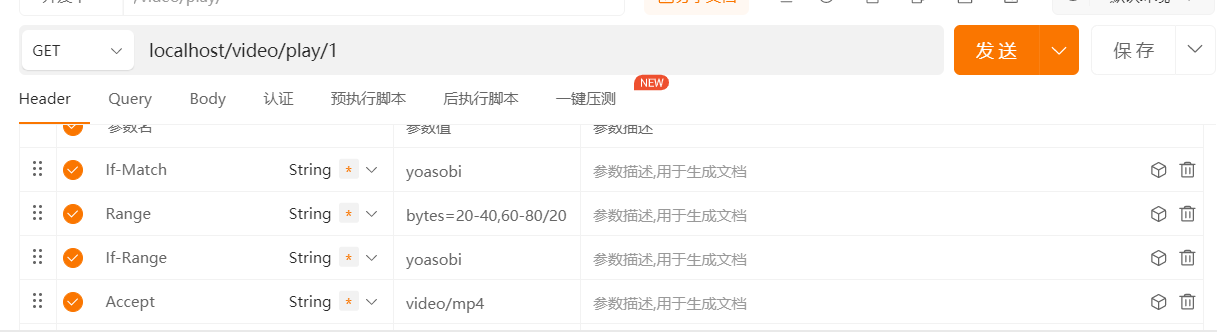
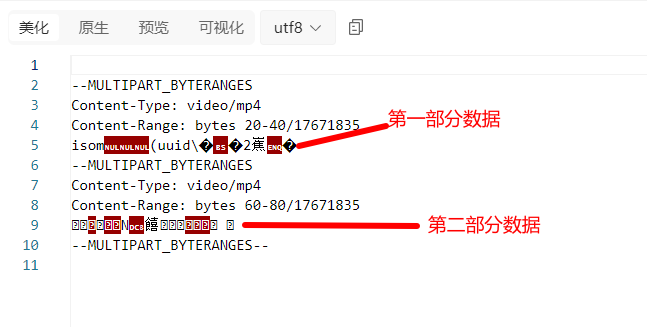
下面是API测试图
请求头设置
返回结果
响应头结果
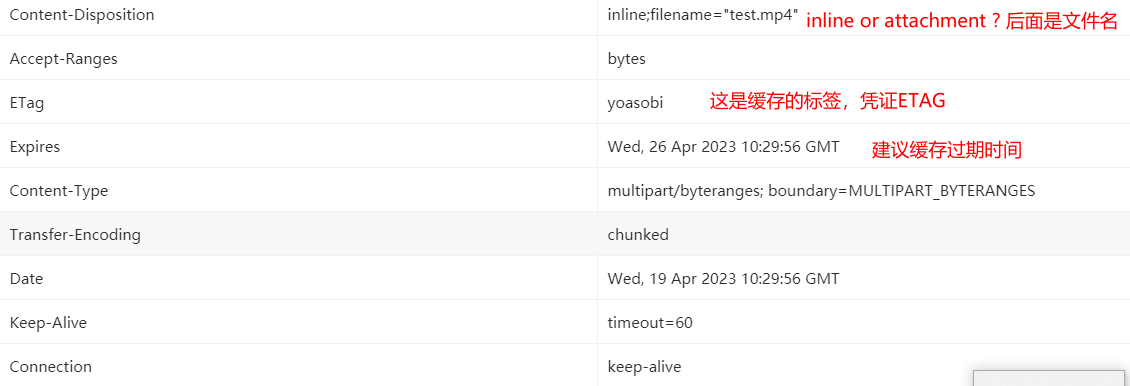
这是我写给前端同学的文档,凑活看看吧...摆烂了
package org.demo.util;

import jakarta.servlet.ServletOutputStream;
import jakarta.servlet.http.HttpServletRequest;
import jakarta.servlet.http.HttpServletResponse;
import lombok.RequiredArgsConstructor;
import lombok.extern.slf4j.Slf4j;
import org.demo.constant.EntityConstant;
import org.demo.mapper.VideoMapper;
import org.demo.pojo.Video;
import org.demo.service.MinioService;
import org.springframework.context.annotation.Scope;
import org.springframework.stereotype.Component;

import java.io.BufferedInputStream;
import java.io.IOException;
import java.io.InputStream;
import java.io.OutputStream;
import java.util.ArrayList;
import java.util.Arrays;
import java.util.List;

/**
 * Created by kevin on 10/02/15.
 * See full code here : https://github.com/davinkevin/Podcast-Server/blob/d927d9b8cb9ea1268af74316cd20b7192ca92da7/src/main/java/lan/dk/podcastserver/utils/multipart/MultipartFileSender.java
 * Updated by limecoder on 23/04/19
 */
@Slf4j
@Component(value = "multipartFileSender")
@RequiredArgsConstructor
@Scope("prototype")
public class MultipartFileSender {

    private static final int DEFAULT_BUFFER_SIZE = 20480; // ..bytes = 20KB.
    private static final long DEFAULT_EXPIRE_TIME = 604800000L; // ..ms = 1 week.
    private static final String MULTIPART_BOUNDARY = "MULTIPART_BYTERANGES";
    private static final String PATTERN = "^bytes=\\d*-\\d*(/\\d*)?(,\\d*-\\d*(/\\d*)?)*$";

    private final HttpServletRequest request;
    private final HttpServletResponse response;
    private final VideoMapper videoMapper;
    private final MinioService minioService;

    public void sent(Long videoId) throws Exception {
        if (response == null || request == null) {
            log.warn("http-request/http-response 注入失败");
            return;
        }

        Video video = videoMapper.selectById(videoId);

        /*
        * 处理视频不存在的情况
        * */
        if (video == null) {
            log.error("videoId doesn't exist at database : {}", videoId);
            response.sendError(HttpServletResponse.SC_NOT_FOUND);
            return;
        }

        Long size = video.getSize();
        String md5 = video.getMd5();

        // 处理缓存信息 ---------------------------------------------------

        /*
        * If-None-Match是缓存请求头,如果缓存的值与文件的md5相同或者值为*,那么就直接提示前端直接使用缓存即可
        * 并将md5再次返回给前端
        * */
        // If-None-Match header should contain "*" or ETag. If so, then return 304.
        String ifNoneMatch = request.getHeader("If-None-Match");
        if (ifNoneMatch != null && HttpUtils.matches(ifNoneMatch, md5)) {
            response.setHeader("ETag", md5); // Required in 304.
            response.sendError(HttpServletResponse.SC_NOT_MODIFIED);
            return;
        }


        // 确保Range请求合法 ----------------------------------------------------

        /*
        * 对于 GET 和 HEAD 方法,搭配 Range首部使用,可以用来保证新请求的范围与之前请求的范围是对同一份资源的请求。
        * 如果 ETag 无法匹配,那么需要返回 416 (Range Not Satisfiable,范围请求无法满足) 响应。
        * */
        // If-Match header should contain "*" or ETag. If not, then return 412.
        String ifMatch = request.getHeader("If-Match");
        if (ifMatch != null && !HttpUtils.matches(ifMatch, md5)) {
            response.sendError(HttpServletResponse.SC_PRECONDITION_FAILED);
            return;
        }

        // 验证和解析Range请求头 -------------------------------------------------------------

        // Prepare some variables. The full Range represents the complete file.
        Range full = new Range(0, size - 1, size);
        List<Range> ranges = new ArrayList<>();

        // Validate and process Range and If-Range headers.
        String range = request.getHeader("Range");
        if (range != null) {

            /*
            * 如果Range请求头不满足规范格式,那么发送错误请求
            * */
            // Range header should match format "bytes=n-n,n-n,n-n...". If not, then return 416.
            if (!range.matches(PATTERN)) {
                response.setHeader("Content-Range", "bytes */" + size); // Required in 416.
                response.sendError(HttpServletResponse.SC_REQUESTED_RANGE_NOT_SATISFIABLE);
                return;
            }

            /*
            * If-Range 头字段通常用于断点续传的下载过程中,用来自从上次中断后,确保下载的资源没有发生改变。
            * */
            String ifRange = request.getHeader("If-Range");
            if (ifRange != null && !ifRange.equals(md5)) {
                // 如果资源发生了改变,直接将数据全部返回
                ranges.add(full);
            }

            /*
            * 如果If-Range请求头是合法的,也就是视频数据并没有更新
            * 例子:bytes:10-80,bytes:80-180
            * */
            // If any valid If-Range header, then process each part of byte range.
            if (ranges.isEmpty()) {
                // substring去除bytes:
                for (String part : range.substring(6).split(",")) {
                    // Assuming a file with size of 100, the following examples returns bytes at:
                    // 50-80 (50 to 80), 40- (40 to size=100), -20 (size-20=80 to size=100).

                    //去除多余空格
                    part = part.trim();

                    /*
                    * 解决20-80及20-80/60的切割问题
                    * */
                    long start = Range.subLong(part, 0, part.indexOf("-"));
                    int index1 = part.indexOf("/");
                    int index2 = part.length();
                    int index = index2 > index1 && index1 > 0 ? index1 : index2;
                    long end = Range.subLong(part, part.indexOf("-") + 1, index);

                    // 如果是-开头的情况 -20
                    if (start == -1) {
                        start = size - end;
                        end = size - 1;
                        // 如果是20但没有-的情况,或者end> size - 1的情况
                    } else if (end == -1 || end > size - 1) {
                        end = size - 1;
                    }

                    /*
                    * 如果范围不合法, 80-10
                    * */
                    // Check if Range is syntactically valid. If not, then return 416.
                    if (start > end) {
                        response.setHeader("Content-Range", "bytes */" + size); // Required in 416.
                        response.sendError(HttpServletResponse.SC_REQUESTED_RANGE_NOT_SATISFIABLE);
                        return;
                    }

                    // Add range.
                    ranges.add(new Range(start, end, size));
                }
            }
        }

        // Prepare and initialize response --------------------------------------------------------

        // Get content type by file name and set content disposition.
        String disposition = "inline";

        // If content type is unknown, then set the default value.
        // For all content types, see: http://www.w3schools.com/media/media_mimeref.asp
        // To add new content types, add new mime-mapping entry in web.xml.
        String contentType = "video/mp4";
        /*
        * 经过测试当accept为"video/mp4"是inline, 其他情况都是attachment
        * */
        // Else, expect for images, determine content disposition. If content type is supported by
        // the browser, then set to inline, else attachment which will pop a 'save as' dialogue.
        String accept = request.getHeader("Accept");
        disposition = accept != null && HttpUtils.accepts(accept, contentType) ? "inline" : "attachment";
        log.debug("Content-Type : {}", contentType);


        // Initialize response.
        response.reset();
        response.setBufferSize(DEFAULT_BUFFER_SIZE);
        response.setHeader("Content-Type", contentType);
        String videoPath = video.getVideoPath();
        response.setHeader("Content-Disposition", disposition + ";filename=\"" + videoPath.substring(videoPath.lastIndexOf('/') + 1) + "\"");
        log.debug("Content-Disposition: {}, fileName: {}", disposition, videoPath.substring(videoPath.lastIndexOf('/') + 1));
        response.setHeader("Accept-Ranges", "bytes");
        response.setHeader("ETag", md5);
        // 设置缓存过期时间
        response.setDateHeader("Expires", System.currentTimeMillis() + DEFAULT_EXPIRE_TIME);
        // Send requested file (part(s)) to client ------------------------------------------------

        /*
        * 注意minioService okhttp3经过测试最大只能一次传8kb, 而bufferedInputStream的默认缓存区恰好8kb
        * */
        // Prepare streams.
        try (InputStream input = new BufferedInputStream(minioService.getDownloadInputStream(EntityConstant.VIDEO_BUCKET, videoPath));
             ServletOutputStream output = response.getOutputStream()) {

            if (ranges.isEmpty() || ranges.get(0) == full) {

                // Return full file.
                log.debug("返回全部的视频文件,不进行划分");
                response.setContentType(contentType);
                response.setHeader("Content-Range", "bytes " + full.start + "-" + full.end + "/" + full.total);
                response.setHeader("Content-Length", String.valueOf(full.length));
                Range.copy(input, output, size, full.start, full.length);

            } else if (ranges.size() == 1) {

                // Return single part of file.
                Range r = ranges.get(0);
                log.info("Return 1 part of file : from ({}) to ({})", r.start, r.end);
                response.setContentType(contentType);
                response.setHeader("Content-Range", "bytes " + r.start + "-" + r.end + "/" + r.total);
                response.setHeader("Content-Length", String.valueOf(r.length));
                response.setStatus(HttpServletResponse.SC_PARTIAL_CONTENT); // 206.

                // Copy single part range.
                Range.copy(input, output, size, r.start, r.length);

            } else {

/*              发送多种数据的多部分对象集合:
                多部分对象集合包含:
                1、multipart/form-data
                在web表单文件上传时使用
                2、multipart/byteranges
                状态码206响应报文包含了多个范围的内容时使用。*/
                // Return multiple parts of file.
                response.setContentType("multipart/byteranges; boundary=" + MULTIPART_BOUNDARY);
                response.setStatus(HttpServletResponse.SC_PARTIAL_CONTENT); // 206.

                // Cast back to ServletOutputStream to get the easy println methods.

                // Copy multi part range.
                for (Range r : ranges) {
                    log.debug("Return multi part of file : from ({}) to ({})", r.start, r.end);
                    // Add multipart boundary and header fields for every range.
                    output.println();
                    output.println("--" + MULTIPART_BOUNDARY);
                    output.println("Content-Type: " + contentType);
                    output.println("Content-Range: bytes " + r.start + "-" + r.end + "/" + r.total);

                    // Copy single part range of multi part range.
                    Range.copy(input, output, size, r.start, r.length);
                }

                // End with multipart boundary.
                output.println();
                output.println("--" + MULTIPART_BOUNDARY + "--");
            }
        }

    }

    private static class Range {
        long start;
        long end;
        long length;
        long total;

        /**
         * Construct a byte range.
         * @param start Start of the byte range.
         * @param end End of the byte range.
         * @param total Total length of the byte source.
         */
        public Range(long start, long end, long total) {
            this.start = start;
            this.end = end;
            this.length = end - start + 1;
            this.total = total;
        }

        public static long subLong(String value, int beginIndex, int endIndex) {
            String substring = value.substring(beginIndex, endIndex);
            return (substring.length() > 0) ? Long.parseLong(substring) : -1;
        }

        private static void copy(InputStream input, OutputStream output, long inputSize, long start, long length) throws IOException {
            byte[] buffer = new byte[DEFAULT_BUFFER_SIZE];
            int read;

            if (inputSize == length) {
                // Write full range.
                while ((read = input.read(buffer)) > 0) {
                    output.write(buffer, 0, read);
                    output.flush();
                }
            } else {
                input.skip(start);
                long toRead = length;

                while ((read = input.read(buffer)) > 0) {
                    if ((toRead -= read) > 0) {
                        output.write(buffer, 0, read);
                        output.flush();
                    } else {
                        output.write(buffer, 0, (int) toRead + read);
                        output.flush();
                        break;
                    }
                }
            }
        }
    }
    private static class HttpUtils {

        /**
         * Returns true if the given accept header accepts the given value.
         * @param acceptHeader The accept header.
         * @param toAccept The value to be accepted.
         * @return True if the given accept header accepts the given value.
         */
        public static boolean accepts(String acceptHeader, String toAccept) {
            String[] acceptValues = acceptHeader.split("\\s*(,|;)\\s*");
            Arrays.sort(acceptValues);

            return Arrays.binarySearch(acceptValues, toAccept) > -1
                    || Arrays.binarySearch(acceptValues, toAccept.replaceAll("/.*$", "/*")) > -1
                    || Arrays.binarySearch(acceptValues, "*/*") > -1;
        }

        /**
         * Returns true if the given match header matches the given value.
         * @param matchHeader The match header.
         * @param toMatch The value to be matched.
         * @return True if the given match header matches the given value.
         */
        public static boolean matches(String matchHeader, String toMatch) {
            String[] matchValues = matchHeader.split("\\s*,\\s*");
            Arrays.sort(matchValues);
            return Arrays.binarySearch(matchValues, toMatch) > -1
                    || Arrays.binarySearch(matchValues, "*") > -1;
        }

    }
}
我有一个Ruby程序,它使用rubyzip压缩XML文件的目录树。gem。我的问题是文件开始变得很重,我想提高压缩级别,因为压缩时间不是问题。我在rubyzipdocumentation中找不到一种为创建的ZIP文件指定压缩级别的方法。有人知道如何更改此设置吗?是否有另一个允许指定压缩级别的Ruby库? 最佳答案 这是我通过查看rubyzip内部创建的代码。level=Zlib::BEST_COMPRESSIONZip::ZipOutputStream.open(zip_file)do|zip|Dir.glob("**/*")d
我在使用omniauth/openid时遇到了一些麻烦。在尝试进行身份验证时,我在日志中发现了这一点:OpenID::FetchingError:Errorfetchinghttps://www.google.com/accounts/o8/.well-known/host-meta?hd=profiles.google.com%2Fmy_username:undefinedmethod`io'fornil:NilClass重要的是undefinedmethodio'fornil:NilClass来自openid/fetchers.rb,在下面的代码片段中:moduleNetclass
我正在查看instance_variable_set的文档并看到给出的示例代码是这样做的:obj.instance_variable_set(:@instnc_var,"valuefortheinstancevariable")然后允许您在类的任何实例方法中以@instnc_var的形式访问该变量。我想知道为什么在@instnc_var之前需要一个冒号:。冒号有什么作用? 最佳答案 我的第一直觉是告诉你不要使用instance_variable_set除非你真的知道你用它做什么。它本质上是一种元编程工具或绕过实例变量可见性的黑客攻击
在我的Controller中,我通过以下方式在我的index方法中支持HTML和JSON:respond_todo|format|format.htmlformat.json{renderjson:@user}end在浏览器中拉起它时,它会自然地以HTML呈现。但是,当我对/user资源进行内容类型为application/json的curl调用时(因为它是索引方法),我仍然将HTML作为响应。如何获取JSON作为响应?我还需要说明什么? 最佳答案 您应该将.json附加到请求的url,提供的格式在routes.rb的路径中定义。这
我真的很习惯使用Ruby编写以下代码:my_hash={}my_hash['test']=1Java中对应的数据结构是什么? 最佳答案 HashMapmap=newHashMap();map.put("test",1);我假设? 关于java-等价于Java中的RubyHash,我们在StackOverflow上找到一个类似的问题: https://stackoverflow.com/questions/22737685/
我想设置一个默认日期,例如实际日期,我该如何设置?还有如何在组合框中设置默认值顺便问一下,date_field_tag和date_field之间有什么区别? 最佳答案 试试这个:将默认日期作为第二个参数传递。youcorrectlysetthedefaultvalueofcomboboxasshowninyourquestion. 关于ruby-on-rails-date_field_tag,如何设置默认日期?[rails上的ruby],我们在StackOverflow上找到一个类似的问
我有一个用户工厂。我希望默认情况下确认用户。但是鉴于unconfirmed特征,我不希望它们被确认。虽然我有一个基于实现细节而不是抽象的工作实现,但我想知道如何正确地做到这一点。factory:userdoafter(:create)do|user,evaluator|#unwantedimplementationdetailshereunlessFactoryGirl.factories[:user].defined_traits.map(&:name).include?(:unconfirmed)user.confirm!endendtrait:unconfirmeddoenden
我正在玩HTML5视频并且在ERB中有以下片段:mp4视频从在我的开发环境中运行的服务器很好地流式传输到chrome。然而firefox显示带有海报图像的视频播放器,但带有一个大X。问题似乎是mongrel不确定ogv扩展的mime类型,并且只返回text/plain,如curl所示:$curl-Ihttp://0.0.0.0:3000/pr6.ogvHTTP/1.1200OKConnection:closeDate:Mon,19Apr201012:33:50GMTLast-Modified:Sun,18Apr201012:46:07GMTContent-Type:text/plain
rails中是否有任何规定允许站点的所有AJAXPOST请求在没有authenticity_token的情况下通过?我有一个调用Controller方法的JqueryPOSTajax调用,但我没有在其中放置任何真实性代码,但调用成功。我的ApplicationController确实有'request_forgery_protection'并且我已经改变了config.action_controller.consider_all_requests_local在我的environments/development.rb中为false我还搜索了我的代码以确保我没有重载ajaxSend来发送
我正在尝试使用boilerpipe来自JRuby。我看过guide从JRuby调用Java,并成功地将它与另一个Java包一起使用,但无法弄清楚为什么同样的东西不能用于boilerpipe。我正在尝试基本上从JRuby中执行与此Java等效的操作:URLurl=newURL("http://www.example.com/some-location/index.html");Stringtext=ArticleExtractor.INSTANCE.getText(url);在JRuby中试过这个:require'java'url=java.net.URL.new("http://www
