上一篇文章讲了cartographer算法手持雷达建图的参数调试,这篇进一步讲如何融合2D雷达与IMU采用cartographer算法进行slam建图。
cartographer算法手持二维激光雷达建图(不使用里程计及IMU)
https://blog.csdn.net/wangchuchua/article/details/127268037?spm=1001.2014.3001.5502
思岚s1激光雷达、Tobotics ROS IMU HFI-A9。
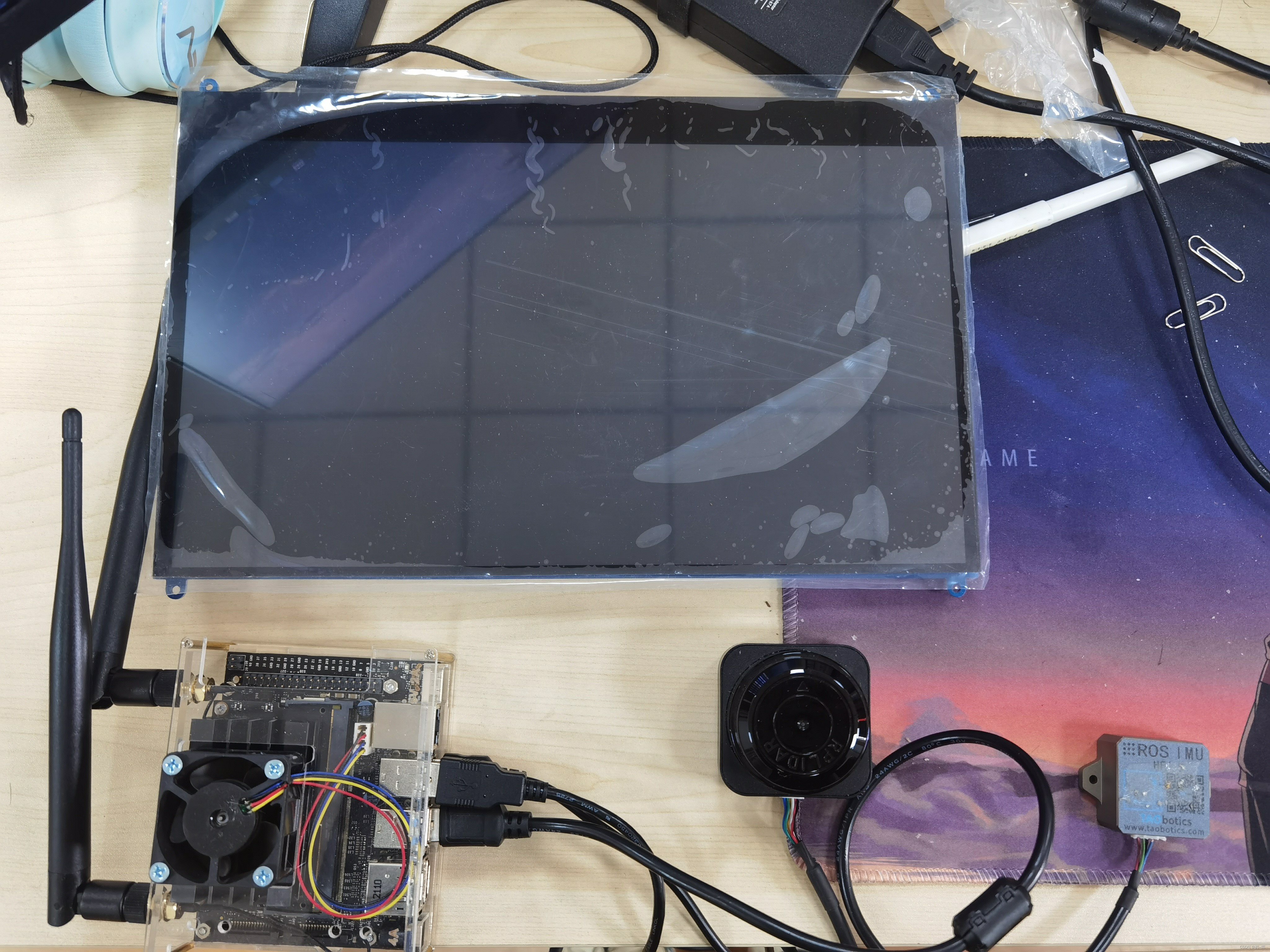
和上一篇讲的一样在进行文件修改之前一定一定要先弄明白自己的雷达和IMU的话题名称topic_id以及frame_id,否则名称对不上肯定是会报错的。
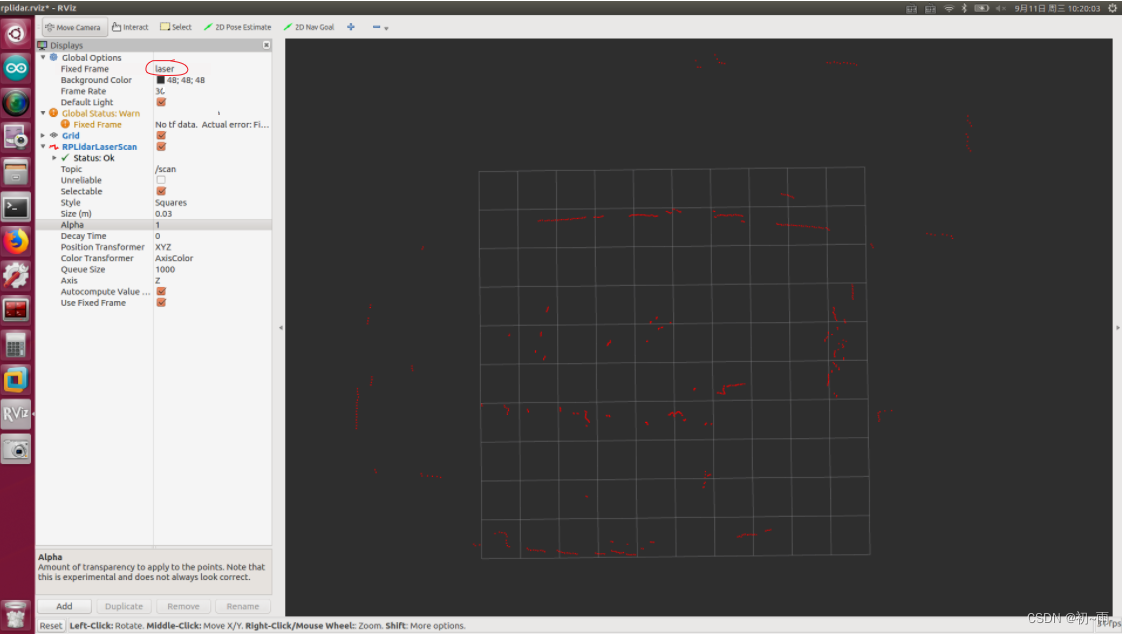
首先启动雷达,如果有用思岚激光雷达的小伙伴可以参考这个网址。(只要可以实现点云信息的发布就好。)ROS与激光雷达入门教程-ROS中使用激光雷达(思岚S1) - 创客智造
雷达的frame_id就是图中画红圈的,我的是laser。
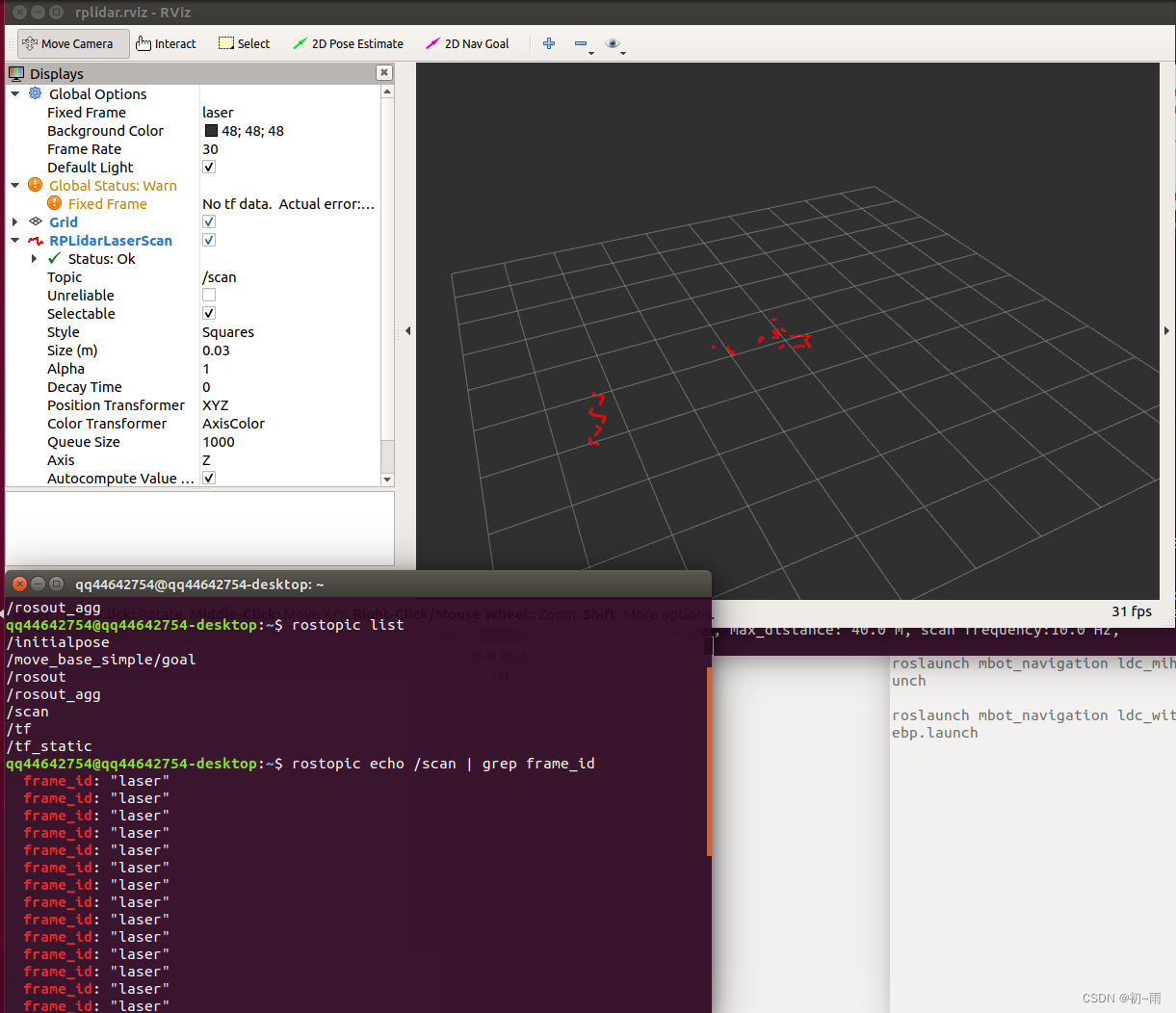
 接下来就是查看雷达的话题名称,打开终端输入:
rostopic list可以看到雷达topic名称一般都是scan。同时还有另一种方法查询雷达的frame_id,就是在终端输入:
rostopic echo /topic | grep frame_id其中topic名称输入你雷达的话题名称就可,我的话题名称是scan所以输入:
rostopic echo /scan | grep frame_id这样就能查到话题scan的fram_id啦。通过以上操作我得知了我的雷达话题是scan、frame_id是laser。
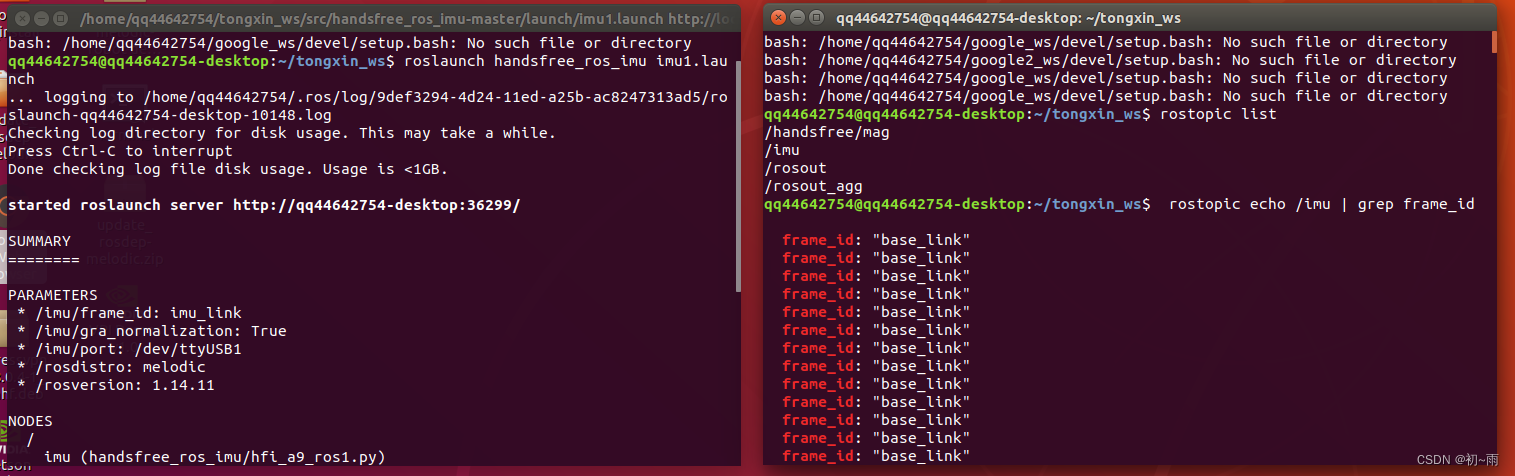
好接下来启动IMU模块,一般rosIMU是会有启动包的,启动IMU后通过rostopic查询一下IMU的话题名称,我的话题名称是/imu。知道话题名称后输入命令:rostopic echo /imu | grep frame_id查询frame-id。通过以上操作我得知了我IMU的话题名称是/imu,frame-id是base_link。知道这些后就开始正式的修改相关的文件。
首先找到~/google_ws/src/cartographer_ros/cartographer_ros/configuration_files目录下的建立一个revo_lds.lua文件,为了和手持建图的lua文件区分开,我有复制了这个文件,重命名为revo_imu.lua。修改后文件内容如下:
-- Copyright 2016 The Cartographer Authors
--
-- Licensed under the Apache License, Version 2.0 (the "License");
-- you may not use this file except in compliance with the License.
-- You may obtain a copy of the License at
--
--      http://www.apache.org/licenses/LICENSE-2.0
--
-- Unless required by applicable law or agreed to in writing, software
-- distributed under the License is distributed on an "AS IS" BASIS,
-- WITHOUT WARRANTIES OR CONDITIONS OF ANY KIND, either express or implied.
-- See the License for the specific language governing permissions and
-- limitations under the License.

include "map_builder.lua"
include "trajectory_builder.lua"

options = {
  map_builder = MAP_BUILDER,
  trajectory_builder = TRAJECTORY_BUILDER,
  map_frame = "map",
  tracking_frame = "base_link",
  published_frame = "laser",
  odom_frame = "odom",
  provide_odom_frame = true,
  publish_frame_projected_to_2d = false,
  use_pose_extrapolator = true,
  use_odometry = false,
  use_nav_sat = false,
  use_landmarks = false,
  num_laser_scans = 1,
  num_multi_echo_laser_scans = 0,
  num_subdivisions_per_laser_scan = 1,
  num_point_clouds = 0,
  lookup_transform_timeout_sec = 0.2,
  submap_publish_period_sec = 0.3,
  pose_publish_period_sec = 5e-3,
  trajectory_publish_period_sec = 30e-3,
  rangefinder_sampling_ratio = 1.,
  odometry_sampling_ratio = 1.,
  fixed_frame_pose_sampling_ratio = 1.,
  imu_sampling_ratio = 1.,
  landmarks_sampling_ratio = 1.,
}

MAP_BUILDER.use_trajectory_builder_2d = true

TRAJECTORY_BUILDER_2D.submaps.num_range_data = 35
TRAJECTORY_BUILDER_2D.min_range = 0.3
TRAJECTORY_BUILDER_2D.max_range = 8.
TRAJECTORY_BUILDER_2D.missing_data_ray_length = 1.
TRAJECTORY_BUILDER_2D.use_imu_data = true
TRAJECTORY_BUILDER_2D.use_online_correlative_scan_matching = true
TRAJECTORY_BUILDER_2D.real_time_correlative_scan_matcher.linear_search_window = 0.1
TRAJECTORY_BUILDER_2D.real_time_correlative_scan_matcher.translation_delta_cost_weight = 10.
TRAJECTORY_BUILDER_2D.real_time_correlative_scan_matcher.rotation_delta_cost_weight = 1e-1

POSE_GRAPH.optimization_problem.huber_scale = 1e2
POSE_GRAPH.optimize_every_n_nodes = 35
POSE_GRAPH.constraint_builder.min_score = 0.65

return options
主要修改的点就是一下三个地方:
tracking_frame = "base_link",#这里要与imu的frame_id名称一致
published_frame = "laser",#这里要与雷达的frame_id名称一致
TRAJECTORY_BUILDER_2D.use_imu_data = true
然后在~/google_ws/src/cartographer_ros/cartographer_ros//urdf/文件下创建一个urdf文件文件内容如下所示(我的urdf文件名称是:backpack_2d1.urdf,原本包里自带了两个urdf文件因为我要自己调整imu和雷达的位置关系就另写了一个urdf文件):这里一定要注意urdf里的link name一定要与雷达或者imu的fram_id相对应。
<!--
  Copyright 2016 The Cartographer Authors

  Licensed under the Apache License, Version 2.0 (the "License");
  you may not use this file except in compliance with the License.
  You may obtain a copy of the License at

       http://www.apache.org/licenses/LICENSE-2.0

  Unless required by applicable law or agreed to in writing, software
  distributed under the License is distributed on an "AS IS" BASIS,
  WITHOUT WARRANTIES OR CONDITIONS OF ANY KIND, either express or implied.
  See the License for the specific language governing permissions and
  limitations under the License.
-->
<robot name="mini">
  <material name="orange">
    <color rgba="1.0 0.5 0.2 1" />
  </material>
  <material name="gray">
    <color rgba="0.2 0.2 0.2 1" />
  </material>

  <link name="base_link">#与imu的fram_id对应
    <visual>
      <origin xyz="0 0 0" />
      <geometry>
        <box size="0.06 0.04 0.02" />
      </geometry>
      <material name="orange" />
    </visual>
  </link>
  <link name="laser">#与雷达的fram_id对应
    <visual>
      <origin xyz="0 0 0" />
      <geometry>
        <cylinder length="0.05" radius="0.03" />
      </geometry>
      <material name="gray" />
    </visual>
  </link>


  <joint name="imu2laser" type="fixed">
    <parent link="laser" />
    <child link="base_link" />
    <origin xyz="0 0 -0.035" />
  </joint>

</robot>
在riviz中显示是这样的,小老板们可以根据需要调整雷达和imu之间的相对位置关系。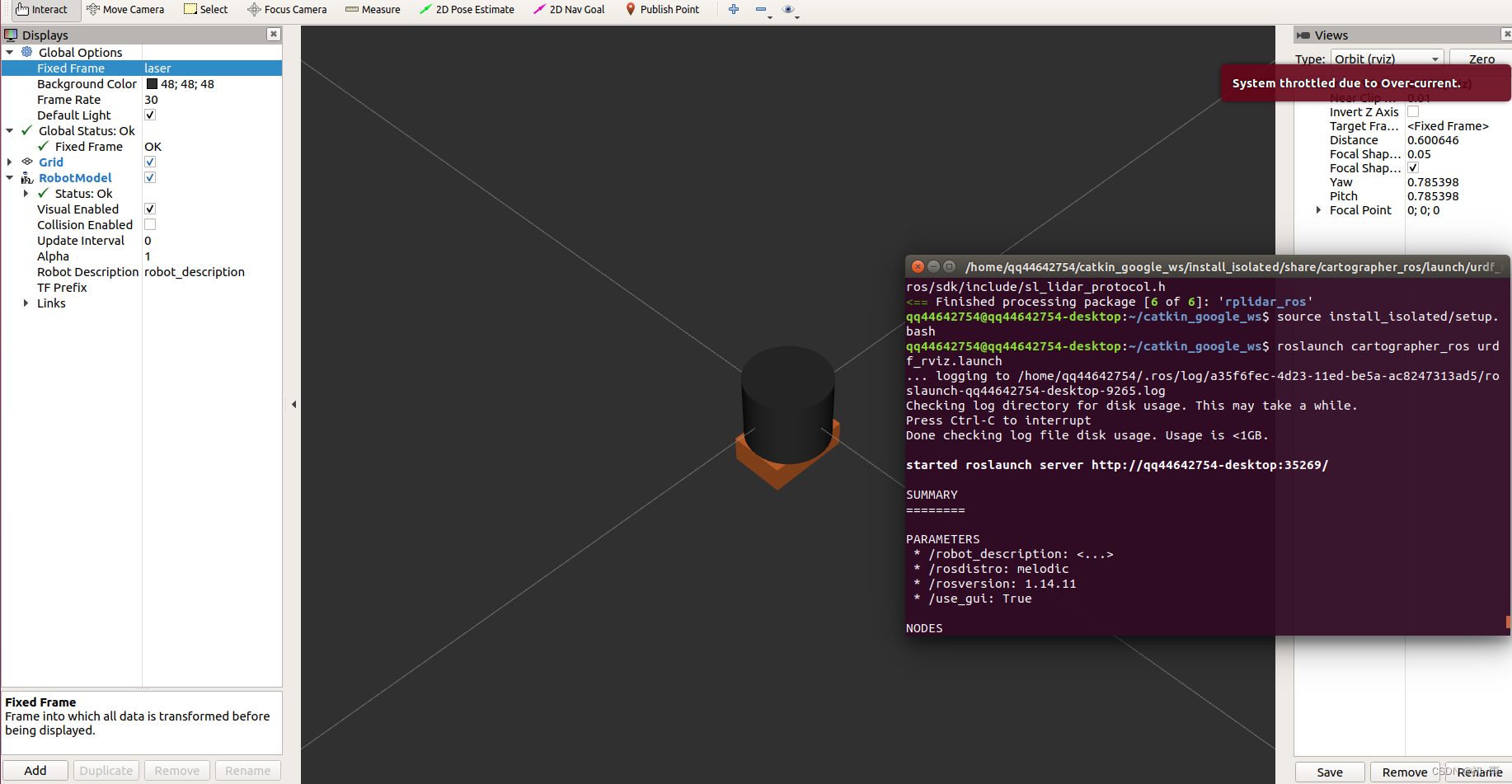
在~/google_ws/src/cartographer_ros/cartographer_ros/launch目录下建立launch文件,我的文件名称是demo_revo_sc_imu.launch。文件内容如下:
<!--
  Copyright 2016 The Cartographer Authors

  Licensed under the Apache License, Version 2.0 (the "License");
  you may not use this file except in compliance with the License.
  You may obtain a copy of the License at

       http://www.apache.org/licenses/LICENSE-2.0

  Unless required by applicable law or agreed to in writing, software
  distributed under the License is distributed on an "AS IS" BASIS,
  WITHOUT WARRANTIES OR CONDITIONS OF ANY KIND, either express or implied.
  See the License for the specific language governing permissions and
  limitations under the License.
-->

<launch>
  <param name="/use_sim_time" value="false" />

  <node name="rplidarNode"          pkg="rplidar_ros"  type="rplidarNode" output="screen">
  <param name="serial_port"         type="string" value="/dev/ttyUSB0"/>
  <param name="serial_baudrate"     type="int"    value="256000"/>
  <param name="frame_id"            type="string" value="laser"/>
  <param name="inverted"            type="bool"   value="false"/>
  <param name="angle_compensate"    type="bool"   value="true"/>
  </node>

  <node name="cartographer_node" pkg="cartographer_ros"
      type="cartographer_node" args="
          -configuration_directory $(find cartographer_ros)/configuration_files
          -configuration_basename revo_imu.lua"
      output="screen">
    <remap from="scan" to="scan" />
    <remap from="imu/data" to="imu" />#这里是你的imu的话题名称
  </node>

  <node name="cartographer_occupancy_grid_node" pkg="cartographer_ros"
      type="cartographer_occupancy_grid_node" args="-resolution 0.05" />
  <param name="robot_description" textfile="$(find cartographer_ros)/urdf/backpack_2d1.urdf" />
  <node name="robot_state_publisher" pkg="robot_state_publisher" type="robot_state_publisher" />


  <node name="rviz" pkg="rviz" type="rviz" required="true"
      args="-d $(find cartographer_ros)/configuration_files/demo_2d.rviz" />

</launch>
这个文件中包含了启动雷达节点,和cartographer建图节点,相对于上节的launch文件内容增加了
<remap from="imu/data" to="imu" />注意要用你自己imu的话题名称。
以及 urdf文件,注意要对应你的urdf文件路径。
 <param name="robot_description" textfile="$(find cartographer_ros)/urdf/backpack_2d1.urdf" />
  <node name="robot_state_publisher" pkg="robot_state_publisher" type="robot_state_publisher" />
到这里文件调整部分就完成了,可以开始启动建图了,因为上面的launch文件没有包含imu启动节点所以我这里先单独启动imu。
roslaunch handsfree_ros_imu imu1.launch
imu启动之后就可以运行 demo_revo_sc_imu.launch文件了,别忘记启动之前要catkin_make_isolated --install --use-ninja。
source install_isolated/setup.bashcatkin_make_isolated --install --use-ninjaroslaunch cartographer_ros demo_revo_sc_imu.launch
运行成功后的效果是这样的。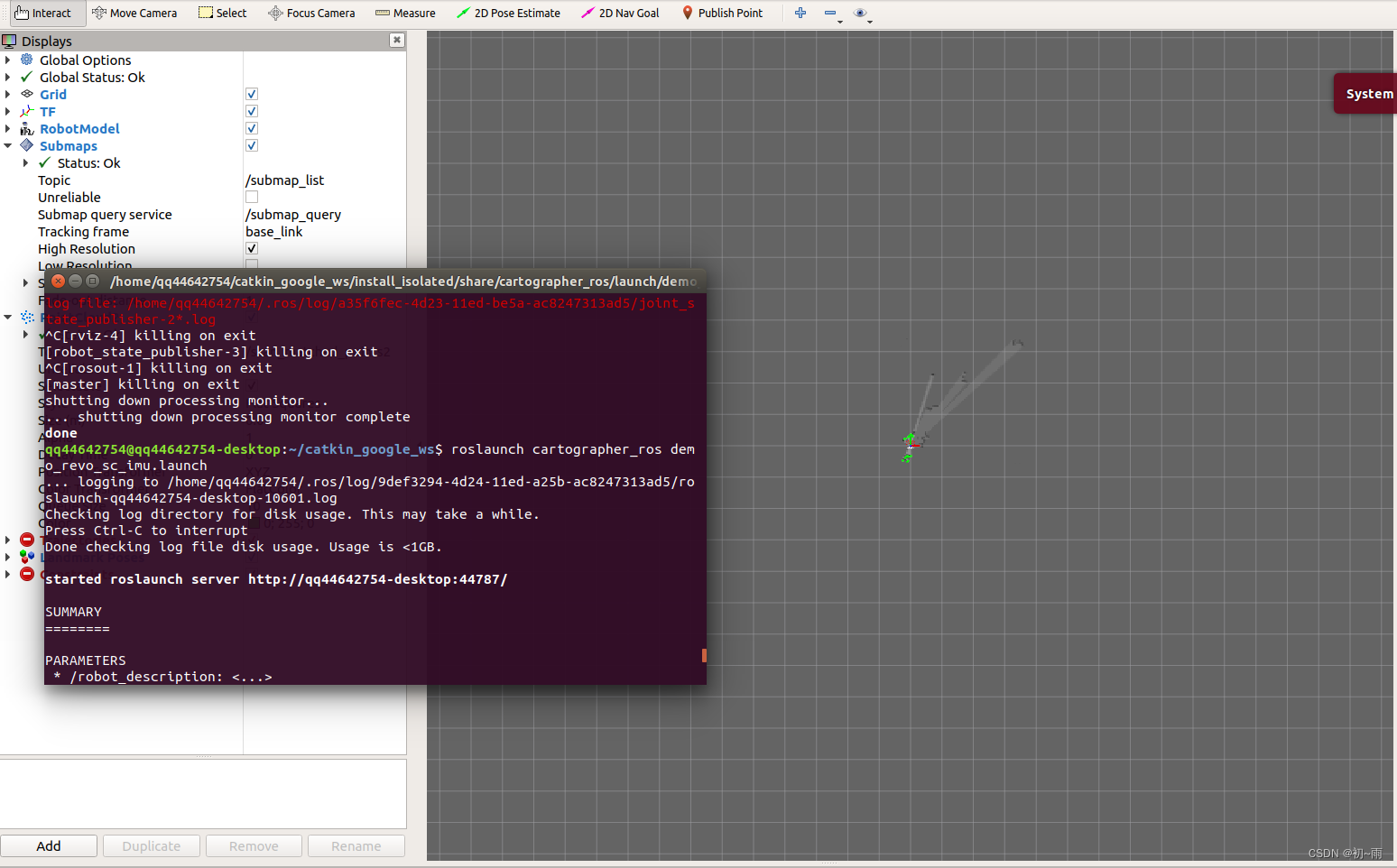
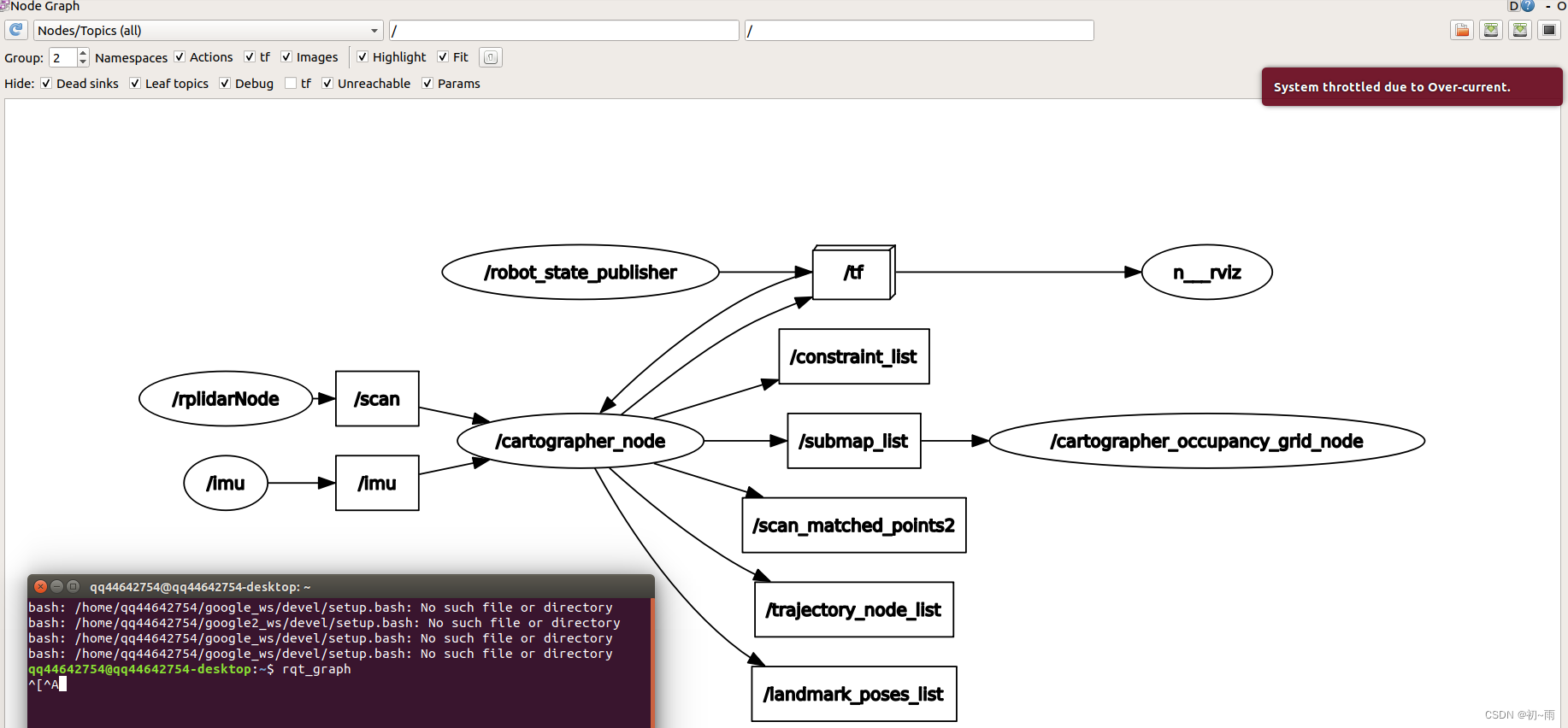
打开终端输入rqt_graph查看节点关系,我们可以看到imu和雷达信息已经输入到cartographer的节点中去说明融合成功了。
rqt_graph
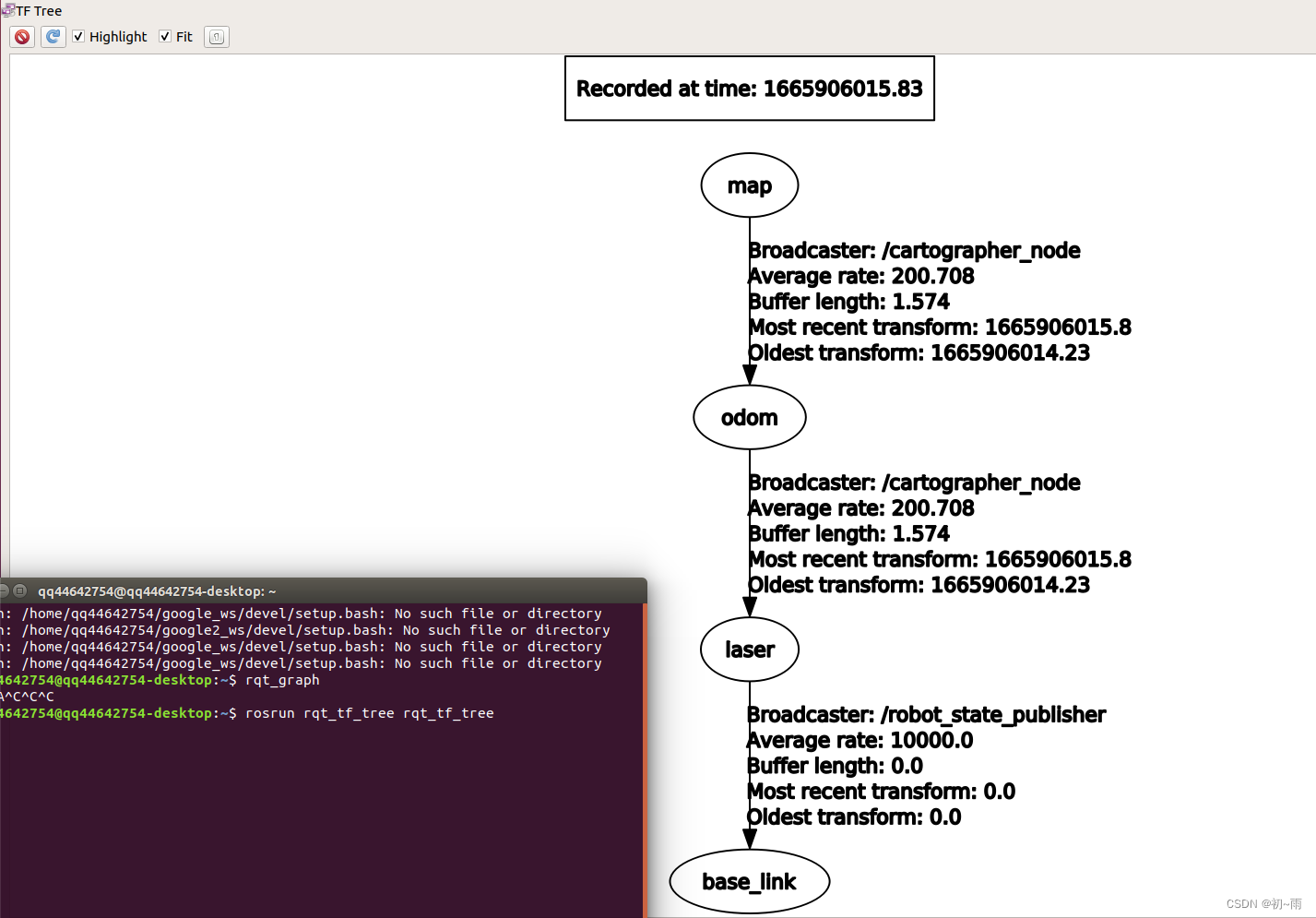
打开终端输入rosrun rqt_tf_tree rqt_tf_tree得到tf关系图:
到这里就完成了cartographer算法的雷达与IMU融合建图。希望这篇文章能够帮助到大家,祝大家生活愉快,学业顺利 (*^▽^*)。
目录一.加解密算法数字签名对称加密DES(DataEncryptionStandard)3DES(TripleDES)AES(AdvancedEncryptionStandard)RSA加密法DSA(DigitalSignatureAlgorithm)ECC(EllipticCurvesCryptography)非对称加密签名与加密过程非对称加密的应用对称加密与非对称加密的结合二.数字证书图解一.加解密算法加密简单而言就是通过一种算法将明文信息转换成密文信息,信息的的接收方能够通过密钥对密文信息进行解密获得明文信息的过程。根据加解密的密钥是否相同,算法可以分为对称加密、非对称加密、对称加密和非
1.问题描述使用Python的turtle(海龟绘图)模块提供的函数绘制直线。2.问题分析一幅复杂的图形通常都可以由点、直线、三角形、矩形、平行四边形、圆、椭圆和圆弧等基本图形组成。其中的三角形、矩形、平行四边形又可以由直线组成,而直线又是由两个点确定的。我们使用Python的turtle模块所提供的函数来绘制直线。在使用之前我们先介绍一下turtle模块的相关知识点。turtle模块提供面向对象和面向过程两种形式的海龟绘图基本组件。面向对象的接口类如下:1)TurtleScreen类:定义图形窗口作为绘图海龟的运动场。它的构造器需要一个tkinter.Canvas或ScrolledCanva
我一直在尝试用Ruby实现Luhn算法。我一直在执行以下步骤:该公式根据其包含的校验位验证数字,该校验位通常附加到部分帐号以生成完整帐号。此帐号必须通过以下测试:从最右边的校验位开始向左移动,每第二个数字的值加倍。将乘积的数字(例如,10=1+0=1、14=1+4=5)与原始数字的未加倍数字相加。如果总模10等于0(如果总和以零结尾),则根据Luhn公式该数字有效;否则无效。http://en.wikipedia.org/wiki/Luhn_algorithm这是我想出的:defvalidCreditCard(cardNumber)sum=0nums=cardNumber.to_s.s
下面是我写的一个计算斐波那契数列中的值的方法:deffib(n)ifn==0return0endifn==1return1endifn>=2returnfib(n-1)+(fib(n-2))endend它工作到n=14,但在那之后我收到一条消息说程序响应时间太长(我正在使用repl.it)。有人知道为什么会这样吗? 最佳答案 Naivefibonacci进行了大量的重复计算-在fib(14)fib(4)中计算了很多次。您可以将内存添加到您的算法中以使其更快:deffib(n,memo={})ifn==0||n==1returnnen
为了防止在迁移到生产站点期间出现数据库事务错误,我们遵循了https://github.com/LendingHome/zero_downtime_migrations中列出的建议。(具体由https://robots.thoughtbot.com/how-to-create-postgres-indexes-concurrently-in概述),但在特别大的表上创建索引期间,即使是索引创建的“并发”方法也会锁定表并导致该表上的任何ActiveRecord创建或更新导致各自的事务失败有PG::InFailedSqlTransaction异常。下面是我们运行Rails4.2(使用Acti
我正在开发一个类似微论坛的项目,其中一个特殊用户发布一条快速(接近推文大小)的主题消息,订阅者可以用他们自己的类似大小的消息来响应。直截了当,没有任何形式的“挖掘”或投票,只是每个主题消息的响应按时间顺序排列。但预计会有很高的流量。我们想根据它们引起的响应嗡嗡声来标记主题消息,使用0到10的等级。在谷歌上搜索了一段时间的趋势算法和开源社区应用示例,到目前为止已经收集到两个有趣的引用资料,但我还没有完全理解它们:Understandingalgorithmsformeasuringtrends,关于使用基线趋势算法比较维基百科页面浏览量的讨论,在SO上。TheBritneySpearsP
我收到错误:unsupportedcipheralgorithm(AES-256-GCM)(RuntimeError)但我似乎具备所有要求:ruby版本:$ruby--versionruby2.1.2p95OpenSSL会列出gcm:$opensslenc-help2>&1|grepgcm-aes-128-ecb-aes-128-gcm-aes-128-ofb-aes-192-ecb-aes-192-gcm-aes-192-ofb-aes-256-ecb-aes-256-gcm-aes-256-ofbRuby解释器:$irb2.1.2:001>require'openssl';puts
文章目录一.Dijkstra算法想解决的问题二.Dijkstra算法理论三.java代码实现一.Dijkstra算法想解决的问题解决的问题:求解单源最短路径,即各个节点到达源点的最短路径或权值考察其他所有节点到源点的最短路径和长度局限性:无法解决权值为负数的情况二.Dijkstra算法理论参数:S记录当前已经处理过的源点到最短节点U记录还未处理的节点dist[]记录各个节点到起始节点的最短权值path[]记录各个节点的上一级节点(用来联系该节点到起始节点的路径)Dijkstra算法步骤:(1)初始化:顶点集S:节点A到自已的最短路径长度为0。只包含源点,即S={A}顶点集U:包含除A外的其他顶
对于体育新闻中文文本的关键字提取,常用的算法包括TF-IDF、TextRank和LDA等。它们的基本步骤如下:1.TF-IDF算法: -将文本进行分词和词性标注处理。-统计每个词在文本中的词频(TF)。-计算每个词在整个语料库中出现的文档频率(DF)和逆文档频率(IDF)。-计算每个词的TF-IDF值,并按照值的大小进行排序,选择排名前几的词作为关键字。2.TextRank算法:-将文本进行分词和词性标注处理。-将分词结果转化成图模型,每个词语为节点,根据词语之间的共现关系建立边。-对图模型进行迭代计算,计算每个节点的PageRank值,表示该节点的重要性。-选择排名前几的节点作为关键字。3.
我正在尝试计算由二进制形式的1和0的P数表示的数字的数量。如果P=2,则表示的数字为0011、1100、0110、0101、1001、1010,所以计数为6。我试过:[0,0,1,1].permutation.to_a.uniq但这不是大数的最佳解决方案(P可以什么可能是最好的排列技术,或者我们是否有任何直接的数学来做到这一点? 最佳答案 Numberofpermutationcanbecalculatedusingfactorial.a=[0,0,1,1](1..a.size).inject(:*)#=>4!=>24要计算重复项,
