实验学时:4 实验类型:设计
一、目的与任务
目的:熟悉在静态网页制作基本流程,熟练应用CSS+HTML+JS。
任务:使用CSS+HTML+JS,开发简易个人网站。
二、内容、要求与方法步骤
1、个人网站分为四个部分:注册页面,登录界面,主界面,以及分界面。
1)注册页面需要使用到用户名及密码等信息,用到的标签有表格、文本框、单选按钮、复选按钮、下拉列表框等基本的标签;登录界面需要输入用户名和密码;
2)登陆成功后,可利用javascript判断输入用户名和密码的正确性,输入正确,则利用form标签中action转向主界面,如果输入不正确,可用警告框提醒用户:“输入不正确,再次输入”;
3)主界面类似图1-1,采用四个盒子分别代表个人简历,我的理想,我的生活,学习内容。每个盒子都采用float浮动。
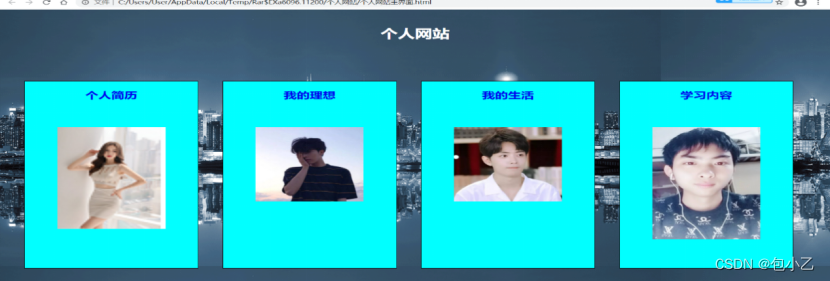 图1-1 主界面
个人简历界面:主要是css3实体样式;同样采用了四个盒子分别介绍四个内容。如图1-2,具体内容自定。
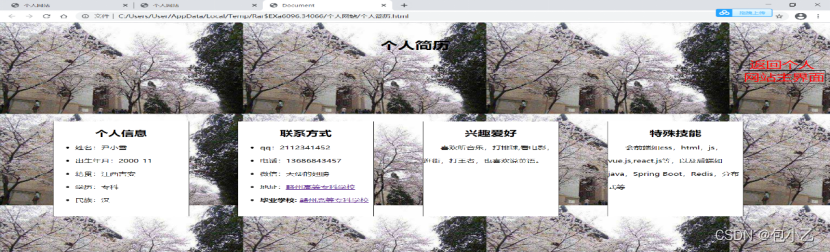
图1-2个人简历界面
我的理想界面:列举我的理想,可以使用无序列表或者表格排列。
我的生活界面:主要内容采用展示照片墙或者视频来体现。
学习内容界面:采用list-style:none的有序列表。
具体操作步骤:
1)准备网站需要的素材:图片和视频;
2)可利用记事本或者Jbuilder编写各个页面。
3)注意各页面之间的转向或者链接关系
4)打开浏览器,观察各个页面运行结果。
2、实验安排方式:上机编码。
3、实验结果展示,包括代码(可分栏展示)和效果图。
注册比较简单,只是做了一个注册的页面。
<!DOCTYPE html>
<html lang="en">
<head>
<meta charset="UTF-8">
<meta name="viewport" content="width=device-width, initial-scale=1.0">
<title>注册</title>
<style>
.bjimg {
position: fixed;
top: 0;
left: 0;
width: 100%;
height: 100%;
z-index: -10;
object-fit: cover;
}
#login_box {
width: 30%;
height: 300px;
background-color: #00000080;
margin: auto;
margin-top: 10%;
text-align: center;
border-radius: 10px;
padding: 50px 50px;
}
tr{
border: 1px solid beige;
}
td{
border: 1px solid aliceblue;
}
h2 {
color: #ffff;
margin-top: 5%;
}
#input-box {
margin-top: 5%;
}
span {
border: 0;
width: 60%;
font-size: 15px;
color:rgb(203, 197, 197);
background: transparent;
padding: 10px 3px;
outline: none;
margin-top: 10px;
}
input {
border: 0;
width: 60%;
font-size: 15px;
color: #fff;
background: transparent;
border-bottom: 2px solid #fff;
padding: 5px 10px;
outline: none;
margin-top: 10px;
}
button {
margin-top: 10px;
width: 60%;
height: 30px;
border-radius: 10px;
border: 0;
color: #fff;
text-align: center;
line-height: 30px;
font-size: 15px;
background-image: linear-gradient(to right, #4b1919, #3f3a3e);
}
#sign_up {
margin-top: 45%;
margin-left: 60%;
}
a {
color: #fff;
}
</style>
</head>
<video src="注册背景.mp4" class="bjimg" autoplay loop muted></video>
<body>
<div id="login_box">
<h2>注册</h2>
<div class="input_box">
<input type="text" id="username1" placeholder="请输入用户名">
<br>
<input type="password"id="password1" placeholder="请输入密码"> <br><br>
</div>
<span>年级班级:</span>
<span colspan="7">
<select>
<option>19级</option>
<option>20级</option>
<option>21级</option>
</select>
<select>
<option>一班</option>
<option>二班</option>
<option>三班</option>
<option>四班</option>
<option>五班</option>
<option>六班</option>
</select>
<br>
<span> 性别:  </span>
<span>男</span>
<span><input style="width: auto;" type="radio" name="sex" value="男" id="sex_man"></span>
<span>女</span>
<span><input style="width: auto;" type="radio" name="sex" value="女" id="sex_woman"></span><br>
<button type="button" id="Button"value="注册" onclick="register()">注册</button>
<br><br>
<span>
已有账号?<a href="登录.html">请登录</a>
</span>
</div>
<from action>
<script type="text/javascript">
function register(){
var username1=document.getElementById("username1").value;
var password1=document.getElementById("password1").value;
//localStorage存储注册信息
localStorage.setItem("username1",username1);
localStorage.setItem("password1",password1);
if(username1=='' || password1==''){
alert("用户名或密码不能为空!");
}
else{
window.location.href="登录.html";
}
}
</script>
</div>
</html>

登录密码为1 2,这里有一个错误我没有解决,但是无影响。
<!DOCTYPE html>
<html lang="en">
<head>
  <meta charset="UTF-8">
  <meta name="viewport" content="width=device-width, initial-scale=1.0">
  <title>登录</title>
  <style>
    .bjimg {
      position: fixed;
      top: 0;
      left: 0;
      width: 100%;
      height: 100%;
      z-index: -10;
      object-fit: cover;
      }

    #login_box {
      width: 30%;
      height: 300px;
      background-color: #00000060;
      margin: auto;
      margin-top: 10%;
      text-align: center;
      border-radius: 10px;
      padding: 50px 50px;
    }

    h2 {
      color: #ffffff90;
      margin-top: 5%;
    }

    #input-box {
      margin-top: 5%;
    }

    span {
      color: #fff;
    }

    input {
      border: 0;
      width: 60%;
      font-size: 15px;
      color: #fff;
      background: transparent;
      border-bottom: 2px solid #fff;
      padding: 5px 10px;
      outline: none;
      margin-top: 10px;
    }

    button {
      margin-top: 30px;
      width: 60%;
      height: 30px;
      border-radius: 10px;
      border: 0;
      color: #fff;
      text-align: center;
      line-height: 30px;
      font-size: 15px;
      background-image: linear-gradient(to right, #101008, #3f3a3e);
    }

    #sign_up {
      margin-top: 45%;
      margin-left: 60%;
    }

    a {
      color: #b94648;
    }
  </style>
</head>
<video src="登录背景.mp4" class="bjimg" autoplay loop muted></video>
<body>
  <div id="login_box">
    <h2>登录</h2>
    <div class="input_box">
      <input type="text" id="username"placeholder="请输入用户名">
    </div>
    <div class="input_box">
      <input type="text"id="password" placeholder="请输入密码">
    </div>
    <div>
      <button type="button" id="Button"value="立即登录" onclick="login()">立即登录</button>
      <br><br>
      <h>没有账号?<a href="注册.html">请注册</a></h>

  </div>


  <from action>
<script type="text/javascript">

    //判断登录是否成功
    function login(){
      //获取注册时存储在localStorage中的值
             var username1=localStorage.getItem("username1").value;
             var password1=localStorage.getItem("password1").value;
             var username=document.getElementById("username").value;
             var password=document.getElementById("password").value;

        //判断输入的信息和注册的信息是否一致
        if(username!='' && password!=''){
          if (username==''&& password==''){
               window.location.href="我的理想.html";
            }
            if (username=='1' && password=='2'){
               window.location.href="主页.html";
            }
            else{
                alert("用户名或密码错误,请重新输入!");
            }
           }
        else{
            alert("用户名或密码不能为空!");
        }
    }
</script>
</div>
</body>
</html>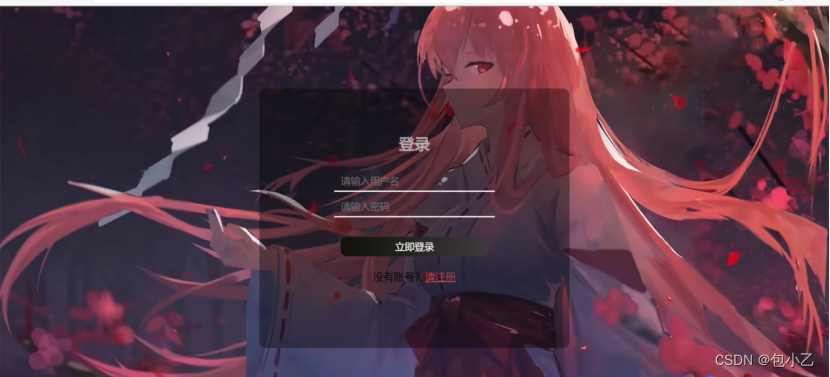
<html>
	<head>
		<title>主页</title>
		<meta charset="UTF-8"/>
		<style type="text/css">/*设置图片样式*/
        #div_box {
      width: 1100px;
      height: 500px;
	  font-family: "宋体";
      background-color: #ffffff90;
      margin: auto;
      margin-top: 3%;
      text-align: center;
      border-radius: 10px;
      padding: 20px 50px;
    }

       body{
	background:url("羊村.jpg")
	no-repeat;
	background-size: 1300px 650px;
      position: fixed;
      top: 0;
      left: 0;
      width: 100%;
      height: 100%;
      z-index: -10;
      object-fit: cover;
      }
		  h{
            text-align: center;
              margin-top:0px;
              font-size: 20px;
			  color:rgb(9, 8, 8);
              font-family: "宋体";
          }
		  h1{
            text-align: center;
              margin-top:30px;
              font-size: 30px;
			  color:rgb(13, 11, 11);
              font-family: "宋体";
          }
		/*设置div的基础样式*/
			div{
            width: 250px;
            height: 250px;
            border-radius: 50%;
        }

		/*设置header和footer的样式*/
			#header,#footer{
				width: 1190px;
				margin: auto;
				margin-top: 100px;
			}
		/*设置子div的样式*/
			#div01{
				border: solid 0px #ffffff90 ;
				float: left;

				margin-right: 20px;

            }


			#div02{
				border: solid 0px #ffffff90;
				float: left;

				margin-right: 20px;

		}
			#div03{
				border: solid 0px #ffffff90 ;
				float: left;
				margin-right: 20px;
			}
			#div04{
				border: solid 0px  #ffffff90;
				float: left;

			}
            #log
            {
                color:rgb(100, 50, 355);
				font-size: 55px;
            }
			img {
            width: 200px;
            height: 200px;
            border-radius: 50%;
        }

	</style>
	<style>
	a:visited {color:rgb(2, 1, 1);}
	a:hover {color:rgb(24, 21, 198);}</style>
	</head>
	<body>
        <div id="div_box">
        <h1>欢迎来到我的主页</h1>
		<div id="header">
				<div id="div01">
                <img src="包包大人一.jpg" alt="" class="img"><br>
			<h><a href="个人简介.html">个人简介</a></h>
				</div>
				<div id="div02">
                    <img src="包包大人二.jpg" alt="" class="img"><br>
					<h><a href="我的理想.html">我的理想</a></h>
				</div>

			<div id="div03">
                <img src="包包大人开车.jpg" alt=""class="img"><br>
				<h><a href="我的生活.html">我的生活</a></h>
			</div>
			<div id="div04">
                <img src="包包大人三.jpg" alt=""class="img"><br>
				<h><a href="学习内容.html">学习内容</a></h>

			</div>
		</div>

        </p>
	</body>
</html>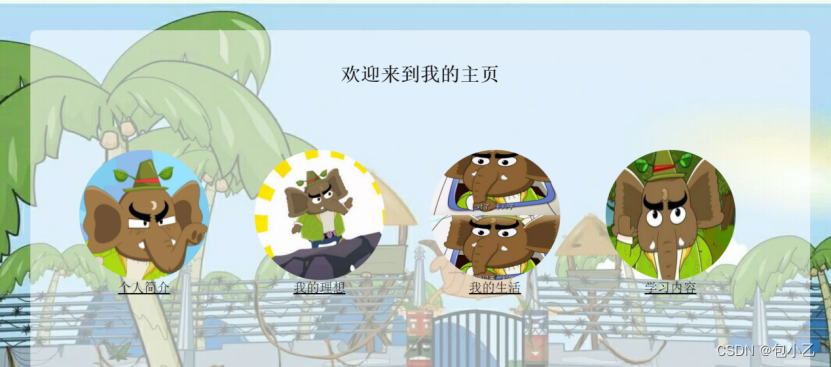
<html>
<head>
<title>个人简介</title>
<meta charset="UTF-8"/>
<style type="text/css">/*设置图片样式*/
#div_box {
width: 1050px;
height: 500px;
margin: 10px 50px;
background-color: #ffffff90;
border: 1px solid #FFFFFF90;
color: rgb(7, 7, 7);
font-family: "宋体";
text-align: center;
border-radius: 10px;
padding: 20px 50px;
}
h2{text-align: right;
font-family: "宋体";
color:#100f0f;
font-size: 18px;
margin-right:15px;
}
body {
background:url("羊村.jpg")
no-repeat;
background-size:120% 100%;
}
/*设置div的基础样式*/
div{width: 240px;
height: 320px;
}
/*设置header和footer的样式*/
#header,#footer{width: 1050px;
margin: auto;
margin-top: 30px;
}
/*设置子div的样式*/
#div01{
border: solid #ffffff90;
float: left;
background-color: #ffffff90 ;
margin-right: 20px;
}
#div02{
border: solid #ffffff90 ;
float: left;
background-color: #ffffff90;
margin-right: 20px;
}
#div03{
border: solid #ffffff90;
float: left;
background-color: #ffffff90;
margin-right: 20px;
}
#div04{
border: solid #ffffff90 ;
float: left;
background-color: #ffffff90;
}
div p{
text-align: right;
display: block;
font-size: 25px;
text-align: center;
color: rgb(6, 6, 6);
font-weight: bold;
}
div span{
display: block;
font-size: 18px;
text-align: left;
color: rgb(5, 5, 5);
font-weight: bold;
}
</style>
</head>
<h2><body>点此返回我的主界面?<a href="主页.html">返回</a></h2>
<style>
a:visited {color:#db1b1e;}
a:hover {color:#480738;}
</style>
<div id="div_box">
<h1>个人简介<h1/>
<div id="header">
<div id="div01">
<p>个人信息</p><br>
<span> *姓名:包包大人
<br/><br/> *性别:女
<br/><br/> *家乡:
<br/><br/> *民族:汉族
</span>
</div>
<div id="div02">
<p>联系方式</p><br>
<span> *电话号码:*
<br/><br/> *QQ:*
<br/><br/> *微信:*
<br/><br/> *地址:*
</span>
</div>
<div id="div03">
<p>兴趣爱好</p><br>
<span> *喜欢包包夫人
<br/><br/> *打游戏
<br/><br/> *拍照
<br/><br/> *喝奶茶
</span>
</div>
<div id="div04">
<p>特长技能</p><br>
<span> *干饭
<br/><br/> *暂时无
<br/><br/> *无
<br/><br/> *无
</span>
</div>
</div>
</p>
</body>
</html>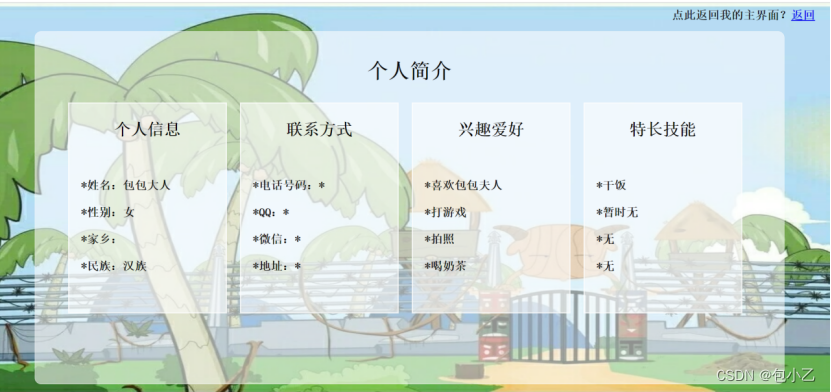
<!DOCTYPE html>
<html lang="en">
<head>
    <meta charset="UTF-8">
    <meta name="viewport" content="width=device-width, initial-scale=1.0">
    <title>我的生活二</title>
    <style>
        /* 重置默认样式 */

        #div_box {
			width: 800px;
		  height: 400px;

	  background-color: #ffffff90;
	  border: 1px solid #FFFFFF90;
      color: rgb(7, 7, 7);
	  font-family: "宋体";
      text-align: center;
      padding: 50px 50px;
      margin: 30px 200px;/*上,左距离*/
      border-radius: 10px;/*改变形状*/
    }


        h1{
            text-align: center;
              margin-top:20px;
              font-size: 24px;
              font-family: "宋体";
          }

         h2{text-align: right;
            font-family: "宋体";
            margin-right:15px;
            margin-top:0; color:#3e3b3b;
            font-size: 15px;
           }
        body{
	background:url("羊村.jpg")
	no-repeat;
	background-size: 1300px 650px;
      position: fixed;
      top: 0;
      left: 0;
      width: 100%;
      height: 100%;
      z-index: -10;
      object-fit: cover;
      }
        .list{
           width: 1100px;
            height:450px;
           display: flex;
           margin:20px auto;
           flex-wrap: wrap;
            }
        .list li{
            width:400px;
            height:350px;
            border-radius: 10px;/*矩形角圆弧度*/
            margin-top:5px;
            list-style: none;
                }
        .list img{
            margin-left: 30px;
            margin-top:10px;
                 }
        .title{
            font-size:20px;
            text-align: left;
            color:#333333;
             text-decoration:
             underline rgb(4, 0, 0); /*色下划线*/
              }
        .smalltitle{
			display: block;
			font-size: 17px;
            color: #060101 ;
			text-align: left;

        }
    </style>
</head>
<body>
     <h2>点此返回我的主界面?<a href="主页.html">返回</a></h2>
    <div id="div_box">
    <h1>我的理想</h1>
    <ul class="list">
        <li>
            <img src="狗狗动图.gif" alt="朱依"width="250" height="250">
        </li>
        <li>
            <p class="title"><b>理想生活</b></p>
            <p class="smalltitle">家人平安健康,生活幸福美满</p>
            <p class="title"><b>近期目标</b></p>
            <p class="smalltitle">学好专业知识</p>
        </li>
    </ul>
</body>
</html>
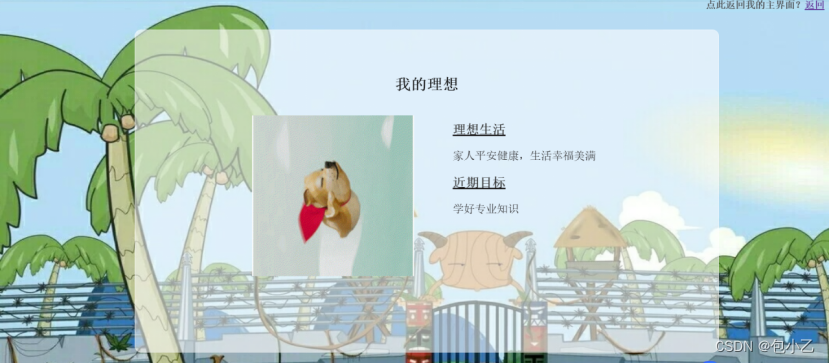
<!DOCTYPE html>
<html lang="en">
<head>
    <meta charset="UTF-8">
    <meta name="viewport" content="width=device-width, initial-scale=1.0">
    <title>我的生活二</title>
    <style>
        /* 重置默认样式 */
        *{
            margin:0;
            padding: 0;
        }
        h1{text-align: center; font-family: "宋体";
    }

         h2{text-align: right;
            font-family: "宋体";
            margin-right:15px;
            margin-top:0; color:#3e3b3b;
            font-size: 15px;
        }
        body{
      background:url("羊村.jpg")
      no-repeat;
	  background-size: 1300px 650px;
      position: fixed;
      top: 0;
      left: 0;
      width: 100%;
      height: 100%;
      z-index: -10;
      object-fit: cover;
         }
        .list{
           width: 1250px;
           height:550px;
           display: flex;
           margin:20px auto
           ;
	  background-color: #ffffff90;
           flex-wrap: wrap;
        }
        .list li{
            width:310px;
            height:250px;
            background-color:#ffffff90;

            border-radius: 10px;
            margin-top:5px;
            box-shadow: 0 0 0px #dedede;

            list-style: none;
            transition: all .2s;/*控制时间*/
        }
        .list img{
            margin-left: 20px;
            margin-top:14px;
        }

        .title{
            font-size:20px;
            color:#333333;
        }
        .smalltitle{


			text-align: right;
			display: block;
			font-size: 17px;
			text-align: center;
			color: rgb(6, 6, 6);


        }
        .list li:hover{
            box-shadow: 10px 10px 10px #fff;
            transform:scale(1.1);
        }
    </style>
</head>

<body>  <h1>照片墙</h1>
  <h2>点此返回我的主界面?<a href="主页.html">返回</a></h2>
    <ul class="list">

        <li>
            <img src="包包大人.jpg" alt=""width="260" height="200">

            <p class="smalltitle">超级喜欢包包大人</p>
        </li>
        <li>
            <img src="可爱猫猫.jpg" alt=""width="260" height="200">

            <p class="smalltitle">可爱猫猫</p>
        </li>
        <li>
            <img src="偶像.jpg" alt=""width="260" height="200">

            <p class="smalltitle">最喜欢的偶像</p>
        </li>
        <li>
            <img src="食物二.jpg" alt=""width="260" height="200">

            <p class="smalltitle">生日聚餐</p>
        </li>
        <li>
            <img src="月饼.jpg" alt=""width="260" height="200">
            <p class="smalltitle">2021年中秋节收到的月饼</p>
        </li>
        <li>
            <img src="风景.jpg" alt=""width="260" height="200">
            <p class="smalltitle">2020年武汉玩纪念</p>
        </li>
        <li>
            <img src="美食三.jpg" alt=""width="260" height="200">

            <p class="smalltitle">和室友聚餐</p>
        </li>
        <li>
            <img src="包包大人开车.jpg" alt=""width="260" height="200">

            <p class="smalltitle">包包大人开车</p>
        </li>
    </ul>
</body>
</html>
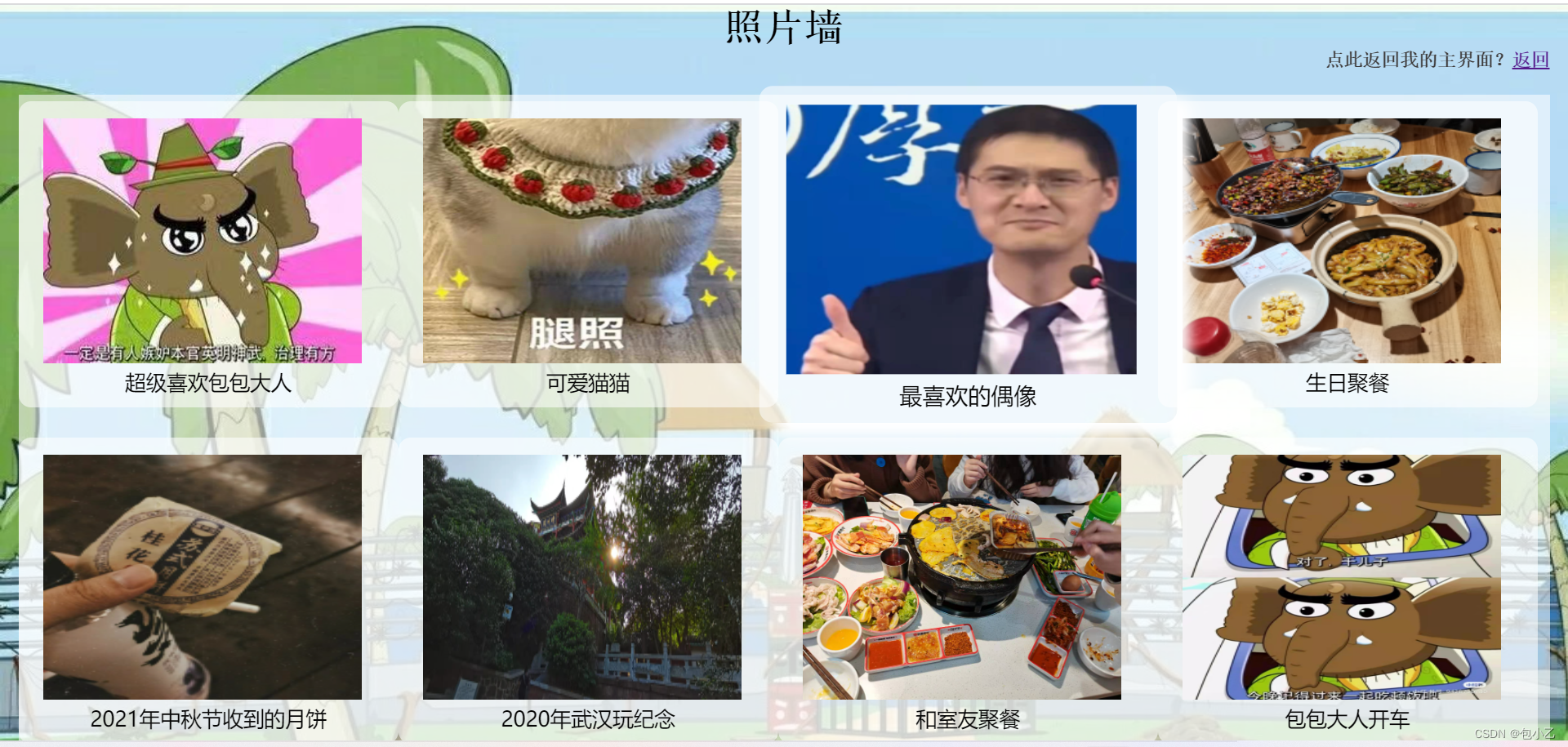
<!DOCTYPE html>
<html>
    <head>
    <title>学习内容</title>
<meta charset="UTF-8"/>
<style type="text/css">
body{
	background:url("羊村.jpg")
	no-repeat;
	background-size: 1300px 650px;
      position: fixed;
      top: 0;
      left: 0;
      width: 100%;
      height: 100%;
      z-index: -10;
      object-fit: cover;
      }
    div.transbox
		{
		  width: 800px;
		  height: 500px;
		  margin: 40px 230px;
		  background-color: #ffffff90;
		  border: 1px solid #FFFFFF90;
		  opacity:0.8;
		}

		h1{text-align: center;
            font-family: "宋体";
             color:#060000;
			  margin-top:20px;
            font-size: 24px;

        }
		h2{text-align: left;
            font-family: "宋体";
             color:#100f0f;
            font-size: 20px;
			margin-left:3cm;
        }
		h3{text-align: right;
            font-family: "宋体";
             color:#100f0f;
            font-size: 18px;
			 margin-top:2px;
			margin-right:15px;
        }
		p{text-align: right;
            font-family: "宋体";
             color:#020001;
            font-size: 18px;
			margin-right:15px;
        }
</style>
<body>
<head>
	<h3>点此返回我的主界面?<a href="主页.html">返回</a></h3>
    <div class="transbox">
	<h1>#每日学习内容#</h1>
		<h2>
			<li>记英语单词学专业知识</li>
			<li>保持锻炼</li>
			<li>少熬夜,早睡</li>
			<li>......</li>
    </div>
</head>
</body>
</html>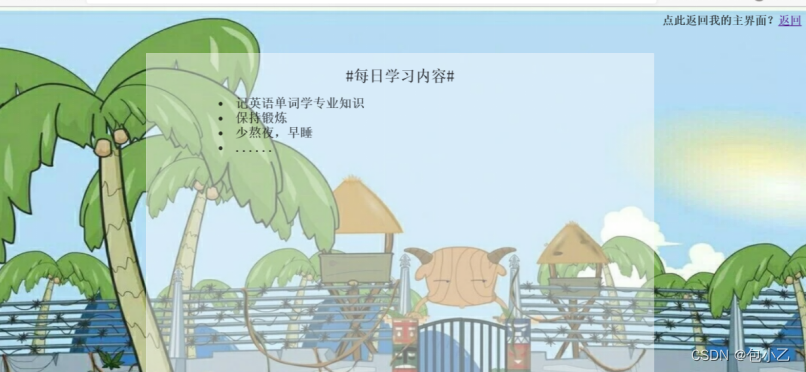
j2ee老师布置的实验,简单的个人网站,以上附代码和实现界面,虽然我分了七个点,但是每个界面用的代码都是差不多的,对了,图片和代码记得放在同一个文件夹下,因为我淋过雨,所以为有缘看到的学弟学妹撑伞,我水平很低,仅供参考。
我想将html转换为纯文本。不过,我不想只删除标签,我想智能地保留尽可能多的格式。为插入换行符标签,检测段落并格式化它们等。输入非常简单,通常是格式良好的html(不是整个文档,只是一堆内容,通常没有anchor或图像)。我可以将几个正则表达式放在一起,让我达到80%,但我认为可能有一些现有的解决方案更智能。 最佳答案 首先,不要尝试为此使用正则表达式。很有可能你会想出一个脆弱/脆弱的解决方案,它会随着HTML的变化而崩溃,或者很难管理和维护。您可以使用Nokogiri快速解析HTML并提取文本:require'nokogiri'h
我在MiniTest::Spec和Capybara中使用以下规范:find_field('Email').must_have_css('[autofocus]')检查名为“电子邮件”的字段是否具有autofocus属性。doc说如下:has_css?(path,options={})ChecksifagivenCSSselectorisonthepageorcurrentnode.据我了解,字段“Email”是一个节点,因此调用must_have_css绝对有效!我做错了什么? 最佳答案 通过JonasNicklas得到了答案:No
我正在编写一个包含C扩展的gem。通常当我写一个gem时,我会遵循TDD的过程,我会写一个失败的规范,然后处理代码直到它通过,等等......在“ext/mygem/mygem.c”中我的C扩展和在gemspec的“扩展”中配置的有效extconf.rb,如何运行我的规范并仍然加载我的C扩展?当我更改C代码时,我需要采取哪些步骤来重新编译代码?这可能是个愚蠢的问题,但是从我的gem的开发源代码树中输入“bundleinstall”不会构建任何native扩展。当我手动运行rubyext/mygem/extconf.rb时,我确实得到了一个Makefile(在整个项目的根目录中),然后当
在我的Controller中,我通过以下方式在我的index方法中支持HTML和JSON:respond_todo|format|format.htmlformat.json{renderjson:@user}end在浏览器中拉起它时,它会自然地以HTML呈现。但是,当我对/user资源进行内容类型为application/json的curl调用时(因为它是索引方法),我仍然将HTML作为响应。如何获取JSON作为响应?我还需要说明什么? 最佳答案 您应该将.json附加到请求的url,提供的格式在routes.rb的路径中定义。这
所以我在关注Railscast,我注意到在html.erb文件中,ruby代码有一个微弱的背景高亮效果,以区别于其他代码HTML文档。我知道Ryan使用TextMate。我正在使用SublimeText3。我怎样才能达到同样的效果?谢谢! 最佳答案 为SublimeText安装ERB包。假设您安装了SublimeText包管理器*,只需点击cmd+shift+P即可获得命令菜单,然后键入installpackage并选择PackageControl:InstallPackage获取包管理器菜单。在该菜单中,键入ERB并在看到包时选择
我已经在Sinatra上创建了应用程序,它代表了一个简单的API。我想在生产和开发上进行部署。我想在部署时选择,是开发还是生产,一些方法的逻辑应该改变,这取决于部署类型。是否有任何想法,如何完成以及解决此问题的一些示例。例子:我有代码get'/api/test'doreturn"Itisdev"end但是在部署到生产环境之后我想在运行/api/test之后看到ItisPROD如何实现? 最佳答案 根据SinatraDocumentation:EnvironmentscanbesetthroughtheRACK_ENVenvironm
有没有办法在这个简单的get方法中添加超时选项?我正在使用法拉第3.3。Faraday.get(url)四处寻找,我只能先发起连接后应用超时选项,然后应用超时选项。或者有什么简单的方法?这就是我现在正在做的:conn=Faraday.newresponse=conn.getdo|req|req.urlurlreq.options.timeout=2#2secondsend 最佳答案 试试这个:conn=Faraday.newdo|conn|conn.options.timeout=20endresponse=conn.get(url
我们的git存储库中目前有一个Gemfile。但是,有一个gem我只在我的环境中本地使用(我的团队不使用它)。为了使用它,我必须将它添加到我们的Gemfile中,但每次我checkout到我们的master/dev主分支时,由于与跟踪的gemfile冲突,我必须删除它。我想要的是类似Gemfile.local的东西,它将继承从Gemfile导入的gems,但也允许在那里导入新的gems以供使用只有我的机器。此文件将在.gitignore中被忽略。这可能吗? 最佳答案 设置BUNDLE_GEMFILE环境变量:BUNDLE_GEMFI
在Ruby中可以使用哪些替代方法来ping一个ip地址?标准库“ping”库的功能似乎非常有限。我对在这里滚动我自己的代码不感兴趣。有没有好的gem?我应该接受它并忍受它吗?(我在Linux上使用Ruby1.8.6编写代码) 最佳答案 net-ping值得一看。它允许TCPping(如标准rubyping),但也允许UDP、HTTP和ICMPping。ICMPping需要root权限,但其他则不需要。 关于ruby-Pingruby网站?,我们在StackOverflow上找到一个类
我正在使用Rails构建一个简单的聊天应用程序。当用户输入url时,我希望将其输出为html链接(即“url”)。我想知道在Ruby中是否有任何库或众所周知的方法可以做到这一点。如果没有,我有一些不错的正则表达式示例代码可以使用... 最佳答案 查看auto_linkRails提供的辅助方法。这会将所有URL和电子邮件地址变成可点击的链接(htmlanchor标记)。这是文档中的代码示例。auto_link("Gotohttp://www.rubyonrails.organdsayhellotodavid@loudthinking.
