目录
零基础 OpenGL (ES) 学习路线推荐 : OpenGL (ES) 学习目录 >> OpenGL ES 基础
零基础 OpenGL (ES) 学习路线推荐 : OpenGL (ES) 学习目录 >> OpenGL ES 转场
零基础 OpenGL (ES) 学习路线推荐 : OpenGL (ES) 学习目录 >> OpenGL ES 特效
零基础 OpenGL (ES) 学习路线推荐 : OpenGL (ES) 学习目录 >> OpenGL ES 函数
零基础 OpenGL (ES) 学习路线推荐 : OpenGL (ES) 学习目录 >> OpenGL ES GPUImage 使用
零基础 OpenGL (ES) 学习路线推荐 : OpenGL (ES) 学习目录 >> OpenGL ES GLSL 编程
GPUImage 共 125 个滤镜, 分为四类
1、Color adjustments : 31 filters , 颜色处理相关
2、Image processing : 40 filters , 图像处理相关.
3、Blending modes : 29 filters , 混合模式相关.
4、Visual effects : 25 filters , 视觉效果相关.
GPUImagePerlinNoiseFilter 属于 GPUImage 图像视觉效果相关,用来处理图像柏林噪点/花边噪点。shader 源码如下:
/******************************************************************************************/
//@Author:猿说编程
//@Blog(个人博客地址): www.codersrc.com
//@File:IOS – OpenGL ES 图像柏林噪点/花边噪点 GPUImagePerlinNoiseFilter
//@Time:2022/06/08 06:30
//@Motto:不积跬步无以至千里,不积小流无以成江海,程序人生的精彩需要坚持不懈地积累!
/******************************************************************************************/

#if TARGET_IPHONE_SIMULATOR || TARGET_OS_IPHONE
NSString *const kGPUImagePerlinNoiseFragmentShaderString = SHADER_STRING
(
 precision highp float;
 varying highp vec2 textureCoordinate;
 uniform float scale;

 uniform vec4 colorStart;
 uniform vec4 colorFinish;

 //
 // Description : Array and textureless GLSL 2D/3D/4D simplex
 // noise functions.
 // Author : Ian McEwan, Ashima Arts.
 // Maintainer : ijm
 // Lastmod : 20110822 (ijm)
 // License : Copyright (C) 2011 Ashima Arts. All rights reserved.
 // Distributed under the MIT License. See LICENSE file.
 // https://github.com/ashima/webgl-noise
 //

 vec4 mod289(vec4 x)
{
    return x - floor(x * (1.0 / 289.0)) * 289.0;
}

 vec4 permute(vec4 x)
{
    return mod289(((x*34.0)+1.0)*x);
}

 vec4 taylorInvSqrt(vec4 r)
{
    return 1.79284291400159 - 0.85373472095314 * r;
}

 vec2 fade(vec2 t) {
     return t*t*t*(t*(t*6.0-15.0)+10.0);
 }

 // Classic Perlin noise
 float cnoise(vec2 P)
{
    vec4 Pi = floor(P.xyxy) + vec4(0.0, 0.0, 1.0, 1.0);
    vec4 Pf = fract(P.xyxy) - vec4(0.0, 0.0, 1.0, 1.0);
    Pi = mod289(Pi); // To avoid truncation effects in permutation
    vec4 ix = Pi.xzxz;
    vec4 iy = Pi.yyww;
    vec4 fx = Pf.xzxz;
    vec4 fy = Pf.yyww;

    vec4 i = permute(permute(ix) + iy);

    vec4 gx = fract(i * (1.0 / 41.0)) * 2.0 - 1.0 ;
    vec4 gy = abs(gx) - 0.5 ;
    vec4 tx = floor(gx + 0.5);
    gx = gx - tx;

    vec2 g00 = vec2(gx.x,gy.x);
    vec2 g10 = vec2(gx.y,gy.y);
    vec2 g01 = vec2(gx.z,gy.z);
    vec2 g11 = vec2(gx.w,gy.w);

    vec4 norm = taylorInvSqrt(vec4(dot(g00, g00), dot(g01, g01), dot(g10, g10), dot(g11, g11)));
    g00 *= norm.x;
    g01 *= norm.y;
    g10 *= norm.z;
    g11 *= norm.w;

    float n00 = dot(g00, vec2(fx.x, fy.x));
    float n10 = dot(g10, vec2(fx.y, fy.y));
    float n01 = dot(g01, vec2(fx.z, fy.z));
    float n11 = dot(g11, vec2(fx.w, fy.w));

    vec2 fade_xy = fade(Pf.xy);
    vec2 n_x = mix(vec2(n00, n01), vec2(n10, n11), fade_xy.x);
    float n_xy = mix(n_x.x, n_x.y, fade_xy.y);
    return 2.3 * n_xy;
}


 void main()
 {

     float n1 = (cnoise(textureCoordinate * scale) + 1.0) / 2.0;

     vec4 colorDiff = colorFinish - colorStart;
     vec4 color = colorStart + colorDiff * n1;

     gl_FragColor = color;
 }
);
#else
NSString *const kGPUImagePerlinNoiseFragmentShaderString = SHADER_STRING
(
 varying vec2 textureCoordinate;
 uniform float scale;

 uniform vec4 colorStart;
 uniform vec4 colorFinish;

 //
 // Description : Array and textureless GLSL 2D/3D/4D simplex
 // noise functions.
 // Author : Ian McEwan, Ashima Arts.
 // Maintainer : ijm
 // Lastmod : 20110822 (ijm)
 // License : Copyright (C) 2011 Ashima Arts. All rights reserved.
 // Distributed under the MIT License. See LICENSE file.
 // https://github.com/ashima/webgl-noise
 //

 vec4 mod289(vec4 x)
{
    return x - floor(x * (1.0 / 289.0)) * 289.0;
}

 vec4 permute(vec4 x)
{
    return mod289(((x*34.0)+1.0)*x);
}

 vec4 taylorInvSqrt(vec4 r)
{
    return 1.79284291400159 - 0.85373472095314 * r;
}

 vec2 fade(vec2 t) {
     return t*t*t*(t*(t*6.0-15.0)+10.0);
 }

 // Classic Perlin noise
 float cnoise(vec2 P)
{
    vec4 Pi = floor(P.xyxy) + vec4(0.0, 0.0, 1.0, 1.0);
    vec4 Pf = fract(P.xyxy) - vec4(0.0, 0.0, 1.0, 1.0);
    Pi = mod289(Pi); // To avoid truncation effects in permutation
    vec4 ix = Pi.xzxz;
    vec4 iy = Pi.yyww;
    vec4 fx = Pf.xzxz;
    vec4 fy = Pf.yyww;

    vec4 i = permute(permute(ix) + iy);

    vec4 gx = fract(i * (1.0 / 41.0)) * 2.0 - 1.0 ;
    vec4 gy = abs(gx) - 0.5 ;
    vec4 tx = floor(gx + 0.5);
    gx = gx - tx;

    vec2 g00 = vec2(gx.x,gy.x);
    vec2 g10 = vec2(gx.y,gy.y);
    vec2 g01 = vec2(gx.z,gy.z);
    vec2 g11 = vec2(gx.w,gy.w);

    vec4 norm = taylorInvSqrt(vec4(dot(g00, g00), dot(g01, g01), dot(g10, g10), dot(g11, g11)));
    g00 *= norm.x;
    g01 *= norm.y;
    g10 *= norm.z;
    g11 *= norm.w;

    float n00 = dot(g00, vec2(fx.x, fy.x));
    float n10 = dot(g10, vec2(fx.y, fy.y));
    float n01 = dot(g01, vec2(fx.z, fy.z));
    float n11 = dot(g11, vec2(fx.w, fy.w));

    vec2 fade_xy = fade(Pf.xy);
    vec2 n_x = mix(vec2(n00, n01), vec2(n10, n11), fade_xy.x);
    float n_xy = mix(n_x.x, n_x.y, fade_xy.y);
    return 2.3 * n_xy;
 }

 void main()
 {

     float n1 = (cnoise(textureCoordinate * scale) + 1.0) / 2.0;

     vec4 colorDiff = colorFinish - colorStart;
     vec4 color = colorStart + colorDiff * n1;

     gl_FragColor = color;
 }
);
#endif
使用GPUImagePerlinNoiseFilter 完成**图像柏林噪点/花边噪点******
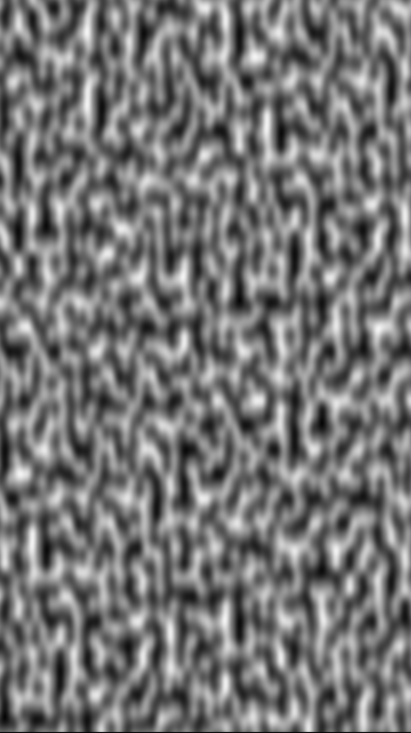
OpenGL ES Demo 下载地址 : IOS – OpenGL ES 图像柏林噪点/花边噪点 GPUImagePerlinNoiseFilter
本文由博客 - 猿说编程 猿说编程 发布!
我有带有Logo图像的公司模型has_attached_file:logo我用他们的Logo创建了许多公司。现在,我需要添加新样式has_attached_file:logo,:styles=>{:small=>"30x15>",:medium=>"155x85>"}我是否应该重新上传所有旧数据以重新生成新样式?我不这么认为……或者有什么rake任务可以重新生成样式吗? 最佳答案 参见Thumbnail-Generation.如果rake任务不适合你,你应该能够在控制台中使用一个片段来调用重新处理!关于相关公司
我正在尝试使用Ruby2.0.0和Rails4.0.0提供的API从imgur中提取图像。我已尝试按照Ruby2.0.0文档中列出的各种方式构建http请求,但均无济于事。代码如下:require'net/http'require'net/https'defimgurheaders={"Authorization"=>"Client-ID"+my_client_id}path="/3/gallery/image/#{img_id}.json"uri=URI("https://api.imgur.com"+path)request,data=Net::HTTP::Get.new(path
2022/8/4更新支持加入水印水印必须包含透明图像,并且水印图像大小要等于原图像的大小pythonconvert_image_to_video.py-f30-mwatermark.pngim_dirout.mkv2022/6/21更新让命令行参数更加易用新的命令行使用方法pythonconvert_image_to_video.py-f30im_dirout.mkvFFMPEG命令行转换一组JPG图像到视频时,是将这组图像视为MJPG流。我需要转换一组PNG图像到视频,FFMPEG就不认了。pyav内置了ffmpeg库,不需要系统带有ffmpeg工具因此我使用ffmpeg的python包装p
有这样的事吗?我想在Ruby程序中使用它。 最佳答案 试试这个http://csl.sublevel3.org/jp2a/此外,Imagemagick可能还有一些东西 关于ruby-是否有将图像文件转换为ASCII艺术的命令行程序或库?,我们在StackOverflow上找到一个类似的问题: https://stackoverflow.com/questions/6510445/
我正在使用Dragonfly在Rails3.1应用程序上处理图像。我正在努力通过url将图像分配给模型。我有一个很好的表格:{:multipart=>true}do|f|%>RemovePicture?Dragonfly的文档指出:Dragonfly提供了一个直接从url分配的访问器:@album.cover_image_url='http://some.url/file.jpg'但是当我在控制台中尝试时:=>#ruby-1.9.2-p290>picture.image_url="http://i.imgur.com/QQiMz.jpg"=>"http://i.imgur.com/QQ
我对图像处理完全陌生。我对JPEG内部是什么以及它是如何工作一无所知。我想知道,是否可以在某处找到执行以下简单操作的ruby代码:打开jpeg文件。遍历每个像素并将其颜色设置为fx绿色。将结果写入另一个文件。我对如何使用ruby-vips库实现这一点特别感兴趣https://github.com/ender672/ruby-vips我的目标-学习如何使用ruby-vips执行基本的图像处理操作(Gamma校正、亮度、色调……)任何指向比“helloworld”更复杂的工作示例的链接——比如ruby-vips的github页面上的链接,我们将不胜感激!如果有ruby-
Organization和Image具有一对一的关系。Image有一个名为filename的列,它存储文件的路径。我在Assets管道中包含这样一个文件:app/assets/other/image.jpg。播种时如何包含此文件的路径?我已经在我的种子文件中尝试过:@organization=...@organization.image.create!(filename:File.open('app/assets/other/image.jpg'))#Ialsotried:#@organization.image.create!(filename:'app/assets/other/i
默认情况下:回形针gem将所有附件存储在公共(public)目录中。出于安全原因,我不想将附件存储在公共(public)目录中,所以我将它们保存在应用程序根目录的uploads目录中:classPost我没有指定url选项,因为我不希望每个图像附件都有一个url。如果指定了url:那么拥有该url的任何人都可以访问该图像。这是不安全的。在user#show页面中:我想实际显示图像。如果我使用所有回形针默认设置,那么我可以这样做,因为图像将在公共(public)目录中并且图像将具有一个url:Someimage:看来,如果我将图像附件保存在公共(public)目录之外并且不指定url(同
使用Paperclip,我想从这样的URL抓取图像:require'open-uri'user.photo=open(url)问题是我最后得到一个像“open-uri20110915-4852-1o7k5uw”这样的文件名。有什么方法可以更改user.photo上的文件名?作为一个额外的变化,Paperclip将我的文件存储在S3上,所以如果我可以在初始分配中设置我想要的文件名就更好了,这样图像就会上传到正确的S3key。像这样:user.photo=open(url),:filename=>URI.parse(url).path 最佳答案
最近我安装了Paperclipgem,我正在努力让默认图像在我的系统上工作,我将图像文件放在assets/images/pic.png中。这是我的模型User中的代码:has_attached_file:pic,:styles=>{:medium=>"300x300>",:thumb=>"100x100>"},:default_url=>'missing_:avatar.png'#:default_url=>'assets/images/avatar.png'has_attached_file:attach这是我的AddPicPaperClip迁移中的代码:defself.upadd_
