1.WebChromeClient的 API onReachedMaxAppCacheSize 没了
'onReachedMaxAppCacheSize' overrides nothing
    // 扩充缓存的容量
        override fun onReachedMaxAppCacheSize(
            spaceNeeded: Long, totalUsedQuota: Long, quotaUpdater: QuotaUpdater
        ) {
            quotaUpdater.updateQuota(spaceNeeded * 2)
        }
2.WebSettings的setAppCacheEnabled(true) 没了
WebView调整:废弃setAppCacheEnabled与setForceDark方法;
(若设置 targetSdk>=33 则此项必需适配!)
修改为
mWebSettings.setCacheMode(WebSettings.LOAD_DEFAULT);
在之前版本的Android系统中,只需将android:exported设为true就可以跨应用显式启动Activity和Service,即使intent-filter中的action或者type不匹配,也能够启动。
为避免上述漏洞,Android 13增强了intent-filter的匹配过滤逻辑。在接收方的targetSdk == 33的情况下,如果intent-filter匹配命中,无论发送方的targetSdk版本如何,intent都将生效。
温馨提示:
以下几种情况不需要遵循intent-filter的匹配过滤逻辑:
组件没有声明
同一个App里的intent
系统或Root进程发出的intent
以往的Android系统下,应用动态注册的BroadcastReceiver广播接收器会接收到任何应用发送的广播(除非该接收器使用了应用签名权限保护),这会使动态注册的广播接收器存在安全风险。
Android13要求,应用动态注册的广播接收器必须以显著的方式指出是否允许其他应用访问,即其他应用是否可以向其发送广播。否则,在动态注册时系统将抛出安全异常(SecurityException)。
目前该增强措施并非默认生效,开发者需启用 DYNAMIC_RECEIVER_EXPLICIT_EXPORT_REQUIRED兼容性框架,并在动态注册广播时指定是否接受其他应用的广播:
context.registerReceiver(receiver, intentFilter, RECEIVER_EXPORTED)
context.registerReceiver(receiver, intentFilter, RECEIVER_NOT_EXPORTED)
Google在Android 13上对本地数据访问权限做了更进一步的细化。
将 READ_EXTERNAL_STORAGE 细分为IAMGES、VIDEO、AUDIO权限, targetSdk>=33 此项必需适配。
从Android 13开始,系统新增运行时权限READ_MEDIA_IAMGES、READ_MEDIA_VIDEO、READ_MEDIA_AUDIO 替代原有的READ_EXTERNAL_STORAGE权限。
| 权限 | 权限说明 |
| READ_MEDIA_IAMGES | 图片权限 |
| READ_MEDIA_VIDEO | 视频权限 |
| READ_MEDIA_AUDIO | 音频权限 |
当应用升级到targetSdk>=33时:
已授权READ_EXTERNAL_STORAGE权限的应用:系统将自动赋予对应的细化权限。
未授权仍请求READ_EXTERNAL_STORAGE权限:亲测系统将不会授予任何权限。
因此,API 32也就是Android 12及以下系统,我们仍然声明的是READ_EXTERNAL_STORAGE权限。从Android 13开始,我们就会使用READ_MEDIA_IMAGES、READ_MEDIA_VIDEO、READ_MEDIA_AUDIO来替代了。
从Android 13开始,注册静态广播时,需设置对其他应用的可见性:
若对其他应用可见,广播注册时设置:Context.RECEIVER_EXPORTED
若仅应用内使用,广播注册时设置:Context.RECEIVER_NOT_EXPORTED
// This broadcast receiver should be able to receive broadcasts from other apps.
// This option causes the same behavior as setting the broadcast receiver's
// "exported" attribute to true in your app's manifest.
context.registerReceiver(sharedBroadcastReceiver, intentFilter,
    RECEIVER_EXPORTED)

// For app safety reasons, this private broadcast receiver should **NOT**
// be able to receive broadcasts from other apps.
context.registerReceiver(privateBroadcastReceiver, intentFilter,
    RECEIVER_NOT_EXPORTED)
Android 13 引入了一种新的运行时通知权限:POST_NOTIFICATIONS。
POST_NOTIFICATIONS 权限级别被定义为dangerous 开发者使用该权限时需动态申请。
对于以Android13,在显示Android通知栏时,一方面需要在AndroidManifest中声明 android.permission.POST_NOTIFICATION,另一方面代码中需动态申请该通知栏权限。
<uses-permission android:name="android.permission.POST_NOTIFICATIONS" /><manifest xmlns:android="http://schemas.android.com/apk/res/android"
xmlns:tools="http://schemas.android.com/tools"
package="xxx.xxxx.xxxx">
<uses-permission android:name="android.permission.POST_NOTIFICATIONS"/>
EasyPermissions.requestPermissions(this, this.getString(R.string.ask_again),
		PermissionActivity.RC_PERMISSION_NOTIFICATIONS, Manifest.permission.POST_NOTIFICATIONS);
判断应用是否有能力发出通知让用户看到(各个系统版本上都是能正常工作):
val notificationManager = getSystemService(NOTIFICATION_SERVICE) as NotificationManager
if (notificationManager.areNotificationsEnabled()) {
    // Permission granted
} else {
    // Permission not granted
}
Android 13上判断发送通知权限 :
if (ContextCompat.checkSelfPermission(this, Manifest.permission.POST_NOTIFICATIONS)
    == PackageManager.PERMISSION_GRANTED) {
    // Permission granted
} else {
    // Permission not granted
}
注意:一旦被用户拒绝授权,下次系统将不会再出现权限申请的弹窗。
引导用户前往设置界面打开通知权限。代码如下:
private void goSetting() {
    final ApplicationInfo applicationInfo = getApplicationInfo();

    try {
        Intent intent = new Intent();
        intent.setFlags(Intent.FLAG_ACTIVITY_NEW_TASK);
        intent.setAction("android.settings.APP_NOTIFICATION_SETTINGS");
        intent.putExtra("app_package", applicationInfo.packageName);
        intent.putExtra("android.provider.extra.APP_PACKAGE", applicationInfo.packageName);
        intent.putExtra("app_uid", applicationInfo.uid);
        startActivity(intent);
    } catch (Throwable t) {
        t.printStackTrace();
        Intent intent = new Intent();
        intent.setFlags(Intent.FLAG_ACTIVITY_NEW_TASK);
        intent.setAction("android.settings.APPLICATION_DETAILS_SETTINGS");
        intent.setData(Uri.fromParts("package", applicationInfo.packageName, null));
        startActivity(intent);
    }
}
class TestNavigationActivity : AppCompatActivity() {

    companion object {
        const val TAG = "TestNavigationActivityTAG"
    }

    override fun onCreate(savedInstanceState: Bundle?) {
        super.onCreate(savedInstanceState)
        setContentView(R.layout.activity_test_navigation)

        checkAndShow()
    }

    private fun checkAndShow() {
        if (Build.VERSION.SDK_INT >= Build.VERSION_CODES.TIRAMISU) {
            val manager = getSystemService(NotificationManager::class.java)
            val flag = manager.areNotificationsEnabled()
            if (!flag) {
                requestPermission(PermissionWrapper(POST_NOTIFICATIONS, 1001))
            }
        }
    }


    private fun checkPermission(permission: String): Boolean {
        if (Build.VERSION.SDK_INT < Build.VERSION_CODES.M) {
            return true
        }
        return (ContextCompat.checkSelfPermission(
            this, permission
        ) == PackageManager.PERMISSION_GRANTED)
    }

    private fun requestPermission(permission: PermissionWrapper) {
        if (checkPermission(permission.name)) {
            Toast.makeText(this, "已授予权限:" + permission.name, Toast.LENGTH_LONG).show()
            Log.v(TAG, "已授予权限:" + permission.name)
        } else {
            Toast.makeText(this, "未授予权限:" + permission.name + ",尝试获取权限...", Toast.LENGTH_LONG)
                .show()
            Log.v(TAG, "未授予权限:" + permission.name + ",尝试获取权限...")
            ActivityCompat.requestPermissions(this, arrayOf(permission.name), permission.code)
        }
    }

    data class PermissionWrapper(val name: String, val code: Int)


    override fun onRequestPermissionsResult(
        requestCode: Int, permissions: Array<out String>, grantResults: IntArray
    ) {
        super.onRequestPermissionsResult(requestCode, permissions, grantResults)
        val result = StringBuilder().apply {
            append("请求码:$requestCode")
            append("-权限:")
            permissions.forEach {
                append(it)
            }
            append("-授权结果:")
            grantResults.forEach {
                append(it)
            }
        }.toString()
        Toast.makeText(this, result, Toast.LENGTH_LONG).show()
        Log.v(TAG, result)
    }
}
V/TestNavigationActivityTAG: 未授予权限:android.permission.POST_NOTIFICATIONS,尝试获取权限...
 V/TestNavigationActivityTAG: 请求码:1001-权限:android.permission.POST_NOTIFICATIONS-授权结果:0

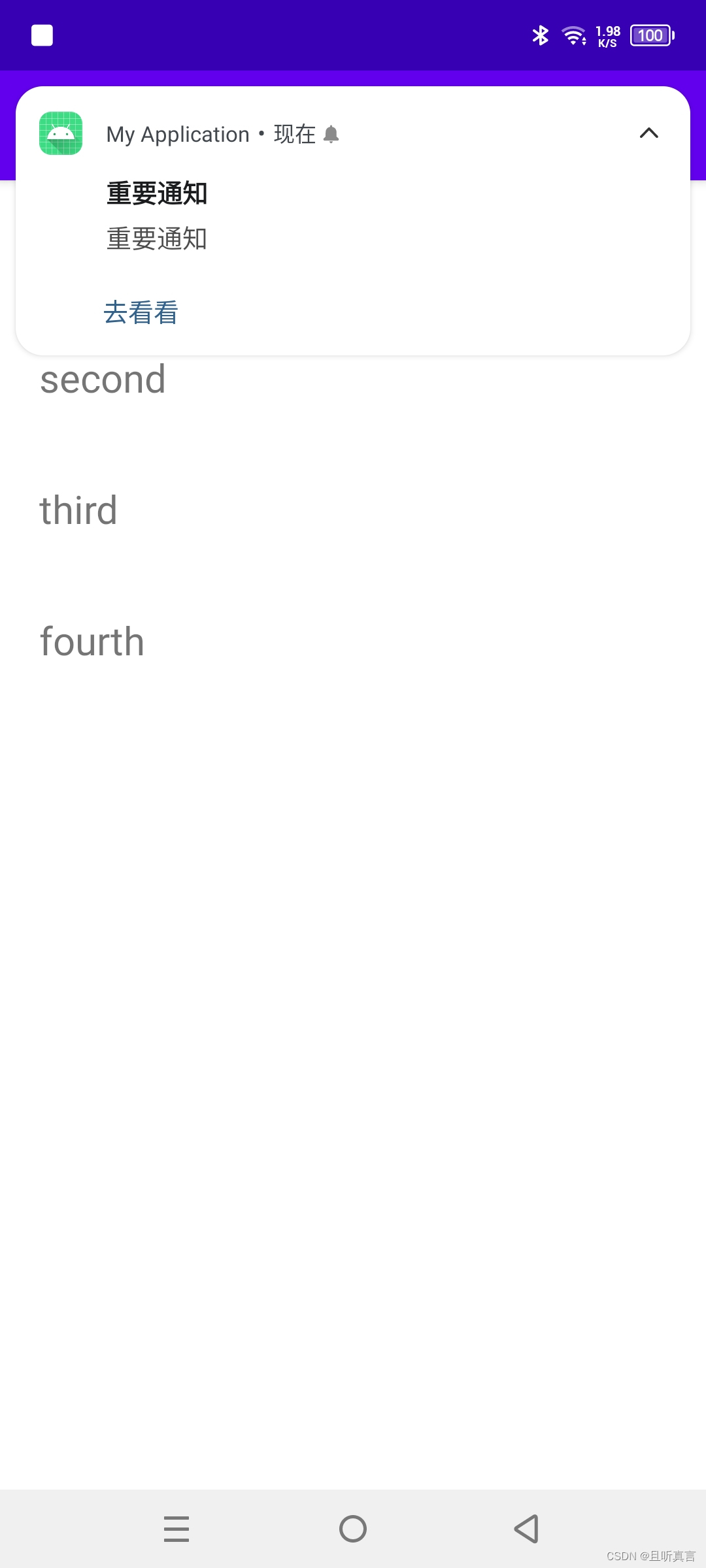
拿到权限后才能发送通知,代码如下:
class TestNavigationActivity : AppCompatActivity() {

    companion object {
        private const val TAG = "TestNavigationActivityTAG"

        private const val CHANNEL_ID = "myApplication_channel_1"

        private const val CHANNEL_NAME = "myApplication_channel_name"

        private const val NOTIFICATION_ID_MSG = 100
    }

    override fun onCreate(savedInstanceState: Bundle?) {
        super.onCreate(savedInstanceState)
        setContentView(R.layout.activity_test_navigation)

        checkAndShow()
    }

    private fun checkAndShow() {
        if (Build.VERSION.SDK_INT >= Build.VERSION_CODES.TIRAMISU) {
            val manager = getSystemService(NotificationManager::class.java)
            val flag = manager.areNotificationsEnabled()
            if (!flag) {
                requestPermission(PermissionWrapper(POST_NOTIFICATIONS, 1001))
            } else {
                showNotification()
            }
        }
    }


    private fun checkPermission(permission: String): Boolean {
        if (Build.VERSION.SDK_INT < Build.VERSION_CODES.M) {
            return true
        }
        return (ContextCompat.checkSelfPermission(
            this, permission
        ) == PackageManager.PERMISSION_GRANTED)
    }

    private fun requestPermission(permission: PermissionWrapper) {
        if (checkPermission(permission.name)) {
            Toast.makeText(this, "已授予权限:" + permission.name, Toast.LENGTH_LONG).show()
            Log.v(TAG, "已授予权限:" + permission.name)
        } else {
            Toast.makeText(this, "未授予权限:" + permission.name + ",尝试获取权限...", Toast.LENGTH_LONG)
                .show()
            Log.v(TAG, "未授予权限:" + permission.name + ",尝试获取权限...")
            ActivityCompat.requestPermissions(this, arrayOf(permission.name), permission.code)
        }
    }

    data class PermissionWrapper(val name: String, val code: Int)


    override fun onRequestPermissionsResult(
        requestCode: Int, permissions: Array<out String>, grantResults: IntArray
    ) {
        super.onRequestPermissionsResult(requestCode, permissions, grantResults)
        val result = StringBuilder().apply {
            append("请求码:$requestCode")
            append("-权限:")
            permissions.forEach {
                append(it)
            }
            append("-授权结果:")
            grantResults.forEach {
                append(it)
            }
        }.toString()
        Toast.makeText(this, result, Toast.LENGTH_LONG).show()
        Log.v(TAG, result)
    }


    private fun showNotification() {
        val intent = Intent(this, NotificationResultMainActivity::class.java)
        val manager = getSystemService(NotificationManager::class.java)
        val pendingIntent = PendingIntent.getActivity(this, 0, intent, PendingIntent.FLAG_IMMUTABLE)
        if (Build.VERSION.SDK_INT >= Build.VERSION_CODES.O) {
            val channel =
                NotificationChannel(CHANNEL_ID, CHANNEL_NAME, NotificationManager.IMPORTANCE_HIGH)
            channel.setShowBadge(true)
            manager.createNotificationChannel(channel)
        }
        val builder = NotificationCompat.Builder(this@TestNavigationActivity, CHANNEL_ID)
            .setContentTitle("重要通知")
            .setContentText("重要通知")
            .setSmallIcon(R.mipmap.ic_launcher)
            .setLargeIcon(BitmapFactory.decodeResource(resources, R.mipmap.ic_launcher))
            .setAutoCancel(true)
            .setNumber(999)
            .addAction(R.mipmap.ic_launcher, "去看看", pendingIntent)
            .setCategory(NotificationCompat.CATEGORY_MESSAGE)
            .setVisibility(NotificationCompat.VISIBILITY_PRIVATE)
        manager.notify(NOTIFICATION_ID_MSG, builder.build())
    }
}
运行bundleinstall后出现此错误:Gem::Package::FormatError:nometadatafoundin/Users/jeanosorio/.rvm/gems/ruby-1.9.3-p286/cache/libv8-3.11.8.13-x86_64-darwin-12.gemAnerroroccurredwhileinstallinglibv8(3.11.8.13),andBundlercannotcontinue.Makesurethat`geminstalllibv8-v'3.11.8.13'`succeedsbeforebundling.我试试gemin
最近因为项目需要,需要将Android手机系统自带的某个系统软件反编译并更改里面某个资源,并重新打包,签名生成新的自定义的apk,下面我来介绍一下我的实现过程。APK修改,分为以下几步:反编译解包,修改,重打包,修改签名等步骤。安卓apk修改准备工作1.系统配置好JavaJDK环境变量2.需要root权限的手机(针对系统自带apk,其他软件免root)3.Auto-Sign签名工具4.apktool工具安卓apk修改开始反编译本文拿Android系统里面的Settings.apk做demo,具体如何将apk获取出来在此就不过多介绍了,直接进入主题:按键win+R输入cmd,打开命令窗口,并将路
我已经通过提供MagickWand.h的路径尝试了一切,我安装了命令工具。谁能帮帮我?$geminstallrmagick-v2.13.1Buildingnativeextensions.Thiscouldtakeawhile...ERROR:Errorinstallingrmagick:ERROR:Failedtobuildgemnativeextension./Users/ghazanfarali/.rvm/rubies/ruby-1.8.7-p357/bin/rubyextconf.rbcheckingforRubyversion>=1.8.5...yescheckingfor/
一些我找到的选项是ActiveCouchCouchRESTCouchPotatoRelaxDBcouch_foo我更喜欢GitHub上的项目,因为这让我更容易fork和推送修复。所有这些都符合该要求。我习惯了Rails,所以我喜欢像ActiveRecord模型一样工作的东西。另一方面,我也不希望我和Couch之间太多--毕竟我使用它作为我的数据库是有原因的。最后,它们似乎都得到了相当积极的维护(couch_foo可能是个异常(exception))。所以我想这归结为(不可否认和不幸的)主观:有没有人对他们有过好的或坏的经历? 最佳答案
我尝试用Ruby设计一个基于Web的应用程序。我开发了一个简单的核心应用程序,在没有框架和数据库的情况下在六边形架构中实现DCI范例。核心六边形中有小六边形和网络,数据库,日志等适配器。每个六边形都在没有数据库和框架的情况下自行运行。在这种方法中,我如何提供与数据库模型和实体类的关系作为独立于数据库的关系。我想在将来将框架从Rails更改为Sinatra或数据库。事实上,我如何在这个核心Hexagon中实现完全隔离的rails和mongodb的数据库适配器或框架适配器。有什么想法吗? 最佳答案 ROM呢?(Ruby对象映射器)。还有
自从我将我的应用程序部署到heroku以来,在过去的几天里,我一直在断断续续地收到这个错误。它发生在我开始使用unicorn作为服务器之前和之后。有时我可以通过使用herokurunrakedb:migrate然后herokurestart让它恢复运行,但这只修复了几个小时,它又坏了。至于网页,它说“应用程序错误”。日志不是很有用,但每次发生此错误时都会显示以下内容:[2014-10-27T21:13:31.675956#2]ERROR--:worker=1PID:8timeout(16s>15s),killing[2014-10-27T21:13:31.731646#14]INFO-
我的迁移看起来像这样classCreateQuestionings现在,当我运行$rakedb:migrate:reset时,在我的db/schema.rb中看不到限制:create_table"questionings",force::cascadedo|t|t.text"body",null:falseend我做错了吗还是这是一个错误?顺便说一下,我使用的是rails5.0.0.beta3和ruby2.3.0p0。 最佳答案 t.text在PostgreSQL和textdoesn'tallowforsizelimits中生成
iOS适配Unity-2019背景由于2019起,Unity的Xcode工程,更改了项目结构。Unity2018的结构:可以看Targets只有一个Unity-iPhone,Unity-iPhone直接依赖管理三方库。Unity2019以后:Targets多了一个UnityFramework,UnityFramework管理三方库,Unity-iPhone依赖于UnityFramwork。所以升级后,会有若干的问题,以下是对问题的解决方式。问题一错误描述error:exportArchive:Missingsigningidentifierat"/var/folders/fr//T/Xcode
考拉版本:2.2.0Errormessage:/scss/styles.scss/System/Library/Frameworks/Ruby.framework/Versions/2.3/usr/lib/ruby/2.3.0/rubygems/dependency.rb:319:into_specs':Couldnotfind'sass'(>=0)among15totalgem(s)(Gem::LoadError)Checkedin'GEM_PATH=/Users/monstercritic/.gem/ruby/2.3.0:/Library/Ruby/Gems/2.3.0:/Syst
当我尝试安装rmagic时:geminstallrmagic它给出了错误:Buildingnativeextensions.Thiscouldtakeawhile...ERROR:Errorinstallingrmagick:ERROR:Failedtobuildgemnativeextension./home/biske/.rbenv/versions/2.0.0-p247/bin/rubyextconf.rbcheckingforRubyversion>=1.8.5...yescheckingforgcc...yescheckingforMagick-config...yesche
