文章目录
①. 在高性能的服务架构设计中,缓存是一个不可或缺的环节。在实际的项目中,我们通常会将一些热点数据存储到Redis或Memcached 这类缓存中间件中,只有当缓存的访问没有命中时再查询数据库。在提升访问速度的同时,也能降低数据库的压力
②. 随着不断的发展,这一架构也产生了改进,在一些场景下可能单纯使用Redis类的远程缓存已经不够了,还需要进一步配合本地缓存使用,例如Guava cache或Caffeine,从而再次提升程序的响应速度与服务性能。于是,就产生了使用本地缓存作为一级缓存,再加上远程缓存作为二级缓存的两级缓存架构
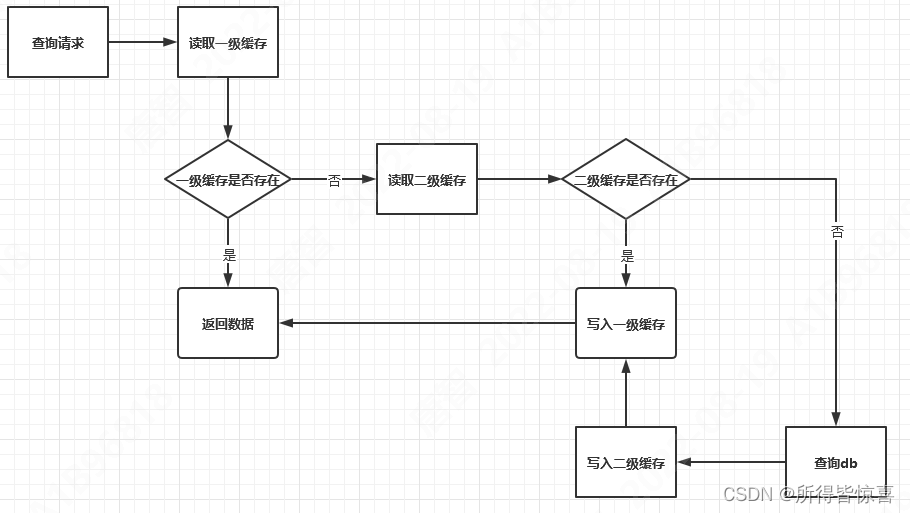
③. 在先不考虑并发等复杂问题的情况下,两级缓存的访问流程可以用下面这张图来表示:
@Service
public class PositionServiceImpl implements PositionService {

    @Autowired
    PositionMapper positionMapper;

    @Autowired
    RedisTemplate redisTemplate;

    private static Cache<Object, Object> cache = CacheBuilder.newBuilder().expireAfterWrite(5,TimeUnit.SECONDS).build();

    @Override
    public List<Position> getHotPosition() throws ExecutionException {
		//从guava本地缓存中获取数据,如果没有则从redis中回源
        Object value = cache.get("position", new Callable() {
            @Override
            public Object call() throws Exception {

                return getHotPositionListFromRedis();
            }
        });

        if(value != null){
            return (List<Position>)value;
        }

        return null;
    }

    @Override
    public List<Position> getHotPositionListFromRedis()  {

        Object position = redisTemplate.opsForValue().get("position");
        System.out.println("从redis中获取数据");

        if(position == null) {
            //从mysql中获取数据
            List<Position> positionList = positionMapper.select(null);
            System.out.println("从mysql中获取数据");
            //同步至redis
            redisTemplate.opsForValue().set("position",positionList);
            System.out.println("同步至redis");
            redisTemplate.expire("position",5, TimeUnit.SECONDS);
			//getHotPositionListFromRedis在guava不存在的时候调用,这里会将数据写入到guava本地缓存中
            return positionList;
        }

        return (List<Position>)position;
    }
}
②. Guava是Google提供的一套Java工具包,而Guava Cache是一套非常完善的本地缓存机制(JVM缓存)
Guava cache的设计来源于CurrentHashMap,可以按照多种策略来清理存储在其中的缓存值且保持很高的并发读写性能。
③. Guava Cache的优势:
	<!--引入guava缓存-->
	<dependency>
		<groupId>com.google.guava</groupId>
		<artifactId>guava</artifactId>
		<version>25.0-jre</version>
	</dependency>
    private static void method1() throws ExecutionException, InterruptedException {
        LoadingCache<String, String> cacheLoadInit = CacheBuilder
                .newBuilder()
                .initialCapacity(5)
                .maximumSize(100)
                .expireAfterWrite(5000, TimeUnit.MILLISECONDS) //
                .removalListener(new RemovalListener<String, String>() {
                    @Override
                    public void onRemoval(RemovalNotification<String, String> removalNotification) {
                        System.out.println(removalNotification.getKey() + ":remove==> :" + removalNotification.getValue());
                    }
                })
                .build(
                        new CacheLoader<String, String>() {
                            @Override
                            public String load(String key) throws Exception {
                                System.out.println("first init.....");
                                return key;
                            }
                        });
        //由于CacheLoader可能抛出异常,LoadingCache.get(K)也声明为抛出ExecutionException异常
        String key = cacheLoadInit.get("first-name");
        String key2 = cacheLoadInit.get("first-name");
        System.out.println(key);
        TimeUnit.MILLISECONDS.sleep(5000);
        System.out.println("==========");
        //设置了5s的过期时间,5s后会重新加载缓存
        String keySecond = cacheLoadInit.get("first-name");
        System.out.println("5s后重新加载缓存数据" + keySecond);
        /**
         * first init.....
         * first-name
         * ==========
         * first init.....
         * 5s后重新加载缓存数据first-name
         */
    }
    private static void method2(){
        Cache<String, String> cache = CacheBuilder.newBuilder()
                .expireAfterWrite(3, TimeUnit.SECONDS)
                .initialCapacity(1)
                .maximumSize(2)
                .removalListener(new RemovalListener<String, String>() {
                    @Override
                    public void onRemoval(RemovalNotification<String, String> notification) {
                        System.out.println(notification.getKey()+"移除了,value:"+notification.getValue());
                    }
                })
                .build();
        // getIfPresent(key):从现有的缓存中获取,如果缓存中有key,则返回value,如果没有则返回null
        String key1 = cache.getIfPresent("java金融1");
        System.out.println(key1);//null
        if(StringUtils.isEmpty(key1)){
            /**
             * null
             * value - java金融2
             * value - java金融3
             */
            cache.put("java金融1","value - java金融1");
            cache.put("java金融2","value - java金融2");
            cache.put("java金融3","value - java金融3");
            System.out.println(cache.getIfPresent("java金融1"));
            System.out.println(cache.getIfPresent("java金融2"));
            System.out.println(cache.getIfPresent("java金融3"));
        }
    }
/**
     所有类型的Guava Cache,不管有没有自动加载功能,都支持get(K, Callable<V>)方法。这个方法返回缓存中相应的值,或者用给定的Callable运算并把结果加入到缓存中。在整个加载方法完成前,缓存项相关的可观察状态都不会更改。这个方法简便地实现了模式"如果有缓存则返回;否则运算、缓存、然后返回"。
     Cache<Key, Graph> cache = CacheBuilder.newBuilder()
     .maximumSize(1000)
     .build(); // look Ma, no CacheLoader
     ...
     try {
     // If the key wasn't in the "easy to compute" group, we need to
     // do things the hard way.
     cache.get(key, new Callable<Key, Graph>() {
    @Override
    public Value call() throws AnyException {
    return doThingsTheHardWay(key);
    }
    });
     } catch (ExecutionException e) {
     throw new OtherException(e.getCause());
     }
     * @throws ExecutionException
     */
    private static void method3() throws ExecutionException {
        Cache<String, String> cache = CacheBuilder.newBuilder()
                .maximumSize(3)
                .initialCapacity(1)
                .expireAfterWrite(1,TimeUnit.MINUTES)
                .build();
        cache.get("key1",new Callable<String>() {
            @Override
            public String call() throws Exception {
                return "value1";
            }
        });
        /**
         * value1
         * null
         */
        System.out.println(cache.getIfPresent("key1"));
        System.out.println("手动清除缓存");
        cache.invalidateAll();
        System.out.println(cache.getIfPresent("key1"));
        System.out.println(cache.getIfPresent("key2"));
    }
   private static void maximumSizeMethod() throws ExecutionException {
        LoadingCache<String, String> cache = CacheBuilder.newBuilder()
                .initialCapacity(1)
                .maximumSize(3)
                .build(new CacheLoader<String, String>() {
                    @Override
                    public String load(String key) throws Exception {
                        return key + " - value";
                    }
                });
        cache.get("1");
        cache.get("2");
        cache.get("3");
        cache.get("4");
        // 最大maximumSize=3 这里添加了四个元素进来了
        // 这里是采用的URL 和 FIFO的方式去进行移除元素
        /**
         * null
         * 2 - value
         * 3 - value
         * 4 - value
         */
        System.out.println(cache.getIfPresent("1"));
        System.out.println(cache.getIfPresent("2"));
        System.out.println(cache.getIfPresent("3"));
        System.out.println(cache.getIfPresent("4"));
    }
	private static void expireAfterAccessMethod() throws InterruptedException {
        // 隔多长时间后没有被访问过的key被删除
        Cache<String, String> build = CacheBuilder.newBuilder()
                //缓存中的数据 如果3秒内没有访问则删除
                .expireAfterAccess(3000, TimeUnit.MILLISECONDS)
                .build();
        build.put("1","1 - value");
        build.put("2","2 - value");
        build.put("3","3 - value");
        Thread.sleep(1000);
        build.getIfPresent("1");
        Thread.sleep(2100);
        // 这里在停顿了1s后,重新获取了,这个时候再次停顿2s,2,3没有发访问,过期了
        System.out.println(build.getIfPresent("1"));
        // 停顿3s后,这里也过期了
        Thread.sleep(3000);
        System.out.println("这里已经过了3s了");
        System.out.println(build.getIfPresent("1"));
    }
	    private static void expireAfterWriteDemo() throws ExecutionException, InterruptedException {
        LoadingCache<String, String> cache = CacheBuilder.newBuilder()
                // 等同于expire ttl 缓存中对象的生命周期就是3秒
                .expireAfterWrite(3, TimeUnit.SECONDS)
                .initialCapacity(1)
                .maximumSize(5)
                .removalListener(new RemovalListener<String, String>() {
                    @Override
                    public void onRemoval(RemovalNotification<String, String> removalNotification) {
                        System.out.println("onRemoval ==> key:" + removalNotification.getKey() + "value:" + removalNotification.getValue());
                    }
                })
                .build(new CacheLoader<String, String>() {
                    @Override
                    public String load(String s) throws Exception {
                        return s + " - value";
                    }
                });
        cache.get("1");
        cache.get("2");
        Thread.sleep(1000);
        cache.getIfPresent("1");
        Thread.sleep(2100);
        // 虽然前面有访问,expireAfterWrite相当于ttl,这里返回的数据是null
        System.out.println(cache.getIfPresent("1"));
    }
	public class GuavaExpireDemo {
	    public static void main(String[] args) throws InterruptedException, ExecutionException {
	        Cache<String, Object> cache = CacheBuilder.newBuilder()
	                .maximumSize(3)
	                .weakValues()
	                .build();
	        Person value = new Person(1,"tang");
	        cache.put("1",value);
	        // Person(id=1, name=tang)
	        System.out.println(cache.getIfPresent("1"));
	        value=new Person(2,"yang");
	        // 强制垃圾回收
	        System.gc();
	        // null
	        System.out.println(cache.getIfPresent("1"));
	    }
	}
①. 通过CacheBuilder.removalListener(RemovalListener),你可以声明一个监听器,以便缓存项被移除时做一些额外操作
②. 缓存项被移除时,RemovalListener会获取移除通知[RemovalNotification],其中包含移除原因[RemovalCause]、键和值
	public class removalListenerDemo {
	    public static void main(String[] args) {
	        Cache cache = CacheBuilder.newBuilder()
	                .initialCapacity(1)
	                .maximumSize(3)
	                .concurrencyLevel(1)
	                .removalListener(new RemovalListener() {
	                    @Override
	                    public void onRemoval(RemovalNotification removalNotification) {
	                        System.out.println("removalListener => key:" + removalNotification.getKey() + ",value:" + removalNotification.getValue());
	                    }
	                })
	                .build();
	        cache.put("key - 1","value - 1");
	        System.out.println(cache.getIfPresent("key - 1"));
	        cache.invalidate("key - 1");
	        System.out.println(cache.getIfPresent("key - 1"));
	        /**
	         value - 1
	         removalListener => key:key - 1,value:value - 1
	         null
	         */
	    }
	}
	public class recordStatsDemo {
	    public static void main(String[] args) throws ExecutionException {
	        // 创建1块缓存,key和value都是integer类型,最大缓存个数是5,开启缓存统计功能
	        // 使用LoadingCache,如果数据不存在就使用CacheLoader加载数据
	        LoadingCache<Integer, Integer> cache = CacheBuilder.newBuilder().recordStats().maximumSize(5).
	                build(new CacheLoader<Integer, Integer>() {
	                    @Override
	                    public Integer load(Integer id) throws Exception {
	                        System.out.println("mock query db....");
	                        if (id % 2 == 0) {
	                            Thread.sleep(100);
	                            throw new RuntimeException();
	                        } else {
	                            Thread.sleep(200);
	                            return id * 10;
	                        }
	                    }
	                });
	        // 预先添加一条缓存数据
	        cache.put(1, 100);
	        //....CacheStats{hitCount=0, missCount=0, loadSuccessCount=0, loadExceptionCount=0, totalLoadTime=0, evictionCount=0}
	        System.out.println("...." + cache.stats());

	        // 缓存命中,hitCount加1
	        System.out.println("get data====" + cache.get(1));
	        //....CacheStats{hitCount=1, missCount=0, loadSuccessCount=0, loadExceptionCount=0, totalLoadTime=0, evictionCount=0}
	        System.out.println("...." + cache.stats());

	        // 没有命中缓存, missCount和loadSuccessCount加1,并增加totalLoadTime(纳秒为单位)
	        System.out.println("get data====" + cache.get(3));
	        //....CacheStats{hitCount=1, missCount=1, loadSuccessCount=1, loadExceptionCount=0, totalLoadTime=214873400, evictionCount=0}
	        System.out.println("...." + cache.stats());

	        // 没有命中缓存, missCount和loadExceptionCount加1,并增加totalLoadTime(纳秒为单位)
	        try {
	            System.out.println("get data====" + cache.get(4));
	        } catch (Exception e) {
	            // ....CacheStats{hitCount=1, missCount=2, loadSuccessCount=1, loadExceptionCount=1, totalLoadTime=318706100, evictionCount=0}
	            System.out.println("...." + cache.stats());
	        }

	        // 手动清除缓存数据,或者是直接操作缓存底层数据,不会影响统计信息
	        System.out.println("get data====" + cache.asMap().get(1));// 通过缓存底层数据结构,读取数据
	        cache.invalidateAll();// 清空缓存
	        //....CacheStats{hitCount=1, missCount=2, loadSuccessCount=1, loadExceptionCount=1, totalLoadTime=317725800, evictionCount=0}
	        System.out.println("...." + cache.stats());

	        // 添加7条缓存数据,由于最大数目是5,所以evictionCount=2
	        System.out.println("size===" + cache.size());
	        cache.put(1, 100);
	        cache.put(2, 100);
	        cache.put(3, 100);
	        cache.put(4, 100);
	        cache.put(5, 100);
	        cache.put(6, 100);
	        cache.put(7, 100);
	        //....CacheStats{hitCount=1, missCount=2, loadSuccessCount=1, loadExceptionCount=1, totalLoadTime=317725800, evictionCount=1}
	        System.out.println("...." + cache.stats());
	    }
	}
	private static void recordStatusMethod2() {
	        LoadingCache cache = CacheBuilder.newBuilder().recordStats().maximumSize(5).
	                build(new CacheLoader<Integer, Integer>() {
	                    @Override
	                    public Integer load(Integer id) throws Exception {
	                        System.out.println("mock query db....");
	                        if (id % 2 == 0) {
	                            Thread.sleep(100);
	                            throw new RuntimeException();
	                        } else {
	                            Thread.sleep(200);
	                            return id * 10;
	                        }
	                    }
	                });
	        // 修改底层的map也会导致cache发生变化
	        ConcurrentMap underlingMap = cache.asMap();
	        underlingMap.put(1, 1);
	        underlingMap.put(2, 2);
	        underlingMap.put(3, 3);
	        underlingMap.put(4, 4);
	        underlingMap.put(5, 5);
	        underlingMap.put(6, 6);
	        underlingMap.put(7, 6);
	        // underlingMap....{3=3, 6=6, 5=5, 7=6, 4=4} cache....5
	        System.out.println("underlingMap...." + underlingMap+"cache...." + cache.size());
	        // stats....CacheStats {hitCount=0, missCount=0, loadSuccessCount=0, loadExceptionCount=0, totalLoadTime=0, evictionCount=2}
	        System.out.println("stats...." + cache.stats());
	    }
	public class GuavaAsMapDemo {
	    public static void main(String[] args) throws ExecutionException {
	        LoadingCache<String, String> cache = CacheBuilder.newBuilder()
	                .build(new CacheLoader<String, String>() {
	                    @Override
	                    public String load(String key) throws Exception {
	                        return "value:" + key;
	                    }
	                });
	        cache.get("1");
	        cache.get("2");
	        cache.get("3");
	        ConcurrentMap<String, String> map = cache.asMap();
	        Set<String> strings = map.keySet();
	        System.out.println("获取到cache所有的key:"+strings);
	        Collection<String> values = map.values();
	        System.out.println("获取到cache所有的value:"+values);
	        Set<Map.Entry<String, String>> set = map.entrySet();
	        for (Map.Entry<String, String> stringStringEntry : set) {
	            System.out.println(stringStringEntry.getKey()+"<====>"+stringStringEntry.getValue());
	        }
	        map.get("4");
	        System.out.println("从缓存中获取key4:"+cache.getIfPresent("4"));
	        /**
	         * 获取到cache所有的key:[1, 3, 2]
	         * 获取到cache所有的value:[value:1, value:3, value:2]
	         * 1<====>value:1
	         * 3<====>value:3
	         * 2<====>value:2
	         */
	    }
	}
	/**
	 refreshAfterWrites — 失效后异步刷新缓存
	 使用refreshAfterWrites后,需要实现CacheLoader的reload方法。需要在方法中创建一个ListenableFutureTask,然后将这个task提交给线程池去异步执行。这样的话,缓存失效后重新加载就变成了异步,加载期间尝试获取取缓存的线程也不会被阻塞。而是获取到加载之前的值。加载完毕之后,各个线程就能取到最新的值。
	 总结:refreshAfterWrites是异步去刷新缓存的方法,使用过期的旧值快速响应。而expireAfterWrites缓存失效后线程需要同步等待加载结果,可能会造成请求大量堆积的问题。
	 **/
	@SuppressWarnings("all")
	public class TestGuavaCache {
	    private static ExecutorService executorService = Executors.newFixedThreadPool(5);


	    static LoadingCache<String, String> cache = CacheBuilder.
	            newBuilder().
	            refreshAfterWrite(2, TimeUnit.SECONDS).
	            build(new CacheLoader<String, String>() {
	                //同步加载缓存
	                @Override
	                public String load(String key) throws Exception {
	                    System.out.println("============");
	                    return "";
	                }

	                //异步加载缓存
	                @Override
	                public ListenableFuture<String> reload(String key, String oldValue) throws Exception {
	                    //定义任务。
	                    ListenableFutureTask<String> futureTask = ListenableFutureTask.create(() -> {
	                        try {
	                            Thread.sleep(1000);
	                        } catch (InterruptedException e) {
	                            e.printStackTrace();
	                        }
	                        System.out.println("================");
	                        return "曹操";
	                    });
	                    //异步执行任务
	                    executorService.execute(futureTask);
	                    return futureTask;
	                }

	            });

	    public static void main(String[] args) throws ExecutionException, InterruptedException {
	        cache.put("name", "李白");
	        //第一次获取缓存:李白
	        System.out.println(cache.get("name"));
	        //睡眠2s后,再次获取,此时缓存失效,异步的加载缓存。但是线程是立即返回“旧结果”。
	        Thread.sleep(2000);
	        System.out.println(cache.get("name"));
	        Thread.sleep(1000);
	        System.out.println(cache.get("name"));
	    }
	}
	 CacheBuilder.newBuilder()
     .refreshAfterWrite(20, TimeUnit.MINUTES)
     .expireAfterWrite(30, TimeUnit.MINUTES)
     .maximumSize(1)
     .build(new CacheLoader<String, List<Map<String, Long>>>() {
         @Override
         public List<Map<String, Long>> load(String s) throws Exception {
             return queryData();
         }

         @Override
         public ListenableFuture<List<Map<String, Long>>> reload(String key, List<Map<String, Long>> oldValue)
                 throws Exception {
             ListenableFutureTask<List<Map<String, Long>>> task = ListenableFutureTask
                     .create(() -> queryData());
             executorService.execute(task);
             return task;
         }
     });
①. Guava Cache的数据结构跟ConcurrentHashMap类似,但也不完全一样。最基本的区别是
ConcurrentMap会一直保存所有添加的元素,直到显式地移除
②. 相对地,Guava Cache为了限制内存占用,通常都设定为自动回收元素。其数据结构图如下:
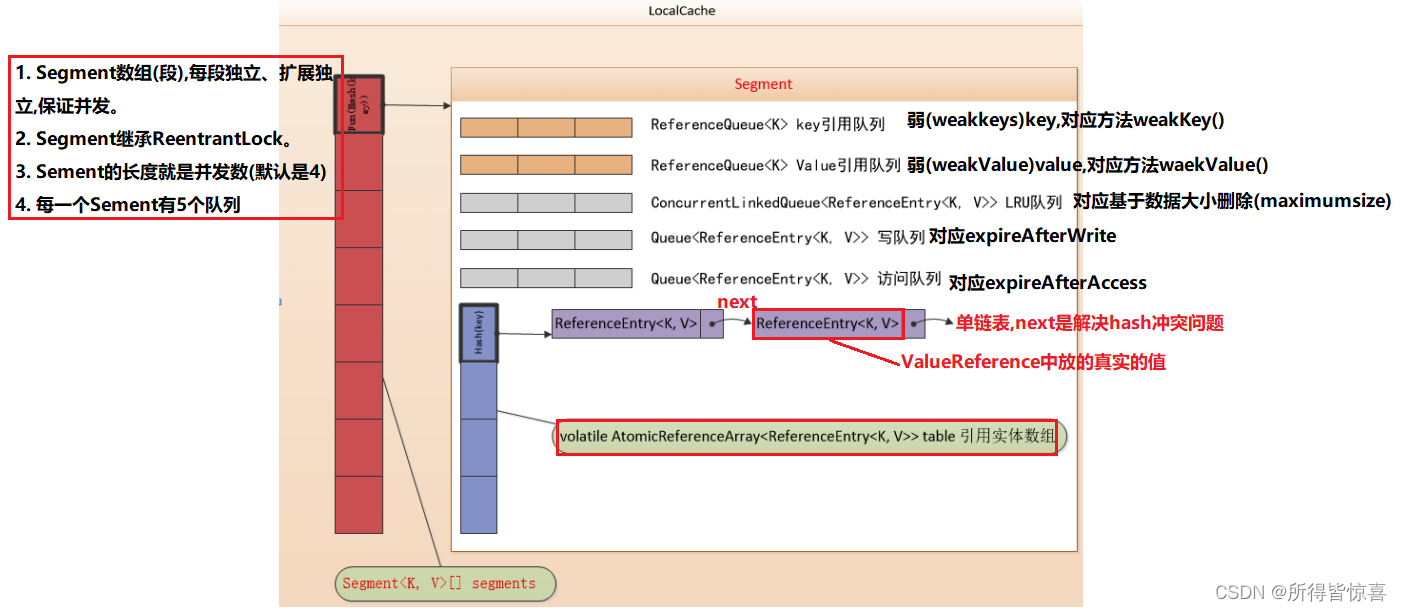
③. LocalCache为Guava Cache的核心类,包含一个Segment数组组成。
出于纯粹的兴趣,我很好奇如何按顺序创建PI,而不是在过程结果之后生成数字,而是让数字在过程本身生成时显示。如果是这种情况,那么数字可以自行产生,我可以对以前看到的数字实现垃圾收集,从而创建一个无限系列。结果只是在Pi系列之后每秒生成一个数字。这是我通过互联网筛选的结果:这是流行的计算机友好算法,类机器算法:defarccot(x,unity)xpow=unity/xn=1sign=1sum=0loopdoterm=xpow/nbreakifterm==0sum+=sign*(xpow/n)xpow/=x*xn+=2sign=-signendsumenddefcalc_pi(digits
关闭。这个问题是opinion-based.它目前不接受答案。想要改进这个问题?更新问题,以便editingthispost可以用事实和引用来回答它.关闭4年前。Improvethisquestion我想在固定时间创建一系列低音和高音调的哔哔声。例如:在150毫秒时发出高音调的蜂鸣声在151毫秒时发出低音调的蜂鸣声200毫秒时发出低音调的蜂鸣声250毫秒的高音调蜂鸣声有没有办法在Ruby或Python中做到这一点?我真的不在乎输出编码是什么(.wav、.mp3、.ogg等等),但我确实想创建一个输出文件。
使用带有Rails插件的vim,您可以创建一个迁移文件,然后一次性打开该文件吗?textmate也可以这样吗? 最佳答案 你可以使用rails.vim然后做类似的事情::Rgeneratemigratonadd_foo_to_bar插件将打开迁移生成的文件,这正是您想要的。我不能代表textmate。 关于ruby-使用VimRails,您可以创建一个新的迁移文件并一次性打开它吗?,我们在StackOverflow上找到一个类似的问题: https://sta
我对最新版本的Rails有疑问。我创建了一个新应用程序(railsnewMyProject),但我没有脚本/生成,只有脚本/rails,当我输入ruby./script/railsgeneratepluginmy_plugin"Couldnotfindgeneratorplugin.".你知道如何生成插件模板吗?没有这个命令可以创建插件吗?PS:我正在使用Rails3.2.1和ruby1.8.7[universal-darwin11.0] 最佳答案 随着Rails3.2.0的发布,插件生成器已经被移除。查看变更日志here.现在
我正在编写一个包含C扩展的gem。通常当我写一个gem时,我会遵循TDD的过程,我会写一个失败的规范,然后处理代码直到它通过,等等......在“ext/mygem/mygem.c”中我的C扩展和在gemspec的“扩展”中配置的有效extconf.rb,如何运行我的规范并仍然加载我的C扩展?当我更改C代码时,我需要采取哪些步骤来重新编译代码?这可能是个愚蠢的问题,但是从我的gem的开发源代码树中输入“bundleinstall”不会构建任何native扩展。当我手动运行rubyext/mygem/extconf.rb时,我确实得到了一个Makefile(在整个项目的根目录中),然后当
如何使用RSpec::Core::RakeTask初始化RSpecRake任务?require'rspec/core/rake_task'RSpec::Core::RakeTask.newdo|t|#whatdoIputinhere?endInitialize函数记录在http://rubydoc.info/github/rspec/rspec-core/RSpec/Core/RakeTask#initialize-instance_method没有很好的记录;它只是说:-(RakeTask)initialize(*args,&task_block)AnewinstanceofRake
关闭。这个问题需要detailsorclarity.它目前不接受答案。想改进这个问题吗?通过editingthispost添加细节并澄清问题.关闭8年前。Improvethisquestion为什么SecureRandom.uuid创建一个唯一的字符串?SecureRandom.uuid#=>"35cb4e30-54e1-49f9-b5ce-4134799eb2c0"SecureRandom.uuid方法创建的字符串从不重复?
我正在阅读SandiMetz的POODR,并且遇到了一个我不太了解的编码原则。这是代码:classBicycleattr_reader:size,:chain,:tire_sizedefinitialize(args={})@size=args[:size]||1@chain=args[:chain]||2@tire_size=args[:tire_size]||3post_initialize(args)endendclassMountainBike此代码将为其各自的属性输出1,2,3,4,5。我不明白的是查找方法。当一辆山地自行车被实例化时,因为它没有自己的initialize方法
我们的git存储库中目前有一个Gemfile。但是,有一个gem我只在我的环境中本地使用(我的团队不使用它)。为了使用它,我必须将它添加到我们的Gemfile中,但每次我checkout到我们的master/dev主分支时,由于与跟踪的gemfile冲突,我必须删除它。我想要的是类似Gemfile.local的东西,它将继承从Gemfile导入的gems,但也允许在那里导入新的gems以供使用只有我的机器。此文件将在.gitignore中被忽略。这可能吗? 最佳答案 设置BUNDLE_GEMFILE环境变量:BUNDLE_GEMFI
我正在尝试按0-9和a-z的顺序创建数字和字母列表。我有一组值value_array=['0','1','2','3','4','5','6','7','8','9','a','b','光盘','e','f','g','h','i','j','k','l','m','n','o','p','q','r','s','','u','v','w','x','y','z']和一个组合列表的数组,按顺序,这些数字可以产生x个字符,比方说三个list_array=[]和一个当前字母和数字组合的数组(在将它插入列表数组之前我会把它变成一个字符串,]current_combo['0','0','0']
