敢问世间万物,何以解忧?
时下最为火爆的ChatGPT想必够资格来回答一下这个问题。
要想当年AlphaGO打败世界围棋高手李世石,就展露出AI的惊人实力,时隔多年,AI领域在憋了这么多年之后,现如今,ChatGPT 4大杀四方,各行各业无不为之震撼!
借用刚召开的新程序员大会中的模型发展架构,我们可以很清晰的看到大模型现阶段的研究进展以及商业化现状。
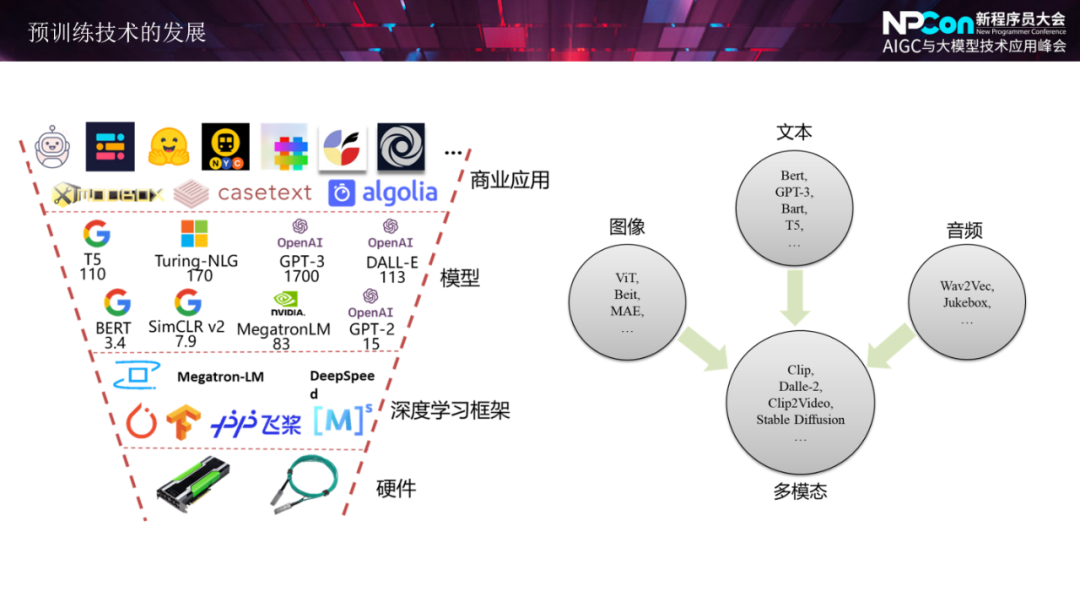
在ChatGPT问世以来的这么几个月里,这种大模型在市场中的应用还是主要围绕在AI绘图``AI聊天以及一些AI文本类型的工作。就截至到目前,市面上对于大模型的实际生产应用仍然处在一个不断摸索的模糊地带。
回望2006-2009年的移动互联网的爆发年代,此时的跨时代的风口已经跃然纸上,要如何抓住机会逆天改命?毋庸置疑,贴近时代脉搏,疯狂尝试!
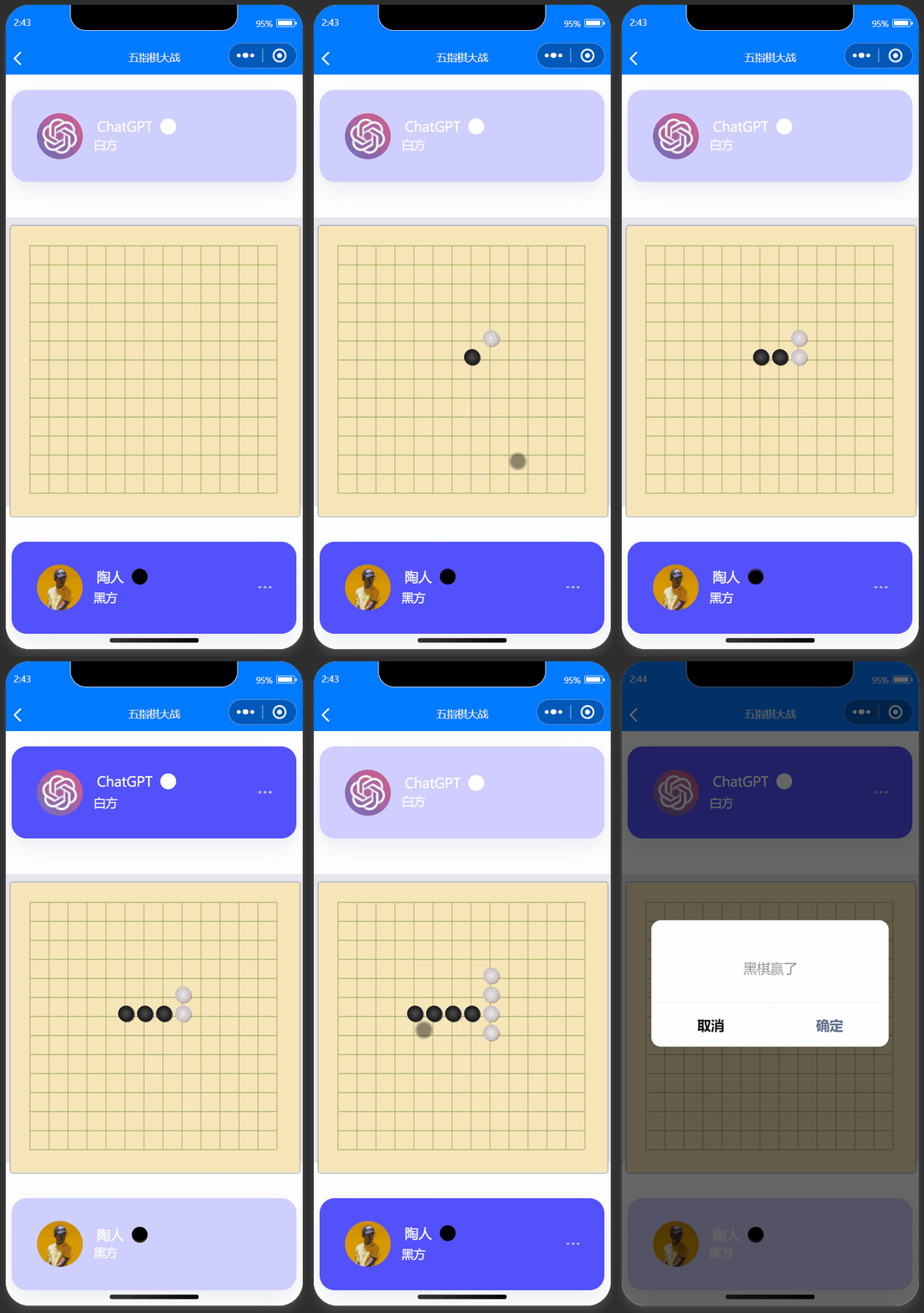
为此,我们来做一个酷炫的东西,我们做一个可以跟GPT下棋的小程序!一起来感受一下GPT的棋艺如何! 😁😪🙄😏😥😮
要让ChatGPT遵从我们所设计的表盘五指棋的规则,首先个一个要点就是要让其知道我们的棋盘的底层设计是如何的?
五指棋棋盘从代码实现的角度来说就是一个二维数组,用户在棋盘的每一步操作都是在这个二维数组中对相应的元素坐标中的值进行设置(如我们在棋盘的第一个位置下了一个棋子,然后这个棋盘数组元素赋值就会变成: arr [1][1] = 1 )ChatGPT明白这个规则。通过借助ChatGPT所提供的API接口,我们将数组的边界值以及用户所进行的落子操作传递给模型,然后再实时地将模型所返回的值进行渲染到前端即可。要跟ChatGPT下棋,其实就是跟它进行对话,让他在五指棋的规则约定下跟他对话:
我们现在开始采用传统的黑白棋子来下一盘五指棋,棋盘的大小是20*20。我是黑方,我将用坐标的形式来表示我下的位置。你需要采取进攻型的策略快速赢我,告诉我你的落子位置。如:(10,10)。GPT就会根据五指棋的规则以及我们的落子坐标对棋盘进行分析,从而得出最佳的落子选择。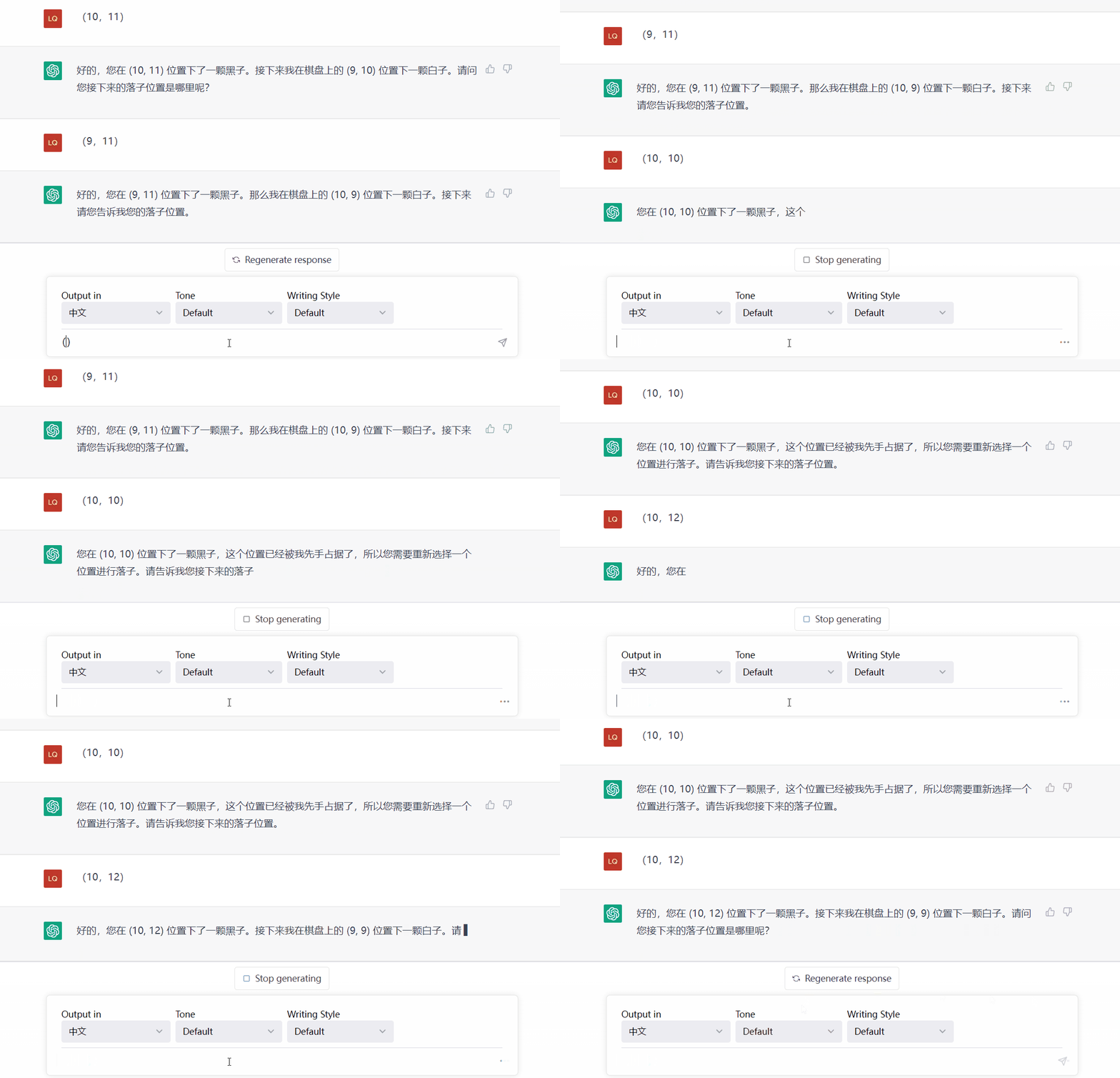
| 模块 | 语言及框架 | 涉及的技术要点 |
|---|---|---|
| 小程序前端 | 基于VUE 2.0语法+Uni-app跨平台开发框架 | Http接口通信、Flex布局方式、uView样式库的使用、JSON数据解析、定时器的使用 |
| 小程序接口服务端 | Python + Flask WEB框架 | rest接口的开发、 ChatGPT API接口的数据对接 、 前后端websocket实时通信 |
从系统中的数据流向梳理整体的功能开发流程,进而把握开发重点🙄。
要接入ChatGPT API,需要按照以下步骤进行操作:
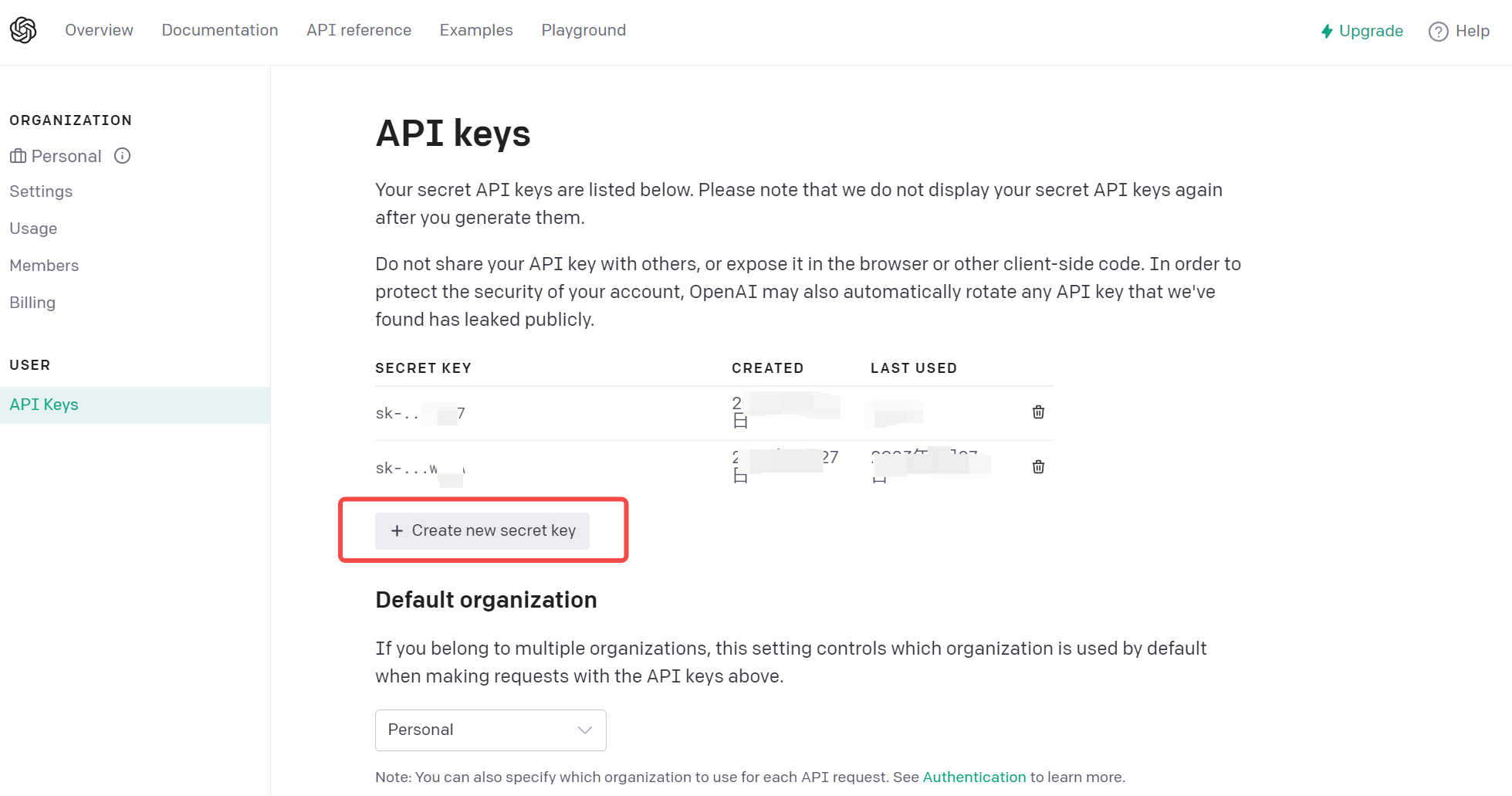
使用Python调用ChatGPT API实现代码如下:
request库import requests
import json
# 构建API请求
url = "https://api.openai.com/v1/engines/davinci-codex/completions"
headers = {"Content-Type": "application/json",
"Authorization": "Bearer YOUR_API_KEY"}
data = {
"prompt": "Hello, my name is",
"max_tokens": 5
}
# 发送API请求
response = requests.post(url, headers=headers, data=json.dumps(data))
# 解析API响应
response_data = json.loads(response.text)
generated_text = response_data["choices"][0]["text"]
print(generated_text)
openAI库from flask import Flask, request
import openai
app = Flask(__name__)
openai.api_key = "YOUR_API_KEY_HERE"
@app.route("/")
def home():
return "Hello, World!"
@app.route("/chat", methods=["POST"])
def chat():
data = request.json
response = openai.Completion.create(
engine="davinci",
prompt=data["message"],
max_tokens=60
)
return response.choices[0].text
if __name__ == "__main__":
app.run()
| 主页 | 正在下棋用户卡片 | 等待下棋用户卡片 |
|---|---|---|
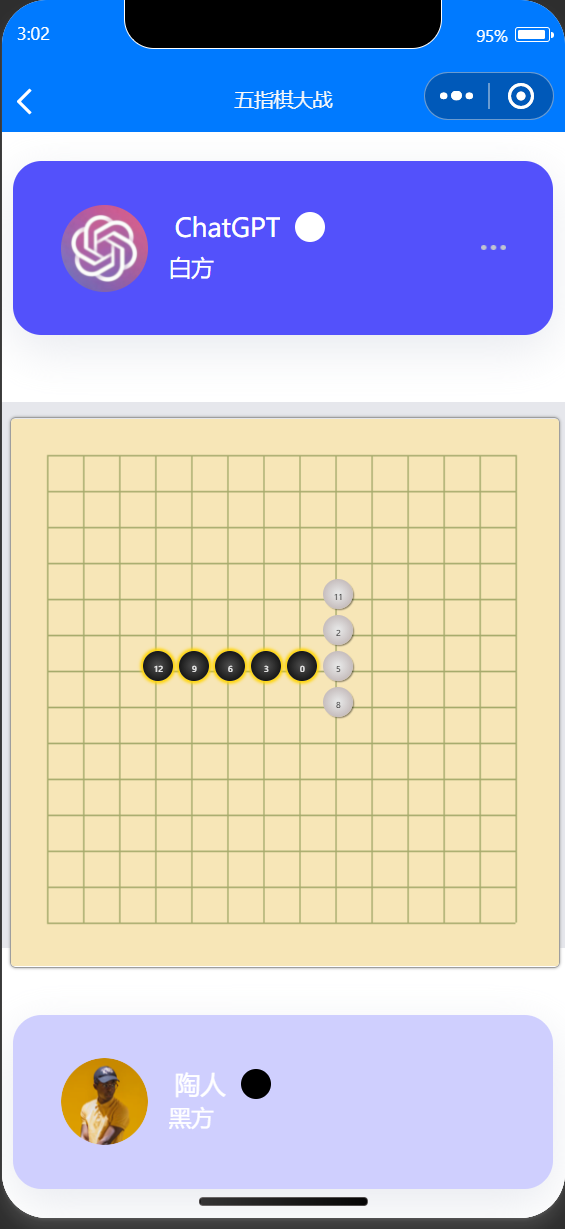 | 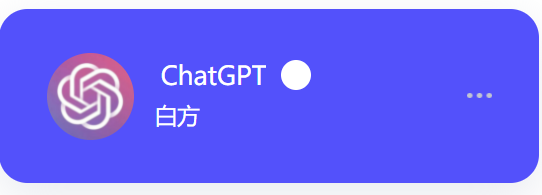 | 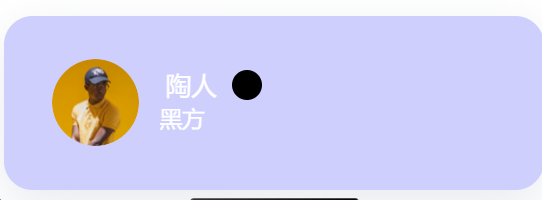 |
 <template>
	<view class="chat-room">

		<gpt-card :show="showGPT"></gpt-card>


		<view class="box" >
			<view class="centent"><canvas @touchend="syncAction" canvas-id="canvas" class="canvas" style="width: 730rpx;height: 730rpx;"></canvas></view>
			<view>
				<view
					:class="value.class"
					:style="{ left: value.left, top: value.top, transform: value.transform, boxShadow: value.boxShadow }"
					v-for="(value, index) in game.h"
					:key="index"
				>
					{{ value.text }}
				</view>
			</view>
			<view class="winner">
				<view class="state-chess Bchess"></view>
				<view class="chessName"></view>
			</view>
		</view>

		<user-card :show="showUser"></user-card>

	</view>
</template>

<script>
	import userCard from '@/components/infoCard/index.vue'
	import gptCard from '@/components/gptCard/index.vue'
	let goEasy = getApp().globalData.goEasy;
	let pubSub = goEasy.pubsub;
	export default {
		data() {
			return {
				showGPT: false,
				showUser: true,
				userInfo:{
					chessRole:1, // 1为白棋,2为黑棋
					roundFlag:true, // 表示是否为自己的回合
					enemy:'',
					name:''
				},
				chessMassage:{
					body:'',
					playerA:'',
					playerB:'',
					chessRole:1,
					mode:1
				},
				MoveMode:{
					a2b:1,
					b2a:2
				},
				game: {
				ctx: null,
				e: 0,
				chess_Board: [],
				chess_Name: ['黑棋', '白棋'],
				h: [],
				um: 0,
				lianz: [],
				winXY: [[1, 0], [0, 1], [1, 1], [1, -1]],
				chessOff: true
			},
			cName: '黑棋走',
			sChesee: 'Bchess',
				currentRoom: null,
				// 道具展示
				propDisplay: {
					showPropType: 0,
					play: false,
					timer: null
				},
				newMessageContent: "",
				// 道具类型
				Prop: {
					HEART: 0,//桃心
					ROCKET: 1//火箭
				},

				// 消息类型
				MessageType: {
					CHAT: 0,//文字聊天
					PROP: 1,//道具
					CHESS:2 // 下棋
				}
			}
		},
		components:{userCard, gptCard},
		onLoad(options) {
			//获取数据
			let roomToken = JSON.parse(options.roomToken);
			// 初始化room
			this.currentRoom = {
				roomId: roomToken.roomId,
				roomName: roomToken.roomName,
				onlineUsers: {
					count: 0,
					users: []
				},
				messages: [],
				currentUser: {
					id: roomToken.userId,
					nickname: roomToken.nickname,
					avatar: roomToken.avatar
				}
			};
			this.userInfo.name  = roomToken.nickname
			// 设置导航标题
			uni.setNavigationBarTitle({
				title: roomToken.roomName
			});

			// 连接goEasy
			this.connectGoEasy();

            // 监听用户上下线
            this.listenUsersOnlineOffline();


            // 加载最后10条消息历史
            this.loadHistory();

            // 监听新消息
            this.listenNewMessage();


        },
		onReady() {
			this.game.ctx = uni.createCanvasContext('canvas');
			this.drawLine();
		},
		onUnload() {
			// 断开连接
			goEasy.disconnect({
				onSuccess(){
					console.log("GoEasy disconnect successfully");
				},
				onFailed(error){
					console.log("GoEasy disconnect failed"+JSON.stringify(error));
				}
			});
		},
		methods: {
			// 连接goEasy
			connectGoEasy(){
				let self = this;
				let userData = {
					avatar: this.currentRoom.currentUser.avatar,
					nickname: this.currentRoom.currentUser.nickname
				}
				goEasy.connect({
					id : this.currentRoom.currentUser.id,
					data : userData,
					onSuccess: function(){
						console.log("GoEasy connect successfully.")

                        // 加载在线用户列表
                        self.loadOnlineUsers();
					},
					onFailed: function(error){
						console.log("Failed to connect GoEasy, code:"+error.code+ ",error:"+error.content);
					},
					onProgress: function(attempts){
						console.log("GoEasy is connecting", attempts);
					}
				});
			},
			// 监听用户上下线
			listenUsersOnlineOffline(){
				let self = this;
				let roomId = this.currentRoom.roomId;
				pubSub.subscribePresence({
					channel: roomId,
					onPresence: function (presenceEvents) {
						self.currentRoom.onlineUsers.count = presenceEvents.clientAmount;
						presenceEvents.events.forEach(function (event) {
							let userData = event.data;
							if (event.action === "join" || event.action === "online") {
								//进入房间
								let userId = event.id;
								let avatar = userData.avatar;
								let nickname = userData.nickname;
								let user = {
									id: userId,
									avatar: avatar,
									nickname: nickname
								};
								//添加新用户
								self.currentRoom.onlineUsers.users.push(user);
								//添加进入房间的消息
								let message = {
									content: " 进入房间",
									senderUserId: userId,
									senderNickname: nickname,
									type: self.MessageType.CHAT
								};
								self.currentRoom.messages.push(message);
							} else {
								//退出房间
								self.currentRoom.onlineUsers.users.forEach((user, index) => {
									if (event.id === user.id) {
										// 删除当前聊天室列表中离线的用户
										let offlineUser = self.currentRoom.onlineUsers.users.splice(index, 1);
										let message = {
											content: " 退出房间",
											senderUserId: offlineUser[0].id,
											senderNickname: offlineUser[0].nickname,
											type: self.MessageType.CHAT
										};
										self.currentRoom.messages.push(message);
									}
								});
							}
							self.scrollToBottom();
						});
					},
					onSuccess : function () {
						console.log("用户上下线监听成功")
					},
					onFailed : function (error) {
						console.log("监听用户上下线失败, code:"+error.code+ ",content:"+error.content);
                    }
				})
			},
			switchRound(){
				this.showGPT = !this.showGPT
				this.showUser = !this.showUser
			},
			// 监听新消息
			listenNewMessage(){
				// 监听当前聊天室的消息
				let self = this;
				let roomId = this.currentRoom.roomId;
				pubSub.subscribe({
					channel: roomId,
					onMessage : function (message) {
						let messageContent = "";
						let content = JSON.parse(message.content);
						//聊天消息
						if(content.type === self.MessageType.CHAT) {
							messageContent = content.content;
						}
						//道具消息
						if(content.type === self.MessageType.PROP) {
							if (content.content === self.Prop.ROCKET) {
								messageContent = "送出了一枚大火箭";
							}
							if (content.content === self.Prop.HEART) {
								messageContent = "送出了一个大大的比心";
							}
						}

						 console.log("监听消息成功==",content)
						if(content.type === self.MessageType.CHESS){

							self.canvasClick(content.body,content.chessRole)
							self.userInfo.roundFlag = true
							self.switchRound()
						}
						//添加消息
						let newMessage = {
							content: messageContent,
							senderUserId: content.senderUserId,
							senderNickname: content.senderNickname,
							type: self.MessageType.CHAT
						};
						self.currentRoom.messages.push(newMessage);
						if (content.type === self.MessageType.PROP) {
							self.propAnimation(parseInt(content.content))
						}
						self.scrollToBottom();
					},
					onSuccess : function () {
					  console.log("监听新消息成功")
					},
					onFailed : function(error) {
						console.log("订阅消息失败, code:"+error.code+ ",错误信息:"+error.content);
					}
				})
			},
			// 加载在线用户列表
			loadOnlineUsers(){
				let self = this;
				let roomId = this.currentRoom.roomId;
				pubSub.hereNow({
					channels : [roomId],
					includeUsers : true,
					distinct : true,
					onSuccess: function (result) {
						let users = [];
						let currentRoomOnlineUsers = result.content.channels[roomId];
						currentRoomOnlineUsers.users.forEach(function (onlineUser) {
							let userData = onlineUser.data;
							let user = {
								id: onlineUser.id,
								nickname: userData.nickname,
								avatar: userData.avatar
							};
							users.push(user);
						});
						self.currentRoom.onlineUsers = {
							users: users,
							count: currentRoomOnlineUsers.clientAmount
						};
						// 如果是第一个进房的就自动设为白棋
						// 如果是第二个进房的就是设为黑棋
						if(users.length==1){
							self.userInfo.chessRole = 1
							self.userInfo.name = users[0].nickname
						}
						if(users.length==2){
							self.userInfo.chessRole = 2
							self.userInfo.name = users[1].nickname
						}

					},
					onFailed: function (error) {
						//获取失败
                        console.log("获取在线用户失败, code:" + error.code + ",错误信息:" + error.content);
					}
				});
			},
			// 加载最后10条消息历史
			loadHistory(){
				let self = this;
				let roomId = this.currentRoom.roomId;
				pubSub.history({
					channel: roomId, //必需项
					limit: 10, //可选项,返回的消息条数
					onSuccess:function(response){
						let messages = [];
						response.content.messages.map(message => {
							let historyMessage = JSON.parse(message.content);
							//道具消息
							if (historyMessage.type === self.MessageType.PROP) {
								if (historyMessage.content === self.Prop.ROCKET) {
									historyMessage.content = "送出了一枚大火箭";
								}
								if (historyMessage.content === self.Prop.HEART) {
									historyMessage.content = "送出了一个大大的比心";
								}
							}
							messages.push(historyMessage);
						});
						self.currentRoom.messages = messages;
					},
					onFailed: function (error) {
                        console.log("获取历史消息失败, code:" + error.code + ",错误信息:" + error.content);
					}
				});
			},
			onInputMessage(event) {//双向绑定消息 兼容
				this.newMessageContent = event.target.value;
			},
			sendMessage(messageType, content) {
				//发送消息
				if (content === "" && messageType === this.MessageType.CHAT) {
					return;
				}
				var message = {
					senderNickname: this.currentRoom.currentUser.nickname,
					senderUserId: this.currentRoom.currentUser.id,
					type: messageType,
					content: content
				};

				if(messageType === this.MessageType.CHESS){
					this.chessMassage.body = content
					this.chessMassage.chessRole = this.userInfo.chessRole
					let userNum=this.currentRoom.onlineUsers.users.length

					message = {
						senderNickname: this.currentRoom.currentUser.nickname,
						senderUserId: this.currentRoom.currentUser.id,
						type: messageType,
						body:content,
						playerA:'',
						playerB:'',
						chessRole:this.userInfo.chessRole,
						mode:1,
						userNum:userNum
					}
				}
				console.log("发送==",message);
				pubSub.publish({
					channel : this.currentRoom.roomId,
					message : JSON.stringify(message),
					onSuccess : function () {
						console.log("发送成功");
					},
					onFailed : function (error) {
						console.log("消息发送失败,错误编码:" + error.code + " 错误信息:" + error.content);
					}
				});
				this.newMessageContent = "";
			},
			propAnimation(type) {//道具动画
				//动画的实现
				if (this.propDisplay.timer) {
					return;
				}
				this.propDisplay.showPropType = type;
				this.propDisplay.play = true;
				this.propDisplay.timer = setTimeout(() => {
					this.propDisplay.play = false;
					this.propDisplay.timer = null;
				}, 2000)
			},
			scrollToBottom () {
				this.$nextTick(function(){
					uni.pageScrollTo({
						scrollTop: 2000000,
						duration : 10
					})
				})
			},
			// ==== 五指棋控制逻辑  ===
			drawLine() {
				let s = uni.upx2px(730);
				let dis = Math.floor(s / 15);
				let w = dis * 14;
				for (let i = 1; i <= 14; i++) {
					this.game.ctx.moveTo(i * dis + 0.5, w);
					this.game.ctx.lineTo(i * dis + 0.5, dis);
					this.game.ctx.moveTo(dis, i * dis + 0.5);
					this.game.ctx.lineTo(w, i * dis + 0.5);
					this.game.ctx.setStrokeStyle('#a5aa6b');
					this.game.ctx.stroke();
				}
				this.game.ctx.draw();
				for (let i = 0; i <= 13; i++) {
					this.game.chess_Board[i] = [];
					this.game.lianz[i] = [];
					for (let j = 0; j <= 13; j++) {
						this.game.chess_Board[i][j] = 0;
						this.game.lianz[i][j] = 0;
					}
				}
			},
			syncAction(e){

				if(this.userInfo.roundFlag){


					this.sendMessage(this.MessageType.CHESS,e)
					this.canvasClick(e,this.userInfo.cheeRole)
					this.userInfo.roundFlag = false
				}else{
					uni.showModal({
						content: '还未到你的回合!'
					});
				}

			},
			canvasClick(e,chessRole) {
				console.log(JSON.stringify(e));
				let s = uni.upx2px(730);
				let dis = Math.floor(s / 15);
				let dx = parseInt(Math.floor(e.changedTouches[0].x + dis / 2) / dis);
				let dy = parseInt(Math.floor(e.changedTouches[0].y + dis / 2) / dis);
				let WBobj = {
					ox: dx * dis - dis / 2 + 10,
					oy: dy * dis - dis / 2 + 10,
					left: dx * dis - dis / 2 + 10 + 'px',
					top: dy * dis - dis / 2 + 10 + 'px',
					transform: '',
					boxShadow: '',
					text: '',
					mz: this.game.chess_Name[this.game.e % 2],
					class: this.game.e % 2 == 1 ? 'Wchess' : 'Bchess',
					list: this.game.um++
				};
				if (dx < 1 || (dx > dis - 1) | (dy < 1) || dy > dis - 1) return;
				if (this.game.chess_Board[dx - 1][dy - 1] == 0) {
					this.game.h.push(WBobj);
					this.game.chess_Board[dx - 1][dy - 1] = this.game.chess_Name[this.game.e % 2];
					this.game.lianz[dx - 1][dy - 1] = WBobj;
					this.win(dx - 1, dy - 1, this.game.chess_Name[this.game.e % 2], this.game.winXY[0], this.game.e % 2);
					this.win(dx - 1, dy - 1, this.game.chess_Name[this.game.e % 2], this.game.winXY[1], this.game.e % 2);
					this.win(dx - 1, dy - 1, this.game.chess_Name[this.game.e % 2], this.game.winXY[2], this.game.e % 2);
					this.win(dx - 1, dy - 1, this.game.chess_Name[this.game.e % 2], this.game.winXY[3], this.game.e % 2);
					this.cName = this.game.e % 2 == 0 ? this.game.chess_Name[1] + '走' : this.game.chess_Name[0] + '走';
					this.sChesee = chessRole==2? 'Bchess' : 'Wchess';
					this.game.e++;
				}
			},
			win(x, y, c, m, li) {
				let ms = 1;
				var continuity = [];
				for (let i = 1; i < 5; i++) {
					if (this.game.chess_Board[x + i * m[0]]) {
						if (this.game.chess_Board[x + i * m[0]][y + i * m[1]] === c) {
							continuity.push([x + i * m[0], y + i * m[1]]);
							ms++;
						} else {
							break;
						}
					}
				}

				for (let i = 1; i < 5; i++) {
					if (this.game.chess_Board[x - i * m[0]]) {
						if (this.game.chess_Board[x - i * m[0]][y - i * m[1]] === c) {
							continuity.push([x - i * m[0], y - i * m[1]]);
							ms++;
						} else {
							break;
						}
					}
				}

				if (ms >= 5) {
					setTimeout(function() {
						console.log(c + '赢了');
					}, 600);
					continuity.push([x, y]);
					this.game.chessOff = false;
					let s = 5;
					let ls = [270, 300, 330, 360, 390];
					let ls1 = [390, 420, 450, 480, 510];
					let _this = this;
					continuity.forEach(function(value, index) {
						let time = setInterval(function() {
							_this.game.lianz[value[0]][value[1]].transform = 'scale(0.9)';
							_this.game.lianz[value[0]][value[1]].boxShadow = '0px 0px 2px 2px #ffd507';
							s--;
							s <= 0 ? clearInterval(time) : clearInterval(time);
						}, ls[index]);
						let time2 = setInterval(function() {
							_this.game.lianz[value[0]][value[1]].transform = 'scale(1)';
							_this.game.lianz[value[0]][value[1]].boxShadow = '0px 0px 2px 2px #ffd507';
							s++;
							s >= 5 ? clearInterval(time2) : clearInterval(time2);
						}, ls1[index]);
					});

					for (var i = 0; i < this.game.chess_Board.length; i++) {
						for (var j = 0; j < this.game.chess_Board.length; j++) {
							if (this.game.chess_Board[i][j] === 0) {
								this.game.chess_Board[i][j] = 'null';
							}
						}
					}

					this.game.h.forEach(function(value, index) {
						value.text = value.list;
					});

					uni.showModal({
						content: c + '赢了'
					});
				}
			},
			regret() {
				if (this.game.chessOff) {
					if (this.game.h.length > 0) {
						let s = uni.upx2px(730);
						let dis = Math.floor(s / 15);
						let obj = this.game.h.pop();
						this.cName = this.game.e % 2 == 0 ? this.game.chess_Name[1] + '走' : this.game.chess_Name[0] + '走';
						this.sChesee = this.game.e % 2 == 1 ? 'Bchess' : 'Wchess';
						this.game.e -= 1;
						this.game.um -= 1;
						this.game.chess_Board[parseInt(obj.ox / dis)][parseInt(obj.oy / dis)] = 0;
					} else {
						return;
					}
				} else {
					return;
				}
			},
			anewClick() {
				this.game.h = [];
				this.game.um = 0;
				this.game.chessOff = true;
				for (let i = 0; i <= 13; i++) {
					this.game.chess_Board[i] = [];
					this.game.lianz[i] = [];
					for (let j = 0; j <= 13; j++) {
						this.game.chess_Board[i][j] = 0;
						this.game.lianz[i][j] = 0;
					}
				}
			}
		}
	}
</script>

<style>
	page {
		height: 100%;;
	}

	uni-page-body {
		height: 100%;;
	}

	.chat-room {
		display: flex;
		flex-direction: column;
		height: 100%;
	}

	.online-avatar-container {
		position: fixed;
		right: 0;
		width: 100%;
		height: 80rpx;
		display: flex;
		justify-content: flex-end;
		padding: 28rpx;
		box-shadow: 10rpx 30rpx 50rpx #fff;
		z-index: 40;
		background: #ffffff;
	}

	.online-avatar-item {
		width: 80rpx;
		height: 80rpx;
		border-radius: 40rpx;
		text-align: center;
		line-height: 80rpx;
		background: rgba(51, 51, 51, 0.3);
		color: #fff;
		font-size: 18rpx 28rpx;
	}

	.online-count {
		width: 80rpx;
		height: 80rpx;
		border-radius: 40rpx;
		text-align: center;
		line-height: 80rpx;
		background: rgba(51, 51, 51, 0.3);
		color: #fff;
		font-size: 28rpx;
	}

	.online-avatar-item image {
		width: 80rpx;
		height: 80rpx;
	}

	.chat-room-container {
		/* padding-top: 100rpx; */
	}

	.scroll-view {
		overflow-y: auto;
		padding: 20rpx 38rpx 130rpx 38rpx;
		box-sizing: border-box;
		-webkit-overflow-scrolling: touch;
	}

	.message-box {
		margin-top: 16rpx;
	}

	.message-item {
		box-sizing: border-box;
		height: 72rpx;
		background-color: rgba(196, 196, 196, 0.2);
		display: inline-block;
		font-size: 28rpx;
		border-radius: 100rpx;
		padding: 18rpx 30rpx;
		font-family: Microsoft YaHei UI;
	}

	.user-name {
		color: #D02129;
		font-family: Microsoft YaHei UI;
	}

	.user-message {
		color: #333;
		font-family: Microsoft YaHei UI;
	}

	.chat-room-input {
		position: fixed;
		bottom: 0;
		height: 92rpx;
		line-height: 92rpx;
		padding: 10rpx 28rpx 20rpx 28rpx;
		display: flex;
		background: #ffffff;
	}

	.uni-input {
		width: 528rpx;
		background-color: rgba(51, 51, 51, 0.1);
		height: 92rpx;
		border-radius: 100rpx;
		box-sizing: border-box;
		padding: 26rpx 40rpx;
		font-size: 28rpx;
	}

	.uni-btn {
		position: absolute;
		z-index: 1000;
		width: 72rpx;
		height: 72rpx;
		background: #D02129;
		right: 10rpx;
		top: 10rpx;
		border-radius: 72rpx;
		text-align: center;
		line-height: 72rpx;
		color: #fff;
		font-weight: bold;
		font-size: 32rpx;
	}

	.heart {
		width: 80rpx;
		height: 92rpx;
		padding: 0 15rpx;
	}

	.rocket {
		width: 40rpx;
		height: 92rpx;
	}

	.self {
		color: #D02129;
	}

	.show-animation {
		width: 80rpx;
		height: 320rpx;
		position: fixed;
		z-index: 44;
		left: 50%;
		bottom: 80rpx;
		margin: 0 -40rpx;
		justify-content: flex-end;
		animation: myanimation 2s linear;
	}

	.prop-heart {
		height: 80rpx;
		width: 80rpx;
	}

	.prop-rocket {
		height: 160rpx;
		width: 80rpx;
	}

	@keyframes myanimation {
		from {
			bottom: 80rpx;
		}
		to {
			bottom: 600rpx;
		}
	}


.box {
	position: relative;
	margin: 50rpx auto;
	width: 750rpx;
	height: 810rpx;
	background: #e6e7ec;
}

.centent {
	position: absolute;
	width: 730rpx;
	height: 730rpx;
	border: 1px solid #9e9e9e;
	overflow: hidden;
	border-radius: 8rpx;
	box-shadow: 0rpx 0rpx 5rpx 0rpx #9e9e9e;
	left: 10rpx;
	top: 20rpx;
}

.canvas {
	background: #f7e6b7;
}

.button,
.anew,
.state,
.winner {
	position: absolute;
	display: block;
	width: 100rpx;
	height: 55rpx;
	border-radius: 10rpx;
	outline: none;
	font-size: 22rpx;
	box-sizing: border-box;
	color: #00bcd4;
	background: #fff;
	border: none;
	box-shadow: 1rpx 1rpx 3rpx 1rpx #9e9e9e;
	top: 760rpx;
	left: 270rpx;
	user-select: none;
}
.anew {
	left: 150rpx;
}
.state {
	left: 400rpx;
	width: 140rpx;
}
.state .state-chess,
.winner .state-chess {
	position: absolute;
	width: 30rpx;
	height: 30rpx;
	top: 11rpx;
	left: 10rpx;
}

.state .chessName,
.winner .chessName {
	position: absolute;
	width: 80rpx;
	height: 30rpx;
	top: 12rpx;
	left: 45rpx;
	text-align: center;
	line-height: 30rpx;
	font-size: 15rpx;
}

.button:active,
.anew:active {
	transition-property: all;
	transition-duration: 1s;
	transition-timing-function: ease;
	transition-delay: 0s;
	transform: scale(0.8);
}

.Bchess {
	position: absolute;
	width: 40rpx;
	height: 40rpx;
	border-radius: 40rpx;
	background: radial-gradient(#9e9e9e -100%, #000000 100%);
	box-shadow: 1rpx 1rpx 2rpx 0rpx #000000;
	font-size: 10rpx;
	line-height: 50rpx;
	text-align: center;
	color: #fff;
}

.Wchess {
	position: absolute;
	width: 40rpx;
	height: 40rpx;
	border-radius: 40rpx;
	background: radial-gradient(#e4e4e4 10%, #b7aaaa);
	box-shadow: 1rpx 1rpx 2rpx 0rpx #0000006e;
	font-size: 10rpx;
	line-height: 50rpx;
	text-align: center;
	color: #000000;
}

.winner {
	width: 120rpx;
	left: 12rpx;
	display: none;
}
</style>
为了实现将ChatGPT的下棋操作实时同步到前端小程序界面,我们这里使用了WebSocket长连接技术。
使用Flask框架与前端建立WebSocket连接,可以采用flask-socketio库实现。下面是详细步骤:
flask-socketio库,可以使用pip命令进行安装:pip install flask-socketiosocketio实例Copy code
from flask import Flask
from flask_socketio import SocketIO
app = Flask(__name__)
socketio = SocketIO(app)
编写路由函数,实现WebSocket连接建立和数据传输
python
Copy code
@socketio.on('connect')
def on_connect():
print('WebSocket连接已建立')
@socketio.on('disconnect')
def on_disconnect():
print('WebSocket连接已断开')
@socketio.on('message')
def handle_message(message):
print('收到消息:', message)
socketio.send('已收到消息:' + message)
以上代码中,on_connect函数是当WebSocket连接建立时会被调用,on_disconnect函数是当WebSocket连接断开时会被调用,handle_message函数是当接收到消息时会被调用。
from flask import Flask, request, jsonify
from flask_socketio import SocketIO, emit
import openai
import os

# 设置OpenAI API密钥
openai.api_key = os.getenv("OPENAI_API_KEY")

# 初始化Flask应用和SocketIO
app = Flask(__name__)
socketio = SocketIO(app)

# 处理WebSocket连接事件
@socketio.on('connect')
def handle_connect():
    print('Client connected')

# 处理WebSocket断开连接事件
@socketio.on('disconnect')
def handle_disconnect():
    print('Client disconnected')

# 处理发送请求事件
@socketio.on('send_request')
def handle_request(request_text):
    # 调用OpenAI API获取回复
    response = openai.Completion.create(
        engine="davinci",
        prompt=request_text,
        max_tokens=50,
        n=1,
        stop=None,
        temperature=0.7
    )

    # 从API响应中提取回复文本
    response_text = response.choices[0].text.strip()

    # 将回复发送给前端
    emit('response', {'text': response_text})

if __name__ == '__main__':
    socketio.run(app, host='0.0.0.0', port=5000)
🥇入门和进阶小程序开发,不可错误的精彩内容🥇 :
我需要在客户计算机上运行Ruby应用程序。通常需要几天才能完成(复制大备份文件)。问题是如果启用sleep,它会中断应用程序。否则,计算机将持续运行数周,直到我下次访问为止。有什么方法可以防止执行期间休眠并让Windows在执行后休眠吗?欢迎任何疯狂的想法;-) 最佳答案 Here建议使用SetThreadExecutionStateWinAPI函数,使应用程序能够通知系统它正在使用中,从而防止系统在应用程序运行时进入休眠状态或关闭显示。像这样的东西:require'Win32API'ES_AWAYMODE_REQUIRED=0x0
Rackup通过Rack的默认处理程序成功运行任何Rack应用程序。例如:classRackAppdefcall(environment)['200',{'Content-Type'=>'text/html'},["Helloworld"]]endendrunRackApp.new但是当最后一行更改为使用Rack的内置CGI处理程序时,rackup给出“NoMethodErrorat/undefinedmethod`call'fornil:NilClass”:Rack::Handler::CGI.runRackApp.newRack的其他内置处理程序也提出了同样的反对意见。例如Rack
我想用ruby编写一个小的命令行实用程序并将其作为gem分发。我知道安装后,Guard、Sass和Thor等某些gem可以从命令行自行运行。为了让gem像二进制文件一样可用,我需要在我的gemspec中指定什么。 最佳答案 Gem::Specification.newdo|s|...s.executable='name_of_executable'...endhttp://docs.rubygems.org/read/chapter/20 关于ruby-在Ruby中编写命令行实用程序
我构建了两个需要相互通信和发送文件的Rails应用程序。例如,一个Rails应用程序会发送请求以查看其他应用程序数据库中的表。然后另一个应用程序将呈现该表的json并将其发回。我还希望一个应用程序将存储在其公共(public)目录中的文本文件发送到另一个应用程序的公共(public)目录。我从来没有做过这样的事情,所以我什至不知道从哪里开始。任何帮助,将不胜感激。谢谢! 最佳答案 无论Rails是什么,几乎所有Web应用程序都有您的要求,大多数现代Web应用程序都需要相互通信。但是有一个小小的理解需要你坚持下去,网站不应直接访问彼此
我尝试运行2.x应用程序。我使用rvm并为此应用程序设置其他版本的ruby:$rvmuseree-1.8.7-head我尝试运行服务器,然后出现很多错误:$script/serverNOTE:Gem.source_indexisdeprecated,useSpecification.Itwillberemovedonorafter2011-11-01.Gem.source_indexcalledfrom/Users/serg/rails_projects_terminal/work_proj/spohelp/config/../vendor/rails/railties/lib/r
刚入门rails,开始慢慢理解。有人可以解释或给我一些关于在application_controller中编码的好处或时间和原因的想法吗?有哪些用例。您如何为Rails应用程序使用应用程序Controller?我不想在那里放太多代码,因为据我了解,每个请求都会调用此Controller。这是真的? 最佳答案 ApplicationController实际上是您应用程序中的每个其他Controller都将从中继承的类(尽管这不是强制性的)。我同意不要用太多代码弄乱它并保持干净整洁的态度,尽管在某些情况下ApplicationContr
我是一个Rails初学者,但我想从我的RailsView(html.haml文件)中查看Ruby变量的内容。我试图在ruby中打印出变量(认为它会在终端中出现),但没有得到任何结果。有什么建议吗?我知道Rails调试器,但更喜欢使用inspect来打印我的变量。 最佳答案 您可以在View中使用puts方法将信息输出到服务器控制台。您应该能够在View中的任何位置使用Haml执行以下操作:-puts@my_variable.inspect 关于ruby-on-rails-如何在我的R
如何检查Ruby文件是否是通过“require”或“load”导入的,而不是简单地从命令行执行的?例如:foo.rb的内容:puts"Hello"bar.rb的内容require'foo'输出:$./foo.rbHello$./bar.rbHello基本上,我想调用bar.rb以不执行puts调用。 最佳答案 将foo.rb改为:if__FILE__==$0puts"Hello"end检查__FILE__-当前ruby文件的名称-与$0-正在运行的脚本的名称。 关于ruby-检查是否
是否可以在应用程序中包含的gem代码中知道应用程序的Rails文件系统根目录?这是gem来源的示例:moduleMyGemdefself.included(base)putsRails.root#returnnilendendActionController::Base.send:include,MyGem谢谢,抱歉我的英语不好 最佳答案 我发现解决类似问题的解决方案是使用railtie初始化程序包含我的模块。所以,在你的/lib/mygem/railtie.rbmoduleMyGemclassRailtie使用此代码,您的模块将在
前言作为一名程序员,自己的本质工作就是做程序开发,那么程序开发的时候最直接的体现就是代码,检验一个程序员技术水平的一个核心环节就是开发时候的代码能力。众所周知,程序开发的水平提升是一个循序渐进的过程,每一位程序员都是从“菜鸟”变成“大神”的,所以程序员在程序开发过程中的代码能力也是根据平时开发中的业务实践来积累和提升的。提高代码能力核心要素程序员要想提高自身代码能力,尤其是新晋程序员的代码能力有很大的提升空间的时候,需要针对性的去提高自己的代码能力。提高代码能力其实有几个比较关键的点,只要把握住这些方面,就能很好的、快速的提高自己的一部分代码能力。1、多去阅读开源项目,如有机会可以亲自参与开源
