1、进入阿里云首页点击短信服务
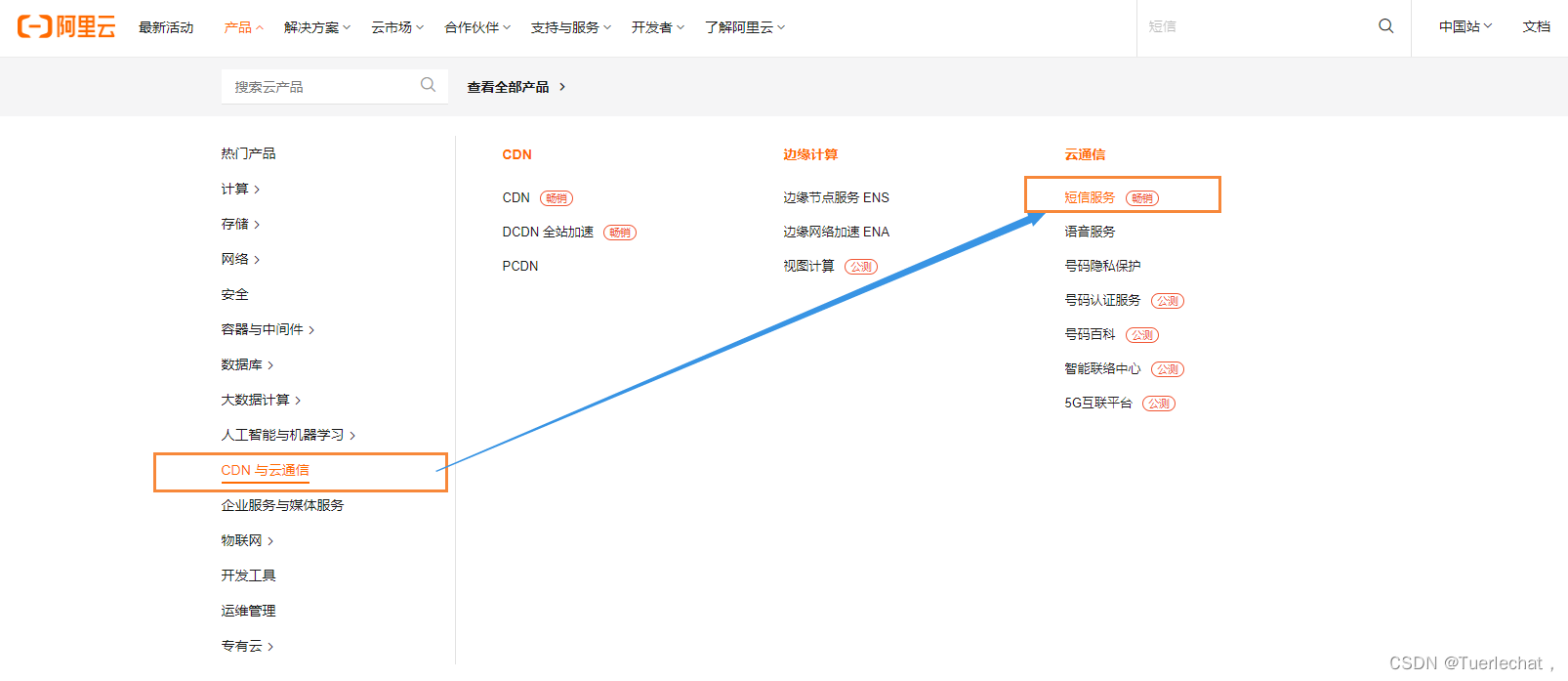
2、短信服务界面
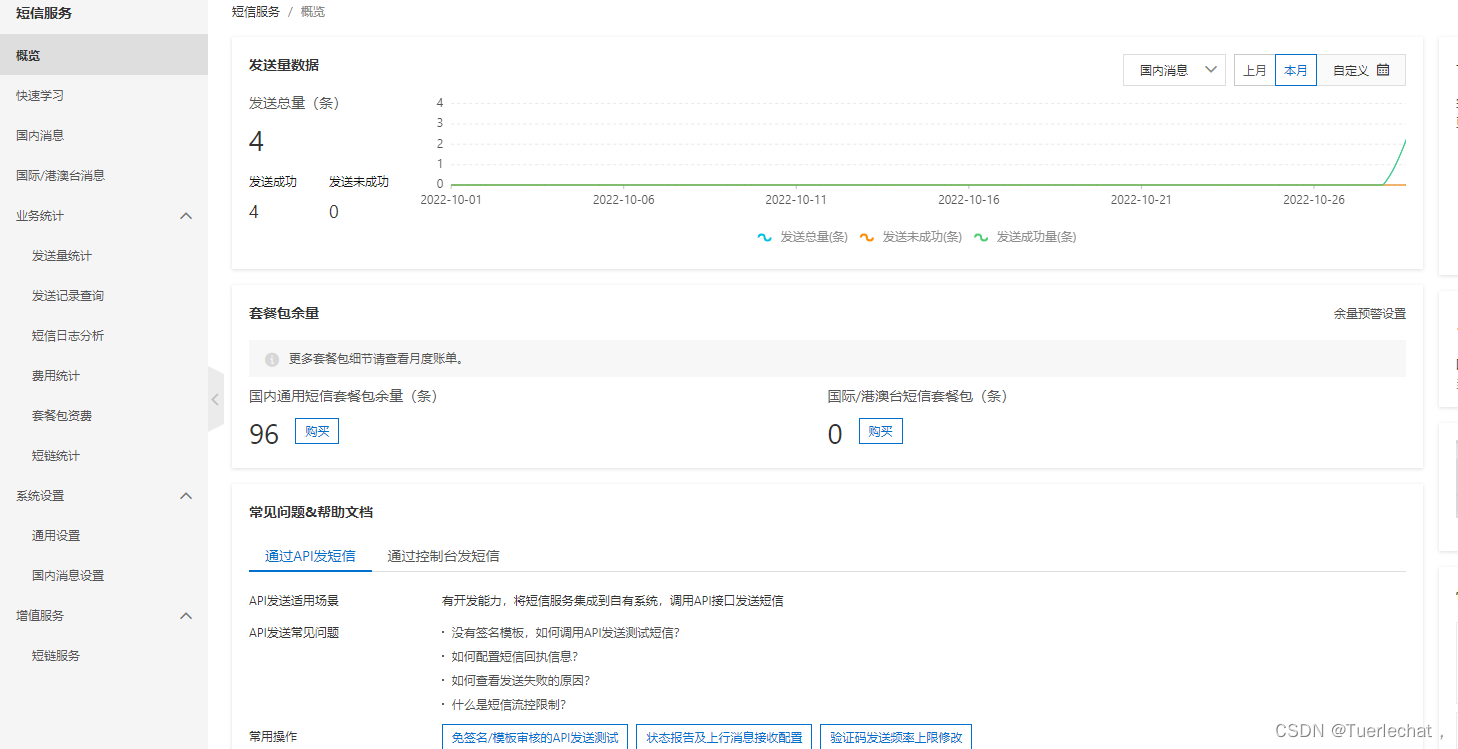
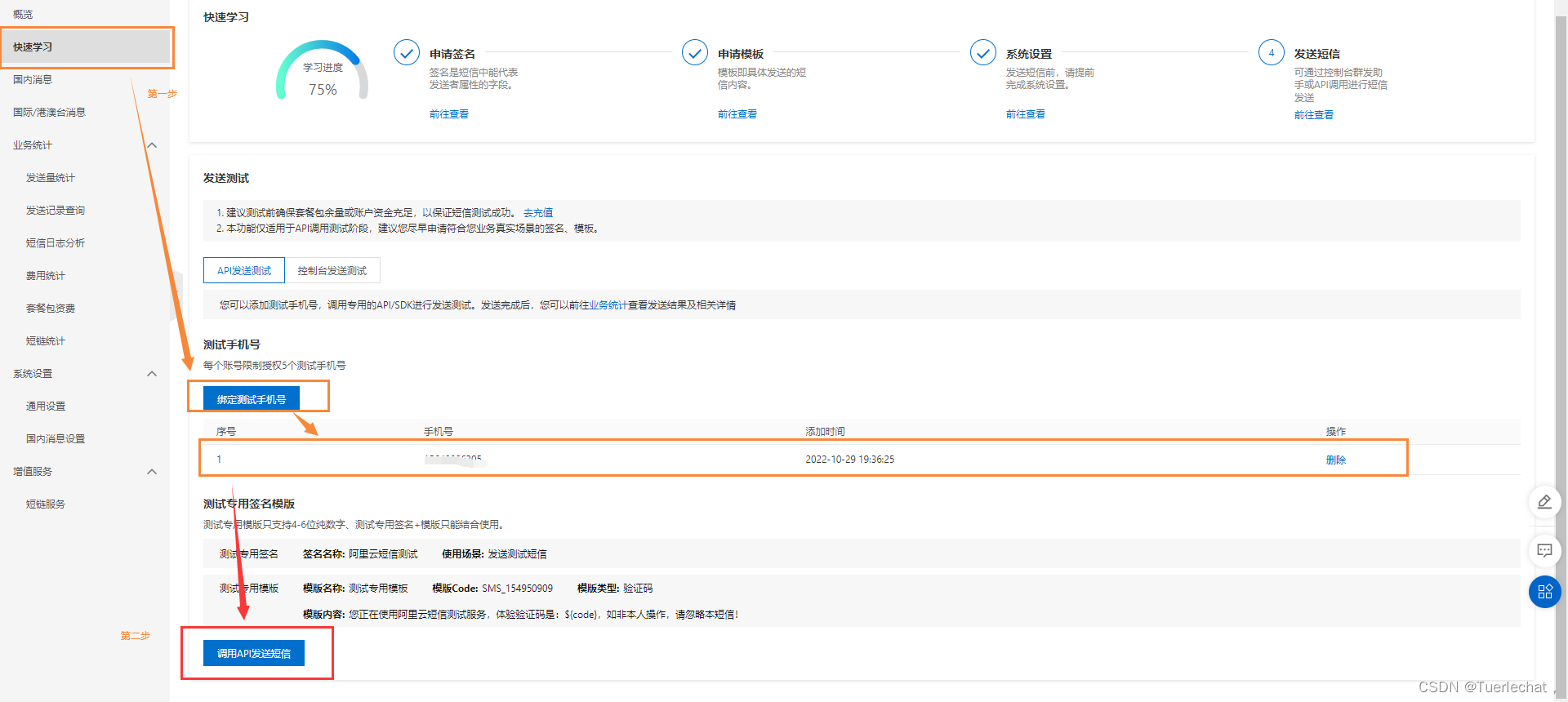
3、点击快速学习,然后绑定测试手机号,绑定好后点击调用API发送短信
4、左侧可以看到一些参数设置,右面是可以选择的demo代码
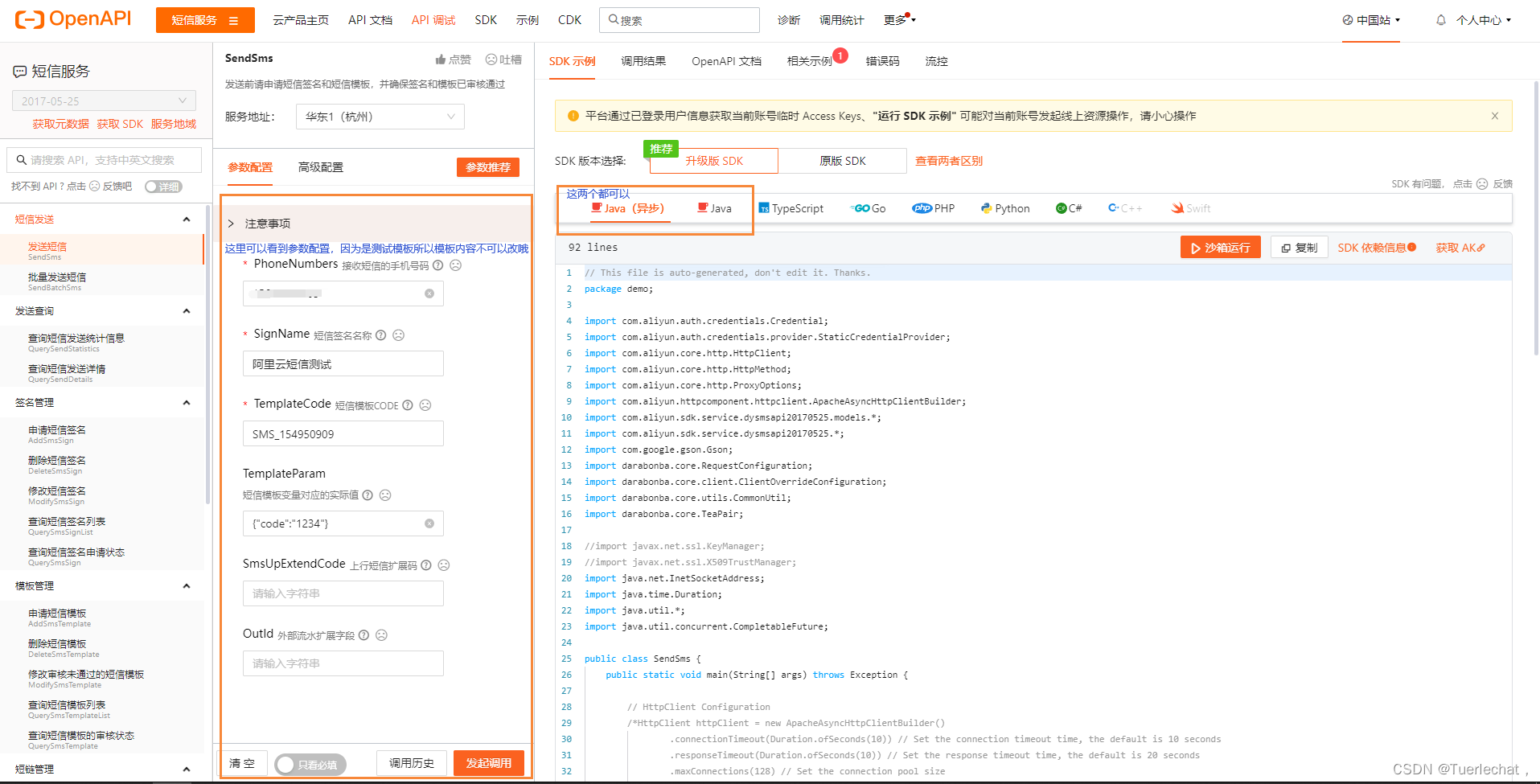
5、测试代码中需要改的是你自己的accessKeyId和accessKeySecret
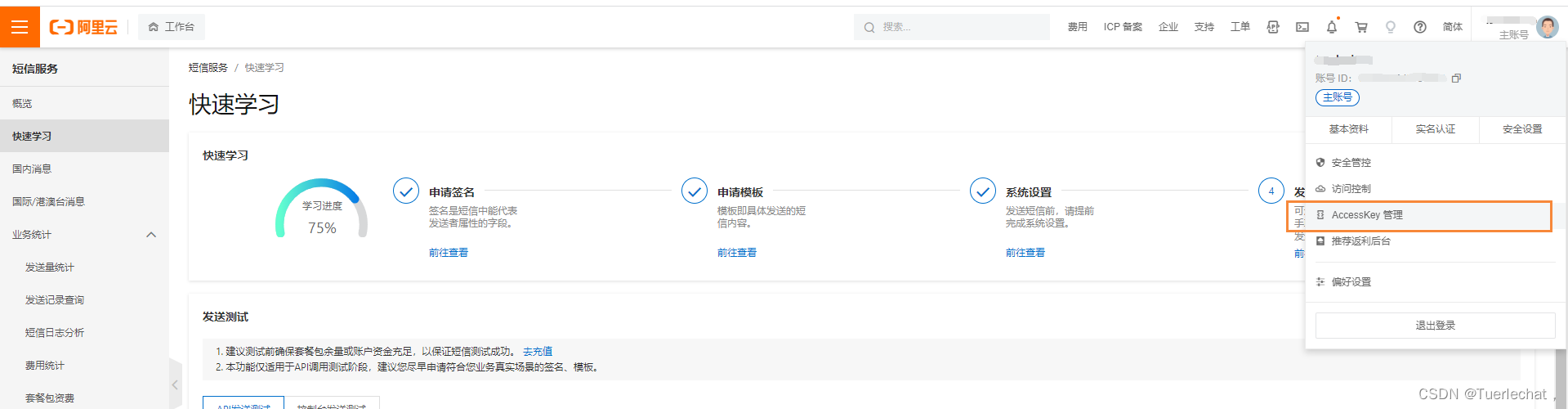
在短信服务页面或主页的右上角点击自己的账号,然后点击AccessKeyId管理
点击创建AccessKey,然后点击查看Secret
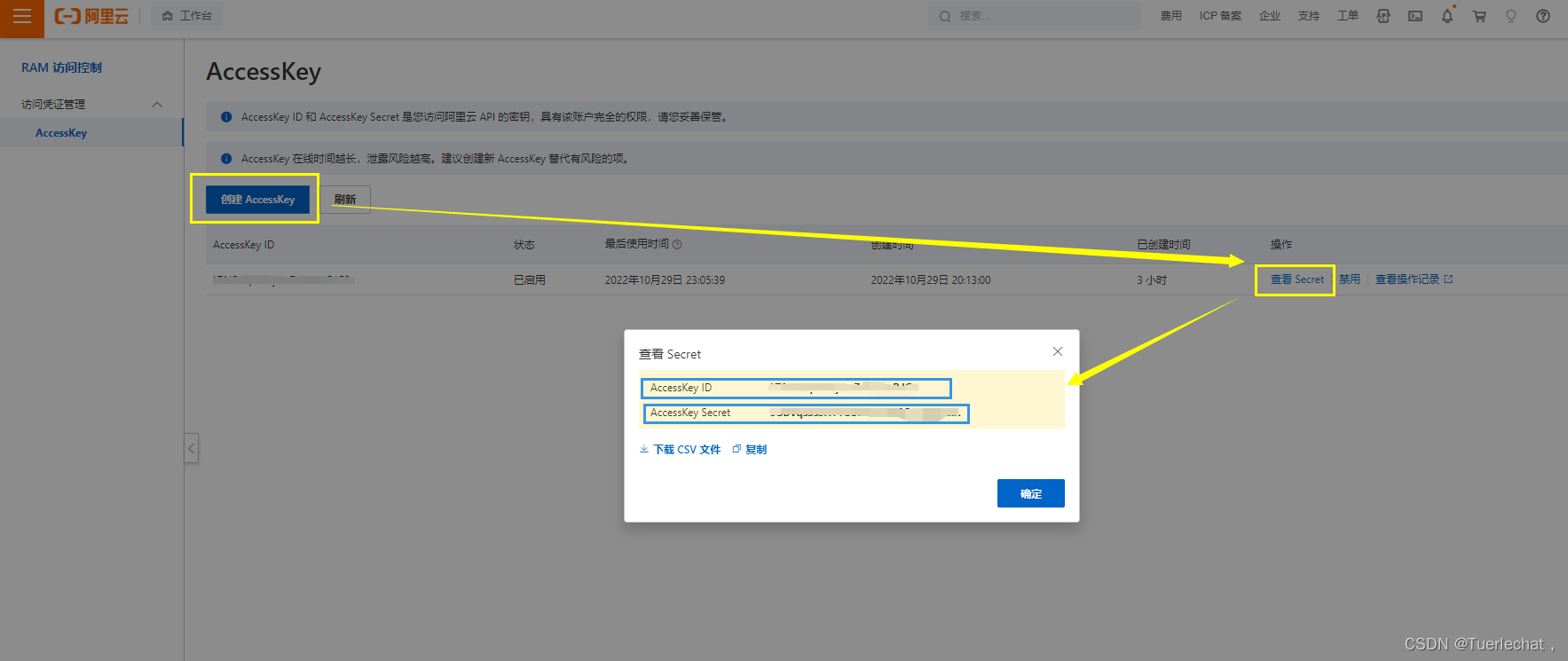
可以看到上面有AccessKey ID和AccessKey Secret,这两个参数内容都要复制下来,都是一会要用到的(查看已有的需要手机号再次验证)
至此网站的配置完成
1、配置maven依赖:pom.xml
<!-- 阿里云短信服务 -->
<dependency>
    <groupId>com.aliyun</groupId>
    <artifactId>dysmsapi20170525</artifactId>
    <version>2.0.22</version>
</dependency>
<dependency>
    <groupId>com.aliyun</groupId>
    <artifactId>darabonba-java-core</artifactId>
    <version>0.1.5-beta</version>
</dependency>
<dependency>
    <groupId>com.aliyun</groupId>
    <artifactId>alibabacloud-dysmsapi20170525</artifactId>
    <version>1.0.1</version>
</dependency>
<!-- 运行时可能会发生缺少slf4j的错误,虽然不一定,但是尽量导一下比较好 -->
<dependency>
    <groupId>org.slf4j</groupId>
    <artifactId>slf4j-nop</artifactId>
    <version>1.7.2</version>
</dependency>
2、这里用的是升级版的SDK版本,虽然官网都有代码了,还是在这里粘一下
在这两个demo里面都只需要改两个参数:就是我们上面保存的那个
AccessKey ID和AccessKey Secret
tips:这两个demo里面只改这两个参数和手机号即可(就是格式为----------XXXX----------的这种)
// This file is auto-generated, don't edit it. Thanks.
package com.r.demo;

import com.aliyun.auth.credentials.Credential;
import com.aliyun.auth.credentials.provider.StaticCredentialProvider;
import com.aliyun.core.http.HttpClient;
import com.aliyun.core.http.HttpMethod;
import com.aliyun.core.http.ProxyOptions;
import com.aliyun.httpcomponent.httpclient.ApacheAsyncHttpClientBuilder;
import com.aliyun.sdk.service.dysmsapi20170525.models.*;
import com.aliyun.sdk.service.dysmsapi20170525.*;
import com.google.gson.Gson;
import darabonba.core.RequestConfiguration;
import darabonba.core.client.ClientOverrideConfiguration;
import darabonba.core.utils.CommonUtil;
import darabonba.core.TeaPair;

//import javax.net.ssl.KeyManager;
//import javax.net.ssl.X509TrustManager;
import java.net.InetSocketAddress;
import java.time.Duration;
import java.util.*;
import java.util.concurrent.CompletableFuture;

public class SendSms {
    public static void main(String[] args) throws Exception {

        // HttpClient Configuration
        /*HttpClient httpClient = new ApacheAsyncHttpClientBuilder()
                .connectionTimeout(Duration.ofSeconds(10)) // Set the connection timeout time, the default is 10 seconds
                .responseTimeout(Duration.ofSeconds(10)) // Set the response timeout time, the default is 20 seconds
                .maxConnections(128) // Set the connection pool size
                .maxIdleTimeOut(Duration.ofSeconds(50)) // Set the connection pool timeout, the default is 30 seconds
                // Configure the proxy
                .proxy(new ProxyOptions(ProxyOptions.Type.HTTP, new InetSocketAddress("<your-proxy-hostname>", 9001))
                        .setCredentials("<your-proxy-username>", "<your-proxy-password>"))
                // If it is an https connection, you need to configure the certificate, or ignore the certificate(.ignoreSSL(true))
                .x509TrustManagers(new X509TrustManager[]{})
                .keyManagers(new KeyManager[]{})
                .ignoreSSL(false)
                .build();*/

        // Configure Credentials authentication information, including ak, secret, token
        StaticCredentialProvider provider = StaticCredentialProvider.create(Credential.builder()
                .accessKeyId("----------在这里写上自己的accessKeyId即可----------")
                .accessKeySecret("----------在这里写上自己的accessKeySecret即可----------")
                //.securityToken("<your-token>") // use STS token
                .build());

        // Configure the Client
        AsyncClient client = AsyncClient.builder()
                .region("cn-hangzhou") // Region ID
                //.httpClient(httpClient) // Use the configured HttpClient, otherwise use the default HttpClient (Apache HttpClient)
                .credentialsProvider(provider)
                //.serviceConfiguration(Configuration.create()) // Service-level configuration
                // Client-level configuration rewrite, can set Endpoint, Http request parameters, etc.
                .overrideConfiguration(
                        ClientOverrideConfiguration.create()
                                .setEndpointOverride("dysmsapi.aliyuncs.com")
                        //.setConnectTimeout(Duration.ofSeconds(30))
                )
                .build();

        // Parameter settings for API request
        SendSmsRequest sendSmsRequest = SendSmsRequest.builder()
                .signName("阿里云短信测试")
                .templateCode("SMS_154950909")
                .phoneNumbers("----------这里是你自己的手机号----------")
                .templateParam("{\"code\":\"1234\"}")
                // Request-level configuration rewrite, can set Http request parameters, etc.
                // .requestConfiguration(RequestConfiguration.create().setHttpHeaders(new HttpHeaders()))
                .build();

        // Asynchronously get the return value of the API request
        CompletableFuture<SendSmsResponse> response = client.sendSms(sendSmsRequest);
        // Synchronously get the return value of the API request
        SendSmsResponse resp = response.get();
        System.out.println(new Gson().toJson(resp));
        // Asynchronous processing of return values
        /*response.thenAccept(resp -> {
            System.out.println(new Gson().toJson(resp));
        }).exceptionally(throwable -> { // Handling exceptions
            System.out.println(throwable.getMessage());
            return null;
        });*/

        // Finally, close the client
        client.close();
    }

}

太长了就不截了
直接结果
{“headers”:{“Access-Control-Allow-Origin”:“*”,“x-acs-request-id”:“50F579AA-A36C-547C-9887-C9B597DBC519”,“Connection”:“keep-alive”,“Content-Length”:“110”,“Date”:“Sat, 29 Oct 2022 15:05:40 GMT”,“Content-Type”:“application/json;charset\u003dutf-8”,“x-acs-trace-id”:“2ca803d78068d3d55a936b22b44c5c68”},“body”:{“bizId”:“755622367055939907^0”,“code”:“OK”,“message”:“OK”,“requestId”:“50F579AA-A36C-547C-9887-C9B597DBC519”}}
// This file is auto-generated, don't edit it. Thanks.
package com.r.demo;

import com.aliyun.tea.*;

public class Sample {

    /**
     * 使用AK&SK初始化账号Client
     * @param accessKeyId
     * @param accessKeySecret
     * @return Client
     * @throws Exception
     */
    public static com.aliyun.dysmsapi20170525.Client createClient(String accessKeyId, String accessKeySecret) throws Exception {
        com.aliyun.teaopenapi.models.Config config = new com.aliyun.teaopenapi.models.Config()
                // 您的 AccessKey ID
                .setAccessKeyId(accessKeyId)
                // 您的 AccessKey Secret
                .setAccessKeySecret(accessKeySecret);
        // 访问的域名
        config.endpoint = "dysmsapi.aliyuncs.com";
        return new com.aliyun.dysmsapi20170525.Client(config);
    }

    public static void main(String[] args_) throws Exception {
        java.util.List<String> args = java.util.Arrays.asList(args_);
        com.aliyun.dysmsapi20170525.Client client = Sample.createClient("----------在这里写上自己的accessKeyId即可----------", "----------在这里写上自己的accessKeySecret即可----------");
        com.aliyun.dysmsapi20170525.models.SendSmsRequest sendSmsRequest = new com.aliyun.dysmsapi20170525.models.SendSmsRequest()
                .setSignName("阿里云短信测试")
                .setTemplateCode("SMS_154950909")
                .setPhoneNumbers("----------这里是你自己的手机号----------")
                .setTemplateParam("{\"code\":\"1234\"}");
        com.aliyun.teautil.models.RuntimeOptions runtime = new com.aliyun.teautil.models.RuntimeOptions();
        try {
            // 复制代码运行请自行打印 API 的返回值
            client.sendSmsWithOptions(sendSmsRequest, runtime);

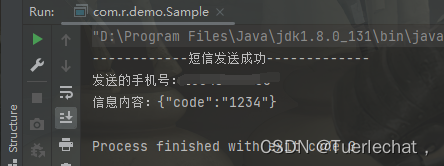
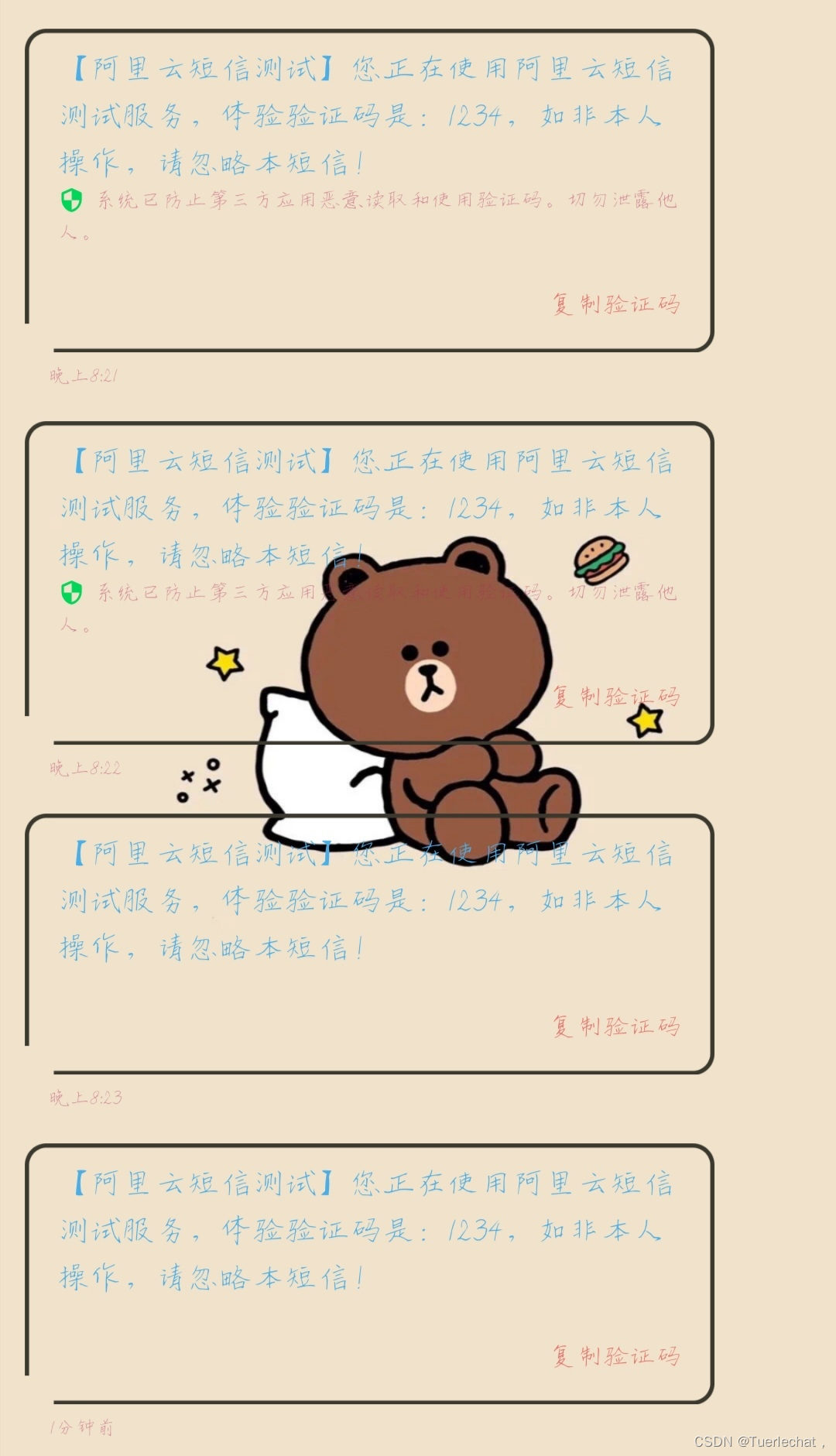
            //这里我自己写了一个打印,要不然默认给的demo是不输出任何东西的,要不是收到短信了我还以为运行没反应呢。。。
            System.out.println("------------短信发送成功-------------");
            System.out.println("发送的手机号:" + sendSmsRequest.getPhoneNumbers() + "\n" +
                    "信息内容:" + sendSmsRequest.getTemplateParam());

        } catch (TeaException error) {
            // 如有需要,请打印 error
            com.aliyun.teautil.Common.assertAsString(error.message);
        } catch (Exception _error) {
            TeaException error = new TeaException(_error.getMessage(), _error);
            // 如有需要,请打印 error
            com.aliyun.teautil.Common.assertAsString(error.message);
        }
    }
}
我正在学习如何使用Nokogiri,根据这段代码我遇到了一些问题:require'rubygems'require'mechanize'post_agent=WWW::Mechanize.newpost_page=post_agent.get('http://www.vbulletin.org/forum/showthread.php?t=230708')puts"\nabsolutepathwithtbodygivesnil"putspost_page.parser.xpath('/html/body/div/div/div/div/div/table/tbody/tr/td/div
我有一个Ruby程序,它使用rubyzip压缩XML文件的目录树。gem。我的问题是文件开始变得很重,我想提高压缩级别,因为压缩时间不是问题。我在rubyzipdocumentation中找不到一种为创建的ZIP文件指定压缩级别的方法。有人知道如何更改此设置吗?是否有另一个允许指定压缩级别的Ruby库? 最佳答案 这是我通过查看rubyzip内部创建的代码。level=Zlib::BEST_COMPRESSIONZip::ZipOutputStream.open(zip_file)do|zip|Dir.glob("**/*")d
类classAprivatedeffooputs:fooendpublicdefbarputs:barendprivatedefzimputs:zimendprotecteddefdibputs:dibendendA的实例a=A.new测试a.foorescueputs:faila.barrescueputs:faila.zimrescueputs:faila.dibrescueputs:faila.gazrescueputs:fail测试输出failbarfailfailfail.发送测试[:foo,:bar,:zim,:dib,:gaz].each{|m|a.send(m)resc
很好奇,就使用rubyonrails自动化单元测试而言,你们正在做什么?您是否创建了一个脚本来在cron中运行rake作业并将结果邮寄给您?git中的预提交Hook?只是手动调用?我完全理解测试,但想知道在错误发生之前捕获错误的最佳实践是什么。让我们理所当然地认为测试本身是完美无缺的,并且可以正常工作。下一步是什么以确保他们在正确的时间将可能有害的结果传达给您? 最佳答案 不确定您到底想听什么,但是有几个级别的自动代码库控制:在处理某项功能时,您可以使用类似autotest的内容获得关于哪些有效,哪些无效的即时反馈。要确保您的提
假设我做了一个模块如下:m=Module.newdoclassCendend三个问题:除了对m的引用之外,还有什么方法可以访问C和m中的其他内容?我可以在创建匿名模块后为其命名吗(就像我输入“module...”一样)?如何在使用完匿名模块后将其删除,使其定义的常量不再存在? 最佳答案 三个答案:是的,使用ObjectSpace.此代码使c引用你的类(class)C不引用m:c=nilObjectSpace.each_object{|obj|c=objif(Class===objandobj.name=~/::C$/)}当然这取决于
我正在尝试使用ruby和Savon来使用网络服务。测试服务为http://www.webservicex.net/WS/WSDetails.aspx?WSID=9&CATID=2require'rubygems'require'savon'client=Savon::Client.new"http://www.webservicex.net/stockquote.asmx?WSDL"client.get_quotedo|soap|soap.body={:symbol=>"AAPL"}end返回SOAP异常。检查soap信封,在我看来soap请求没有正确的命名空间。任何人都可以建议我
关闭。这个问题是opinion-based.它目前不接受答案。想要改进这个问题?更新问题,以便editingthispost可以用事实和引用来回答它.关闭4年前。Improvethisquestion我想在固定时间创建一系列低音和高音调的哔哔声。例如:在150毫秒时发出高音调的蜂鸣声在151毫秒时发出低音调的蜂鸣声200毫秒时发出低音调的蜂鸣声250毫秒的高音调蜂鸣声有没有办法在Ruby或Python中做到这一点?我真的不在乎输出编码是什么(.wav、.mp3、.ogg等等),但我确实想创建一个输出文件。
我在我的项目目录中完成了compasscreate.和compassinitrails。几个问题:我已将我的.sass文件放在public/stylesheets中。这是放置它们的正确位置吗?当我运行compasswatch时,它不会自动编译这些.sass文件。我必须手动指定文件:compasswatchpublic/stylesheets/myfile.sass等。如何让它自动运行?文件ie.css、print.css和screen.css已放在stylesheets/compiled。如何在编译后不让它们重新出现的情况下删除它们?我自己编译的.sass文件编译成compiled/t
我想将html转换为纯文本。不过,我不想只删除标签,我想智能地保留尽可能多的格式。为插入换行符标签,检测段落并格式化它们等。输入非常简单,通常是格式良好的html(不是整个文档,只是一堆内容,通常没有anchor或图像)。我可以将几个正则表达式放在一起,让我达到80%,但我认为可能有一些现有的解决方案更智能。 最佳答案 首先,不要尝试为此使用正则表达式。很有可能你会想出一个脆弱/脆弱的解决方案,它会随着HTML的变化而崩溃,或者很难管理和维护。您可以使用Nokogiri快速解析HTML并提取文本:require'nokogiri'h
我想为Heroku构建一个Rails3应用程序。他们使用Postgres作为他们的数据库,所以我通过MacPorts安装了postgres9.0。现在我需要一个postgresgem并且共识是出于性能原因你想要pggem。但是我对我得到的错误感到非常困惑当我尝试在rvm下通过geminstall安装pg时。我已经非常明确地指定了所有postgres目录的位置可以找到但仍然无法完成安装:$envARCHFLAGS='-archx86_64'geminstallpg--\--with-pg-config=/opt/local/var/db/postgresql90/defaultdb/po
