目录
语法:get_json_object(json_string, ‘$.key’),(使用 "$“的方式,”.“表示对象,”[]"引用数组)
说明:解析json的字符串json_string,返回path指定的内容。如果输入的json字符串无效,那么返回NULL。这个函数每次只能返回一个数据项。
特征:每次只能解析一个字段,如果需要解析多个字段,需要调用函数多次。
示例:
-- 创建临时表
with t as (
        select 1 as id,'{"name":"孙先生","carrer":"大数据开发工程师","dream":["开个便利店","去外面逛一逛","看本好书"],"friend":{
       "friend_1":"MM",
       "friend_2":"NN",
       "friend_3":"BB",
       "friend_4":"VV"
       }
        }' as list
  union all
  select 2 as id,'{"name":"唐女士","carrer":"退休农民","dream":["儿子听话","带孙子"],"friend":{
       "friend_1":"CC"
       }
      }' as list
       )
-- get_json_object查询字段
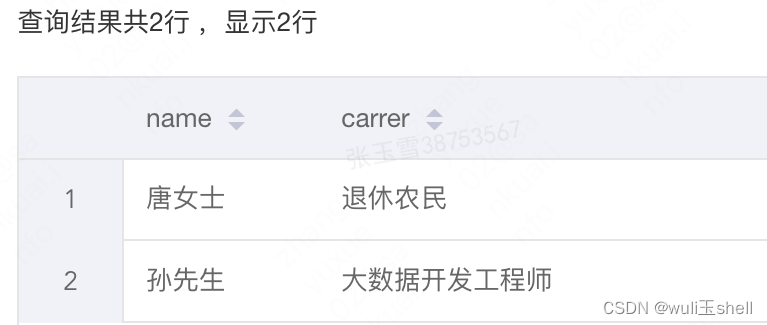
select get_json_object(list,'$.name') as name,
       get_json_object(list,'$.carrer') as carrer
  from t
-- 获取标签中的数组元素
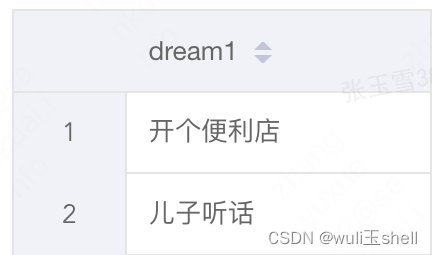
select get_json_object(list,'$.dream[0]') as dream1
  from t
-- 获取多层中的对象
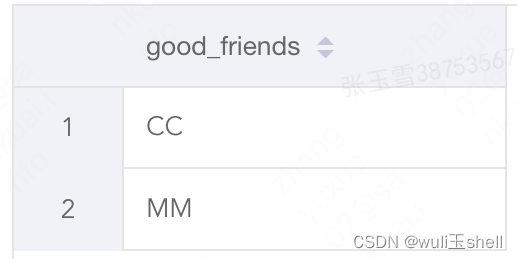
select get_json_object(list,'$.friend.friend_1') as good_friends
  from t
语法: json_tuple(json_string, k1, k2 …)
说明:解析json的字符串json_string,可指定多个json数据中的key,返回对应的value。如果输入的json字符串无效,那么返回NULL。
特征:相比get_json_object,json_tuple的优势就是一次可以解析多个json字段。
注意:json_tuple函数**不需要加$.**了,否则会解析不到。
示例:
-- 创建临时表
with t as (
        select 1 as id,
               '{"name":"孙先生","carrer":"大数据开发工程师","dream":["开个便利店","去外面逛一逛","看本好书"],"friend":{
       "friend_1":"MM",
       "friend_2":"NN",
       "friend_3":"BB",
       "friend_4":"VV"
       }
        }' as list
     union all select 2 as id,
               '{"name":"唐女士","carrer":"退休农民","dream":["儿子听话","带孙子"],"friend":{
       "friend_1":"CC"
       }
      }' as list
       )
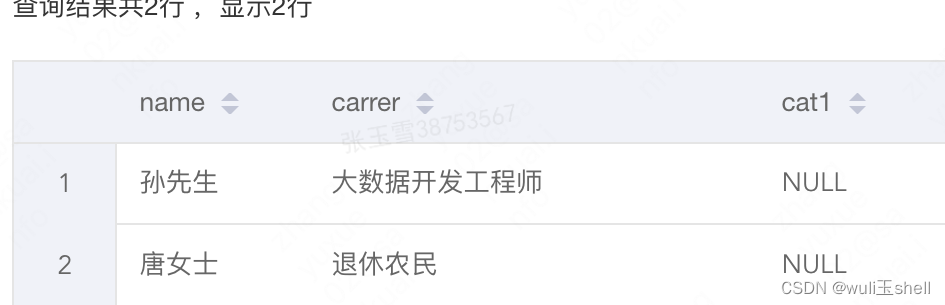
-- json_tuple解析多个字段,由于无cat1字段,则返回null,一级解析
select name,
       carrer,
       cat1
  from t lateral view json_tuple(list,'name','carrer','cat1') tb as name,
       carrer,
       cat1;
-- 二级解析,提取标签中所有的内容(没有的标签,返回null)
select good_friend_1,
       good_friend_2,
       good_friend_3,
       good_friend_4
  from t lateral view json_tuple(list,'friend') tb as good_friend
  		 lateral view json_tuple(good_friend,"friend_1","friend_2","friend_3","friend_4")dd as good_friend_1,
       good_friend_2,
       good_friend_3,
       good_friend_4

-- 提取Array
select dream_col
  from t
  lateral view json_tuple(list,'dream') tb as dreaming
  lateral view explode(dreaming)dd as dream_col
执行报错-待定位
hive解析、处理复杂类型Map、Array、Json
Hive解析Json数组超全讲解
map 是一种(key-value)键值对类型;
array 是一种数组类型,array 中存放相同类型的数据;
struct 是一种集合类型。
create table demo_class(
name string,
score array<int>,
result map<string, int>,
class struct<id:int, grade:string>
)
row format delimited fields terminated by '\t' #列分隔符
collection items terminated by '|' #每个map,struct,array 数据之间的分隔符,三种类型的数据统一用一个
map keys terminated by ':' #map 中的key与value的分隔符
lines terminated by '\n' #行分隔符
stored as textfile;
查看表结构

打开文件写入三行数据
vim /root/tmp/demo_class.txt
注意分隔符要与建表语句一致,如此表指定每列字段之间用tab分割,数据之间用“|”分隔,map的key与value之间用冒号“:”分隔,回车换行
a 90|92 math:90|english:92 1|genius
b 80|60 math:80|english:60 2|excellent
c 50|66 math:50|english:66 3|fighting
将数据载入表中
load data local inpath '/root/tmp/demo_class.txt' overwrite into table test.demo_class ;
查看数据:

-- 语法
array(val1, val2,…)
map(key1, value1, key2, value2,…)
struct(val1, val2, val3,…) -- 表结构已经是写入格式,只需要按照顺序输入value
-- 查询语句
select
 array(90,92) as score ,
 map('math',90,'english',92)as result ,
 struct(1,'genius') as class
-- 结果
[90,92] {“math”:90,“english”:92} {“col1”:1,“col2”:“genius”}
1、语法
语法: A[n]
操作类型: A为array类型,n为int类型
说明:返回数组A中的第n个变量值,数组的起始下标为0
select score, score[0], score[1] from demo_class ;
-- 结果
[90,92] 90 92
[80,60] 80 60
[50,66] 50 66
2、size()函数可以查询数组中元素的个数,下标超过长度返回null 值
select score, size(score), score[3] from demo_class ;
-- 结果
[90,92] 2 NULL
[80,60] 2 NULL
[50,66] 2 NULL
3、array_contains()函数可以查询数组中是否包含某个元素
array_contains(数组名,值)
返回 true 或 false
select score, array_contains(score, 90) from demo_class;
-- 结果
[90,92] true
[80,60] false
[50,66] false
1、语法
语法: M[key]
操作类型: M为map类型,key为map中的key值
说明:返回map类型M中key值为指定值的value值
select result, result['math'], result['english'] from demo_class ;
-- 结果
{“math”:90,“english”:92} 90 92
{“math”:80,“english”:60} 80 60
{“math”:50,“english”:66} 50 66
2、获取map中的键、值
map_keys()
map_values()
select map_keys(result), map_values(result) from demo_class ;
-- 结果
[“math”,“english”] [90,92]
[“math”,“english”] [80,60]
[“math”,“english”] [50,66]
3、size()函数获取map中键值对的个数
select result, size(result) from demo_class ;
-- 结果
{“math”:90,“english”:92} 2
{“math”:80,“english”:60} 2
{“math”:50,“english”:66} 2
4、查询map中是否包含某个键、值
array_contains(map_keys(字段名), 键名)
array_contains(map_values(字段名), 值名)
返回true/false
select result, array_contains(map_keys(result), 'math') from demo_class ;
-- 结果
{“math”:90,“english”:92} true
{“math”:80,“english”:60} true
{“math”:50,“english”:66} true
select result, array_contains(map_values(result), 90) from demo_class ;
-- 结果
{“math”:90,“english”:92} true
{“math”:80,“english”:60} false
{“math”:50,“english”:66} false
可以当做where 过滤条件,如选取所有result 值为90的数据
select * from demo_class where array_contains(map_values(result), 90) ;
1、语法
语法: S.x
操作类型: S为struct类型
说明:返回集合S中的x字段
select class, class.id, class.grade from demo_class ;
-- 结果
{“id”:1,“grade”:“genius”} 1 genius
{“id”:2,“grade”:“excellent”} 2 excellent
{“id”:3,“grade”:“fighting”} 3 fighting
总的来说,我对ruby还比较陌生,我正在为我正在创建的对象编写一些rspec测试用例。许多测试用例都非常基础,我只是想确保正确填充和返回值。我想知道是否有办法使用循环结构来执行此操作。不必为我要测试的每个方法都设置一个assertEquals。例如:describeitem,"TestingtheItem"doit"willhaveanullvaluetostart"doitem=Item.new#HereIcoulddotheitem.name.shouldbe_nil#thenIcoulddoitem.category.shouldbe_nilendend但我想要一些方法来使用
我有一个字符串input="maybe(thisis|thatwas)some((nice|ugly)(day|night)|(strange(weather|time)))"Ruby中解析该字符串的最佳方法是什么?我的意思是脚本应该能够像这样构建句子:maybethisissomeuglynightmaybethatwassomenicenightmaybethiswassomestrangetime等等,你明白了......我应该一个字符一个字符地读取字符串并构建一个带有堆栈的状态机来存储括号值以供以后计算,还是有更好的方法?也许为此目的准备了一个开箱即用的库?
我的目标是转换表单输入,例如“100兆字节”或“1GB”,并将其转换为我可以存储在数据库中的文件大小(以千字节为单位)。目前,我有这个:defquota_convert@regex=/([0-9]+)(.*)s/@sizes=%w{kilobytemegabytegigabyte}m=self.quota.match(@regex)if@sizes.include?m[2]eval("self.quota=#{m[1]}.#{m[2]}")endend这有效,但前提是输入是倍数(“gigabytes”,而不是“gigabyte”)并且由于使用了eval看起来疯狂不安全。所以,功能正常,
在我的Rails(2.3,Ruby1.8.7)应用程序中,我需要将字符串截断到一定长度。该字符串是unicode,在控制台中运行测试时,例如'א'.length,我意识到返回了双倍长度。我想要一个与编码无关的长度,以便对unicode字符串或latin1编码字符串进行相同的截断。我已经了解了Ruby的大部分unicode资料,但仍然有些一头雾水。应该如何解决这个问题? 最佳答案 Rails有一个返回多字节字符的mb_chars方法。试试unicode_string.mb_chars.slice(0,50)
对于具有离线功能的智能手机应用程序,我正在为Xml文件创建单向文本同步。我希望我的服务器将增量/差异(例如GNU差异补丁)发送到目标设备。这是计划:Time=0Server:hasversion_1ofXmlfile(~800kiB)Client:hasversion_1ofXmlfile(~800kiB)Time=1Server:hasversion_1andversion_2ofXmlfile(each~800kiB)computesdeltaoftheseversions(=patch)(~10kiB)sendspatchtoClient(~10kiBtransferred)Cl
大约一年前,我决定确保每个包含非唯一文本的Flash通知都将从模块中的方法中获取文本。我这样做的最初原因是为了避免一遍又一遍地输入相同的字符串。如果我想更改措辞,我可以在一个地方轻松完成,而且一遍又一遍地重复同一件事而出现拼写错误的可能性也会降低。我最终得到的是这样的:moduleMessagesdefformat_error_messages(errors)errors.map{|attribute,message|"Error:#{attribute.to_s.titleize}#{message}."}enddeferror_message_could_not_find(obje
我试图获取一个长度在1到10之间的字符串,并输出将字符串分解为大小为1、2或3的连续子字符串的所有可能方式。例如:输入:123456将整数分割成单个字符,然后继续查找组合。该代码将返回以下所有数组。[1,2,3,4,5,6][12,3,4,5,6][1,23,4,5,6][1,2,34,5,6][1,2,3,45,6][1,2,3,4,56][12,34,5,6][12,3,45,6][12,3,4,56][1,23,45,6][1,2,34,56][1,23,4,56][12,34,56][123,4,5,6][1,234,5,6][1,2,345,6][1,2,3,456][123
我正在使用的第三方API的文档状态:"[O]urAPIonlyacceptspaddedBase64encodedstrings."什么是“填充的Base64编码字符串”以及如何在Ruby中生成它们。下面的代码是我第一次尝试创建转换为Base64的JSON格式数据。xa=Base64.encode64(a.to_json) 最佳答案 他们说的padding其实就是Base64本身的一部分。它是末尾的“=”和“==”。Base64将3个字节的数据包编码为4个编码字符。所以如果你的输入数据有长度n和n%3=1=>"=="末尾用于填充n%
我主要使用Ruby来执行此操作,但到目前为止我的攻击计划如下:使用gemsrdf、rdf-rdfa和rdf-microdata或mida来解析给定任何URI的数据。我认为最好映射到像schema.org这样的统一模式,例如使用这个yaml文件,它试图描述数据词汇表和opengraph到schema.org之间的转换:#SchemaXtoschema.orgconversion#data-vocabularyDV:name:namestreet-address:streetAddressregion:addressRegionlocality:addressLocalityphoto:i
我正在使用ruby1.9解析以下带有MacRoman字符的csv文件#encoding:ISO-8859-1#csv_parse.csvName,main-dialogue"Marceu","Giveittohimóhe,hiswife."我做了以下解析。require'csv'input_string=File.read("../csv_parse.rb").force_encoding("ISO-8859-1").encode("UTF-8")#=>"Name,main-dialogue\r\n\"Marceu\",\"Giveittohim\x97he,hiswife.\"\
