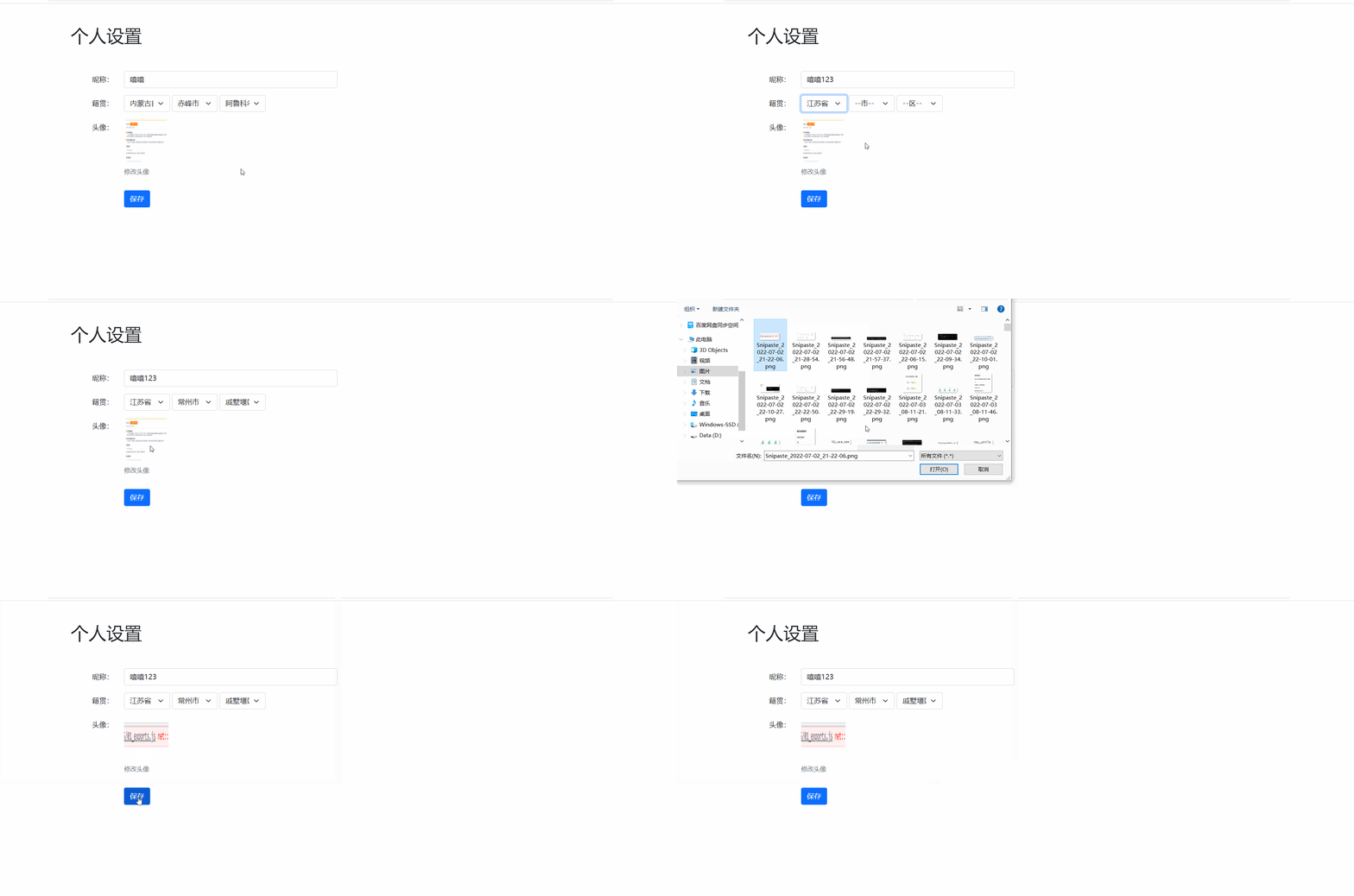
如图所示,页面加载时有数据回填,同时实现select表单同步和图片上传,保存后上传至服务器等功能
<!DOCTYPE html>
<html lang="en">

<head>
  <meta charset="UTF-8" />
  <meta http-equiv="X-UA-Compatible" content="IE=edge" />
  <meta name="viewport" content="width=device-width, initial-scale=1.0" />
  <title>08.案例_个人信息修改</title>
  <link rel="stylesheet" href="https://unpkg.com/bootstrap@5.1.3/dist/css/bootstrap.min.css" />
  <style>
    .form-select {
      width: 103px;
      display: inline-block;
    }

    .col-form-label {
      text-align: right;
    }

    .figure-img {
      width: 100px;
      height: 100px;
      cursor: pointer;
    }

    #upload {
      display: none;
    }
  </style>
</head>

<body>
  <div class="container">
    <h1 class="p-5">个人设置</h1>
    <form class="col-6">
      <div class="row mb-3">
        <label class="col-form-label col-3">昵称:</label>
        <div class="col-9">
          <input class="form-control col-9" type="text" name="nickname" />
        </div>
      </div>
      <div class="row mb-3">
        <label class="col-form-label col-3">籍贯:</label>
        <div class="col-9">
          <select class="form-select col-4" name="province">
            <option value="">--省--</option>
          </select>
          <select class="form-select col-4" name="city">
            <option value="">--市--</option>
          </select>
          <select class="form-select col-4" name="area">
            <option value="">--区--</option>
          </select>
        </div>
      </div>
      <div class="row mb-3">
        <label class="col-form-label col-3">头像:</label>
        <div class="col-9">
          <input class="form-control col-9" type="hidden" name="avatar" />
          <figure class="figure">
            <input type="file" id="upload" />
            <img src="https://yanxuan-item.nosdn.127.net/12a882699bd531a1bd428bffe1989525.jpg"
              class="figure-img img-fluid rounded" alt="..." />
            <figcaption class="figure-caption">修改头像</figcaption>
          </figure>
        </div>
      </div>
      <div class="row mb-3">
        <label class="col-3"></label>
        <div class="col-9">
          <button class="btn btn-primary">保存</button>
        </div>
      </div>
    </form>
  </div>

  <script src="https://unpkg.com/bootstrap@5.1.3/dist/js/bootstrap.js"></script>
  <script src="https://cdn.jsdelivr.net/npm/axios@0.27.2/dist/axios.min.js"></script>
  <script src="./lib/form-serialize.js"></script>

</body>

</html>
通过获取内置个人信息进行页面回填
<script>
    // 前缀基地址
    axios.defaults.baseURL = 'http://ajax-api.itheima.net/'
    // 获取标签方法$
    function $(id) {
        return document.querySelector('#' + id)
    }
    // 数据回填方法
    async function getInfo() {
        const res = await axios.get('api/settings')
        const { nickname, province, city, area, avatar } = res.data.data
        // 昵称
        $('nickname').value = nickname
        // 头像地址
        $('avatar').src = avatar
        // 给头像框input进行赋值,方便后期拿取数据
        $('avatarInp').value = avatar
        // 省数据
        const provinceAll = await axios.get('api/province')
        $('province').innerHTML += provinceAll.data.data.map(item => `<option value="${item}">${item}</option>`).join('')
        $('province').value = province
        // 市数据
        const cityAll = await axios.get('api/city?pname=' + province)
        $('city').innerHTML += cityAll.data.data.map(item => `<option value="${item}">${item}</option>`).join('')
        $('city').value = city
        // 区数据
        const areaAll = await axios.get(`api/area?pname=${province}&cname=${city}`)
        $('area').innerHTML += areaAll.data.data.map(item => `<option value="${item}">${item}</option>`).join('')
        $('area').value = area

    }
    // 调用回填方法
    getInfo()
</script>
<script>
    // 省数据下拉框
    $('province').addEventListener('change', async () => {
        // 获取省下市数据
        const cityAll = await axios.get('api/city?pname=' + $('province').value)
        // 渲染市数据
        $('city').innerHTML = cityAll.data.data.map(item => `<option value="${item}">${item}</option>`).join('')
        // 获取市下区数据
        const areaAll = await axios.get(`api/area?pname=${$('province').value}&cname=${$('city').value}`)
        // 渲染区数据
        $('area').innerHTML = areaAll.data.data.map(item => `<option value="${item}">${item}</option>`).join('')
    })

    $('city').addEventListener('change', async () => {
        const areaAll = await axios.get(`api/area?pname=${$('province').value}&cname=${$('city').value}`)
        $('area').innerHTML = areaAll.data.data.map(item => `<option value="${item}">${item}</option>`).join('')
    })
</script>
<script>
    // 图片上传功能
    $('upload').addEventListener('change', (e) => {
        // 非空判断
        if (e.target.files.length === 0) {
            return
        }
        // 创建FormData接收
        const fd = new FormData()
        // 将图片数据添加到fd中
        fd.append('avatar', e.target.files[0])
        // 图片上传接口
        axios.post('api/file', fd).then(res => {
            console.log(res);
            $('avatar').src = res.data.data.url
            //  给头像框input进行赋值,方便拿取数据
            $('avatarInp').value = res.data.data.url
        })
    })
    // 图片点击事件
    $('avatar').addEventListener('click', () => {
        // 优化图片上传功能
        $('upload').click()
    })
</script>
<script>
    // 上传点击事件
    $('uploadAll').addEventListener('click', async (e) => {
        // 取消默认刷新操作
        e.preventDefault()
        // 用serialize获取表单中所有内容(前面给头像框input赋值的应用)
        const userFormall = serialize($('userForm'), { hash: true })
        try {
            // 执行成功,上传数据并弹出ok弹框
            await axios.put('api/settings', userFormall)
            alert('ok')
        } catch (error) {
            alert('error')
        }
    })
</script>
<!DOCTYPE html>
<html lang="en">

<head>
    <meta charset="UTF-8" />
    <meta http-equiv="X-UA-Compatible" content="IE=edge" />
    <meta name="viewport" content="width=device-width, initial-scale=1.0" />
    <title>08.案例_个人信息修改</title>
    <link rel="stylesheet" href="https://unpkg.com/bootstrap@5.1.3/dist/css/bootstrap.min.css" />
    <style>
        .form-select {
            width: 103px;
            display: inline-block;
        }

        .col-form-label {
            text-align: right;
        }

        .figure-img {
            width: 100px;
            height: 100px;
            cursor: pointer;
        }

        #upload {
            display: none;
        }
    </style>
</head>

<body>
    <div class="container">
        <h1 class="p-5">个人设置</h1>
        <form class="col-6" id="userForm">
            <div class="row mb-3">
                <label class="col-form-label col-3">昵称:</label>
                <div class="col-9">
                    <input class="form-control col-9" type="text" name="nickname" id="nickname" />
                </div>
            </div>
            <div class="row mb-3">
                <label class="col-form-label col-3">籍贯:</label>
                <div class="col-9">
                    <select class="form-select col-4" name="province" id="province">
                        <option value="">--省--</option>
                    </select>
                    <select class="form-select col-4" name="city" id="city">
                        <option value="">--市--</option>
                    </select>
                    <select class="form-select col-4" name="area" id="area">
                        <option value="">--区--</option>
                    </select>
                </div>
            </div>
            <div class="row mb-3">
                <label class="col-form-label col-3">头像:</label>
                <div class="col-9">
                    <input class="form-control col-9" type="hidden" name="avatar" id="avatarInp" />
                    <figure class="figure">
                        <input type="file" id="upload" />
                        <img src="https://yanxuan-item.nosdn.127.net/12a882699bd531a1bd428bffe1989525.jpg"
                            class="figure-img img-fluid rounded" alt="..." id="avatar" />
                        <figcaption class="figure-caption" id="load">修改头像</figcaption>
                    </figure>
                </div>
            </div>
            <div class="row mb-3">
                <label class="col-3"></label>
                <div class="col-9">
                    <button class="btn btn-primary"   id="uploadAll">保存</button>
                </div>
            </div>
        </form>
    </div>

    <script src="https://unpkg.com/bootstrap@5.1.3/dist/js/bootstrap.js"></script>
    <script src="https://cdn.jsdelivr.net/npm/axios@0.27.2/dist/axios.min.js"></script>
    <script src="./lib/form-serialize.js"></script>
    <script>
        // 前缀基地址
        axios.defaults.baseURL = 'http://ajax-api.itheima.net/'
        // 获取标签方法$
        function $(id) {
            return document.querySelector('#' + id)
        }
        // 数据回填方法
        async function getInfo() {
            const res = await axios.get('api/settings')
            const { nickname, province, city, area, avatar } = res.data.data
            // 昵称
            $('nickname').value = nickname
            // 头像地址
            $('avatar').src = avatar
            // 给头像框input进行赋值,方便后期拿取数据
            $('avatarInp').value = avatar
            // 省数据
            const provinceAll = await axios.get('api/province')
            $('province').innerHTML += provinceAll.data.data.map(item => `<option value="${item}">${item}</option>`).join('')
            $('province').value = province
            // 市数据
            const cityAll = await axios.get('api/city?pname=' + province)
            $('city').innerHTML += cityAll.data.data.map(item => `<option value="${item}">${item}</option>`).join('')
            $('city').value = city
            // 区数据
            const areaAll = await axios.get(`api/area?pname=${province}&cname=${city}`)
            $('area').innerHTML += areaAll.data.data.map(item => `<option value="${item}">${item}</option>`).join('')
            $('area').value = area

        }
        // 调用回填方法
        getInfo()

        // 省数据下拉框
        $('province').addEventListener('change', async () => {
            // 获取省下市数据
            const cityAll = await axios.get('api/city?pname=' + $('province').value)
            // 渲染市数据
            $('city').innerHTML = cityAll.data.data.map(item => `<option value="${item}">${item}</option>`).join('')
            // 获取市下区数据
            const areaAll = await axios.get(`api/area?pname=${$('province').value}&cname=${$('city').value}`)
            // 渲染区数据
            $('area').innerHTML = areaAll.data.data.map(item => `<option value="${item}">${item}</option>`).join('')
        })

        $('city').addEventListener('change', async () => {
            const areaAll = await axios.get(`api/area?pname=${$('province').value}&cname=${$('city').value}`)
            $('area').innerHTML = areaAll.data.data.map(item => `<option value="${item}">${item}</option>`).join('')
        })

        // 图片上传功能
        $('upload').addEventListener('change',(e)=>{
            // 非空判断
            if(e.target.files.length===0){
                return
            }
            // 创建FormData接收
            const fd = new FormData()
            // 将图片数据添加到fd中
            fd.append('avatar', e.target.files[0])
            // 图片上传接口
            axios.post('api/file',fd).then(res=>{
                console.log(res);
                $('avatar').src = res.data.data.url
                //  给头像框input进行赋值,方便拿取数据
                $('avatarInp').value = res.data.data.url
            })
        })
        // 图片点击事件
        $('avatar').addEventListener('click',()=>{
            // 优化图片上传功能
            $('upload').click()
        })

        // 上传点击事件
        $('uploadAll').addEventListener('click', async (e)=>{
            // 取消默认刷新操作
            e.preventDefault()
            // 用serialize获取表单中所有内容(前面给头像框input赋值的应用)
            const userFormall = serialize($('userForm'),{hash:true})
            try {
                // 执行成功,上传数据并弹出ok弹框
                await axios.put('api/settings',userFormall)
                alert('ok')
            } catch (error) {
                alert('error')
            }
        })
    </script>
</body>

</html>
大约一年前,我决定确保每个包含非唯一文本的Flash通知都将从模块中的方法中获取文本。我这样做的最初原因是为了避免一遍又一遍地输入相同的字符串。如果我想更改措辞,我可以在一个地方轻松完成,而且一遍又一遍地重复同一件事而出现拼写错误的可能性也会降低。我最终得到的是这样的:moduleMessagesdefformat_error_messages(errors)errors.map{|attribute,message|"Error:#{attribute.to_s.titleize}#{message}."}enddeferror_message_could_not_find(obje
我主要使用Ruby来执行此操作,但到目前为止我的攻击计划如下:使用gemsrdf、rdf-rdfa和rdf-microdata或mida来解析给定任何URI的数据。我认为最好映射到像schema.org这样的统一模式,例如使用这个yaml文件,它试图描述数据词汇表和opengraph到schema.org之间的转换:#SchemaXtoschema.orgconversion#data-vocabularyDV:name:namestreet-address:streetAddressregion:addressRegionlocality:addressLocalityphoto:i
rails中是否有任何规定允许站点的所有AJAXPOST请求在没有authenticity_token的情况下通过?我有一个调用Controller方法的JqueryPOSTajax调用,但我没有在其中放置任何真实性代码,但调用成功。我的ApplicationController确实有'request_forgery_protection'并且我已经改变了config.action_controller.consider_all_requests_local在我的environments/development.rb中为false我还搜索了我的代码以确保我没有重载ajaxSend来发送
在应用开发中,有时候我们需要获取系统的设备信息,用于数据上报和行为分析。那在鸿蒙系统中,我们应该怎么去获取设备的系统信息呢,比如说获取手机的系统版本号、手机的制造商、手机型号等数据。1、获取方式这里分为两种情况,一种是设备信息的获取,一种是系统信息的获取。1.1、获取设备信息获取设备信息,鸿蒙的SDK包为我们提供了DeviceInfo类,通过该类的一些静态方法,可以获取设备信息,DeviceInfo类的包路径为:ohos.system.DeviceInfo.具体的方法如下:ModifierandTypeMethodDescriptionstatic StringgetAbiList()Obt
本文主要介绍在使用Selenium进行自动化测试或者任务时,对于使用了iframe的页面,如何定位iframe中的元素文章目录场景描述解决方案具体代码场景描述当我们在使用Selenium进行自动化测试的时候,可能会遇到一些界面或者窗体是使用HTML的iframe标签进行承载的。对于iframe中的标签,如果直接查找是无法找到的,会抛出没有找到元素的异常。比如近在咫尺的例子就是,CSDN的登录窗体就是使用的iframe,大家可以尝试通过F12开发者模式查看到的tag_name,class_name,id或者xpath来定位中的页面元素,会抛出NoSuchElementException异常。解决
我有一个电子邮件表格。但是我正在制作一个测试电子邮件表单,用户可以在其中添加一个唯一的电子邮件,并让电子邮件测试将其发送到该特定电子邮件。为了简单起见,我决定让测试电子邮件通过ajax执行,并将整个内容粘贴到另一个电子邮件表单中。我不知道如何将变量从我的HAML发送到我的Controllernew.html.haml-form_tagadmin_email_blast_pathdoSubject%br=text_field_tag'subject',:class=>"mass_email_subject"%brBody%br=text_area_tag'message','',:nam
我遇到了一个非常奇怪的问题,我很难解决。在我看来,我有一个与data-remote="true"和data-method="delete"的链接。当我单击该链接时,我可以看到对我的Rails服务器的DELETE请求。返回的JS代码会更改此链接的属性,其中包括href和data-method。再次单击此链接后,我的服务器收到了对新href的请求,但使用的是旧的data-method,即使我已将其从DELETE到POST(它仍然发送一个DELETE请求)。但是,如果我刷新页面,HTML与"new"HTML相同(随返回的JS发生变化),但它实际上发送了正确的请求类型。这就是这个问题令我困惑的
我遇到了这个奇怪的错误.../Users/gideon/Documents/ca_ruby/rubytactoe/lib/player.rb:13:in`gets':Isadirectory-spec(Errno::EISDIR)player_spec.rb:require_relative'../spec_helper'#theuniverseisvastandinfinite...itcontainsagame....butnoplayersdescribe"tictactoegame"docontext"theplayerclass"doit"musthaveahumanplay
我有两个文本文件,master.txt和926.txt。如果926.txt中有一行不在master.txt中,我想写入一个新文件notinbook.txt。我写了我能想到的最好的东西,但考虑到我是一个糟糕的/新手程序员,它失败了。这是我的东西g=File.new("notinbook.txt","w")File.open("926.txt","r")do|f|while(line=f.gets)x=line.chompifFile.open("master.txt","w")do|h|endwhile(line=h.gets)ifline.chomp!=xputslineendende
我使用raise(ConfigurationError.new(msg))引发错误我试着用rspec测试一下:expect{Base.configuration.username}.toraise_error(ConfigurationError,message)但这行不通。我该如何测试呢?目标是匹配message。 最佳答案 您可以使用正则表达式匹配错误消息:it{expect{Foo.bar}.toraise_error(NoMethodError,/private/)}这将检查NoMethodError是否由privateme
