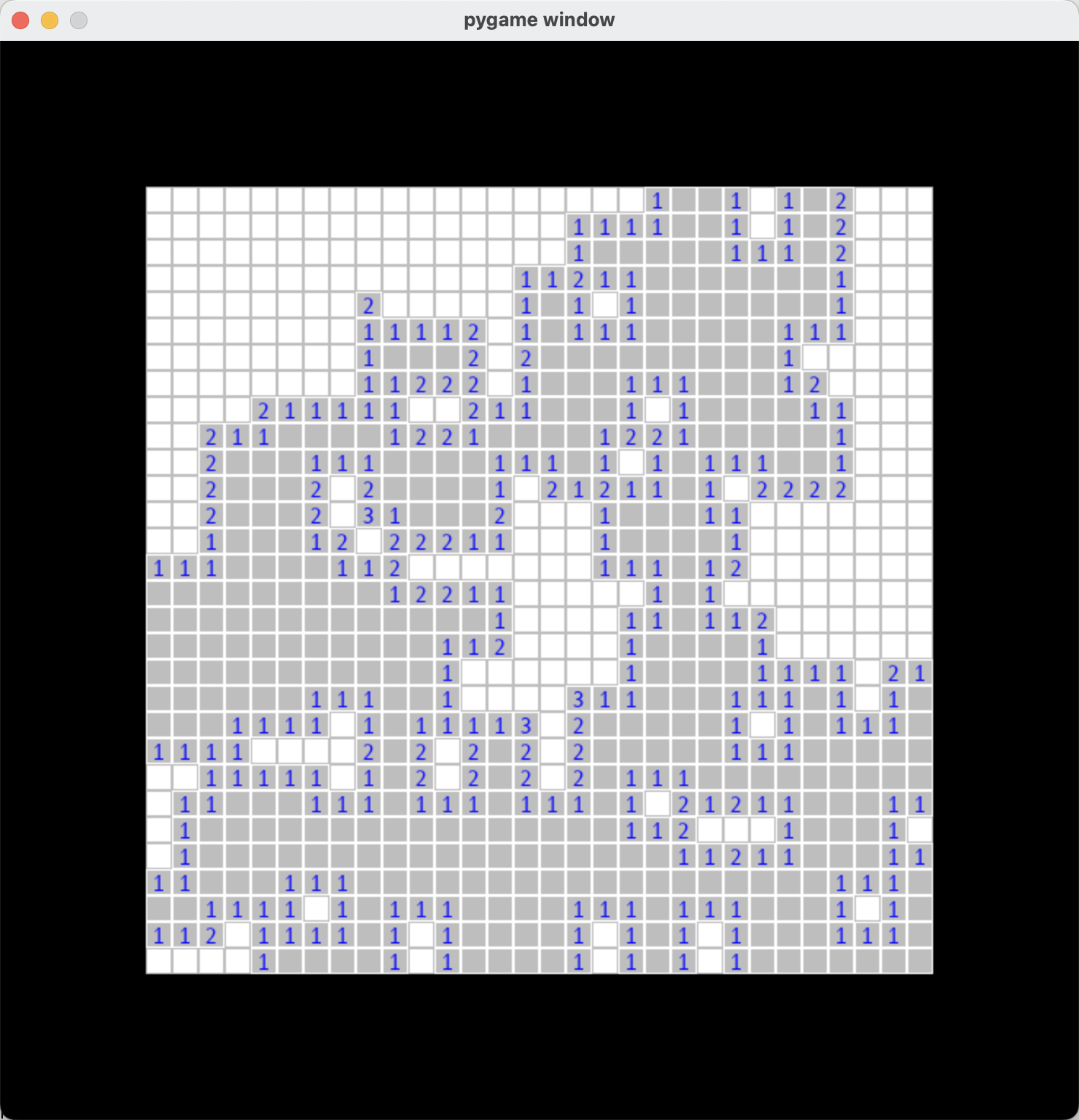
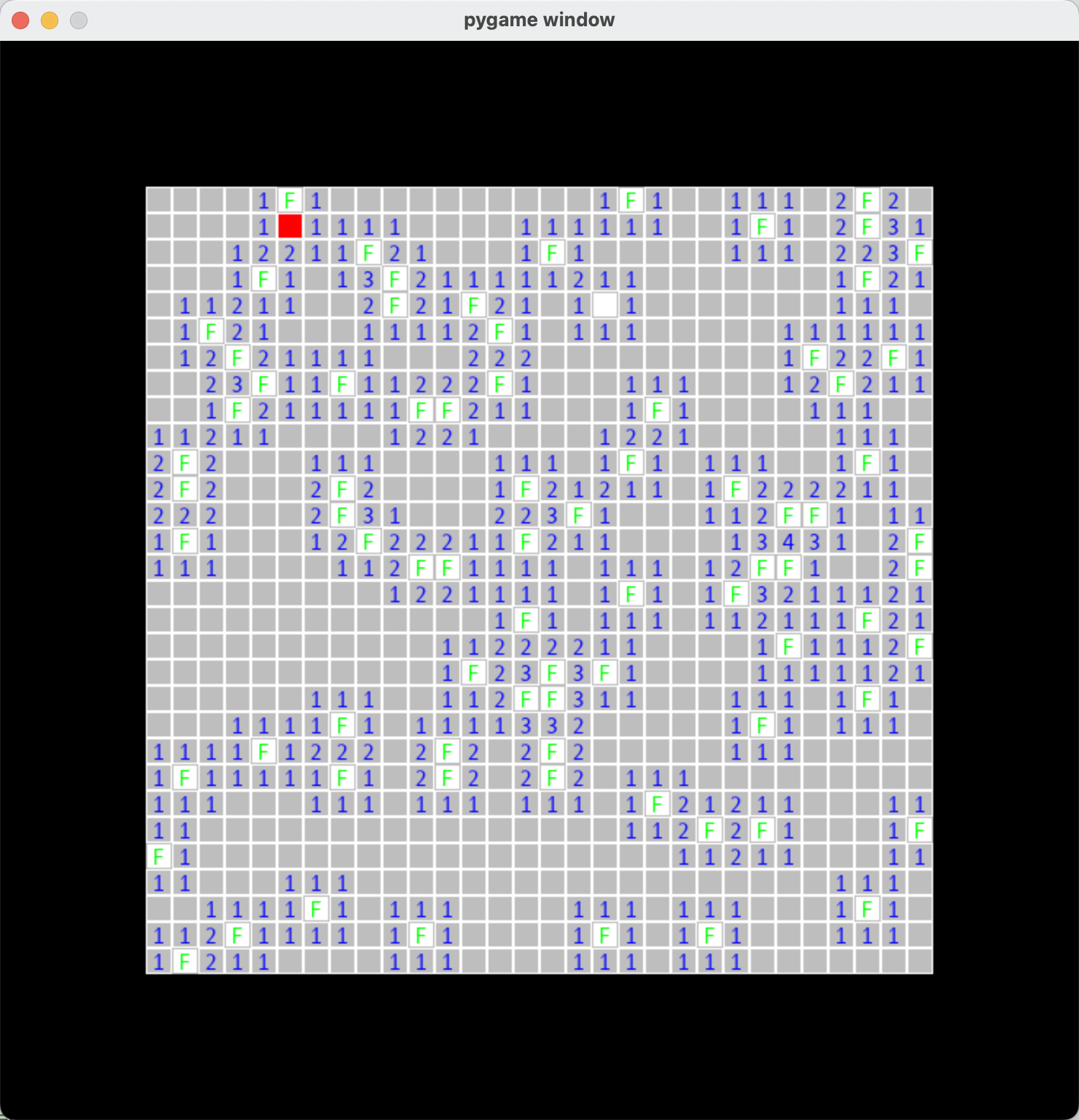
基本上GUI应用都会有一个主循环,用来接收各种事件,并按照时间类型进行不同的处理。
    while True:
        for event in pygame.event.get():
            if event.type == pygame.MOUSEBUTTONUP:
                if game.is_over():
                    init_game(30)
                    continue
                pos = event.pos
                if event.button == 1:
                    game.clicked(pos)
                elif event.button == 3:
                    game.right_clicked(pos)
                # 获取当前那个格子被点击了
            if event.type == pygame.QUIT:
                sys.exit(0)
            pygame.display.update()
表示一次游戏。当前游戏中所有的地雷分布;保存所有的格子信息;以及每个格子周围的地雷数量。Game点击后需要判断是否是否游戏结束。
如何获胜:
表示一个格子,初始化的时候会传入是否包含地雷的信息,格子作为一圈的地雷数量。
Square本身含有一个状态机,根据点击状态和点击方式画出各种样式(空白,带数字,F,红色)等。
主循环中的事件会传给Game,最终根据位置传个某个Square。
pygame.Screen 使用pygame.display.set_mode返回一个画布,然后可以将各种Rect,font之类的放到这画布上。
pygame.display.set_mode((total_width, total_height))
pygame.Rect 输出格子
pygame.font 输出字体
重点方法
            self.face = pygame.Surface((self.rect.width, self.rect.height))
            self.face.fill('white')
            game.get_screen().blit(self.face, (self.rect.left, self.rect.top))
            pygame.draw.rect(self.surface, 'gray', self.rect, 1)
# 这是一个示例 Python 脚本。

# 按 ⌃R 执行或将其替换为您的代码。
# 按 双击 ⇧ 在所有地方搜索类、文件、工具窗口、操作和设置。
import sys
import pygame
import random

game = None
BOMB_COUNT = 80

class Game(object):
    screen = None
    row_count = 0
    bomb_location = []
    squares_list = []
    squares_val_dict = {}
    win = False

    def __init__(self, count):
        pygame.init()
        total_width = count * 18 + 100 * 2
        total_height = count * 18 + 100 * 2
        self.row_count = count
        self.screen = pygame.display.set_mode((total_width, total_height))
        self.win = False
        self.bomb_location = []
        self.squares_list = []
        self.squares_val_dict = {}

    def __del__(self):
        print('del game')
        pygame.display.quit()

    def is_over(self):
        return self.win

    def get_screen(self):
        return self.screen

    # 初始化随机产生炸弹
    def random_bomb(self):
        # 随机产生炸弹
        for i in range(BOMB_COUNT):
            while 1:
                x = random.randint(0, 29)
                y = random.randint(0, 29)
                if (x, y) in self.bomb_location:
                    continue
                else:
                    self.bomb_location.append((x, y))
                break

        # 计算某个位置范围的数字
        for x in range(self.row_count):
            for y in range(self.row_count):
                count = 0
                if (x - 1, y) in self.bomb_location:
                    count += 1
                if (x - 1, y - 1) in self.bomb_location:
                    count += 1
                if (x - 1, y + 1) in self.bomb_location:
                    count += 1

                if (x , y - 1) in self.bomb_location:
                    count += 1
                if (x , y) in self.bomb_location:
                    count += 1
                if (x , y + 1) in self.bomb_location:
                    count += 1

                if (x + 1 , y - 1) in self.bomb_location:
                    count += 1
                if (x + 1 , y) in self.bomb_location:
                    count += 1
                if (x + 1, y + 1) in self.bomb_location:
                    count += 1

                # print('%s,%s %d' % (x, y, count))
                self.squares_val_dict[(x, y)] = count

    def init_square(self):
        for i in range(self.row_count):
            self.squares_list.append([])
            top = 100 + i * 18
            for j in range(self.row_count):
                left = 100 + j * 18
                width = 18
                height = 18
                exist = False
                if (i, j) in self.bomb_location:
                    # print('%s,%s exists' % (j, i))
                    exist = True

                # 周围的炸弹数量
                around_count = self.squares_val_dict.get((i, j), 0)
                # print('init square %s,%s %d' % (i, j, around_count))
                self.squares_list[i].append(Square(exist, around_count, self.screen, left, top, width, height))
                self.squares_list[i][j].draw()
        pygame.display.update()

    def start_game(self):
        pass

    # 胜利后显示的文字
    def display_win(self):
        font = pygame.font.SysFont("Andale Mono", 32)
        txt = font.render("Winner Winner Winner", True, 'Red')
        self.get_screen().blit(txt, (200, 0))

        font = pygame.font.SysFont("Andale Mono", 16)
        txt = font.render("uploading to dashboard...", True, 'green')
        self.get_screen().blit(txt, (260, 40))

        font = pygame.font.SysFont("Andale Mono", 16)
        txt = font.render("click to continue...", True, 'gray')
        self.get_screen().blit(txt, (280, 60))

        self.win = True

    def display_flag(self):
        for (x, y) in self.bomb_location:
            square = self.squares_list[x][y]
            square.right_click()
            square.draw()

    # 根据所有的旗帜来判断胜利
    def check_win_by_flag(self):
        for (x, y) in self.bomb_location:
            square = self.squares_list[x][y]
            if square.state == 'flag' and square.exist:
                continue
            return False
        self.display_win()
        return True

    # 根据已经没有格子点击了来判断胜利
    def check_win_by_click(self):
        # print('check by click')
        for x in range(self.row_count):
            for y in range(self.row_count):
                square = self.squares_list[x][y]
                if square.state == 'blank' or square.exist:
                    # print(1)
                    continue
                return False
        self.display_flag()
        self.display_win()
        return True

    def right_clicked(self, pos):
        left = pos[0]
        top = pos[1]
        x = int((top - 100) / 18)
        y = int((left - 100) / 18)

        # print('right clicked %s, %s' % (x, y))
        if x in range(0, self.row_count) and y in range(0, self.row_count):
            square = self.squares_list[x][y]
            if not square.right_click():
                return
            # 表示右键生效
            square.draw()

            if square.state == 'flag' and square.exist:
                # 只有当前标记是正确的时候才判断
                # 判断是否已经将所有的炸弹标记出来
                self.check_win_by_flag()
            pygame.display.update()

    def clicked(self, pos):
        left = pos[0]
        top = pos[1]
        x = int((top - 100) / 18)
        y = int((left - 100) / 18)

        def click_square(self, x, y):
            if x not in range(0, self.row_count) or y not in range(0, self.row_count):
                return False

            square = self.squares_list[x][y]
            if square.state != 'new':
                return False

            if not square.click():
                return False

            square.draw()
            if square.around_count == 0:
                # print('around is 0')
                for (x1, y1) in [
                    (x - 1, y), (x - 1, y - 1), (x - 1, y + 1),
                    (x, y - 1), (x, y), (x, y + 1),
                    (x + 1, y - 1), (x + 1, y), (x + 1, y + 1),

                ]:
                    click_square(self, x1, y1)
            return True

        if x in range(0, self.row_count) and y in range(0, self.row_count):
            if click_square(self, x, y):
                # 判断是否成功
                self.check_win_by_click()
            pygame.display.update()

    def refresh(self):
        pygame.display.update()


# 扫雷中的一个格子
class Square(object):
    exist = False
    surface = None
    rect = None
    state = '' # new, blank, flag, bomed
    face = None
    around_count = 0

    def __init__(self, exist, around_count, surface, left, top, width, height):
        self.rect = pygame.Rect(left, top, width, height)
        self.exist = exist
        self.surface = surface
        self.state = 'new'
        self.around_count = around_count
        # print('%s' % (self.around_count))

    def exists(self):
        return self.exist

    def draw(self):
        global game
        if self.state == 'new':
            self.face = pygame.Surface((self.rect.width, self.rect.height))
            self.face.fill('white')
            game.get_screen().blit(self.face, (self.rect.left, self.rect.top))
            pygame.draw.rect(self.surface, 'gray', self.rect, 1)

        elif self.state == 'blank':
            self.face.fill('gray')
            game.get_screen().blit(self.face, (self.rect.left, self.rect.top))
            pygame.draw.rect(self.surface, 'white', self.rect, 1)

            # 在格子中间画上数字
            font = pygame.font.SysFont("Andale Mono", 16)
            txt = font.render("%s" % (self.around_count if self.around_count > 0 else ''), True, 'blue')
            # print('%s, %s' % (txt.get_rect(), self.around_count))
            game.get_screen().blit(txt, (self.rect.left + 4, self.rect.top))

            pass
        elif self.state == 'flag':
            # 在格子中间画上 F
            font = pygame.font.SysFont("Andale Mono", 16)
            txt = font.render("F", True, 'green')
            # print('%s, %s' % (txt.get_rect(), self.around_count))
            game.get_screen().blit(txt, (self.rect.left + 4, self.rect.top))

        elif self.state == 'boom':
            self.face.fill('red')
            game.get_screen().blit(self.face, (self.rect.left, self.rect.top))
            pygame.draw.rect(self.surface, 'white', self.rect, 1)
            pass

    def click(self):
        need_update = False
        if self.state == 'new':
            if self.exist:
                self.state = 'boom'
                need_update = True
            else:
                self.state = 'blank'
                need_update = True
        return need_update

    def right_click(self):
        need_update = False
        if self.state == 'new':
            self.state = 'flag'
            need_update = True
        elif self.state == 'flag':
            self.state = 'new'
            need_update = True
        return need_update


def init_game(count, x=18, y=18):
    global game
    if game:
        del game
    game = Game(count)
    game.random_bomb()
    game.init_square()


# 按间距中的绿色按钮以运行脚本。
if __name__ == '__main__':
    init_game(30)

    # 主事件循环
    while True:
        for event in pygame.event.get():
            if event.type == pygame.MOUSEBUTTONUP:
                if game.is_over():
                    init_game(30)
                    continue
                pos = event.pos
                if event.button == 1:
                    game.clicked(pos)
                elif event.button == 3:
                    game.right_clicked(pos)
                # 获取当前那个格子被点击了
            if event.type == pygame.QUIT:
                sys.exit(0)
            pygame.display.update()
使用带有Rails插件的vim,您可以创建一个迁移文件,然后一次性打开该文件吗?textmate也可以这样吗? 最佳答案 你可以使用rails.vim然后做类似的事情::Rgeneratemigratonadd_foo_to_bar插件将打开迁移生成的文件,这正是您想要的。我不能代表textmate。 关于ruby-使用VimRails,您可以创建一个新的迁移文件并一次性打开它吗?,我们在StackOverflow上找到一个类似的问题: https://sta
我需要从一个View访问多个模型。以前,我的links_controller仅用于提供以不同方式排序的链接资源。现在我想包括一个部分(我假设)显示按分数排序的顶级用户(@users=User.all.sort_by(&:score))我知道我可以将此代码插入每个链接操作并从View访问它,但这似乎不是“ruby方式”,我将需要在不久的将来访问更多模型。这可能会变得很脏,是否有针对这种情况的任何技术?注意事项:我认为我的应用程序正朝着单一格式和动态页面内容的方向发展,本质上是一个典型的网络应用程序。我知道before_filter但考虑到我希望应用程序进入的方向,这似乎很麻烦。最终从任何
我想要做的是有2个不同的Controller,client和test_client。客户端Controller已经构建,我想创建一个test_clientController,我可以使用它来玩弄客户端的UI并根据需要进行调整。我主要是想绕过我在客户端中内置的验证及其对加载数据的管理Controller的依赖。所以我希望test_clientController加载示例数据集,然后呈现客户端Controller的索引View,以便我可以调整客户端UI。就是这样。我在test_clients索引方法中试过这个:classTestClientdefindexrender:template=>
如果您尝试在Ruby中的nil对象上调用方法,则会出现NoMethodError异常并显示消息:"undefinedmethod‘...’fornil:NilClass"然而,有一个tryRails中的方法,如果它被发送到一个nil对象,它只返回nil:require'rubygems'require'active_support/all'nil.try(:nonexisting_method)#noNoMethodErrorexceptionanymore那么try如何在内部工作以防止该异常? 最佳答案 像Ruby中的所有其他对象
关闭。这个问题需要detailsorclarity.它目前不接受答案。想改进这个问题吗?通过editingthispost添加细节并澄清问题.关闭8年前。Improvethisquestion为什么SecureRandom.uuid创建一个唯一的字符串?SecureRandom.uuid#=>"35cb4e30-54e1-49f9-b5ce-4134799eb2c0"SecureRandom.uuid方法创建的字符串从不重复?
我有一个正在构建的应用程序,我需要一个模型来创建另一个模型的实例。我希望每辆车都有4个轮胎。汽车模型classCar轮胎模型classTire但是,在make_tires内部有一个错误,如果我为Tire尝试它,则没有用于创建或新建的activerecord方法。当我检查轮胎时,它没有这些方法。我该如何补救?错误是这样的:未定义的方法'create'forActiveRecord::AttributeMethods::Serialization::Tire::Module我测试了两个环境:测试和开发,它们都因相同的错误而失败。 最佳答案
我想在Ruby中创建一个用于开发目的的极其简单的Web服务器(不,不想使用现成的解决方案)。代码如下:#!/usr/bin/rubyrequire'socket'server=TCPServer.new('127.0.0.1',8080)whileconnection=server.acceptheaders=[]length=0whileline=connection.getsheaders想法是从命令行运行这个脚本,提供另一个脚本,它将在其标准输入上获取请求,并在其标准输出上返回完整的响应。到目前为止一切顺利,但事实证明这真的很脆弱,因为它在第二个请求上中断并出现错误:/usr/b
我想让一个yaml对象引用另一个,如下所示:intro:"Hello,dearuser."registration:$introThanksforregistering!new_message:$introYouhaveanewmessage!上面的语法只是它如何工作的一个例子(这也是它在thiscpanmodule中的工作方式。)我正在使用标准的rubyyaml解析器。这可能吗? 最佳答案 一些yaml对象确实引用了其他对象:irb>require'yaml'#=>trueirb>str="hello"#=>"hello"ir
我的问题的一个例子是体育游戏。一场体育比赛有两支球队,一支主队和一支客队。我的事件记录模型如下:classTeam"Team"has_one:away_team,:class_name=>"Team"end我希望能够通过游戏访问一个团队,例如:Game.find(1).home_team但我收到一个单元化常量错误:Game::team。谁能告诉我我做错了什么?谢谢, 最佳答案 如果Gamehas_one:team那么Rails假设您的teams表有一个game_id列。不过,您想要的是games表有一个team_id列,在这种情况下
我在一个静态网站上工作(因此没有真正的服务器支持),我想在另一个网站中包含一个小的细长片段,可能会向它传递一个变量。这可能吗?在rails中很容易,虽然是render方法,但我不知道如何在slim上做(显然load方法不适用于slim)。 最佳答案 Slim包含Include插件,允许在编译时直接在模板文件中包含其他文件:require'slim/include'includepartial_name文档可在此处获得:https://github.com/slim-template/slim/blob/master/doc/incl
